1
C. IP Assignment
1. Use “IP Installer” to assign an IP address of IP CAMERA.
The IP Installer software is in the attached CD.
2. IP Installer supports two languages.
a. LUPUSNET_IpInstallerGER_V2.2.exe:Deutsche Version
b. LUPUSNET_IpInstallerEN_V2.2.exe: Englische Version
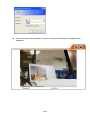
3. OS: Windows XP SP2 or above. If the following “Windows Security Alert” popup,
please click “Unblock”.
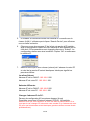
4. The GUI of IP Installer is as follows (Default IP:192.168.1.200).
5. IP Installer will search all IP Cameras connected on LAN. The user can click “Search
Device” to search again.
6. Click one of IP Cameras listed on the left side of IP Installer, then the network
configuration of that IP Camera will be listed on the right side. If parameters
changed, click on “Submit”. Then, the network configuration will be changed. Just
8/18