1
 power your future℠
PRESTIGE High Frequency On‐Line UPS User Manual 1,000 VA 2,000 VA 3,000 VA ROCPOWER – PRESTIGE ‐ user manual Table of Contents IMPORTANT SAFETY INSTRUCTIONS ..................................................3 CHAPTER 1 .........................................................................................5 Front Display Panel Explanation.........................................................5 Rear Panel Explanation.......................................................................7 Communication Port Explanation ......................................................8 The RS232 Interface Settings..............................................................8 The Pin Assignments of True RS232 Type ..........................................9 CHAPTER 2 .......................................................................................10 Unpacking.........................................................................................10 Installation Location .........................................................................10 Storage Instructions .........................................................................11 CHAPTER 3 .......................................................................................12 Setup…..............................................................................................12 Operation Test and Installation Instruction .....................................12 CHAPTER 4 .......................................................................................13 Product Introduction ........................................................................13 SNMP Slot .........................................................................................13 CHAPTER 5 .......................................................................................14 How the UPS Works .........................................................................14 When Utility is Normal – Figure 1 ....................................................14 Utility Failure and Recovery – Figures 2 and 3 .................................14 Overload Condition – Figure 4..........................................................15 Abnormal Output Condition – Figure 5............................................15 CHAPTER 6 .......................................................................................17 Troubleshooting ...............................................................................17 Maintenance.....................................................................................18 CHAPTER 7 .......................................................................................19 Communication ................................................................................19 Hardware Installation.......................................................................19 Software Installation ........................................................................19 CHAPTER 8 .......................................................................................20 Specifications....................................................................................20 Recycling the Used Battery ..............................................................22 CHAPTER 9 .......................................................................................23 LIMITED WARRANTY.........................................................................23 TECHNICAL SUPPORT INFORMATION ..............................................28 Trademarks Acknowledgements......................................................29 Copyrights.........................................................................................29 Contact Information .........................................................................30 2
ROCPOWER – PRESTIGE ‐ user manual IMPORTANT SAFETY INSTRUCTIONS PLEASE, SAVE THESE INSTRUCTIONS This manual contains important instructions that should be followed during unpacking, installation and maintenance of the UPS and batteries. Important Notices • To ensure safety in all applications where a UPS is hard‐wired to the electrical supply, the connections between the UPS and the electrical supply should be made by a qualified electrical contractor. • Those UPS systems supplied with a factory input lead can be safely connected to the wall outlet by the purchaser. • The UPS has its own internal energy source (battery). Should the battery be switched on when no AC power is available, voltage will be at the output terminals. • Ensure that the AC utility outlet is correctly wired and grounded. • Ensure that the input voltage of the UPS matches the supply voltage. • Use a certified input power cable with the correct plugs and sockets that matches the voltage system. • Do not open the case as there are no serviceable parts inside. Opening the case will void the warranty. • Any attempt to repair the UPS unit by someone other than an authorized technician shall void the warranty. • To eliminate overheating of the UPS, keep all ventilation openings free from obstruction, and do not store anything on top of the UPS. Keep the UPS 8 inches (20 cm) away from the wall. • Ensure the UPS is installed within the proper environment as specified (0‐40°C or 32‐40o F and 30‐90% non‐condensing humidity). • Do not install the UPS in direct sunlight. The warranty may be void if the batteries fail. • Install the UPS indoors as it is not designed for outdoor use. • Dusty, corrosive and salty environments can damage the UPS. • Install the UPS away from objects which give off excessive heat and areas which are excessively wet. • Liquids spilled and/or foreign objects dropped into the UPS will void the warranty. • The battery will discharge naturally if the system is unused for any length of time. • The UPS should be recharged every 2‐3 months if unused. If this is not done, the warranty will be void. When the UPS is used regularly, the batteries will be automatically recharged and kept in top condition. • This UPS has been designed and constructed to protect your assets from the wide range of power aberrations experienced on utility power lines. Take care to install and maintain the system correctly by your local distributor. • Intended for installation in a temperature controlled environment. 3
ROCPOWER – PRESTIGE ‐ user manual •
Servicing of batteries should be performed or supervised by persons knowledgeable about batteries and the required precautions. Keep unauthorized personnel away from batteries. • When replacing batteries, replace with the same number and type. CAUTION – Do NOT dispose of battery or batteries in a fire. The battery may explode. CAUTION – Do NOT open or mutilate the battery or batteries. Released electrolyte is harmful to the skin and eyes. It may be toxic. CAUTION – Risk of Electric Shock – Do NOT remove the cover. There are no user serviceable parts. Refer servicing to qualified technicians. CAUTION – Risk of Electric Shock – The battery circuit is NOT isolated from AC. Hazardous voltage may exist between the battery terminals and ground. Test before touching. CAUTION – A battery can present a risk of electrical shock and high short circuit current. CAUTION – Keep children away from this product. CAUTION – HEALTH CARE – THE UPS IS NOT TO BE USED IN PATIENT CARE APPLICATIONS: The Rocpower product you purchased was not designed for direct or indirect patient care and treatment. DO NOT use this product with any equipment used to directly or indirectly treat or care for a patient. CAUTION – To prevent personal injury or property damage, do not carry or move the UPS by the handle or the front cover. CAUTION – The UPS is designed to be used with computer loads only. CAUTION – Do NOT connect a laser printer to the UPS outlets. The Following precautions should be observed when working on batteries: • Remove watches, rings, or other metal objects. • Use tools with insulated handles. • Wear rubber gloves and boots. • Do not lay tools or metal parts on top of batteries. • Disconnect charging source prior to connecting or disconnecting battery terminals. WARNING: • This is a Class A‐UPS Product in a domestic environment • This product may cause radio interference. Should this occur, the user may be required to take additional measures. CAUTION – To reduce the risk of fire, connect only to a circuit provided with 20 amperes maximum branch circuit over‐current protection in accordance with the National Electric Code, ANSI/NFPA 70. (For 1KVA and 2KVA models) CAUTION – To reduce the risk of fire, connect only to a circuit provided with 30 amperes maximum branch circuit over‐current protection in accordance with the national electric code, ANSI/NFPA 70. (For 3KVA model) CAUTION ‐ To disconnect loads from the UPS, please install a suitable external power switch or breaker between UPS output and loads. 4
ROCPOWER – PRESTIGE ‐ user manual CHAPTER 1 Front Display Panel Explanation 5
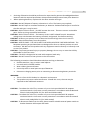
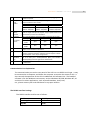
ROCPOWER – PRESTIGE ‐ user manual 1. Main Switch 2. Self Test OK LED 3. Test/Silence 4. Fault LED 5. Bypass LED 6. Utility LED 7. Inverter LED 8. Battery low LED 9. Over load LED This is control the ON/OFF of the UPS Green LED lights up if self test is O.K. a. To silence alarm by pressing the button. b.1. For Standard Unit To execute the self test of the UPS by pressing the button over 10 sec. b.2. For Unit with Manual Bypass function (Special model) To press the button over 5 seconds, the UPS will be switched to Bypass Mode and vice versa. c. To illustrate the percentage of output load level at AC Mode, and the battery energy level at Backup Mode by pressing the button. Red LED lights up if UPS is faulty. Amber LED lights up when UPS is in Bypass Mode. a. AC normal: Green LED lights up. b. 100% for load & battery level a. Inverter On: Green LED lights up b. 75% for load & battery level. a. Battery low : Red LED lights up b. 50% for load & battery level a. Over load condition: Red LED lights up b. 25% for load & battery level. 6
ROCPOWER – PRESTIGE ‐ user manual Rear Panel Explanation 120V 5
4
6
6
8
8
5
5
6
8
4
2
7
1
3
7
7
3
1
4
2
1
2
1KVa
3
2KVa
3KVa
7
ROCPOWER – PRESTIGE ‐ user manual 1) AC Inlet 3) External Battery Terminal This is to be connected with an AC power cord for plugging into the wall receptacle. This is to disconnect line input to protect application from Output overload or short circuit. Fuse/Breaker Rating for 120Vac/230Vac systems 1KVA 2KVA 3KVA 120Vac: 20A/250V 120Vac: 25A/250V
120Vac: 50A/250V 230Vac: 10A/250V 230Vac: 20A/250V
230Vac: 25A/250V This is a battery terminal to be connected with additional battery banks for longer backup time purpose. Only a qualified technician is permitted to process the installation. 4) AC Outlet For 120Vac System This is to be plugged by the devices being protected by the UPS. Socket type 1KVA 2KVA 3KVA NEMA 4pcs 4pcs 6pcs 5‐15R 2) AC Input Fuse/ Breaker 5) SNMP Slot 6) Com Port 7) RJ11/RJ45 Jack NEMA N/A 2pcs 2pcs 5‐20R It is an optional feature used for SNMP card. Please Refer to Chapter 3.5 for hardware installation. This is an interface to send signals to and receive signals from the computer. Optional computer software may be required. Please refer to Chapter 2.3 for its pin assignments. This is to offer you a modem/internet (RJ11) and 10‐Base T Network (RJ45) protection against line interference. 8) DIP Switches For Calibration. Communication Port Explanation The communication port on the rear panel of the UPS is a true RS232 serial type. It may be connected to a computer and allows the computer to monitor the status of UPS. It also controls the operation of the UPS via additional UPS software kits. The bundled software is for the Windows environment, such as Windows 95 & 98, Windows NT, XP and Vista. For other applications, such as Novell NetWare, Unix/Linux, etc., please contact your local distributor for a proper solution. The RS232 Interface Settings The RS232 interface shall be set as follows: Baud Rate : 2400 bps Data Length : 8 bits Stop Bit : 1 bit 8
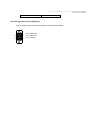
ROCPOWER – PRESTIGE ‐ user manual Parity : None The Pin Assignments of true RS232 type The Pin Assignments of true RS232 type are illustrated as follows: 9
8
7
6
Pin 6: RS232 Rx Pin 9: RS232 Tx Pin 7: Ground 5
4
3
2
1
9
ROCPOWER – PRESTIGE ‐ user manual CHAPTER 2 Check the unit in its packing container and after removal, but before installation, for any obvious problems. Retain the packing material for future use. Unpacking CAUTION: Please be careful when lifting the shipping container or the UPS. These items are heavy. Improper lifting or movement may cause personal injuries or property damage. • Take the UPS out of the packing material. Retain it for future use. • Inspect the UPS for any obvious damage. If damage exits, IMMEDIATELY contact the hipper. • Standard Package includes: ‐ User's Manual ‐ AC Input Power Cord (Not available for hard wiring connection models) ‐ IEC output cables (for the UPS with IEC sockets only) ‐ RJ11 Phone Jack Cable ‐ UPS communication kit (optional) Installation Location It is necessary to select a proper environment to install the unit, in order to minimize the possibility of damage to the UPS and extend the life of the UPS. Please follow the instructions below: 1. Keep at least 20cm (8 inches) clearance from the rear panel of the UPS to the wall. 2. Do not block the air‐flow to the ventilation openings of the unit. 3. Please check the installation site to avoid overheat and excessive moisture. 4. Do not place the UPS in an environment near dusty, corruptive or salty material or flammable objects. 5. Do not expose the UPS to outdoors. 10
ROCPOWER – PRESTIGE ‐ user manual Storage Instructions For extended storage through moderate climate (‐15 to +30 °C / +5 to +86 °F), the batteries should be charged for 12 hours every six (6) months by plugging the UPS power cord into the wall outlet. Repeat this every three (3) months in a high temperature (+30 to +45 °C / +86 to +113 °F) environment. 11
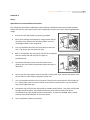
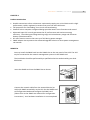
ROCPOWER – PRESTIGE ‐ user manual CHAPTER 3 Setup Operation Test and Installation Instruction The installation should be conducted or supervised by a qualified technician to avoid accident. Charge the UPS for more than 8 hours after unpacking to ensure the UPS is fully charged before usage. 1. Ensure that the wall outlet is properly grounded. 2. Verify if the voltage and frequency ratings match that of the utility, then connect the AC Input power cord to a verified grounded 3‐wire receptacle. 3. Turn on the Main switch on the front panel to start the UPS. The fan on the rear panel will spin. 4. After 7~10 seconds, the start‐up of UPS will be completed, then the utility LED and inverter LED light up simultaneously. 5. Disconnect the input power cord of the UPS to see whether the UPS remains operational when the utility is abnormal. 6. Re‐connect the input power cord of the UPS to wall outlet, then connect the power cord of your device to the output receptacle of the UPS. 7. Turn on the Main switch on the front panel. The utility LED and inverter LED will light up in 7~10 seconds, then turn on the switch of the device connected to it. Do not execute any critical application yet! 8. Disconnect the UPS from the wall outlet to simulate utility failure. The utility LED should extinguish and the alarm will sound continuously until battery cutoff. The device connected to the UPS should operate continuously. To mute the audible alarm, please push the Test/Silence Button on the front panel. 9. Your installation is done successfully. 12
ROCPOWER – PRESTIGE ‐ user manual CHAPTER 4 Product Introduction •
•
•
•
•
•
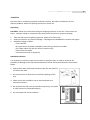
Double conversions online architecture continuously supply your critical device with a high performance, stable, regulated, transient‐free pure sine‐wave AC Power. Full protection for overloading, short circuit and overheating. Powerful micro‐computer integrated design provides better smart‐functions and control. Advanced Input PFC control guarantees the PF performance and maximum energy efficiency. The wide input voltage working range minimizes battery usage and enhances battery utilization and life. DC‐start function ensures the start‐up of UPS during power outages. SNMP adapter slot represents the advanced upgrade solution in direct power management via Internet. SNMP Slot You may install the SNMP card into the SNMP slot on the rear panel of the UPS. The UPS may be connected to the network management system via the SNMP card. The installation should be performed by a qualified technician authorized by your local distributor. Insert the SNMP card into the SNMP slot as shown. Connect the network cable from the network device (ex. Hub) with SNMP accessibility to the UPS. Set the SNMP card to Configuration Mode and configure the SNMP card. (Please refer to the SNMP User Manual for configuration instructions.) Your hardware installation is now completed. 13
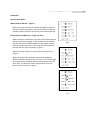
ROCPOWER – PRESTIGE ‐ user manual CHAPTER 5 How the UPS Works When Utility is Normal – Figure 1 When the utility is normal, the utility LED lights up and the batteries are being charged. If the inverter was turned ON, and the output is normal, the inverter LED will also light up. Utility Failure and Recovery – Figures 2 and 3 When the utility is abnormal, the utility LED will dim and the batteries will stop charging. If the inverter was turned ON, the UPS will convert battery power for the output and the inverter LED will remain lit. If the inverter was turned OFF, the UPS will shut OFF completely. Figure 2 Fig 1 When the utility is back to normal, the UPS will return to Figure 1. When the utility fails, the batteries will drain gradually. When the battery energy is low, the “Bat. Low” LED will light up and the buzzer will beep twice a second before the UPS shuts OFF. The UPS will restart automatically when the utility is back to normal. Figure 3 Fig 2
Fig 3
14
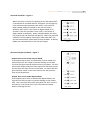
ROCPOWER – PRESTIGE ‐ user manual Overload Condition – Figure 4 When the utility is normal, the loading of the UPS above 105% is considered an overload and the “Overload” LED will light up. If the UPS overload is between 105~120%, it will switch to Bypass Mode within 60 seconds. If the UPS overload is between 120%‐150%, it will switch to Bypass Mode in 10 seconds. If the UPS overload is over 150%, it will switch to Bypass Mode immediately. When in Bypass Mode, the utility LED, bypass LED and overload LED light up. When the overload condition is eliminated by reducing the load under 90%, the UPS will automatically switch back to Normal Mode. In Battery Mode, the overload will shut OFF the UPS output. Fig 4
Abnormal Output Condition – Figure 5 Output short‐circuit under Inverter Mode If the output load is short‐circuited under Inverter Mode, the UPS will turn OFF the output to prevent damage to the load. The fault LED lights up and the buzzer has a long beep. The UPS will lock the output and you will be required to manually restart the UPS after the short‐circuit is eliminated. To restart the UPS, push the Main switch on the front panel to the OFF position, then to the ON position. Output short‐circuit under Bypass Mode If the output load is short‐circuited under Bypass Mode, the input AC fuse will trip open to prevent damage to the output load. Use a new fuse with same rating after the short‐circuit is eliminated. Ensure that short‐circuit has been eliminated before restarting the UPS. Fig 5
15
ROCPOWER – PRESTIGE ‐ user manual Overheating If the UPS overheats when the utility is normal, it will switch to Bypass Mode. The fault LED and bypass LED will light up and the UPS will switch to Inverter Mode after the overheating is eliminated. If it happens when the utility is abnormal, the buzzer will beep continuously and the fault LED will light up. The output of the UPS will also be shut OFF. Inverter Over‐current or Output Voltage Abnormal – Figure 6 If excessive inverter current or out of range voltage is detected by the UPS, it will switch to Bypass Mode when the utility is normal. The utility LED, bypass LED and fault LED will light up. If these two conditions occur when the utility is abnormal, the UPS will turn OFF the output and the fault LED will light up. Fig 6
16
ROCPOWER – PRESTIGE ‐ user manual CHAPTER 6 Troubleshooting When the UPS malfunctions during operation, you may check the list below for proper adjustment. Should the problem persist, please contact your local distributor for help. Situation Check Items Utility LED is not ON and the AC input cord is loose or UPS is on Battery Mode, AC input fuse is broken. when the utility is normal. Solution 1. Connect the AC input cord to wall receptacle. 2. Replace the AC fuse with one of the same rating. 3. If problem persists, please call for service. The UPS switches to Battery 1. Check if any power strip Mode then back to Utility is connected to the 1. Do not use power strip. Mode, when the connected UPS. 2. Replace the wall receptacle. device is turned ON. Or, the 2. Check for damage to the UPS switches back and forth wall receptacle. between battery and utility. UPS is overloaded. Please remove some load at the Overload LED lights up output end of the UPS until the RED LED extinguishes. 17
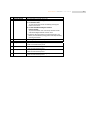
ROCPOWER – PRESTIGE ‐ user manual Situation Check Items Battery Low LED lights up Fault LED lights up System fails to backup when the utility fails. UPS is normal but no output Check to see if all cords to load are properly connected. Strange noise and smell Solution Battery is running out. Please proceed to immediately shutdown your load and applications, then recharge the batteries. Disconnect the output load immediately and turn on the UPS to see if the fault LED is still on. If not, your output load has probably been shorted. Otherwise, call for service. Disconnect the input power cord from the rear panel and turn on the front switch to see if the UPS turns on. If not, call for service. Check all outlets to see if they are properly connected. Immediately shut down the whole system. Disconnect the power from the UPS and call for service. Maintenance Clean the dust from the ventilation openings and intakes on the rear panel. 1. Turn OFF the UPS and wipe the casing with a damp cloth. 2. Periodically unplug the power cord of the UPS from the wall outlet to test the condition of the batteries. 3. Ensure that all applications have been saved before the battery discharging capability test is conducted. 18
ROCPOWER – PRESTIGE ‐ user manual CHAPTER 7 Communication Hardware Installation 1. Connect the male connector of RS‐232 cable to the UPS communication port. 2. Connect the female connector of RS‐232 cable to a dedicated RS232 port. If there is only a DB25 connector on your PC, use a DB9‐DB25 adapter to convert it. Software Installation Please refer to the documents contained in the software CD‐ROM. 19
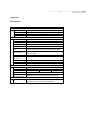
ROCPOWER – PRESTIGE ‐ user manual CHAPTER 8 Specifications MODEL INPUT Voltage (Vac) Frequency (Hz) Phase Input Power Factor OUTPUT Voltage (Vac) Capacity (VA/W) Wave Form Voltage Regulation Frequency Stability Transient Response (ms) Synchronization Crest Factor Transfer Time (Line Fault) Efficiency (AC to AC) Run Time(Full Load) DC Start BATTERY Type Quantity (pcs) Voltage (Vdc) Recharge Time Supplementary Charger (Optional) DISPLAY LED 1KVA 2KVA 3KVA 80~140 or 160~280 50 / 60±5% (Auto Sensing) Single > 0.98 (Full Load) 100/110/115/120 or 200/220/230/240 1000/700 2000/1400 3000/2100 Sine Wave, THD<3% (no load to full load) ±2% ±0.5Hz (Free Running) +/‐4% Under full load change and corrected within 60ms 1 Hz/Sec. Slew Rate: Inverter Free Running If Input Frequency Over ±5% Range 3 : 1 0 ms > 83% 8 Min. Yes 7 Min. Sealed Maintenance Free Lead Acid 3 6 36 72 8 Hours To 90% 8 Min. 8 96 200/500W Charger, for extended back‐up application. Utility, Battery Low, Inverter, Bypass, Self‐Test, Load Level, Battery Level, Overload, Fault Conditions 20
ROCPOWER – PRESTIGE ‐ user manual MODEL 1,000 VA 2,000 VA 3,000 VA PROTECTION Overload Short Circuit Overheat High Voltage Trip‐Off Battery Low Noise Suppression Spike Suppression ALARM Audible and Visual 100%~120% delay 60 seconds before switching to bypass; 120%~150% delay 10 seconds before switching to bypass; >150% immediately switch to bypass a) Inv. Mode: UPS shutdown and Cut the Output. b) Bypass Mode: AC Input fuse Breaks down. a) Utility Normal: Switch to Bypass. b) Utility Abnormal: Buzzer sounds continuously, Fault LED lights up then cut the output. Switch to Backup Mode Alarm continuously till battery cutoff Comply with EN50091‐2. Comply with EN61000‐4‐5. Line Failure, Battery Low, Transfer to Bypass, Overload, System Fault Conditions PHYSICAL Dimensions (WxHxD) 147x223x401 130x365x479 190x365x453 mm) Net Weight (Kgs) 15 27 36 Outlets’ (IEC/Local) For detailed information, please refer to Chapter 1. ENVIRONMENT Temperature 0℃~40℃ Humidity 30~90% RH Maximum, Non‐Condensing Noise <45 dB (at 1 meter) COMPUTER INTERFACE Interface Type Standard RS232 Interface Protocol MegaTec RUPS II SNMP Adaptability Yes, Slot for Standard SNMP Card Available Operating Systems Novell Netware, Windows, OS/2, NetLite, MS‐DOS, HP‐UX, AIX, Compatibility SUN OS, UNIX, XENIX. Linux, etc SAFETY CONFORMANCE Safety Standard EN50091‐1, cUL EMC Standard EN50091‐2, EN61000‐3‐3, EN61000‐3‐2, FCC Class A Marks CE, cUL Above specifications are subject to change without prior notice. Trademarks of MegaTec, RUPS, IBM, MS‐DOS, Novell Netware, Windows, OS/2, NetLite, HP‐UX, AIX, SUN, UNIX, and XENIX and Linux are registered trademarks of their respective companies. 21
ROCPOWER – PRESTIGE ‐ user manual Recycling the Used Battery Contact your local recycling or hazardous waste center for information on the proper disposal of the used batteries. 22
ROCPOWER – PRESTIGE ‐ user manual CHAPTER 9 LIMITED WARRANTY This Limited Warranty is provided by Rocstorage, Inc. (hereinafter: Rocstor) for the Rocstor, Rocpower and Rocsecure lines of products. General Terms EXCEPT AS EXPRESSLY SET FORTH IN THIS LIMITED WARRANTY, ROCSTOR MAKES NO OTHER WARRANTIES OR CONDITIONS, EXPRESS OR IMPLIED, INCLUDING ANY IMPLIED WARRANTIES OF MERCHANTABILITY AND FITNESS FOR A PARTICULAR PURPOSE. ROCSTOR EXPRESSLY DISCLAIMS ALL WARRANTIES AND CONDITIONS NOT STATED IN THIS LIMITED WARRANTY. ANY IMPLIED WARRANTIES THAT MAY BE IMPOSED BY LAW ARE LIMITED IN DURATION TO THE LIMITED WARRANTY PERIOD. SOME STATES OR COUNTRIES DO NOT ALLOW A LIMITATION ON HOW LONG AN IMPLIED WARRANTY LASTS OR THE EXCLUSION OR LIMITATION OF INCIDENTAL OR CONSEQUENTIAL DAMAGES FOR CONSUMER PRODUCTS. IN SUCH STATES OR COUNTRIES, SOME EXCLUSIONS OR LIMITATIONS OF THIS LIMITED WARRANTY MAY NOT APPLY TO YOU. This Limited Warranty applies to the Rocstor branded hardware products sold by or leased from Rocstor, Inc., its worldwide subsidiaries, affiliates, authorized resellers, or country distributors (collectively referred to in this Limited Warranty as “Rocstor”). This Limited Warranty is applicable in all countries and may be enforced in any country where Rocstor or its authorized service providers offer warranty service subject to the terms and conditions set forth in this Limited Warranty. However, warranty service availability and response times may vary from country to country and may also be subject to registration requirements in the country of purchase. Rocstor warrants that the Rocstor hardware product and all the internal components of the product that you have purchased or leased from Rocstor are free from defects in materials or workmanship under normal use during the Limited Warranty Period. The Limited Warranty Period starts on the date of purchase or lease from Rocstor. Your dated sales or delivery receipt, showing the date of purchase or lease of the product, is your proof of the purchase or lease date. You may be required to provide proof of purchase or lease as a condition of receiving warranty service. You are entitled to warranty service according to the terms and conditions of this document if a repair to your Rocstor branded hardware is required within the Limited Warranty Period. This Limited Warranty extends only to the original purchaser or lessee of this Rocstor branded product and is not transferable to anyone who obtains ownership of the Rocstor branded product from the original purchaser or lessee. Rocstor products are manufactured using new materials or new and used materials equivalent to new in performance and reliability. Spare parts may be new or equivalent to new. Spare parts are warranted to be free from defects in material or workmanship for thirty (30) days or for the remainder of the Limited Warranty Period of the Rocstor hardware product in which they are installed, whichever is longer. 23
ROCPOWER – PRESTIGE ‐ user manual This Limited Warranty is provided by Rocstor for, Rocpower lines of products used in the ordinary course of your business. Descriptions, Drawings and Specifications Rocstor products will substantially conform to the descriptions, drawings and specifications published by Rocstor. However, the descriptions, drawings and specifications are not warranties of performance and not warranties of fitness for a particular purpose. The descriptions, drawings and specifications are subject to this limited warranty. Rocstor’s Obligation under the Warranty During the Limited Warranty Period, Rocstor will repair or replace the defective component parts or the hardware product. All component parts or hardware products removed under this Limited Warranty become the property of Rocstor. The replacement part or product takes on either the Limited Warranty status of the removed part or product or the thirty (30) day limited warranty of the spare part. In the unlikely event that your Rocstor product has a recurring failure, Rocstor, at its discretion, may elect to provide you with a replacement unit of Rocstor‘s choosing that is at least equivalent to your Rocstor branded product in hardware performance. Rocstor reserves the right to elect, at its sole discretion, to give you a refund of your purchase price or lease payments (less interest) instead of a replacement. This is your exclusive remedy for defective products. The original Limited Warranty is not extended when the product, or a part of the product, is repaired or replaced during the Limited Warranty period. Rocstor does not warrant that the operation of this product will be uninterrupted or error‐free. Rocstor is not responsible for damage that occurs as a result of your failure to follow the instructions that came with the Rocstor branded product. This Limited Warranty does not apply to expendable parts. This Limited Warranty does not extend to any product from which the serial number has been removed or that has been damaged or rendered defective (a) as a result of accident, misuse, abuse, or other external causes; (b) as a result of normal wear; (c) by operation outside the usage parameters stated in the user documentation that shipped with the product and/or posted on the Rocstor website; (d) by the use of parts not manufactured or sold by Rocstor; or (e) by modification or service by anyone other than (i) Rocstor, (ii) a Rocstor authorized service provider, or (iii) your own installation of end‐user replaceable Rocstor or Rocstor approved parts if available for your product in the servicing country. These terms and conditions constitute the complete and exclusive Limited Warranty agreement between Rocstor and you regarding the Rocstor branded product you have purchased or leased. These terms and conditions supersede any prior agreements or representations including representations made in Rocstor sales literature or advice given to you by Rocstor or an agent or employee of Rocstor that may have been made in connection with your purchase or lease of the Rocstor branded product. No change to the conditions of this Limited Warranty is valid unless it is made in writing and signed by an authorized representative of Rocstor. 24
ROCPOWER – PRESTIGE ‐ user manual Buyer’s Obligation under the Warranty The person requesting coverage under this warranty shall prove that he or she is the original purchaser and declares that the product has not been sold, leased, bartered or otherwise changed possession. The buyer must notify Rocstor and show proof of notification through any reasonable means of communication in which there is acknowledgment of receipt. See full street address, email address and toll free phone numbers below. The notification shall identify any defect, malfunction or nonconformity promptly upon discovery. Rocstor will acknowledge receipt of the communication and issue a Return Merchandise Authorization (RMA) code. The buyer is obligated to securely and safely package the product, preferably in the original packing materials, WITH THE RMA code on the shipping label, and deliver it together with a copy of the original purchase receipt and a description of the problem to the Rocstor home office. Buyer is responsible for the product until it is received by Rocstor. It is recommended that the product be insured during transportation. NOTICE: The individual user should take care to determine, prior to use, whether this device is suitable, adequate or safe for the use intended. Since individual applications are subject to great variation, Rocstor makes no representation or warranty as to the suitability or fitness of these products for any specific application. Limitation of Damages (Liability) IF YOUR ROCSTOR BRANDED HARDWARE PRODUCT FAILS TO WORK AS WARRANTED ABOVE, THE ORIGINAL PURCHASER’S SOLE AND EXCLUSIVE REMEDY SHALL BE REPAIR OR REPLACEMENT. ROCSTOR‘S MAXIMUM LIABILITY UNDER THIS LIMITED WARRANTY IS EXPRESSLY LIMITED TO THE LESSER OF THE PRICE YOU HAVE PAID FOR THE PRODUCT OR THE COST OF REPAIR OR REPLACEMENT OF ANY ROCSTOR HARDWARE COMPONENTS THAT MALFUNCTION IN CONDITIONS OF NORMAL USE. ROCSTOR IS NOT LIABILE FOR ANY DAMAGE TO ANY OTHER PRODUCT CONNECTED TO A ROCSTOR PRODUCT. Limitation on Consequential Damages ROCSTOR IS NOT LIABLE FOR ANY DAMAGES CAUSED BY THE PRODUCT OR THE FAILURE OF THE PRODUCT TO PERFORM, INCLUDING ANY LOST PROFITS OR SAVINGS OR SPECIAL, INCIDENTAL, CONSEQUENTIAL OR PUNITIVE DAMAGES. ROCSTOR IS NOT LIABLE FOR ANY CLAIM MADE BY A THIRD PARTY OR MADE BY YOU ON BEHALF OF A THIRD PARTY. ROCSTOR IS NOT LIABILE FOR ANY DAMAGE TO ANY OTHER PRODUCT CONNECTED TO A ROCSTOR PRODUCT. THIS LIMITATION OF LIABILITY APPLIES TO ANY CLAIM FOR DAMAGES OR EQUITABLE RELIEF, WHETHER A TORT CLAIM (INCLUDING NEGLIGENCE AND STRICT PRODUCT LIABILITY), A CONTRACT CLAIM, BREACH OF WARRANTY OR ANY OTHER CLAIM. THIS LIMITATION OF LIABILITY CANNOT BE WAIVED OR AMENDED BY ANY PERSON. THIS LIMITATION OF LIABILITY WILL BE EFFECTIVE EVEN IF YOU HAVE ADVISED ROCSTOR OR AN AUTHORIZED REPRESENTATIVE OF ROCSTOR OF THE POSSIBILITY OF ANY SUCH DAMAGES. 25
ROCPOWER – PRESTIGE ‐ user manual THIS LIMITED WARRANTY GIVES YOU SPECIFIC LEGAL RIGHTS. YOU MAY ALSO HAVE OTHER RIGHTS THAT MAY VARY FROM STATE TO STATE OR FROM COUNTRY TO COUNTRY. YOU ARE ADVISED TO CONSULT APPLICABLE STATE OR COUNTRY LAWS FOR A FULL DETERMINATION OF YOUR RIGHTS. Limitation on the Use of Any Rocstor “Rocpower” Product The product you purchased was not designed for direct or indirect patient care and treatment. Do not use this product with any equipment used to directly or indirectly treat or care for a patient. CAUTION IF DAMAGED The UPS contains sealed, non‐spillable, lead acid batteries. The UPS must be recycled or disposed of properly. Packages that are crushed, punctured or torn such that the contents are revealed should be set aside in an isolated area and must be inspected by a qualified person. If the package is not shippable, the contents shall be promptly collected and segregated. Immediately contact the cosigner or consignee. Disclaimer We accept no liability for any loss of data, damages and the inability of Rocstor products to work with any third party equipment. Nor can Rocstor accept any liability or responsibility for software or third party hardware products. Options and Software The Limited Warranty terms and conditions for Rocstor options are as indicated in the Limited Warranty applicable to Rocstor options. ROCSTOR DOES NOT WARRANTY SOFTWARE PRODUCTS, INCLUDING ANY SOFTWARE PRODUCTS OR THE OPERATING SYSTEM PREINSTALLED BY ROCSTOR. Rocstor’s only obligations with respect to software distributed by Rocstor under the Rocstor brand name are set forth in the applicable end‐user license or program license agreement. Non‐Rocstor hardware and software products are provided “AS IS” and without any Warranty. However, non‐Rocstor manufacturers, suppliers, or publishers may provide their own warranties directly to you. Software Technical Support Software technical support is defined as assistance with questions and issues about the software that was either preinstalled by Rocstor on the Rocstor branded product or that was included with the Rocstor branded product at the time of your purchase or lease of the product. Technical support for software is available for the first ninety (90) days from date of product purchase or lease. Your dated sales or delivery receipt, showing the date of purchase or lease of the product, is your proof of the purchase or lease date. You may be required to provide proof of purchase or lease as a condition of receiving software technical support. 26
ROCPOWER – PRESTIGE ‐ user manual After the first ninety (90) days, technical support for software that was either preinstalled by Rocstor on the Rocstor branded product or included with the Rocstor branded product at the time of your purchase or lease of the product is available for a fee. WARNING The individual user should take care to determine prior to use whether this device is suitable, adequate or safe for the use intended. Since individual applications are subject to great variation, the manufacturer “Rocstor” makes no representation or warranty as to the suitability or fitness of these devices for any specific application. Limited Warranty Period The limited warranty period for ROCPOWER UPS products is two (2) years Parts and Labor on the chassis and one (1) year Parts and Labor on the batteries, whether inside the chassis or provided separately. Rocstor warrants this equipment, when properly applied and operated within specified conditions, against faulty materials or workmanship for a period of one (1) year from the date of original purchase by the original end user. This Limited Warranty extends only to the original purchaser or lessee of this Rocstor branded product and is not transferable. For equipment sites within the United States and Canada, this limited warranty covers repair or replacement of defective equipment at the discretion of Rocstor. Repair will be from the nearest authorized service center. Replacement parts and warranty labor will be borne by Rocstor. For equipment located outside of the United States and Canada, Rocstor, Inc. only covers faulty parts. Rocstor products repaired or replaced pursuant to this limited warranty shall be warranted for the unexpired portion of the limited warranty applying to the original product. This limited warranty applies only to the original purchaser who must have properly registered the product within 10 days of purchase. Customers in Mexico may obtain service under this Limited Warranty only by delivering or shipping the product (with all shipping or delivery charges prepaid) to an authorized service center. Types of Limited Warranty Service Your Rocstor Limited Warranty consists of repair or replacement of defective parts, identified by the Rocstor Support Organization as “pre‐failure.” Carry‐in Limited Warranty Service Available Monday – Friday Under the terms of carry‐in service, you may be required to deliver your Rocstor product to the Rocstor Service Center or an authorized service location for warranty repair. You must prepay any shipping charges, insurance, taxes, or duties associated with transportation of the product. You are responsible for insuring any product shipped or returned for service. You assume risk of loss during shipping. 27
ROCPOWER – PRESTIGE ‐ user manual Service Upgrades Rocstor offers extra coverage for your product. For information on service upgrades, visit www.Rocstor.com. Service upgrades purchased in one country are not transferable to another country. Manual – Disclaimer Revisions to this manual occur periodically. Please go to the Rocstor website, www.rocstor.com to obtain the most current version of the User Manual. Rocstor is not responsible for any errors or omissions or for the results obtained from the use of the information contained in this manual. All information in this manual is provided with no guarantee of completeness, accuracy, and without warranty of any kind, express or implied, including, but not limited to warranties of the completeness, accuracy, or currency of this information, nor its suitability for any particular purpose. TECHNICAL SUPPORT INFORMATION Technical Support All Rocstor products are backed by free telephone technical support for two (2) years from the date of purchase. Please register your product with Rocstor. To register, fill in the Limited Warranty Registration form in the Support tab at www.Rocstor.com. Free telephone technical support is available weekdays from 9 AM until 6 PM Pacific Standard Time. Customers in the United States and Canada can call toll‐free: (888) 877‐8777; all others must call (818) 449‐2000. When calling for support, please have the product’s serial number and system hardware information available. Rocstor Replaceable Parts Program Where available, the Rocstor Replaceable Parts program ships approved replacement parts directly to you to fulfill your warranty. This will save considerable repair time. After you call the Rocstor Technical Support Center at 888.877.8777, a replaceable part can be sent directly to you. Once the part arrives, call the Rocstor Technical Support Center. A technician will assist you over the phone to ensure that the installation is quick and easy. Limitation on the Use of Any Rocstor Product The product you purchased was not designed for direct or indirect patient care and treatment. Do not use this product with any equipment used to directly or indirectly treat or care for a patient. 28
ROCPOWER – PRESTIGE ‐ user manual Trademarks Acknowledgements © 2008, Rocstorage, Inc; acknowledges the following trademarks for company names or products mentioned within the Rocstor site, portal pages and articles/text/manuals: Rocstor, Rocsecure and Rocpower are registered trademarks of Rocstorage, Inc. Rocwave, Rocforce, Smartroc, Rocsafe … are the trademarks of Rocstorage, Inc. "store your future", "secure your future" and “power your future” are the slogan marks of Rocstorage, Inc. Apple, the Apple logo, Mac, Power Macintosh, FireWire, and Mac Pro, Leopard … are trademarks of Apple Computer, Inc. in the United States and other countries. Microsoft, MS‐DOS, Windows CE, Windows NT, Windows 98, Soft Windows, Vista … are registered trademarks of Microsoft Corporation in the United States and other countries. Intel, Itanium, Pentium XXX, Celeron, and Xeon MMX … are registered U.S. trademarks of Intel Corporation or its subsidiaries in the United States and other countries. Novel and is all related marks are registered trademarks of Novell, Inc. in the United States and other countries. Java is a U.S. trademark of Sun Microsystems, Inc Java T and all Java‐based trademarks and logos are trademarks or registered trademarks of Sun Microsystems, Inc. in the U.S. and other countries Netscape and Netscape Navigator are U.S. trademarks of Netscape Communications Corporation. Oracle® is a registered U.S. trademark of Oracle Corporation, Redwood City, California. Sun®, Sun Microsystems®, are trademarks or registered trademarks of Sun Microsystems, Inc. in the U.S. and other countries. UNIX® is a registered trademark of The Open Group. Digital Equipment® is trademarks of Digital Equipment Corporation, registered in the U.S. and other countries. Silicon Graphics® is a registered trademark of Silicon Graphics, Inc. registered in the U.S. and other countries. IBM® is trademarks of International Business Machines Corporation, registered in the U.S. and other countries. Xerox® is registered trademarks of Xerox Corporation, registered in the U.S. and other countries. Dell, the Dell logo, Dimension, Inspiron, Latitude, OptiPlex, PowerEdge, PowerConnect, PowerVault, SmartStep and Dell Precision are trademarks of Dell Computer Corporation, registered in the U.S. and other countries. All other names are trademarks of their respective companies. © 2000 ‐ 2008 Copyrights © 2008 Rocstorage, Inc. This Manual is protected by United States copyright law and may not be reproduced, distributed, transmitted, displayed, published or broadcast without the prior written permission of Rocstorage, Inc. You may not alter or remove any trademark, copyright or other notice from copies of this Manual. 29
ROCPOWER – PRESTIGE ‐ user manual Contact Information Corporate Headquarters 8130 Remmet Avenue Canoga Park, CA 91304‐4129 Office: +1 (818) 449‐2000 Fax: +1 (818) 884‐8777 Email: [email protected] Technical Support / RMA Tel: (888) 877‐7716 (USA and Canada) Tel: +1 (818) 449‐2000 (Domestic and Internationals) Fax: +1 (818) 884‐8777 Hours: 9:00 am ‐ 5:00 pm PST Mon ‐ Fri (excluding holidays) Email: [email protected] Sales Info Hours: 8:00 am ‐ 5:00 pm PST Mon ‐ Fri (excluding holidays) Email: [email protected] Tel: (888) 877‐7716 Fax: (818) 884‐8777 Corporate, Government and Academic Customers Our Corporate Sales Team's goal is to help our U.S.A. and Canadian customers find a storage solution that best serves their needs. We will help you determine your best purchasing options. For more information please contact the appropriate department below or call us at +1 (888) 877‐7716 General sales information: [email protected] Corporate sales information: [email protected] Educational sales information: [email protected] Federal, State & Local government sales information: [email protected] Resellers/Business Development/OEM Partners All Channel National and International Resellers, VARs, Consultants … contact Rocstor Channel Sales: In U.S., call: 888.877.7716 Out of USA call +1.818.449.2000 Email: [email protected] Thank you for purchasing Rocpower product. Rocstor Ver.1009G 30
ROCPOWER – PRESTIGE ‐ user manual Note 31
ROCPOWER – PRESTIGE ‐ user manual 32
www.ROCPOWER.com 192321062029001