1
Connecting the PowerScan BT8300
Linking the PowerScan BT8300 to a Bluetooth-Enabled PC
The PowerScan BT8300 reader can optionally be linked to a Bluetooth-enabled
host with the serial port profile (SPP) or human interface device (HID) as a virtual
keyboard.
Depending on the driver used by your device, specific actions
may be required the first time a connection is made between the
PowerScan PBT8300 and a generic Bluetooth peripheral. For further information, download “Initial Bluetooth Connection
Guide,” available on the Datalogic website in the PowerScan BT
section.
Linking to a PC in Serial Port Profile (Slave) Mode
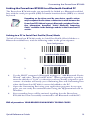
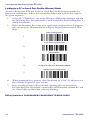
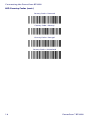
To link a PowerScan BT8300 reader in Serial Port Profile (Slave) Mode to a
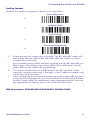
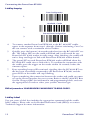
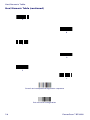
Bluetooth-enabled host, read the following codes in the given sequence.
Enter Configuration
1.
Serial Port Profile (Slave)
2.
Exit and Save Configuration
3.
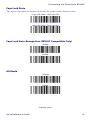
4.
Use the HOST computer's Bluetooth manager to "Add Bluetooth Device
Wizard" and select "PowerScan BT8300." When prompted for a passkey,
enter the default of "1234" or whatever you have already assigned to your
scanner. A window will notify you of Incoming Port and Outcoming Port
when the PowerScan BT8300 is successful added to the PC.
5.
Open the Outcoming Port using your application program; for test purposes you can verify the communication using the Hyperterminal tool in
Windows.
6.
Four ascending beeps will be emitted, signaling that the PowerScan
BT8300 has been successfully connected to the Bluetooth-enabled PC.
END of procedure. YOUR READER IS NOW READY TO READ CODES.
Quick Reference Guide
13