1
2
Installing C90LE and C90LEW Thin
Client Flash and RAM
This chapter contains information for users of Wyse C90LE and C90LEW thin clients who
must install new flash and RAM. If you are installing firmware only, you can skip this
chapter and proceed to"Installing WES7 Firmware."
Requirements
•
Small Phillips screwdriver
•
Needle-nose pliers
•
(Optional) Plastic alignment tools or equivalent for prying
Warning
Flash and RAM modules may be susceptible to damage by Electro-Static
Discharge (ESD). All industry-standard cautions should be followed to avoid
ESD. Before you remove or install a module, touch any metal part of the
chassis and keep that contact with the chassis during the installation
process.
Procedures
Caution
Follow all precautions listed in the Quick-Start Guide that came with your thin
client for disconnecting and reconnecting the thin client.
1. Perform a proper shutdown of the thin client by closing all files and ending your
session, and then press the power button to turn off the thin client.
2. Unplug the power cord and power adapter, remove all of the cables from the rear of the
thin client, and then detach any support feet.
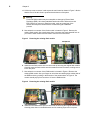
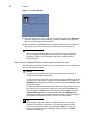
3. Position the thin client horizontally, remove the screw from the back of the thin client
using a small Phillips screwdriver, and then use a plastic alignment tool to pry and
loosen the top cover as shown in Figure 2.
Figure 2
Removing the top cover