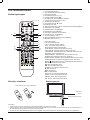
1
-/-NICAM
ASPECT
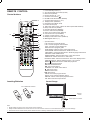
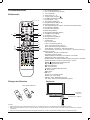
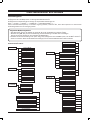
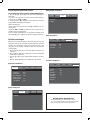
BASIC OPERATIONS
VOL
CH.
DISPLAY
STANDBY
AUTO
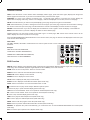
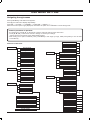
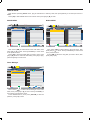
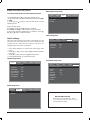
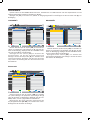
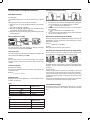
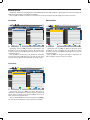
Select the input source
MUTE
Make sure all necessary connections are correctly
connected before turn on the power.
The power indicator turns red and the unit is in the standby
mode.
S ource
Turn on the connected necessary external
device. Press [INPUT] to select the proper
LCD
MENU
input source.
The input source menu appears.
TV
DTV
S-Video
Media
AV
OK
INPUT
Turn on the power
Press [z] to turn on the main unit.
The power indicator turns blue.
1. Press [o/p] to move the high-lighted
bar to the desired source item.
2. Press [OK] ( or [a] )to confirm.
-/-NICAM
ASPECT
Turn off the power
VOL
DISPLAY
OK
LCD
MENU
FAV -
HOLD
ANGLE
ZOOM
INDEX
SIZE
DVD
INTRO
D.MENU
TITLE
D.DISP
AUTO
CH.
DISPLAY
OK
-/--
LCD
MENU
INPUT
SUBPAGE
DVD
NICAM
ASPECTSETUP
PMODE VOL
SMODE
EXIT
SLEEP
DISPLAY
GOTO
MEDIA
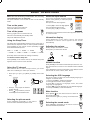
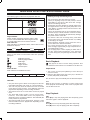
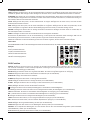
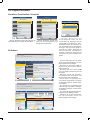
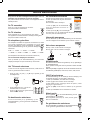
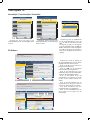
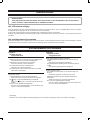
Press [SLEEP] on the remote control, the remain sleep time
TV/RADIO
appears on the screen for a few seconds.
STANDBY
STANDBY
REPEAT
A-B
AUDIO
(The sleep timer starts when the setting
is finished.)
INDEX
SIZE
REVEAL
To check the remain sleep time
LANG SUBTITLE
AUDIO
REVEAL SUBPAGE
-/-RPOG
TEXT105HOLD
LANG 120
SUBTITLE
Min v
Min
v60 Min v 75 Min v 90 Min v
ZOOM
FAV +
EPG
YPBPR
SCART 1
ASPECT NICAM
Press [DISPLAY] on the remote control, the
related
information of current source appears on the screen
VOL
automatically.
SETUP
The sleep timer automatically switches off the power after
a
preset time has elapsed. There are 9 time periods available,
EXIT
INPUT
PMODE SMODE
Adjusting the volume
press [SLEEP] on the remote control
repeatedly
to SLEEP
Press [+VOL] to increase the volume.
select the desired sleep time:
Press [VOL-] to reduce the volume.
FAV
0 Min v 15 Min v 30 Min v 45
MinFAV - FAV + EPG
ANGLE
MUTE
TV/RADIO
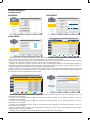
Information display
Using the Sleep Timer
FAV
TEXT
EXIT
SLEEP
S-Video
PC AUTO
SMODE
Information of the selected source nameD.MENU
appears
on
theGOTOTV
TITLE
D.DISP
MEDIA
for a few seconds.
CH.
Press [z] again can turn off the main unit.
The unit is automatically set standby mode.
The power indicator turns red.
PMODE
STANDBY
DVD
SETUP
RPOG
AUTO
REPEAT
INTRO
MUTE
A-B
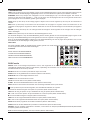
NICAM Function
FAV
FAV -
FAV +
EPG
TEXT
HOLD
LANG SUBTITLE
ANGLE
ZOOM
AUDIO
OK
INDEX
SIZELCD
Press [NICAM] on the remote control when input
source
is REVEAL
"TV". SUBPAGE
MENU
STANDBY
MUTE
TITLE NICAM
D.DISP
GOTO
AUTO
This operation
do no effect to the channelsD.MENU
without
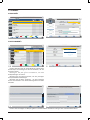
Select the TV channel
MEDIA
STANDBY
signal.
MUTE
AUTO
PMODE SMODE
After selected "ATV" or "DTV" as input source, you can do
Once [NICAM] is pressed, it alternates in the differentINPUT
sound
either one of followings to select your channel.
options such as mono, stereo, dual I, dual TV/RADIO
II.
• Press [CH.+] or [CH.-] (or [b CH] or [CH a] on the main
unit).
-/--
RPOG
Selecting the OSD language
TEXT
NICAM
-/--
VOL
CH.
DISPLAY
VOL
• Press [0, 1~9] to input the channel
OK
number directly.
LCD
• Press [ ] to go back
MENU the previous
channel you've watched last time.
INPUT
PMODE
SMODE
FAV
FAV -
FAV +
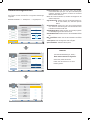
The factory setting of OSD (On Screen Display) language is
INDEX
SIZE
REVEAL
"English". To edit the OSD.
D.MENU
TITLE
D.DISP
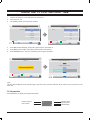
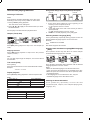
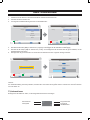
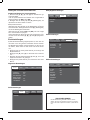
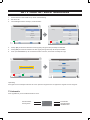
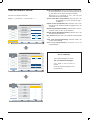
1. Press [LCD MENU], OSD menu appears.
MEDIA
2. Press [p] until "Feature" menu appears. -/-ASPECT NICAM
3. Press [a] to enter the "Language" menu,ASPECT
andTV/RADIO
"OSD
NICAM
Language" is high-lighted.
CH.
RPOG
INTRO REPEAT
4. Press [b/a] to set the language to your desired language.
DISPLAY
CH.
5. Press [LCD MENU] to exit the submenu.VOL
STANDBY
OK
EPG
INPUT
AUTOoff
Press [MUTE ] on the remote control to switch
the sound temporarily.
DVD
OK
Press SETUP
this
button again (or [+VOL]), the sound comes
LCD
back.
MENU
D.MENU
FAV
FAV -
FAV +
TEXT
HOLD
LANG SUBTITLE
D.DISP
GOTO
MEDIA
TV/RADIO
INTRO
REPEAT
A-B
ANGLE
ZOOM
INDEX
SIZE
D.MENU
TITLE
MEDIA
SMODE
Selecting the sound mode
INPUT
DVD
SETUP
PMODE
SMODE
EXIT
SLEEP
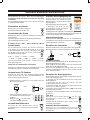
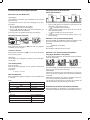
Press [SMODE] repeatedly on the remote control to
EPG
select
the desired sound mode.
-/--
AUDIO
REVEAL SUBPAGE
E8
D.DISP
GOTO
VOL
FAV
FAV -
ASPECT
TEXT
NICAM
HOLD
ANGLE
ZOOM
INDEX
SIZE
DISPLAY
D.MENU
TITLE
MEDIA
TV/RADIO
MUTE
EXIT
SLEEP
PMODE
FAV +
EPG
LANG SUBTITLE
AUDIO
CH.
REVEAL
SUBPAGE
D.DISP
E
AUDIO
Mute function
-/--
EXIT
SLEEP
TEXT
HOLD
Press [PMODE] repeatedly
on LANG
the SUBTITLE
remote
ANGLE
ZOOM
AUDIO
control to select the desired
picture
mode.
INDEX
SIZE
REVEAL SUBPAGE
TITLE
ZOOM
DISPLAY
DVD
SETUP
LCD
MENU
Selecting the picture mode
FAV +
LANG SUB
HOLD
ANGLE
ASPECT
RPOG
FAV
FAV REPEAT
A-B
INTRO
S
GOTO
SUB
G
A