1
Predator Pro 3D
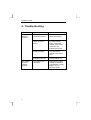
4. Troubleshooting
Problem
The joystick
does not
respond.
The joystick
does not
function
properly.
6
Cause
The plug is not
connected properly.
Possible solutions
Connect the plug to the
game port properly.
The game port of the
sound card is not
active.
Set the game port of
the sound card to
active. Consult the
manual of the sound
card and of the
software being used.
The sound card is not
installed properly.
Re-install the sound
card. Consult the
manual of the sound
card.
No joystick is defined
in Windows 95 / 98.
Add the joystick.
Consult Chapter 2.1.
The joystick is not
calibrated.
Calibrate the joystick.
Consult the manual of
your software. Consult
Chapter 2.1 for
Windows 95/98.