1
Hard Key Functions
Hard Key Functions, cont.
2
1
3
4
5
7
6
9
11
8
10
12
13
14
15
17
16
18
1.
2.
3.
4.
5.
6.
7.
8.
9.
10.
11.
12.
13.
14.
15.
16.
17.
18.
19.
20.
21.
22.
: Quick access keys for favourites stored under
groups.
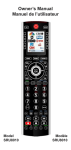
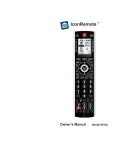
POWER: Turns current device On or Off.
SIDE KEYS: Used to access on-screen features.
LCD - (Liquid Crystal Display).
MODE: Selects mode (TV, VCR, etc.) for the remote.
FAVORITE: Used to access favourites groups on the LCD.
HOME: The starting screen on the LCD for most operations.
EXIT: Exits On-Screen Menus/Returns to previous On-Screen selection.
MENU: Brings up the Menu screen.
GUIDE: Displays on-screen program or channel guides.
16/9: Change the size of the image (4/3, 16/9, etc...)
INFO: Displays program channel information.
VOLUME UP/DOWN: Changes the volume level of the device, normally the TV.
PROG UP/DOWN: Changes the program channels.
UP, DOWN, LEFT & RIGHT: Used to Navigate menus.
OK: Selects menu items for the device you are controlling, or confirms selections on the
screen.
MUTE : Turns the Volume on/off, normally the TV.
LAST: Toggle between the 2 last selected channels of the selected equipment (when
available on the equipment).
NUMBERS - Enter numbers for direct program channel selection.
SKIP-, PLAY, PAUSE, SKIP+, REWIND, STOP, RECORD, FAST FORWARD:
Operates your VCR, DVR, or DVD Player. Note, the Record key needs pressed twice to
operate.
AV: Selects input source (SCART input, HDMI input,...).
-/--: In connection with the numeric keys, this button allows you with some equipment
and brand to select directly 2 digit channels.
Note: Teletext Keys (Teletext On, Teletext Off, etc.) and Fast Text Colour Keys (Red, yellow,
green and blue) can be found on the LCD screen
20
19
21
22
4
5