1
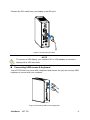
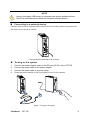
Connect the DVI cable from your display to the DVI port. Figure 4 Connect the DVI cable NOTE To connect a VGA display, you need the DVI to VGA adapter to connect a display with a VGA connector. Connecting USB mouse & keyboard Your VOT125 does not come with a keyboard and mouse, but you can use any USB keyboard or mouse with your computer. Figure 5 Connecting USB mouse & keyboard ViewSonic VOT125 8