1
Preface
Preface
About This Manual
This manual is written for system integrators, PC technicians and knowledgeable
PC users. It provides information for the installation and use of the
X8DA6/
X8DAE motherboard.
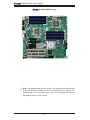
About This Motherboard
The
X8DA6/X8DAE supports the Intel 5500/5600 Series Processor
platform, the first dual-processing platform that implements the Intel QuickPath
Interconnect (QPI) Technology and provides the next generation point-to-point
system interface, replacing the current Front Side Bus. With the 5500/5600 Series
Processor platform built in, the X8DA6/X8DAE substantially enhances system
performance with increased bandwidth and unprecedented scalability optimized
for CAD workstations and graphic-intensive systems. Please refer to our web site
(http://www.supermicro.com/products/) for updates on supported processors. This
product is intended to be installed and serviced by professional technicians.
Manual Organization
Chapter 1 describes the features, specifications and performance of the motherboard and provides detailed information about the chipset.
Chapter 2 provides hardware installation instructions. Read this chapter when installing the processor, memory modules and other hardware components into the
system. If you encounter any problems, see Chapter 3, which describes troubleshooting procedures for video, memory and system setup stored in the CMOS.
Chapter 4 includes an introduction to BIOS and provides detailed information on
running the CMOS Setup utility.
Appendix A lists BIOS POST Error Codes. Appendix B and Appendix C provide
the Windows OS and Other Software Installation Instructions.
Conventions Used in the Manual
Special attention should be given to the following symbols for proper installation and
to prevent damage done to the components or injury to yourself:
Warning: Important information given to ensure proper system installation
or to prevent damage to the components.
Note: Additional Information given to differentiate various models or to
ensure correct system setup.
iii