1
WorkForce 320 Series
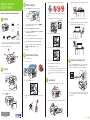
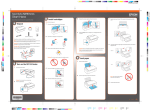
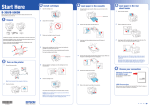
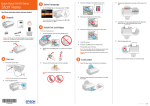
4 Remove only the yellow tape from each cartridge.
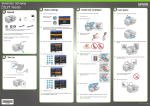
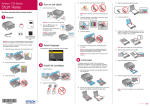
3 Select settings
®
Start Here
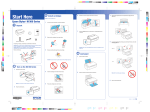
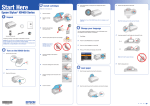
3 Squeeze the edge guide as you slide it all the way to the
left.
1 To select English as your language, press OK.
Read these instructions before using your product.
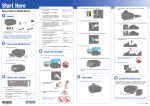
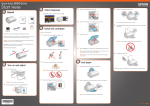
1 Unpack
C
aution: Don’t remove any other seals or the cartridges may
leak.
5 Insert the cartridges in the holder for each color.
(If you want to change the language, press
select it, then press OK.)
or
T ip: If the clear plastic feeder guard is in the way, move it
forward.
4 Load letter- or A4-size paper against the right edge and
behind the tab, with the printable side face up.
to
2 Select your Country/Region and press OK.
3 Select the current Daylight Saving Time setting (Winter
or Summer) and press OK.
Phone cord
Power cord
French control
panel stickers
(included for
Canada only)
Caution: Do not open ink cartridge packages until you are ready to
install the ink. Cartridges are vacuum packed to maintain reliability.
Remove all protective materials.
4 Select the Date format and press OK.
6 Press each cartridge down until it clicks.
5 Press the number keys to enter the Date and press OK.
5 Slide the edge guide over.
6 Select the Time format (12h or 24h) and press OK.
7 Press the number keys to enter the Time. Then press
or
to select AM or PM, if necessary.
8 Press OK.
7 Close the cartridge cover. Press down until it clicks.
4 Install ink cartridges
Note: Do not load paper yet.
1 Lift up the scanner.
2 Turn on
1 Connect the power cable.
2 Open the cartridge cover.
8 Lower the scanner.
9 Press the OK button to charge the ink.
Priming takes about 2½ minutes.
N
ote: Your printer ships with full cartridges and part of the ink
from the first cartridges is used for priming the printer.
C
aution: Don’t turn off the printer while it is priming or you’ll
waste ink.
6 Connect the phone cord
To fax, connect the included phone cord to a telephone wall
jack and to the LINE port on your product. To connect a
telephone or answering machine, see the Quick Guide.
5 Load paper
1 Open the paper support and pull up the extensions.
Caution: Do not connect to your computer yet.
2 Press the
Note: If you’re connecting to a DSL phone line, you must use a DSL
filter or you won’t be able to fax. Contact your DSL provider for the
necessary filter.
On button.
3 Shake the ink cartridges gently 4 or 5 times, then unpack
them.
2 Pull out the output tray extensions and raise the stopper.
*411867400*
*411867400*