1
Please read the safety instructions booklet
before setting up the projector.
1
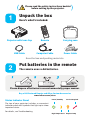
Unpack the box
Here's what's included:
Projector with Lens Cap
Remote
Carrying case
USB Cable
Computer Cable
Power Cable
Save the box and packing materials.
2
Put batteries in the remote
The remote uses 2 AA batteries.
Please dispose of batteries in an environmentally proper manner.
Buy a Full-Featured Remote and Other Custom Accessories
www.infocus.com/store
Status Indicator Panel
Power/Standby
Service Required
High Temperature
Replace Lamp
The top of your projector includes a convenient
indicator panel with symbols that light up to show
important status.
For details, see Troubleshooting.