Transcript
Notebook
Computer skin
REFERENCE GUIDE
®
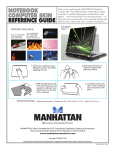
Shown: Streetscape,
Model 475709,
with grid
designs available:
Racing Car, Model 475686
Guitar, Model 475679
Flame, Model 475655
Thank you for purchasing this manhattan Notebook
Computer Skin. These high-resolution, limited-edition designs
are printed on durable polypropylene material that’s easily
applied — and removed without any remaining residue — to
help protect new computers from minor everyday hazards and
refresh the look of those with minor scratches and abrasions.
Soccer, Model 475662
Earth, Model 475693
Retro, Model 475723
Cityscape, Model 475716
1.Clean your
notebook
cover, letting
the surface
dry before
applying the skin.
2.With the skin’s grid (back) side facing up and
using the notebook cover dimensions, trim the
skin to fit. TIP: Some notebook covers feature beveled edges, rounded corners other design
characteristics that may affect full adhesion and a flat, secure installation. To compensate,
consider trimming up to 2 cm (0.75 in.) more
when preparing the skin for application.
3. Place the skin on the
notebook cover to confirm
that no additional trimming
is needed, then peel away
the back of the skin to
expose the adhesive
surface.
Specifications
4.Carefully position
the skin on your
notebook cover —
taking into account
any edge features
addressed above
in Step 2 — and
press it into place.
• Material: polypropylene • Dimensions: 250 x 375 mm (9.8 x 14.7 in.) • Weight: 62 g (2.2 oz.)
MANHATTAN® offers a complete line of PC Components, Peripherals, Cables and Accessories.
Ask your local computer dealer for more information or visit us online at
www.manhattan-products.com
Copyright © MANHATTAN
All products mentioned are trademarks or registered trademarks of their respective owners.
MH-NBSKIN-QIG-1008-02