1
Desktop Board Features
Hardware Management
The hardware management features of Intel Desktop Board DX58SO2 enable the
board to be compatible with the Wired for Management (WfM) specification. The board
has several hardware management features including the following:
•
•
•
Fan speed monitoring and control
Thermal and voltage monitoring
Chassis intrusion detection
Hardware Monitoring and Fan Speed Control
The features of the hardware monitoring and fan speed control include:
•
•
•
•
Monitoring of power supply voltages to detect levels above and below acceptable
values
Intel® Precision Cooling Technology fan speed control, delivering acousticallyoptimized thermal management
A thermal sensor in the processor
Thermally monitored closed-loop fan control, for all onboard fans, that can adjust
fan speed
Intel® Precision Cooling Technology
Intel Precision Cooling Technology automatically adjusts processor fan speed based on
the processor temperature and adjusts chassis fan speeds based on the internal
system temperature.
Chassis Intrusion
The board supports a chassis security feature that detects if the chassis cover has
been removed. The security feature uses a mechanical switch on the chassis that can
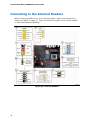
be connected to the chassis intrusion header on the Desktop Board. See Figure 23 for
the location of the chassis intrusion header.
Power Management
Power management is implemented at several levels, including software support
through the Advanced Configuration and Power Interface (ACPI) and the following
hardware support:
•
•
•
•
•
•
•
•
•
Power connectors
Fan headers
LAN wake capabilities
Instantly Available PC technology (Suspend to RAM)
+5 V standby power indicator LED
Wake from USB
Power Management Event signal (PME#) wakeup support
WAKE# signal wake-up support
Wake from Consumer IR
21