1
Image Projection (Continued)
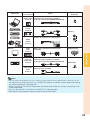
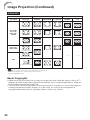
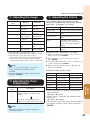
VIDEO/DTV
Input signal
Video/DTV
Image type
For 4:3 screen
NORMAL
AREA ZOOM
For 16:9 screen
V-STRETCH
BORDER
16:9
*1
*1
*1
*1
*1
*1
4:3 aspect ratio
480I, 480P,
576I, 576P,
NTSC, PAL,
SECAM
Squeeze
Letter box
720P, 1035I,
1080I, 1080P
*1
16:9 aspect ratio
—*2
16:9 aspect ratio
—*2
*1
540P
(4:3 aspect ratio in 16:9)
: Cutout area on which images cannot be projected
: Area on which the image is not included in the original signals
*1 The Image Shift function can be used for these images.
*2 Same as NORMAL mode.
About Copyrights
• When using the Resize function to select an image size with a different aspect ratio to a TV
program or video image, the image will look different from its original appearance. Keep this
in mind while choosing an image size.
• The use of the Resize or Keystone Correction function to compress or stretch the image for
commercial purposes/public displays in a café, hotel, etc. may be an infringement of
copyright protected by law for copyright holders. Please use caution.
32