1
Hi-Speed
to SATA/IDE Adapter
Manual
Hi-SpeedUSB
USB2.0
ExpressCard/34
• User• User
Manual
English
English
Thank you for purchasing the MANHATTAN Hi-Speed USB PC Card, Model
516167. For specifications, go to www.manhattan-products.com.
®
Installation
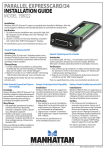
1. Turn off your notebook computer.
2. Insert the card in the PCMCIA slot
and make sure it’s making a solid
connection.
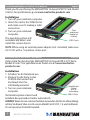
Power
3. Turn on your notebook
adapter jack
(adapter not
computer.
included)
The operating system will
USB 2.0 ports
automatically detect and
install the correct drivers.
NOTE: When using an external power adapter (not included), make sure
it’s 5 V DC with a 1 A positive center post.
Hi-Speed USB 2.0 PC Karte • Handbuch
Deutsch
Vielen Dank für den Kauf der MANHATTAN® Hi-Speed USB 2.0 PC Karte,
Modell 516167. Die Spezifikationen finden Sie auf www.manhattanproducts.com.
Installation
1. Schalten Sie Ihr Notebook aus.
2. Stecken Sie die Karte in den
PCMCIA-Slot und achten
Sie darauf, dass Sie
vollständig einrastet.
Netzteilbuchse
(Netzteil
3. Turn on your notebook
nicht im
computer.
Lieferumfang)
USB-2.0-Ports
Ihr Betriebssystem erkennt und
installiert den passenden Treiber automatisch.
HINWEIS: Wenn Sie ein externes Netzteil verwenden (nicht im Lieferumfang),
achten Sie darauf, dass es sich um ein Modell mit 5 V DC, 1 A und mittlerem
Pin mit positiver Polarität handelt.
2
ENGLISH / deutsch