1
Targus Laser Presentation Remote
Setting Up Your Remote
Installing the Batteries
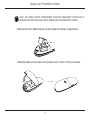
Press the battery cover release button to open the battery cover and
carefully lift the cover as shown.
Battery
cover
Battery cover
release button
Insert the supplied batteries, making sure the positive (+) and negative
(-) ends of the batteries match the polarity indicators inside the battery
compartment.
Spare battery compartment
3