1
Introduction
DATA PROJECTOR
Easy Start
MODEL
Setup
PG-D3550W
PG-D3050W
PG-D2870W
OPERATION MANUAL
Connections
Basic
Operation
Useful
Features
PG-D3550W/PG-D3050W
Appendix
IMPORTANT
• For your assistance in reporting the loss
or theft of your Projector, please record
the Model and Serial Number located on
the bottom of the projector and retain this
information.
• Before recycling the packaging, please
ensure that you have checked the contents of the carton thoroughly against the
list of “Supplied accessories” on page 11.
ii
Model No.:
Serial No.:
SPECIAL NOTE FOR USERS IN THE U.K.
The mains lead of this product is fitted with a non-rewireable (moulded) plug incorporating
a 10A fuse. Should the fuse need to be replaced, a BSI or ASTA approved BS 1362 fuse
marked or
and of the same rating as above, which is also indicated on the pin face
of the plug, must be used.
Always refit the fuse cover after replacing the fuse. Never use the plug without the fuse
cover fitted.
In the unlikely event of the socket outlet in your home not being compatible with the plug
supplied, cut off the mains plug and fit an appropriate type.
DANGER:
The fuse from the cut-off plug should be removed and the cut-off plug destroyed immediately and disposed of in a safe manner.
Under no circumstances should the cut-off plug be inserted elsewhere into a 13A socket
outlet, as a serious electric shock may occur.
To fit an appropriate plug to the mains lead, follow the instructions below:
WARNING:
THIS APPARATUS MUST BE EARTHED.
IMPORTANT:
The wires in this mains lead are coloured in accordance with the following code:
Green-and-yellow : Earth
Blue
: Neutral
Brown
: Live
As the colours of the wires in the mains lead of this apparatus may not correspond with
the coloured markings identifying the terminals in your plug proceed as follows:
x The wire which is coloured green-and-yellow must be connected to the terminal in the
plug which is marked by the letter E or by the safety earth symbol
or coloured green
or green-and-yellow.
x The wire which is coloured blue must be connected to the terminal which is marked
with the letter N or coloured black.
x The wire which is coloured brown must be connected to the terminal which is marked
with the letter L or coloured red.
IF YOU HAVE ANY DOUBT, CONSULT A QUALIFIED ELECTRICIAN.
Authorized representative responsible for the European Union Community Market
SHARP ELECTRONICS (Europe) GmbH
Sonninstraße 3, D-20097 Hamburg
E.U. ONLY
iii
The supplied CD-ROM contains operation instructions in English, German, French, Spanish,
Italian, Dutch, Swedish, Portuguese, Chinese, Korean and Arabic. Carefully read through the
operation instructions before operating the projector.
Die mitgelieferte CD-ROM enthält Bedienungsanleitungen in Englisch, Deutsch, Französisch,
Spanisch, Italienisch, Niederländisch, Schwedisch, Portugiesisch, Chinesisch, Koreanisch
und Arabisch. Bitte lesen Sie die Bedienungsanleitung vor der Verwendung des Projektors
sorgfältig durch.
Le CD-ROM fourni contient les instructions de fonctionnement en anglais, allemand, français,
espagnol, italien, néerlandais, suédois, portugais, chinois, coréen et arabe. Veuillez lire attentivement ces instructions avant de faire fonctionner le projecteur.
El CD-ROM suministrado contiene instrucciones de operación en inglés, alemán, francés,
español, italiano, holandés, sueco, portugués, chino, coreano y árabe. Lea cuidadosamente
las instrucciones de operación antes de utilizar el proyector.
Il CD-ROM in dotazione contiene istruzioni per l’uso in inglese, tedesco, francese, spagnolo,
italiano, olandese, svedese, portoghese, cinese, coreano e arabo. Leggere attentamente le
istruzioni per l’uso prima di usare il proiettore.
De meegeleverde CD-ROM bevat handleidingen in het Engels, Duits, Frans, Spaans,
Italiaans, Nederlands, Zweeds, Portugees, Chinees, Koreaans en Arabisch. Lees de
handleiding zorgvuldig door voor u de projector in gebruik neemt.
Den medföljande CD-ROM-skivan innehåller bruksanvisningar på engelska, tyska, franska,
spanska, italienska, holländska, svenska, portugisiska, kinesiska, koreanska och arabiska.
Läs noga igenom bruksanvisningen innan projektorn tas i bruk.
O CD-ROM fornecido contém instruções de operação em Inglês, Alemão, Francês,
Espanhol, Italiano, Holandês, Sueco, Português, Chinês, Coreano e Árabe. Leia
cuidadosamente todas as instruções de operação antes de operar o projetor.
iv
Introduction
Introduction
Before using the projector, please read this operation manual carefully.
ENGLISH
There are two important reasons for prompt warranty registration of your new
SHARP Projector, using the REGISTRATION CARD packed with the projector.
1. WARRANTY
This is to assure that you immediately receive the full benefit of the parts,
service and labor warranty applicable to your purchase.
2. CONSUMER PRODUCT SAFETY ACT
To ensure that you will promptly receive any safety notification of inspection,
modification, or recall that SHARP may be required to give under the 1972
Consumer Product Safety Act, PLEASE READ CAREFULLY THE IMPORTANT
“LIMITED WARRANTY” CLAUSE.
U.S.A. ONLY
WARNING:
High brightness light source. Do not stare into the beam of light, or view
directly. Be especially careful that children do not stare directly into the
beam of light.
WARNING: To reduce the risk of fire or electric shock, do not
expose this product to rain or moisture.
See bottom of projector.
CAUTION
RISK OF ELECTRIC SHOCK.
DO NOT REMOVE SCREWS
EXCEPT SPECIFIED USER
SERVICE SCREW.
CAUTION: TO REDUCE THE RISK OF ELECTRIC SHOCK,
DO NOT REMOVE COVER.
NO USER-SERVICEABLE PARTS EXCEPT LAMP UNIT.
REFER SERVICING TO QUALIFIED SERVICE
PERSONNEL.
The lightning flash with arrowhead symbol, within an equilateral triangle, is intended to alert the user to the presence
of uninsulated “dangerous voltage”
within the product's enclosure that may
be of sufficient magnitude to constitute
a risk or electric shock to persons.
The exclamation point within a triangle
is intended to alert the user to the presence of important operating and maintenance (servicing) instructions in the
literature accompanying the product.
WARNING:
This is a Class A product. In a domestic environment this product may cause
radio interference in which case the user may be required to take adequate
measures.
WARNING:
FCC Regulations state that any unauthorized changes or modifications
to this equipment not expressly approved by the manufacturer could
void the user's authority to operate this equipment.
U.S.A. ONLY
The enclosed computer cable must be used with the device. The cable is
provided to ensure that the device complies with FCC Class A verification.
U.S.A. ONLY
1
INFORMATION
This equipment has been tested and found to comply with the limits for a Class A
digital device, pursuant to Part 15 of the FCC Rules. These limits are designed to
provide reasonable protection against harmful interference when the equipment is
operated in a commercial environment. This equipment generates, uses, and can
radiate radio frequency energy and, if not installed and used in accordance with
the operation manual, may cause harmful interference to radio communications.
Operation of this equipment in a residential area is likely to cause harmful
interference, in which case the user will be required to correct the interference at
his own expense.
U.S.A. ONLY
PRODUCT DISPOSAL
This product utilizes tin-lead solder, and lamp containing a small
amount of mercury. Disposal of these materials may be regulated due
to environmental considerations. For disposal or recycling information,
please contact your local authorities, the Electronics Industries Alliance:
www.eiae.org, the lamp recycling organization www.lamprecycle.org, or
Sharp at 1-800-BE-SHARP.
U.S.A. ONLY
Caution Concerning Lamp Replacement
■ This projector utilizes a pressurized mercury lamp. A loud sound may indicate lamp failure. Lamp
failure can be attributed to numerous sources such as: excessive shock, improper cooling, surface
scratches or deterioration of the lamp due to a lapse of usage time.
The period of time up to failure largely varies depending on the individual lamp and/or the condition
and the frequency of use. It is important to note that failure can often result in the bulb cracking.
■ When the lamp replacement indicator and on-screen display icon are illuminated, it is recommended
that the lamp be replaced with a new one immediately, even if the lamp appears to be operating
normally.
■ Should the lamp break, there is also a possibility that glass particles may spread inside of the
projector. In such a case, it is recommended you contact your nearest Sharp Authorized Projector
Dealer or Service Center to assure safe operation.
■ Should the lamp break, the glass particles may spread inside the lamp cage or gas contained in the
lamp may be vented into the room from the exhaust vent. Because the gas in this lamp includes
mercury, ventilate the room well if the lamp breaks and avoid all exposure to the released gas. In
case of exposure to the gas, consult a doctor as soon as possible.
Caution
• Do not remove the lamp unit from the projector right after use. The lamp will be very hot and may
cause burns or injury.
• Wait at least one hour after the power cord is disconnected to allow the surface of the lamp unit to
fully cool before removing the lamp unit.
• Do not touch the glass surface of the lamp unit or the inside of the projector.
• Do not loosen other screws except for the lamp unit cover and lamp unit.
• Make sure to reset the lamp timer only when replacing the lamp. If you reset the lamp timer and
continue to use the same lamp, this may cause the lamp to become damaged or explode.
■ Carefully change the lamp by following the instructions described on pages 60 to 62.
* If you wish, you may have the lamp replaced at your nearest Sharp Authorized Projector
Dealer or Service Center.
* If the new lamp does not light after replacement, take your projector to the nearest Sharp Authorized
Projector Dealer or Service Center for repair.
2
Introduction
How to Read this Operation Manual
■ The specifications are slightly different, depending on the model. However, you can connect
and operate all models in the same manner.
• In this operation manual, the illustration and the screen display are simplified for explanation, and
may differ slightly from the actual display. The examples used throughout this manual are based
on the PG-D3550W/PG-D3050W model.
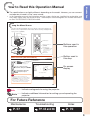
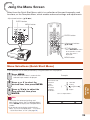
Using the Menu Screen
Select from the Quick Start Menu, which is a collection of the most frequently used
functions, or the Complete Menu, which enables advanced settings and adjustments.
Adjustment buttons (P/R/O/Q)
ENTER button
MENU button
ENTER button
Buttons used in
this operation
Adjustment buttons
(P/R/O/Q)
RETURN button
• Press RETURN to return
to the previous screen
when the menu is
displayed.
MENU button
Button used in
this step
Menu Selections (Quick Start Menu)
• This operation can also be performed by using the buttons on the projector.
1
2
Example
• The “Quick Start Menu” screen for the
selected Input mode is displayed.
Press P or R to select the
desired item, then press ENTER.
Press P/R/O/Q to adjust the
item selected, then press
ENTER.
Quick Start Menu
Input Search Start
Resolution
Resize
Keystone
Eco+Quiet
Language
Information
1024×768
Normal
0
Useful
Features
3
Press MENU.
Off
English
Go To Complete Menu…
On-screen
display
Info
• To display the advanced settings and
adjustments, select “Go To Complete Menu”.
Press ENTER to display the Complete Menu
screen.
• If you do not want to display the Quick Start
Menu, set “Go To Complete Menu” - “PRJ-ADJ2”
- “Quick Start Menu” to “Off”. (See page 52.)
SEL./ADJ.
ENTER
END
39
Info .........Indicates safeguards for using the projector.
Note ....... Indicates additional information for setting up and operating the
projector.
For Future Reference
Maintenance
P. 57
Troubleshooting
PP. 65 and 66
Index
P. 70
3
Contents
Preparing
Introduction
How to Read this Operation Manual ......3
Contents .................................................4
IMPORTANT SAFEGUARDS ..................6
How to Access the PDF Operation
Manuals..............................................10
Accessories ..........................................11
Part Names and Functions ...................12
Front View .............................................. 12
Top View ................................................ 12
Rear View (Terminals) .............................. 13
Inserting the Batteries ............................. 15
Usable Range ......................................... 15
Easy Start
Easy Start .............................................16
Setup and Projection .............................. 16
Setup
Setting Up the Projector .......................18
Video Setup............................................ 18
Setting Up the Projector ......................... 18
Standard Setup (Front Projection) ........... 18
Screen Size and Projection Distance ...... 19
Projection (PRJ) Mode ............................ 20
Ceiling-Mount Setup ............................... 20
Connections
Connecting the Projector to
Other Equipment ................................21
Controlling the Projector by
a Computer ........................................24
Connecting the Power Cord .................25
Using
Basic Operation
Turning the Projector On/Off ................26
Turning the Projector On ......................... 26
Turning the Power Off (Putting the
Projector into Standby Mode) .............. 26
Image Projection ..................................27
About the Setup Guide ........................... 27
Adjusting the Projected Image ................ 27
Correcting Trapezoidal Distortion ............ 29
Switching the Input Mode ....................... 30
Adjusting the Volume .............................. 30
4
Displaying the Black Screen and
Turning Off the Sound Temporarily ....... 30
Resize Mode .......................................... 31
Useful Features
Operating with the Remote Control......33
Displaying and Setting the
Break Timer ......................................... 33
Displaying the Pointer ............................. 33
Using the Spot Function ......................... 33
Switching the Eco+Quiet Mode .............. 33
Auto Sync (Auto Sync Adjustment) ......... 34
Freezing a Moving Image ........................ 34
Selecting the Picture Mode ..................... 34
Displaying an Enlarged Portion of
an Image ............................................. 34
Using the Remote Control as the
Wireless Computer Mouse ................... 35
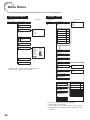
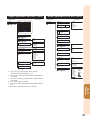
Menu Items...........................................36
Using the Menu Screen ........................39
Menu Selections (Quick Start Menu) .........39
Quick Start Menu .....................................40
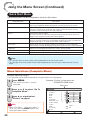
Menu Selections (Complete Menu) ...........40
Picture Adjustment (“Picture” Menu) ....42
Selecting the Picture Mode ..................... 42
Adjusting the Image ................................ 43
Adjusting the Color Temperature............. 43
Adjusting the Colors ............................... 43
Selecting the Film Mode ......................... 44
Reducing Image Noise (DNR) ................. 44
Eco+Quiet .............................................. 44
Signal Adjustment (“SIG-ADJ” Menu) ..45
Adjusting the Computer Image ............... 45
Resolution Setting .................................. 45
Signal Type Setting ................................. 45
Selecting the Dynamic Range ................. 45
EDID Selection ....................................... 46
Setting the Video System ....................... 46
Setting the Video Setup .......................... 46
Checking the Input Signal ....................... 46
Adjusting the Projected Image
(“SCR - ADJ” Menu)...........................47
Setting the Resize Mode......................... 47
Adjusting the Image Position .................. 47
Keystone Correction ............................... 47
Setting the Overscan .............................. 48
Setting the On-screen Display ................ 48
Closed Caption ...................................... 48
Selecting the Background Image ............ 49
Selecting the Setup Guide ...................... 49
Reversing/Inverting Projected Images ..... 49
Selecting the Wall Color .......................... 49
Selecting the On-screen Display Language ... 49
Introduction
Adjusting the Projector Function
(“PRJ - ADJ1/2” Menu) ......................50
Auto Sync (Auto Sync Adjustment) ......... 50
Auto Power Off Function ........................ 50
Auto Restart Function ............................. 50
Speaker Setting ...................................... 50
Selecting the Transmission Speed
(RS-232C) ........................................... 50
Fan Mode Setting ................................... 51
System Lock Function ............................ 51
Keylock Function .................................... 52
Selecting the Quick Start Menu .............. 52
COMPUTER2 Select .............................. 52
Setting the FUNCTION Button Operation.. 53
STANDBY Mode ..................................... 53
STANDBY Audio Out .............................. 53
DLP® LinkTM ............................................ 53
DLP® LinkTM Invert .................................. 53
Returning to the Default Settings ............ 53
Checking the Lamp Life Status ............... 53
Setting Up the Projector Network
Environment (“Network” Menu)..........54
Setting a Password ................................ 54
DHCP Client Setting ............................... 55
TCP/IP Setting........................................ 55
Returning to Default Settings (Network) .. 55
Restart Network Function ....................... 55
Confirming the Projector Information....... 56
Reference
Appendix
Maintenance .........................................57
Maintenance Indicators ........................58
Regarding the Lamp .............................60
Lamp...................................................... 60
Caution Concerning the Lamp ................ 60
Replacing the Lamp ............................... 60
Removing and Installing the
Lamp Unit ............................................ 61
Resetting the Lamp Timer ...................... 62
Storing the Projector ............................63
How to Use the Storage Case ................ 63
Compatibility Chart ..............................64
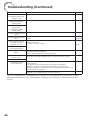
Troubleshooting ....................................65
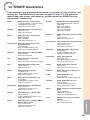
For SHARP Assistance .........................67
Specifications .......................................68
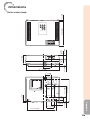
Dimensions ...........................................69
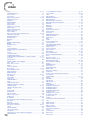
Index .....................................................70
5
IMPORTANT SAFEGUARDS
CAUTION: Please read all of these instructions before you operate this
product and save these instructions for later use.
Electrical energy can perform many useful functions. This product has been engineered
and manufactured to assure your personal safety. BUT IMPROPER USE CAN RESULT IN
POTENTIAL ELECTRICAL SHOCK OR FIRE HAZARDS. In order not to defeat the
safeguards incorporated in this product, observe the following basic rules for its
installation, use and servicing.
1. Read Instructions
All the safety and operating instructions
should be read before the product is
operated.
2. Retain Instructions
The safety and operating instructions
should be retained for future reference.
3. Heed Warnings
All warnings on the product and in the
operating instructions should be adhered to.
4. Follow Instructions
All operating and use instructions should
be followed.
5. Cleaning
Unplug this product from the wall outlet before
cleaning. Do not use liquid cleaners or aerosol
cleaners. Use a damp cloth for cleaning.
6. Attachments
Do not use attachments not recommended by the
product manufacturer as they may cause hazards.
7. Water and Moisture
Do not use this product near water–for
example, near a bath tub, wash bowl, kitchen
sink, or laundry tub; in a wet basement; or
near a swimming pool; and the like.
8. Accessories
Do not place this product on an unstable
cart, stand, tripod, bracket, or table. The
product may fall, causing serious injury to a
child or adult, and serious damage to the
product. Use only with a cart, stand, tripod,
bracket, or table recommended by the
manufacturer, or sold with the product. Any
mounting of the product should follow the
manufacturer's instructions, and should use a
mounting accessory recommended by the
manufacturer.
9. Transportation
A product and cart
combination should be
moved with care. Quick
stops, excessive force, and
uneven surfaces may
cause the product and cart
combination to overturn.
6
10. Ventilation
Slots and openings in the cabinet are provided
for ventilation to ensure reliable operation of
the product and to protect it from overheating,
and these openings must not be blocked or
covered. The openings should never be
blocked by placing the product on a bed, sofa,
rug, or other similar surface. This product
should not be placed in a built-in installation
such as a bookcase or rack unless proper
ventilation is provided or the manufacturer's
instructions have been adhered to.
11. Power Sources
This product should be operated only from
the type of power source indicated on the
marking label. If you are not sure of the
type of power supply to your home, consult
your product dealer or local power
company. For products intended to operate
from battery power, or other sources, refer
to the operating instructions.
12. Grounding or Polarization
This product is provided with one of the
following types of plugs. If the plug should
fail to fit into the power outlet, please contact
your electrician.
Do not defeat the safety purpose of the plug.
a. Two-wire type (mains) plug.
b. Three-wire grounding type (mains) plug
with a grounding terminal.
This plug will only fit into a grounding
type power outlet.
13. Power-Cord Protection
Power-supply cords should be routed so
that they are not likely to be walked on or
pinched by items placed upon or against
them, paying particular attention to cords
at plugs, convenience receptacles, and the
point where they exit from the product.
14. Lightning
For added protection for this product during
a lightning storm, or when it is left
unattended and unused for long periods of
time, unplug it from the wall outlet and
disconnect the cable system. This will
prevent damage to the product due to
lightning and power-line surges.
Do not overload wall outlets, extension cords,
or integral convenience receptacles as this
can result in a risk of fire or electric shock.
16. Object and Liquid Entry
Never push objects of any kind into this
product through openings as they may touch
dangerous voltage points or short-out parts
that could result in a fire or electric shock.
Never spill liquid of any kind on the product.
17. Servicing
Do not attempt to service this product
yourself as opening or removing covers
may expose you to dangerous voltage or
other hazards. Refer all servicing to
qualified service personnel.
18. Damage Requiring Service
Unplug this product from the wall outlet
and refer servicing to qualified service
personnel under the following conditions:
a. When the power-supply cord or plug is
damaged.
b. If liquid has been spilled, or objects
have fallen into the product.
c. If the product has been exposed to rain
or water.
d. If the product does not operate normally
by following the operating instructions.
Adjust only those controls that are
covered by the operating instructions,
as an improper adjustment of other
controls may result in damage and will
often require extensive work by a
qualified technician to restore the
product to normal operation.
e. If the product has been dropped or
damaged in any way.
f. When the product exhibits a distinct
change in performance, this indicates a
need for service.
Introduction
15. Overloading
19. Replacement Parts
When replacement parts are required, be
sure the service technician has used
replacement parts specified by the
manufacturer or have the same
characteristics as the original part.
Unauthorized substitutions may result in
fire, electric shock, or other hazards.
20. Safety Check
Upon completion of any service or repairs
to this product, ask the service technician
to per form safety checks to determine that
the product is in proper operating
condition.
21. Wall or Ceiling Mounting
This product should be mounted to a wall
or ceiling only as recommended by the
manufacturer.
22. Heat
This product should be situated away from
heat sources such as radiators, heat
registers, stoves, or other products
(including amplifiers) that produce heat.
• DLP® and the DLP logo are registered trademarks of Texas Instruments and
BrilliantColorTM and DLP® LinkTM are trademarks of Texas Instruments.
• Microsoft® and Windows® are registered trademarks of Microsoft Corporation in the
United States and/or other countries.
• PC/AT is a registered trademark of International Business Machines Corporation in the
United States.
• Adobe® Reader® is a trademark of Adobe Systems Incorporated.
• Macintosh® is a registered trademark of Apple Computer, Inc. in the United States and/or
other countries.
• HDMI, the HDMI logo and High-Definition Multimedia Interface are trademarks or
registered trademarks of HDMI Licensing LLC.
• PJLink is a registered trademark or an application trademark in Japan, the United States,
Canada, E.U., China and/or other countries/regions.
• All other company or product names are trademarks or registered trademarks of their
respective companies.
• Some IC chips in this product include confidential and/or trade secret property belonging
to Texas Instruments. Therefore you may not copy, modify, adapt, translate, distribute,
reverse engineer, reverse assemble or discompile the contents thereof.
7
Observe the following safeguards when setting up your
projector.
Caution concerning the lamp unit
■ Potential hazard of glass particles if lamp
ruptures. In case of lamp rupture, contact
your nearest Sharp Authorized Projector
Dealer or Service Center
for replacement.
See “Regarding the Lamp”
on page 60.
Caution concerning the setup of the
projector
■ For minimal servicing and to maintain high
image quality, SHARP recommends that
this projector be installed in an area free
from humidity, dust and cigarette smoke.
When the projector is subjected to these
environments, the vents and lens must be
cleaned more often. As long as the
projector is regularly cleaned, use in these
environments will not reduce the overall
operation life of the unit. Internal cleaning
should only be performed by a Sharp
Authorized Projector Dealer or Service
Center.
Rest your eyes occasionally.
■ Continuously watching the screen for long
hours will cause eye strain. Take regular
breaks to rest your eyes.
Do not set up the projector in places
exposed to direct sunlight or bright light.
■ Position the screen so that it is not in direct
sunlight or room light. Light falling directly
on the screen washes out the colors,
making viewing difficult. Close the curtains
and dim the lights when setting up the
screen in a sunny or bright room.
Caution regarding placing of the projector
■ Place the projector on a level site within the
adjustment range (9 degrees) of the
adjustment foot.
■ After the projector is purchased, a faint
smell from the vent may appear when the
power is first turned on. This is normal and
is not a malfunction. It will disappear after
the projector is used for a while.
8
When using the projector in highaltitude areas such as mountains (at
altitudes of approximately 1,500
meters (4,900 feet) or more)
■ When you use the projector in high-altitude
areas with thin air, set “Fan Mode” to
“High”. Neglecting this can affect the
longevity of the optical system.
■ Use the projector at altitudes of 2,300
meters (7,500 feet) or less.
Warning about placing the projector in
a high position
■ When placing the projector in a high
position, make certain it is carefully secure
to avoid personal injury caused by the
projector falling down.
Do not subject the projector to hard
impact and/or vibration.
■ Protect the lens so as not to hit or damage
the surface of the lens.
Avoid locations with extremes of
temperature.
■ The operating temperature of the projector
is from 41°F to 95°F (+5°C to +35°C).
■ The storage temperature of the projector is
from –4°F to 140°F (–20°C to +60°C).
Do not block the exhaust and intake
vents.
■ Allow at least 11 13/16 inches (30 cm) of
space between the exhaust vent and the
nearest wall or obstruction.
■ Ensure that the intake vent and the exhaust
vent are not obstructed.
■ If the cooling fan becomes obstructed, a
protection circuit will automatically put the
projector into Standby mode to prevent
overheat damage. This does not indicate a
malfunction. (See pages 58 and 59.)
Remove the projector power cord from the
wall outlet and wait at least 10 minutes.
Place the projector where the intake and
exhaust vents are not blocked, plug the
power cord back in and turn on the
projector. This will return the projector to
the normal operating condition.
Using the projector in other countries
■ If you are not to use the projector for a long
time or before moving the projector, make
certain you unplug the power cord from the
wall outlet, and disconnect any other
cables connected to it.
■ Do not carry the projector by holding the
lens.
■ When storing the projector, ensure that you
close the lens shutter.
■ Do not expose the projector to direct
sunlight or place next to heat sources.
Doing so may affect the cabinet color or
cause deformation of the plastic cover.
■ The power supply voltage and the shape of
the plug may vary depending on the region
or country you are using the projector in.
When using the projector overseas, make
sure you use an appropriate power cord for
the country you are in.
Other connected equipment
■ When connecting a computer or other
audio-visual equipment to the projector,
make the connections AFTER unplugging
the power cord of the projector from the
AC outlet and turning off the equipment to
be connected.
■ Please read the operation manuals of the
projector and the equipment to be
connected for instructions on how to make
the connections.
Introduction
Caution regarding usage of the projector
Temperature monitor function
■ If the temperature inside the projector
increases, due to blockage of the air vents,
or the setting location, the temperature
warning indicator will blink. And if the
temperature keeps on rising, “
” will
illuminate in the lower left corner of the
picture with the temperature warning
indicator blinking. If this state continues,
the lamp will turn off, the cooling fan will
run and then the projector will enter
Standby mode. Refer to “Maintenance
Indicators” on pages 58 and 59 for details.
Info
• The cooling fan regulates the internal
temperature, and its performance is automatically
controlled. The sound of the fan may change
during projector operation due to changes in the
fan speed. This does not indicate malfunction.
Closed Caption uses Bitstream Vera fonts
Copyright (c) 2003 by Bitstream, Inc. All Rights Reserved. Bitstream Vera is a trademark of Bitstream, Inc.
Permission is hereby granted, free of charge, to any person obtaining a copy of the fonts accompanying this
license (“Fonts”) and associated documentation files (the “Font Software”), to reproduce and distribute the
Font Software, including without limitation the rights to use, copy, merge, publish, distribute, and/or sell
copies of the Font Software, and to permit persons to whom the Font Software is furnished to do so, subject
to the following conditions:
The above copyright and trademark notices and this permission notice shall be included in all copies of one
or more of the Font Software typefaces.
The Font Software may be modified, altered, or added to, and in particular the designs of glyphs or
characters in the Fonts may be modified and additional glyphs or characters may be added to the Fonts,
only if the fonts are renamed to names not containing either the words “Bitstream” or the word “Vera”.
This License becomes null and void to the extent applicable to Fonts or Font Software that has been
modified and is distributed under the “Bitstream Vera” names.
The Font Software may be sold as part of a larger software package but no copy of one or more of the Font
Software typefaces may be sold by itself.
THE FONT SOFTWARE IS PROVIDED “AS IS”, WITHOUT WARRANTY OF ANY KIND, EXPRESS OR
IMPLIED, INCLUDING BUT NOT LIMITED TO ANY WARRANTIES OF MERCHANTABILITY, FITNESS FOR A
PARTICULAR PURPOSE AND NONINFRINGEMENT OF COPYRIGHT, PATENT, TRADEMARK, OR OTHER
RIGHT. IN NO EVENT SHALL BITSTREAM OR THE GNOME FOUNDATION BE LIABLE FOR ANY CLAIM,
DAMAGES OR OTHER LIABILITY, INCLUDING ANY GENERAL, SPECIAL, INDIRECT, INCIDENTAL, OR
CONSEQUENTIAL DAMAGES, WHETHER IN AN ACTION OF CONTRACT, TORT OR OTHERWISE, ARISING
FROM, OUT OF THE USE OR INABILITY TO USE THE FONT SOFTWARE OR FROM OTHER DEALINGS IN
THE FONT SOFTWARE.
Except as contained in this notice, the names of Gnome, the Gnome Foundation, and Bitstream Inc., shall
not be used in advertising or otherwise to promote the sale, use or other dealings in this Font Software
without prior written authorization from the Gnome Foundation or Bitstream Inc., respectively. For further
information, contact: fonts at gnome dot org.
9
How to Access the PDF Operation Manuals
PDF operation manuals in several languages are included in the CD-ROM. To
utilize these manuals, you need to install Adobe® Reader ® on your computer
(Windows® or Macintosh®).
Please download Adobe® Reader ® from the Internet (http://www.adobe.com).
Accessing the PDF Manuals
For Windows®:
Insert the CD-ROM in the CD-ROM drive.
Double click the “My Computer” icon.
Double click the “CD-ROM” drive.
When you want to view the operation
manual
1) Double click the “MANUALS” folder.
2) Double click the language (name of the
folder) that you want to view.
3) Double click the pdf file to access the
projector manuals.
When you want to view the SETUP
MANUAL
1) Double click the “SETUP” folder.
2) Double click the language (name of the
folder) that you want to view.
3) Double click the pdf file to access the
SETUP MANUAL.
For Macintosh®:
Insert the CD-ROM in the CD-ROM drive.
Double click the “CD-ROM” icon.
When you want to view the operation
manual
1) Double click the “MANUALS” folder.
2) Double click the language (name of the
folder) that you want to view.
3) Double click the pdf file to access the
projector manuals.
When you want to view the SETUP
MANUAL
1) Double click the “SETUP” folder.
2) Double click the language (name of the
folder) that you want to view.
3) Double click the pdf file to access the
SETUP MANUAL.
Note
• If the desired pdf file cannot be opened by double clicking the mouse, start Adobe® Reader ® first,
then specify the desired file using the “File”, “Open” menu.
SETUP MANUAL
Refer to the “SETUP MANUAL” contained on the supplied CD-ROM for details.
Connecting Pin Assignments ······················································· 2
RS-232C Specifications and Commands ····································· 4
Operating the Projector Using the PJLinkTM Protocol·················· 10
Setting up the Projector Network Environment ·························· 11
Controlling the Projector via LAN ··············································· 17
Resetting the Lamp Timer of the Projector via LAN···················· 22
Troubleshooting·········································································· 24
10
Introduction
Accessories
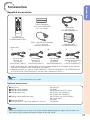
Supplied accessories
Two R-6 batteries
(“AA” size, UM/SUM-3,
HP-7 or similar)
RGB cable
(10' (3.0 m))
<QCNWGA086WJPZ>
Remote control
<RRMCGA837WJSA>
DIN-D-sub RS-232C adaptor
(5 57/64 " (15 cm))
<QCNWGA091WJPZ>
Power cord*
(1)
For U.S. and
Canada, etc.
(6' (1.8 m))
<QACCDA007WJPZ>
(2)
For Europe,
except U.K.
(6' (1.8 m))
<QACCVA011WJPZ>
Storage case
<GCASNA024WJSA>
(3)
(4)
For U.K. and
Singapore
(6' (1.8 m))
<QACCBA036WJPZ>
For Australia, New
Zealand and Oceania
(6' (1.8 m))
<QACCLA018WJPZ>
* Which power cords are supplied along with your projector depends on the region. Use the power
cord that corresponds to the wall outlet in your country.
• Operation manuals (this manual <TINS-E588WJZZ>, OPERATION MANUAL FOR STEREOSCOPIC
3D PROJECTION <TINS-E643WJZZ> and CD-ROM <UDSKAA127WJZZ>)
Note
• Codes in “< >” are Replacement parts codes.
Optional accessories
■ Lamp unit
■ Ceiling-mount adaptor
■ Ceiling-mount bracket
■ Ceiling-mount unit
■ Ceiling-mount extension tube
■ Remote receiver
■ 3 RCA to mini D-sub 15 pin cable (10 n (3.0 m))
AN-D350LP
AN-60KT
AN-XRCM30 (for U.S.A. only)
AN-TK201 <for AN-60KT>
AN-TK202 <for AN-60KT>
AN-EP101B <for AN-XRCM30>
(for U.S.A. only)
AN-MR2
AN-C3CP2
Note
• Some of the optional accessories may not be available depending on the region. Please check with
your nearest Sharp Authorized Projector Dealer or Service Center.
11
Part Names and Functions
Numbers in Z refer to the main pages in this operation manual where the
topic is explained.
1
10
2
11
3
12
4
5
6
7
17
15
18
8 9
PG-D2870W
3
Front View
1 Exhaust vent 57
2 Zoom ring (except PG-D2870W) 28
For enlarging/reducing the picture.
3 Focus ring 27
For adjusting the focus.
4
5
6
7
8
9
12
19
Top View
10
11
12
13
Lens shutter 26, 30
HEIGHT ADJUST lever 28
Adjustment foot 28
Remote control sensor 15
Temperature warning indicator 58
Lamp indicator 58
Power indicator 58
STANDBY/ON button 26
For turning the power on and putting the
projector into Standby mode.
14
INPUT buttons (P/R) 30
For switching Input mode.
15
AUTO SYNC button 34
For automatically adjusting images when
connected to a computer.
16
Adjustment buttons (P/R/O/Q) 39
For selecting menu items.
17
ENTER button 39
For setting items selected or adjusted on
the menu.
18
MENU button 39
For displaying adjustment and setting
screens.
19
VOL (Volume) buttons (–O/Q+) 30
For adjusting the speaker sound level.
Speaker 50
Intake vent 57
16
13
14
2
3
4
6
5
7
8
Introduction
1
9
10
11
15
12
13 14
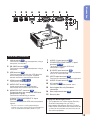
Rear View (Terminals)
1 LAN terminal 25
Terminal for controlling the projector using a
computer via network.
2 RS-232C terminal 24
Terminal for controlling the projector using a
computer.
3 USB terminal 35
Terminal connecting with the USB terminal
on the computer for using the supplied
remote control as the computer mouse.
4 HDMI terminal 21, 22, 23
Terminal for HDMI input.
5 AUDIO OUT terminal 23
Audio output terminal of equipment
connected to the audio input terminal.
6 MONITOR OUT* terminal 23
(Output terminal for computer RGB and
component signals)
Terminal for connecting a monitor.
COMPUTER/COMPONENT 2* input
terminal 21, 22
Terminal for computer RGB and component
signals.
* You must switch the setting depending on
whether you are using the terminal for MONITOR
OUT or COMPUTER/COMPONENT 2 input.
7 AUDIO 1 input terminal 23
8 COMPUTER/COMPONENT 1 input
terminal 21, 22
Terminal for computer RGB and
component signals.
9 S-VIDEO input terminal 22
Terminal for connecting video equipment
with an S-video terminal.
10 VIDEO input terminal 22
Terminal for connecting video equipment.
11 AUDIO 2 input terminal 23
12 AC socket 25
Connect the supplied power cord.
13 Kensington Security Standard
connector
14 Rear adjustment foot 28
15 Security bar
Using the Kensington Lock
• This projector has a Kensington Security
Standard connector for use with a
Kensington MicroSaver Security System.
Refer to the information that came with the
system for instructions on how to use it to
secure the projector.
13
Part Names and Functions (Continued)
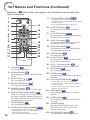
Numbers in Z refer to the main pages in this operation manual where the
topic is explained.
1
9 L-CLICK/EFFECT button 35, 33
• For the Left click when with the USB
connection (using a USB cable or the optional
remote receiver).
• For changing the pointer or spot area.
2
14
3
4
15
5
6
7
8
16
10
KEYSTONE button 29
For entering the Keystone Correction
mode.
11
AUTO SYNC button 34, 50
For automatically adjusting images when
connected to a computer.
12
FUNCTION button 53
For operating and executing a function
assigned to “FUNCTION Button”.
13
ECO+QUIET button 33
For lowering the noise of the cooling fan
and extending the lamp life.
14
FREEZE button 34
For freezing images.
15
AV MUTE button 30
For temporarily displaying a black screen
and turning off the sound.
16
VOL +/– (Volume) buttons 30
For adjusting the speaker sound level.
17
SPOT button 33
For displaying the spotlight.
18
ENTER button 39
For setting items selected or adjusted on
the menu.
19
R-CLICK/RETURN button 35, 39
17
9
10
11
12
18
19
20
21
22
13
23
1 ON button 26
For turning the power on.
2 STANDBY button 26
For putting the projector into the Standby
mode.
3 INPUT buttons ( / ) 30
For switching Input mode.
• For the Right click when with the USB
connection (using a USB cable or the optional
remote receiver).
• For returning to the previous menu screen
during menu operations.
4 BREAK TIMER button 33
For displaying the break time.
5 MAGNIFY buttons 34
For enlarging/reducing part of the image.
20
MENU button 39
For displaying adjustment and setting
screens.
21
RESIZE button 31
For switching the picture size (NORMAL,
16:9, etc.).
22
3D MODE button
See the OPERATION MANUAL FOR
STEREOSCOPIC 3D PROJECTION
provided separately.
23
PICTURE MODE button 34
For selecting the appropriate picture.
6 PAGE UP/PAGE DOWN buttons 35
Same as the [Page Up] and [Page Down]
keys on a computer keyboard, when with
the USB connection (using a USB cable or
the optional remote receiver).
7 POINTER button 33
For displaying the pointer.
8 MOUSE/Adjustment buttons (P/R/O/Q) 35, 39
14
• For moving the computer cursor when with the
USB connection (using a USB cable or the
optional remote receiver).
• For selecting and adjusting menu items.
1
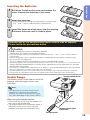
Pull down the tab on the cover and remove the
cover towards the direction of the arrow.
2
Insert the batteries.
3
Insert the lower tab of the cover into the opening,
and lower the cover until it clicks in place.
Introduction
Inserting the Batteries
• Insert the batteries making sure the polarities correctly match
the m and n marks inside the battery compartment.
Incorrect use of the batteries may cause them to leak or explode.
Please follow the precautions below
Caution
• Danger of explosion if battery is incorrectly replaced.
Replace only with alkaline or manganese batteries.
• Insert the batteries making sure the polarities correctly match the m and n marks inside the battery
compartment.
• Batteries of different types have different properties, therefore do not mix batteries of different types.
• Do not mix new and old batteries.
This may shorten the life of new batteries or may cause old batteries to leak.
• Remove the batteries from the remote control once they have run out, as leaving them in can cause them to leak.
Battery fluid from leaked batteries is harmful to skin, therefore ensure you wipe them first and then
remove them using a cloth.
• The batteries included with this projector may run down in a short period, depending on how they are kept.
Be sure to replace them as soon as possible with new batteries.
• Remove the batteries from the remote control if you will not be using the remote control for a long time.
• Comply with the rules (ordinance) of each local government when disposing of worn-out batteries.
Remote control sensor
Usable Range
The remote control can be used to control the
projector within the ranges shown in the
illustration.
Note
• The signal from the remote control can be
reflected off a screen for easy operation.
However, the effective distance of the signal
may differ depending on the screen material.
30°
When using the remote control
• Ensure that you do not drop it or expose it to
moisture or high temperature.
• The remote control may malfunction under a
fluorescent lamp. In this case, move the
projector away from the fluorescent lamp.
30°
33 n (10 m)
Remote control signal
transmitters
Remote control
15
Easy Start
This section shows the basic operation (projector connecting with the computer). For details,
see the page described below for each step.
Setup and Projection
In this section, connection of the projector and the computer is explained using one example.
3
8
STANDBY/ON
button
8 STANDBY button
3 ON button
6 O/Q buttons
6 INPUT buttons
6 INPUT buttons
4 Zoom ring
(except PG-2870W)
5
6
Adjustment
buttons
(P/R/O/Q)
4 Focus ring
5 KEYSTONE button
4
HEIGHT
ADJUST lever
1. Place the projector facing a wall or a screen
BP. 18
2. Connect the projector to the computer and plug the power
cord into the AC socket of the projector
When connecting equipment other than a computer, see pages
22 and 23.
BPP. 21, 25
3. Open the lens shutter fully and then turn the projector on
On the projector
On the remote control
BP. 26
16
4. Adjust the projected image with the Setup Guide
1
After the projector turns on, the Setup Guide appears.
(When “Setup Guide” is set to “On”. See page 49.)
2
3
Follow the steps in the Setup Guide and adjust the focus, height (angle) and picture size.
After adjusting the focus, height (angle) and picture size, press ENTER to finish the
Setup Guide.
Easy Start
BP. 27
5. Correct trapezoidal distortion
Correcting trapezoidal distortion using Keystone Correction.
Shrinks
upper side.
On the remote control
Shrinks
lower side.
BP. 29
6. Select the Input mode
Press INPUT P/R to display the INPUT list. Use INPUT P/R to select the Input mode,
and use O/Q to select the audio input terminal.
On the
projector
INPUT list
INPUT
Audio
On the
projector
1 COMPUTER1
2 MONITOR OUT
On the remote
control
H
On the remote
control
HDMI
BP. 30
7. Turn the computer on
8. Turn the power off
Press STANDBY/ON on the projector or STANDBY on the remote control, and then press
the button again while the confirmation message is displayed to put the projector into
Standby mode.
On-screen display
On the
projector
On the remote
control
BP. 26
17
Setting Up the Projector
Video Setup
If using this projector outside the U.S.A., please change setting to “0 IRE” in Video Setup. (See
page 46.)
Setting Up the Projector
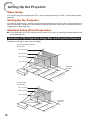
For optimal image quality, position the projector perpendicular to the screen with the projector's
feet flat and level. Doing so will eliminate the need for Keystone correction and provide the best
image quality. (See page 29.)
Standard Setup (Front Projection)
■ Place the projector at the required distance from the screen according to the desired picture
size. (See page 19.)
Indication of the Projection Image Size and Projection Distance
Example: 16:10 Signal Input (Normal Mode)
[PG-D3550W/PG-D3050W]
Picutre Size
300" (762 cm)
200" (508 cm)
100" (254 cm)
40" (102 cm)
254
"
(646 ×159"
cm
× 40
170
4 cm
"×
)
(431 106"
c
m×
85"×
269
53"
cm)
(215
cm ×
135
cm)
34"×
2
(86 cm 1"
× 54 c
m)
3'
(1 10
.2 "–
m 4
– 1 '8
.4 "
m
)
9'
(2 8"–
.9 1
m 1
– 3 '8
.6 "
m
)
19
(5 '4
.9 "–
m 2
– 7 3'
.1 5"
m
)
28
(8 '1
.8 1
m "–
– 1 35
0. '1
7 "
m
)
Projection
Distance
[PG-D2870W]
Picutre Size
150" (381 cm)
100" (254 cm)
60" (152 cm)
127
"×
(323 79"
cm
85"×
× 20
5
2 cm
(215 3"
)
cm ×
135
51"×
c
32"
m)
(129 c
m×8
1 cm)
18
7'
(2 7"
.3
m
)
5'
(1 1"
.5
m
)
3'
(0 1"
.9
m
)
Projection
Distance
Screen Size and Projection Distance
Screen
Note
H
• Allow a margin of error in the values in the
diagrams below.
Lens center
L
16:10 Signal Input (Normal Mode)
Picture (Screen) size
Width
646 cm (254")
538 cm (212")
431 cm (170")
323 cm (127")
258 cm (102")
215 cm (85")
172 cm (68")
129 cm (51")
86 cm (34")
PG-D3550W/PG-D3050W
Height
Minimum [L1] Maximum [L2]
404 cm (159") 8.8 m (28' 11") 10.7 m (35' 1")
337 cm (132") 7.4 m (24' 2")
8.9 m (29' 3")
269 cm (106") 5.9 m (19' 4")
7.1 m (23' 5")
202 cm (79")
4.4 m (14' 6")
5.4 m (17' 7")
162 cm (64")
3.5 m (11' 7")
4.3 m (14' 1")
135 cm (53")
2.9 m (9' 8")
3.6 m (11' 8")
108 cm (42")
2.4 m (7' 9")
2.9 m (9' 4")
81 cm (32")
1.8 m (5' 9")
2.1 m (7' 0")
54 cm (21")
1.2 m (3' 10")
1.4 m (4' 8")
Distance from the lens center
to the bottom of the image [H]
PG-D2870W
PG-D3550W/
PG-D3050W
PG-D2870W
—
—
—
2.3 m (7' 7")
1.9 m (6' 1")
1.5 m (5' 1")
1.2 m (4' 1")
0.9 m (3' 1")
—
8 cm
6 cm
5 cm
4 cm
3 cm
3 cm
2 cm
2 cm
1 cm
—
—
—
8 cm (3 1/32")
6 cm (2 27/64")
5 cm (2 1/32")
4 cm (1 5/8")
3 cm (1 7/32")
—
(3")
(2 1/2")
(2")
(1 1/2")
(1 13/64")
(1")
(51/64")
(19/32")
(13/32")
Setup
Diagonal [F]
300" (762 cm)
250" (635 cm)
200" (508 cm)
150" (381 cm)
120" (305 cm)
100" (254 cm)
80" (203 cm)
60" (152 cm)
40" (102 cm)
Projection distance [L]
4:3 Signal Input (Normal Mode)
Picture (Screen) size
Diagonal [F]
300" (762 cm)
250" (635 cm)
200" (508 cm)
150" (381 cm)
120" (305 cm)
100" (254 cm)
80" (203 cm)
70" (178 cm)
60" (152 cm)
40" (102 cm)
Width
610 cm (240")
508 cm (200")
406 cm (160")
305 cm (120")
244 cm (96")
203 cm (80")
163 cm (64")
142 cm (56")
122 cm (48")
81 cm (32")
Projection distance [L]
PG-D3550W/PG-D3050W
Height
Minimum [L1] Maximum [L2]
457 cm (180") 10.0 m (32' 9") 12.1 m (39' 9")
381 cm (150") 8.3 m (27' 4") 10.1 m (33' 2")
305 cm (120") 6.7 m (21' 10") 8.1 m (26' 6")
229 cm (90")
5.0 m (16' 5")
6.1 m (19' 11")
183 cm (72")
4.0 m (13' 1")
4.8 m (15' 11")
152 cm (60")
3.3 m (10' 11") 4.0 m (13' 3")
122 cm (48")
2.7 m (8' 9")
3.2 m (10' 7")
107 cm (42")
2.3 m (7' 8")
2.8 m (9' 3")
91 cm (36")
2.0 m (6' 7")
2.4 m (7' 11")
61 cm (24")
1.3 m (4' 4")
1.6 m (5' 4")
Distance from the lens center
to the bottom of the image [H]
PG-D2870W
PG-D3550W/
PG-D3050W
—
—
—
—
2.1 m (6' 11")
1.8 m (5' 9")
1.4 m (4' 7")
1.2 m (4' 0")
1.1 m (3' 5")
—
9 cm
7 cm
6 cm
4 cm
3 cm
3 cm
2 cm
2 cm
2 cm
1 cm
PG-D2870W
(3 13/32")
(2 53/64")
(2 17/64")
(1 45/64")
(1 23/64")
(1 9/64")
(29/32")
(51/64")
(11/16")
(29/64")
—
—
—
—
7 cm (2 3/4")
6 cm (2 19/64")
5 cm (1 53/64")
4 cm (1 39/64")
3 cm (1 3/8")
—
When using the projector with screen sizes not listed in the above charts, calculate the values according to the formulas.
L1: Minimum projection distance (m/ft)
PG-D3550W/ L2: Maximum projection distance (m/ft)
PG-D3050W H: Distance from the lens center to the bottom of the
PG-D2870W
image (cm/in)
L: Projection distance (m/ft)
H: Distance from the lens center to the bottom of the
image (cm/in)
16:10 Signal
4:3 Signal
[m/cm]
[Feet/inches]
[m/cm]
[Feet/inches]
0.02942F 0.02942F / 0.3048 0.03331F 0.03331F / 0.3048
0.03568F 0.03568F / 0.3048 0.04039F 0.04039F / 0.3048
0.02545F
0.02545F / 2.54
0.02881F
0.02881F / 2.54
0.01549F 0.01549F / 0.3048 0.01754F 0.01754F / 0.3048
0.05142F
0.05142F / 2.54
0.05821F
0.05821F / 2.54
F : Picture diagonal size : 40''-300'' (PG-D3550W/PG-D3050W)
60''-150'' (16:10)/60''-120'' (4:3) (PG-D2870W)
19
Setting Up the Projector (Continued)
Projection (PRJ) Mode
The projector can use any of the 4 projection modes shown in the diagram below. Select the
mode most appropriate for the projection setting in use. (You can set the PRJ mode in “SCRADJ” menu. See page 49.)
■ Table mounted, front projection
[Menu item ➞ “Front”]
■ Ceiling mounted, front projection
[Menu item ➞ “Ceiling + Front”]
■ Table mounted, rear projection
(with a translucent screen)
[Menu item ➞ “Rear”]
■ Ceiling mounted, rear projection
(with a translucent screen)
[Menu item ➞ “Ceiling + Rear”]
a Ceiling-Mount Setup
It is recommended that you use the optional Sharp ceiling-mount adaptor and unit for this
installation. Before mounting the projector, contact your nearest Sharp Authorized Projector
Dealer or Service Center to obtain the recommended ceiling-mount adaptor and unit (sold
separately).
20
Connecting the Projector to Other Equipment
Before connecting, ensure that the power cord of the projector is unplugged from the AC outlet
and turn off the equipment to be connected. After making all connections, turn on the projector
and then the other pieces of equipment. When connecting a computer, ensure that it is the last
equipment to be turned on after all the connections are made.
IMPORTANT:
Ensure that the appropriate input mode has been selected on the projector before
you turn on the connected equipment.
• For more details of connection and cables, refer to the operation manual of the connecting equipment.
• You may need other cables or connectors not listed below.
Terminals on the Projector
Terminal on
connected equipment
Computer
Cable
HDMI output
terminal
Terminal on the
projector
RGB cable (supplied)
COMPUTER/
COMPONENT 1, 2
HDMI cable (commercially available)
HDMI
RGB
output
terminal
Connections
Equipment
Note
• Depending on specifications of equipment or the DVIÙHDMI digital cable, the signal transmission
may not work property. (The HDMI specification does not support all connections to equipment that
has digital output terminal using a DVIÙHDMI digital cable.)
• You can also use the COMPUTER/COMPONENT 2 terminal as the MONITOR OUT terminal. To use
this terminal as an input terminal, set “COMPUTER2 Select” to “Input” before connecting the external
equipment. (See page 52.)
• See page 64 “Compatibility Chart” for a list of computer signals compatible with the projector. Use
with computer signals other than those listed may cause some of the functions to not work.
• A Macintosh adaptor may be required for use with some Macintosh computers. Contact your nearest
Macintosh Dealer.
• Depending on the computer you are using, an image may not be projected unless the
computer's external output port is switched on (e.g. Press “Fn” and “F5” keys
simultaneously when using a SHARP notebook computer). Refer to the specific instructions in
your computer's operation manual to enable your computer's external output port.
21
Connecting the Projector to Other Equipment (Continued)
Equipment
Video equipment
Terminal on
connected equipment
HDMI output
terminal
Component
video output
terminal
S-video
output
terminal
HDMI cable (commercially available)
Terminal on the
projector
HDMI
3 RCA to mini D-sub 15 pin cable
(optional, AN-C3CP2)
COMPUTER/
COMPONENT 1, 2
S-video cable (commercially available)
S-VIDEO
Cable
Video output Video cable (commercially available)
terminal
Camera/Video game
VIDEO
Cables for a camera or a video game/3 RCA to COMPUTER/
mini D-sub 15 pin cable (optional, AN-C3CP2) COMPONENT 1, 2
Component
video
output
terminal
RCA adaptor plug
(commercially available)
Cables for a camera or a video game
S-VIDEO
Cables for a camera or a video game
VIDEO
S-video
output
terminal
Video
output
terminal
Note
• Depending on specifications of equipment or the DVIÙHDMI digital cable, the signal transmission
may not work property. (The HDMI specification does not support all connections to equipment that
has digital output terminal using a DVIÙHDMI digital cable.)
• HDMI (High-Definition Multimedia Interface) is a digital AV interface that can deliver a high-definition
video signal, multi-channel audio signal, and bi-directional control signal all in just one cable.
• Because it is compatible with the HDCP (High-bandwidth Digital Content Protection) system, the
digital video signal does not degrade when transmitted, and a high-quality image with a simple
connection can be enjoyed.
• The HDMI terminal does not support the CEC signal.
• You can also use the COMPUTER/COMPONENT 2 terminal as the MONITOR OUT terminal. To use
this terminal as an input terminal, set “COMPUTER2 Select” to “Input” before connecting the external
equipment. (See page 52.)
• When you connect video equipment with a 21-pin RGB output (Euro-scart) to the projector, use a
commercially available cable that fits in the projector terminal you want to connect.
• The projector does not support RGBC signals via the Euro-scart.
22
Equipment
Audio equipment
Terminal on
connected equipment
Cable
ø3.5 mm
audio output
terminal
ø3.5 mm stereo or mono audio cable
(commercially available or available
as Sharp service part QCNWGA038WJPZ)
RCA audio
output
terminal
RCA audio cable (commercially available)
Terminal on the
projector
AUDIO 1
AUDIO 2
Cables for a camera or a video game
Audio
output
terminal
HDMI output
terminal
RGB
input
terminal
Amplifier
ø3.5 mm
audio input
terminal
RCA audio
input
terminal
HDMI
RGB cable (supplied or commercially
available)
MONITOR OUT
Connections
Monitor
HDMI cable (commercially available)
ø3.5 mm stereo or mono audio cable
(commercially available or available
as Sharp service part QCNWGA038WJPZ)
AUDIO OUT
ø3.5 mm stereo minijack to RCA audio cable
(commercially available)
Note
• You can also use the MONITOR OUT terminal as the COMPUTER/COMPONENT 2 terminal. To use
this terminal as an output terminal, set “COMPUTER2 Select” to “Monitor Output” before connecting
the external equipment. (See page 52.)
• When using the ø3.5 mm mono audio cable, the volume level will be half of when using the ø3.5 mm
stereo audio cable.
• You can select AUDIO 1, AUDIO 2 or HDMI in the INPUT list. (See page 30.)
• RGB signals and Component signals can be output to the monitor. HDMI input video signal would
not be output.
This projector is able to process the following signals when connected to HDMI
equipment:
• Video signal: For details, see “Digital Support” in the list of “Compatibility Chart” on page 64.
• Audio signal: Linear PCM audio
• Sampling frequency: 48kHz/44.1kHz/32kHz
23
Controlling the Projector by a Computer
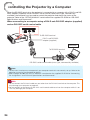
When the RS-232C terminal on the projector is connected to a computer with a DIN-D-sub RS232C adaptor (supplied) and an RS-232C serial control cable (cross type, commercially
available), the computer can be used to control the projector and check the status of the
projector. Refer to the “SETUP MANUAL” contained on the supplied CD-ROM for “RS-232C
Specifications and Commands”.
When connecting to a computer using a DIN-D-sub RS-232C adaptor (supplied)
and an RS-232C serial control cable
To RS-232C terminal
DIN-D-sub RS-232C
adaptor (supplied)
Computer
To RS-232C terminal
RS-232C serial control cable (cross type, commercially available)
Note
• The RS-232C function may not operate if your computer terminal is not correctly set up. Refer to the
operation manual of the computer for details.
• Refer to pages 2 to 9 of the “SETUP MANUAL” contained on the supplied CD-ROM for “Connecting
Pin Assignments” and “RS-232C Specifications and Commands”.
Info
• Do not connect the RS-232C cable to a port other than the RS-232C terminal on the computer. This
may damage your computer or projector.
• Do not connect or disconnect an RS-232C serial control cable to or from the computer while it is on.
This may damage your computer.
24
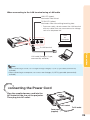
When connecting to the LAN terminal using a LAN cable
LINK LED (green)
Illuminates when linked.
TX/RX LED (yellow)
Illuminates when transmitting/receiving data.
* To ensure safety, do not connect the LAN terminal
with any cables that may cause excessive voltage
such as a telephone line.
Hub
or
Computer
To LAN terminal
Connections
LAN cable (Category 5 type,
commercially available)
Note
• When connecting to a hub, use a straight-through Category 5 (CAT.5) type cable (commercially
available).
• When connecting to a computer, use a cross-over Category 5 (CAT.5) type cable (commercially
available).
Connecting the Power Cord
Plug the supplied power cord into the
AC socket on the rear of the projector.
Then plug into AC outlet.
AC socket
To AC outlet
Power cord
(supplied)
25
Turning the Projector On/Off
Info
Turning the Projector On
Note that the connections to external
equipment and power outlet should be
done before performing the operations
written below. (See pages 21 to 25.)
Open the lens shutter fully and press
STANDBY/ON on the projector or ON
on the remote control.
• When “Auto Restart” is set to “On”:
If the power cord is unplugged from the outlet
or the breaker switch is turned off when the
projector is on, then the projector
automatically turns on when the power cord
is plugged into the AC outlet or the breaker
switch is turned on. (See page 50.)
• English is the factory default language. If you
want to change the on-screen display to
another language, change the language
according to the procedure on page 49.
• The power indicator illuminates green.
• After the lamp indicator illuminates, the projector
is ready to start operation.
Power indicator
Lamp indicator
Note
STANDBY/ON button
• About the Lamp Indicator
The lamp indicator illuminates to indicate the
status of the lamp.
Green: The lamp is on.
Blinking in green: The lamp is warming up.
Red: The lamp is shut down
abnormally or the lamp should be
replaced.
• When switching on the projector, a slight
flickering of the image may be experienced
within the first minute after the lamp has been
illuminated. This is normal operation as the
lamp's control circuitry is stabilising the lamp
output characteristics. It should not be
regarded as faulty operation.
• If the projector is put into Standby mode and
immediately turned on again, the lamp may
take some time to start projection.
• When System Lock is set, the keycode input
box appears. To cancel the keycode setting,
input the keycode that you have already set.
See page 51 for details.
STANDBY
button
ON button
On-screen display (confirmation message)
Turning the Power Off (Putting
the Projector into Standby Mode)
Press STANDBY/ON on the projector
or STANDBY on the remote control,
then press that button again while the
confirmation message is displayed, to
put the projector into Standby mode.
• The projector cannot be turned on while cooling.
26
Info
• Direct Power Off function:
You can unplug the power cord from the AC
outlet even if the cooling fan is still running.
Image Projection
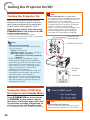
Setup Guide screen
(e.g. PG-D3550W/PG-D3050W)
About the Setup Guide
After turning on the projector, the Setup
Guide screen appears to assist you with
projector setup.
Guidance items
1 FOCUS
2 HEIGHT ADJUST
3 ZOOM*
Press ENTER to exit the Setup Guide
screen.
Note
• The Setup Guide screen automatically
highlights the items in the following order:
1 FOCUS
4 ENTER
2 HEIGHT ADJUST
3 ZOOM*
However, you can adjust the focus, height
(angle) or zoom* regardless of the highlighted
item.
• If you do not want to display the Setup Guide
for the next time, set “Menu” - “SCR - ADJ” “Setup Guide” to “Off”. (See page 49.)
ENTER button
* The PG-D2870W model is not equipped with
the ZOOM function.
Basic
Operation
Adjusting the Projected Image
1 Adjusting the Focus
You can adjust the focus with the focus
ring on the projector.
Rotate the focus ring to adjust the
focus while watching the projected
image.
• Using the knob on the focus ring will make the
adjustments easier.
Focus ring
PG-D2870W
27
Image Projection (Continued)
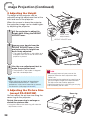
2 Adjusting the Height
The height of the projector can be
adjusted using the adjustment feet at the
front and rear of the projector.
When the screen is above the projector,
the projection image can be made higher
by adjusting the projector.
1
Lift the projector to adjust its
height while lifting the HEIGHT
ADJUST lever.
Make small
adjustments.
HEIGHT ADJUST lever
2
Remove your hands from the
HEIGHT ADJUST lever of the
projector after its height has
been finely adjusted.
• The angle of projection is adjustable up to
9 degrees from the surface on which the
projector is placed.
Rear adjustment foot
3
Use the rear adjustment foot to
make the projector level.
• The projector is adjustable ±2 degrees
from the standard position.
Note
• When adjusting the height of the projector,
trapezoidal distortion occurs. Follow the
procedures in Keystone Correction to correct
the distortion. (See pages 29 and 47.)
3 Adjusting the Picture Size
(except PG-D2870W)
You can adjust the picture size using the
zoom ring on the projector.
Rotate the zoom ring to enlarge or
shrink the picture size.
• Using the knob on the zoom ring will make the
adjustments easier.
28
Info
• Do not apply too much pressure on the
projector when the front adjustment foot
comes out.
• When lowering the projector, be careful not to
get your fingers caught in the area between
the adjustment foot and the projector.
• Hold the projector firmly while lifting or carrying.
• Do not hold by the lens area.
Zoom ring
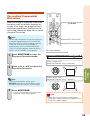
Correcting Trapezoidal
Distortion
Adjustment buttons
(P/R/O/Q)
When the image is projected either from
the top or from the bottom towards the
screen at an angle, the image becomes
distorted trapezoidally. The function for
correcting trapezoidal distortion is called
Keystone Correction.
Note
• The Keystone Correction can be adjusted up to
an angle of approximately ±40 (PG-D3550W/
D3050W)/±XX (PG-D2870W) degrees and the
screen can also be set up to an angle of
approximately ±40 (PG-D3550W/D3050W)/
±XX (PG-D2870W) degrees (When the Resize
mode is set to “NORMAL” (see page 31)).
1
Press KEYSTONE to enter the
Keystone Correction mode.
RETURN button
KEYSTONE button
On-screen display
(Keystone Correction mode)
KEYSTONE
ADJUST
0
END
Shrinks upper side.
(Move the slide bar in the + direction.)
2
Press P/Q or O/R to adjust the
Keystone Correction.
Shrinks lower side.
(Move the slide bar in the - direction.)
Basic
Operation
Note
• To return to the default setting, press
RETURN while the on-screen display of the
Keystone Correction mode is on the screen.
3
Press KEYSTONE.
• The on-screen display of the Keystone
Correction mode will disappear.
Info
• While adjusting the image using Keystone
Correction, straight lines and the edges of the
image may appear jagged.
29
Image Projection (Continued)
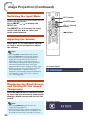
Switching the Input Mode
INPUT buttons
Select the appropriate Input mode for the
connected equipment.
Press INPUT / to display the
INPUT list.
Use INPUT / to select the Input
mode, and use O/Q to select the
audio input terminal.
AV MUTE button
VOL +/– (Volume)
buttons
O/Q buttons
Adjusting the Volume
Press VOL +/– on the remote control
or –O/Q+ on the projector to adjust
the volume.
Note
• Pressing VOL–/–O will lower the volume.
• Pressing VOL+/Q+ will raise the volume.
• When the projector is connected to external
equipment, the volume level of the external
equipment changes in accordance with the
volume level of the projector. Set the projector's
volume to the lowest level when turning the
projector on/off or when changing the input signal.
• When you do not want to output the sound
from the projector's speaker while the
projector is connected to external equipment,
set “Speaker” in the “PRJ-ADJ1” menu to
“Off”. (See page 50.)
On-screen display
Displaying the Black Screen
and Turning Off the Sound
Temporarily
Press AV MUTE on the remote control
or close the lens shutter to temporarily
display a black screen and turn off the
sound.
On-screen display
Note
• Pressing AV MUTE again will turn the
projected image back on.
• When you close the lens shutter, the projector will
be set to AV Mute mode and then the projector will
be turned off automatically after about 30 minutes.
30
Resize Mode
This function allows you to modify or customize the Resize mode to enhance the input
image. Depending on the input signal, you can choose a desired image.
Press RESIZE.
RESIZE
button
• See page 47 for setting on menu screen.
COMPUTER
NORMAL
FULL
SVGA (800 × 600)
4:3 aspect ratio
XGA (1024 × 768)
SXGA (1152 × 864)
16:9
1024 × 768
1068 × 800
1152 × 864
SXGA+ (1400 × 1050)
1280 u 800
1000 × 800
1280 × 720
1280 × 720
—
1360 × 768
1280 × 722
1360 × 768
1366 × 768
1280 × 720
1366 × 768
1280 × 768
1280 × 768
1280 × 800
1280 × 800
Input signal
Image type
1280 × 720
1400 × 1050
SXGA (1280 × 1024)
Other aspect ratios
Computer
NATIVE
800 × 600
1280 × 1024
—
—
—
1280 × 720
Output screen image
NORMAL
FULL
NATIVE
16:9
Resolution
XGA and below
4:3 aspect ratio
*1
SXGA
(1280 × 1024)
5:4 aspect ratio
Basic
Operation
Resolution
higher than
XGA
*1
*3
—*2
1280 × 720
16:9 aspect ratio
*1
—*2
1360 × 768
1366 × 768
16:9 aspect ratio
*1
*1
1280 × 768
15:9 aspect ratio
—*2
*1
—*2
1280 × 800
16:10 aspect ratio
: Cutout area on which images cannot be projected
: Area where the signals are off screen
*1 The Image Shift function can be used for these images.
*2 Same as NORMAL mode.
*3 In case SXGA+ input.
31
Image Projection (Continued)
VIDEO/DTV
Input signal
Video/DTV
Output screen image
Image type
NORMAL
AREA ZOOM
V-STRETCH
16:9
*1
4:3 aspect ratio
480I, 480P,
576I, 576P,
NTSC, PAL,
SECAM
*1
Squeeze
*1
Letter box
*1
720P, 1035I,
1080I, 1080P
16:9 aspect ratio
*1
16:9 aspect ratio
*1
—*2
16:9 aspect ratio
540P
*1
16:9 aspect ratio
(4:3 aspect ratio in 16:9)
: Cutout area on which images cannot be projected
: Area on which the image is not included in the original signals
*1 The Image Shift function can be used for these images.
*2 Same as NORMAL mode.
About Copyrights
• When using the Resize function to select an image size with a different aspect ratio to a TV
program or video image, the image will look different from its original appearance. Keep this
in mind while choosing an image size.
• The use of the Resize or Keystone Correction function to compress or stretch the image for
commercial purposes/public displays in a café, hotel, etc. may be an infringement of
copyright protected by law for copyright holders. Please use caution.
32
Operating with the Remote Control
BREAK TIMER button
FREEZE button
Displaying the Pointer
POINTER button
Press POINTER and press P/R/
O/Q on the remote control to
move the pointer.
SPOT button
• Press EFFECT to change the pointer icon
(5 types).
MAGNIFY buttons
1
Star
Finger1
Finger2
Heart
Underline
Adjustment buttons
(P/R/O/Q)
EFFECT button
PICTURE MODE button
ECO+QUIET button
AUTO SYNC button
2
Press POINTER again.
• The pointer will disappear.
Using the Spot Function
Displaying and Setting the
Break Timer
1
1
Press BREAK TIMER.
Press SPOT and press P/R/O/Q
on the remote control to move
the spot area.
• Press EFFECT to change the spot area
size (3 types).
• The timer starts to count down from 5
minutes.
1/9
1/25
1/8
On-screen display
2
Press P/R/O/Q to adjust the
length of the break time.
• Increases with P or Q
2
Press SPOT again.
• The spot area will disappear.
5 minutes ➞ 6 minutes ➞ 60 minutes
• Shortens with O or R
Canceling the break timer display function
Press BREAK TIMER.
Note
• The Break Timer is not available while the
projector is operating the following functions.
- Auto Sync
- Freeze
- AV Mute
- Input Search
Switching the Eco+Quiet
Mode
Useful
Features
4 minutes ➞ 3 minutes ➞1 minute
• The break time can be set in units of one
minute (up to 60 minutes).
Press ECO+QUIET to switch the
Eco+Quiet mode between on and off.
• When the Eco+Quiet Mode is set to “ON”, the
sound of the cooling fan will turn down, the power
consumption will decrease, and the lamp life will
extend.
Note
• Refer to “Eco+Quiet” on page 44 for details.
33
Operating with the Remote Control (Continued)
Auto Sync
(Auto Sync Adjustment)
Displaying an Enlarged
Portion of an Image
Auto Sync function works when detecting
input signal after the projector turns on.
Graphs, tables and other portions of
projected images can be enlarged. This
is helpful when providing more detailed
explanations.
Press AUTO SYNC to manually adjust
with Auto Sync function.
1
Note
Press
MAGNIFY on the
remote control.
• Enlarges the image.
• Pressing
or
MAGNIFY enlarges
or reduces the projected image.
• When the optimum image cannot be achieved
with Auto Sync adjustment, use manual
adjustments. (See page 45.)
Note
.
Press
×1 ×2
Freezing a Moving Image
×3
Press
1
Press FREEZE.
2
Press FREEZE again to return to
the moving image from the
currently connected device.
×4
.
• You can change the location of the
enlarged image using P, R, O and Q.
• The projected image is frozen.
2
Press RETURN on the remote
control to cancel the operation.
• The magnification then returns to u1.
Note
Selecting the Picture Mode
You can select the appropriate Picture
mode for the projected image, such as
movie or video game.
Press PICTURE MODE.
• When pressing PICTURE MODE, the Picture
mode changes in the following order:
STANDARD
PRESENTATION
MOVIE
GAME
sRGB*
Note
• See page 42 for details on the Picture mode.
* “sRGB” is displayed only when RGB signal is input.
34
• The selectable magnifications differ
depending on the input signal.
• In the following cases, the image will
return to the normal size (u1).
- When switching the Input mode.
- When RETURN has been pressed.
- When the input signal is changed.
- When the input signal resolution and
refresh rate (vertical frequency)
change.
- When the Resize mode is changed.
Using the Remote Control as the Wireless Computer Mouse
When connecting the projector and the computer with a USB cable, you can use the
remote control as the computer mouse.
If the computer is placed too far away from the projector to be connected via the USB
cable, the remote receiver (optional, AN-MR2) makes it possible to operate the
projector with the remote control. For details, see the operation manual of the
receiver.
Connecting with a USB cable
Computer
To USB terminal
To USB terminal
Remote receiver
(optional, AN-MR2)
or
USB cable
(commercially available or available as
Sharp service part QCNWGA014WJPZ)
The mouse pointer can be
operated in the following way
after it is connected.
■ When moving the cursor
PAGE UP/
PAGE DOWN buttons
MOUSE/Adjustment
buttons (
//?/_)
Press MOUSE/Adjustment buttons (P/R/O/Q).
■ When left-clicking
Press L-CLICK.
■ When right-clicking
Press R-CLICK.
R-CLICK button
■ When your computer supports only a
one-click mouse (such as Macintosh)
L-CLICK button
■ When using [Page Up] or [Page Down]
Same as the [Page Up] and [Page Down] keys
on a computer keyboard.
Press PAGE UP or PAGE DOWN.
Useful
Features
Press L-CLICK or R-CLICK.
L-CLICK and R-CLICK have common function.
Note
• This function only works with the Microsoft® Windows® OS and Mac OS® that support USB.
• You cannot use this function when displaying the menu screen.
• Confirm that the computer recognizes the USB connection.
35
Menu Items
The following shows the items that can be set in the projector.
“Quick Start Menu”
Main menu
Quick Start Menu
“Picture” menu
Sub menu
Main menu
Picture
Input Search Start
Page 42
Page 40
Sub menu
Standard
Presentation
Movie
Game
sRGB *3
Picture Mode
Page 42
Resolution
Page 40
Contrast
-30
+30
Bright
-30
+30
Color
-30
+30 *4
Tint
-30
+30 *4
Sharp
-30
+30 *4
+80 *1
+XX *2
Red
-30
+30
Page 40
Blue
-30
+30
Resize
Page 40
Normal
Full
Native
Area Zoom
V-Stretch
16:9
Keystone
-80
-XX
Page 43
Eco + Quiet [On/Off]
Page 40
Language
Page 40
English
Deutsch
Español
Nederlands
Français
Italiano
Svenska
Português
polski
Magyar
Türkçe
Information
Page 40
Go To Complete Menu
Page 40
CLR Temp
-1
1
0
2
Page 43
BrilliantColor™
Page 43
C.M.S. Setting [On/Off]
Page 43
C.M.S.
Page 43
Film Mode
*1 Adjustment range for PG-D3550W/D3050W.
*2 Adjustment range for PG-D2870W.
Auto
Off
*4
Page 44
DNR
Level 1
Level 2
Level 3
Page 44
Eco+Quiet [On/Off]
Page 44
Reset
C.M.S.-Hue
R
-30
+30
Page 43
Y
-30
+30
C.M.S.-Saturation
G
-30
+30
Page 43
C
-30
+30
B
-30
+30
M
-30
+30
C.M.S.-Value
Page 43
Reset
Reset
Return
*3 Item when inputting RGB signal through
COMPUTER 1/2 or HDMI.
*4 Items when inputting component signal through
COMPUTER 1/2 or HDMI, or when selecting S-VIDEO
or VIDEO.
36
“Signal adjustment (SIG-ADJ)” menu
Main menu
SIG-ADJ
Page 45
Sub menu
Clock
-150
-30
+30 *5
H-Pos
-150
+150 *6
V-Pos
-60
+60 *6
Reset
Page 47
*6
Video Setup
Page 46
+80 *1
+XX *2
Page 47
Page 48
*7
Auto
RGB
YPbPr
OSD Display [On/Off]
*8
Auto
Standard
Enhanced
Closed Caption
Page 45
Page 46
+96
Overscan [On/Off]
Page 45
Video System
-96
Normal
Full
Native
Area Zoom
V-Stretch
16:9
Keystone
-80
-XX
Page 45
EDID Selection
Page 47
Page 47
Resolution
Dynamic Range
Sub menu
Resize
Image Shift
Page 45
Signal Type
Main menu
SCR - ADJ
+150 *5
Phase
“Screen adjustment (SCR-ADJ)” menu
*9
*10
Standard
Enhanced
Auto
PAL
SECAM
NTSC4.43
NTSC3.58
PAL-M
PAL-N
PAL-60
0 IRE
7.5 IRE
Signal Info
Page 46
Page 48
Page 48
Background
Page 49
Logo
Blue
None
Setup Guide [On/Off]
Page 49
PRJ Mode
Page 49
Wall Color
Page 49
Language
Page 49
Front
Ceiling + Front
Rear
Ceiling + Rear
Off
Blackboard
Whiteboard
English
Deutsch
Español
Nederlands
Français
Italiano
Svenska
Português
polski
Magyar
Türkçe
Useful
Features
*5 Items when inputting RGB signal through
COMPUTER/COMPONENT 1 or 2.
*6 Items when inputting COMPUTER/COMPONENT 1,
2 or HDMI.
*7 Item when selecting COMPUTER/COMPONENT 1,
2 or HDMI.
*8 Item when selecting HDMI.
*9 Item when selecting COMPUTER/COMPONENT 1
or 2.
*10 Item when selecting S-VIDEO or VIDEO.
Off
CC1
CC2
37
Menu Items (Continued)
“Projector adjustment (PRJ-ADJ1/2)” menu
Main menu
PRJ-ADJ1
Page 50
Sub menu
Auto Sync [On/Off]
Page 54
Auto Power Off [On/Off]
Page 50
Page 55
Page 50
Page 55
Reset Network Setting
Page 50
Page 51
Page 54
TCP/IP
Speaker [On/Off]
Fan Mode
Password [Enable/Disable]
DHCP Client [On/Off]
Auto Restart [On/Off]
Page 50
Main menu
Network
Page 50
RS-232C
“Network” menu
Page 55
9600bps
38400bps
115200bps
Restart Network
Normal
High
IP Address
Page 55
Page 56
System Lock
[Enable/Disable]
MAC Address
Page 51
Page 56
Keylock [On/Off]
Projector
Page 52
Page 56
Link
Page 56
Main menu
PRJ-ADJ2
Page 50
Sub menu
Quick Start Menu [On/Off]
Page 52
COMPUTER2 Select
Page 52
FUNCTION Button
Page 53
STANDBY Mode
Page 53
STANDBY Audio Out [On/Off]
Page 53
DLP® LinkTM [On/Off]
Page 53
DLP® LinkTM Invert
Page 53
All Reset
Page 53
Lamp Timer (Life)
Page 53
38
Input
Monitor Output
Input Search
Audio Mute
Image Shift
Signal Info
Quick Start
Eco
Using the Menu Screen
Select from the Quick Start Menu, which is a collection of the most frequently used
functions, or the Complete Menu, which enables advanced settings and adjustments.
Adjustment buttons (P/R/O/Q)
ENTER button
MENU button
ENTER button
Adjustment buttons
(P/R/O/Q)
RETURN button
• Press RETURN to return
to the previous screen
when the menu is
displayed.
MENU button
Menu Selections (Quick Start Menu)
• This operation can also be performed by using the buttons on the projector.
1
2
Example
• The “Quick Start Menu” screen for the
selected Input mode is displayed.
Press P or R to select the
desired item, then press ENTER.
Press P/R/O/Q to adjust the
item selected, then press
ENTER.
Quick Start Menu
Input Search Start
Resolution
Resize
Keystone
Eco+Quiet
Language
Information
1024×768
Normal
0
Useful
Features
3
Press MENU.
Off
English
Go To Complete Menu…
Info
• To display the advanced settings and
adjustments, select “Go To Complete Menu”.
Press ENTER to display the Complete Menu
screen.
• If you do not want to display the Quick Start
Menu, set “Go To Complete Menu” - “PRJ-ADJ2”
- “Quick Start Menu” to “Off”. (See page 52.)
SEL./ADJ.
ENTER
END
39
Using the Menu Screen (Continued)
Quick Start Menu
The following items can be configured on the Quick Start Menu.
Selectable items
Description
Input Search Start
Automatically searches for and switches to the appropriate Input mode.
Pressing an operation button during input searching cancels the search.
Resolution
Manually change the resolution.
Use this function when the image and screen size do not match with the
resolution selected automatically. (See page 45.)
Resize
Changes the Resize mode.
Use this function to stretch the image vertically or horizontally or when the
edges of the image cannot be seen. (See page 47.)
Keystone
Corrects the keystone distortion of projected images.
Use this function to correct the trapezoidal distortion of images caused when
projecting images at an angle to the screen. (See page 47.)
Eco+Quiet
When set to “On”, this function reduces the cooling fan noise and power
consumption, thereby prolonging the operating life of the lamp. (See page 44.)
Language
Selects the language displayed on the screen. (See page 49.)
Information
Displays the input signal, lamp use time, remaining lamp life, etc.
Go To Complete Menu
Displays the Complete Menu for advanced settings and adjustments.
Note
• The setting of Resize mode will be made independently for each Input mode.
• The setting of Eco+Quiet mode will be made independently for each Input mode and each Picture
mode.
Menu Selections (Complete Menu)
Example: Adjusting “Bright”.
• This operation can also be performed by using the buttons on the projector.
1
2
3
Press MENU.
• The “Quick Start Menu” screen is
displayed.
Press P or R to select “Go To
Complete Menu”.
Press Q or O and select
“Picture” to adjust.
Info
• When “PRJ-ADJ2” - “Quick Start Menu” is
set to “On”, pressing MENU displays the
Quick Start Menu screen.
40
Example: “Picture” screen menu for
COMPUTER (RGB) input
Menu item
Picture
SIG
Picture Mode
Contrast
Bright
Red
Blue
CLR Temp
BrilliantColor TM
C.M.S. Setting
C.M.S.
DNR
Eco+Quiet
Reset
SEL./ADJ.
SCR
PRJ1
PRJ2
Net.
Standard
0
0
0
0
0
1
On
Level 2
Off
ENTER
END
4
Press P or R and select “Bright”
to adjust.
• The selected item is highlighted.
Picture
SIG
SCR
PRJ1
Picture Mode
Contrast
Bright
Red
Blue
CLR Temp
BrilliantColor TM
C.M.S. Setting
C.M.S.
DNR
Eco+Quiet
Reset
PRJ2
Net.
Standard
0
0
0
0
0
1
On
Level 2
Off
SEL./ADJ.
END
Single ADJ
Items to be adjusted
Pict.
To adjust the projected
image while watching it
SIG
PRJ1
SCR-ADJ
Resize
Image Shift
Keystone
PRJ2
Net.
Normal
0
0
Press ENTER.
• The selected item (e.g. “Bright”) is
displayed by itself at the bottom of the
screen.
• When pressing P or R, the following item
(“Red” after “Bright”) will be displayed.
Press ENTER.
The item displayed by itself
Picture
Note
Bright
SEL./ADJ.
0
Rtn. Menu
END
• Press ENTER again to return to the
previous screen.
5
Press O or Q to adjust the item
selected.
• The adjustment is stored.
Press MENU.
• The menu screen will disappear.
SIG
SEL./ADJ.
SCR
PRJ1
PRJ2
Net.
Standard
0
15
0
0
0
1
Useful
Features
6
Picture
Picture Mode
Contrast
Bright
Red
Blue
CLR Temp
BrilliantColor TM
C.M.S. Setting
C.M.S.
DNR
Eco+Quiet
Reset
On
Level 2
Off
Single ADJ
END
Note
• The MENU button is not available while the projector is operating:
- Auto Sync/Break Timer/Freeze/AV Mute/Input Search
41
Picture Adjustment (“Picture” Menu)
Menu operation n Page 40
Q PAGE1
Q PAGE2
Picture
1
2
SIG
Picture Mode
Contrast
Bright
Color
Tint
Sharp
Red
Blue
SEL./ADJ.
SCR
PRJ1
PRJ2
Net.
Picture
Standard
0
0
0
0
0
0
0
ENTER
SIG
SCR
PRJ1
Picture Mode
3
2
4
5
6
7
END
PRJ2
Net.
Standard
0
1
CLR Temp
BrilliantColor TM
C.M.S. Setting
C.M.S.
Film Mode
DNR
Eco+Quiet
Reset
SEL./ADJ.
On
Auto
Level 2
Off
ENTER
END
1 Selecting the Picture Mode
Selectable
items
Description
The default settings of each item when selecting Picture Mode
CLR Temp
BrilliantColorTM
0
1
Off
Presentation Brightens portions of image for
more enhanced presentations.
0
2
Off
Movie
Gives natural tint to the
projected image.
–1
0
On
Game
Gives sharpness to the
projected image.
0
1
Off
*sRGB
For high fidelity reproduction of
images from a computer.
–
–
Off
Standard
For standard image
Eco+Quiet
• “sRGB” is displayed only when RGB signal is input.
• You can set or adjust each item in the “Picture” menu to your preference. Any changes you make are
retained in memory.
Note
• You can also press PICTURE MODE on the remote control to select the Picture mode. (See page 34.)
• *sRGB is an international standard of color reproduction regulated by the IEC (International
Electrotechnical Commission). As the fixed color area has been decided by the IEC, the images are
displayed in a natural tint based on an original image, when “sRGB” is selected.
You cannot set the items, “Red”, “Blue”, “CLR Temp”, “BrilliantColorTM”, when “sRGB” is selected.
Info
• When “sRGB” is selected, the projected image may become dark, but this does not indicate a
malfunction.
42
Menu operation n Page 40
2 Adjusting the Image
Adjustment
items
Contrast
Bright
Color*1
Tint*1
Sharp*1
Red*2
Blue*2
BrilliantColor™*2 *3
O button
Q button
For less
contrast.
For less
brightness.
For less color
intensity.
For making skin
tones purplish.
For less
sharpness.
For weaker red.
For more
contrast.
For more
brightness.
For more color
intensity.
For making skin
tones greenish.
For more
sharpness.
For stronger
red.
For stronger
blue.
For making the
effect stronger.
For weaker
blue.
For making the
effect weaker.
*1 Not displayed in the RGB input mode.
*2 Not adjustable/selectable when selecting “sRGB”.
*3 BrilliantColor™ uses Texas Instruments'
BrilliantColor™ technology. As the BrilliantColor™
level is increased, the image becomes brighter
while the color reproduction is kept at a high level.
Note
• “Red”, “Blue”, “BrilliantColorTM” and “CLR
Temp” cannot be set when “sRGB” is
selected.
• To reset all adjustment items, select “Reset”
and press ENTER.
Adjusting the Color
Temperature
–1
Description
For lower color temperature for
warmer, reddish incandescent-like
images.
0
1
For higher color temperature for
cooler, bluish, fluorescent-like images.
This function adjusts each of the six main
colors that comprise the color wheel, altering
their “Hue”, “Saturation”, or “Value”.
Selectable items
Description
C.M.S.-Hue
Sets the hue of the main colors.
C.M.S.-Saturation
Sets the saturation of the main
colors
C.M.S.-Value
Sets the brightness of the main
colors.
Reset
The adjustments of “Hue”,
“Saturation” and “Value” of all
colors are reset to the default
setting.
Return
Returns to the “Picture” menu
screen.
Adjusting “Hue”, “Saturation”, or “Value”.
1
Select “On” for “C.M.S. Setting” in the “Picture”
menu and then press ENTER.
2
Select “C.M.S.” in the “Picture” menu and then
press ENTER.
3
Press P or R to select either “Hue”, “Saturation”, or
“Value” and then press ENTER.
4
Select the color to be adjusted with P or R and
adjust it with O or Q.
Example of adjusting the “Hue”
Main colors
O button
Q button
R (Red)
Closer to magenta
Closer to yellow
Y (Yellow)
Closer to red
Closer to green
G (Green)
Closer to yellow
Closer to cyan
C (Cyan)
Closer to green
Closer to blue
B (Blue)
Closer to cyan
Closer to magenta
M (Magenta) Closer to blue
Closer to red
• When “Saturation” is selected, the selected
color becomes
O: lighter. Q: thicker.
• When “Value” is selected, the selected color
becomes
O: darker. Q: brighter.
• To reset the adjustment values of each color to
the default settings, select “Reset” and press
ENTER.
Useful
Features
Selectable
items
4 Adjusting the Colors
Note
• Values on “CLR Temp” are only for general
standard purposes.
43
Picture Adjustment (“Picture” Menu)
(Continued)
Menu operation n Page 40
5 Selecting the Film Mode
This function provides high-quality playback
of images originally projected at 24 fps, such
as movies on DVDs.
Selectable
items
Description
Auto
Films are detected automatically.
Off
Films are not detected.
Note
• This function is available for the following
signals.
With COMPUTER/COMPONENT 1 or 2 input:
- 480I
- 576I
- 1035I
- 1080I
With S-VIDEO or VIDEO input:
- All signals
6 Reducing Image Noise (DNR)
Video digital noise reduction (DNR) provides
high quality images with minimal dot crawl
and cross color noise.
Selectable
items
Description
Level 1
Level 2
Sets the DNR level for viewing a
clearer picture.
Level 3
Note
• This function is not available for some signals.
44
7 Eco+Quiet
Selectable
items
Brightness and Power consumption
On
Approx. 65%
Off
100%
Note
• When “Eco+Quiet” is set to “On”, the fan
sound and power consumption are lower than
they are when “Off” is selected. (Projection
brightness decreases as shown in the chart.)
Signal Adjustment (“SIG-ADJ” Menu)
Menu operation n Page 40
Pict.
-1
SIG-ADJ
SCR
Clock
Phase
H-Pos
V-Pos
Reset
Resolution
Signal Type
Dynamic Range
EDID Selection
Video Setup
H
1 Adjusting the Computer Image
If the optimum image cannot be obtained with
Auto Sync adjustment, use the SIG-ADJ function.
Description
Clock
Adjusts vertical noise.
Phase
Adjusts horizontal noise (similar to
tracking on your VCR).
H-Pos
Centers the on-screen image by
moving it to the left or right.
V-Pos
PRJ2
Net.
0
0
0
0
1024 x 768
Auto
Standard
Standard
0 IRE
Signal Info 1024 x 768
48.3 kHz / V
60.0
SEL./ADJ.
Selectable
items
PRJ1
-2
Video System
Auto
Hz
ENTER
END
3 Signal Type Setting
This function allows you to select the input signal
type RGB or Component for COMPUTER/
COMPONENT 1 or 2.
Selectable
items
Auto
Description
Input signals are automatically
recognized as RGB or component.
RGB
Set when RGB signals are received.
YPbPr
Set when Component signals are
received.
Centers the on-screen image by
moving it up or down.
4 Selecting the Dynamic Range
Note
• To reset all adjustment items, select “Reset”
and press ENTER.
• The adjustable range of “H-Pos” (H-Position)
and “V-Pos” (V-Position) may vary depending
on the screen resolution of the computer.
Ordinarily, the type of input signal is detected and
the correct Resolution mode is automatically
selected. However, for some signals, the optimal
Resolution mode in “Resolution” may need to be
selected to match the computer display mode.
Selectable
items
Description
Auto
In most circumstances, “Auto” should
be selected.
Standard
When the black levels of the image
show banding or appear faded, select
the item that results in the best picture
quality.
Enhanced
Useful
Features
2 Resolution Setting
An optimum picture may not be displayed if an
HDMI-capable device’s output signal type and
the projector’s input signal type do not match. If
this should occur, switch “Dynamic Range”.
Note
Note
• See “Checking the Input Signal” on page 46
for information on the currently selected input
signal.
• The Dynamic Range can be selected only
when “HDMI” input mode is selected.
45
Signal Adjustment (“SIG-ADJ” Menu)
(Continued)
Menu operation n Page 40
5-1 EDID Selection
EDID (Extended Display Identification Data) is
data that enables a computer to make proper
display settings.
When you cannot find the desired resolution
on your computer, switch EDID selection. If
still unsuccessful, reboot the computer.
Selectable
items
Description
Standard
Standard setting.
Enhanced
When the desired resolution cannot
be found in standard setting.
5-2 Setting the Video System
The video input system mode is factory preset
to “Auto”; however, a clear picture from the
connected audio-visual equipment may not be
received, depending on the Video signal
difference.
In that case, switch the Video signal.
Selectable items
Auto
PAL
SECAM
*NTSC4.43
NTSC3.58
PAL-M
PAL-N
PAL -60
* When reproducing NTSC signals in PAL
video equipment.
Note
• The Video signal can only be set in S-VIDEO
or VIDEO mode.
• When “Video System” is set to “Auto”, you
may not receive a clear picture due to signal
differences. Should this occur, switch to the
video system of the source signal.
46
6 Setting the Video Setup
Selectable
items
Description
0 IRE
Sets the black level to 0 IRE.
7.5 IRE
Sets the black level to 7.5 IRE.
Note
• This function is available for the following
signals.
With COMPUTER/COMPONENT 1 or 2 input:
- 480I
With S-VIDEO or VIDEO input:
- NTSC3.58
7 Checking the Input Signal
This function allows you to check the current
input signal information.
Adjusting the Projected Image (“SCR-ADJ” Menu)
Menu operation n Page 40
Pict.
1
2
3
4
5
6
7
8
9
0
SIG
PRJ1
SCR-ADJ
Resize
Image Shift
Keystone
1 Setting the Resize Mode
Use this function to stretch the image
vertically or horizontally or when the edges of
the image cannot be seen.
Net.
Normal
0
0
On
On
Off
Logo
On
Front
Overscan
OSD Display
Closed Caption
Background
Setup Guide
PRJ Mode
Wall Color
Language
SEL./ADJ.
PRJ2
Off
English
ENTER
END
3 Keystone Correction
When the image is projected either from the top
or from the bottom towards the screen at an
angle, the image becomes distorted trapezoidally.
The function for correcting trapezoidal distortion
is called Keystone Correction.
Note
• For details of the Resize mode, see pages
31 and 32.
• You can also press RESIZE on the remote
control to set the Resize mode. (See page 31.)
Select “Keystone” on the “SCR-ADJ”
menu and adjust with the slide bar.
See page 29 for details of Keystone Correction.
Q button
O button
2 Adjusting the Image
Position
You can move the projected image vertically.
Note
Q button
Useful
Features
O button
• The Keystone Correction can be adjusted up to
an angle of approximately ±40 (PG-D3550W/
D3050W)/±XX (PG-D2870W) degrees (When
the Resize mode is set to “NORMAL”).
• You can also press KEYSTONE on the
remote control to adjust Keystone Correction.
Note
• This function only works in some Resize
modes. (See pages 31 and 32.)
47
Adjusting the Projected Image (“SCR-ADJ” Menu)
(Continued)
Menu operation n Page 40
4 Setting the Overscan
This function allows you to set the overscan area
(display area).
Selectable
items
The input area is displayed without the
screen edges.
Off
The whole input area is displayed.
Note
• This function is available for the following
signals.
With COMPUTER/COMPONENT 1 or 2 input:
- 480P
- 540P
- 576P
- 720P
- 1035I
- 1080I/1080P
• If noise appears at the screen edges when
“Off” is selected, set the function to “On”.
• Also see “About Copyrights” on page 32.
5 Setting the On-screen
Display
48
<For Americas only>
Info
Description
On
Selectable
items
6 Closed Caption
• This function is available for NTSC3.58 signal.
• This function is available in the following cases
only:
Resize
mode
PG-D2870W
Normal
Area Zoom
V-Stretch
-40 − +40
-XX − +XX
16:9
-12 − +12
-XX − +XX
• “Closed Caption” is a system which allows
conversations, narration, and sound effects in TV
programs (Limited regions) and home videos to
be viewed as captions on the screen.
• Not all programs and videos will offer closed
captioning. Please look for the
symbol to
ensure that captions will be shown.
• Two channels are available: CC1 and CC2.
Selectable
items
Off
Description
On
All on-screen displays are displayed.
Off
VOLUME/AV MUTE/FREEZE/AUTO
SYNC/RESIZE/PICTURE MODE/
ECO+QUIET/MAGNIFY/Input Search/
Audio Mute/“An invalid button has
been pressed.” are not displayed.
Keystone Correction
PG-D3550W/
D3050W
Description
—
CC1
Closed Caption mode for CH1 data
CC2
Closed Caption mode for CH2 data
Note
• Closed Caption may malfunction (white blocks,
strange characters, etc.) if signal conditions are
poor or if there are problems at the broadcast
source. This does not necessarily indicate a
problem with the projector.
• If any button is pressed to call up the onscreen display while viewing a Closed Caption
broadcast, the closed captions will disappear.
Menu operation n Page 40
7 Selecting the Background
Image
Selectable items
Description
Logo
Sharp logo screen
Blue
Blue screen
None
—
8 Selecting the Setup Guide
Selectable items
Displaying the Setup Guide
when turning the projector on.
Off
Not displaying the Setup Guide.
9 Reversing/Inverting
Projected Images
Selectable items
Ceiling + Front
Rear
Ceiling + Rear
This function allows you to project the image
to a colored (white or dark green) surface or
wall without using a screen.
Selectable items
Description
Off
The Wall Color function is not
activated.
Blackboard
Projects images onto a
blackboard (dark green).
Whiteboard
Projects images onto a
whiteboard.
Description
On
Front
0 Selecting the Wall Color
Description
Normal image (Projected from
the front of the screen)
Inverted image (Projected from
the front of the screen with an
inverted projector)
Reversed image (Projected from
the rear of the screen or with a
mirror)
Reversed and inverted image
(Projected with a mirror)
Selecting the On-screen
Display Language
The projector can switch the on-screen
display language among 17 languages.
English
Deutsch
Español
Nederlands
Français
Italiano
Svenska
Português
polski
Magyar
Türkçe
See page 20 for details of Projection (PRJ) Mode.
Useful
Features
49
Adjusting the Projector Function (“PRJ-ADJ1/2” Menu)
Menu operation n Page 40
Q PRJ-ADJ1
Pict.
1
2
3
4
5
6
7
8
Q PRJ-ADJ2
SIG
SCR
PRJ-ADJ1
Auto Sync
Auto Power Off
Auto Restart
Speaker
RS-232C
Fan Mode
System Lock
Keylock
PRJ2
Pict.
Net.
On
On
On
On
9600bps
Normal
Disable
Off
SIG
ENTER
DLP® Link TM
DLP® Link TM Invert
All Reset
Off
1 Auto Sync (Auto Sync
Adjustment)
Selectable
items
SEL./ADJ.
END
Description
On
Auto Sync adjustment will occur when
the projector is turned on or when the
input signals are switched, when
connected to a computer.
Off
Auto Sync adjustment is not
automatically performed.
2 Auto Power Off Function
Selectable
items
Description
On
When no input signal is detected for
more than 15 minutes, the projector will
automatically enter Standby mode.
Off
The Auto Power Off function will be
disabled.
Note
• When the Auto Power Off function is set to
“On”, 5 minutes before the projector enters
Standby mode, the message “Enter STANDBY
mode in X min.” will appear on the screen to
indicate the remaining minutes.
50
0 h
0 min 100%
ENTER
END
3 Auto Restart Function
Selectable
items
Description
On
If the power cord is unplugged from the
outlet or the breaker switch is turned off
when the projector is on, then the
projector automatically turns on when
the power cord is plugged into the AC
outlet or the breaker switch is turned on.
Off
The projector does not turn on
automatically when the power cord is
plugged into the AC outlet or the
breaker switch is turned on.
Note
• Auto Sync adjustment is also performed by
pressing AUTO SYNC.
• The Auto Sync adjustment may take some
time to complete, depending on the image of
the computer connected to the projector.
• When the optimum image cannot be achieved
with Auto Sync adjustment, use manual
adjustments. (See page 45.)
Net.
On
Monitor Output
Input Search
Quick Start
On
Lamp Timer(Life)
SEL./ADJ.
PRJ1 PRJ-ADJ2
SCR
Quick Start Menu
COMPUTER2 Select
FUNCTION Button
STANDBY Mode
STANDBY Audio Out
4 Speaker Setting
Selectable
items
Description
On
The audio signal is output from the
internal speaker.
Off
The audio signal is not output from the
internal speaker.
5 Selecting the Transmission
Speed (RS-232C)
Make sure that both the projector and
computer are set for the same baud rate.
Selectable
items
9600bps
Description
Transmission speed is slow.
38400bps
115200bps
Transmission speed is rapid.
Menu operation n Page 40
6 Fan Mode Setting
This function changes the fan rotation speed.
Selectable
items
Description
Normal
Suitable for normal environments.
High
Set when using the projector at
altitudes of approximately 1,500 meters
(4,900 feet) or more.
Note
• If you input a wrong keycode, the cursor returns to
the first point of the “Old Code”.
• The preset keycode is 4 R buttons on the
projector. When you press the R button four
times, the keycord input screen disappears.
4
When “Fan Mode” is set to “High”, the fan rotation
speeds up, and the fan noise becomes louder.
7 System Lock Function
Press the 4 buttons on the remote
control or on the projector to enter
the new keycode in “New Code”.
Note
• You cannot use the following buttons
for keycode: STANDBY/ON, ON,
STANDBY, ENTER, L-CLICK, RCLICK/RETURN and MENU
• System Lock function recognizes
each button on the remote control
or on the projector as an individual
button, even if they share the same
button name. If you used the buttons
on the projector in setting your
keycode, the keycode cannot be
canceled with the remote control.
This function prevents unauthorized use of the
projector. Once this function is activated,
users must enter the correct keycode each
time the projector is turned on. We suggest
you record the keycode in a safe place
where only authorized users have access.
Info
• If you lose or forget your keycode, contact
your nearest Sharp Authorized Projector
Dealer or Service Center (see page 67). Even
if the product warranty is valid, the keycode
reset will incur a charge.
PRJ - ADJ1
Setting the System Lock
Old Code
New Code
Reconfirm
a Setting/Changing the Keycode
1
2
5
Enter the same keycode in “Reconfirm”.
Select “Next”, then press ENTER.
• The screen for entering the keycode
appears.
Press the 4 buttons on the remote
control or on the projector to enter
the preset keycode in “Old Code”.
• When setting the keycode for the first time,
press R on the projector for four times.
PRJ - ADJ1
Setting the System Lock
Old Code
New Code
Reconfirm
– – – –
– – – –
– – – –
Note
To cancel the keycode that you have
already set
• Press R on the projector for four times in
steps 4 and 5 above.
Useful
Features
3
Select “System Lock”, then press
ENTER or Q.
****
– – – –
– – – –
When the System Lock is set
• When System Lock is set, the keycode input
screen appears after the power is turned on.
When it appears, enter the right keycode to
start projection.
Input screen for keycode
System Lock
– – – –
51
Adjusting the Projector Function (“PRJ-ADJ1/2” Menu)
(Continued)
Menu operation n Page 40
8 Keylock Function
Taking the Keylock Off
Use this function to lock the operation buttons
on the projector.
This function can be set using either the menu
screen or ENTER on the projector.
Hold down ENTER on the projector for about
5 seconds.
On-screen display
a Setting with the menu screen
Selectable
items
Info
Description
On
All buttons on the projector, except
STANDBY/ON, are locked.
Off
Turns off the Keylock function.
a Setting with the projector buttons
Locking the Operation Buttons
1
Hold down ENTER on the
projector for about 5 seconds
while the projector is being
turned on.
• The Keylock function screen is displayed.
• Even when Keylock function is set to “On”,
STANDBY/ON on the projector can be used
to turn on and off the power.
• Keylock cannot be set while the projector is:
displaying the “Setup Guide” or “Menu”
screens, in Standby mode, warming up,
changing input signals, operating the Auto
Sync or Input Search function, in Freeze
mode or on the “System Lock” screen during
warming up.
9 Selecting the Quick
Start Menu
PRJ - ADJ1
Use this function to lock the operation buttons
on the projector.
(Except STANDBY/ON button)
Selectable items
Note: You can release the keylock by holding
down ENTER on the projector for about 5 seconds.
Description
On
Pressing MENU displays the
Quick Start Menu screen.
Off
Pressing MENU displays the
Complete Menu screen.
Return
On
SEL.
2
ENTER
END
Select “On”, then press ENTER.
On-screen display
0 COMPUTER2 Select
You can also use the MONITOR OUT terminal
as the COMPUTER/COMPONENT 2 terminal.
Select whether to use the terminal as an input
terminal or output terminal.
Selectable items
Input
• The Keylock function does not affect the
operation with the remote control buttons.
• You cannot use the Keylock function while the
projector is warming up.
Description
The terminal can be used as an
input terminal (COMPUTER/
COMPONENT 2).
Monitor Output
The terminal can be used as an
output terminal (MONITOR
OUT).
Note
• Set this before connecting the external
equipment.
• The setting cannot be changed when Input
mode is “COMPUTER 2”.
52
Menu operation n Page 40
Setting the FUNCTION
Button Operation
You can assign one of the following functions
to the FUNCTION button on the remote control. The assigned function can be performed
by just pressing FUNCTION.
Selectable items
Input Search
Audio Mute
Image Shift
Signal Info
Description
Automatically searches for and
switches to the appropriate Input
mode.
For temporarily turning off the
sound. Press FUNCTION again
to turn on the sound
For moving the projected image
vertically. (See page 47.)
Input signal information is displayed.
DLP® LinkTM
See the OPERATION MANUAL FOR
STEREOSCOPIC 3D PROJECTION provided
separately.
DLP® LinkTM Invert
See the OPERATION MANUAL FOR
STEREOSCOPIC 3D PROJECTION provided
separately.
Returning to the Default
Settings
This function allows you to initialize the
settings you have made in the projector.
STANDBY Mode
When set to “Eco”, power consumption is
reduced in Standby mode.
Selectable
items
Description
Eco
The monitor output, RS-232C and
Network functions are switched off in
Standby mode.
Quick Start
The monitor output, RS-232C and
Network functions are activated even if
the projector is in Standby mode.
STANDBY Audio Out
You can set audio output from the AUDIO
OUTPUT terminal of the projector that is in
Standby mode.
Selectable
items
The audio signal is output from the
AUDIO OUTPUT terminal in Standby
mode.
Off
The audio signal is not output from the
AUDIO OUTPUT terminal in Standby
mode.
Checking the Lamp
Life Status
You can confirm the cumulative lamp usage
time and the remaining lamp life (percentage).
Lamp usage condition
“Life”
Remaining lamp life
100%
5%
Operated exclusively
with “Eco+Quiet”
set to “On”
Approx.
4,000 hours
Approx.
200 hours
Operated exclusively
with “Eco+Quiet”
set to “Off”
Approx.
2,000 hours
Approx.
100 hours
Useful
Features
On
Description
Note
• The following items or menu cannot be
initialized.
- Resolution
- Language
- Lamp Timer (Life)
- System Lock
- COMPUTER2 Select
Note
• When “Eco” is selected for “STANDBY Mode”,
“STANDBY Audio Out” is set to “Off” automatically
and you cannot change the setting.
• The HDMI audio will not output from the
AUDIO OUTPUT terminal when the projector
is in Standby mode.
Note
• It is recommended that the lamp be changed
when the remaining lamp life becomes 5%.
• The lamp life may vary depending on the
usage condition.
53
Setting Up the Projector Network Environment (“Network” Menu)
Menu operation n Page 40
Pict.
1
2
3
4
5
6
SIG
SCR
PRJ1
Password
Disable
DHCP Client
TCP/IP
Off
Reset Network Setting
XXX.XXX.XXX.XXX
IP Address
MAC Address X X : X X : X X : X X : X X : X X
Projector
XX-XXXX
Disconnected
SEL./ADJ.
1 Setting a Password
ENTER
a Setting a Password
Enter the password in “Old
Password” using P, R, Q and O,
then press ENTER.
3
Enter the password in “New
Password” using P, R, Q and O,
then press ENTER.
4
Enter the same password again
in “Reconfirm” using P, R, Q and
O, then press ENTER.
Select “Password”, then press
ENTER or Q.
• The screen for entering the password
appears.
Network
Setting the Password
– – – –
– – – –
– – – –
2
Press P or R to set the first digit
in “New Password”, then press Q.
3
Enter the remaining 3 digits, then
press ENTER.
END
2
If you do not want others to change the setting
for the “Network” menu, set a password.
Old Password
New Password
Reconfirm
Network
Restart Network
Link
1
PRJ2
Note
• If you do not need the password protection
for the “Network” menu settings anymore,
press ENTER without entering the new
password in steps 3 and 4.
• To cancel the password settings, press
RETURN.
• To return to the previous digit, press O.
4
Enter the same password in
“Reconfirm”, then press ENTER.
• The status for “Password” changes to
“Enable”.
If you forget the password
If you forget the password, perform the
following procedure to delete it, then set a
new password.
On the projector, press
Note
• Once the password is set, you must enter the
password to change the “Network” menu
settings.
a Changing the Password
1
Select “Password”, then press
ENTER or Q.
• The screen for entering the password
appears.
54
.
Note
• If ENTER is held down for more than 5
seconds, the operation buttons on the
projector will be locked. (See page 52.)
• You cannot use the buttons on the
remote control to delete the password.
Menu operation n Page 40
2 DHCP Client Setting
Connect the LAN cable before turning the
projector on. If not, the DHCP Client function
does not work.
Selectable items
Description
On
Obtains configuration
parameters for TCP/IP network
automatically.
Off
Sets the TCP/IP manually.
Select “On” for “DHCP Client”. “Obtaining IP
Address...” appears, then the menu screen
appears. Confirm the parameters of IP
Address, Subnet Mask and Gateway on the
TCP/IP screen.
If the DHCP server is not available, “Could not
obtain IP Address.” appears.
In this case, set the TCP/IP manually. (See the
item 3.)
3 TCP/IP Setting
Set the TCP/IP manually.
1
Select “Off” for “DHCP Client”,
then press ENTER.
2
Select “TCP/IP”, then press
ENTER.
3
Enter “IP Address” using P, R, Q
and O, then press ENTER.
Network
Setting the TCP/IP
1 9 2 . 1 6 8 . 1 5 0 . 0 0 2
2 5 5 . 2 5 5 . 2 5 5 . 0 0 0
0 0 0 . 0 0 0 . 0 0 0 . 0 0 0
4
Enter “Subnet Mask” using P, R,
Q and O, then press ENTER.
5
Enter “Gateway” using P, R, Q
and O, then press ENTER.
Description
Factory default setting:
192.168.150.002
Enter an IP address
appropriate for the network.
Subnet Mask
Factory default setting:
255.255.255.000
Set the subnet mask to the
same as that of the computer
and equipment on the
network.
Gateway
Factory default setting:
000. 000. 000. 000
* When not in use, set to “000.
000. 000. 000”.
Note
• Confirm the existing network's segment (IP
address group) to avoid setting an IP address
that duplicates the IP addresses of other
network equipment or computers. If
“192.168.150.002” is not used in a network
with an IP address of “192.168.150.XXX”, you
don't have to change the projector IP address.
• For details about each setting, consult your
network administrator.
4 Returning to Default
Settings (Network)
This function allows you to initialize the
Network settings you have made in the
projector.
Note
• If the values for IP Address, Subnet Mask or
Gateway of the projector have been returned
to the default settings, the computer cannot
be connected to the projector depending on
the computer’s network settings.
Useful
Features
IP Address
Subnet Mask
Gateway
Selectable items
IP Address
5 Restart Network Function
Restarts the network function.
Perform this function when the projector
cannot be controlled via the network.
55
Setting Up the Projector Network Environment (“Network” Menu)
(Continued)
Menu operation n Page 40
6 Confirming the
Projector Information
You can confirm the following items.
Selectable
items
IP Address
Description
The IP address of the projector is
displayed.
MAC Address The MAC address of the projector is
displayed.
Projector
The projector name is displayed.
Link
Displays the network connection
status.
Connected
Connected to the
network.
Disconnected Disconnected from
the network.
Note
• For information on how to change the
projector name, see “SETUP MANUAL”
contained in the supplied CD-ROM.
56
Maintenance
Cleaning the projector
■ Ensure that you have unplugged the power
cord before cleaning the projector.
■ The cabinet as well as the operation panel is
made of plastic. Avoid using benzene or
thinner, as these can damage the finish on
the cabinet.
■ Do not use volatile agents such as
insecticides on the projector.
Do not attach rubber or plastic items to the
projector for long periods.
The effects of some of the agents in the
plastic may cause damage to the quality or
finish of the projector.
■ Wipe off dirt gently with a soft flannel cloth.
Using a chemical cloth (wet/dry sheet type
cloth, etc.) may deform the components of
the cabinet or cause cracking.
■ Wiping with a hard cloth or using strong
force may scratch the cabinet surface.
■ When the dirt is hard to remove, soak a cloth
in a mild detergent diluted with water, wring
the cloth well and then wipe the projector.
Strong cleaning detergents may discolor,
warp or damage the coating on the projector.
Make sure to test on a small, inconspicuous
area on the projector before use.
Cleaning the lens
■ Use a commercially available blower or lens
cleaning paper (for glasses and camera
lenses) for cleaning the lens. Do not use any
liquid type cleaning agents, as they may
wear off the coating film on the surface of the
lens.
■ As the surface of the lens can easily get
damaged, be careful not to scrape or hit the
lens.
[PG-D2870W Only]
■ Use a commercially available blower to
remove dust. If necessary, gently wipe the
lens surface with lens cleaning paper (for
plastic lens only). Do not use any liquid type
cleaning agents, as they may wear off the
coating film on the surface of the lens.
Caution
• Do not use any glass cleaner to clean the lens.
• Avoid touching the lens with your hands to
prevent fingerprints on or damage to the lens
surface.
nt
rge
ete
dd
Mil
Mild detergent diluted
with water
Wax
Cleaning the exhaust and intake vents
■ Use a vacuum cleaner to clean dust from the
exhaust vent and the intake vent.
Thinner
Info
Appendix
• If you want to clean the air vents during
projector operation, ensure you press
STANDBY/ON on the projector or
STANDBY on the remote control and put the
projector into Standby mode. After the
cooling fan has stopped, clean the vents.
57
Maintenance Indicators
■ The warning lights (power indicator, lamp indicator and temperature warning indicator) on the
projector indicate problems inside the projector.
■ If a problem occurs, either the temperature warning indicator or the lamp indicator will
illuminate red, and the projector will enter Standby mode. After the projector has entered
Standby mode, follow the procedures given below.
Top View
Temperature warning indicator
Lamp indicator
Power indicator
About the temperature warning indicator
If the temperature inside the projector increases, due to blockage of the air vents, or the setting
location, the temperature warning indicator will blink. And if the temperature keeps on rising,
“
” will illuminate in the lower left corner of the picture with the temperature warning
indicator blinking. If this state continues, the lamp will turn off, the cooling fan will run and then
the projector will enter Standby mode. When you find the temperature warning indicator
blinking, be sure to perform the measures described on page 59.
About the lamp indicator
■ When the remaining lamp life becomes 5% or less, (yellow) and “Change The Lamp” will
be displayed on the screen. When the percentage becomes 0%, it will change to (red), the
lamp will automatically turn off and then the projector will automatically enter Standby mode.
At this time, the lamp indicator will illuminate in red.
■ If you try to turn on the projector a fourth time without replacing the lamp, the
projector will not turn on.
Indicators on the Projector
Power indicator
Lamp indicator
Red on
Green on
Red blinks
Green blinks
Green and orange
blink alternately
Green on
Green blinks
Red on
Normal (Standby)
Normal (Power on)
Abnormal (See page 59.)
Normal (Cooling)
The lens shutter is closed. (See page 30.)
Normal
The lamp is warming up.
The lamp is shut down abnormally or requires to be
changed. (See page 59.)
Temperature
Off
Normal
warning indicator Red on/Red blinks The internal temperature is abnormally high. (See page 59.)
58
Maintenance indicator
Normal
Temperature
warning
indicator
Lamp
indicator
Power
indicator
Off
Green on
(Green
blinks
when the
lamp is
warming
up.)
Green on/
Red on
Green
blinks
(Cooling)
Abnormal
Problem
Cause
Possible Solution
• Temperatures
around the projector
are high.
• Blocked air intake
• Use the projector in an
area with a temperature of
lower than 95°F (+35ºC).
• Relocate the projector to
an area with proper
ventilation. (See page 8.)
• Cooling fan
breakdown
• Internal circuit failure
• Clogged air intake
• Take the projector to your
nearest Sharp Authorized
Projector Dealer or Service
Center (see page 67) for
repair.
The lamp does
not illuminate.
• The lamp is shut
down abnormally.
• Disconnect the power cord
from the AC outlet, and
then connect it again.
Time to change
the lamp.
• Carefully replace the lamp.
• Remaining lamp life
becomes 5% or less.
(See page 60.)
• Take the projector to your
• Burnt-out lamp
nearest Sharp Authorized
• Lamp circuit failure
Projector Dealer or Service
Center (see page 67) for
repair.
• Please exercise care when
replacing the lamp.
• Securely install the cover.
Red blinks The internal
(On)/
temperature is
Red on
abnormally high.
(Standby)
Red on
Red on
(Standby)
The lamp does
not illuminate.
Red blinks The power
• The lamp unit cover
indicator blinks in
is open.
red when the
projector is on.
• If the power indicator blinks
in red even when the lamp
unit cover are securely
installed, contact your
nearest Sharp Authorized
Projector Dealer or Service
Center (see page 67) for
advice.
Info
• If the temperature warning indicator illuminates, and the projector enters Standby mode, follow the
possible solutions above and then wait until the projector has cooled down completely before
plugging in the power cord and turning the power back on. (At least 10 minutes.)
• If the power is turned off for a brief moment due to power outage or some other cause while using
the projector, and the power supply recovers immediately after that, the lamp indicator will illuminate
in red and the lamp may not be lit. In this case, unplug the power cord from the AC outlet, replace
the power cord in the AC outlet and then turn the power on again.
• The cooling fan keeps the internal temperature of the projector constant and this function is
controlled automatically. The sound of the cooling fan may change during operation because the fan
speed may change and this is not a malfunction.
Appendix
59
Regarding the Lamp
Lamp
■ It is recommended that the lamp (sold separately) be replaced when the remaining lamp life becomes
5% or less, or when you notice a significant deterioration in the picture and color quality. The lamp life
(percentage) can be checked with the on-screen display. (See page 53.)
■ Purchase a replacement lamp of type AN-D350LP from your place of purchase, nearest Sharp
Authorized Projector Dealer or Service Center.
IMPORTANT NOTE TO U.S. CUSTOMERS:
The lamp included with this projector is backed by a 90-day parts and labor limited
warranty. All service of this projector under warranty, including lamp replacement,
must be obtained through a Sharp Authorized Projector Dealer or Service Center.
For the name of the nearest Sharp Authorized Projector Dealer or Service Center,
please call toll-free: 1-888-GO-SHARP (1-888-467-4277).
Hg LAMP CONTAINS MERCURY For State Lamp Disposal
Information
www.lamprecycle.org or 1-800-BE-SHARP
U.S.A ONLY
Caution Concerning the Lamp
■ This projector utilizes a pressurized mercury lamp. A loud sound may indicate lamp failure. Lamp failure
can be attributed to numerous sources such as: excessive shock, improper cooling, surface scratches
or deterioration of the lamp due to a lapse of usage time.
The period of time up to failure largely varies depending on the individual lamp and/or the condition and
the frequency of use. It is important to note that failure can often result in the bulb cracking.
■ When the lamp replacement indicator and on-screen display icon are illuminated, it is recommended
that the lamp be replaced with a new one immediately, even if the lamp appears to be operating
normally.
■ Should the lamp break, there is also a possibility that glass particles may spread inside of the projector.
In such a case, it is recommended you contact your nearest Sharp Authorized Projector Dealer or
Service Center to assure safe operation.
■ Should the lamp break, the glass particles may spread inside the lamp cage or gas contained in the
lamp may be vented into the room from the exhaust vent. Because the gas in this lamp includes
mercury, ventilate the room well if the lamp breaks and avoid all exposure to the released gas. In case of
exposure to the gas, consult a doctor as soon as possible.
Replacing the Lamp
Caution
• Do not remove the lamp unit from the projector right after use. The lamp will be very hot and may cause
burns or injury.
• Wait at least one hour after the power cord is disconnected to allow the surface of the lamp unit to fully
cool before removing the lamp unit.
■ Carefully change the lamp by following the instructions described in this section.
* If you wish, you may have the lamp replaced at your nearest Sharp Authorized Projector
Dealer or Service Center.
* If the new lamp does not light after replacement, take your projector to the nearest Sharp Authorized Projector
Dealer or Service Center for repair.
60
Removing and Installing the
Lamp Unit
Warning!
• Do not remove the lamp unit from the
projector right after use. The lamp and parts
around the lamp will be very hot and may
cause burns or injury.
Optional
accessory
Lamp unit
AN-D350LP
Info
• Do not touch the glass surface of the lamp
unit or the inside of the projector.
• To avoid injury to yourself and damage to the
lamp, make sure you carefully follow the
steps below.
• Do not loosen other screws except for the
lamp unit cover and lamp unit.
1
Press STANDBY/ON on the
projector or STANDBY on the
remote control to put the
projector into Standby mode.
2
Disconnect the power cord.
3
• Unplug the power cord from the AC
socket.
• Leave the lamp until it has fully cooled
down (about 1 hour).
Remove the lamp unit cover.
• Close the lens shutter and turn the
projector over. Loosen the user service
screw (1) that secures the lamp unit
cover. Remove the lamp unit cover (2).
STANDBY/ON button
AC socket
User service screw
(for lamp unit cover)
Appendix
61
Regarding the Lamp (Continued)
4
Remove the lamp unit.
• Loosen the securing screw from the lamp
unit. Hold the lamp unit and pull it in the
direction of the arrow. At this time, keep
the lamp unit horizontal and do not tilt it.
5
Insert the new lamp unit.
6
Replace the lamp unit cover.
Securing
screw
• Press the lamp unit firmly into the lamp unit
compartment. Fasten the securing screw.
• Align the tab on the lamp unit cover
(1) and close it (2). Then tighten the user
service screw (3) to secure the lamp unit
cover.
Info
• If the lamp unit and lamp unit cover
are not correctly installed, the power
will not turn on, even if the power
cord is connected to the projector.
Resetting the Lamp Timer
Reset the lamp timer after replacing the lamp.
Info
• Make sure to reset the lamp timer only when
replacing the lamp. If you reset the lamp timer
and continue to use the same lamp, this may
cause the lamp to become damaged or
explode.
1
Connect the power cord and
open the lens shutter fully.
• Plug the power cord into the AC socket of
the projector.
2
62
AC socket
STANDBY/ON
button
Reset the lamp timer.
ENTER button
• While simultaneously holding down
MENU, ENTER and R on the projector,
press STANDBY/ON on the projector and
keep all four buttons pressed down until
the lamp indicator starts blinking green.
• “LAMP 0000H” is displayed, indicating
that the lamp timer is reset.
MENU button
R button
Storing the Projector
How to Use the Storage Case
When storing the projector, close the lens
shutter, and place it in the supplied storage
case.
1
Open the cover of the storage
case.
• Fold out the inner padding.
2
Place the projector into the
storage case.
Info
• Ensure the projector has cooled down
sufficiently before placing it in the
case.
• Ensure the lens shutter is closed for
protection.
• Place the projector into the
storage case with the lens facing
the direction indicated in the
illustration.
• Ensure the projector is held in place
by using the fixing band.
• Do not expose the storage case to
direct sunlight or near heat sources.
The storage case may change color or
become deformed.
3
Close the cover of the storage
case.
4
Place the accessories in the front
pocket of the storage case.
Lens shutter
Fixing band
Supplied accessories
(Remote control, etc.)
Appendix
63
Compatibility Chart
Computer
• Multiple signal support
Horizontal Frequency: 15-110 kHz,
Vertical Frequency: 45-85 Hz,
PC/MAC
Mode
Resolution
Pixel Clock: 12-165 MHz
Sync signal: Compatible with TTL level
• Compatible with sync on green signal
Horizontal frequency
[kHz]
Vertical
frequency[Hz]
Analog
Support
50
60
70
72
75
85
50
56
60
70
72
75
85
50
60
70
75
85
60
60
60
75
60
60
60
60
70
75
60
75
60
75
60
60
60
60
67
75
75
✔
✔
✔
✔
✔
✔
✔
✔
✔
✔
✔
✔
✔
✔
✔
✔
✔
✔
✔
✔
✔
✔
✔
✔
✔
✔
✔
✔
✔
✔
✔
✔
✔
✔
✔
✔
✔
✔
✔
75
✔
SXGA+
1400 × 1050
MAC 13”
MAC 16”
MAC 19”
WSXGA+
UXGA
VGA
SVGA
XGA
1680 × 1050
1600 × 1200
640 × 480
832 × 624
1024 × 768
26.2
31.5
34.7
37.9
37.5
43.3
31.3
35.2
37.9
46.6
48.1
46.9
53.7
40.3
48.4
56.5
60.0
68.7
45.0
47.8
49.7
62.8
47.7
47.8
55.9
55.0
66.2
67.5
60.0
75.0
64.0
80.0
64.0
65.3
65.3
75.0
34.9
49.7
60.2
MAC 21”
SXGA
1152 × 870
68.7
VGA
640 × 480
SVGA
800 × 600
XGA
1024 × 768
WXGA
1280 × 800
WXGA+
1360 × 768
1366 × 768
1440 × 900
PC
1280 × 720
1280 × 768
1152 × 864
SXGA
1280 × 960
1280 × 1024
Digital
Support
Display
✔
✔
✔
✔
✔
Upscale
✔
✔
✔
✔
✔
✔
✔
✔
TRUE
✔
✔
✔
Intelligent
Compression
✔
✔
✔
✔
Upscale
Intelligent
Compression
Note
• Optimum image quality will be achieved by matching your computer's output resolution to the
resolution that corresponds to “TRUE” in the “Display” column shown above.
• When “Screen resolution” of the computer is different from the resolution displayed on the projected
image, follow the procedures shown below.
– Refer to “Resolution” on the “SIG-ADJ” menu and select the same resolution as the resolution in
“Screen resolution” of the computer.
– Depending on the computer you are using, the output signal may not be faithful to the “Screen resolution”
adjustment. Check the settings of the computer's signal output. If the settings cannot be changed, it is
recommended that the resolution be set to the one that corresponds to “TRUE” in the “Display” column.
DTV
Horizontal
Signal Frequency
(kHz)
15.7
480I
480P
31.5
540P
33.8
15.6
576I
576P
31.3
720P
37.5
720P
45.0
33.8
1035I
64
Vertical
Frequency (Hz)
60
60
60
50
50
50
60
60
Analog
Support
✔
✔
✔
✔
✔
✔
✔
✔
Digital
Support
✔
✔
✔
✔
Horizontal
Signal Frequency
(kHz)
28.1
1080I
33.8
1080I
1080P
27.0
1080P
28.1
1080P
33.8
1080P
56.3
1080P
67.5
Vertical
Frequency (Hz)
50
60
24
25
30
50
60
Analog
Support
✔
✔
✔
✔
Digital
Support
✔
✔
✔
✔
✔
✔
✔
Troubleshooting
Problem
Check
Projector power cord is not plugged into the wall outlet.
Power to the external connected devices is off.
The lens shutter is closed.
The selected Input mode is wrong.
The AV Mute function is working.
Cables are incorrectly connected to the projector.
Remote control battery has run out.
External output has not been set when connecting a notebook computer.
The lamp unit cover is not installed correctly.
Cables are incorrectly connected to the projector.
“Bright” is set to minimum position.
Depending on the computer you are using, an image may not be
projected unless the signal output setting of the computer is switched
to the external output. Refer to the computer's operation manual for
how to switch its signal output settings.
• Is “On” selected in “DLP® LinkTM”?
Page
25
–
26, 30
30
30
21–25
15
21
61, 62
21–25
43
–
• Check that “Wall Color” is configured correctly.
49
•
•
•
•
•
•
No picture and no sound •
or projector does not
•
start.
•
•
•
•
53
Sound is heard but no
picture appears
(or picture is dark).
Dark or bluish image
• Image adjustments are incorrectly set.
43
• Make adjustments of “Color” and “Tint” in “Picture Mode” and lower the
“BrilliantColorTM” value.
(S-Video, Video Input only)
• Video input system is incorrectly set.
46
(COMPUTER/COMPONENT 1, 2 Input only)
• Input signal type (RGB/Component) is incorrectly set.
45
Color is faded or poor.
Picture is blurred;
noise appears.
Picture appears but no
sound is heard.
• Adjust the focus.
• The projection distance exceeds the focus range.
• There is fog on the lens. If the projector is carried from a cold room into a
warm room, or if it is suddenly heated, condensation may form on the surface
of the lens and the image will become blurred. Set up the projector at least
one hour before it is to be used. If condensation should form, remove the
power cord from the wall outlet and wait for it to clear.
(Computer Input only)
• Perform “SIG-ADJ” Adjustments (“Clock” and “Phase” Adjustment)
• Noise may appear depending on the computer.
• Cables are incorrectly connected to the projector.
• Volume is set to minimum.
• When the projector is connected to an external device and the volume
is set to minimum, the sound is not output even if you turn up the
volume of the external device.
27
19
–
• “Speaker” is set to “Off”.
• The Audio Mute function is working.
50
53
45
–
21–25
30
• Make the necessary adjustments of each item in the “SIG-ADJ” menu. 45
• Depending on the computer you are using, the output resolution signal –
may be different from the one you have set. For details, refer to the
operation manual of the computer.
• If the picture is normal, the sound is due to cabinet shrinkage caused
–
An unusual sound is
by room temperature changes. This will not affect operation or
occasionally heard from
performance.
the cabinet.
Appendix
Data image is not
centered.
65
Troubleshooting (Continued)
Problem
Check
Maintenance indicator on • See “Maintenance Indicators”.
the projector illuminates
or blinks in red.
• Change the input signal type setting.
Picture is green on
COMPUTER (YPbPr)/
HDMI (YPbPr)
Page
58
45
Picture is pink
(no green) on
COMPUTER (RGB)/
HDMI (RGB)
Picture is too bright and
whitish.
• Image adjustments are incorrectly set.
The cooling fan becomes • When temperature inside the projector increases, the cooling fan runs
faster.
noisy.
•
The lamp indicator is illuminating in red.
The lamp does not light
Replace the lamp.
up even after the
• The lens shutter is closed.
projector turns on.
43
8, 9
57, 58, 59
58, 61, 62
26, 30
The lamp suddenly turns
off during projection.
The image sometimes
flickers.
The lamp needs much
time to turn on.
• Cables are incorrectly connected to the projector or the connected
equipment works improperly.
• If this happens frequently, replace the lamp.
• The lamp will eventually need to be changed.
While the remaining lamp life draws to a close, replace the lamp.
21–25
• Operate the remote control while pointing it at the projector's remote
control sensor.
• The remote control may be too far away from the projector.
• If direct sunlight or a strong fluorescent lamp is shining on the
projector's remote control sensor, place the projector where it will not
be affected by strong light.
• The batteries may be depleted or inserted incorrectly. Make sure the
batteries are inserted correctly or insert new ones.
15
61
61
Picture is dark.
The remote control
cannot be used.
15
This unit is equipped with a microprocessor. Its performance could be adversely affected by incorrect
operation or interference. If this should happen, unplug the Unit and plug it in again after more than 5
minutes.
66
For SHARP Assistance
If you encounter any problems during setup or operation of this projector, first
refer to the “Troubleshooting” section on pages 65 and 66. If this operation
manual does not answer your question, please contact the SHARP Service
departments listed below.
U.S.A.
Sharp Electronics Corporation
1-888-GO-SHARP (1-888-467-4277)
[email protected]
http://www.sharpusa.com
Canada
Sharp Electronics of Canada Ltd.
(905) 568-7140
http://www.sharp.ca
Mexico
Sharp Electronics Corporation
Mexico Branch
(525) 716-9000
http://www.sharp.com.mx
Latin America Sharp Electronics Corp. Latin
American Group
(305) 264-2277
[email protected]
http://www.siempresharp.com
Benelux
SHARP Electronics Benelux BV
0900-SHARPCE (0900-7427723)
Nederland
9900-0159 Belgium
http://www.sharp.nl
http://www.sharp.be
http://www.sharp.lu
Australia
Sharp Corporation of Australia Pty.
Ltd.
1300-135-022
http://www.sharp.net.au
New Zealand
Sharp Corporation of New Zealand
Phone: (09) 573-0111
Fax: (09) 573-0112
http://www.sharp.net.nz
Singapore
Sharp-Roxy Sales (S) Pte. Ltd.
65-226-6556
[email protected]
http://www.sharp.com.sg
Hong Kong
Sharp-Roxy (HK) Ltd.
(852) 2410-2623
[email protected]
http://www.sharp.com.hk
Sharp Electronics (Europe) GMBH
01805-234675
http://www.sharp.de
U.K.
Sharp Electronics (U.K.) Ltd.
08705 274277
http://www.sharp.co.uk/customersupport
Italy
Sharp Electronics (Italy) S.P.A.
(39) 02-89595-1
http://www.sharp.it
Taiwan
Sharp Corporation (Taiwan)
0800-025111
http://www.sharp-scot.com.tw
France
Sharp Electronics France
01 49 90 35 40
[email protected]
http://www.sharp.fr
Malaysia
Sharp-Roxy Sales & Service Co.
(60) 3-5125678
U.A.E.
Spain
Sharp Electronica Espana, S.A.
93 5819700
[email protected]
http://www.sharp.es
Sharp Middle East Fze
971-4-81-5311
[email protected]
Thailand
Sharp Thebnakorn Co. Ltd.
02-236-0170
[email protected]
http://www.sharp-th.com
Korea
Sharp Electronics Incorporated of
Korea
(82) 2-3660-2002
[email protected]
http://www.sharpkorea.co.kr
India
Sharp Business Systems (India)
Limited
(91) 11- 6431313
[email protected]
Switzerland
Sharp Electronics (Schweiz) AG
0041 1 846 63 11
[email protected]
http://www.sharp.ch
Sweden
Sharp Electronics ( Nordic ) AB
(46) 8 6343600
[email protected]
http://www.sharp.se
Austria
Sharp Electronics (Europe) GMBH
Branch Office Austria
0043 1 727 19 123
[email protected]
http://www.sharp.at
Appendix
Germany
67
Specifications
Model
Display devices
Resolution
Lens
Input terminals
Output
terminals
Control and
communication
terminals
F number
Zoom
Focus
HDMI
Computer/Component
(mini D-sub 15 pin)
S-Video (mini DIN 4 pin)
Video (RCA)
Audio (ø3.5 mm stereo minijack)
Audio (RCA)
Computer/Component
(mini D-sub 15 pin)
Audio (ø3.5 mm stereo minijack)
LAN (RJ-45)
USB (Type B)
RS-232C (mini DIN 9 pin)
Speaker
Projection lamp
Rated voltage
Rated frequency
Input current
Power consumption
Eco+Quiet
Off
Eco+Quiet
On
Power consumption
(STANDBY Mode)
Quick Start
Eco
Operation temperature
Cabinet
Dimensions (main body only) [W × H × D]
Weight (approx.)
AC 100 V
AC 240 V
AC 100 V
AC 240 V
AC 100 V
AC 240 V
AC 100 V
AC 240 V
PG-D3550W/PG-D3050W
0.65" DLP® Chip ×1
WXGA (1280 × 800)
F 2.4 – 2.6
Manual, ×1.20
Manual
f = 19.0 – 22.7 mm
×1
×2
PG-D2870W
F 2.8
—
f = 10.2 mm
×1
×1
×1
×1 (L/R)
×1
(Shared with COMPUTER/COMPONENT 2; switchable)
×1 (variable audio output)
×1
×1
×1
7W (Mono)
250 W
AC 100 – 240 V
50/60 Hz
3.2 A
322 W
309 W
215 W
210 W
4.4 W
5.2 W
0.32 W
0.77 W
41ºF to 95ºF (+5ºC to +35ºC)
Plastic
11 52/64" × 3 1/8" × 9 19/64"
(300 × 79 × 236 mm)
6.2 lbs. (2.8 kg)
6.4 lbs. (2.9 kg)
As a part of policy of continuous improvement, SHARP reserves the right to make design and
specification changes for product improvement without prior notice. The performance specification
figures indicated are nominal values of production units. There may be some deviations from these
values in individual units.
This SHARP projector uses a DLP® chip. This very sophisticated panel contains 1,024,000
pixels (micromirrors). As with any high technology electronic equipment such as large screen
TVs, video systems and video cameras, there are certain acceptable tolerances that the
equipment must conform to.
This unit has some inactive pixels within acceptable tolerances which may result in inactive dots
on the picture screen. This will not affect the picture quality or the life expectancy of the unit.
68
1 9/32 (32.5)
5
27/64 (137.5)
2 61/64 (75)
4
8 19/32 (218)
4
M4 M4
7/64 (104)
2 5/16 (58.5)
2 61/64 (75)
21/32 (118)
Appendix
1
M4 M4
21/32
(16.5)
11 52/64 (300)
15/16 (49)
13/32 (10)
1 21/32
(41.7)
3 1/8 (79)
1 1/2 (38)
1 15/32
(37.3)
9 19/64 (236)
13/32 (10)
Dimensions
Units: inches (mm)
1 31/32 (50)
69
Index
16:9·············································································31, 32
3D MODE button ······························································14
Accessories ······································································11
AC socket ·········································································25
Adjustment buttons ····················································39, 40
Adjustment foot ································································28
All Reset ···········································································53
AREA ZOOM ····································································32
Aspect ratio ······································································31
Audio input ·······································································30
AUDIO 1, 2 terminals ························································23
Audio Mute ·······································································53
AUDIO OUT terminal ························································23
Auto Power Off ·································································50
Auto Restart ·····································································50
Auto Sync (Auto Sync adjustment) ····························34, 50
AUTO SYNC button··························································34
AV MUTE button ·······························································30
Background ······································································49
Batteries ···········································································15
Blue ··················································································49
BREAK TIMER button ······················································33
Bright ················································································43
BrilliantColorTM ·································································43
Clock ················································································45
Closed Caption·································································48
CLR Temp (Color Temperature) ········································43
C.M.S. ··············································································43
Color ·················································································43
Complete Menu ································································40
COMPUTER2 Select ························································52
COMPUTER/COMPONENT1, 2 input terminals ·········21, 22
Contrast ············································································43
DHCP Client ·····································································55
DIN-D-sub RS-232C adaptor ···········································11
DLP® LinkTM ······································································53
DLP® LinkTM Invert ····························································53
DNR ··················································································44
Dynamic Range ································································45
Eco+Quiet···································································33, 44
ECO+QUIET button ··························································33
EDID Selection ·································································46
ENTER button···································································39
Exhaust vent ·······························································12, 57
Fan Mode ·········································································51
Film Mode·········································································44
Focus ring·········································································27
FREEZE button ·································································34
FULL ·················································································31
FUNCTION button ····························································14
FUNCTION Button setting ················································53
HDMI terminal·····························································21, 22
HEIGHT ADJUST lever ·····················································28
H-Pos ···············································································45
Image shift ········································································47
Information ·······································································40
INPUT modes ···································································30
Input Search Start ····························································40
Intake vent ··································································12, 57
IP Address ········································································56
Kensington Security Standard connector ························13
Keycode ··········································································51
Keylock ············································································52
KEYSTONE button ··························································29
Keystone Correction···················································29, 47
Lamp ················································································60
Lamp indicator ·································································58
Lamp Timer (Life) ······························································53
Lamp unit ·········································································61
Language (on-screen display language) ··························49
LAN terminal ·····································································25
70
L-CLICK/EFFECT button ············································33, 35
Lens shutter································································26, 30
Link ···················································································56
MAC Address ···································································56
MAGNIFY buttons ····························································34
MENU button····································································39
MONITOR OUT terminal···················································23
MOUSE/Adjustment buttons ······································35, 39
NATIVE··············································································31
Network ············································································54
NORMAL ····································································31, 32
ON button ·········································································26
Optional accessories ························································11
OSD Display ····································································48
Overscan ··········································································48
PAGE DOWN button·························································35
PAGE UP button ·······························································35
Password··········································································54
PDF···················································································10
Phase················································································45
Picture Adjustment ··························································42
Picture Mode ······························································34, 42
PICTURE MODE button ···················································34
POINTER button ·······························································33
Power cord ·······································································25
Power indicator ································································58
PRJ-ADJ1/2······································································50
PRJ Mode···································································20, 49
Quick Start Menu ·····························································40
R-CLICK/RETURN button ··········································35, 39
Red ···················································································43
Remote control ·································································14
Remote control sensor ·····················································15
Replacing the lamp·····················································60, 61
Reset Network Setting ·····················································55
Resize ·········································································31, 47
RESIZE button ··································································31
Resolution·········································································45
Restart Network ·······························································55
RGB cable ········································································21
RS-232C terminal ·····························································24
SCR-ADJ ··········································································47
Screen Size and Projection Distance ·······························19
Security bar ······································································13
Setup Guide ·······························································27, 49
Sharp ················································································43
SIG-ADJ ···········································································45
Signal Info·········································································46
Signal Type ·······································································45
Speaker ············································································50
SPOT button·····································································33
STANDBY Audio Out ························································53
STANDBY button ······························································26
STANDBY Mode ·······························································53
STANDBY/ON button ·······················································26
Storage case ····································································63
Supplied accessories ·······················································11
S-VIDEO terminal ·····························································22
System Lock·····································································51
TCP/IP ··············································································55
Temperature warning indicator ·········································58
Tint····················································································43
USB terminal ····································································35
Video Setup ······································································46
Video System ···································································46
VIDEO terminal ·································································22
VOL (Volume) buttons·······················································30
V-Pos ················································································45
V-STRETCH ······································································32
Wall Color ·········································································49
Zoom ring ·········································································28