1
MMP3780
User’s Guide
Guía del usuario
1 GB MP3/WMA
Digital Audio Player
Reproductor de audio digital
MP3/WMA con 1GB
Before operating this product, please read these instructions completely.
Antes de operar este producto, lea este instructivo en su totalidad.
PRECAUTIONS
COPYRIGHT:
• Distributing copies of MP3, WMA with DRM or WAV tracks without permission is a
violation of international copyright laws.
SAFETY:
• Vibration experienced during walking or exercising will not affect the player. However,
dropping the player or dropping a heavy object on the player may result in damage or
sound distortion.
• Avoid spilling any liquid onto or into the player.
• Do not leave the player in a location near heat sources; in a location subject to direct
sunlight, excessive dust, sand, moisture, rain or mechanical shock; on an unlevel
surface; or in a car with the windows closed during periods of excessive heat.
ROAD SAFETY:
• Do not use headphones while driving, cycling or operating any motorized vehicle. It
may create a traffic hazard and it is illegal in some areas. It can be potentially
dangerous to play your headset at a high volume while walking, especially at pedestrian
crossings. You should exercise extreme caution or discontinue use in potentially
hazardous situations.
FCC WARNING:
• This equipment may generate or use radio frequency energy. Changes or
modifications to this equipment may cause harmful interference unless the
modifications are expressly approved in the instruction manual. The user could lose
the authority to operate this equipment if an unauthorized change or modification is
made.
This Class B digital apparatus complies with Canadian ICES-003.
Cet appareil numérique de la classe B est conforme à la norme NMB-003 du Canada.
1
FCC DECLARATION
This device complies with Part 15 of the FCC rules. Operation is subject to the
following two conditions: 1) This device may not cause interference, and 2) This
device must accept any interference received, including interference that may cause
undesired operation.
Warning: Changes or modifications to this unit not expressly approved by the party
responsible for compliance could void the user’s authority to operate the equipment.
NOTE: This equipment has been tested and found to comply with the limits for a
Class B digital device, pursuant to Part 15 of the FCC Rules. These limits are
designed to provide reasonable protection against harmful interference in a
residential installation. This equipment generates, uses and can radiate radio
frequency energy and, if not installed and used in accordance with the instructions,
may cause harmful interference to radio communications.
However, there is no guarantee that interference will not occur in a particular
installation. If this equipment does cause harmful interference to radio or television
reception, which can be determined by turning the equipment off and on, the user is
encouraged to try to correct the interference by one or more of the following
measures:
• Reorient or relocate the receiving antenna.
• Increase the separation between the equipment and receiver.
• Connect the equipment into an outlet on a circuit different from that to which the
receiver is connected.
• Consult the dealer or an experienced radio/TV technician for help.
Shield cable must be used with this unit to ensure
compliance with class B FCC limits.
2
Dear Customer:
Selecting fine audio equipment such as the unit you’ve just purchased is only the start
of your musical enjoyment. Now it’s time to consider how you can maximize the fun
and excitement your equipment offers. This manufacturer and the Electronic Industries
Association’s Consumer Electronics Group want you to get the most out of your
equipment by playing it at a safe level. One that lets the sound come through loud and
clear without annoying blaring or distortion and, most importantly, without affecting
your sensitive hearing.
Sound can be deceiving. Over time your hearing “comfort level” adapts to higher
volumes of sound. So what sounds “normal” can actually be loud and harmful to your
hearing. Guard against this by setting your equipment at a safe level BEFORE your
hearing adapts.
To establish a safe level:
• Start your volume control at a low setting.
• Slowly increase the sound until you can hear it comfortably and clearly, and without
distortion.
Once you have established a comfortable sound level:
• Set the dial and leave it there.
Taking a minute to do this now will help to prevent hearing damage or loss in the future.
After all, we want you listening for a lifetime.
We Want You Listening For A Lifetime
Used wisely, your new sound equipment will provide a lifetime of fun and enjoyment.
Since hearing damage from loud noise is often undetectable until it is too late, this
manufacturer and the Electronic Industries Association’s Consumer Electronics Group
recommend you avoid prolonged exposure to excessive noise. This list of sound levels
is included for your protection.
3
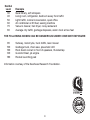
Decibel
Level
30
40
50
60
70
80
Example
Quiet library, soft whispers
Living room, refrigerator, bedroom away from traffic
Light traffic, normal conversation, quiet office
Air conditioner at 20 feet, sewing machine
Vacuum cleaner, hair dryer, noisy restaurant
Average city traffic, garbage disposals, alarm clock at two feet
THE FOLLOWING NOISES CAN BE DANGEROUS UNDER CONSTANT EXPOSURE:
90
100
120
140
180
Subway, motorcycle, truck traffic, lawn mower
Garbage truck, chain saw, pneumatic drill
Rock band concert in front of speakers, thunderclap
Gunshot blast, jet engine
Rocket launching pad
Information courtesy of the Deafness Research Foundation.
We
Want You
LISTENING
For A Lifetime
NI
C
IND
N
A
EST. 1924
O
O C I A TI
IES
ELECT
TR
EIA
S
S
4
U
S
R
O
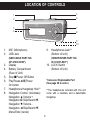
LOCATION OF CONTROLS
5
6
1
2
7
8
3
4
1.
2.
MIC (Microphone)
USB Jack
9.
3.
4.
Display
Battery Compartment
(Rear of Unit)
Stop ■/Power Off Button
Play/Pause ®p/Power
On button
Headphones Hangstrap Hole**
Navigation Control: (clockwise)
Navigation π/Volume +
Navigation ®/Skip/Search n
Navigation †/Volume Navigation √/Skip/Search o
Menu/Enter (center)
10. LOCK Switch
(Bottom of Unit)
5.
6.
7.
8.
(USB CABLE PART NO.
337-01000-E050*)
Headphones Jack**
(Bottom of Unit)
9
10
(HEADPHONES PART NO.
261-32201-E001*)
*Consumer Replaceable Part
(See page 36 to order.)
**The headphones included with this unit
come with a necklace and a detachable
hangstrap.
5
1
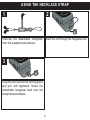
USING THE NECKLACE STRAP
2
Unscrew the detachable hangstrap
from the headphones/necklace.
Insert the cord through the hangstrap hole.
3
Loop the cord around the locking piece
and pull until tightened. Screw the
detachable hangstrap back onto the
headphones/necklace.
6
BATTERY INSTALLATION
When the bars in the battery indicator (in the display) become low (see Figure 1),
replace the battery as follows.
1. Disconnect the headphone plug from
50%
EMPTY
the Headphones jack on the bottom of FULL
the unit. Then, remove the Battery
Figure 1
Compartment cover on the rear of the
unit by sliding it out.
2. Insert one (1) “AAA” battery, following the
polarity indicated in the Battery Compartment,
as shown in Figure 2. An alkaline battery is
recommended for the longest playing time.
3. Slide the Battery Compartment cover back
onto the rear of the unit.
Figure 2
BATTERY PRECAUTIONS
Follow these precautions when using a battery in this device:
1. Use only the size and type of battery specified.
2. Be sure to follow the correct polarity when installing the battery as indicated. Reversed
batteries may cause damage to the device.
3. If the device is not to be used for a long period of time, remove the battery to prevent damage
or injury from possible battery leakage.
4. Do not try to recharge batteries not intended to be recharged; they can overheat and rupture.
(Follow battery manufacturer’s directions.)
7
DOWNLOADING AND TRANSFERRING FILES
SUPPORTED OPERATING SYSTEMS
This unit is compatible with the following Operating Systems:
Windows ME, 2000 and XP or Mac 9.2X
Please refer to the following pages to learn how to: transfer files, convert music on
an audio CD into MP3 or WMA format using Windows Media Player 10, transfer
MP3/WMA files and WMA files with DRM 9 using Windows Media Player 10, and
safely remove your unit from the computer.
NOTE: Visit www.Microsoft.com to download the corresponding Windows Media
Player for your computer.
8
DOWNLOADING AND TRANSFERRING FILES (CONT.)
TRANSFERRING FILES
You can download digital music files from the Internet or use encoding software to
convert music that you have on an audio CD into MP3 or WMA format. Once these
files are stored on your computer you can easily copy them to your player.
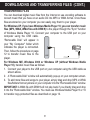
For Windows XP, if you have Windows Media Player 10, you can transfer music
files (MP3, WMA, WMA files with DRM 9) to the player through the "Sync" function
of Windows Media Player 10. Connect your computer to the USB port on your
computer using the USB cable.
“Removable Disk” will appear in
your "My Computer" folder which
indicates the player is connected.
Then, follow the procedure on page
12 to transfer music files to the
player.
For Windows ME, Windows 2000 or Windows XP (without Windows Media
Player 10), transfer music files as follows:
1. Connect your player to the USB port on your computer using the USB cable as
shown above.
2. A "Removable Disk" window will automatically pop-up on your computer screen.
3. To add more files and songs to your player, simply drag and drop MP3 or WMA
files/folders from anywhere on your computer into the "Removable Disk" window.
IMPORTANT: A WMA file with DRM 9 will not play back if you directly drag and drop
it into the "Removable Disk" window. You must use Windows Media Player 9 or 10
to transfer copy-protected files as described on page 12.
9
DOWNLOADING AND TRANSFERRING FILES (CONT.)
TRANSFERRING AUDIO FILES TO YOUR DIGITAL AUDIO PLAYER USING A
MACINTOSH COMPUTER
Make sure to use a Macintosh computer with an operating system of 9.2X to transfer
audio files.
1. Turn on your computer.
2. Turn on your digital audio player.
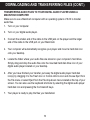
3. Connect the smaller end of the cable to the USB jack on the player and the larger
end of the cable to the USB port on your Macintosh.
4. Your computer will automatically recognize your player and mount a hard disk icon
onto your desktop.
5. Locate the folder where your audio files are stored on your computer’s hard drive.
Simply drag and drop the audio files onto the mounted hard disk drive icon of your
digital audio player located on your desktop.
6. After you have finished your transfer, put away the digital audio player hard disk
icon(s) by dragging it to the Trash icon or Control-click its icon and choose Eject from
the File menu or select Eject from the File drop-down menu located at the top of your
screen. You can also use the keyboard shortcuts by selecting the digital audio player
hard disk icon and pressing the Command-E keys.
7. Your player is ready to play the files you transferred.
10
DOWNLOADING AND TRANSFERRING FILES (CONT.)
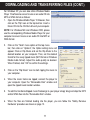
For Windows XP, you can also utilize Windows Media
Player 10 software to convert music on an audio CD into
MP3 or WMA format as follows:
1. Open the Windows Media Player 10 Browser, then
click on the “Rip” icon on the top tool bar. Insert a
Music CD into the CD-Rom drive of your computer.
NOTE: For Windows ME and Windows 2000, please
use the corresponding Windows Media Player for your
computer to convert music on an audio CD into MP3 or
WMA format.
2.
3.
4.
5.
6.
Click on the “Tools” menu option at the top menu
bar, then click on “Options”; the Option setting menu will
appear. Click on Rip Music and set the Rip Music to the
desired location on your computer. Then, set the desired
format for the newly ripped music (MP3 format or Windows
Media Audio format). Adjust the audio quality as desired.
When finished, click “OK” to confirm the settings.
Click on the “Rip Music” icon to start ripping the music to
your computer.
When the music tracks are ripped; connect the player to
your computer. Open the “Removable Disk” window and
open the ripped music location window.
To add the transferred/ripped music files/songs to your player simply drag and drop the MP3
and/or WMA files into the “Removable Disk” window.
When the files are finished loading into the player, you can follow the “Safely Remove
Hardware” procedure as shown on page 13.
11
DOWNLOADING AND TRANSFERRING FILES (CONT.)
TRANSFERRING MP3/WMA FILES AND WMA
FILES WITH DRM 9 USING WINDOWS MEDIA
PLAYER 10 (FOR WINDOWS XP ONLY)
To transfer MP3 files/WMA files/WMA files with
DRM 9 to the player, follow the procedure
described below using Windows Media Player
10. Before beginning the procedure please turn
the unit on and connect the unit to the computer
as previously described.
1. Open the “Windows Media Player Browser
10” and click on “Sync”.
2. Click on the “Sync List” pull-down menu to
locate the music files you wish to download.
Then make sure to tick the box next to
the files.
3. Select the Portable Device ("Removable
Disk") that you want to copy to from the right
side drop-down menu. Click “Start Sync” to
start
transferring
music
files
to
the player.
4. After finished transferring all the desired files
to your unit, you can remove your unit from
the computer.
NOTE:
• For WMA files with DRM 9, you can use
Windows Media Player 9 or 10 to transfer
files to your player.
12
SAFELY REMOVE HARDWARE
SAFELY REMOVING YOUR PLAYER FROM THE COMPUTER
(FOR WINDOWS ME OR 2000)
NOTE: To avoid damage to your player or data loss, always follow the procedure listed below
before disconnecting your player from the USB port on your computer.
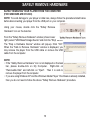
Using your mouse, double click the "Safely Remove
Hardware" icon on the task bar.
From the "Safely Remove Hardware" window (shown lower
right), select "USB Mass Storage Device" and click the "Stop" button.
The "Stop a Hardware Device" window will pop-up. Click "OK".
When the "Safe to Remove Hardware" window is displayed, you
may remove the player from the USB cable or remove the USB
cable from the computer.
NOTE:
• If the “Safely Remove Hardware” icon is not displayed on the task
bar, please double-click on My Computer. Right-click on
“Removable Disk” and left-click on “Eject”. Then it is safe to
remove the player from the computer.
• If you are using Windows XP and the Windows Media Player 10 software is already installed,
then you do not need to follow the above "Safely Remove Hardware" procedure.
13
OPERATION
LOCK SWITCH
TURNING THE POWER ON/OFF
1
2
1
1
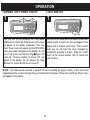
Turn the unit on by pressing the Play/Pause
®p/Power On button 1; the Memorex start screen
will appear in the display temporarily. Then the
Music Player menu will appear and the MP3/WMA
track’s information will appear in the display. To turn
the unit off, press and hold the Stop ■/Power Off
button 2; “Continue Holding To Power Off” will
appear in the display. Do not release the Stop
■/Power Off button 2 until the unit turns off.
With the unit on, slide the LOCK switch to the Lock
position (right); a small Lock icon will appear in the
display and no buttons will function. This is useful
when you do not want the track changed by
accidentally pressing a button. Slide the LOCK
2 position1(left) to cancel the
switch to the Unlock
Lock function.
NOTE: It will take several seconds to several minutes to update the player’s library or the music files
depending on the number of songs that you transferred to the player. When done, the Music Player menu
will appear in the display.
14
OPERATION (CONTINUED)
TO LISTEN TO MP3s/WMAs
1
2
4
1
2
3
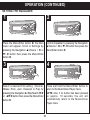
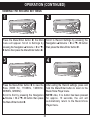
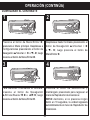
Turn the unit on by pressing the Play/Pause
®p/Power On button; the Memorex start
screen will appear in the display
temporarily. Then the Music Player menu
will appear and the MP3/WMA track’s
information will appear in the display.
3
2
1
To turn the unit off, press and hold the Stop
■/Power Off button; “Continue Holding To
Power Off” will appear in the display. Do not
release the Stop ■/Power Off button until the
unit turns off.
NOTE:
• See pages 8-12 for information on uploading
MP3 and WMA files to this unit.
2
1
15
Press the Play/Pause ®p/Power On button
1 to start playback. Press the Navigation
▲/Volume + 2 or ▼/- 3 buttons to increase
or decrease the volume. To stop playback,
press the Stop ■/Power Off button 4.
OPERATION (CONTINUED)
TO PAUSE PLAYBACK
1
2
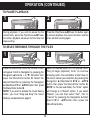
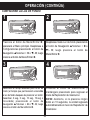
During playback, if you wish to pause the file
momentarily, press the Play/Pause ®p/Power
On button; playback will pause and the timer will
stop counting.
Press the Play/Pause ®p/Power On button again
to resume playback; the sound will return and the
timer will start counting again.
1
2
2
21
1
TO SELECT/BROWSE THROUGH THE FILES
3
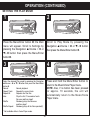
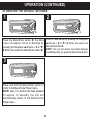
Press the Menu/Enter button 1; the Main menu
will appear. Scroll to Navigation by pressing the
Navigation ▲/Volume + or ▼/- 2 button then
press the Menu/Enter button 1. Select the
desired folder/file by pressing the Navigation
®/Skip/Search n or √/o 3 button then press
the Menu/Enter button 1.
NOTE: If you want to browse the music files by
folder, you must “drag and drop” the music
folder(s) as described on page 9.
16
2
1
2
3
1
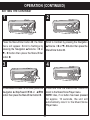
Select the desired option from the pop-up menu:
Play (to begin playback), Enter (to continue
browsing within the sub-folders and/or files) or
Cancel (to cancel your selection) by pressing the
Navigation ®/Skip/Search n 1 or √/o 2
button then press the Menu/Enter button 3.
NOTE: In the last sub-folder, the “Enter” option
will change to a "Delete" option. If you select
"Delete", you can then select "Yes", "No" or
"Cancel" by pressing the Navigation ®/Skip/
Search n or √/o button then press the
Menu/Enter button.
OPERATION (CONTINUED)
FORWARD/REVERSE SKIP
1
2
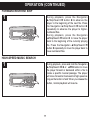
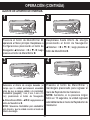
During playback, press the Navigation
®/Skip/Search n button 1 to advance the
player to the beginning of the next file. Press
the Navigation ®/Skip/Search n button 1
repeatedly to advance the player to highernumbered files.
During playback, press the Navigation
√/Skip/Search o button 2 to move the player
back to the beginning of the currently playing
file. Press the Navigation √/Skip/Search o
button 2 repeatedly to move the player back to
lower-numbered files.
1
HIGH-SPEED MUSIC SEARCH
1
2
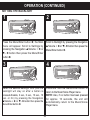
During playback, press and hold the Navigation
®/Skip/Search n 1 or √/o 2 button to move
the player forward or backward within a file to
locate a specific musical passage. The player
will move forward or backward at high speed as
long as the button is held. When you release the
button, normal playback will resume.
1
17
OPERATION (CONTINUED)
TO CREATE A VOICE RECORDING
1
2
1
2
3
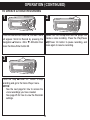
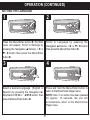
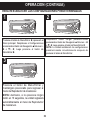
Press the Menu/Enter button 1; the Main menu
will appear. Scroll to Record by pressing the
Navigation ▲/Volume + 2 or ▼/- 3 button then
press the Menu/Enter button 1.
Speak into the microphone and the player will
create a voice recording. Press the Play/Pause
®p/Power On button to pause recording, and
press again to resume recording.
3
2
Press the Stop ■/Power Off button to stop
recording and go to the Voice Player menu.
NOTES:
•
See the next page for how to access the
voice recordings you have created.
2 to1 view the Recorder
•
See page 25 for how
settings.
18
1
OPERATION (CONTINUED)
2
1
1
4
TO LISTEN TO A RECORDING
3
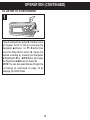
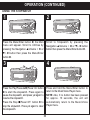
Press the Menu/Enter button 1; the Main menu
will appear. Scroll to Voice by pressing the
Navigation ▲/Volume + or ▼/- 2 button then
press the Menu/Enter button 1. Select the
desired recording by pressing the Navigation
®/Skip/Search n or √/o 3 button then press
the Play/Pause ®p/Power On button 4.
NOTE: You can also select/browse through the
recordings as described on page 16 by
selecting the VOICE folder.
19
OPERATION (CONTINUED)
SETTING THE EQUALIZER
1
2
2
1
1
3
Scroll to Equalizer by pressing the Navigation
▲/Volume + 1 or ▼/- 2 button then press the
Menu/Enter button 3.
Press the Menu/Enter button 1; the Main
menu will appear. Scroll to Settings by
pressing the Navigation ▲/Volume + 2 or
▼/- 3 button then press the Menu/Enter
button 1.
3
4
3
2
3
2
1
Select a desired EQ setting (Normal,
XBass, Rock, Jazz, Classical or Pop) by
pressing the Navigation ®/Skip/Search n 1
or √/o 2 button then press the Menu/Enter
button 3.
Press and hold the Menu/Enter button to
return to the Music/Voice Player menu.
NOTE: Also, if no button has been pressed
for approx. 10 seconds, the unit will
automatically return to the Music/Voice
Player menu.
20
OPERATION (CONTINUED)
SETTING THE PLAY MODE
1
2
2
1
1
2
3
Scroll to Play Mode by pressing the
Navigation ▲/Volume + 1 or ▼/- 2 button
then press the Menu/Enter button 3.
Press the Menu/Enter button 1; the Main
menu will appear. Scroll to Settings by
pressing the Navigation ▲/Volume + 2 or
▼/- 3 button then press the Menu/Enter
button 1.
3
1
3
4
3
2
Press and hold the Menu/Enter button to
return to the Music/Voice Player menu.
NOTE: Also, if no button has been pressed
for approx. 10 seconds, the unit will
automatically return to the Music/Voice
Player menu.
Select the desired Play mode by pressing the Navigation
▲/Volume + 1 or ▼/- 2 button then press the Menu/Enter
button 3.
Normal:
Normal playback
Repeat Track:
Repeats the current track
Repeat All:
Repeats all of the files
Intro:
Plays the first 15 seconds of each
file once and then stops*
Shuffle:
Randomly plays the files once
and then stops*
Shuffle Repeat:
Randomly plays all the files repeatedly*
* Not available while in Voice Player mode.
21
OPERATION (CONTINUED)
SETTING THE CONTRAST
1
2
2
1
1
3
2
3
Press the Menu/Enter button 1; the Main
menu will appear. Scroll to Settings by
pressing the Navigation ▲/Volume + 2 or
▼/- 3 button then press the Menu/Enter
button 1.
Scroll to Contrast by pressing the Navigation
▲/Volume + 1 or ▼/- 2 button then press the
Menu/Enter button 3.
4
3
3
2
1
To decrease/increase the contrast, press the
Navigation ®/Skip/Search n 1 or √/o 2
button then press the Menu/Enter button 3.
Press and hold the Menu/Enter button to
return to the Music/Voice Player menu.
NOTE: Also, if no button has been pressed
for approx. 10 seconds, the unit will
automatically return to the Music/Voice
Player menu.
22
OPERATION (CONTINUED)
SETTING THE BACKLIGHT
1
2
2
1
1
2
3
Scroll to Backlight by pressing the Navigation
▲/Volume + 1 or ▼/- 2 button then press the
Menu/Enter button 3.
Press the Menu/Enter button 1; the Main
menu will appear. Scroll to Settings by
pressing the Navigation ▲/Volume + 2 or
▼/- 3 button then press the Menu/Enter
button 1.
4
3
1
3
3
2
Press and hold the Menu/Enter button to
return to the Music/Voice Player menu.
NOTE: Also, if no button has been pressed
for approx. 10 seconds, the unit will
automatically return to the Music/Voice
Player menu.
Select the desired Backlight time (time the
backlight will stay on after a button is
pressed–Disable, 3 sec., 5 sec., 10 sec., 15
sec. or On) by pressing the Navigation
▲/Volume + 1 or ▼/- 2 button then press the
Menu/Enter button 3.
23
OPERATION (CONTINUED)
SETTING THE POWER SAVINGS
1
2
2
1
1
3
2
3
Scroll to Power Savings by pressing the
Navigation ▲/Volume + 1 or ▼/- 2 button
then press the Menu/Enter button 3.
Press the Menu/Enter button 1; the Main
menu will appear. Scroll to Settings by
pressing the Navigation ▲/Volume + 2 or ▼/3 button then press the Menu/Enter button 1.
4
3
3
2
1
Select the desired Power Savings (time the unit
will stay on before turning off due to
inactivity–Disable [ Off ], 1 min, 2 mins, 5 mins
or 10 mins) by pressing the Navigation
®/Skip/Search n 1 or √/o 2 button then
press the Menu/Enter button 3.
NOTE: Select Disable to disable this feature
and not have the unit enter the Power Savings
mode.
Press and hold the Menu/Enter button to
return to the Music/Voice Player menu.
NOTE: Also, if no button has been pressed
for approx. 10 seconds, the unit will
automatically return to the Music/Voice
Player menu.
24
OPERATION (CONTINUED)
VIEWING THE RECORD SETTINGS
1
2
2
1
1
2
3
Scroll to Record Settings by pressing the
Navigation ▲/Volume + 1 or ▼/- 2 button
then press the Menu/Enter button 3.
Press the Menu/Enter button 1; the Main
menu will appear. Scroll to Settings by
pressing the Navigation ▲/Volume + 2 or ▼/3 button then press the Menu/Enter button 1.
4
3
2
3
1
3
After exiting the Record settings, press and
hold the Menu/Enter button to return to the
Music/Voice Player menu.
NOTE: Also, if no button has been pressed
for approx. 10 seconds, the unit will
automatically return to the Music/Voice
Player menu.
Press the Menu/Enter button 1 to view the
Rate (8000 Hz, 11025Hz, 16000Hz,
22050Hz, 32000Hz).
Scroll to Exit by pressing the Navigation
▲/Volume + 2 or ▼/- 3 button then press
the Menu/Enter button 1.
25
OPERATION (CONTINUED)
TO RESTORE THE DEFAULT SETTINGS
1
2
2
1
1
3
2
3
Press the Menu/Enter button 1; the Main
menu will appear. Scroll to Settings by
pressing the Navigation ▲/Volume + 2 or ▼/3 button then press the Menu/Enter button 1.
Scroll to Load Default by pressing the Navigation
▲/Volume + 1 or ▼/- 2 button then press the
Menu/Enter button 3.
NOTE: The unit will restore the default settings
immediately after you press the Menu/Enter button.
3
Press and hold the Menu/Enter button to
return to the Music/Voice Player menu.
NOTE: Also, if no button has been pressed
for approx. 10 seconds, the unit will
automatically return to the Music/Voice
Player menu.
26
OPERATION (CONTINUED)
SETTING THE LANGUAGE
1
2
2
1
1
3
2
3
Scroll to Language by pressing the
Navigation ▲/Volume + 1 or ▼/- 2 button
then press the Menu/Enter button 3.
Press the Menu/Enter button 1; the Main
menu will appear. Scroll to Settings by
pressing the Navigation ▲/Volume + 2 or
▼/- 3 button then press the Menu/Enter
button 1.
4
3
3
2
1
Select a desired Language (English or
Spanish) by pressing the Navigation ®/
Skip/Search n 1 or √/o 2 button then
press the Menu/Enter button 3.
Press and hold the Menu/Enter button to
return to the Music/Voice Player menu.
NOTE: Also, if no button has been pressed
for approx. 10 seconds, the unit will
automatically return to the Music/Voice
Player menu.
27
OPERATION (CONTINUED)
SETTING THE SLEEP TIME
1
2
2
1
1
3
2
3
Scroll to Sleep Time by pressing the
Navigation ▲/Volume + 1 or ▼/- 2 button
then press the Menu/Enter button 3.
Press the Menu/Enter button 1; the Main
menu will appear. Scroll to Utilities by
pressing the Navigation ▲/Volume + 2 or
▼/- 3 button then press the Menu/Enter
button 1.
4
3
3
2
1
Select the desired Sleep Time (after the set
amount of time, the unit will automatically
turn itself off–Off, 15 min, 30 min, 45 min,
60 min, 90 min, 120 min) by pressing the
Navigation ®/Skip/Search n 1 or √/o 2
button then press the Menu/Enter button 3.
Press and hold the Menu/Enter button to
return to the Music/Voice Player menu.
NOTE: Also, if no button has been pressed
for approx. 10 seconds, the unit will
automatically return to the Music/Voice
Player menu.
28
OPERATION (CONTINUED)
USING THE STOPWATCH
1
2
2
1
1
2
3
Scroll to Stopwatch by pressing the
Navigation ▲/Volume + 1 or ▼/- 2 button
button then press the Menu/Enter button 3.
Press the Menu/Enter button 1; the Main
menu will appear. Scroll to Utilities by
pressing the Navigation ▲/Volume + 2 or
▼/- 3 button then press the Menu/Enter
button 1.
3
2
4
1
Press the Play/Pause ®p/Power On button
1 to start the stopwatch. Press again to
pause the stopwatch, and press yet again to
resume the stopwatch.
Press the Stop ■/Power Off button 2 to
stop the stopwatch. Press yet again to clear
the stopwatch.
3
Press and hold the Menu/Enter button to
return to the Music/Voice Player menu.
NOTE: Also, if no button has been pressed
for approx. 10 seconds, the unit will
automatically return to the Music/Voice
Player menu.
29
OPERATION (CONTINUED)
TO VIEW THE SYSTEM INFO (ABOUT)
1
2
1
2
2
1
3
Press the Menu/Enter button 1; the Main
menu will appear. Scroll to About by
pressing the Navigation ▲/Volume + 2 or
▼/- 3 button then press the Menu/Enter
button 1.
Scroll between Model, Version, Int. (Internal)
Media and Free (Space) by pressing the
Navigation ®/Skip/Search n 1 or √/o
2 button.
3
Press and hold the Menu/Enter button to
return to the Music/Voice Player menu.
NOTE: Also, if no button has been pressed
for approx. 10 seconds, the unit will
automatically return to the Music/Voice
Player menu.
30
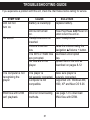
TROUBLESHOOTING GUIDE
If you experience a problem with this unit, check the chart below before calling for service.
SYMPTOM
Unit will not
turn on.
CAUSE
Battery is low/empty.
SOLUTION
Replace battery.
The computer is not
recognizing the
player.
Unit is not turned
on.
Headphones are not
inserted.
Volume is set too
low.
The MP3 or WMA files
are corrupted.
No files are in the
player.
The player is
not securely connected.
Computer is not
compatible.
Raise the volume using the
Navigation ▲/Volume + button.
Download uncorrupted
files.
Upload files to the unit as
described on pages 8-12.
WMA files with DRM
can’t playback.
Incorrect downloading
methods.
See page 12 to download
WMA files with DRM.
No sound.
31
Press Play/Pause ®p/Power On
button to turn the unit on.
Insert headphones.
Make sure player is
securely connected.
Supported OS: Windows ME,
2000, XP and Mac OS 9.2X
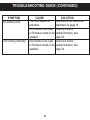
TROUBLESHOOTING GUIDE (CONTINUED)
SYMPTOM
No buttons work.
Unit acting erratically.
CAUSE
The Lock feature is
activated.
Unit needs to be reset
or firmware needs to be
updated.
Unit needs to be reset
or firmware needs to be
updated.
32
SOLUTION
Deactivate Lock feature as
described on page 14.
Reset unit and/or
update firmware, see
page 34.
Reset unit and/or
update firmware, see
page 34.
FORMATTING THE PLAYER
Formatting the Player
WARNING! Do not format this player unless it stops working and you are
instructed to do so by technical support personnel.
1. Use the USB cable to connect the
player and the computer.
949MB
2. Double click on My Computer, then
right click "Removable Disk" and left
click on "Format".
3. For "Removable Disk", at the
"Format" window, select "FAT 32"
from the file system pull-down menu,
then click "Start" to format the unit
(see figure right).
NOTE: Make sure you have selected
"FAT 32" at the file system pull-down
menu; otherwise, after formatting, the
player will not work properly. Then, click OK to confirm and the player will
start to format. When finished, click "Close" to close the Format window.
33
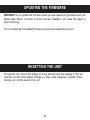
UPDATING THE FIRMWARE
WARNING! Do not update the firmware unless you are experiencing problems with your
digital audio device. Incorrect or faulty firmware installation will cause the player to
stop functioning.
You can download the updated firmware at www.memorexelectronics.com.
RESETTING THE UNIT
To reset the unit, remove the battery for a few seconds and then replace it. This will
reset the unit but all the default settings (i.e. Play mode, Equalizer, Contrast, Power
Savings, etc.) will be saved in the unit.
34
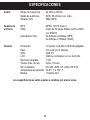
Audio
File Support
SPECIFICATIONS
Frequency Range
Headphones Output
S/N Ratio
MP3
WMA
Bit Rate
General
Dimension
Weight
USB
LCD
Built-in Memory
Max. Playtime
Supported OS
Operating Temperature
Battery
20Hz – 20KHz
5mW, 32ohm (Max. Vol)
85db (MP3)
MPEG 1/2/2.5 Layer 3
Windows Media Audio (WMA file
with DRM9)
32kbps–320kbps (MP3)
32kbps–192kbps (WMA)
1.4 (W) x 3.2 (H) x 0.8 (D) inches
0.8 ounces (without battery)
USB 2.0
Full Graphic with Backlight
1 GB
Approx. 8 hours
Win ME, 2000, XP and Mac OS 9.2X
23° F to 104° F
1 x AAA battery
Specifications are subject to change without notice.
35
FOR FIRMWARE UPGRADE, PLEASE VISIT OUR WEBSITE AT
WWW.MEMOREXELECTRONICS.COM
TO CHECK IF THERE IS NEW FIRMWARE AVAILABLE.
FOR ADDITIONAL SET-UP OR OPERATING ASSISTANCE,
PLEASE VISIT OUR WEBSITE AT
WWW.MEMOREXELECTRONICS.COM
OR CONTACT CUSTOMER SERVICE AT (954) 660-7100.
PLEASE KEEP ALL PACKAGING MATERIAL FOR AT LEAST 90
DAYS IN CASE YOU NEED TO RETURN THIS PRODUCT TO YOUR
PLACE OF PURCHASE OR TO MEMOREX.
FOR CONSUMER REPLACEABLE PART(S), SEE PART
NUMBER(S) ON PAGE 5 AND THEN CONTACT FOX
INTERNATIONAL AT 1-800-321-6993.
36
PRECAUCIONES
DERECHO DE AUTOR:
•
La distribución de copias de pistas en formato MP3, WMA, WMA con archivos DRM y/o
WAV sin premiso es una violación de las leyes internacionales de los derechos de autor.
SEGURIDAD:
•
La vibración experimentada al caminar o hacer ejercicio no afectará al reproductor. Sin
embargo, dejar caer el reproductor o dejar caer un objeto pesado sobre el reproductor
puede ocasionar daños o distorsión en el sonido.
•
No permita que caiga líquido sobre el reproductor o en su interior.
•
No deje el reproductor en un lugar cercano a una fuente de calor; ni en lugar donde caiga
la luz directa del sol, polvo excesivo, arena, humedad, lluvia o impacto mecánico; ni en
una superficie desnivelada; ni tampoco en un auto con las ventanas cerradas durante
períodos de calor excesivo.
SEGURIDAD EN EL CAMINO:
•
No utilice audífonos mientras conduce, anda en bicicleta o mientras opera un vehículo
motorizado. Eso puede crear un peligro de tránsito y es ilegal en algunos lugares. Es
potencialmente peligroso tener los audífonos a alto volumen mientras camina,
especialmente en cruces peatonales. Sea extremadamente precavido o suspenda el uso
en situaciones potencialmente peligrosas.
ADVERTENCIA DE LA FCC:
•
Este equipo puede generar o bien usar energía de radiofrecuencia. Los cambios o
modificaciones hechos a este equipo pueden causar interferencias dañinas, a menos
que las modificaciones estén expresamente aprobadas en el manual de instrucciones. El
usuario puede perder el derecho de operar este equipo si efectuara un cambio o
modificación no autorizados.
Este aparato digital de Clase B cumple con la norma ICES-003 de Canadá.
Cet appareil numérique de la classe B est conforme à la norme NMB-003 du Canada.
1
DECLARACIÓN DE LA FCC
Este aparato cumple con el Apartado 15 de las normas de la FCC. El funcionamiento está
sujeto a las siguientes dos condiciones: (1) Este aparato no debe causar interferencia
dañina y (2) este aparato debe aceptar cualquier interferencia que reciba, incluso aquella
interferencia que pueda causar una operación indeseada.
Advertencia: Los cambios o modificaciones a esta unidad, que no fueron expresamente
aprobados por la parte responsable del cumplimiento, pueden invalidar el derecho del
usuario a operar el equipo.
NOTA: Este equipo fue probado y se encontró que cumple con las limitantes para
aparatos digitales de Clase B, de conformidad con el Apartado 15 de las Normas de la
FCC. Dichas limitantes fueron diseñadas con la intención de brindar una protección
razonable contra la interferencia dañina en una instalación residencial. Este equipo
genera, usa y puede irradiar energía de radiofrecuencia y, si no se instala y usa conforme
a las instrucciones, puede generar interferencia dañina con las radiocomunicaciones.
Sin embargo, no hay garantía de que no habrá interferencia en una instalación particular.
Si este equipo llegara a causar interferencia dañina con la recepción de radio o televisión,
lo cual se puede determinar encendiendo y apagando el equipo, le pedimos que intente
corregir la interferencia con las siguientes medidas:
• Cambie la orientación o ubicación de la antena receptora.
• Incremente la distancia entre el equipo y el receptor.
• Conecte el equipo a un contacto eléctrico que esté en un circuito distinto al que está
conectado el receptor.
• Pida ayuda a su distribuidor o a un técnico en radio o televisión con experiencia.
Debe usar un cable blindado con esta unidad para
asegurar el cumplimiento con las limitantes de la
clase B de la FCC.
2
Estimado Cliente:
En el momento en que seleccionó un equipo de tan alta tecnología como el que usted
acaba de comprar, su entretenimiento musical recién comenzó. Ahora es tiempo de
pensar en cómo puede optimizar el entretenimiento que su equipo le ofrece. Este
fabricante y la Asociación de Industrias Electrónicas del Grupo de Consumidores
Electrónicos desean que usted obtenga el mejor resultado de su equipo, usándolo a un
nivel seguro como es escuchar un sonido claro y sonoro, sin distorsión y, sobre todo,
sin que afecte su sentido auditivo. El sonido es engañoso, ya que con el tiempo su nivel
de audición puede adaptarse a escuchar sólo en volumen alto, resultando en un serio
daño a su sentido auditivo. Protéjase contra este daño innecesario ajustando el
volumen de su equipo a un nivel bajo antes de acostumbrarse a escuchar siempre la
música a un volumen alto.
Para establecer un nivel auditivo seguro:
•
Ponga el control de volumen en posición baja.
•
Lentamente aumente el nivel hasta que escuche el sonido de manera clara y
confortable, sin distorsión.
Una vez que establezca el nivel de audición confortable:
•
Deje fijo el control de volumen en dicho nivel.
Eso le tomará tan solo un minuto, y le ayudará a prevenir la pérdida del oído en el futuro.
Nosotros deseamos que usted pueda oír durante toda su vida
Si sabe usar su equipo, éste le proveerá mucho tiempo de satisfacción y
entretenimiento. Debido a que el daño causado al oído es imperceptible hasta que ya
es muy tarde, este fabricante y la Asociación de Industrias Electrónicas le recomiendan
evitar la exposición prolongada a ruidos excesivos. La lista que le damos a
continuación le servirá de guía:
3
Nivel de decibeles
30
40
50
60
70
80
Ejemplo
Una biblioteca, susurros.
Sala, refrigerador, dormitorio lejos del tráfico.
Semáforo, conversación normal, oficina tranquila.
Aire acondicionado a 20 pies, máquina de coser
Aspiradora, secadora de pelo, restaurante bullicioso.
Tráfico en la calle, triturador de basura, alarma de reloj a 60 cm.
90
100
120
140
180
Metro, motocicletas, tráfico de camiones, podadora de césped.
Camión de basura, sierra eléctrica, perforadora neumática.
Concierto de rock frente a las bocinas, ruido de truenos.
Sonido de disparo, motor de avión.
Lanzamiento de una nave espacial.
LOS SIGUIENTES RUIDOS PUEDEN SER PELIGROSOS SI SE SOMETE A ELLOS
EN FORMA CONSTANTE:
Esta información fue proporcionada gratuitamente por la Fundación de Investigación de
la Sordera.
We
Want You
LISTENING
For A Lifetime
NI
C
IND
N
A
EST. 1924
O
O C I A TI
IES
ELECT
TR
EIA
S
S
4
U
S
R
O
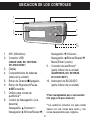
UBICACIÓN DE LOS CONTROLES
5
6
1
2
7
8
3
4
9
10
1.
2.
MIC (Micrófono)
Conector USB
3.
4.
Display
Compartimiento de baterías
(atrás de la unidad)
Botón de Detener ■/Apagado
Botón de Reproducir/Pausa
®p/Encendido
Orificio para correa de
audífonos**
Control de Navegación: (a la
derecha)
Navegación π/Volumen +
Navegación ®/Brincar/Buscar n
5.
6.
7.
8.
(CABLE USB, NO. DE PIEZA
337-01000-E050*)
9.
Navegación †/Volumen Navegación √/Brincar/Buscar o
Menú/Entrar (centro)
Conector de audífonos**
(parte inferior de la unidad)
(AUDÍFONOS, NO. DE PIEZA
261-32201-E001*)
10. Interruptor de BLOQUEO
(parte inferior de la unidad)
*Pieza reemplazable por el consumidor
(Ver página 36 para ordenar.)
5
**Los audífonos incluidos con esta unidad
vienen con una correa para cuello y una
correa desprendible para colgarlos.
1
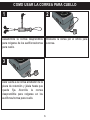
CÓMO USAR LA CORREA PARA CUELLO
2
Desatornille la correa desprendible
para colgarse de los audífonos/correa
para cuello.
Introduzca la correa por el orificio para
la correa.
3
Déle vuelta a la correa alrededor de la
pieza de retención y jálela hasta que
quede fija. Atornille la correa
desprendible para colgarse en los
audífonos/correa para cuello.
6
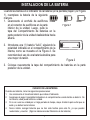
INSTALACIÓN DE LA BATERÍA
Cuando las barras en el indicador de la batería (en la pantalla) bajan (ver Figura
1), reemplace la batería de la siguiente
manera.
50%
VACÍA
1. Desconecte el enchufe de audífonos LLENA
en el conector de audífonos en la parte
Figura 1
inferior de la unidad. Luego, quite la
tapa del Compartimiento de baterías en la
parte posterior de la unidad deslizándola hacia
afuera.
2. Introduzca una (1) batería “AAA”, siguiendo la
polaridad indicada en el compartimiento de la
misma, como se muestra en la Figura 2. Se
recomienda el uso de una batería alcalina para
una mayor duración.
Figura 2
3. Coloque nuevamente la tapa del compartimiento de baterías en la parte
posterior de la unidad.
CUIDADO DE LAS BATERÍAS
Cuando use baterías, tome las siguientes precauciones:
1. Use únicamente el tamaño de batería que indica el fabricante.
2. Asegúrese de seguir la polaridad indicada en el compartimiento cuando instale su batería. De
no hacerlo, usted puede dañar su unidad.
3. Si no va a usar su unidad por un largo período de tiempo, saque la batería para evitar que se
oxide y se dañen las terminales.
4. Nunca intente recargar baterías que no han sido hechas para este fin, ya que pueden
recalentarse y reventar. (Siga las indicaciones del fabricante de las baterías).
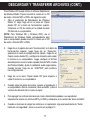
7
DESCARGAR Y TRANSFERIR ARCHIVOS
SISTEMAS OPERATIVOS COMPATIBLES
Esta unidad es compatible con los siguientes sistemas operativos:
Windows ME, 2000 y XP o Mac 9.2X
Consulte las siguientes páginas para aprender a: transferir archivos, convertir
música en un CD de audio a formato MP3 o WMA usando el Reproductor de
Windows Media 10, transferir archivos MP3/WMA y WMA con DRM 9 usando
el Reproductor de Windows Media 10, y retirar la unidad de manera segura de
la computadora.
NOTA: Visite www.Microsoft.com para descargar el Reproductor de Windows
Media que corresponde a su computadora.
8
DESCARGAR Y TRANSFERIR ARCHIVOS (CONT.)
TRANSFERIR ARCHIVOS
Puede descargar archivos de música digital desde internet o utilizar un software de
codificación para convertir la música que tiene un disco de audio a formato MP3 o WMA.
Una vez que guarde estos archivos en su computadora, puede copiarlos fácilmente en
su reproductor.
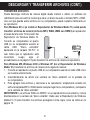
Para Windows XP, si ya instaló el Reproductor de Windows Media 10, usted puede
transferir archivos de música (archivos MP3, WMA, WMA con DRM 9) al reproductor
a través de la función “Sincronizar” del
Reproductor de Windows Media 10.
Conecte su computadora al puerto
USB en su computadora usando el
cable
USB.
“Disco
extraíble”
aparecerá en la carpeta “Mi PC”, lo
cual indica que el reproductor está
conectado.
Luego,
siga
el
procedimiento en la página 12 para transferir los archivos de música al reproductor.
Para Windows ME, Windows 2000 o Windows XP (sin el Reproductor de Windows
Media 10), transfiera los archivos de música de la siguiente manera:
1. Conecte el reproductor al puerto USB en su computadora usando el cable USB como
se muestra anteriormente.
2. Automáticamente se abrirá una ventana de “disco extraíble” en la pantalla de
su computadora.
3. Para agregar más archivos y canciones a su reproductor, simplemente arrastre los
archivos/carpetas MP3 o WMA desde cualquier lugar de su computadora y colóquelos
en la ventana de “disco extraíble”.
IMPORTANTE: Los archivos WMA con DRM 9 no se reproducirán si los arrastra y coloca
directamente en la ventana de “disco extraíble”. Debe usar el Reproductor de Windows
Media 9 ó 10 para transferir los archivos protegidos contra copia, como se indica en la
página 12.
9
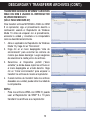
DESCARGAR Y TRANSFERIR ARCHIVOS (CONT.)
TRANSFERIR ARCHIVOS DE AUDIO A SU REPRODUCTOR DE AUDIO DIGITAL
USANDO UNA COMPUTADORA MAC
Asegúrese de que la computadora Mac tenga un sistema operativo de 9.2X para
transferir los archivos de audio.
1. Encienda su computadora.
2. Encienda el reproductor de audio digital.
3. Conecte el extremo más pequeño del cable al conector USB en el reproductor y el
extremo más grande del cable al puerto USB de su Mac.
4. Su computadora reconocerá automáticamente el reproductor y establecerá un icono
de disco duro en el escritorio.
5. Ubique la carpeta donde guarda los archivos de audio en el disco duro de su
computadora. Simplemente arrastre y coloque los archivos de audio en el icono de
disco duro establecido para su reproductor de audio digital, ubicado en el escritorio.
6. Después de terminar la transferencia, borre el icono de disco duro del reproductor de
audio digital arrastrándolo al icono de Papelera de reciclaje o haga clic presionando
la tecla control en el icono y seleccione Expulsar del menú de Archivo o seleccione
Expulsar del menú desplegable de Archivo ubicado en la parte superior de la
pantalla. También puede usar el método abreviado del teclado seleccionando el
icono de disco duro del reproductor de audio digital y presionando las teclas
Comando-E.
7. Su reproductor está listo para reproducir los archivos que transfirió.
10
DESCARGAR Y TRANSFERIR ARCHIVOS (CONT.)
Para Windows XP, puede utilizar el software Reproductor
de Windows Media 10 para convertir la música en un CD
de audio a formato MP3 o WMA, del siguiente modo:
1. Abra el explorador de Reproductor de Windows
Media 10, luego haga clic en el icono de “Copiar
desde CD” en la barra de herramientas superior.
Introduzca un CD de música en la unidad de disco
CD-Rom de su computadora.
NOTA: Para Windows ME y Windows 2000, use el
Reproductor de Windows Media correspondiente para
que su computadora pueda convertir la música en un CD
de audio a formato MP3 o WMA.
2.
3.
4.
5.
6.
Haga clic en la opción de menú “Herramientas” en la barra de
herramientas superior, luego haga clic en “Opciones”;
aparecerá el menú de configuración de Opción. Haga clic en
Copiar música desde CD y configure la ubicación para copiar
la música en su computadora. Luego, configure el formato
deseado para la música recién copiada (formato MP3 o Audio
de Windows Media). Ajuste la calidad de audio según desee.
Cuando termine, haga clic en “ACEPTAR” para confirmar
las configuraciones.
Haga clic en el icono “Copiar desde CD” para empezar a
copiar la música a su computadora.
Cuando copie las pistas de música; conecte el reproductor a
su computadora. Abra la ventana de “disco extraíble” y abra la
ventana de ubicación de la música a copiar.
Para agregar los archivos/canciones de música transferidos/copiados a su reproductor,
simplemente arrastre los archivos MP3 y/o WMA y colóquelos en la ventana de “disco extraíble”.
Cuando se terminen de cargar los archivos en el reproductor, siga el procedimiento de “Quitar
hardware con seguridad”, como se muestra en la página 13.
11
DESCARGAR Y TRANSFERIR ARCHIVOS (CONT.)
TRANSFERIR ARCHIVOS MP3/WMA Y ARCHIVOS
WMA CON DRM 9 USANDO EL REPRODUCTOR
DE WINDOWS MEDIA 10
(SÓLO PARA WINDOWS XP)
Para transferir archivos MP3/WMA o WMA con DRM
9 al reproductor, siga el procedimiento descrito a
continuación usando el Reproductor de Windows
Media 10. Antes de empezar con el procedimiento,
encienda la unidad y conéctela a la computadora
como se describió anteriormente.
1. Abra el explorador de Reproductor de Windows
Media 10 y haga clic en “Sincronizar”.
2. Haga clic en el menú desplegable “Lista de
sincronización” para encontrar los archivos de
música que desea descargar. Luego asegúrese
de seleccionar la casilla junto a los archivos.
3. Seleccione el Dispositivo portátil (“disco
extraíble”) a donde desea copiar los archivos en
el menú desplegable en el lado derecho. Haga
clic en “Iniciar sincronización” para empezar a
transferir los archivos de música al reproductor.
4. Cuando termine de transferir todos los archivos
deseados a su unidad, puede retirar la unidad de
la computadora.
NOTA:
• Para los archivos WMA con DRM 9, puede
usar el Reproductor de WMP 9 o 10 para
transferir los archivos a su reproductor.
12
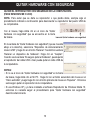
QUITAR HARDWARE CON SEGURIDAD
QUITAR EL REPRODUCTOR CON SEGURIDAD DE LA COMPUTADORA
(PARA WINDOWS ME O 2000)
NOTA: Para evitar que se dañe su reproductor o que pierda datos, siempre siga el
procedimiento indicado a continuación para desconectar su reproductor del puerto USB de
su computadora.
Con el mouse, haga doble clic en el icono de “Quitar
hardware con seguridad” que se encuentra en la barra
Icono de Quitar hardware con seguridad
de tareas.
En la ventana de “Quitar hardware con seguridad” (que se muestra
abajo a la derecha), seleccione “Dispositivo de almacenamiento
masivo USB” y haga clic en el botón “Detener”. Se abrirá la ventana
“Detener un dispositivo de hardware”. Haga clic en “Aceptar”.
Cuando vea la ventana “Es seguro quitar el hardware”, puede quitar
el reproductor del cable USB o bien puede quitar el cable USB de
la computadora.
NOTAS:
• Si no ve el icono de “Quitar hardware con seguridad” en la barra
de tareas, haga doble clic en Mi PC. Haga clic con el botón secundario del mouse en el
“Disco extraíble” y luego haga clic con el botón primario del mouse en “Expulsar”. Entonces
será seguro quitar el reproductor de la computadora.
• Si usa Windows XP y ya tiene instalado el software Reproductor de Windows Media 10,
entonces no necesita seguir el procedimiento para “Quitar hardware con seguridad”
descrito anteriormente.
13
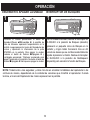
OPERACIÓN
INTERRUPTOR DE BLOQUEO
ENCENDER O APAGAR LA UNIDAD
1
2
1
1
Encienda la unidad presionando el botón de
Reproducir/Pausa ®p/Encendido 1; la pantalla de
inicio de Memorex aparecerá temporalmente en la
pantalla. Luego aparecerá el menú del Reproductor de
música y aparecerá la información de la pista
MP3/WMA en la pantalla. Para apagar la unidad,
presione el botón de Detener ■/Apagado 2 y
manténgalo presionado; “Mantener presionado para
apagar” aparecerá en la pantalla. No suelte el botón de
Detener ■/Apagado 2 hasta que se apague la unidad.
Con la unidad encendida, deslice el interruptor de
BLOQUEO a la posición de Bloqueo (derecha)
aparecerá un pequeño icono de Bloqueo en la
pantalla y ningún botón funcionará. Eso es útil
cuando no desea que se cambie accidentalmente
2 botón. Deslice
1
la pista al presionar un
el interruptor
de BLOQUEO a la posición de Desbloquear
(izquierda) para cancelar la función de Bloqueo.
NOTA: Tardará entre unos segundos y varios minutos en actualizar la biblioteca del reproductor o los
archivos de música, dependiendo de la cantidad de canciones que transfirió al reproductor. Cuando
termine, el menú del Reproductor de música aparecerá en la pantalla.
14
OPERACIÓN (CONTINÚA)
PARA ESCUCHAR MÚSICA EN MP3/WMA
1
2
4
1
2
3
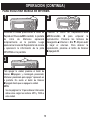
Encienda la unidad presionando el botón de
Reproducir/Pausa ®p/Encendido; la pantalla
de
inicio
de
Memorex
aparecerá
temporalmente en la pantalla. Luego
aparecerá el menú del Reproductor de música
y aparecerá la información de la pista
MP3/WMA en la pantalla.
2
3
1
Para apagar la unidad, presione el botón de
Detener ■/Apagado y manténgalo presionado;
“Mantener presionado para apagar” aparecerá en
la pantalla. No suelte el botón de Detener
■/Apagado hasta que se apague la unidad.
NOTA:
• Vea las páginas 8 a 12 para obtener información
sobre cómo cargar los archivos MP3 y WMA a
2 1
esta unidad.
15
Presione el botón de Reproducir/Pausa
®p/Encendido
1
para
empezar
la
reproducción. Presione los botones de
Navegación ▲/Volumen + 2 o ▼/- 3 para subir
o bajar el volumen. Para detener la
reproducción, presione el botón de Detener
■/Apagado 4.
OPERACIÓN (CONTINÚA)
PARA PAUSAR LA REPRODUCCIÓN
1
2
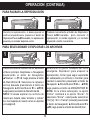
Durante la reproducción, si desea pausar el
archivo temporalmente, presione el botón de
Reproducir/Pausa ®p/Encendido; la reproducción
pausará y el contador dejará de contar.
Presione nuevamente el botón de Reproducir/
Pausa ®p/Encendido para reanudar la
reproducción; el sonido regresará y el contador
empezará a contar nuevamente.
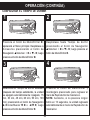
1
2
2
21
1
PARA SELECCIONAR O EXPLORAR LOS ARCHIVOS
3
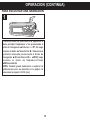
Presione el botón de Menú/Entrar 1; aparecerá
el Menú principal. Desplácese a Navegación
presionando el botón de Navegación
▲/Volumen + o ▼/- 2; luego presione el botón
de Menú/Entrar 1. Seleccione la carpeta o
archivo deseado presionando el botón de
Navegación ®/Brincar/Buscar n o √/o 3;
luego presione el botón de Menú/Entrar 1.
NOTA: Si desea explorar los archivos de
música por carpeta, debe “arrastrar y colocar”
la o las carpetas de música como se describe
en la página 9.
16
2
1
2
3
1
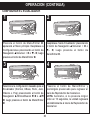
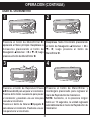
Seleccione la opción deseada del menú
emergente: Reproducir (para empezar la
reproducción), Entrar (para seguir explorando
las subcarpetas y/o archivos) o Cancelar (para
cancelar la selección) presionando el botón de
Navegación ®/Brincar/Buscar n 1 o √/o 2;
luego presione el botón de MENÚ/ENTRAR 3.
NOTA: En la última subcarpeta, la opción
“Entrar” cambiará a la opción “Borrar”. Si
selecciona “Borrar”, usted puede seleccionar
“Yes” [sí], “No” o “Cancel” [cancelar] presionando
el botón de Navegación ®/Brincar/Buscar n o
√/o; luego presione el botón de Menú/Entrar.
OPERACIÓN (CONTINÚA)
BRINCAR ADELANTE/ATRÁS
1
2
Durante la reproducción, presione el botón de
Navegación ®/Brincar/Buscar n 1 para avanzar
el reproductor al inicio del próximo archivo.
Presione repetidamente el botón de Navegación
®/Brincar/Buscar n 1 para avanzar el reproductor
a un archivo de número más alto.
Durante la reproducción, presione el botón de
Navegación √/Brincar/Buscar o 2 para mover el
reproductor de regreso al inicio del archivo actual.
Presione repetidamente el botón de Navegación
√/Brincar/Buscar o 2 para mover el reproductor
de regreso a archivos de número menor.
1
BÚSQUEDA DE MÚSICA A ALTA VELOCIDAD
1
2
Durante la reproducción, presione el botón de
Navegación ®/Brincar/Buscar n 1 o √/o 2 y
manténgalo presionado para mover el
reproductor hacia adelante o atrás dentro del
archivo para encontrar un pasaje musical
específico. El reproductor avanzará o
retrocederá a alta velocidad mientras mantenga
el botón presionado. Cuando suelte el botón, se
reanudará la reproducción normal.
1
17
OPERACIÓN (CONTINÚA)
PARA CREAR UNA GRABACIÓN DE VOZ
1
2
1
2
3
Presione el botón de Menú/Entrar 1; aparecerá
el Menú principal. Desplácese a Grabar
presionando el botón de Navegación
▲/Volumen + 2 o ▼/- 3; luego presione el
botón de Menú/Entrar 1.
3
Hable al micrófono y el reproductor creará una
grabación de voz. Presione el botón de
Reproducir/Pausa ®p/Encendido para pausar la
grabación y presiónelo nuevamente para
reanudar la grabación.
2
Presione el botón de Detener ■/Apagado para
detener la grabación y vaya al menú de
Reproductor de voz.
NOTAS:
•
Vea la siguiente página en cuando a cómo
2 1 de voz que ha
acceder las grabaciones
creado.
•
Vea la página 25 en cuanto a cómo ver las
configuraciones de la Grabadora.
18
1
OPERACIÓN (CONTINÚA)
2
1
1
4
PARA ESCUCHAR UNA GRABACIÓN
3
Presione el botón de Menú/Entrar 1; aparecerá el
Menú principal. Desplácese a Voz presionando el
botón de Navegación ▲/Volumen + o ▼/- 2; luego
presione el botón de Menú/Entrar 1. Seleccione la
grabación deseada presionando el botón de
Navegación ®/Brincar/Buscar n o √/o 3; luego
presione el botón de Reproducir/Pausa
®p/Encendido 4.
NOTA: También puede seleccionar o explorar las
grabaciones como se describe en la página 16
selecciona la carpeta VOICE [voz].
19
OPERACIÓN (CONTINÚA)
CONFIGURAR EL ECUALIZADOR
1
2
2
1
1
3
Desplácese hasta Ecualizador presionando
el botón de Navegación ▲/Volumen + 1 o
▼ /- 2; luego presione el botón de
Menú/Entrar 3.
Presione el botón de Menú/Entrar 1;
aparecerá el Menú principal. Desplácese a
Configuraciones presionando el botón de
Navegación ▲/Volumen + 2 o ▼/- 3; luego
presione el botón de Menú/Entrar 1.
3
4
3
2
3
2
1
Seleccione la configuración deseada para el
Ecualizador (Normal, XBass, Rock, Jazz,
Clásico o Pop) presionando el botón de
Navegación ®/Brincar/Buscar n 1 o √/o
2; luego presione el botón de Menú/Entrar
3.
Presione el botón de Menú/Entrar y
manténgalo presionado para regresar al
menú de Reproductor de música/voz.
NOTA: Asimismo, si no presiona ningún
botón en 10 segundos, la unidad regresará
automáticamente al menú de Reproductor de
música/voz.
20
OPERACIÓN (CONTINÚA)
CONFIGURAR EL MODO DE REPRODUCIR
1
2
2
1
1
2
3
Desplácese hasta Modo de reproducir
presionando el botón de Navegación
▲/Volumen + 1 o ▼/- 2; luego presione el
botón de Menú/Entrar 3.
Presione el botón de Menú/Entrar 1;
aparecerá el Menú principal. Desplácese a
Configuraciones presionando el botón de
Navegación ▲/Volumen + 2 o ▼/- 3; luego
presione el botón de Menú/Entrar 1.
3
1
3
4
3
2
Seleccione el Modo de reproducir deseado presionando el
botón de Navegación ▲/Volumen + 1 o ▼/- 2; luego
presione el botón de Menú/Entrar 3.
Normal:
Reproducción normal
Repetir pista:
Se repite la pista actual
Repetir todas:
Se repiten todos los archivos
Intro:
Reproduce los primeros 15 segundos de
cada archivo una vez y luego se detiene*
Mezclar:
Reproduce los archivos una vez en orden
aleatorio y luego se detiene*
Repetir aleatorio: Reproduce repetidamente todos los
archivos en orden aleatorio*
* No disponible en modo de Reproductor de voz.
Presione el botón de Menú/Entrar y
manténgalo presionado para regresar al
menú de Reproductor de música/voz.
NOTA: Asimismo, si no presiona ningún
botón en 10 segundos, la unidad regresará
automáticamente al menú de Reproductor de
música/voz.
21
OPERACIÓN (CONTINÚA)
CONFIGURAR EL CONTRASTE
1
2
2
1
1
3
2
3
Presione el botón de Menú/Entrar 1;
aparecerá el Menú principal. Desplácese a
Configuraciones presionando el botón de
Navegación ▲/Volumen + 2 o ▼/- 3; luego
presione el botón de Menú/Entrar 1.
3
Desplácese hasta Contraste presionando el
botón de Navegación ▲ /Volumen + 1
o ▼ /- 2; luego presione el botón de
Menú/Entrar 3.
4
3
2
1
Para disminuir o aumentar el contrate,
presione el botón de Navegación
®/Brincar/Buscar n 1 o √/o 2; luego
presione el botón de Menú/Entrar 3.
Presione el botón de Menú/Entrar y
manténgalo presionado para regresar al
menú de Reproductor de música/voz.
NOTA: Asimismo, si no presiona ningún
botón en 10 segundos, la unidad regresará
automáticamente al menú de Reproductor de
música/voz.
22
OPERACIÓN (CONTINÚA)
CONFIGURAR LA LUZ DE FONDO
1
2
2
1
1
2
3
Desplácese hasta Luz de fondo presionando
el botón de Navegación ▲/Volumen + 1 o
▼ /- 2; luego presione el botón de
Menú/Entrar 3.
Presione el botón de Menú/Entrar 1;
aparecerá el Menú principal. Desplácese a
Configuraciones presionando el botón de
Navegación ▲/Volumen + 2 o ▼/- 3; luego
presione el botón de Menú/Entrar 1.
4
3
1
3
3
2
Seleccione el tiempo deseado para la luz de
fondo (el tiempo que permanecerá encendida
la luz de fondo después de presionar un botón:
Desactivar, 3 seg., 5 seg., 10 seg., 15 seg. o
Encendido) presionando el botón de
Navegación ▲/Volumen + 1 o ▼/- 2; luego
presione el botón de Menú/Entrar 3.
23
Presione el botón de Menú/Entrar y
manténgalo presionado para regresar al
menú de Reproductor de música/voz.
NOTA: Asimismo, si no presiona ningún
botón en 10 segundos, la unidad regresará
automáticamente al menú de Reproductor de
música/voz.
OPERACIÓN (CONTINÚA)
AJUSTE DE AHORRO DE ENERGÍA
1
2
2
1
1
3
2
3
Desplácese hasta Ahorro de energía
presionando el botón de Navegación
▲/Volumen + 1 o ▼/- 2 ; luego presione el
botón de Menú/Entrar 3.
Presione el botón de Menú/Entrar 1;
aparecerá el Menú principal. Desplácese a
Configuraciones presionando el botón de
Navegación ▲/Volumen + 2 o ▼/- 3; luego
presione el botón de Menú/Entrar 1.
4
3
3
2
1
Seleccione el Ahorro de energía deseado (el
tiempo que la unidad permanecerá encendida
antes de que se apague debido a la inactividad:
Deshabilitar [Apagado], 1 min, 2 min, 5 min o 10
min) presionando el botón de Navegación
®/Brincar/Buscar n 1 o √/o 2; luego presione el
botón de Menú/Entrar 3.
NOTA: Seleccione Deshabilitar para deshabilitar
esta función y que la unidad no entre al modo de
Ahorro de energía.
Presione el botón de Menú/Entrar y
manténgalo presionado para regresar al
menú de Reproductor de música/voz.
NOTA: Asimismo, si no presiona ningún
botón en 10 segundos, la unidad regresará
automáticamente al menú de Reproductor de
música/voz.
24
OPERACIÓN (CONTINÚA)
VER LAS CONFIGURACIONES DE GRABACIÓN
1
2
2
1
1
2
3
Desplácese hasta Configuraciones de
grabación presionando el botón de
Navegación ▲/Volumen + 1 o ▼/- 2; luego
presione el botón de Menú/Entrar 3.
Presione el botón de Menú/Entrar 1; aparecerá el
Menú principal. Desplácese a Configuraciones
presionando el botón de Navegación ▲/Volumen +
2 o ▼/- 3; luego presione el botón de
Menú/Entrar 1.
4
3
2
3
1
3
Presione el botón de Menú/Entrar 1 para
ver la clasificación (8000 Hz, 11025Hz,
16000Hz, 22050Hz, 32000Hz).
Desplácese a Salir presionando el botón de
Navegación ▲/Volumen + 2 o ▼/- 3; luego
presione el botón de Menú/Entrar 1.
25
Después de salir de las configuraciones de
Grabación, presione el botón de Menú/Entrar
y manténgalo presionado para regresar al
menú de Reproductor de música/voz.
NOTA: Asimismo, si no presiona ningún
botón en 10 segundos, la unidad regresará
automáticamente al menú de Reproductor de
música/voz.
OPERACIÓN (CONTINÚA)
PARA RESTABLECER LAS CONFIGURACIONES PREDETERMINADAS
1
2
2
1
1
3
2
3
Desplácese hasta Cargar predeterminado
presionando el botón de Navegación ▲/Volumen + 1
o ▼/- 2; luego presione el botón de Menú/Entrar 3.
NOTA: La unidad restablecerá las configuraciones
predeterminadas inmediatamente después de
presionar el botón de Menú/Entrar.
Presione el botón de Menú/Entrar 1; aparecerá el
Menú principal. Desplácese a Configuraciones
presionando el botón de Navegación ▲/Volumen +
2 o ▼/- 3; luego presione el botón de
Menú/Entrar 1.
3
Presione el botón de Menú/Entrar y
manténgalo presionado para regresar al
menú de Reproductor de música/voz.
NOTA: Asimismo, si no presiona ningún
botón en 10 segundos, la unidad regresará
automáticamente al menú de Reproductor
de música/voz.
26
OPERACIÓN (CONTINÚA)
CONFIGURAR EL IDIOMA
1
2
2
1
1
3
2
3
Desplácese hasta Idioma presionando el
botón de Navegación ▲/Volumen + 1 o ▼/2; luego presione el botón de Menú/Entrar 3.
Presione el botón de Menú/Entrar 1;
aparecerá el Menú principal. Desplácese a
Configuraciones presionando el botón de
Navegación ▲/Volumen + 2 o ▼/- 3; luego
presione el botón de Menú/Entrar 1.
4
3
3
2
1
Seleccione la configuración deseada para el
Idioma (inglés o español) presionando el
botón de Navegación ®/Brincar/Buscar n 1
o √/o 2; luego presione el botón de
Menú/Entrar 3.
27
Presione el botón de Menú/Entrar y
manténgalo presionado para regresar al
menú de Reproductor de música/voz.
NOTA: Asimismo, si no presiona ningún
botón en 10 segundos, la unidad regresará
automáticamente al menú de Reproductor de
música/voz.
OPERACIÓN (CONTINÚA)
CONFIGURAR EL TIEMPO DE DORMIR
1
2
2
1
1
3
2
3
Desplácese hasta Tiempo de dormir
presionando el botón de Navegación
▲/Volumen + 1 o ▼/- 2; luego presione el
botón de Menú/Entrar 3.
Presione el botón de Menú/Entrar 1;
aparecerá el Menú principal. Desplácese a
Accesorios presionando el botón de
Navegación ▲/Volumen + 2 o ▼/- 3; luego
presione el botón de Menú/Entrar 1.
4
3
3
2
1
Seleccione el Tiempo de dormir deseado
(después del tiempo establecido, la unidad
se apagará automáticamente: Apagado, 15
min, 30 min, 45 min, 60 min, 90 min, 120
min) presionando el botón de Navegación
®/Brincar/Buscar n 1 o √/o 2; luego
presione el botón de Menú/Entrar 3.
28
Presione el botón de Menú/Entrar y
manténgalo presionado para regresar al
menú de Reproductor de música/voz.
NOTA: Asimismo, si no presiona ningún
botón en 10 segundos, la unidad regresará
automáticamente al menú de Reproductor de
música/voz.
OPERACIÓN (CONTINÚA)
USAR EL CRONÓMETRO
1
2
2
1
1
2
3
Desplácese hasta Cronómetro presionando
el botón de Navegación ▲/Volumen + 1 o
▼ /- 2; luego presione el botón de
Menú/Entrar 3.
Presione el botón de Menú/Entrar 1;
aparecerá el Menú principal. Desplácese a
Accesorios presionando el botón de
Navegación ▲/Volumen + 2 o ▼/- 3; luego
presione el botón de Menú/Entrar 1.
3
2
4
1
Presione el botón de Reproducir/Pausa
®p/Encendido 1 para empezar el cronómetro.
Presione dicho botón nuevamente para pausar
el cronómetro y presiónelo una vez más para
reanudar el cronómetro.
Presione el botón de Detener ■/Apagado 2
para detener el cronómetro. Presiónelo una vez
más para borrar el cronómetro.
3
29
Presione el botón de Menú/Entrar y
manténgalo presionado para regresar al
menú de Reproductor de música/voz.
NOTA: Asimismo, si no presiona ningún
botón en 10 segundos, la unidad regresará
automáticamente al menú de Reproductor de
música/voz.
OPERACIÓN (CONTINÚA)
PARA VER LA INFORMACIÓN DEL SISTEMA (ACERCA DE)
1
2
2
1
2
1
3
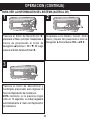
Presione el botón de Menú/Entrar 1;
aparecerá el Menú principal. Desplácese a
Acerca de presionando el botón de
Navegación ▲/Volumen + 2 o ▼/- 3; luego
presione el botón de Menú/Entrar 1.
Desplácese entre Modelo, Versión, Medio
interno y Espacio libre presionando el botón de
Navegación ®/Brincar/Buscar n 1 o √/o 2.
3
Presione el botón de Menú/Entrar y
manténgalo presionado para regresar al
menú de Reproductor de música/voz.
NOTA: Asimismo, si no presiona ningún
botón en 10 segundos, la unidad regresará
automáticamente al menú de Reproductor
de música/voz.
30
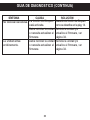
GUÍA DE DIAGNÓSTICO
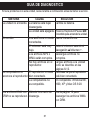
Si tiene problemas con esta unidad, revise la tabla a continuación antes de llamar a servicio.
SÍNTOMA
CAUSA
SOLUCIÓN
La unidad no enciende. La batería está baja/
Cambie la batería.
descargada.
La unidad está apagada. Presione Reproducir/Pausa ®p/
Sin sonido.
Los audífonos no están
conectados.
El volumen está muy
bajo.
Los archivos MP3 o
WMA están corruptos.
No hay archivos en el
reproductor.
La computadora no
El reproductor no está
reconoce el reproductor. bien conectado.
La computadora no
es compatible.
Los archivos WMA con Método incorrecto de
DRM no se reproducen. descarga.
31
Encendido para encender la unidad.
Inserte los audífonos.
Suba el volumen usando el
Navegación ▲/Volumen +.
Descargue archivos no
corruptos.
Cargue archivos a la unidad
como se describe en las
páginas 8-12.
Cerciórese de que el reproductor
esté bien conectado.
OS compatible: Windows ME,
2000, XP y Mac OS 9.2X
Vea la página 12 para
descargar los archivos WMA
con DRM.
GUÍA DE DIAGNÓSTICO (CONTINÚA)
SÍNTOMA
CAUSA
No funcionan los botones. La función de Bloqueo
está activada.
Debe reiniciar la unidad
o necesita actualizar el
firmware.
La unidad actúa
Debe reiniciar la unidad
erráticamente.
o necesita actualizar el
firmware.
32
SOLUCIÓN
Desactive la función de Bloqueo
como se describe en la pág. 14.
Reinicie la unidad y/o
actualice el firmware, ver
página 34.
Reinicie la unidad y/o
actualice el firmware, ver
página 34.
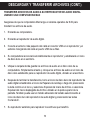
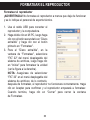
FORMATEAR EL REPRODUCTOR
Formatear el reproductor
¡ADVERTENCIA! No formatee el reproductor a menos que deje de funcionar
y se lo indique el personal de soporte técnico.
1. Use el cable USB para conectar el
reproductor y la computadora.
2. Haga doble clic en Mi PC, luego haga
949MB
clic con el botón secundario en “Disco
extraíble” y haga clic con el botón
primario en “Formatear”.
3. Para el “Disco extraíble”, en la
ventana de “Formatear”, seleccione
“FAT 32” del menú desplegable del
sistema de archivos, luego haga clic
en “Iniciar” para formatear la unidad
(ver la figura a la derecha).
NOTA: Asegúrese de seleccionar
“FAT 32” en el menú desplegable del
sistema de archivos; de lo contrario,
después de formatear, el reproductor no funcionará correctamente. Haga
clic en Aceptar para confirmar y el reproductor empezará a formatear.
Cuando termine, haga clic en “Cerrar” para cerrar la ventana
de Formatear.
33
ACTUALIZAR EL FIRMWARE
¡ADVERTENCIA! No actualice el firmware a menos que experimente problemas con
su aparato de audio digital. La instalación de un firmware incorrecto o defectuoso hará
que el reproductor deje de funcionar.
Puede descargar el firmware actualizado de www.memorexelectronics.com.
REINICIAR LA UNIDAD
Para reiniciar la unidad, reitre la batería durante unos segundos y luego colóquela
nuevamente. Así reiniciará la unidad pero la unidad guardará las configuraciones
predeterminadas (como son, modo de reproducir, ecualizador, contraste, ahorro de
energía, etc.).
34
ESPECIFICACIONES
Audio
Soporte de
archivos
General
Rango de frecuencia
Salida de audífonos
Relación S/N
de 20Hz a 20KHz
5mW, 32 ohmios (vol. máx.)
85db (MP3)
MP3
WMA
Velocidad en bits
Dimensión
Peso
USB
LCD
Memoria integrada
Tiempo máx. de rep.
OS compatible
Temperatura de operación
Batería
MPEG 1/2/2.5 Capa 3
Audio de Windows Media (archivo WMA
con DRM 9)
De 32kbps a 320kbps (MP3)
De 32kbps a 192kbps (WMA)
1.4 (ancho) x 3.2 (alto) x 0.8 (fondo) pulgadas
0.8 onza (sin la batería)
USB 2.0
Gráficos completos con luz de fondo
1 GB
Aprox. 8 horas
Win ME, 2000, XP y Mac OS 9.2X
De 23° F a 104° F
1 batería AAA
Las especificaciones están sujetas a cambios sin previo aviso.
35
PARA OBTENER LA ACTUALIZACIÓN DEL FIRMWARE, VISITE
NUESTRO SITIO WEB EN
WWW.MEMOREXELECTRONICS.COM
PARA REVISAR SI HAY UN FIRMWARE NUEVO DISPONIBLE.
PARA OBTENER AYUDA ADICIONAL CON RESPECTO A LOS AJUSTES
O LA OPERACIÓN, VISITE NUESTRO SITIO WEB EN:
WWW.MEMOREXELECTRONICS.COM
O COMUNÍQUESE CON SERVICIO AL CLIENTE AL (954) 660-7100.
CONSERVE EL EMPAQUE AL MENOS DURANTE 90 DÍAS POR SI ACASO
NECESITARA REGRESAR EL PRODUCTO A SU DISTRIBUIDOR O
A MEMOREX.
PARA OBTENER PIEZAS REEMPLAZABLES POR EL CONSUMIDOR,
CONSULTE EL NÚMERO DE PIEZA EN LA PÁGINA 5 Y LUEGO
COMUNÍQUESE CON FOX INTERNATIONAL AL 1-800-321-6993.
36
Memcorp, Inc.
Weston, FL
Printed in / Impreso en Hong Kong
Visit our website at / Visite nuestro sitio web en
www.memorexelectronics.com
201-03471-E010