1
GB USER MANUAL
GB USER MANUAL
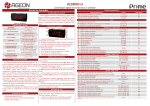
TECHNICAL SPECIFICATIONS
TFT screen
7” 16:9 wide LCD display
Resolution 1440 (H) x 234(V)
Power supply DC 12V
Power consumption 7,5W
Input/output
+12V power (red) and ground (black)
Video in (2x female RCA)
Audio in (2x female RCA)
IR headphone output (2,8MHz/2,3MHz)
2 AV channels (AV 1 / AV 2)
PAL & NTSC (auto switching)
Red to +12V
Black to ground
OPERATION
1. Infrared eyes
2. Power on/off,
3. Video 1 / Video 2
Video 1 (yellow)
Video 2 (yellow)
Audio R (red)
Audio L (white)
The setup of the monitor can be adjusted using the remote control.
Power on/off
Source
Next
Menu
Mode select
Previous
MENU:
TROUBLESHOOTING
If it appears that your monitor is faulty, first consult this checklist. It may be that something
simple has been overlooked. Under no circumstances should you try to repair the player
yourself; as this will invalidate the warranty. Only qualified service personnel can remove the
cover and service this player.
MONITOR WON’T WORK
• Reset the monitor by unplugging the DC power cord and plugging it back in.
NO POWER
• Check the on/off button.
• Check if power plug is properly connected.
• Check if there is power at the DC outlet by plugging in another appliance.
NO PICTURE
• Check if the source is switched on.
• Select the correct AV input on the source.
• Check the video connection.
• Check if channel selector is set to AV on the source.
(See your source manual for instructions).
THE MONITOR DOES NOT RESPOND TO THE REMOTE CONTROL
• Aim the remote control directly at the sensor on the front of the monitor.
• Avoid all obstacles which may interfere with the signal path.
BUTTONS DO NOT WORK
• Unplug the monitor from power outlet and reconnect after a few seconds.
3
4