1
PD-D9MK2_SYXJ5.book
1 ページ
D9
2009年4月15日 水曜日 午後6時9分
PD-D9MK2-K
Super Audio CD Player
Lecteur Super Audio CD
Super Audio CD-Spieler
Super-Audio CD-speler
Lettore CD Super Audio
Reproductor de Super Audio CD
Discover the benefits of registering your product online at
http://www.pioneer.co.uk (or http://www.pioneer.eu).
Découvrez les nombreux avantages offerts en enregistrant votre
produit en ligne maintenant sur http://www.pioneer.fr (ou
http://www.pioneer.eu).
Bitte nutzen Sie die Möglichkeit zur Registrierung Ihres Produktes
unter http://www.pioneer.de (oder http://www.pioneer.eu)
Ontdek nu de voordelen van online registratie! Registreer uw Pioneer
product via http://www.pioneer.nl - http://www.pioneer.be
(of http://www.pioneer.eu).
Registra il tuo prodotto su http://www.pioneer.it
(o http://www.pioneer.eu) e scopri subito quali vantaggi puoi ottenere!
Registre su producto en http://www.pioneer.es
(o en http://www.pioneer.eu) Descubra los beneficios de registrarse
on-line:
Зарегистрируйте Baшe изделие на http://www.pioneer-rus.ru
(или http://www.pioneer.eu). Oзнакомьтесь с преимуществами
регистрации в Интернет
Operating Instructions | Mode d’emploi | Bedienungsanleitung |
Handleiding | Istruzioni per I’uso | Manual de instrucciones |
Инструкции по эксплуатации
PD-D9MK2_SYXJ5.book
2 ページ
2009年4月15日 水曜日 午後6時9分
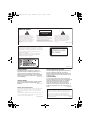
IMPORTANT
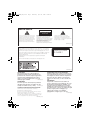
CAUTION
RISK OF ELECTRIC SHOCK
DO NOT OPEN
The lightning flash with arrowhead symbol,
within an equilateral triangle, is intended to
alert the user to the presence of uninsulated
“dangerous voltage” within the product’s
enclosure that may be of sufficient
magnitude to constitute a risk of electric
shock to persons.
CAUTION:
TO PREVENT THE RISK OF ELECTRIC
SHOCK, DO NOT REMOVE COVER (OR
BACK). NO USER-SERVICEABLE PARTS
INSIDE. REFER SERVICING TO QUALIFIED
SERVICE PERSONNEL.
The exclamation point within an equilateral
triangle is intended to alert the user to the
presence of important operating and
maintenance (servicing) instructions in the
literature accompanying the appliance.
D3-4-2-1-1_A1_En
CAUTION
This product is a class 1 laser product, but this
product contains a laser diode higher than Class 1.
To ensure continued safety, do not remove any covers
or attempt to gain access to the inside of the product.
Refer all servicing to qualified personnel.
The following caution label appears on your unit.
Location: rear of the unit
CLASS 1
LASER PRODUCT
D3-4-2-1-8*_C_En
&$(# !'&!"'*'%#%"""#%)!'%
"%&"-%"!"'#!,"!'!%
*'$(!%'&$(# !'&(&)&"%
"*%#"'"%+#"&''"%##!&#&!%!
!
"% "&'(% "#%)!'%+%"!"'#!*!
&"(%&&(&'!"!'
!
$(# !' Operating Environment
Operating environment temperature and humidity:
+5 °C to +35 °C (+41 °F to +95 °F); less than 85 %RH
(cooling vents not blocked)
Do not install this unit in a poorly ventilated area, or in
locations exposed to high humidity or direct sunlight (or
strong artificial light)
D3-4-2-1-7c*_A1_En
+$!)$)+ !!%$,'(*%%!- '(
$' #)$$*#)'-$'' $#(*')))
%$,'(*%%!-+$!)$)',') (*# )
, !!*(")()'&* '+$!)
#
$',' ))#$#)''%#!
VENTILATION CAUTION
When installing this unit, make sure to leave space
around the unit for ventilation to improve heat
radiation (at least 5 cm at top, 10 cm at rear, and
5 cm at each side).
WARNING
Slots and openings in the cabinet are provided for
ventilation to ensure reliable operation of the
product, and to protect it from overheating. To
prevent fire hazard, the openings should never be
blocked or covered with items (such as newspapers,
table-cloths, curtains) or by operating the
equipment on thick carpet or a bed.
D3-4-2-1-7b_A_En
CAUTION
The POWER switch on this unit will not completely
shut off all power from the AC outlet. Since the
power cord serves as the main disconnect device for
the unit, you will need to unplug it from the AC outlet
to shut down all power. Therefore, make sure the
unit has been installed so that the power cord can
be easily unplugged from the AC outlet in case of an
accident. To avoid fire hazard, the power cord should
also be unplugged from the AC outlet when left
unused for a long period of time (for example, when
D3-4-2-2-2a_A_En
on vacation).
PD-D9MK2_SYXJ5.book
3 ページ
2009年4月15日 水曜日 午後6時9分
If the AC plug of this unit does not match the AC
outlet you want to use, the plug must be removed
and appropriate one fitted. Replacement and
mounting of an AC plug on the power supply cord of
this unit should be performed only by qualified
service personnel. If connected to an AC outlet, the
cut-off plug can cause severe electrical shock. Make
sure it is properly disposed of after removal.
The equipment should be disconnected by removing
the mains plug from the wall socket when left unused
for a long period of time (for example, when on
vacation).
D3-4-2-2-1a_A1_En
POWER-CORD CAUTION
Handle the power cord by the plug. Do not pull out the
plug by tugging the cord and never touch the power
cord when your hands are wet as this could cause a
short circuit or electric shock. Do not place the unit, a
piece of furniture, etc., on the power cord, or pinch the
cord. Never make a knot in the cord or tie it with other
cords. The power cords should be routed such that they
are not likely to be stepped on. A damaged power cord
can cause a fire or give you an electrical shock. Check
the power cord once in a while. When you find it
damaged, ask your nearest PIONEER authorized
service center or your dealer for a replacement. S002*_En
Replacement and mounting of an AC plug on the power supply cord of this unit should be performed only by qualified
service personnel.
IMPORTANT: THE MOULDED PLUG
This appliance is supplied with a moulded three pin mains plug for your safety and convenience. A 10 amp fuse is fitted in this plug. Should the
fuse need to be replaced, please ensure that the replacement fuse has a rating of 10 amps and that it is approved by ASTA or BSI to BS1362.
Check for the ASTA mark
or the BSI mark
on the body of the fuse.
If the plug contains a removable fuse cover, you must ensure that it is refitted when the fuse is replaced. If you lose the fuse cover the plug
must not be used until a replacement cover is obtained. A replacement fuse cover can be obtained from your local dealer.
If the fitted moulded plug is unsuitable for your socket outlet, then the fuse shall be removed and the plug cut off and disposed of
safely. There is a danger of severe electrical shock if the cut off plug is inserted into any 13 amp socket.
If a new plug is to be fitted, please observe the wiring code as shown below. If in any doubt, please consult a qualified electrician.
IMPORTANT: The wires in this mains lead are coloured in accordance with the following code:
Blue : Neutral Brown : Live
As the colours of the wires in the mains lead of this appliance may not correspond with the coloured markings identifying the terminals in
your plug, proceed as follows ;
The wire which is coloured BLUE must be connected to the terminal which is marked with the
letter N or coloured BLACK.
The wire which is coloured BROWN must be connected to the terminal which is marked with the
letter L or coloured RED.
How to replace the fuse: Open the fuse compartment with a screwdriver and replace the fuse.
D3-4-2-1-2-2_B_En
Information for users on collection and disposal of old equipment and used batteries
Symbol for
equipment
These symbols on the products, packaging, and/or accompanying documents mean
that used electrical and electronic products and batteries should not be mixed with
general household waste.
For proper treatment, recovery and recycling of old products and used batteries,
please take them to applicable collection points in accordance with your national
legislation.
Symbol examples
for batteries
By disposing of these products and batteries correctly, you will help to save valuable
resources and prevent any potential negative effects on human health and the
environment which could otherwise arise from inappropriate waste handling.
For more information about collection and recycling of old products and batteries,
please contact your local municipality, your waste disposal service or the point of sale
where you purchased the items.
These symbols are only valid in the European Union.
For countries outside the European Union:
If you wish to discard these items, please contact your local authorities or dealer and
ask for the correct method of disposal.
Pb
K058a_A1_En
PD-D9MK2_SYXJ5.book
4 ページ
2009年4月15日 水曜日 午後6時9分
Thank you for buying this Pioneer product.
Please read through these operating instructions so that you will know how to operate your
model properly. After you have finished reading the instructions, put them in a safe place for
future reference.
Contents
01 Before you start
Features . . . . . . . . . . . . . . . . . . . . . . . . . . .
What’s in the box . . . . . . . . . . . . . . . . . . . .
Inserting the battery . . . . . . . . . . . . . . . . . .
Disc/content format playback
compatibility . . . . . . . . . . . . . . . . . . . . . . .
04 Getting started
5
6
6
Switching on . . . . . . . . . . . . . . . . . . . . . . . 12
Playing discs . . . . . . . . . . . . . . . . . . . . . . . 12
Other playback features . . . . . . . . . . . . . . 13
7
05 Other settings and features
02 Connecting up
Connecting to an amplifier. . . . . . . . . . . . . 8
Using the remote sensor of another
Pioneer component . . . . . . . . . . . . . . . . . . 8
Plugging in . . . . . . . . . . . . . . . . . . . . . . . . 9
Listening to Pure Audio . . . . . . . . . . . . . . . 14
Using the SACD/CD . . . . . . . . . . . . . . . . . 14
Using Legato Link Pro . . . . . . . . . . . . . . . . 14
Dimming the display . . . . . . . . . . . . . . . . . 14
Displaying disc information. . . . . . . . . . . . 14
06 Additional information
03 Controls and displays
Front panel. . . . . . . . . . . . . . . . . . . . . . . . 10
Display . . . . . . . . . . . . . . . . . . . . . . . . . . . 10
Remote control . . . . . . . . . . . . . . . . . . . . 11
4
En
Hints on installation . . . . . . . . . . . . . . . . . 15
Taking care of your player and discs . . . . . 15
Troubleshooting . . . . . . . . . . . . . . . . . . . . 17
Glossary . . . . . . . . . . . . . . . . . . . . . . . . . . 18
Specifications . . . . . . . . . . . . . . . . . . . . . . 18
PD-D9MK2_SYXJ5.book
5 ページ
2009年4月15日 水曜日 午後6時9分
Before you start
01
English
Chapter 1
Before you start
Español
• Legato Link Conversion Pro and Hi-Bit
Pioneer’s unique Legato Link Conversion
system restores high-frequency dynamics lost
in the digital recording process, to fully
reproduce all the shading and detail of the
original musical performance. This results in a
minimum amount of phase shift across the
entire hearable audio spectrum.
Italiano
• Sampling rate converter
During CD play, signals are up-sampled to
176.4 kHz, while the dedicated audio master
clock simultaneously reduces jitter, thus
assuring high-fidelity sound reproduction.
Nederlands
• High-precision low-jitter master clock
For more accurate digital transmission, the
crystal oscillator used is the same type found in
commercial communications devices
demanding high-precision time-keeping.
Deutsch
• Quick response power supply circuit
The superior power supply circuit adopted by
this unit achieves vastly improved response by
employing ‘no feedback’ circuitry and low
impedance parallel main capacitors
characteristicly used in professional audio
monitoring.
• Fine-tuned to world-class standards
With the cooperation of the world-class studio
engineers at AIR Studios, this player has been
AIR Studios certified.
Français
Features
• Twin D/A converter 192 kHz/24-bit
The on-board Twin Wolfson 192 kHz/24-bit DAC
means that this player is fully capable of
delivering exceptional sound quality in terms of
dynamic range, low-level resolution and highfrequency detail.
• Pure Audio listening
The Pure Audio feature allows you to listen to
analog audio sources with the digital outputs
disabled, and the front panel display switched
off.
5
En
PD-D9MK2_SYXJ5.book
01
6 ページ
2009年4月15日 水曜日 午後6時9分
Before you start
What’s in the box
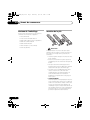
Inserting the battery
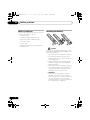
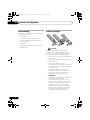
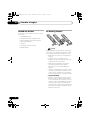
Please confirm that the following accessories
are in the box when you open it.
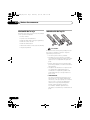
• Remote control
• AAA/IEC R03 dry cell batteries x2
• RCA audio cable (red/white plugs)
• SR control cable
• Power cable
• Operating instructions (This document)
• Warranty card
Caution
Incorrect use of batteries may result in such
hazards as leakage and bursting. Observe the
following precautions:
• Never use new and old batteries together.
• Insert the plus and minus sides of the
batteries properly according to the marks
in the battery case.
• Batteries with the same shape may have
different voltages. Do not use different
batteries together.
• When disposing of used batteries, please
comply with governmental regulations or
environmental public institution’s rules
that apply in your country or area.
• WARNING
Do not use or store batteries in direct
sunlight or other excessively hot place,
such as inside a car or near a heater. This
can cause batteries to leak, overheat,
explode or catch fire. It can also reduce the
life or performance of batteries.
6
En
01_before_start.fm
7 ページ
2009年4月16日 木曜日 午前11時51分
Before you start
01
Media
Compatible formats
About WMA
Please also note that recordable discs cannot be
recorded using this player.
This player can playback Windows Media
Audio content.
CD-R
CD-RW
Super Audio CD*
Disc compatibility table
CD-R/-RW
• CD-Audio, ISO 9660 CD-ROM*
* ISO 9660 Level 1 or 2 compliant. CD
physical format: Mode1, Mode2 XA
Form1. Romeo and Joliet file systems
are both compatible.
• Multi-session playback: No
• Unfinalized disc playback: No
Compressed • MPEG-1 Audio Layer 3 (MP3),
audio
Windows Media Audio (WMA)
• Sampling rates: 44.1 kHz
• Bit-rates: Any (128 kbps or higher
recommended)
• VBR (variable bit rate) playback: No
• WMA lossless encoding: No
• DRM (Digital Rights Management)
compatible: Yes (DRM-protected audio
files will not play in this player.)
• File extensions: .mp3, .wma (these
must be used for the player to recognize
MP3/WMA files)
• File structure (may differ): Up to 299
folders on a disc; up to 648 folders and
files (combined) within each folder
This product includes technology owned by
Microsoft Corporation and cannot be used or
distributed without a license from Microsoft
Licensing, Inc.
About DualDisc playback
A DualDisc is a new two-sided disc, one side of
which contains DVD content video, audio, etc.
while the other side contains non-DVD content
such as digital audio material. The non-DVD,
audio side of the disc is not compliant with the
CD Audio specification and therefore may not
play. For more detailed information on the
DualDisc specification, please refer to the disc
manufacturer or disc retailer.
Español
Compatible formats
Italiano
Media
Windows Media is either a registered trademark
or trademark of Microsoft Corporation in the
United States and/or other countries.
Nederlands
Audio CD
*“Super Audio CD” is a registered trademark.
WMA is an acronym for Windows Media Audio
and refers to an audio compression technology
developed by Microsoft Corporation. WMA files
can be encoded by using Windows Media®
Player 7 or later version, Windows Media®
Player for Windows® XP, or Windows Media®
Player 9 series, or later version.
Deutsch
This player is compatible with a wide range of
audio disc types and media formats. Playable
discs will generally feature one of the following
logos on the disc and/or disc packaging. Note
however that some disc types, such as
recordable CDs, may be in an unplayable
format — see the Disc compatibility table below
for further compatibility information.
Français
PC-created • Discs recorded using a PC may not
disc
be playable due to the setting of the
software used to create the disc. In
these instances, check the software
manual or disc boxes for more on
compatibility.
• Discs recorded in packet write mode
are not compatible.
English
Disc/content format playback
compatibility
7
En
PD-D9MK2_SYXJ5.book
02
8 ページ
2009年4月15日 水曜日 午後6時9分
Connecting up
Chapter 2
Connecting up
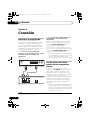
Connecting to an amplifier
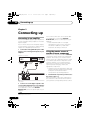
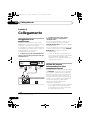
You can connect this player to your amplifier or
receiver using the analog outputs or one of the
digital outputs.
If you connect using one of the digital outputs,
you should also connect the 2 channel analog
outputs for compatibility with all discs.
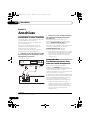
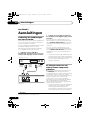
1 Connect the analog LINE OUT jacks on this
player to a set of analog audio inputs on your
amplifier.
Amplifier or receiver
To digital input
(coaxial)
To digital input
(optical)
To audio input
(analog)
For a coaxial connection, use a coaxial cable
(not supplied) to connect the COAXIAL
DIGITAL OUT jack to a coaxial input on your
amplifier.
• Note that SACD audio is not output
through these jacks, so this connection
should be in addition to, rather than
instead of, an analog connection.
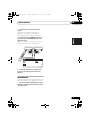
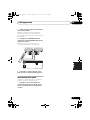
Using the remote sensor of
another Pioneer component
Many Pioneer components have SR CONTROL
jacks which can be used to link components
together. This allows you to use the remote
sensor of just one component, which is useful
if you want to put several components out of
view (for example, in a closed shelf space).
When you use a remote control, the control
signal is passed along the chain to the
appropriate component.1
• Note that if you use this feature, make sure
that you also have at least one set of analog
audio jacks connected to another
component for grounding purposes.
DIGITAL OUT
LINE OUT
R
COAXIAL
OPTICAL
L
CONTROL
IN
OUT
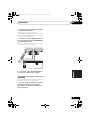
This player
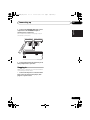
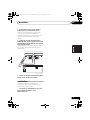
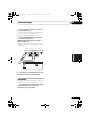
1 Decide which component you want to use
the remote sensor of.
When you want to control any component in
the chain, this is the remote sensor at which
you’ll point the corresponding remote control.
2 Connect one of the digital outputs to the
corresponding digital input on your amplifier.
For an optical connection, use an optical cable
(not supplied) to connect the OPTICAL
DIGITAL OUT jack to an optical input on your
amplifier.
Note
1 If you have connected a remote control to the CONTROL IN jack (using a mini-plug cable), you won’t be able to control this
unit using the remote sensor.
8
En
PD-D9MK2_SYXJ5.book
9 ページ
2009年4月15日 水曜日 午後6時9分
Connecting up
02
Pioneer component
CONTROL
IN
OUT
CONTROL
IN
Français
Pioneer component
English
2 Connect the CONTROL OUT jack of that
component to the CONTROL IN jack of
another Pioneer component.
Use a cable with a mono mini-plug on each
end for the connection.
OUT
Deutsch
IN
OUT
This player
Plugging in
• Connect the AC power cord to the AC IN
inlet on the rear panel of the player, then
plug into a power outlet.
Español
Make sure to complete all connections before
connecting to an AC outlet.
Italiano
3 Continue the chain in the same way for as
many components as you have.
Nederlands
AC IN
CONTROL
9
En
PD-D9MK2_SYXJ5.book
03
10 ページ
2009年4月15日 水曜日 午後6時9分
Controls and displays
Chapter 3
Controls and displays
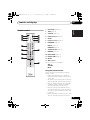
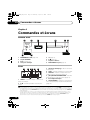
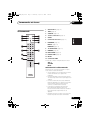
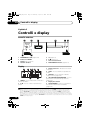
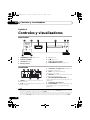
Front panel
1
2
3
4
5
6
D9
POWER
STANDBY
OFF
ON
PURE AUDIO
7
8
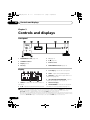
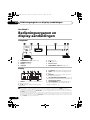
1
POWER OFF ON (page 12)1
5
(page 12)
2
STANDBY indicator
6
/ (page 12)
3
Display (below)
7
Remote sensor
4
Disc tray
8
PURE AUDIO indicator (page 14)
3
Scan display – Shows the scan speed.
4
SACD – Lights during SACD playback.
Display
1
2
3 4
5
6
LEGATO ALL REPEAT
SACD TOTAL RANDOM
REMAIN PGM
TRACK
7
8
1 TRACK – Lights when the track number is
indicated.
2
/ – Light during playback/when paused.
5 LEGATO – Lights when Legato Link Pro is
switched on (page 14).
6 (ALL) REPEAT/RANDOM/PGM – Light to
indicate the playback mode (page 13).
7
Character display
8 TOTAL/REMAIN – Indicate the disc/track
information currently displayed (page 14).
Note
1 • When the unit is in the standby mode, if the power is turned off by pressing the main unit’s POWER button, the power will
not turn on if the button is pressed again. To turn on the power in this case, press either the remote control unit’s
CD PLAYER button or a different button (other than the POWER button) on the main unit.
• When the unit is in the standby mode, if the power is turned off by unplugging the power cord, the power will not turn merely
by reconnecting the power cord. To turn on the power in this case, reconnect the power cord and then press either the remote
control unit’s CD PLAYER button or a different button (other than the POWER button) on the main unit.
10
En
PD-D9MK2_SYXJ5.book
11 ページ
2009年4月15日 水曜日 午後6時9分
Controls and displays
03
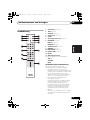
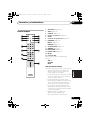
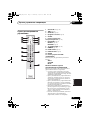
CD PLAYER
OPEN/CLOSE
1
8
DIMMER
TIME
2
3
9
10
11
5
2
3
4
5
6
7
8
9
CLEAR
0
ENTER
2
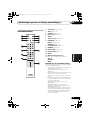
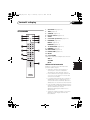
TIME (page 14)
3
SACD/CD (page 14)
4
Number buttons (page 12)
5
CLEAR
6
Playback controls (page 12)
7
PROGRAM (page 13)
REPEAT (page 13)
RANDOM (page 13)
12
OPEN/CLOSE (page 12)
9
DIMMER (page 14)
10 PURE AUDIO (page 14)
PROGRAM REPEAT
11 LEGATO LINK (page 14)
RANDOM
7
12 ENTER
AMP
VOLUME
MUTE
13 AMP controls
Use to control Pioneer amplifier.
AMP
VOLUME
MUTE
Keep in mind the following when using the
remote control:
SACD PLAYER
• Make sure that there are no obstacles
between the remote and the remote sensor
on the unit.
• The remote has a range of about 7 m at an
angle of about 30º from the remote sensor.
• Remote operation may become unreliable
if strong sunlight or fluorescent light is
shining on the unit’s remote sensor.
• Remote controllers for different devices
can interfere with each other. Avoid using
remotes for other equipment located close
to this unit.
• Replace the batteries when you notice a fall
off in the operating range of the remote.
Español
Using the remote control
Italiano
13
Nederlands
6
8
Deutsch
4
1
CD PLAYER (page 12)
Français
SACD/CD
LEGATO
LINK PURE AUDIO
1
English
Remote control
11
En
PD-D9MK2_SYXJ5.book
04
12 ページ
2009年4月15日 水曜日 午後6時9分
Getting started
Chapter 4
Getting started
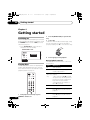
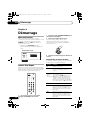
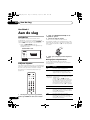
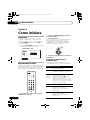
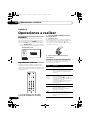
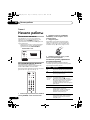
2 Press (OPEN/CLOSE) to open the disc
tray.
Switching on
After making sure that everything is connected
properly and that the player is plugged in, push
the POWER button into the ON position to
switch the player on.
3 Load a disc.
Load a disc with the label side facing up, using
the disc tray guide to align the disc. Once
properly seated, press to close the disc tray.
• Press CD PLAYER on the remote to
switch the unit into standby.
POWER OFF ON
POWER
STANDBY
OFF
ON
PURE AUDIO
4
Press (play) to start playback.
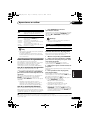
Basic playback controls
The table below shows the basic controls for
playing discs.
Playing discs
The basic playback controls for playing CDs,
SACDs, and MP3/WMA discs are covered
here. Further functions are detailed in Other
playback features on page 13.
CD PLAYER
OPEN/CLOSE
TIME
DIMMER
SACD/CD
12
En
LEGATO
LINK PURE AUDIO
1
2
3
4
5
6
7
8
9
CLEAR
0
ENTER
1 If the player isn’t already on, press
POWER to switch it on.
Button
What it does
Starts playback.
Pauses a disc that’s playing, or
restarts a paused disc.
/
Starts playback/stops a disc that’s
(front panel playing.
only)
• While depressing /, press
(front panel only). Counting from the
first track on the disc, playback will
begin from the track number
corresponding to the number of
times is pressed.
Stops playback.
Press to start fast reverse scanning.
Press (play) to resume normal
playback.
Press to start fast forward scanning.
Press (play) to resume normal
playback.
PD-D9MK2_SYXJ5.book
13 ページ
2009年4月15日 水曜日 午後6時9分
Getting started
What it does
Skips to the start of the current
track, then to previous tracks.
Skips to the next track.
Tip
• Use the following controls during random
play:
What it does
Selects a new track at random.
Returns to the beginning of the
current track.
FAQ
SACD audio is only available through the
analog outputs. This is not a malfunction.
Creating a program list
This feature lets you program the play order of
tracks on a disc.2
1
Other playback features
Using repeat play
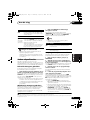
• During playback, press REPEAT to select a
repeat play mode.
Select between 1-track repeat (REPEAT lights
in the display), all repeat (ALL REPEAT lights in
the display), or repeat off.
• It’s also possible to use ‘all’ repeat play
together with program play (see Creating a
program list below).
Using random play
Use the random play feature to play tracks at
random. You can set the random play option
when a disc is playing or stopped.1
3 Repeat step 2 to build up a program list.
A program list can contain up to 24 tracks.
4 To play the program list, press (play).
Program play remains active (PGM shows in
the display) until you stop playback (press
(play) after (stop) to start normal
playback).
Español
There are two repeat play options available
during playback.
2 Use the number buttons and ENTER to
select a track for the current step in the
program list.
If you accidently enter the wrong track, press
CLEAR to delete it.
Italiano
The following features allow you to customize
the playback order. Note that these features
are not available with data discs (containing
WMA/MP3 files).
While stopped, press PROGRAM.
Nederlands
• Why can’t I hear SACD audio through the
digital outputs?
Deutsch
Button
Français
Numbers Use to enter a track number. Press
(not available ENTER to select.
with MP3/
• If the disc is stopped, playback
WMA data
starts from the selected track.
discs)
• If the disc is playing, playback
jumps to the start of the selected
track.
• Press RANDOM to start random play.
Random play remains in effect (RANDOM
shows in the display) until you press (or
RANDOM again) to cancel.
English
Button
04
• Press PROGRAM then (play) to restart
program play.
• To add more tracks to the program list,
repeat steps 1 and 2.
• When the disc is stopped, press
PROGRAM then CLEAR to erase one track
at a time (from the end of the list), or simply
press CLEAR to erase all tracks.
Note
1 You can’t use random play together with program play.
2 You can’t program pauses, or use program play together with random or 1-track repeat play.
13
En
PD-D9MK2_SYXJ5.book
05
14 ページ
2009年4月15日 水曜日 午後6時9分
Other settings and features
Chapter 5
Other settings and features
Listening to Pure Audio
Using Legato Link Pro
This unit has been specially designed to
provide you the truest possible reproduction of
recorded audio. When the Pure Audio feature
is selected, the front panel display is switched
off and the digital outputs are disabled, leaving
you with the pure sound source.
For as great as CDs sound, the digital
recording process clips off important musical
shadings and nuances above 20 kHz. These
signals contain important clues about musical
texture and shape that define a live musical
event. Pioneer’s Legato Link Pro Conversion
system uses psychoacoustic processing to
restore missing high frequency dynamics to
fully recapture all the shading and detail of the
original performance.
• Press PURE AUDIO to switch Pure Audio
listening on or off.
The PURE AUDIO indicator on the front panel
lights to indicate Pure Audio listening is on.
Using the SACD/CD
Hybrid SACD discs include a conventional CD
layer along with the high-resolution SACD
layer, so it is necessary to indicate to the player
which layer you want to listen to. Use the
SACD/CD to do this.1
• When the disc is stopped, press SACD/CD
to switch between the CD area and the SACD
area of a hybrid disc.
• Press LEGATO LINK to switch Legato Link
Pro Conversion on or off.
The LEGATO lights in the display to indicate
Legato Link Pro Conversion is on.
Dimming the display
You can choose one of three brightness
settings for the front panel display.
• Press DIMMER to switch between
brightness settings for the display.
Select between light, dark or backlight off.
Displaying disc information
Various track information, such as the elapsed
and remaining playing time can be displayed
while a disc is playing.2
• To switch the information displayed,
press TIME repeatedly.
Note
1 Note that this player is not compatible with multichannel SACD discs.
2 With data discs, MP3/WMA filenames are displayed (up to eight characters). Note that some characters may not display
correctly.
14
En
PD-D9MK2_SYXJ5.book
15 ページ
2009年4月15日 水曜日 午後6時9分
Additional information
06
Additional information
English
Hints on installation
Français
Chapter 6
We want you to enjoy using this product for
years to come, so please use the following
guidelines when choosing a suitable location:
• Use in a well-ventilated room.
• Place on a solid, flat, level surface, such as
a table, shelf or stereo rack.
Hold discs by the edge or by the center hole
and edge.
When you’re not using a disc, return it to its
case and store upright. Avoid leaving discs in
excessively cold, humid, or hot environments
(including under direct sunlight).
Don’t glue paper or put stickers on to discs. Do
not use a pencil, ball-point pen or other
sharp-tipped writing instrument to write on the
disc.
• Use in an excessively dusty or damp
environment.
Don’t use self-adhesive disc labels on discs as
these can cause the disc to warp slightly
during playback causing distortion in the
sound.
• Use near a television or monitor as you may
experience interference — especially if the
television uses an indoor antenna.
Damaged and shaped discs
• Use in a kitchen or other room where the
player may be exposed to smoke or steam.
Do not use cracked, chipped, warped, or
otherwise damaged discs as they may damage
the player.
Español
• Place directly on top of an amplifier, or
other component in your stereo system
that becomes hot in use.
Italiano
• Place on a window sill or a place where the
player will be exposed to direct sunlight.
Nederlands
Don’t...
• Use in a place exposed to high
temperatures or humidity, including near
radiators and other heat-generating
appliances.
General
Deutsch
Do...
Taking care of your player and
discs
• Use on a thick rug or carpet, or cover with
cloth — this may prevent proper cooling of
the unit.
• Place on an unstable surface, or one that is
not large enough to support all four of the
unit’s feet.
15
En
06_additional_info.fm 16 ページ
06
2009年4月21日 火曜日 午後6時13分
Additional information
This player is designed to be used only with
conventional, fully circular discs. Do not use
shaped discs. Pioneer disclaims all liability
arising in connection with the use of shaped
discs.
Cleaning discs
Fingerprints and dust on discs can affect
playback performance. Clean using a soft, dry
cloth, wiping the disc lightly from the center to
the outside edge as shown below.
If necessary, use a cloth soaked in alcohol, or a
commercially available CD/DVD cleaning kit to
clean a disc more thoroughly. Never use
benzine, thinner or other cleaning agents,
including products designed for cleaning vinyl
records.
Cleaning the unit’s exterior
Unplug the unit before cleaning.
Use a dry cloth to wipe off dust and dirt. If the
surfaces are very dirty, wipe with a soft cloth
dipped in some neutral cleanser diluted five or
six times with water and wrung out well, then
wipe again with a dry cloth.
Do not use furniture wax or cleaners. Never use
thinners, benzine or insecticide sprays or other
chemicals on or near this unit.
If you use a chemical-impregnated cleaning
cloth, read the instructions carefully before
use. These cloths may leave smear marks on
half-mirror finish surfaces; if this happens,
finish with a dry cloth.
16
En
Cleaning the pickup lens
The player’s lens should not become dirty in
normal use, but if for some reason it should
malfunction due to dust or dirt, consult your
nearest Pioneer-authorized service center. We
do not recommend using commercially
available lens cleaners for CD players.
Condensation
Condensation may form inside the player if it is
brought into a warm room from outside, or if
the temperature of the room rises quickly.
Although the condensation won’t damage the
player, it may temporarily impair its
performance. Leave it to adjust to the warmer
temperature for about an hour before
switching on.
Moving the player
If you need to move the player, first switch the
unit into standby (press CD PLAYER on the
remote), then unplug the power cable. Never
lift or move the unit during playback — discs
rotate at a high speed and may be damaged.
Caution for when the unit is installed
in a rack with a glass door
Do not press the OPEN/CLOSE on the
remote control to open the disc tray while the
glass door is closed. The door will hamper the
movement of the disc tray, and the unit could
be damaged.
PD-D9MK2_SYXJ5.book
17 ページ
2009年4月15日 水曜日 午後6時9分
Additional information
• The remote control is too far from the player, or the angle with the remote
sensor is too wide: Use the remote within its operating range (page 11).
• If you’re trying to switch on using the remote control, make sure the front
panel POWER button is switched on first.
• The battery is exhausted: Replace the battery (page 6).
No audio, or audio is
distorted.
• Check that the disc is not damaged, and free from dust and dirt (page 15).
• Check that all interconnects are firmly inserted.
• Check that the plugs and terminals are free of dirt, oxide, etc. and clean if
necessary. Also check the cable for damage.
• Make sure the player’s output is not connected to the amplifier’s phono
(turntable) inputs.
• Check your amplifier/receiver’s settings (volume, input function, speaker
settings, etc.).
The analog audio is OK,
but there appears to be
no digital audio signal.
• Make sure that Pure Audio feature is switched off (page 14).
• SACDs do not output digital audio. The signal is heard through the player’s
analog audio outputs.
Noticeable difference in
SACD and CD volume.
• This is due to differences in the audio format and is not a malfunction.
Cannot play
multichannel audio.
• This player is not compatible with multichannel audio.
Settings are erased.
Español
The remote control
doesn’t seem to work.
Italiano
• Make sure the disc is free from dirt and dust and is not damaged (page 15).
• Check Disc/content format playback compatibility on page 7 to confirm that the
disc is compatible with this player.
• Make sure the disc is loaded with the label side face-up and aligned properly
in the disc tray guide.
• Condensation inside the player: Allow time for condensation to evaporate.
Avoid using the player near an air-conditioning unit.
Nederlands
Remedy
Deutsch
Problem
The disc won’t play or is
automatically ejected
after loading.
Français
Incorrect operation is often mistaken for trouble or malfunction. If you think that there is
something wrong with this component, check the points below. Sometimes the trouble may lie in
another component. Inspect the other components and electrical appliances being used. If the
trouble cannot be rectified after checking the items below, ask your nearest Pioneer authorized
service center or your dealer to carry out repair work.
English
Troubleshooting
06
• If you have switched the unit off (using the front panel POWER button) for
more than 30 days, all settings will be erased.
Note
• Static electricity or other external influences may cause malfunctioning of this unit. In this
case, unplug the power cord and then plug back in. This will usually reset the unit for proper
operation. If this does not correct the problem, please consult your nearest Pioneer service
center.
17
En
PD-D9MK2_SYXJ5.book
06
18 ページ
2009年4月15日 水曜日 午後6時9分
Additional information
Glossary
Specifications
Analog audio Direct representation of sound by an
electrical signal. See also Digital audio.
General
Digital audio Indirect representation of sound using
numbers. See also Sampling frequency
and Analog audio.
DRM
18
En
DRM (digital rights management) copy
protection is a technology designed to
prevent unauthorized copying by
restricting playback, etc. of compressed
audio files on devices other than the PC
(or other recording equipment) used to
record it. For detailed information,
please see the instruction manuals or
help files that came with your PC and/or
software.
File
extension
A tag added to the end of a filename to
indicate the type of file. For example,
“.mp3” indicates an MP3 file.
ISO 9660
format
International standard for the volume
and file structure of CD-ROM discs.
MP3
MP3 (MPEG1 audio layer 3) is a
compressed stereo audio file format.
Files are recognized by their file
extension “.mp3”.
PCM
(Pulse Code
Modulation)
Digital audio encoding system found on
CDs. Good quality, but requires a lot of
data compared to compressed audio
formats. See also Digital audio.
Sampling
frequency
The rate at which sound is measured to
be turned into digital audio data. The
higher the rate, the better the sound
quality. CD is 44.1 kHz; DVD can be up
to 96 kHz. See also Digital audio.
WMA
See About WMA on page 7.
Super Audio
CD (SACD)
Super Audio CD is a high quality audio
disc format that can accommodate high
sampling rate stereo and multi-channel
audio, as well as conventional CD audio
all on the same disc.
System . . . . . . . . . . . . . . Super Audio CD player
Power requirements
. . . . . . . . . . . . . . . AC 220 V to 240 V, 50 Hz/60 Hz
Power consumption . . . . . . . . . . . . . . . . . . 22 W
Power consumption (standby) . . . . . . . . . . 0.4 W
Weight. . . . . . . . . . . . . . . . . . . . . . . . . . . . .11.0 kg
Dimensions
. . . . 420 mm (W) x 113 mm (H) x 340 mm (D)
Operating temperature . . . . . . .+5 °C to +35 °C
Operating humidity . . . . . . . . . . . . . . 5 % to 85 %
(no condensation)
Audio output (1 stereo pair)
Output level . . . . . . . . . . . . .During audio output
200 mVrms (1 kHz, –20 dB)
Number of channels . . . . . . . . . . . . . . . . . . . . . . 2
Jacks . . . . . . . . . . . . . . . . . . . . . . . . . . . . . . . RCA
Digital audio characteristics
Frequency response . . . . 4 Hz to 50 kHz (SACD)
4 Hz to 20 kHz (CD)
S/N ratio:
CD . . . . . . . . . . . . . . . . . . . . . . . . . . . . . . 115 dB
SACD . . . . . . . . . . . . . . . . . . . . . . . . . . . 110 dB
Dynamic range:
CD . . . . . . . . . . . . . . . . . . . . . . . . . . . . . . 100 dB
SACD . . . . . . . . . . . . . . . . . . . . . . . . . . . 110 dB
Total harmonic distortion:
CD . . . . . . . . . . . . . . . . . . . . . . . . . . . . . 0.002 %
SACD . . . . . . . . . . . . . . . . . . . . . . . . . . 0.003 %
Wow and flutter . . . . . . . . Limit of measurement
(±0.001 % W. PEAK) or lower
Digital output
Coaxial digital output. . . . . . . . . . . . . . . RCA jack
Optical digital output. . . . . . . Optical digital jack
06_additional_info.fm 19 ページ
2009年4月21日 火曜日 午前11時9分
Additional information
Note
Nederlands
Published by Pioneer Corporation.
Copyright © 2009 Pioneer Corporation.
All rights reserved.
Deutsch
• Specifications and the design are subject
to possible modifications without notice,
due to improvements.
Français
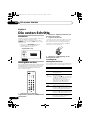
Remote control . . . . . . . . . . . . . . . . . . . . . . . . . . 1
AAA/IEC R03 dry cell batteries . . . . . . . . . . . . 2
RCA audio cable (red/white plugs) . . . . . . . . 1
SR control cable . . . . . . . . . . . . . . . . . . . . . . . . . 1
Power cable . . . . . . . . . . . . . . . . . . . . . . . . . . . . . 1
Warranty card
Operating Instructions (This document)
English
Accessories
06
Italiano
Español
19
En
PD-D9MK2_SYXJ5.book
Page 2
Wednesday, April 22, 2009
1:10 PM
IMPORTANT
ATTENTION
DANGER D´ELECTROCUTION
NE PAS OUVRIR
Ce symbole de l’éclair, placé dans un
triangle équilatéral, a pour but d’attirer
l’attention de l’utilisateur sur la présence, à
l’intérieur du coffret de l’appareil, de
“tensions dangereuses” non isolées d’une
grandeur suffisante pour représenter un
risque d’électrocution pour les êtres
humains.
ATTENTION :
POUR ÉVITER TOUT RISQUE
D’ÉLECTROCUTION, NE PAS ENLEVER LE
COUVERCLE (NI LE PANNEAU ARRIÈRE).
AUCUNE PIÈCE RÉPARABLE PAR
L’UTILISATEUR NE SE TROUVE À
L’INTÉRIEUR. CONFIER TOUT ENTRETIEN À
UN PERSONNEL QUALIFIÉ UNIQUEMENT.
Ce point d’exclamation, placé dans un
triangle équilatéral, a pour but d’attirer
l’attention de l’utilisateur sur la présence,
dans les documents qui accompagnent
l’appareil, d’explications importantes du
point de vue de l’exploitation ou de
l’entretien.
D3-4-2-1-1_A1_Fr
ATTENTION
Cet appareil est un produit laser de Classe 1, mais la
diode laser qu’il renferme est supérieure à la Classe 1.
Pour garantir une sécurité constante, ne retirez aucun
des couvercles et n’essayez pas d’avoir accès à
l’intérieur de l’appareil.
Confiez toute réparation à un personnel qualifié.
L’étiquette suivante se trouve sur votre appareil.
Emplacement : Panneau arrière
APPAREIL Á LASER
DE CLASSE 1
D3-4-2-1-8*_C_Fr
AVERTISSEMENT
PRÉCAUTION DE VENTILATION
Cet appareil n’est pas étanche. Pour éviter les
risques d’incendie et de décharge électrique, ne
placez près de lui un récipient rempli d’eau, tel
qu’un vase ou un pot de fleurs, et ne l’exposez pas
à des gouttes d’eau, des éclaboussures, de la pluie
D3-4-2-1-3_A_Fr
ou de l’humidité.
Lors de l’installation de l’appareil, veillez à laisser
un espace suffisant autour de ses parois de
manière à améliorer la dissipation de chaleur (au
moins 5 cm sur le dessus, 10 cm à l’arrière et 5 cm
de chaque côté).
AVERTISSEMENT
Pour éviter les risques d’incendie, ne placez aucune
flamme nue (telle qu’une bougie allumée) sur
D3-4-2-1-7a_A_Fr
l’appareil.
Milieu de fonctionnement
Température et humidité du milieu de fonctionnement :
De +5 °C à +35 °C (de +41 °F à +95 °F) ; Humidité
relative inférieure à 85 % (orifices de ventilation non
obstrués)
N’installez pas l’appareil dans un endroit mal ventilé ou
un lieu soumis à une forte humidité ou en plein soleil
(ou à une forte lumière artificielle).
D3-4-2-1-7c*_A1_Fr
AVERTISSEMENT
Les fentes et ouvertures du coffret sont prévues
pour la ventilation, pour assurer un fonctionnement
stable de l’appareil et pour éviter sa surchauffe.
Pour éviter les risques d’incendie, ne bouchez
jamais les ouvertures et ne les recouvrez pas
d’objets, tels que journaux, nappes ou rideaux, et
n’utilisez pas l’appareil posé sur un tapis épais ou
un lit.
D3-4-2-1-7b_A_Fr
"
PD-D9MK2_SYXJ5.book
Page 3
Wednesday, April 22, 2009
Si la fiche d’alimentation secteur de cet appareil ne
convient pas à la prise secteur à utiliser, la fiche doit
être remplacée par une appropriée. Ce
remplacement et la fixation d’une fiche secteur sur le
cordon d’alimentation de cet appareil doivent être
effectués par un personnel de service qualifié. En cas
de branchement sur une prise secteur, la fiche de
coupure peut provoquer une sérieuse décharge
électrique. Assurez-vous qu’elle est éliminée
correctement après sa dépose.
L’appareil doit être déconnecté en débranchant sa
fiche secteur au niveau de la prise murale si vous
prévoyez une période prolongée de non utilisation
(par exemple avant un départ en vacances).
D3-4-2-2-1a_A1_Fr
AVERTISSEMENT
Avant de brancher l’appareil pour la première, lisez
attentivement la section suivante.
La tension de l’alimentation électrique disponible
varie selon le pays ou la région. Assurez-vous que
la tension du secteur de la région où l’appareil sera
utilisé correspond à la tension requise (par ex. 230
V ou 120 V), indiquée sur le panneau arrière.
D3-4-2-1-4_A_Fr
1:10 PM
ATTENTION
! ! !
& ! !
(#! !"* ((!
"! !!! & (! "%
, &!
!* ((
! !(" ! ! ((!"! !"!
("$%!((! #" !( "
D3-4-2-2-2a_A_Fr
NOTE IMPORTANTE SUR LE CABLE
D’ALIMENTATION
Tenir le câble d’alimentation par la fiche. Ne pas
débrancher la prise en tirant sur le câble et ne pas
toucher le câble avec les mains mouillées. Cela risque
de provoquer un court-circuit ou un choc électrique. Ne
pas poser l’appareil ou un meuble sur le câble. Ne pas
pincer le câble. Ne pas faire de noeud avec le câble ou
l’attacher à d’autres câbles. Les câbles d’alimentation
doivent être posés de façon à ne pas être écrasés. Un
câble abîmé peut provoquer un risque d’incendie ou un
choc électrique. Vérifier le câble d’alimentation de
temps en temps. Contacter le service après-vente
PIONEER le plus proche ou le revendeur pour un
remplacement.
S002*_Fr
Information à destination des utilisateurs sur la collecte et l’élimination des
équipements et batteries usagés
Marquage pour les
équipements
Ces symboles qui figurent sur les produits, les emballages et/ou les documents
d’accompagnement signifient que les équipements électriques et électroniques et
batteries usagés ne doivent pas être jetés avec les déchets ménagers et font l’objet
d’une collecte sélective.
Pour assurer l’enlèvement et le traitement appropriés des produits et batteries
usagés, merci de les retourner dans les points de collecte sélective habilités
conformément à la législation locale en vigueur.
Exemples de marquage
pour les batteries
En respectant les circuits de collecte sélective mis en place pour ces produits, vous
contribuerez à économiser des ressources précieuses et à prévenir les impacts
négatifs éventuels sur la santé humaine et l’environnement qui pourraient résulter
d’une mauvaise gestion des déchets.
Pour plus d’information sur la collecte et le traitement des produits et batteries
usagés, veuillez contacter votre municipalité, votre service de gestion des déchets
ou le point de vente chez qui vous avez acheté ces produits.
Pb
Ces symboles ne sont valables que dans les pays de l’Union Européenne.
Pour les pays n’appartenant pas à l’Union Européenne :
Si vous souhaitez jeter ces articles, veuillez contacter les autorités ou revendeurs
locaux pour connaître les méthodes d’élimination appropriées.
K058a_A1_Fr
PD-D9MK2_SYXJ5.book
Page 4
Wednesday, April 22, 2009
1:10 PM
Nous vous remercions d’avoir acheté ce produit Pioneer.
Veuillez lire attentivement ce mode d’emploi afin d’apprendre à manipuler votre modèle
correctement. Lorsque vous avez terminé, rangez-le en lieu sûr afin de pouvoir vous y référer à
l’avenir.
Sommaire
01 Avant de commencer
Caractéristiques. . . . . . . . . . . . . . . . . . . . .
Contenu de l’emballage . . . . . . . . . . . . . . .
Insertion de la pile . . . . . . . . . . . . . . . . . . .
Compatibilité en lecture des disques et du
format de gravure. . . . . . . . . . . . . . . . . . . .
04 Démarrage
5
6
6
Mise sous tension . . . . . . . . . . . . . . . . . . . 12
Lecture d’un disque. . . . . . . . . . . . . . . . . . 12
Autres fonctions de lecture . . . . . . . . . . . . 13
7
05 Autres réglages et fonctions
02 Connexions
Connexion à un amplificateur . . . . . . . . . . 8
Utilisation du capteur à distance d’un autre
appareil Pioneer . . . . . . . . . . . . . . . . . . . . . 8
Branchement . . . . . . . . . . . . . . . . . . . . . . . 9
Écoute en mode Pure Audio . . . . . . . . . . . 14
Utilisation du SACD/CD . . . . . . . . . . . . . . 14
Utilisation de Legato Link Pro . . . . . . . . . . 14
Atténuation de l’affichage . . . . . . . . . . . . . 14
Affichage des informations du disque . . . . 14
06 Informations complémentaires
03 Commandes et écrans
Panneau avant . . . . . . . . . . . . . . . . . . . . . 10
Écran . . . . . . . . . . . . . . . . . . . . . . . . . . . . 10
Télécommande . . . . . . . . . . . . . . . . . . . . 11
4
Fr
Conseils d’installation . . . . . . . . . . . . . . . . 15
Précautions d’utilisation du lecteur et des
disques . . . . . . . . . . . . . . . . . . . . . . . . . . . 15
Guide de dépannage . . . . . . . . . . . . . . . . . 17
Glossaire . . . . . . . . . . . . . . . . . . . . . . . . . . 18
Caractéristiques techniques . . . . . . . . . . . 18
PD-D9MK2_SYXJ5.book
Page 5
Wednesday, April 22, 2009
1:10 PM
Avant de commencer
01
Chapitre 1
Avant de commencer
Caractéristiques
• Circuit d’alimentation à réaction rapide
Le circuit d’alimentation supérieur de cet
appareil permet une réaction largement
améliorée grâce à l’utilisation de circuits ‘sans
retour’ et de condensateurs parallèles à faible
impédance généralement utilisés dans la
surveillance audio professionnelle.
• Écoute en mode Pure Audio
La fonction Pure Audio permet d’écouter des
sources audio analogiques lorsque les sorties
audio sont désactivées et l’écran du panneau
avant éteint.
• Réglage fin aux normes mondiales
Ce lecteur a été certifié AIR Studios en
collaboration avec les ingénieurs du studio de
classe internationale AIR Studios.
• Horloge maître de haute précision à faible
gigue
Pour une transmission numérique précise,
l’oscillateur à crystal utilisé est de même type
que dans les appareils de communication du
commerce qui demandent un maintien de
l’heure de haute précision.
• Convertisseur de taux d’échantillonnage
Pendant la lecture de CD, les signaux sont
pré-échantillonnés à 176,4 kHz, tandis que
l’horloge maître audio dédiée réduit
simultanément la gigue, assurant ainsi une
reproduction du son de haute fidélité.
• Legato Link Conversion Pro et Hi-Bit
Le système Legato Link Conversion unique de
Pioneer rétablit les pertes dynamiques de
haute fréquence dans le processus
d’enregistrement numérique pour reproduire
complètement toutes les nuances et les détails
de l’événement musical original. Cela entraîne
une quantité réduite de glissements de phase
sur l’ensemble du spectre audio audible.
• Convertisseur Twin D/A 192 kHz/24 bits
Le convertisseur Twin Wolfson 192 kHz/24 bits
intégré signifie que ce lecteur est entièrement
capable de fournir des sons de qualité
supérieure en termes de dynamique, de
résolution à bas niveau et de détail dans les
aigus.
5
Fr
PD-D9MK2_SYXJ5.book
01
Page 6
Wednesday, April 22, 2009
1:10 PM
Avant de commencer
Contenu de l’emballage
Insertion de la pile
Veuillez vous assurer que les accessoires
suivants sont livrés avec l’appareil.
• Télécommande
• Piles sèches AAA/IEC R03 x 2
• Câble audio RCA (fiches rouge/blanc)
• Câble de commande SR
• Câble d’alimentation
• Mode d’emploi (ce document)
• Carte de garantie
Attention
Toute utilisation incorrecte des piles peut
entraîner des accidents, comme une fuite ou
une explosion. Respectez les précautions
suivantes :
• N’utilisez jamais des piles neuves avec des
piles usagées.
• Insérez correctement les pôles positif et
négatif des piles en suivant les marques du
boîtier.
• Des piles de forme identique peuvent
présenter des tensions différentes. Utilisez
uniquement des piles du même type.
• Lorsque vous vous débarrassez de piles
usées, veuillez vous conformer aux
réglementations gouvernementales ou
environnementales des institutions
publiques en vigueur dans votre pays ou
votre région.
• AVERTISSEMENT
N’utilisez pas et ne rangez pas pas les piles
sous la lumière directe du soleil ou dans un
endroit excessivement chaud, comme une
voiture ou à proximité d’un appareil de
chauffage. Les piles risqueraient de fuir, de
surchauffer, d’exploser ou de s’enflammer.
Leur durée de vie ou leurs performances
pourraient également être réduites.
6
Fr
PD-D9MK2_SYXJ5.book
Page 7
Wednesday, April 22, 2009
1:10 PM
Avant de commencer
Compatibilité en lecture des
disques et du format de gravure
Ce lecteur est compatible avec une vaste
gamme de types de disques audio et de
formats de gravure. Les disques que cet
appareil peut lire, ou leur coffret, portent, en
général, un des logos suivants. Certains types
de disques, tels que les CD enregistrables,
peuvent toutefois présenter un format non
reconnu — pour plus d’informations sur la
compatibilité, reportez-vous au Tableau de
compatibilité des disques ci-dessous.
Cet appareil n’est pas conçu pour graver les
disques, quels qu’ils soient.
CD Audio
CD-R
CD-RW
Super Audio CD*
*“Super Audio CD” est une marque déposée.
Tableau de compatibilité des disques
Support
Formats compatibles
CD-R/-RW • CD-Audio, ISO 9660 CD-ROM*
* Conforme à ISO 9660 Niveau 1 ou 2.
Format physique des CD : Mode1, Mode2
XA Form1. Les systèmes de fichiers
Romeo et Joliet sont compatibles.
• Lecture multisession : Non
• Lecture d’un disque non finalisé : Non
Audio
• MPEG-1 Audio Layer 3 (MP3),
compressé Windows Media Audio (WMA)
• Taux d’échantillonnage : 44,1 kHz
• Taux binaires : Quelconque (128 kbps,
ou mieux, est conseillé)
• Lecture VBR (à taux binaire variable) :
Non
• Encodage WMA sans perte : Non
• Compatibilité DRM (Digital Rights
Management) : Oui (les fichiers audio
avec protection DRM ne sont pas lus par
ce lecteur.)
• Extensions de fichier : .mp3, .wma
(elles doivent être utilisées pour que le
lecteur reconnaisse les fichiers MP3/
WMA)
• Structure de fichier (peut varier) :
Jusqu’à 299 dossiers sur un disque ;
combinaison de 648 dossiers et fichiers
maximum dans chaque dossier
01
Support
Formats compatibles
Disque
créé sur
PC
• Les disques enregistrés à l’aide d’un
ordinateur peuvent être illisibles en
raison des paramètres du logiciel utilisé
pour créer le disque. Dans ce cas,
consultez le manuel du logiciel ou le
boîtier des disques pour plus
d’informations sur la compatibilité.
• Les disques enregistrés en mode
d’écriture en paquet ne sont pas
compatibles.
À propos du format WMA
Ce lecteur peut lire des contenus Windows
Media Audio.
WMA est l’abréviation de Windows Media
Audio, technique de compression audio mise
au point par Microsoft Corporation. Les
fichiers WMA peuvent être encryptés à l’aide
de Windows Media® Player 7 ou d’une version
ultérieure, Windows Media® Player pour
Windows® XP, ou la série Windows Media®
Player 9, ou les versions ultérieures.
Windows Media est une marque déposée ou
une marque commerciale de Microsoft
Corporation aux États-Unis et/ou dans d’autres
pays.
Ce produit intègre une technologie détenue par
Microsoft Corporation, qui ne peut être utilisée
et distribuée que sous licence de Microsoft
Licensing, Inc.
À propos de la lecture de disques
DualDisc
Un disque DualDisc est un nouveau disque à
deux faces, l’une d’elle comportant du contenu
DVD vidéo, audio, etc. et l’autre comportant du
contenu non-DVD tel que des données audio
numériques. La face audio non-DVD du disque
n’est pas conforme aux spécifications des CD
audio et il se peut donc que la lecture soit
impossible. Pour de plus amples informations
sur les caractéristiques des DualDisc, veuillez
consulter le fabricant ou le détaillant du
disque.
7
Fr
PD-D9MK2_SYXJ5.book
02
Page 8
Wednesday, April 22, 2009
1:10 PM
Connexions
Chapitre 2
Connexions
Connexion à un amplificateur
Vous pouvez relier ce lecteur à un
amplificateur ou récepteur en utilisant les
sorties analogiques ou l’une des sorties
numériques.
Si vous effectuez la connexion à l’aide d’une
sortie numérique, vous devez également
connecter les sorties analogiques à 2 voies
pour assurer la compatibilité avec tous les
disques.
1 Branchez les prises analogiques LINE OUT
du lecteur à un ensemble de sorties audio
analogiques de l’amplificateur.
Amplificateur ou récepteur
2 Branchez l’une des sorties numériques à
l’entrée numérique correspondante de
l’amplificateur.
Pour établir une connexion optique, utilisez un
câble à fibres optiques (non fourni) et branchez
la prise OPTICAL DIGITAL OUT à une entrée
optique de l’amplificateur.
Pour établir une connexion coaxiale, utilisez un
câble à fibres coaxiales (non fourni) et
branchez la prise COAXIAL DIGITAL OUT à
une entrée coaxiale de l’amplificateur.
• Aucune sortie SACD audio n’est assurée
par ces prises, cette connexion doit donc
être utilisée en plus – et non pas en
remplacement – d’une connexion
analogique.
Utilisation du capteur à distance
d’un autre appareil Pioneer
Sur l’entrée
numérique
(coaxiale)
Sur l’entrée
numérique
(optique)
DIGITAL OUT
LINE OUT
R
COAXIAL
OPTICAL
Ce lecteur
Sur l’entrée
audio
(analogique)
L
CONTROL
IN
OUT
Bon nombre d’appareils Pioneer sont équipés
de prises SR CONTROL qui peuvent être
utilisées pour relier des composants. Cela
permet d’utiliser le capteur à distance d’un
seul composant, ce qui est utile pour masquer
plusieurs appareils (par exemple, sur une
étagère étroite). Lorsque vous utilisez une
télécommande, le signal de commande est
diffusé par la chaîne à l’appareil approprié.1
• Si vous utilisez cette fonction, assurez-vous
de disposer d’au moins un ensemble de
prises audio analogiques branchées à un
autre appareil pour des raisons de mise à
la terre.
Remarque
1 Si vous avez branché une télécommande à la prise CONTROL IN (à l’aide d’un câble à mini prise), vous ne pourrez pas
commander cet appareil à l’aide du capteur à distance.
8
Fr
PD-D9MK2_SYXJ5.book
Page 9
Wednesday, April 22, 2009
Connexions
1:10 PM
02
1 Sélectionnez le capteur à distance à
utiliser.
Lorsque vous souhaitez commander un
appareil de la chaîne, vous dirigerez la
télécommande vers ce capteur à distance.
2 Branchez la prise CONTROL OUT de cet
appareil à la prise CONTROL IN d’un autre
appareil Pioneer.
Utilisez un câble avec une mini prise mono à
chaque extrémité pour le branchement.
Composant Pioneer
Composant Pioneer
CONTROL
IN
OUT
CONTROL
IN
OUT
AC IN
CONTROL
IN
OUT
Ce lecteur
3 Continuez la chaîne de la même façon
pour tous les autres appareils dont vous
disposez.
Branchement
Assurez-vous que tous les branchements sont
effectués avant de relier l’appareil au secteur.
• Branchez le câble d’alimentation à la prise
AC IN sur le panneau arrière du lecteur, puis à
une prise secteur.
9
Fr
PD-D9MK2_SYXJ5.book
03
Page 10
Wednesday, April 22, 2009
1:10 PM
Commandes et écrans
Chapitre 3
Commandes et écrans
Panneau avant
1
2
3
4
5
6
D9
POWER
STANDBY
OFF
ON
PURE AUDIO
7
1
2
3
4
8
POWER OFF ON (page 12)1
Voyant STANDBY
Écran (ci-dessous)
Tiroir pour le disque
5
6
7
8
(page 12)
/ (page 12)
Capteur à distance
PURE AUDIO Voyant (page 14)
Écran
1
2
3 4
5
6
LEGATO ALL REPEAT
SACD TOTAL RANDOM
REMAIN PGM
TRACK
7
8
1 TRACK – S’allume lorsque le numéro de
plage est indiqué.
2 / – S’allume pendant la lecture/une
pause.
3 Affichage du balayage – Affiche la vitesse
de balayage.
4 SACD – S’allume pendant la lecture SACD.
5 LEGATO – S’allume lorsque la fonction
Legato Link Pro est activée (page 14).
6 (ALL) REPEAT/RANDOM/PGM – S’allume
pour indiquer le mode de lecture (page 13).
7 Écran alphanumérique
8 TOTAL/REMAIN – Indique les informations
sur le disque/la plage actuellement affichées
(page 14).
Remarque
1 • Lorsque l’appareil est en veille, si vous le mettez hors tension en appuyant sur le bouton POWER de l’unité principale, il ne
se remettra pas sous tension si vous appuyez une nouvelle fois sur le bouton. Pour remettre l’appareil sous tension dans ce
cas, appuyez sur la bouton CD PLAYER de la télécommande ou sur un bouton différent (autre que le bouton POWER) de
l’unité principale.
• Lorsque l’appareil est en veille, si vous le mettez hors tension en débranchant la fiche du câble d’alimentation, il ne se
remettra pas sous tension simplement en rebranchant la fiche du cordon d’alimentation. Pour remettre l’appareil sous
tension dans ce cas, rebranchez la fiche du cordon d’alimentation puis appuyez sur la bouton CD PLAYER de la
télécommande ou sur un bouton différent (autre que le bouton POWER) de l’unité principale.
10
Fr
PD-D9MK2_SYXJ5.book
Page 11
Wednesday, April 22, 2009
1:10 PM
Commandes et écrans
1
CD-PLAYER (page 12)
2
TIME (page 14)
3
SACD/CD (page 14)
8
4
Touches numérotées (page 12)
Télécommande
CD PLAYER
OPEN/CLOSE
TIME
DIMMER
1
2
SACD/CD
LEGATO
LINK
PURE AUDIO
3
1
2
3
4
5
6
7
8
9
CLEAR
0
ENTER
03
9
5
CLEAR
10
6
Commandes de lecture (page 12)
11
7
PROGRAM (page 13)
REPEAT (page 13)
4
5
RANDOM (page 13)
12
8
OPEN/CLOSE (page 12)
9
DIMMER (page 14)
10 PURE AUDIO (page 14)
6
11 LEGATO LINK (page 14)
PROGRAM REPEAT
12 ENTER
RANDOM
7
13 Commandes AMP
Permet de contrôler l’amplificateur Pioneer.
AMP
VOLUME
13
MUTE
AMP
VOLUME
MUTE
Utilisation de la télécommande
Respectez les consignes suivantes lorsque
vous utilisez la télécommande :
SACD PLAYER
• Aucun obstacle ne doit être présent entre
la télécommande et le capteur de
l’appareil.
• La télécommande a une portée d’environ
7 m à un angle d’environ 30° par rapport au
capteur.
• Le fonctionnement de la télécommande
peut être perturbé si le capteur est soumis
à un éclairage trop puissant (rayons
solaires ou lumière fluorescente).
• L’utilisation simultanée de plusieurs
télécommandes peut brouiller leur
fonctionnement. Évitez d’utiliser d’autres
télécommandes à proximité de cet
appareil.
• Remplacez la pile lorsque vous notez une
baisse de portée de la télécommande.
11
Fr
PD-D9MK2_SYXJ5.book
04
Page 12
Wednesday, April 22, 2009
1:10 PM
Démarrage
Chapitre 4
Démarrage
2 Appuyez sur (OUVRIR/FERMER) pour
ouvrir le tiroir du disque.
Mise sous tension
Après vous être assuré que toutes les
connexions sont correctement établies et que
le lecteur est branché, activez le bouton
POWER en position ON pour mettre le
lecteur sous tension.
• Appuyez sur CD PLAYER sur la
télécommande pour mettre l’appareil en
veille.
3 Déposez un disque dans le tiroir.
Placez le disque dans l’alvéole, face
imprimée orientée vers le haut. Une fois
correctement inséré, appuyez sur pour
refermer le tiroir.
POWER OFF ON
POWER
STANDBY
OFF
ON
4 Appuyez sur (lecture) pour démarrer la
lecture.
PURE AUDIO
Commandes de lecture de base
Le tableau ci-dessous indique les commandes
de base pour la lecture de disques.
Lecture d’un disque
Cette section traite des commandes de base
pour la lecture des disques CD, SACD et MP3/
WMA. D’autres fonctions sont décrites dans
Autres fonctions de lecture à la page 13.
CD PLAYER
OPEN/CLOSE
DIMMER
TIME
SACD/CD
12
Fr
LEGATO
LINK
PURE AUDIO
Touches
Fonction
Démarre la lecture.
Commande la pause de la lecture
ou, en cas de pause, relance la
lecture.
/
Démarre la lecture/arrête un disque
en cours de lecture.
(panneau
• En abaissant /, appuyez sur
avant
uniquement) (panneau avant uniquement). À
compter de la première plage du
disque, la lecture démarre à partir
du numéro de plage correspondant
au nombre de fois où est enfoncé.
1
2
3
4
5
6
Interrompt la lecture.
7
8
9
CLEAR
0
ENTER
Appuyez sur cette touche pour
lancer le défilement rapide arrière.
Appuyez sur la touche (lecture)
pour reprendre la lecture normale
du disque.
Appuyez sur cette touche pour
lancer le défilement rapide avant.
Appuyez sur la touche (lecture)
pour reprendre la lecture normale
du disque.
1 Si le lecteur n’est pas sous tension,
appuyez sur POWER pour l’activer.
PD-D9MK2_SYXJ5.book
Page 13
Wednesday, April 22, 2009
1:10 PM
Démarrage
Touches
Fonction
Donne accès au début de la plage
en cours de lecture, puis aux plages
suivantes.
Donne accès à la plage suivante.
Numéros Permettent d’entrer un numéro de
plage. Appuyez sur la touche
(non
disponibles ENTER pour valider le choix.
• Si le disque est arrêté, la lecture
pour les
démarre à la plage sélectionnée.
disques de
• Si le disque est en cours de
données
lecture, celle-ci passe au début de la
MP3/WMA) plage sélectionnée.
04
• Appuyez sur RANDOM pour démarrer la
lecture au hasard.
La lecture au hasard reste active (RANDOM
s’allume à l’écran) jusqu’à ce que vous
appuyiez sur (ou de nouveau sur RANDOM)
pour l’annuler.
Note
• Utilisez les touches suivantes pour la
lecture au hasard :
Touches Fonction
Sélectionne une nouvelle plage au hasard.
Revient au début de la plage actuelle.
Questions fréquemment posées
• Pourquoi les signaux fournis par le SACD ne
sont-ils pas disponibles sur les sorties
numériques?
Les signaux SACD ne sont disponibles que
sur les sorties analogiques. Il ne s’agit pas
d’un défaut de fonctionnement de l’appareil.
Autres fonctions de lecture
Les fonctions suivantes vous permettent de
personnaliser l’ordre de lecture. Ces fonctions
ne sont pas disponibles avec les disques de
données (contenant des fichiers WMA/MP3).
Utilisation de la lecture répétée
Deux options de lecture répétée sont
disponibles pendant la lecture.
• En cours de lecture, appuyez sur REPEAT
pour sélectionner un mode de lecture répétée.
Sélectionnez la répétition d’une plage (REPEAT
s’allume à l’écran), la répétition de toutes les
plages (ALL REPEAT s’allume à l’écran) ou
désactivez la répétition.
• Il est également possible d’utiliser la
répétition de ‘toutes’ les plages avec la
lecture programmée (voir Création d’un
programme de lecture ci-dessous).
Utilisation de la lecture au hasard
Utilisez la fonction de lecture au hasard pour lire
des plages de manière aléatoire. Vous pouvez
commander la lecture au hasard lorsque la
lecture du disque est en cours ou arrêtée.1
Création d’un programme de lecture
Cette fonction permet de programmer l’ordre
de lecture des plages d’un disque.2
1 Lorsque le disque est arrêté, appuyez sur
PROGRAM.
2 Utilisez les touches numérotées et ENTER
pour sélectionner une plage pour l’étape
actuelle de création du programme de
lecture.
Si vous entrez accidentellement une plage
incorrecte, appuyez sur CLEAR pour la supprimer.
3 Répétez l’étape 2 pour composer le
programme de lecture.
Un programme de lecture peut contenir
24 plages maximum.
4 Pour lire le programme, appuyez sur
(lecture).
La lecture programmée reste active (PGM
s’affiche à l’écran) jusqu’à ce que vous
l’arrêtiez (appuyez sur (lecture) après
(arrêt) pour démarrer la lecture normale).
• Appuyez sur PROGRAM, puis sur
(lecture) pour redémarrer la lecture
programmée.
• Pour ajouter d’autres plages au programme
de lecture, répétez les étapes 1 et 2.
• Lorsque le disque est arrêté, appuyez sur
PROGRAM, puis sur CLEAR pour
supprimer une plage à la fois (à partir de la
fin de la liste) ou appuyez simplement sur
CLEAR pour supprimer toutes les plages.
Remarque
1 Vous ne pouvez pas utiliser simultanément la lecture au hasard et la lecture programmée.
2 Vous ne pouvez pas programmer de pauses ni utiliser simultanément la lecture programmée avec la lecture au hasard ou la
lecture répétée d’une plage.
13
Fr
PD-D9MK2_SYXJ5.book
05
Page 14
Wednesday, April 22, 2009
1:10 PM
Autres réglages et fonctions
Chapitre 5
Autres réglages et fonctions
Écoute en mode Pure Audio
Utilisation de Legato Link Pro
Cet appareil a été spécialement conçu pour
vous fournir la reproduction la plus fiable
possible d’un signal audio enregistré. Lorsque
le mode Pure Audio est sélectionné, l’écran du
panneau avant s’éteint et les sorties
numériques sont désactivées. Vous pouvez
ainsi profiter de la source sonore pure.
Pour un son aussi agréable que le son CD, le
processus d’enregistrement numérique coupe
les nuances musicales importantes au-dessus
de 20 kHz. Ces signaux contiennent
d’importants indices sur la texture musicale et
la forme qui définissent un événement musical
en direct. Le système Legato Link Pro
Conversion de Pioneer utilise le traitement
psychoacoustique pour rétablir les
dynamiques haute fréquence manquantes afin
de rétablir complètement les nuances et les
détails du morceau original.
• Appuyez sur PURE AUDIO pour activer ou
désactiver l’écoute en mode Pure Audio.
Le voyant PURE AUDIO du panneau avant
s’allume pour indiquer que l’écoute en mode
Pure Audio est activée.
Utilisation du SACD/CD
Les disques SACD hybrides comprennent une
couche CD conventionnelle et une couche
SACD haute résolution. Il est donc nécessaire
d’indiquer au lecteur la couche que vous
souhaitez écouter. Utilisez le SACD/CD pour ce
faire.1
• Lorsque le disque s’arrête, appuyez sur
SACD/CD pour passer de la zone CD à la zone
SACD d’un disque hybride.
• Appuyez sur LEGATO LINK pour activer
ou désactiver le système Legato Link Pro
Conversion.
Le voyant LEGATO s’allume à l’écran pour
indiquer que le système Legato Link Pro
Conversion est activé.
Atténuation de l’affichage
Vous pouvez sélectionner l’un des trois
réglages de luminosité de l’écran du panneau
avant.
• Appuyez sur DIMMER pour basculer
entre les réglages de luminosité de l’écran.
Vous pouvez sélectionner clair, sombre ou
désactiver le rétroéclairage.
Affichage des informations du
disque
Pendant la lecture du disque, il est possible
d’afficher diverses informations, comme le
temps écoulé ou le temps restant.2
• Pour sélectionner les informations
affichées, appuyez plusieurs fois sur TIME.
Remarque
1 Ce lecteur n’est pas compatible avec des disques SACD multivoies.
2 Avec les disques de données, les noms de fichier MP3/WMA s’affichent (ocho caractères maximum). Certains caractères
risquent de ne pas s’afficher correctement.
14
Fr
PD-D9MK2_SYXJ5.book
Page 15
Wednesday, April 22, 2009
1:10 PM
Informations complémentaires
06
Chapitre 6
Informations complémentaires
Conseils d’installation
Nous souhaitons que vous puissiez utiliser ce
lecteur pendant de nombreuses années ; les
consignes suivantes vous aideront à choisir un
emplacement adéquat :
Ce que vous devez faire…
• Utiliser l’appareil dans une pièce bien
aérée.
• Placer l’appareil sur une surface
horizontale stable, telle qu’une table, une
étagère ou un rack stéréo.
Ce que vous ne devez pas faire…
• Utiliser l’appareil dans un endroit où il sera
exposé à des températures ou un degré
d’humidité élevés, y compris à proximité de
radiateurs ou autres appareils de
chauffage.
• Placer l’appareil devant une fenêtre ou tout
autre endroit où il serait directement
exposé au soleil.
• Utiliser l’appareil dans un environnement
très poussiéreux ou très humide.
• Placer l’appareil directement au-dessus
d’un amplificateur ou de tout autre
appareil de votre chaîne stéréo susceptible
de dégager de la chaleur au cours de son
utilisation.
• Utiliser l’appareil à proximité d’un
téléviseur ou d’un moniteur ; en effet, il
risque de provoquer des brouillages,
notamment si le téléviseur est équipé
d’une antenne interne.
• Utiliser l’appareil dans une cuisine ou
toute autre pièce où il serait exposé à la
fumée ou à la vapeur.
• Poser l’appareil sur de la moquette ou un
tapis épais, ou le recouvrir d’un linge, ce
qui empêcherait son refroidissement
correct.
• Placer l’appareil sur une surface instable
ou trop petite pour porter les quatre pieds
de son socle.
Précautions d’utilisation du
lecteur et des disques
Généralités
Tenez le disque par les bords ou par son centre
et un bord.
Lorsque vous n’utilisez pas le disque,
replacez-le dans son coffret et rangez ce
dernier sur la tranche. Évitez d’exposer les
disques à des environnements excessivement
froids, humides ou chauds (y compris à la
lumière directe du soleil).
Ne collez aucun papier ni aucune étiquette sur
les disques. N’écrivez pas sur les disques, que
ce soit au crayon, au stylo à bille ou à l’aide
d’un instrument pointu.
Ne posez aucune étiquette autocollante sur les
disques car elles peuvent entraîner un léger
voile du disque, provoquant une distorsion du
son au moment de la lecture.
Disques endommagés et non
circulaires
N’utilisez aucun disque fendu, ébréché, voilé,
endommagé car cela pourrait également
endommager le lecteur.
15
Fr
PD-D9MK2_SYXJ5.book
06
Page 16
Wednesday, April 22, 2009
1:10 PM
Informations complémentaires
Ce lecteur est exclusivement conçu pour
l’utilisation de disques conventionnels
parfaitement circulaires. N’utilisez aucun
disque non circulaire. Pioneer exclut toute
responsabilité liée à l’utilisation de disques
non circulaires.
Nettoyage des disques
Les empreintes digitales et les poussières sur
les disques peuvent dégrader les
performances de lecture. Utilisez un chiffon
doux et sec que vous déplacez légèrement du
centre vers l’extérieur, comme illustré
ci-dessous.
Si vous utilisez un chiffon imprégné de
produits chimiques, respectez attentivement
les instructions d’utilisation. Ces chiffons
peuvent laisser des marques sur les surfaces
vitrées ; dans ce cas, essuyez avec un chiffon
sec.
Nettoyage de l’optique du capteur
L’optique du capteur du lecteur ne devrait pas
se salir lors d’une utilisation normale, mais si,
pour une raison quelconque, des poussières
ou saletés perturbent son fonctionnement,
consultez un centre d’entretien agréé par
Pioneer. Nous déconseillons l’emploi d’agents
de nettoyage pour optique de lecteur de CD.
Condensation
Si nécessaire et pour mieux nettoyer le disque,
utilisez un chiffon humecté d’alcool ou un kit
de nettoyage CD/DVD disponible dans le
commerce. N’utilisez jamais d’essence, de
diluants, de détergents, y compris les produits
destinés au nettoyage des disques vinyles.
Nettoyage de l’extérieur de
l’appareil
Débranchez l’appareil avant de le nettoyer.
Utilisez un chiffon sec pour enlever la
poussière et la saleté. Si les surfaces sont très
sales, nettoyez-les avec un chiffon doux trempé
dans un produit nettoyant neutre dilué avec
cinq ou six fois le même volume d’eau, essorez
soigneusement le chiffon avant de l’utiliser et
terminez avec un autre chiffon sec.
N’utilisez ni cire pour les meubles ni autres
produits de nettoyage. N’utilisez ni diluant, ni
essence, ni insecticide, ni autres produits
chimiques sur ou à proximité de l’appareil.
16
Fr
De la condensation risque de se former à
l’intérieur du lecteur si vous le transportez de
l’extérieur dans une pièce chaude ou si la
température de la pièce augmente
rapidement. Bien que la condensation ne
puisse pas endommager l’appareil, elle risque
de dégrader provisoirement ses performances.
Conservez le lecteur dans la pièce, environ une
heure, le temps nécessaire à ce qu’il en prenne
la température, avant de le mettre sous
tension.
Déplacement du lecteur
Si vous devez déplacer le lecteur, mettez
d’abord le lecteur en veille (appuyez sur
CD PLAYER sur la télécommande), puis
débranchez le câble d’alimentation. Ne
soulevez pas, ne déplacez pas l’appareil
lorsqu’il il fonctionne — le disque tourne à
vitesse élevée et risquerait d’être endommagé.
Attention si l’appareil est installé
dans un meuble avec une porte en
verre
N’appuyez pas sur OPEN/CLOSE de la
télécommande pour ouvrir le tiroir à disque
lorsque la porte de verre est fermée. La porte
gênerait l’ouverture du tiroir à disque et le
lecteur pourrait être endommagé.
PD-D9MK2_SYXJ5.book
Page 17
Wednesday, April 22, 2009
1:10 PM
Informations complémentaires
06
Guide de dépannage
Une erreur de commande est souvent prise pour une anomalie de fonctionnement. Si vous pensez que
l’appareil ne fonctionne pas correctement, vérifiez les points suivants. Parfois, l’anomalie est causée
par un autre appareil. Vérifiez les autres appareils de la chaîne ainsi que le matériel électrique utilisé.
Si ces vérifications ne vous permettent pas de trouver une solution au problème qui se pose, consultez
le service après-vente agréé par Pioneer ou le distributeur afin d’obtenir la réparation de l’appareil.
Anomalie
Action corrective
La lecture du disque est
impossible ou le disque
est éjecté
immédiatement après
son chargement.
• Assurez-vous que le disque est propre et qu’il n’est pas endommagé
(page 15).
• Vérifiez Compatibilité en lecture des disques et du format de gravure à la
page 7 pour confirmer que le disque est compatible avec ce lecteur.
• Assurez-vous que le disque est en place la face portant l’étiquette orientée
vers le haut et correctement aligné dans son alvéole.
• De la condensation s’est formée à l’intérieur du lecteur : Attendez que la
condensation se soit évaporée. Évitez d’utiliser le lecteur près d’un climatiseur.
La télécommande ne
fonctionne pas.
• La télécommande est trop éloignée du lecteur, ou encore l’angle entre le
faisceau de télécommande et le capteur est trop obtus : Utilisez la
télécommande à l’intérieur de sa portée (page 11).
• Si vous essayez de mettre l’appareil sous tension à l’aide de la télécommande,
vérifiez d’abord que le bouton POWER du panneau avant est activé.
• La pile est épuisée : Remplacez la pile (page 6).
Absence de sons ou
sons déformés.
• Vérifiez que le disque n’est pas endommagé et qu’il est exempt de
poussières et de saletés (page 15).
• Assurez-vous que toutes les fiches sont insérées à fond.
• Assurez-vous que les prises et les bornes sont propres, qu’elles ne sont
pas oxydées, etc. ; le cas échéant, nettoyez-les. Assurez-vous également que
les câbles ne sont pas endommagés.
• Assurez-vous que la sortie du lecteur n’est pas reliée à l’entrée phono
(table de lecture) de l’amplificateur.
• Contrôlez les réglages de l’amplificateur ou du récepteur (niveau de
sortie, source, enceintes choisies, etc.).
Les signaux audio
• Vérifiez que la fonction Pure Audio est activée (page 14).
analogiques sont
• Les SACD n’émettent pas de signaux audio numériques. Le signal est
corrects mais les
émis par les sorties audio analogiques du lecteur.
signaux audio
numériques ne
semblent pas présents.
Il existe une différence
• Cela tient aux formats audio et n’est pas la conséquence d’une anomalie.
notable de niveau sonore
entre les SACD et les CD.
Lecture audio
multivoies impossible.
• Ce lecteur n’est pas compatible avec l’audio multivoies.
Les réglages sont
supprimés.
• Si vous avez mis l’appareil hors tension (à l’aide du bouton POWER du
panneau avant) pendant plus de 30 jours, tous les réglages sont supprimés.
Remarque
• L’électricité statique et certains phénomènes extérieurs peuvent provoquer une anomalie de
fonctionnement de l’appareil. Dans ce cas, débranchez la fiche du câble d’alimentation puis
rebranchez-la. Cette opération suffit en principe pour rétablir le fonctionnement correct. Si ce
n’est pas le cas, consultez le service après-vente de Pioneer.
17
Fr
PD-D9MK2_SYXJ5.book
06
Page 18
Wednesday, April 22, 2009
Informations complémentaires
Glossaire
Caractéristiques techniques
Audio
analogique
Représentation directe d’un son par un
signal électrique. Reportez-vous
également à Audio numérique.
Audio
numérique
Représentation indirecte des sons au
moyen de nombres. Reportez-vous
également à Fréquence
d’échantillonnage et Audio analogique.
DRM
La protection DRM (Digital Rights
Management) est une technologie
conçue pour empêcher les copies
illégales en restreignant la lecture, etc.
des fichiers audio comprimés sur tout
appareil autre que l’ordinateur (ou autre
matériel d’enregistrement) utilisé pour
les enregistrer. Pour de plus amples
informations, veuillez vous reporter au
manuel d’instruction ou aux fichiers
d’aide de l’ordinateur et/ou du logiciel.
Fr
Généralités
Système . . . . . . . . . . . . Lecteur Super Audio CD
Alimentation. . . . 220 V à 240 V CA, 50 Hz/60 Hz
Consommation. . . . . . . . . . . . . . . . . . . . . . . 22 W
Consommation en veille . . . . . . . . . . . . . . . 0,4 W
Poids . . . . . . . . . . . . . . . . . . . . . . . . . . . . . .11,0 kg
Dimensions
. . . . . 420 mm (L) x 113 mm (H) x 340 mm (P)
Température ambiante de fonctionnement
. . . . . . . . . . . . . . . . . . . . . . . . . . . . +5 °C à +35 °C
Humidité ambiante . . . . . . . . . . . . . . .5 % à 85 %
(sans condensation)
Sortie audio (1 paire stéréo)
Extension de Groupe de lettres ajouté à la fin d’un
nom de fichier pour indiquer le type du
fichier
fichier. Par exemple, l’extension “.mp3”
indique un fichier MP3.
Niveau de sortie . . . . . . . Pendant la sortie audio
200 mVeff. (1 kHz, –20 dB)
Nombre de voies . . . . . . . . . . . . . . . . . . . . . . . . . 2
Prise . . . . . . . . . . . . . . . . . . . . . . . . . . . . . . . . RCA
Format ISO
9660
Norme internationale définissant le
volume et la structure des fichiers des
CD-ROM.
Caractéristiques audio numériques
MP3
MP3 (MPEG1 audio layer 3) est un
format de fichier audio compressé. Ces
fichiers sont identifiés par leur extension
de fichier, à savoir “.mp3”.
PCM
(Pulse Code
Modulation)
Système de codage numérique des sons
employé pour les gravures sur CD. Bonne
qualité, nécessitant toutefois un certain
nombre de données par rapport aux formats
audio comprimés. Reportez-vous également
à Audio numérique.
Fréquence
Fréquence à laquelle le son est mesuré
d’échantillonnage pour être transformé en données audio
numériques. Plus la fréquence est
élevée, plus la qualité sonore l’est aussi.
La fréquence utilisée pour les CD est
44,1 kHz ; dans le cas des DVD, elle peut
atteindre 96 kHz. Reportez-vous
également à Audio numérique.
18
1:10 PM
WMA
Reportez-vous à À propos du format WMA
à la page 7.
Super Audio
CD (SACD)
Super Audio CD est un nouveau format
permettant d’associer sur le même
disque, outre une gravure CD ordinaire,
des gravures stéréophoniques à
fréquence d’échantillonnage élevée et
des gravures multivoies.
Réponse en fréquence . . . .4 Hz à 50 kHz (SACD)
4 Hz à 20 kHz (CD)
Rapport signal sur bruit :
CD . . . . . . . . . . . . . . . . . . . . . . . . . . . . . . 115 dB
SACD . . . . . . . . . . . . . . . . . . . . . . . . . . . 110 dB
Dynamique :
CD . . . . . . . . . . . . . . . . . . . . . . . . . . . . . . 100 dB
SACD . . . . . . . . . . . . . . . . . . . . . . . . . . . 110 dB
Distorsion harmonique totale :
CD . . . . . . . . . . . . . . . . . . . . . . . . . . . . . 0,002 %
SACD . . . . . . . . . . . . . . . . . . . . . . . . . . 0,003 %
Pleurage et scintillement
. . . . . . . . . . . . . . . . . . . Limite du seuil de mesure
(±0,001 % crête, pondéré) ou inférieur
Sortie numérique
Sortie numérique coaxiale . . . . . . . . . Prise RCA
Sortie numérique optique
. . . . . . . . . . . . . . . . . . . . Prise numérique optique
PD-D9MK2_SYXJ5.book
Page 19
Wednesday, April 22, 2009
1:10 PM
Informations complémentaires
06
Accessoires
Télécommande . . . . . . . . . . . . . . . . . . . . . . . . . . 1
Piles sèches AAA/IEC R03 . . . . . . . . . . . . . . . . 2
Câble audio RCA (fiches rouge/blanc) . . . . . 1
Câble de commande SR . . . . . . . . . . . . . . . . . . . 1
Câble d’alimentation . . . . . . . . . . . . . . . . . . . . . . 1
Carte de garantie
Mode demploi (ce document)
Remarque
• Les caractéristiques et la présentation
peuvent être modifiées, sans avis
préalable, dans un souci d'amélioration.
Publication de Pioneer Corporation.
© 2009 Pioneer Corporation.
Tous droits de reproduction et de traduction réservés.
19
Fr
PD-D9MK2_SYXJ5.book
Page 2
Wednesday, April 22, 2009
9:43 AM
WICHTIG
CAUTION
RISK OF ELECTRIC SHOCK
DO NOT OPEN
Das Blitzsymbol in einem Dreieck weist den
Benutzer darauf hin, dass eine
Berührungsgefahr mit nicht isolierten Teilen
im Geräteinneren, die eine gefährliche
Spannung führen, besteht. Die Spannung
kann so hoch sein, dass sie die Gefahr eines
elektrischen Schlages birgt.
ACHTUNG:
UM SICH NICHT DER GEFAHR EINES
ELEKTRISCHEN SCHLAGES
AUSZUSETZEN, DÜRFEN SIE NICHT DEN
DECKEL (ODER DIE RÜCKSEITE)
ENTFERNEN. IM GERÄTEINNEREN
BEFINDEN SICH KEINE VOM BENUTZER
REPARIERBAREN TEILE. ÜBERLASSEN SIE
REPARATUREN DEM QUALIFIZIERTEN
KUNDENDIENST.
Ein Ausrufezeichen in einem Dreieck weist
den Benutzer auf wichtige Bedienungs- und
Wartungsanweisungen in den Dokumenten
hin, die dem Gerät beiliegen.
D3-4-2-1-1_A1_De
ACHTUNG
Bei diesem Gerät handelt es sich zwar um ein Laserprodukt der
Klasse 1, doch enthält es eine Laserdiode einer höheren Klasse
als 1. Um einen stets sicheren Betrieb zu gewährleisten, weder
irgendwelche Abdeckungen entfernen, noch versuchen, sich zum
Geräteinneren Zugang zu verschaffen.
Wartungsarbeiten sind grundsätzlich dem Kundendienstpersonal
zu überlassen.
Das Gehäuse ist mit dem unten abgebildeten Warnaufkleber
versehen.
Lage des Aufklebers: Rückwand des Gerätes
LASER KLASSE 1
D3-4-2-1-8*_C_Ge
WARNUNG
VORSICHTSHINWEIS ZUR BELÜFTUNG
Dieses Gerät ist nicht wasserdicht. Zur Vermeidung
der Gefahr von Brand und Stromschlag keine
Behälter mit Flüssigkeiten (z.B. Blumenvasen und
-töpfe) in die Nähe des Gerätes bringen und dieses
vor Tropfwasser, Spritzwasser, Regen und Nässe
D3-4-2-1-3_A_Ge
schützen.
Bei der Aufstellung dieses Gerätes muss für einen
ausreichenden Freiraum gesorgt werden, um eine
einwandfreie Wärmeabfuhr zu gewährleisten
(mindestens 5 cm oberhalb des Gerätes, 10 cm
hinter dem Gerät und jeweils 5 cm an der Seite des
Gerätes).
WARNUNG
WARNUNG
Keine Quellen offener Flammen (z.B. eine
brennende Kerze) auf dieses Gerät stellen.
D3-4-2-1-7a_A_Ge
Betriebsumgebung
Betriebstemperatur und Betriebsluftfeuchtigkeit:
+5 °C bis +35 °C, 85 % rel. Feuchte max.
(Ventilationsschlitze nicht blockiert)
Eine Aufstellung dieses Gerät an einem unzureichend
belüfteten, sehr feuchten oder heißen Ort ist zu
vermeiden, und das Gerät darf weder direkter
Sonneneinstrahlung noch starken Kunstlichtquellen
ausgesetzt werden.
D3-4-2-1-7c*_A1_De
Im Gerätegehäuse sind Ventilationsschlitze und
andere Öffnungen vorgesehen, die dazu dienen,
eine Überhitzung des Gerätes zu verhindern und
einen zuverlässigen Betrieb zu gewährleisten. Um
Brandgefahr auszuschließen, dürfen diese
Öffnungen auf keinen Fall blockiert oder mit
Gegenständen (z.B. Zeitungen, Tischdecken und
Gardinen) abgedeckt werden, und das Gerät darf
beim Betrieb nicht auf einem dicken Teppich oder
D3-4-2-1-7b_A_Ge
Bett aufgestellt sein.
PD-D9MK2_SYXJ5.book
Page 3
Wednesday, April 22, 2009
ACHTUNG
Der POWER-Schalter dieses Gerätes trennt das
Gerät nicht vollständig vom Stromnetz. Um das
Gerät vollständig vom Netz zu trennen, muss der
Netzstecker aus der Netzsteckdose gezogen werden.
Daher sollte das Gerät so aufgestellt werden, dass
stets ein unbehinderter Zugang zur Netzsteckdose
gewährleistet ist, damit der Netzstecker in einer
Notsituation sofort abgezogen werden kann. Um
Brandgefahr auszuschließen, sollte der Netzstecker
vor einem längeren Nichtgebrauch des Gerätes,
beispielsweise während des Urlaubs, grundsätzlich
von der Netzsteckdose getrennt werden.
D3-4-2-2-2a_A_Ge
9:43 AM
Falls der Netzstecker des Netzkabels dieses Gerätes
nicht in die Zusatzsteckdose einer anderen
Komponente passt, muss er gegen einen Netzstecker
der geeigneten Ausführung ausgewechselt werden.
Ein derartiger Austausch des Netzsteckers muss vom
Kundendienstpersonal vorgenommen werden. Wenn
der vom Netzkabel abgeschnittene ursprüngliche
Netzstecker in eine Netzsteckdose eingesteckt wird,
besteht akute Stromschlaggefahr! Daher ist
unbedingt dafür zu sorgen, dass der abgeschnittene
Netzstecker sofort vorschriftsmäßig entsorgt wird.
Vor einem längeren Nichtgebrauch des Gerätes,
beispielsweise während des Urlaubs, sollte der
Netzstecker aus der Netzsteckdose gezogen werden,
um das Gerät vollständig vom Netz zu trennen.
D3-4-2-2-1a_A1_De
Dieses Gerät ist für den Heimgebrauch vorgesehen.
Falls bei Einsatz zu einem anderem Zweck (z.B.
Langzeitgebrauch zu gewerblichen Zwecken in
einem Restaurant oder Betrieb in einem Fahrzeug
bzw. Schiff) eine Funktionsstörung auftritt, die eine
Reparatur des Gerätes erforderlich macht, werden
die Reparaturkosten dem Kunden selbst dann in
Rechnung gestellt, wenn die Garantiefrist noch nicht
K041_Ge
abgelaufen ist.
WARNUNG
Vor dem erstmaligen Anschluss des Gerätes an das
Stromnetz bitte den folgenden Hinweis sorgfältig
beachten.
Die Netzspannung ist je nach Land verschieden. Vor
der Inbetriebnahme des Gerätes sicherstellen, dass
die örtliche Netzspannung mit der auf dem
Typenschild an der Rückwand des Gerätes
angegebenen Nennspannung (z.B. 230 V oder 120 V)
D3-4-2-1-4_A_Ge
übereinstimmt.
VORSICHT MIT DEM NETZKABEL
Fassen Sie das Netzkabel immer am Stecker. Ziehen Sie
nicht am Kabel selbst, und fassen Sie das Netzkabel
niemals mit nassen Händen an, da dies einen
Kurzschluss oder elektrischen Schlag verursachen
kann. Stellen Sie nicht das Gerät, Möbelstücke o.ä. auf
das Netzkabel; sehen Sie auch zu, dass es nicht
eingeklemmt wird. Machen Sie niemals einen Knoten
in das Netzkabel, und binden Sie es nicht mit anderen
Kabeln. Das Netzkabel sollte so gelegt werden, dass
niemand darauf tritt. Ein beschädigtes Netzkabel kann
einen Brand oder elektrischen Schlag verursachen.
Prüfen Sie das Netzkabel von Zeit zu Zeit. Sollte es
beschädigt sein, wenden Sie sich an Ihre nächste
autorisierte PIONEER-Kundendienststelle oder Ihren
S002*_Ge
Händler, um es zu ersetzen.
Informationen für Anwender zur Sammlung und Entsorgung von Altgeräten und
gebrauchten Batterien
Symbol für
Geräte
Diese Symbole auf den Produkten, der Verpackung und/oder Begleitdokumenten
bedeuten, dass gebrauchte elektrische und elektronische Produkte und Batterien
nicht über den Haushaltsmüll entsorgt werden dürfen.
Zur richtigen Handhabung, Rückgewinnung und Wiederverwertung von Altprodukten
und gebrauchten Batterien bringen Sie diese bitte zu den gemäß der nationalen
Gesetzgebung dafür zuständigen Sammelstellen.
Symbolbeispiele
für Batterien
Mit der korrekten Entsorgung dieser Produkte und Batterien helfen Sie dabei,
wertvolle Ressourcen zu schonen und vermeiden mögliche negative Auswirkungen
auf die Gesundheit und die Umwelt, die durch eine unsachgemäße Behandlung des
Abfalls entstehen könnten.
Weitere Informationen zur Sammlung und Wiederverwertung von Altprodukten und
Batterien erhalten Sie von Ihrer örtlichen Gemeindeverwaltung, Ihrem Müllentsorger
oder dem Verkaufsort, an dem Sie die Waren erworben haben.
Diese Symbole gelten ausschließlich in der Europäischen Union.
Pb
Für Länder außerhalb der Europäischen Union:
Wenn Sie diese Gegenstände entsorgen wollen, wenden Sie sich bitte an Ihre
lokalen Behörden oder Händler und fragen Sie dort nach der korrekten
Entsorungsweise.
K058a_A1_De
PD-D9MK2_SYXJ5.book
Page 4
Wednesday, April 22, 2009
9:43 AM
Vielen Dank, dass Sie sich für dieses Pioneer-Produkt
entschieden haben.
Bitte lesen Sie diese Bedienungsanleitung sorgfältig, damit Sie wissen, wie Sie Ihr Gerät
ordnungsgemäß bedienen können. Bewahren Sie die Bedienungsanleitung anschließend an
einem sicheren Ort auf, um später nachschlagen zu können.
Inhalt
01 Bevor Sie beginnen
Merkmale. . . . . . . . . . . . . . . . . . . . . . . . . .
Lieferumfang . . . . . . . . . . . . . . . . . . . . . . .
Batterie einlegen . . . . . . . . . . . . . . . . . . . .
Wiedergabekompatibilität von Disc-/
Inhaltsformaten . . . . . . . . . . . . . . . . . . . . .
04 Die ersten Schritte
5
6
6
Einschalten . . . . . . . . . . . . . . . . . . . . . . . . 12
Wiedergeben von Discs. . . . . . . . . . . . . . . 12
Weitere Wiedergabefunktionen . . . . . . . . . 13
7
05 Weitere Einstellungen und
Funktionen
02 Anschluss
4
De
Anschließen an einen Verstärker . . . . . . . . 8
Verwenden des Fernbedienungssensors einer
anderen Pioneer-Komponente . . . . . . . . . . 8
Anschließen . . . . . . . . . . . . . . . . . . . . . . . . 9
Hören mit Pure Audio . . . . . . . . . . . . . . . . 14
Verwenden des SACD/CD . . . . . . . . . . . . . 14
Verwenden von Legato Link Pro. . . . . . . . . 14
Abblenden der Display-Helligkeit. . . . . . . . 14
Anzeigen von Disc-Informationen . . . . . . . 14
03 Bedienelemente und Anzeigen
06 Zusätzliche Informationen
Frontplatte . . . . . . . . . . . . . . . . . . . . . . . . 10
Display . . . . . . . . . . . . . . . . . . . . . . . . . . . 10
Fernbedienung. . . . . . . . . . . . . . . . . . . . . 11
Hinweise zur Aufstellung. . . . . . . . . . . . . . 15
Pflege des Players und der Discs . . . . . . . 15
Störungssuche . . . . . . . . . . . . . . . . . . . . . 17
Glossar . . . . . . . . . . . . . . . . . . . . . . . . . . . 18
Technische Daten . . . . . . . . . . . . . . . . . . . 18
PD-D9MK2_SYXJ5.book
Page 5
Wednesday, April 22, 2009
9:43 AM
Bevor Sie beginnen
01
Kapitel 1
Bevor Sie beginnen
Merkmale
• Reaktionsschnelles Netzteil
Das überragende Schaltungsdesign des
Netzteils für dieses Gerät erzielt eine
dramatisch verbesserte Leistung durch
Anwendung von ‘No Feedback’-Schaltkreisen
und parallel geschalteten Netzkondensatoren
mit niedriger Impedanz, die zumeist in
professionellen Audio-Monitor-Anlagen zum
Einsatz kommen.
• Hoch präziser Taktgeber mit geringem
Jitter
Zur exakteren digitalen Übertragung wird ein
Quarzoszillator des Typs genutzt, der
gewöhnlich bei kommerziellen
Kommunikationsgeräten eingesetzt wird, bei
denen es auf höchste Präzision ankommt.
• Twin-D/A-Wandler 192 kHz/24-Bit
Durch den eingebauten Wolfson Twin DAC mit
192 kHz und 24-Bit ist dieser Player in der
Lage, eine außergewöhnliche Klangqualität
hinsichtlich Dynamikumfang, Auflösung bei
geringen Lautstärken und Detailreichtum bei
höheren Frequenzen zu liefern.
• Hören mit Pure Audio
Durch die Pure-Audio-Funktion können Sie
analoge Audio-Signalquellen mit deaktivierten
Digitalausgängen und ausgeschaltetem
Display hören.
• Fein abgestimmt auf die Standards der
Weltklasse
In Zusammenarbeit mit den international
renommierten Studio-Ingenieuren bei AIR
Studios wurde dieser Player durch AIR Studios
zertifiziert.
• Abtastratenkonverter
Bei der CD-Wiedergabe werden Signale auf
176,4 kHz hochgerechnet, während ein
spezieller Audio-Mastertaktgeber gleichzeitig
Jitter reduziert; diese Kombination ermöglicht
eine absolut originalgetreue Klangwiedergabe.
• Legato Link Conversion Pro und Hi-Bit
Das einzigartige System Legato Link
Conversion von Pioneer stellt die bei der
Digitalaufnahme verloren gegangenen
Dynamikanteile hoher Frequenzen wieder her,
um alle Feinheiten und Details der
ursprünglichen Aufnahme wiederzugeben.
Dies hat eine minimale Phasenverschiebung
im gesamten hörbaren Audiospektrum zur
Folge.
5
De
PD-D9MK2_SYXJ5.book
01
Page 6
Wednesday, April 22, 2009
9:43 AM
Bevor Sie beginnen
Lieferumfang
Batterie einlegen
Überprüfen Sie zuerst, ob die folgenden Teile
im Paket enthalten sind.
• Fernbedienung
• AAA/IEC R03 Trockenbatterien x2
• Cinch-Audiokabel (rote/weiße Stecker)
• SR-Steuerkabel
• Netzkabel
• Bedienungsanleitung (dieses Dokument)
• Garantiekarte
Vorsicht
Eine unsachgemäße Verwendung der
Batterien kann zu Gefährdungen durch
Auslaufen oder Explosion führen. Beachten
Sie die folgenden Vorsichtsmaßnahmen:
• Verwenden Sie nie neue und alte Batterien
zusammen.
• Legen Sie die Batterien polrichtig in das
Batteriefach ein.
• Formgleiche Batterien können
unterschiedliche Spannungen aufweisen.
Verwenden Sie unterschiedliche Batterien
nicht zusammen.
• Beachten Sie bei der Entsorgung
verbrauchter Batterien und Akkus die
gesetzlichen und umweltrechtlichen
Bestimmungen Ihres Wohnortes.
• WARNUNG
Vermeiden Sie Gebrauch und Lagerung
von Batterien unter direkter
Sonneneinstrahlung oder an einem
anderen sehr heißen Ort, z.B. im Inneren
eines Fahrzeugs oder in der Nähe eines
Heizkörpers. Dies kann zu Leckage,
Überhitzung, Explosion oder Brand der
Batterien führen. Darüber hinaus kann
sich dadurch die Lebensdauer oder
Leistung der Batterien verringern.
6
De
PD-D9MK2_SYXJ5.book
Page 7
Wednesday, April 22, 2009
9:43 AM
Bevor Sie beginnen
Wiedergabekompatibilität von
Disc-/Inhaltsformaten
Dieser Player ist mit verschiedenen
Audio-CD-Typen und Medienformaten
kompatibel. Abspielbare Discs sind im
Allgemeinen mit einem der folgenden Logos
auf der Disc und/oder Verpackung
gekennzeichnet. Beachten Sie jedoch, dass
einige Disc-Typen, wie z.B. bespielbare CDs,
ein nicht abspielbares Format besitzen können
– lesen Sie unter Disc-Kompatibilitätstabelle
unten für weitere Informationen zur
Kompatibilität.
Bitte beachten Sie auch, dass Discs nicht mit
diesem Player bespielt werden können, auch
wenn sie beschreibbar sind.
CD-Audio
CD-R
CD-RW
Super Audio CD*
*“Super Audio CD” ist ein eingetragenes Warenzeichen.
Disc-Kompatibilitätstabelle
Medien
Kompatible Formate
CD-R/-RW
• CD-Audio, ISO 9660 CD-ROM*
* Kompatibel mit ISO 9660 Level 1 oder
2. Physikalisches CD-Format: Mode1,
Mode2 XA Form1. Die Dateisysteme
Romeo und Joliet sind beide mit
diesem Player kompatibel.
• Multi-Session-Wiedergabe: Nein
• Wiedergabe nicht finalisierter Discs:
Nein
Komprimiertes • MPEG-1 Audio Layer 3 (MP3),
Windows Media Audio (WMA)
Audio
• Sampling-Raten: 44,1 kHz
• Bit-Raten: Beliebig (128 kbps oder
höher empfohlen)
• VBR-Wiedergabe (Variable Bit-Rate):
Nein
• Verlustfreie WMA-Codierung: Nein
• Kompatibel mit DRM (Digital Rights
Management): Ja (DRM-geschützte
Audio-Dateien laufen nicht in diesem
Player.)
• Dateinamenerweiterungen: .mp3
und .wma (Diese müssen verwendet
werden, damit der Player MP3-/
WMA-Dateien erkennt)
• Dateistruktur (kann abweichen): Bis
zu 299 Ordner auf einer Disc; bis zu
648 Ordner und Dateien insgesamt in
jedem Ordner
01
Medien
Kompatible Formate
Auf dem
Computer
erzeugte
Disc
• Auf einem Computer gebrannte
Discs sind je nach der Einstellung der
Brenn-Software möglicherweise nicht
in diesem Gerät abspielbar. Lesen Sie in
diesem Fall die Bedienungsanleitung
oder die Hinweise auf der Verpackung
der Software.
• Discs, die im Packet-Write-Modus
bespielt wurden, sind nicht mit diesem
Player kompatibel.
Hinweise zu WMA
Dieser Player kann Windows Media
Audioinhalte wiedergeben.
WMA ist die Abkürzung für Windows Media
Audio und bezieht sich auf eine von der
Microsoft Corporation entwickelte AudioKomprimierungstechnologie. WMA-Dateien
können mit dem Windows Media® Player 7
und aktuelleren Versionen, Windows Media®
Player für Windows® XP oder Windows
Media® Player 9 und aktuelleren Versionen
enkodiert und wiedergegeben werden.
Windows Media ist eine eingetragene Marke
oder eine Marke der Microsoft Corporation in den
USA und/oder anderen Ländern.
Dieses Produkt enthält Technologie, die
Eigentum der Microsoft Corporation ist und
nicht ohne Lizenz von Microsoft Licensing, Inc.
vertrieben werden darf.
Hinweise zur DualDisc-Wiedergabe
Eine DualDisc ist eine neue, doppelseitige
Disc, die auf einer Seite DVD-Video-,
Audioinhalte etc. enthält und auf der anderen
Seite nicht-DVD-Inhalte wie z.B. digitales
Audiomaterial. Die nicht-DVD Audioseite der
Disc ist nicht kompatibel mit den technischen
Audiodaten von CDs und lässt sich deshalb
möglicherweise nicht abspielen. Nähere
Informationen zu den technischen Daten der
DualDisc erhalten Sie vom Disc-Hersteller
oder Disc-Einzelhändler.
7
De
PD-D9MK2_SYXJ5.book
02
Page 8
Wednesday, April 22, 2009
9:43 AM
Anschluss
Kapitel 2
Anschluss
Anschließen an einen Verstärker
Sie können diesen Player wahlweise über die
Analogausgänge oder einen der
Digitalausgänge an Ihren Verstärker oder
Receiver anschließen.
Falls Sie die Verbindung über einen der
Digitalanschlüsse herstellen, sollten Sie
zusätzlich auch die 2-kanaligen
Analogausgänge anschließen, damit die
Anlage mit allen Discs kompatibel ist.
1 Verbinden Sie die analogen Buchsen LINE
OUT dieses Players mit den analogen AudioEingängen Ihres Verstärkers.
2 Schließen Sie einen der Digitalausgänge
am entsprechenden Digitaleingang Ihres
Verstärkers an.
Wenn Sie ein optisches Kabel (nicht
mitgeliefert) verwenden, verbinden Sie die
Buchse OPTICAL DIGITAL OUT mit dem
optischen Eingang Ihres Verstärkers.
Wenn Sie ein Koaxialkabel (nicht mitgeliefert)
verwenden, verbinden Sie die Buchse
COAXIAL DIGITAL OUT mit dem
Koaxialeingang Ihres Verstärkers.
• Beachten Sie, dass SACD-Audio nicht über
diese Buchsen ausgegeben wird, so dass
dieser Anschluss zusätzlich (und nicht
anstelle eines analogen Anschlusses)
erfolgen muss.
Verstärker oder Receiver
Verwenden des
Fernbedienungssensors einer
anderen Pioneer-Komponente
An Digitaleingang
(koaxial)
An Digitaleingang
(optisch)
DIGITAL OUT
LINE OUT
R
COAXIAL
OPTICAL
Dieser Player
An Audio-Eingang
(analoge)
L
CONTROL
IN
OUT
Viele Pioneer-Komponenten haben
SR-Buchsen CONTROL, über welche die
Komponenten miteinander verbunden werden
können. Dadurch können Sie den
Fernbedienungssensor nur einer Komponente
nutzen, was sinnvoll ist, wenn Sie
Komponenten verdeckt aufgestellt haben (zum
Beispiel in einem geschlossenen Regal). Wenn
Sie die Fernbedienung betätigen, wird das
Steuersignal entlang der Kette an die
entsprechende Komponente weitergeleitet.1
• Achten Sie darauf, dass Sie für die
Nutzung dieser Funktion mindestens ein
Paar analoge Audiobuchsen mit einer
anderen Komponente verbunden haben,
um eine ausreichende Erdung zu
gewährleisten.
Hinweis
1 Wenn Sie eine Fernbedienung über ein Miniklinken-Kabel an der Buchse CONTROL IN angeschlossen haben, können Sie
dieses Gerät nicht per Sensor bedienen.
8
De
PD-D9MK2_SYXJ5.book
Page 9
Wednesday, April 22, 2009
Anschluss
9:43 AM
02
1 Entscheiden Sie, den Sensor welcher
Komponente Sie verwenden möchten.
Wenn Sie eine beliebige Komponente der
Kette steuern möchten, wird dies der
Fernbedienungssensor sein, auf den Sie die
entsprechende Fernbedienung richten
müssen.
2 Verbinden Sie den Anschluss Buchse
CONTROL OUT dieser Komponente mit dem
Anschluss Buchse CONTROL IN einer anderen
Pioneer-Komponente.
Verwenden Sie für die Verbindung ein Kabel
mit je einem Mono-Miniklinkenstecker an
jedem Ende.
Pioneer-Komponente Pioneer-Komponente
CONTROL
IN
OUT
CONTROL
IN
OUT
AC IN
CONTROL
IN
OUT
Dieser Player
3 Führen Sie die Kette auf die gleiche Weise
bis zur letzten Komponente weiter.
Anschließen
Denken Sie daran, alle Verbindungen
herzustellen, bevor Sie die Geräte an einer
Netzsteckdose anschließen.
• Schließen Sie das Netzkabel erst an der
Buchse AC IN und dann an einer
Netzsteckdose an.
9
De
PD-D9MK2_SYXJ5.book
03
Page 10
Wednesday, April 22, 2009
9:43 AM
Bedienelemente und Anzeigen
Kapitel 3
Bedienelemente und Anzeigen
Frontplatte
1
2
3
4
5
6
D9
POWER
STANDBY
OFF
ON
PURE AUDIO
7
8
POWER OFF ON (Seite 12)1
5
(Seite 12)
STANDBY-Anzeige
6
/ (Seite 12)
3
Display (unten)
7
Fernbedienungssensor
4
Disc-Fach
8
PURE AUDIO -Anzeige (Seite 14)
1
2
Display
1
2
3 4
5
6
LEGATO ALL REPEAT
SACD TOTAL RANDOM
REMAIN PGM
TRACK
7
8
1 TRACK – Leuchtet, wenn die Tracknummer
angezeigt wird.
2 / – Leuchtet während der Wiedergabe/
in Pausenstellung.
3 Scan-Display – Zeigt die
Scan-Geschwindigkeit an.
4 SACD – Leuchtet während der
SACD-Wiedergabe.
5 LEGATO – Leuchtet, wenn Legato Link Pro
eingeschaltet ist (Seite 14).
6 (ALL) REPEAT/RANDOM/PGM – Leuchtet
zur Anzeige des Wiedergabemodus (Seite 13).
7 Zeichenfeld
8 TOTAL/REMAIN – Zeigt die momentan
angezeigte Disc/Trackinformation an (Seite 14).
Hinweis
1 • Wenn sich das Gerät im Standby-Modus befindet, wird der Strom nicht wieder durch erneutes Drücken eingeschaltet, falls
der Strom durch Drücken der POWER-Taste am Hauptgerät ausgeschaltet wurde. Um in diesem Fall den Strom wieder
einzuschalten, drücken Sie entweder die CD PLAYER -Taste der Fernbedienung oder eine beliebige andere Taste (außer
der POWER-Taste) am Gerät selbst.
• Wenn sich das Gerät in Bereitschaft befindet wird der Strom nicht durch ein einfaches Wiederanschließen des Netzkabels
wieder eingeschaltet, falls der Strom durch Herausziehen des Steckers unterbrochen wurde. Um in diesem Fall den Strom
wieder einzuschalten, drücken Sie entweder die CD PLAYER -Taste der Fernbedienung oder eine andere Taste (außer der
POWER-Taste) am Gerät.
10
De
PD-D9MK2_SYXJ5.book
Page 11
Wednesday, April 22, 2009
9:43 AM
Bedienelemente und Anzeigen
Fernbedienung
CD PLAYER
OPEN/CLOSE
TIME
DIMMER
1
8
2
SACD/CD
LEGATO
LINK
PURE AUDIO
3
9
10
1
CD PLAYER (Seite 12)
2
TIME (Seite 14)
3
SACD/CD (Seite 14)
4
Zifferntasten (Seite 12)
5
CLEAR
6
Wiedergabesteuerung (Seite 12)
7
PROGRAM (Seite 13)
11
4
5
1
2
3
4
5
6
7
8
9
CLEAR
0
ENTER
03
REPEAT (Seite 13)
RANDOM (Seite 13)
12
8
OPEN/CLOSE (Seite 12)
9
DIMMER (Seite 14)
10 PURE AUDIO (Seite 14)
11 LEGATO LINK (Seite 14)
12 ENTER
6
PROGRAM REPEAT
13 AMP-Bedienelemente
Zur Steuerung des Pioneer-Verstärkers.
RANDOM
7
AMP
AMP
VOLUME
VOLUME
13
MUTE
SACD PLAYER
MUTE
Verwendung der Fernbedienung
Beachten Sie bei Verwendung der
Fernbedienung die folgenden Angaben:
• Vergewissern Sie sich, dass keine
Hindernisse zwischen der Fernbedienung
und dem Sensor am Gerät vorhanden sind.
• Die Fernbedienung hat bis zu einem
Winkel von etwa 30º eine Reichweite von
etwa 7 m vom Fernbedienungssensor.
• Der Fernbedienung arbeitet nicht
zuverlässig, wenn der
Fernbedienungssensor am Gerät starker
Sonneneinstrahlung oder Licht einer
Leuchtstofflampe ausgesetzt wird.
• Fernbedienungen verschiedener Geräte
können sich gegenseitig beeinflussen.
Vermeiden Sie den Gebrauch anderer
Fernbedienungen in der Nähe dieses
Geräts.
• Wechseln Sie die Batterien aus, wenn die
Reichweite der Fernbedienung merklich
nachlässt.
11
De
PD-D9MK2_SYXJ5.book
04
Page 12
Wednesday, April 22, 2009
9:43 AM
Die ersten Schritte
Kapitel 4
Die ersten Schritte
2 Drücken Sie (Öffnen/Schließen), um
das Disc-Fach zu öffnen.
Einschalten
Nachdem Sie sichergestellt haben, dass alles
richtig verbunden und der Player
angeschlossen ist, schalten Sie die Taste
POWER in die Stellung ON, um den Player
einzuschalten.
• Drücken Sie CD PLAYER auf der
Fernbedienung, um das Gerät in
Bereitschaft zu schalten.
3 Legen Sie eine Disc ein.
Legen Sie die Disc mit dem Label nach oben
ein, und achten Sie auf die Führungen im
Disc-Fach, um die Disc richtig einzulegen.
Sobald sie richtig liegt, drücken Sie , um
das Disc-Fach zu schließen.
POWER OFF ON
POWER
STANDBY
OFF
ON
PURE AUDIO
4 Drücken Sie (Wiedergabe), um die
Wiedergabe zu starten.
Wiedergeben von Discs
Dieser Abschnitt behandelt die grundlegenden
Wiedergabefunktionen für CDs, SACDs und
MP3/WMA-Discs. Weitere Funktionen sind
unter Weitere Wiedergabefunktionen auf
Seite 13 beschrieben.
CD PLAYER
OPEN/CLOSE
DIMMER
TIME
SACD/CD
LEGATO
LINK
PURE AUDIO
1
2
3
4
5
6
7
8
9
CLEAR
0
ENTER
1 Wenn der Player nicht bereits
eingeschaltet ist, drücken Sie POWER, um ihn
einzuschalten.
12
De
Grundlegende
Wiedergabefunktionen
Die folgende Tabelle zeigt die grundlegenden
Steuerfunktionen zur Wiedergabe von Discs.
Taste
Funktion
Startet die Wiedergabe.
Schaltet auf Pause bzw. setzt die
Wiedergabe fort.
/
Startet/Stoppt die Wiedergabe einer
laufenden Disc.
(nur
• Halten Sie / fest und drücken
Frontplatte) Sie (nur vorderes Bedienfeld). Die
Wiedergabe beginnt bei der
Tracknummer, die der Anzahl der
Tastendrücke auf entspricht
(gezählt ab dem ersten Track).
Stoppt die Wiedergabe.
Startet den Rückwärts-Suchlauf.
Drücken Sie (Wiedergabe), um die
normale Wiedergabe fortzusetzen.
Startet den Vorwärts-Suchlauf.
Drücken Sie (Wiedergabe), um die
normale Wiedergabe fortzusetzen.
Springt zum Anfang des
momentanen Tracks, danach zu
vorhergehenden Tracks.
PD-D9MK2_SYXJ5.book
Page 13
Wednesday, April 22, 2009
9:43 AM
Die ersten Schritte
Taste
Funktion
Springt zum nächsten Track.
Ziffernta Dienen zur Eingabe einer
sten(nicht Tracknummer. Drücken Sie zur
Auswahl auf ENTER.
für MP3/
• Wenn die Disc gestoppt ist, startet
WMA-Discs
die Wiedergabe ab dem
verfügbar)
ausgewählten Track.
• Wenn die Disc läuft, springt die
Wiedergabe zum Anfang des
ausgewählten Tracks.
Häufig gestellte Fragen
• Warum wird über die Digitalausgänge kein
SACD-Tonsignal ausgegeben?
SACD-Ton wird nur über die
Analogausgänge ausgegeben. Dies ist
keine Funktionsstörung.
Weitere Wiedergabefunktionen
Mit den folgenden Funktionen können Sie die
Wiedergabereihenfolge verändern. Beachten
Sie, dass diese Funktionen nicht für DatenDiscs (mit WMA/MP3-Dateien) verfügbar sind.
Verwenden der Wiederholfunktion
Es kann eine von zwei Optionen für die
Wiederholfunktion während der Wiedergabe
ausgewählt werden.
• Drücken Sie während der Wiedergabe
REPEAT zur Auswahl einer der
Wiederholfunktionen.
Wählen Sie zwischen 1-Track-Wiederholung
(REPEAT leuchtet im Display), Alle
wiederholen (ALL REPEAT leuchtet im Display)
und Wiederholung ausgeschaltet.
• Die Option ‘Alle’ wiederholen kann auch
zusammen mit der programmierten
Wiedergabe verwendet werden (siehe
Erstellen einer Programmliste unten).
Verwenden der Zufallswiedergabe
Mit der Zufallsfunktion können alle Tracks in
zufälliger Reihenfolge abgespielt werden. Die
Zufallswiedergabe kann aus dem Wiedergabeoder Stoppmodus heraus aktiviert werden.1
04
• Drücken Sie RANDOM, um die
Zufallswiedergabe zu starten.
Die Zufallswiedergabe bleibt aktiv (RANDOM
steht im Display), bis Sie (oder nochmals
RANDOM) für Abbruch gedrückt haben.
Tipp
• Folgende Bedienungselemente können
während der Zufallswiedergabe verwendet
werden:
Taste Funktion
Wählt zufällig einen neuen Track aus.
Kehrt zurück zum Anfang des aktuellen
Tracks.
Erstellen einer Programmliste
Mit dieser Funktion kann die Trackreihenfolge
einer Disc programmiert werden.2
1 Drücken Sie im Stopp PROGRAM.
2 Verwenden Sie die Zifferntasten und
ENTER, um einen Track für den aktuellen
Programmschritt auszuwählen.
Falls Sie versehentlich den falschen Track
eingegeben haben, drücken Sie CLEAR, um
ihn zu löschen.
3 Wiederholen Sie Schritt 2, bis die
Programmliste vollständig ist.
Eine Programmliste kann bis zu 24 Tracks
enthalten.
4 Um die Programmliste abzuspielen,
drücken Sie (Wiedergabe).
Die Programmwiedergabe bleibt aktiv (PGM
steht im Display), bis Sie (Wiedergabe) nach
(Stopp) für normale Wiedergabe gedrückt
haben.
• Drücken Sie PROGRAM und dann
(Wiedergabe), um die
Programmwiedergabe erneut zu starten.
• Um der Programmliste weitere Tracks
hinzuzufügen, wiederholen Sie Schritte
1 und 2.
• Wenn die Disc gestoppt ist, drücken Sie
PROGRAM und dann CLEAR, um einzelne
Tracks (jeweils am Ende der Liste) zu
löschen, oder drücken Sie CLEAR, um alle
Tracks zu löschen.
Hinweis
1 Die gleichzeitige Verwendung von Zufallswiedergabe mit Programmwiedergabe ist nicht möglich.
2 Sie können keine Pausen programmieren, oder die Programmwiedergabe zusammen mit der Zufallswiedergabe oder
der 1-Track-Wiederholung verwenden.
13
De
PD-D9MK2_SYXJ5.book
05
Page 14
Wednesday, April 22, 2009
9:43 AM
Weitere Einstellungen und Funktionen
Kapitel 5
Weitere Einstellungen und
Funktionen
Hören mit Pure Audio
Verwenden von Legato Link Pro
Dieses Gerät wurde speziell im Hinblick auf die
bestmögliche Reproduktion aufgenommener
Audiosignale entwickelt. Wenn die Funktion
Pure Audio ausgewählt wird, schaltet sich das
Display an der Frontplatte aus, und die
Digitalausgänge werden deaktiviert, wodurch
Sie nur noch die reine (pure)
Audio-Signalquelle hören.
So hervorragend CDs auch klingen mögen, der
digitale Aufnahmevorgang schneidet wichtige
musikalische Feinheiten und Nuancen
oberhalb 20 kHz ab. Diese Signale enthalten
wichtige Elemente musikalischer Texturen und
Wellenformen, die ein lebendiges
musikalisches Ereignis auszeichnen. Das
System Legato Link Pro Conversion von
Pioneer verwendet psychoakustische
Signalbearbeitung, um fehlende Dynamik in
den Höhen wiederherzustellen und alle
Schattierungen und Details der
ursprünglichen Aufnahme zu reproduzieren.
• Drücken Sie LEGATO LINK, um die
Funktion Legato Link Pro Conversion ein- und
auszuschalten.
LEGATO leuchtet im Display, um anzuzeigen,
dass Legato Link Pro Conversion eingeschaltet
ist.
• Drücken Sie PURE AUDIO, um die
Pure-Audio-Funktion ein- und auszuschalten.
Die Anzeige PURE AUDIO an der Frontplatte
leuchtet, um anzuzeigen, dass Pure Audio
eingeschaltet ist.
Verwenden des SACD/CD
Hybride SACD-Discs enthalten neben der
hochauflösenden SACD-Ebene (Layer) eine
herkömmliche CD-Ebene, Sie müssen dem
Player daher angeben, welche Layer Sie hören
möchten. Verwenden Sie hierfür das SACD/
CD.1
• Wenn die Disc gestoppt ist, drücken Sie
SACD/CD zum Umschalten zwischen dem
CD-Bereich und dem SACD-Bereich einer
hybriden Disc.
Abblenden der Display-Helligkeit
Sie können für das Display an der Frontplatte
zwischen drei Helligkeitsstufen auswählen.
• Drücken Sie DIMMER, um zwischen den
drei Helligkeitsstufen des Displays
umzuschalten.
Wählen Sie zwischen hell, dunkel oder
Hintergrundbeleuchtung aus.
Anzeigen von Disc-Informationen
Verschiedene Trackinformationen, wie z. B. die
verstrichene und restliche Spielzeit, können
während der Wiedergabe einer Disc angezeigt
werden.2
• Drücken Sie wiederholt TIME, um die
Informationsanzeige umzuschalten.
Hinweis
1 Beachten Sie, dass dieser Player nicht mit mehrkanaligen SACD-Discs kompatibel ist.
2 Bei Daten-Discs werden MP3/WMA-Dateinamen angezeigt (bis zu acht Zeichen). Beachten Sie, dass einige Zeichen evtl. nicht
richtig dargestellt werden.
14
De
PD-D9MK2_SYXJ5.book
Page 15
Wednesday, April 22, 2009
9:43 AM
Zusätzliche Informationen
06
Kapitel 6
Zusätzliche Informationen
Hinweise zur Aufstellung
Pflege des Players und der Discs
Damit Sie viele Jahre lang Freude an diesem
Gerät haben, beachten Sie bitte die folgenden
Angaben zum Aufstellungsort:
Allgemeines
Das Gerät bitte...
• in einem gut belüfteten Raum betreiben.
• auf eine stabile, ebene Oberfläche, z.B.
einen Tisch oder ein Wand- oder Hifi-Regal
stellen.
Das Gerät bitte nicht...
• hohen Temperaturen oder Luftfeuchtigkeit
(z.B. Nähe von Heizkörpern oder anderen
Wärme erzeugenden Geräten) aussetzen.
• auf ein Fensterbrett oder einen anderen
Platz stellen, an dem es direktem
Sonnenlicht ausgesetzt ist.
• in extrem staubiger oder feuchter
Umgebung betreiben.
• direkt auf einen Verstärker oder eine
andere Komponente der Stereoanlage
stellen, die bei Betrieb heiß wird.
• in die Nähe eines Fernsehgerätes bzw.
Monitors stellen, da es sonst zu
Empfangsstörungen kommen kann – vor
allem dann, wenn das Fernsehgerät mit
einer Zimmerantenne ausgestattet ist.
• in der Küche oder anderen Räumen
verwenden, in denen es Rauch oder Dampf
ausgesetzt ist.
Halten Sie Discs an den Kanten oder zwischen
Mittelloch und Kante.
Wenn Sie eine Disc nicht benutzen, legen Sie
sie in die Hülle und lagern Sie diese hochkant.
Setzen Sie Discs keinen extrem niedrigen oder
hohen Temperaturen (auch keiner direkten
Sonneneinstrahlung) und hoher
Luftfeuchtigkeit aus.
Kleben Sie kein Papier oder Aufkleber auf die
Discs. Beschriften Sie die Discs nicht mit
einem Bleistift, einem Kugelschreiber oder
einem anderen spitzen Schreibgerät.
Bringen Sie keine selbstklebenden Etiketten
auf den Discs an, da sie bei der Wiedergabe
eine geringfügige Verformung der Disc
verursachen können, die zu
Tonbeeinträchtigungen führen.
Beschädigte und nicht normgerechte
Discs
Verwenden Sie keine Discs, die gerissen,
gewellt, verzogen oder anderweitig beschädigt
sind, da sonst der Player beschädigt werden
kann.
• auf einen dicken Teppich stellen und nicht
mit einem Tuch bedecken, da dies die
Belüftung des Geräts beeinträchtigen
kann.
• auf eine unstabile oder zu kleine
Stellfläche stellen (alle vier Füße des
Gerätes müssen auf der Stellfläche
stehen).
15
De
PD-D9MK2_SYXJ5.book
06
Page 16
Wednesday, April 22, 2009
9:43 AM
Zusätzliche Informationen
Dieser Player ist nur zur Wiedergabe von
herkömmlichen, runden Discs ausgelegt.
Verwenden Sie keine Discs mit Sonderformen.
Pioneer lehnt jede Haftung für Schäden ab, die
auf den Gebrauch nicht genormter Discs
zurückzuführen sind.
Falls Sie chemisch behandelte
Reinigungstücher verwenden, lesen Sie vorher
die Gebrauchsanweisung sorgfältig durch.
Solche Tücher können Schmierstreifen auf
mattglänzenden Oberflächen hinterlassen.
Wischen Sie in diesem Fall mit einem
trockenen Tuch nach.
Reinigen von Discs
Reinigen der Abtastlinse
Fingerabdrücke und Staub auf Discs können
die Wiedergabe beeinträchtigen. Zum
Reinigen der Disc wischen Sie wie unten
gezeigt mit einem weichen, trockenen Tuch
vorsichtig von der Mitte zum Rand über die
Disc.
Die Linse des Players verschmutzt bei
normalem Gebrauch praktisch nicht. Sollte sie
dennoch auf Grund von Staub oder Schmutz
versagen, wenden Sie sich an die nächste
Pioneer-Kundendienststelle. Von der
Verwendung handelsüblicher Linsenreiniger
für CD-Player wird abgeraten.
Kondensation
Bei stark verschmutzter Disc verwenden Sie
ein mit Alkohol getränktes Tuch oder einen im
Fachhandel erhältlichen CD/DVDReinigungssatz. Verwenden Sie niemals
Benzin, Verdünner oder andere
Reinigungsmittel und auch keine für
Schallplatten bestimmte Reiniger.
Reinigen des Gehäuses
Ziehen Sie vor der Reinigung den Netzstecker
ab.
Verwenden Sie ein trockenes Tuch, um Staub
und Schmutz abzuwischen. Bei starker
Verschmutzung wischen Sie das Gehäuse mit
einem weichen Tuch ab, das Sie in ein fünfoder sechsfach mit Wasser verdünntes
neutrales Reinigungsmittel getaucht und
gründlich ausgewrungen haben. Wischen Sie
anschließend mit einem trockenen Tuch nach.
Verwenden Sie keine Möbelpolitur und keinen
Haushaltsreiniger. Auf keinen Fall dürfen
Verdünner, Benzin, Insektensprays oder
andere Chemikalien mit dem Gerät in Kontakt
kommen oder in der Nähe des Geräts
verwendet werden.
16
De
Kondensation kann sich im Player
niederschlagen, wenn er von draußen in einen
warmen Raum gebracht wird, oder wenn die
Raumtemperatur schnell ansteigt.
Kondensation beschädigt den Player zwar
nicht, sie kann den Betrieb jedoch
vorübergehend beeinträchtigen. Warten Sie
etwa eine Stunde lang ab, bis der Player die
Raumtemperatur angenommen hat, bevor Sie
ihn einschalten.
Transportieren des Players
Wenn Sie den Player transportieren müssen,
schalten Sie ihn zunächst in Bereitschaft
(drücken Sie CD PLAYER an der
Fernbedienung), und ziehen Sie dann das
Kabel heraus. Während der Wiedergabe darf
das Gerät nicht angehoben und nicht bewegt
werden. Die Disc rotiert mit hoher Drehzahl
und kann beschädigt werden.
Vorsichtsmaßregel, wenn das Gerät
in einem Rack mit Glastür
aufgestellt ist
Drücken Sie nicht die Taste OPEN/CLOSE
auf der Fernbedienung, um die Disc-Lade bei
geschlossener Glastür zu öffnen. Die Tür
behindert die Bewegung der Disc-Lade, und
das Gerät könnte beschädigt werden.
PD-D9MK2_SYXJ5.book
Page 17
Wednesday, April 22, 2009
9:43 AM
Zusätzliche Informationen
06
Störungssuche
Häufig ist eine vermeintliche Störung durch einen Bedienungsfehler bedingt. Wenn das Gerät nicht richtig
arbeitet, gehen Sie zunächst die unten stehenden Punkte durch. Manchmal wird eine Störung auch durch
ein externes Gerät verursacht. Überprüfen Sie alle Geräte im Umfeld des Players. Wenn Sie die Störung nicht
beheben können, wenden Sie sich an die nächste Pioneer-Kundendienststelle oder an Ihren Händler.
Problem
Abhilfe
Die Disc kann nicht
wiedergegeben
werden oder wird
automatisch wieder
ausgeworfen.
• Vergewissern Sie sich, dass die Disc nicht verschmutzt, verstaubt oder
beschädigt ist (Seite 15).
• Lesen Sie Wiedergabekompatibilität von Disc-/Inhaltsformaten auf Seite 7,
um sich zu vergewissern, dass die Disc mit diesem Player kompatibel ist.
• Vergewissern Sie sich, dass die Disc mit dem Label nach oben richtig in
die Führung der Lade eingelegt ist.
• Kondenswasser im Player: Warten Sie, bis die Feuchtigkeit verdunstet ist.
Verwenden Sie den Player nicht in der Nähe einer Klimaanlage.
Die Fernbedienung
arbeitet nicht.
• Die Fernbedienung ist zu weit vom Player entfernt oder nicht innerhalb des
Empfangswinkels des Sensors: Gehen Sie mit der Fernbedienung näher an
den Player heran (Seite 11).
• Wenn Sie versuchen, das Gerät per Fernbedienung einzuschalten, achten
Sie darauf, dass das Gerät zunächst mit der Taste POWER eingeschaltet
wird.
• Die Batterie ist erschöpft: Erneuern Sie die Batterien (Seite 6).
Kein Ton, oder
verzerrter Ton.
• Vergewissern Sie sich, dass die Disc nicht verschmutzt, verstaubt oder
beschädigt ist (Seite 15).
• Vergewissern Sie sich, dass alle Kabel sicher angeschlossen sind.
• Vergewissern Sie sich, dass die Stecker und Buchsen nicht verschmutzt
oder oxidiert sind. Reinigen Sie sie gegebenenfalls. Überprüfen Sie die
Kabel auch auf Beschädigungen.
• Vergewissern Sie sich, dass der Ausgang des Players nicht an den
Phonoeingang (Plattenspielereingang) des Verstärkers angeschlossen ist.
• Überprüfen Sie Einstellungen am Verstärker/Receiver (Lautstärke,
Eingangsmodus, Lautsprechereinstellungen usw.).
Der Analogton ist
• Achten Sie darauf, dass Pure Audio ausgeschaltet ist (Seite 14).
einwandfrei, es scheint
• SACDs geben keine digitalen Audiodaten aus. Das Signal ist über die
jedoch kein digitales
Analogausgänge des Players zu hören.
Tonsignal vorhanden zu sein.
Merklicher Unterschied • Dies ist durch das unterschiedliche Audioformat bedingt; es liegt keine
zwischen der SACDStörung vor.
und CD-Lautstärke.
Es ist keine mehrkanalige
Audiowiedergabe möglich.
• Dieser Player ist nicht kompatibel mit mehrkanaligen Audioformaten.
Einstellungen werden
gelöscht.
• Wenn Sie das Gerät mehr als 30 Tage ausgeschaltet haben (mit der Taste
POWER an der Frontplatte), werden alle Einstellungen gelöscht.
Hinweis
• Statische Aufladung, externe Störeinstrahlungen usw. können die Funktion des Geräts
beeinträchtigen. Trennen Sie in einem solchen Fall das Netzkabel einmal ab und schließen Sie
es wieder an. Danach arbeitet das Gerät meist wieder normal. Falls nicht, wenden Sie sich an
die nächste Pioneer-Kundendienststelle.
17
De
PD-D9MK2_SYXJ5.book
06
Page 18
Wednesday, April 22, 2009
Zusätzliche Informationen
Glossar
Analoges
Audio
Technische Daten
Direkte Repräsentation des Schalls
mittels eines elektrischen Signals.
Siehe auch Digital Audio.
Digital Audio
Indirekte Repräsentation des Schalls
unter Verwendung von Zahlendaten.
Siehe auch Sampling-Frequenz und
Analoges Audio.
DRM
DRM (Digital Rights Management) ist
ein Kopierschutzverfahren, das
entwickelt wurde, um illegales Kopieren
durch Einschränken der Wiedergabe
usw. von Material auf anderen Geräten
außer dem für die Aufzeichnung
verwendeten Computer (oder anderen
Aufnahmegeräten) zu verhüten. Nähere
Informationen erhalten Sie in den
Bedienungsanleitungen oder HilfeDateien, die mit Ihrem Computer und/
oder der Software geliefert wurden.
Dateinamenerweiterung Ein Zusatz am Ende eines Dateinamens
zur Kennzeichnung des Dateityps. Die
Erweiterung “.mp3” kennzeichnet z.B.
eine MP3-Datei.
18
De
9:43 AM
ISO 9660Format
Internationaler Standard für die Datenund Dateistruktur auf CD-ROM-Discs.
MP3
MP3 (MPEG1 Audio Layer 3) ist ein
Format zur Komprimierung von StereoAudiodateien. Die Dateien sind durch
die Erweiterung “.mp3” gekennzeichnet.
PCM
(Pulse Code
Modulation)
Digitales Audio-Kodiersystem auf CDs.
Gute Tonqualität, die Datenmenge ist
jedoch wesentlich größer als bei
komprimierten Audio-Formaten. Siehe
auch Digital Audio.
SamplingFrequenz
Die Rate, mit der Tonsignale zur
Umwandlung in digitale Audiodaten
abgetastet werden. Je höher die Rate,
desto besser die Tonqualität. Bei CDs
beträgt die Abtastrate 44,1 kHz; bei
DVDs kann sie bis zu 96 kHz betragen.
Siehe auch Digital Audio.
WMA
Siehe Hinweise zu WMA auf Seite 7.
Super Audio
CD (SACD)
Super Audio CD ist ein neues Format für
höchste Tonqualität. Neben den
herkömmlichen CD-Audiodaten sind
auf einer Super Audio CD Stereo- und
Mehrkanal-Audiodaten mit hoher
Abtastrate aufgezeichnet.
Allgemeines
System . . . . . . . . . . . . . .Super Audio CD-Spieler
Elektrischer Anschluss
. . . . . . . . . . . . . . AC 220 V bis 240 V, 50 Hz/60 Hz
Leistungsaufnahme. . . . . . . . . . . . . . . . . . . 22 W
Leistungsaufnahme (Bereitschaft). . . . . . . 0,4 W
Gewicht . . . . . . . . . . . . . . . . . . . . . . . . . . . .11,0 kg
Abmessungen
. . . . .420 mm (B) x 113 mm (H) x 340 mm (T)
Betriebstemperatur . . . . . . . . . +5 °C bis +35 °C
Betriebsluftfeuchtigkeit. . . . . . . . . . 5 % bis 85 %
(keine Kondensation)
Audioausgang (1 Stereopaar)
Ausgangspegel . . . Während der Audioausgabe
200 mVrms (1 kHz, –20 dB)
Anzahl der Kanäle . . . . . . . . . . . . . . . . . . . . . . . . 2
Buchsen . . . . . . . . . . . . . . . . . . . . . . . . . . . . Cinch
Digital-Audio-Eigenschaften
Frequenzgang . . . . . . . . 4 Hz bis 50 kHz (SACD)
4 Hz bis 20 kHz (CD)
Signal-/Rauschabstand:
CD . . . . . . . . . . . . . . . . . . . . . . . . . . . . . . 115 dB
SACD . . . . . . . . . . . . . . . . . . . . . . . . . . . 110 dB
Dynamikbereich:
CD . . . . . . . . . . . . . . . . . . . . . . . . . . . . . . 100 dB
SACD . . . . . . . . . . . . . . . . . . . . . . . . . . . 110 dB
Gesamte Harmonische Verzerrungen:
CD . . . . . . . . . . . . . . . . . . . . . . . . . . . . . 0,002 %
SACD . . . . . . . . . . . . . . . . . . . . . . . . . . 0,003 %
Gleichlaufschwankungen . . . . . . . . .Messgrenze
(±0,001 % W. PEAK) oder niedriger
Digitalausgang
Koaxialer Digitalausgang . . . . . . . Cinch-Buchse
Optischer Digitalausgang . . . . . . . Optobuchse
PD-D9MK2_SYXJ5.book
Page 19
Wednesday, April 22, 2009
Zusätzliche Informationen
9:43 AM
06
Zubehör
Fernbedienung. . . . . . . . . . . . . . . . . . . . . . . . . . . 1
AAA/IEC R03 Trockenbatterien . . . . . . . . . . . . 2
Cinch-Audiokabel (rote/weiße Stecker) . . . . . 1
SR-Steuerkabel . . . . . . . . . . . . . . . . . . . . . . . . . . 1
Netzkabel . . . . . . . . . . . . . . . . . . . . . . . . . . . . . . . 1
Garantiekarte
Bedienungsanleitung (dieses Dokument)
Hinweis
• Technische Daten und das Design können
sich aufgrund von Verbesserungen ohne
Ankündigung ändern.
Veröffentlicht von Pioneer Corporation.
Urheberrechtlich geschützt © 2009 Pioneer Corporation.
Alle Rechte vorbehalten.
19
De
PD-D9MK2_SYXJ5.book
Page 2
Wednesday, April 22, 2009
10:31 AM
BELANGRIJK
CAUTION
RISK OF ELECTRIC SHOCK
DO NOT OPEN
De lichtflash met pijlpuntsymbool in een
gelijkzijdige driehoek is bedoeld om de
aandacht van de gebruikers te trekken op
een niet geïsoleerde “gevaarlijke spanning”
in het toestel, welke voldoende kan zijn om
bij aanraking een elektrische shock te
veroorzaken.
WAARSCHUWING:
OM HET GEVAAR VOOR EEN ELEKTRISCHE
SHOCK TE VOORKOMEN, DEKSEL (OF
RUG) NIET VERWIJDEREN. AAN DE
BINNENZIJDE BEVINDEN ZICH GEEN
ELEMENTEN DIE DOOR DE GEBRUIKER
KUNNEN BEDIEND WORDEN. ENKEL
DOOR GEKWALIFICEERD PERSONEEL TE
BEDIENEN.
Het uitroepteken in een gelijkzijdige
driehoek is bedoeld om de aandacht van de
gebruiker te trekken op de aanwezigheid van
belangrijke bedienings- en
onderhoudsinstructies in de handleiding bij
dit toestel.
D3-4-2-1-1_A1_Nl
LET OP
Dit apparaat is een klasse 1 laserproduct, maar het
bevat een laserdiode van een hogere klasse dan 1.
Om veiligheidsredenen mogen geen panelen worden
verwijderd of de ombouw van het apparaat op andere
wijze worden geopend.
Laat alle reparaties over aan bevoegd
onderhoudspersoneel.
Op uw apparaat is het onderstaande
waarschuwingslabel aangebracht.
Plaats: Achterkant van apparaat
KLASSE 1
LASERPRODUCT
D3-4-2-1-8*_C_Du
WAARSCHUWING
Dit apparaat is niet waterdicht. Om brand of een
elektrische schok te voorkomen, mag u geen
voorwerp dat vloeistof bevat in de buurt van het
apparaat zetten (bijvoorbeeld een bloemenvaas) of
het apparaat op andere wijze blootstellen aan
waterdruppels, opspattend water, regen of vocht.
D3-4-2-1-3_A_Du
WAARSCHUWING
Om brand te voorkomen, mag u geen open vuur
(zoals een brandende kaars) op de apparatuur
D3-4-2-1-7a_A_Du
zetten.
Gebruiksomgeving
Temperatuur en vochtigheidsgraad op de plaats van
gebruik:
+5 °C tot +35 °C, minder dan 85 % RH
(ventilatieopeningen niet afgedekt)
Zet het apparaat niet op een slecht geventileerde plaats
en stel het apparaat ook niet bloot aan hoge
vochtigheid of direct zonlicht (of sterke kunstmatige
verlichting).
D3-4-2-1-7c*_A1_Nl
BELANGRIJKE INFORMATIE BETREFFENDE
DE VENTILATIE
Let er bij het installeren van het apparaat op dat er
voldoende vrije ruimte rondom het apparaat is om
een goede doorstroming van lucht te waarborgen
(tenminste 5 cm boven, 10 cm achter en 5 cm aan
de zijkanten van het apparaat).
WAARSCHUWING
De gleuven en openingen in de behuizing van het
apparaat zijn aangebracht voor de ventilatie, zodat
een betrouwbare werking van het apparaat wordt
verkregen en oververhitting wordt voorkomen. Om
brand te voorkomen, moet u ervoor zorgen dat
deze openingen nooit geblokkeerd worden of dat
ze afgedekt worden door voorwerpen (kranten,
tafelkleed, gordijn e.d.) of door gebruik van het
apparaat op een dik tapijt of een bed. D3-4-2-1-7b_A_Du
PD-D9MK2_SYXJ5.book
Page 3
Wednesday, April 22, 2009
WAARSCHUWING
Lees zorgvuldig de volgende informatie voordat u de
stekker de eerste maal in het stopcontact steekt.
De bedrijfsspanning van het apparaat verschilt
afhankelijk van het land waar het apparaat wordt
verkocht. Zorg dat de netspanning in het land waar
het apparaat wordt gebruikt overeenkomt met de
bedrijfsspanning (bijv. 230 V of 120 V) aangegeven
D3-4-2-1-4_A_Du
op de achterkant van het apparaat.
Als de netstekker van dit apparaat niet geschikt is
voor het stopcontact dat u wilt gebruiken, moet u de
stekker verwijderen en een geschikte stekker
aanbrengen. Laat het vervangen en aanbrengen van
een nieuwe netstekker over aan vakkundig
onderhoudspersoneel. Als de verwijderde stekker per
ongeluk in een stopcontact zou worden gestoken,
kan dit resulteren in een ernstige elektrische schok.
Zorg er daarom voor dat de oude stekker na het
verwijderen op de juiste wijze wordt weggegooid.
Haal de stekker van het netsnoer uit het stopcontact
wanneer u het apparaat geruime tijd niet denkt te
gebruiken (bijv. wanneer u op vakantie gaat).
D3-4-2-2-1a_A1_Nl
10:31 AM
Dit apparaat is bestemd voor normaal huishoudelijk
gebruik. Indien het apparaat voor andere doeleinden
of op andere plaatsen wordt gebruikt (bijvoorbeeld
langdurig gebruik in een restaurant voor zakelijke
doeleinden, of gebruik in een auto of boot) en als
gevolg hiervan defect zou raken, zullen de reparaties
in rekening gebracht worden, ook als het apparaat
K041_Du
nog in de garantieperiode is.
WAARSCHUWING NETSNOER
Pak het netsnoer beet bij de stekker. Trek de stekker er
niet uit door aan het snoer te trekken en trek nooit aan
het netsnoer met natte handen aangezien dit
kortsluiting of een elektrische schok tot gevolg kan
hebben. Plaats geen toestel, meubelstuk o.i.d. op het
netsnoer, en klem het niet vast. Maak er nooit een
knoop in en en verbind het evenmin met andere
snoeren. De netsnoeren dienen zo te worden geleid dat
er niet per ongeluk iemand op gaat staan. Een
beschadigd netsnoer kan brand of een elektrische
schok veroorzaken. Kontroleer het netsnoer af en toe.
Wanneer u de indruk krijgt dat het beschadigd is, dient
u bij uw dichtstbijzijnde erkende PIONEER
onderhoudscentrum of uw dealer een nieuw snoer te
S002*_Du
kopen.
LET OP
De POWER schakelaar van dit apparaat koppelt het
apparaat niet volledig los van het lichtnet. Aangezien
er na het uitschakelen van het apparaat nog een
kleine hoeveelheid stroom blijft lopen, moet u de
stekker uit het stopcontact halen om het apparaat
volledig van het lichtnet los te koppelen. Plaats het
apparaat zodanig dat de stekker in een noodgeval
gemakkelijk uit het stopcontact kan worden gehaald.
Om brand te voorkomen, moet u de stekker uit het
stopcontact halen wanneer u het apparaat langere
tijd niet denkt te gebruiken (bijv. wanneer u op
D3-4-2-2-2a_A_Du
vakantie gaat).
Gebruikersinformatie voor het verzamelen en verwijderen van oude producten en
batterijen
Symbool voor
toestellen
De symbolen op producten, verpakkingen en bijbehorende documenten geven aan
dat de gebruikte elektronische producten en batterijen niet met het gewone
huishoudelijk afval kunnen worden samengevoegd.
Er bestaat een speciaal wettelijk voorgeschreven verzamelsysteem voor de juiste
behandling, het opnieuw bruikbaar maken en de recyclage van gebruikte producten
en batterijen.
Symbolen
voor batterijen
Door een correcte verzamelhandeling zorgt u ervoor dat het verwijderde product en/of
batterij op de juiste wijze wordt behandeld, opnieuw bruikbaar wordt gemaakt, wordt
gerecycleerd en het niet schadelijk is voor de gezondheid en het milieu.
Voor verdere informatie betreffende de juiste behandling, het opnieuw bruikbaar
maken en de recyclage van gebruikte producten en batterijen kunt u contact opnemen
met de plaatselijke overheid of een verkooppunt.
Deze symbolen zijn enkel geldig in de landen van de europese unie.
Pb
Indien u zich in een ander dan bovengenoemde landen bevindt kunt u contact
opnemen met de plaatselijke overheid voor meer informatie over de juiste verwijdering
van het product.
K058a_A1_Nl
PD-D9MK2_SYXJ5.book
Page 4
Wednesday, April 22, 2009
10:31 AM
Dank u wel dat u dit Pioneer-product hebt gekocht.
Lees alstublieft deze gebruiksaanwijzing goed door zodat u weet hoe u uw apparaat correct kunt
gebruiken. Als u de gebruiksaanwijzing hebt gelezen, bergt u hem op een veilige plaats op voor
later gebruik.
Inhoud
01 Voordat u begint
Kenmerken . . . . . . . . . . . . . . . . . . . . . . . .
Inhoud van de doos . . . . . . . . . . . . . . . . . .
De batterij plaatsen . . . . . . . . . . . . . . . . . .
Ondersteunde typen schijven en
mediaformaten . . . . . . . . . . . . . . . . . . . . .
04 Aan de slag
5
6
6
Inschakelen. . . . . . . . . . . . . . . . . . . . . . . . 12
Schijven afspelen . . . . . . . . . . . . . . . . . . . 12
Andere afspeelfuncties . . . . . . . . . . . . . . . 13
7
05 Overige instellingen en functies
02 Aansluitingen
Verbinding tot stand brengen met een
versterker . . . . . . . . . . . . . . . . . . . . . . . . . . 8
De externe sensor van een andere
Pioneer-component gebruiken . . . . . . . . . . 8
Aansluiten . . . . . . . . . . . . . . . . . . . . . . . . . 9
03 Bedieningsorganen en
display-aanduidingen
Voorpaneel . . . . . . . . . . . . . . . . . . . . . . . . 10
Display . . . . . . . . . . . . . . . . . . . . . . . . . . . 10
Afstandsbediening . . . . . . . . . . . . . . . . . . 11
4
Nl
Luisteren naar Pure Audio. . . . . . . . . . . . . 14
De SACD/CD gebruiken . . . . . . . . . . . . . . 14
Legato Link Pro gebruiken. . . . . . . . . . . . . 14
Het licht in het display dimmen. . . . . . . . . 14
Schijfinformatie weergeven . . . . . . . . . . . . 14
06 Extra informatie
Hints voor de opstelling van de speler . . . . 15
Onderhoud van uw speler en
de schijven . . . . . . . . . . . . . . . . . . . . . . . . 15
Storingen verhelpen . . . . . . . . . . . . . . . . . 17
Woordenlijst . . . . . . . . . . . . . . . . . . . . . . . 18
Technische gegevens . . . . . . . . . . . . . . . . 18
PD-D9MK2_SYXJ5.book
Page 5
Wednesday, April 22, 2009
10:31 AM
Voordat u begint
01
Hoofdstuk 1
Voordat u begint
Kenmerken
• ’Quick response’-voedingscircuit
Het kwalitatief zeer hoogwaardige
voedingscircuit dat in dit apparaat wordt
toegepast maakt sterk verbeterde
reactiesnelheden mogelijk door gebruik te
maken van circuits ‘zonder feedback’ en
parallelle hoofdcondensatoren met lage
impedantie die kenmerkend zijn voor
professionele audiobewaking.
• Hoofdklok met hoge precisie en geringe
afwijking
Voor een nauwkeurige digitale overdracht
wordt een kristaloscillator gebruikt van
hetzelfde type als u vindt in commerciële
communicatieapparatuur waarbij de tijd met
hoge precisie bekend moet zijn.
• Dubbele digitaal-analoogomzetter
192 kHz/24-bits
Door de geïntegreerde twin Wolfson 192 kHz/
24-bit digitaal-analoogomzetter is deze speler
volledig geschikt een uitzonderlijke
geluidskwaliteit te leveren op het gebied van
dynamisch bereik, resolutie op laag niveau
endetailweergave bij hoge frequenties.
• Pure Audio-functie
De Pure Audio-functie stelt u in staat te
luisteren naar analoge audiobronnen met
uitgeschakelde digitale uitgangen en
uitgeschakeld display op het voorpaneel.
• Afgestemd volgens normen van
wereldklasse
In samenwerking met de wereldvermaarde
studio-engineers van AIR Studios is deze
speler gecertificeerd door AIR Studios.
• Converter voor de
bemonsteringsfrequentie
Tijdens het afspelen van een cd worden de
signalen bemonsterd tot 176,4 kHz, terwijl de
aangewezen audiohoofdklok gelijktijdig de
afwijkingen vermindert. Dit resulteert in een
geluidsreproductie met hoge getrouwheid.
• Legato Link Conversion Pro en Hi-Bit
Het unieke conversiesysteem Legato Link van
Pioneer herstelt de dynamieken bij hoge
frequenties die verloren zijn gegaan in het
digitale opnameproces, waardoor alle
accenten en details van de oorspronkelijke
muziekweergave kunnen worden
gereproduceerd. Dit resulteert in een minimale
faseverschuiving door het hele hoorbare
geluidsspectrum heen.
5
Nl
PD-D9MK2_SYXJ5.book
01
Page 6
Wednesday, April 22, 2009
10:31 AM
Voordat u begint
Inhoud van de doos
De batterij plaatsen
Controleer of de volgende accessoires in de
doos zitten.
• Afstandsbediening
• AAA/IEC R03 droge celbatterijen x2
• RCA audiokabel (rode/witte stekkers)
• SR-besturingskabel
• Netsnoer
• Handleiding (dit document)
• Garantiebewijs
Let op
Onjuist gebruik van de batterijen kan gevaar
opleveren, zoals lekkage of ontploffen. Neem
de volgende voorzorgsmaatregelen in acht:
• Gebruik nooit nieuwe en oude batterijen
tegelijk.
• Plaats de plus- en minkant van de
batterijen op de juiste manier volgens de
markeringen in de behuizing.
• Batterijen met dezelfde vorm kunnen
verschillende spanningen afgeven.
Gebruik nooit verschillende batterijen
tegelijk.
• Wanneer u lege batterijen weggooit, moet
u hierbij de overheidsvoorschriften of de
regels van de openbare milieu-instanties
die van toepassing zijn in uw land, naleven.
• WAARSCHUWING
Gebruik of leg de batterijen niet in direct
zonlicht of op een andere warme plaats,
zoals in de buurt van een kachel of in een
auto die in de zon staat. Batterijen kunnen
hierdoor gaan lekken, oververhit raken,
exploderen of in brand vliegen. Bovendien
kan dit de levensduur of prestatie van de
batterijen reduceren.
6
Nl
PD-D9MK2_SYXJ5.book
Page 7
Wednesday, April 22, 2009
10:31 AM
Voordat u begint
01
Ondersteunde typen schijven en
mediaformaten
Deze speler ondersteunt met een groot aantal
typen schijven en mediaformaten. De schijven
die kunnen worden afgespeeld, zijn gewoonlijk
voorzien van een van de volgende logo’s op de
schijf en/of de verpakking van de schijf.
Sommige typen schijven, zoals opneembare
CD’s, kunnen echter een formaat bevatten dat
niet kan worden afgespeeld. Raadpleeg de
Compatibiliteitstabel voor schijven hieronder
voor nadere compatibiliteitsgegevens.
Vergeet ook niet dat opneembare schijven niet
met deze speler kunnen worden opgenomen.
CD-Audio
CD-R
CD-RW
Super Audio CD*
*“Super Audio CD” is een geregistreerd handelsmerk.
Compatibiliteitstabel voor schijven
Medium
Compatibele formaten
CD-R/-RW
• CD-Audio, ISO 9660 CD-ROM*
* Moet voldoen aan ISO 9660 niveau 1
of 2. Fysiek formaat van CD: Mode1,
Mode2 XA Form1. De
bestandssystemen Romeo en Joliet
zijn beide compatibel.
• Multisessie weergave: Nee
• Afspelen van niet gefinaliseerde
schijven: Nee
Gecomprimeerde • MPEG-1 Audio Layer 3 (MP3),
Windows Media Audio (WMA)
audio
• Bemonsteringsfrequenties: 44,1 kHz
• Bitrates: Elke bitrate (128 kbps of
hoger wordt aanbevolen)
• VBR-weergave (variabele bitrate):
Nee
• WMA-codering zonder
gegevensverlies: Nee
• Compatibel met DRM (Digital Rights
Management): Ja (via DRM beveiligde
audiobestanden kunnen niet worden
afgespeeld met dit apparaat.)
• Bestandsextensies: .mp3, .wma
(deze moeten worden gebruikt om de
speler in staat te stellen MP3/
WMA-bestanden te herkennen)
• Bestandsstructuur (kan afwijken):
Maximaal 299 mappen op een schijf;
maximaal 648 mappen en bestanden
(tezamen) in elke map
Medium
Compatibele formaten
Op pc
gemaakte
schijf
• Schijven die zijn opgenomen met
behulp van een pc zijn mogelijk niet
afspeelbaar vanwege de instelling van
de software die is gebruikt voor het
maken van de schijf. Controleer in
dergelijke gevallen de
softwarehandleiding of de verpakking
van de schijf voor nadere informatie
over compatibiliteit.
• Schijven die zijn opgenomen in de
packet write-modus zijn niet
compatibel.
Info over WMA
Dit apparaat kan Windows Media Audio
formaten afspelen.
WMA is het acroniem voor Windows Media
Audio; dit is een audiocompressie-technologie
die ontwikkeld is door Microsoft Corporation.
WMA-bestanden kunnen gecodeerd worden
met Windows Media® Player 7 of een latere
versie, Windows Media® Player voor
Windows® XP of de serie Windows Media®
Player 9 of een latere versie.
Windows Media is een gedeponeerd
handelsmerk of een handelsmerk van Microsoft
Corporation in de Verenigde Staten en/of in
andere landen.
Dit product bevat technologie die het eigendom
is van Microsoft Corporation en die niet gebruikt
of gedistribueerd mag worden zonder
toestemming van Microsoft Licensing, Inc.
DualDisc afspelen
Een DualDisc is een nieuwe tweezijdige schijf,
een zijde bevat DVD-gegevens videao, audion
etc, terwijl de andere zijde niet-DVD-gegevens
bevat zoals digitaal audiomateriaal. De
audiozijde van de niet-DVD is niet compatibel
met de Audio CD gegevens en daarom is het
mogelijk dat deze niet afspeelt. Voor meer
gedetailleerde informatie over de DualDisc
gegevens, wendt u tot de fabrikant of verdeler
van de schijf.
7
Nl
PD-D9MK2_SYXJ5.book
02
Page 8
Wednesday, April 22, 2009
10:31 AM
Aansluitingen
Hoofdstuk 2
Aansluitingen
Verbinding tot stand brengen
met een versterker
U kunt deze speler via de analoge uitgangen of
via een van de digitale uitgangen verbinden
met uw versterker of receiver.
Als u de verbinding tot stand brengt via een van
de digitale uitgangen, moet u ook de
tweekanaals analoge uitgangen verbinden
voor compatibiliteit met alle schijven.
1 Verbind de analoge LINE OUTaansluitingen op deze speler met een reeks
analoge audio-ingangen van uw versterker.
Versterker of receiver
Met digitale
ingang
(coaxiaal)
Met digitale
ingang
(optische)
DIGITAL OUT
LINE OUT
R
COAXIAL
OPTICAL
Deze speler
Met audio
ingang
(analoog)
L
CONTROL
IN
OUT
2 Verbind een van de digitale uitgangen
met de bijbehorende digitale ingang van uw
versterker.
Voor een optische verbinding moet u een
optische kabel (niet meegeleverd) gebruiken
om de OPTICAL DIGITAL OUT-aansluiting te
verbinden met een optische ingang van uw
versterker.
Voor een coaxiale verbinding moet u een
coaxiale kabel (niet meegeleverd) gebruiken
om de COAXIAL DIGITAL OUT-aansluiting te
verbinden met een coaxiale ingang van uw
versterker.
• Houd er rekening mee dat SACD-audio niet
via deze aansluitingen wordt weergegeven,
dus deze aansluiting moet een aanvulling
zijn op en geen vervanging voor een
analoge verbinding.
De externe sensor van een
andere Pioneer-component
gebruiken
Veel Pioneer-componenten beschikken over
SR CONTROL-aansluitingen die kunnen
worden gebruikt om componenten met elkaar
te verbinden. Hierdoor kunt u de externe
sensor van slechts één component gebruiken,
hetgeen handig is als u verschillende
componenten uit het zicht wilt plaatsen
(bijvoorbeeld in een dichte kast). Bij gebruik
van een afstandsbediening wordt het
besturingssignaal via de keten doorgegeven
naar de juiste component.1
• Houd er rekening mee dat u bij gebruik van
deze functie moet controleren of tevens
minimaal één reeks analoge audioaansluitingen is verbonden met een andere
component ten behoeve van de aarding.
Opmerking
1 Als u een afstandsbediening hebt verbonden met de CONTROL IN-aansluiting (via een kabel met ministekker), kunt u dit
apparaat niet bedienen via de afstandsbediening.
8
Nl
PD-D9MK2_SYXJ5.book
Page 9
Wednesday, April 22, 2009
Aansluitingen
10:31 AM
02
1 Kies van welke component u de externe
sensor wilt gebruiken.
Als u een component in de keten wilt bedienen,
is dat de externe sensor waarop u de
bijbehorende afstandsbediening richt.
2 Verbind de CONTROL OUT-aansluiting
van die component met de
CONTROL IN-aansluiting van een andere
Pioneer-component.
Gebruik een kabel met een mono ministekker
aan beide uiteinden om de verbinding tot stand
te brengen.
Pioneer-component
Pioneer-component
CONTROL
IN
OUT
CONTROL
IN
OUT
AC IN
CONTROL
IN
OUT
Deze speler
3 Breid de keten op dezelfde wijze uit met
alle componenten waarover u beschikt.
Aansluiten
Breng alle verbindingen tot stand voordat u het
apparaat aansluit op een stopcontact.
• Sluit het netsnoer aan op de AC IN-ingang
op het achterpaneel van de speler en
vervolgens op een stopcontact.
9
Nl
PD-D9MK2_SYXJ5.book
03
Page 10
Wednesday, April 22, 2009
10:31 AM
Bedieningsorganen en display-aanduidingen
Hoofdstuk 3
Bedieningsorganen en
display-aanduidingen
Voorpaneel
1
2
3
4
5
6
D9
POWER
STANDBY
OFF
ON
PURE AUDIO
7
1
2
3
4
8
POWER OFF ON (pagina 12)1
STANDBY-indicator
Display (hieronder)
Schijflade
5
6
7
8
(pagina 12)
/ (pagina 12)
Externe sensor
PURE AUDIO -indicator (pagina 14)
Display
1
2
3 4
5
6
LEGATO ALL REPEAT
SACD TOTAL RANDOM
REMAIN PGM
TRACK
7
8
1 TRACK – Licht op als het tracknummer
wordt weergegeven.
2 / – Licht op tijdens het afspelen/in
pauzestand.
3 Scandisplay – Geeft de scansnelheid aan.
4 SACD – Licht op tijdens het afspelen van
SACD’s.
5 LEGATO – Licht op als Legato Link Pro is
ingeschakeld (pagina 14).
6 (ALL) REPEAT/RANDOM/PGM – Licht op
om de afspeelmodus aan te geven (pagina 13).
7 Alfanumeriek display
8 TOTAL/REMAIN – Geeft informatie weer
over de schijf/track die momenteel wordt
afgespeeld (pagina 14).
Opmerking
1 • Als de apparatuur in de ruststand staat en deze wordt uitgeschakeld door te drukken op de POWER toets van de
hoofdeenheid, schakelt de apparatuur niet opnieuw in als er nogmaals op deze toets wordt gedrukt. Om in dit geval de
stroom in te schakelen, druk of op de CD PLAYER toets van de afstandsbediening of een verschillende toets (anders dan
de POWER toets) op de hoofdeenheid.
• Wanneer de eenheid in stand-by modus is, indien de stroom uitgeschakeld is door het netsnoer los te koppelen, zal de stroom
niet ingeschakeld worden door enkel het netsnoer opnieuw aan te sluiten. Om in dit geval de stroom in te schakelen, sluit
het netsnoer opnieuw aan en druk op de CD PLAYER toets van de afstandsbediening of een verschillende toets (anders
dan de POWER toets) op de hoofdeenheid.
10
Nl
PD-D9MK2_SYXJ5.book
Page 11
Wednesday, April 22, 2009
10:31 AM
Bedieningsorganen en display-aanduidingen
Afstandsbediening
CD PLAYER
OPEN/CLOSE
TIME
DIMMER
1
8
2
SACD/CD
LEGATO
LINK
PURE AUDIO
3
9
10
1
CD PLAYER (pagina 12)
2
TIME (pagina 14)
3
SACD/CD (pagina 14)
4
Cijfertoetsen (pagina 12)
5
CLEAR
6
Afspeeltoetsen (pagina 12)
7
PROGRAM (pagina 13)
11
1
2
3
4
5
6
03
REPEAT (pagina 13)
RANDOM (pagina 13)
4
5
7
8
9
CLEAR
0
ENTER
12
8
OPEN/CLOSE (pagina 12)
9
DIMMER (pagina 14)
10 PURE AUDIO (pagina 14)
11 LEGATO LINK (pagina 14)
12 ENTER
6
PROGRAM REPEAT
13 AMP-bedieningselementen
Om de Pioneer versterker te bedienen.
AMP
VOLUME
MUTE
RANDOM
7
AMP
VOLUME
13
MUTE
SACD PLAYER
Gebruik van de afstandsbediening
Neem de volgende punten in acht bij gebruik
van de afstandsbediening:
• Zorg dat er geen obstakels zijn tussen de
afstandsbediening en de
afstandsbedieningssensor die op het
apparaat is.
• De afstandsbediening heeft een bereik van
ongeveer 7 m onder een hoek van
ongeveer 30º ten opzichte van de externe
sensor.
• Het is mogelijk dat de afstandsbediening
niet goed werkt als er zonlicht of het licht
van een tl-lamp op de
afstandsbedieningssensor van het
apparaat valt.
• Afstandsbedieningen van andere
apparatuur kunnen storing veroorzaken.
Vermijd het gebruik van
afstandsbedieningen voor apparatuur die
in de buurt van dit apparaat is opgesteld.
• Vervang de batterijen wanneer het bereik
van de afstandsbediening aanzienlijk
korter is geworden.
11
Nl
PD-D9MK2_SYXJ5.book
04
Page 12
Wednesday, April 22, 2009
10:31 AM
Aan de slag
Hoofdstuk 4
Aan de slag
2 Druk op (OPENEN/SLUITEN) om de
schijflade te openen.
Inschakelen
Zet, nadat u hebt gecontroleerd of alle
verbindingen correct zijn uitgevoerd en het
netsnoer is aangesloten, de knop POWER in de
stand ON om de speler in te schakelen.
• Druk op CD PLAYER op de
afstandsbediening om het apparaat op
standby te zetten.
3 Plaats een schijf in de lade.
Plaats een schijf met de label aan de
bovenkant, waarbij u de uitsparing in de lade
gebruikt om de schijf er goed in te leggen. Als
dat is gebeurd, drukt u op om de schijflade
te sluiten.
POWER OFF ON
POWER
STANDBY
OFF
ON
PURE AUDIO
4 Druk op (afspelen) om het afspelen te
starten.
Belangrijkste afspeeltoetsen
In de onderstaande tabel worden de
basistoetsen voor het afspelen van schijven
weergegeven.
Schijven afspelen
Hier komen de basisfuncties voor het afspelen
van CD’s, SACD’s en MP3/WMA-schijven aan
bod. De overige functies worden in detail
beschreven in Andere afspeelfuncties op
pagina 13.
CD PLAYER
DIMMER
LEGATO
LINK
PURE AUDIO
1
2
3
4
5
6
7
8
9
CLEAR
0
ENTER
1 Als de speler nog niet is ingeschakeld,
drukt u op POWER om deze aan te zetten.
12
Nl
Functie
Hiermee start u het afspelen.
Hiermee pauzeert u een disc die
wordt afgespeeld of hervat u het
afspelen van een gepauzeerde disc.
/
Hiermee start u het afspelen van een
OPEN/CLOSE
TIME
SACD/CD
Toets
(uitsluitend schijf of stopt u een schijf die wordt
voorpaneel) afgespeeld.
• Druk, terwijl u / ingedrukt
houdt, op (uitsluitend voorpaneel).
Het afspelen begint, gerekend vanaf
de eerste track op de schijf, bij het
tracknummer dat overeenkomt met
het aantal keren dat op is gedrukt.
Hiermee stopt u het afspelen.
Hiermee start u de versnelde
weergave in achterwaartse richting.
Druk op (afspelen) om de normale
weergave te hervatten.
Hiermee start u de versnelde
weergave in voorwaartse richting.
Druk op (afspelen) om de normale
weergave te hervatten.
PD-D9MK2_SYXJ5.book
Page 13
Wednesday, April 22, 2009
10:31 AM
Aan de slag
Toets
Functie
Hiermee gaat u naar het begin van
de huidige track en vervolgens naar
eerdere tracks.
Hiermee gaat u naar de volgende track.
Cijfertoetsen Hiermee voert u een tracknummer
(niet beschikbaar in. Druk op ENTER om te selecteren.
voor MP3/WMA- • Als de schijf is gestopt, wordt het
afspelen gestart vanaf de
gegevensschijven) geselecteerde track.
• Als de schijf bezig is met afspelen,
wordt het afspelen hervat vanaf het
begin van de geselecteerde track.
Vragen en antwoorden
• Waarom kan ik geen SACD-audio via de
digitale uitgangen horen?
SACD-audio is alleen beschikbaar via de
analoge uitgangen. Het gaat hier niet om
een defect.
Andere afspeelfuncties
Met de volgende functies kunt u de
afspeelvolgorde aanpassen. Houd er rekening
mee dat deze functies niet beschikbaar zijn voor
gegevensschijven (met WMA/MP3-bestanden).
Herhaalde weergave gebruiken
Er zijn twee opties voor herhaalde weergave
beschikbaar tijdens het afspelen.
• Druk tijdens het afspelen op REPEAT om een
modus voor herhaalde weergave te selecteren.
Kies uit de opties voor het herhalen van 1 track
(REPEAT licht op in het display), het herhalen
van alle tracks (ALL REPEAT licht op in het
display) of niet herhalen.
• Tevens is het mogelijk om de optie voor het
herhalen van ‘alle’ tracks te gebruiken in
combinatie met programmaweergave (zie
Een programmalijst samenstellen
hieronder).
Willekeurige weergave gebruiken
Gebruik de functie voor willekeurige weergave
om tracks in willekeurige volgorde weer te
geven. U kunt de optie voor willekeurige
weergave instellen wanneer een schijf wordt
afgespeeld of is stopgezet.1
04
• Druk op RANDOM om willekeurige
weergave te starten.
De willekeurige weergave blijft actief
(RANDOM wordt weergegeven in het display)
totdat u op (of nogmaals op RANDOM)
drukt om deze functie te annuleren.
Tip
• Gebruik de volgende toetsen tijdens
willekeurige weergave:
Toets Functie
Hiermee selecteert u willekeurig een
nieuwe track.
Hiermee gaat u terug naar het begin van
de huidige track.
Een programmalijst samenstellen
Met deze functie kunt u de afspeelvolgorde
programmeren van tracks op een schijf.2
1 Druk, terwijl de schijf is gestopt, op
PROGRAM.
2 Gebruik de cijfertoetsen en ENTER om
een track te selecteren voor de huidige stap
in de programmalijst.
Als u per ongeluk de verkeerde track invoert, kunt
u op CLEAR drukken om deze te verwijderen.
3 Herhaal stap 2 om een programmalijst
samen te stellen.
Een programmalijst kan maximaal 24 tracks
bevatten.
4 U kunt de programmalijst afspelen door
op (afspelen) te drukken.
De programmaweergave blijft actief (PGM
wordt weergegeven in het display) totdat u het
afspelen stopt (druk op (afspelen) nadat u op
(stoppen) hebt gedrukt om de normale
weergave te starten).
• Druk op PROGRAM en vervolgens op
(afspelen) om de programmaweergave
opnieuw te starten.
• U kunt extra tracks aan de programmalijst
toevoegen door stappen 1 en 2 te herhalen.
• Als de schijf is gestopt, drukt u op
PROGRAM en vervolgens op CLEAR om
telkens één track (vanaf het einde van de
lijst) te wissen, of simpelweg op CLEAR om
alle tracks te wissen.
Opmerking
1 U kunt willekeurig afspelen niet gebruiken in combinatie met programmaweergave.
2 U kunt geen pauzes programmeren of geprogrammeerde weergave in combinatie met willekeurige weergave of met herhaalde
weergave van 1 track.
13
Nl
PD-D9MK2_SYXJ5.book
05
Page 14
Wednesday, April 22, 2009
10:31 AM
Overige instellingen en functies
Hoofdstuk 5
Overige instellingen en functies
Luisteren naar Pure Audio
Legato Link Pro gebruiken
Dit apparaat is specifiek ontworpen om u een
zo getrouw mogelijke weergave van
opgenomen audio te bieden. Als de functie
Pure Audio is geselecteerd, wordt het display
op het voorpaneel uitgeschakeld en worden de
digitale uitgangen gedeactiveerd, zodat u kunt
genieten van de pure geluidsbron.
Hoewel CD’s fantastisch klinken, gaan
belangrijke muzikale accenten en nuances
boven 20 kHz verloren in het digitale
opnameproces. Deze signalen bevatten
belangrijke aanwijzingen over de muzikale
structuur en vorm die een live
muziekevenementen kenmerken. In het
conversiesysteem Legato Link Pro van Pioneer
wordt gebruikgemaakt van psychoakoestische
verwerking om de ontbrekende dynamieken bij
hoge frequenties te herstellen zodat alle
nuances en details van het oorspronkelijke
optreden volledig worden weergegeven.
• Druk op PURE AUDIO om de functie
Audio in of uit te schakelen.
De PURE AUDIO-indicator op het voorpaneel
licht op om aan te geven dat de functie Pure
Audio is ingeschakeld.
De SACD/CD gebruiken
Hybride SACD-schijven bevatten een
conventionele CD-laag plus een SACD-laag
met hoge resolutie, waardoor het noodzakelijk
is aan te geven voor de speler naar welke laag
u wilt luisteren. Gebruik de SACD/CD om dit te
doen.1
• Als de schijf is gestopt, drukt u op SACD/
CD om over te schakelen tussen het
CD-gedeelte en het SACD-gedeelte van een
hybride schijf.
• Druk op LEGATO LINK om conversie via
Legato Link Pro in of uit te schakelen.
De LEGATO licht op in het display om aan te
geven dat conversie via Legato Link Pro is
ingeschakeld.
Het licht in het display dimmen
U kunt kiezen uit drie helderheidsinstellingen
voor het display op het voorpaneel.
• Druk op DIMMER om over te schakelen
tussen de helderheidsinstellingen voor het
display.
Kies tussen licht, donker of uitgeschakelde
achtergrondverlichting.
Schijfinformatie weergeven
Verschillende gegevens over de track, zoals de
verstreken en resterende afspeeltijd, kunnen
tijdens het afspelen van een schijf worden
weergegeven.2
• U kunt schakelen tussen de weergegeven
informatie door herhaaldelijk op TIME te
drukken.
Opmerking
1 Houd er rekening mee dat deze speler geen meerkanaals SACD-schijven ondersteunt.
2 Bij gegevensschijven worden de namen van MP3/WMA-bestanden weergegeven (maximaal acht tekens). Houd er rekening
mee dat sommige tekens mogelijk niet correct worden weergegeven.
14
Nl
PD-D9MK2_SYXJ5.book
Page 15
Wednesday, April 22, 2009
10:31 AM
Extra informatie
06
Hoofdstuk 6
Extra informatie
Hints voor de opstelling van de
speler
Wij willen graag dat u jarenlang plezier zult
hebben van dit apparaat. Let daarom op het
volgende wanneer u een geschikte plaats voor
het apparaat uitzoekt:
U moet de speler...
• In een goed geventileerde kamer
gebruiken.
• Op een stevige, vlakke ondergrond, zoals
een tafel, plank of stereomeubel, zetten.
U mag de speler niet...
• Gebruiken op een plaats waar deze
blootgesteld staat aan hoge temperaturen
of vocht, dus niet bij radiatoren of andere
apparaten die warmte afgeven.
• Op de vensterbank of op een andere plaats
zetten waar deze aan direct zonlicht
blootgesteld staat.
• In een extreem stoffige of vochtige
omgeving gebruiken.
• Direct boven op een versterker plaatsen, of
op andere componenten van uw stereoinstallatie die warm worden tijdens
gebruik.
• Vlakbij een televisie of monitor gebruiken,
omdat dit storing kan veroorzaken, vooral
wanneer de televisie een binnenantenne
heeft.
• In een keuken of andere kamer gebruiken
waar deze misschien blootgesteld wordt
aan rook of stoom.
• Op een dik kleed of tapijt zetten en ook niet
met een doek bedekken, omdat dit een
goede ventilatie van het apparaat
verhindert.
• Op een onstabiel oppervlak plaatsen of op
een oppervlak waar niet alle vier de voetjes
van het apparaat op kunnen rusten.
Onderhoud van uw speler en de
schijven
Algemeen
Houd de schijf bij de rand vast, of bij het gaatje
in het midden en de rand.
Wanneer u een schijf niet gebruikt, doe deze
dan terug in het doosje en zet dit rechtop. Laat
schijven niet liggen op plaatsen waar het erg
koud, vochtig of heet is (ook niet in direct
zonlicht).
Plak geen papier of stickers op de schijven.
Schrijf er ook niet met een potlood, balpen of
ander scherp schrijfinstrument op.
Gebruik geen zelfklevende disclabels op de
schijven want de schijf kan hierdoor tijdens het
afspelen, enigzins kromtrekken met
vervorming in het geluid tot gevolg.
Beschadigde schijven en schijven
met een afwijkende vorm
Gebruik geen gebarsten, kromgetrokken of
anderszins beschadigde schijven want deze
kunnen schade aan de speler veroorzaken.
15
Nl
PD-D9MK2_SYXJ5.book
06
Page 16
Wednesday, April 22, 2009
10:31 AM
Extra informatie
Deze speler is uitsluitend ontworpen voor
gebruik met conventionele, geheel ronde
schijven. Gebruik geen schijven met een
afwijkende vorm. Pioneer kan niet
aansprakelijk worden gesteld voor eventuele
defecten als gevolg van het gebruik van
schijven met een afwijkende vorm.
Als u kant-en-klare reinigingsdoekjes gebruikt
die zijn geïmpregneerd met chemische stoffen
dient u de instructies op de verpakking
zorgvuldig vóór het gebruik door te lezen. Deze
doekjes kunnen smeervlekken op het
oppervlak achterlaten. Eventuele smeervlekken
kunnen met een droge doek verwijderd
worden.
De schijven reinigen
De lens reinigen
Vingerafdrukken en vuil op de schijven kunnen
de weergaveprestatie beïnvloeden. Gebruik
een zachte, droge doek en veeg voorzichtig
vanuit het midden naar de buitenrand van de
schijf, zoals hieronder is aangegeven.
Bij normaal gebruik van de speler zal de lens
niet vuil worden, maar mocht de lens om de
een of andere reden door stof of vuil niet goed
werken, raadpleeg dan uw dichtstbijzijnde
officiële servicecentrum van Pioneer. Wij
raden het gebruik van in de handel verkrijgbare
lensreinigingsmiddelen voor CD-spelers af.
Condensatie
Gebruik, indien nodig, een met alcohol
bevochtigde doek of een in de winkel
verkrijgbare CD/DVD-reinigingskit om een
schijf grondig schoon te maken. Gebruik nooit
wasbenzine, witte spiritus of andere
schoonmaakmiddelen, inclusief
reinigingsproducten voor grammofoonplaten.
De buitenkant van de speler reinigen
Haal de stekker van de speler uit het
stopcontact voordat u de speler reinigt.
Gebruik een droog doekje om stof en vuil af te
nemen. Als de buitenkant van de speler erg vuil
is geworden, kunt u de speler afnemen met
een doekje bevochtigd met een neutraal
reinigingsmiddel dat vijf- of zesmaal verdund
is. Wring het doekje goed uit. Droog de speler
hierna met een droge doek af.
Gebruik geen meubelwas of -reinigers. Gebruik
nooit witte spiritus, wasbenzine of
insectenbestrijdingsmiddelen of andere
chemische stoffen op of in de buurt van deze
speler.
16
Nl
Er kan zich condensvocht in de speler vormen
wanneer deze vanuit de kou in een warme
ruimte wordt gebracht of als de temperatuur in
de kamer snel wordt verhoogd. Hoewel
condensvocht de speler niet zal beschadigen,
kunnen de prestaties van de speler tijdelijk
minder goed zijn. Laat de speler daarom
ongeveer een uur wennen aan de hogere
temperatuur voordat u hem aanzet.
De speler verplaatsen
Als u de speler moet verplaatsen, zet u het
apparaat eerst op standby (door op
CD PLAYER op de afstandsbediening te
drukken) en koppelt u vervolgens het netsnoer
los. Tijdens weergave mag u het apparaat nooit
optillen of verplaatsen omdat schijven zeer
snel ronddraaien en beschadigd kunnen
raken.
Voorzichtig wanneer de discspeler
staat opgesteld in een audiorek met
een glazen deurtje
Druk niet op de OPEN/CLOSE toets van de
afstandsbediening om de disc-lade te openen
terwijl het glazen deurtje gesloten is. Wanneer
het deurtje het uitschuiven van de disc-lade
tegenhoudt, kan de discspeler defect raken.
PD-D9MK2_SYXJ5.book
Page 17
Wednesday, April 22, 2009
10:31 AM
Extra informatie
06
Storingen verhelpen
Een verkeerde bediening is vaak de oorzaak van een storing of foutieve werking. Als u denkt dat
het apparaat niet juist functioneert, doorloopt u eerst de onderstaande lijst. Soms kan de storing
worden veroorzaakt door een andere component. Controleer daarom ook de andere componenten
en elektrische apparatuur die wordt gebruikt. Als u het probleem niet kunt verhelpen aan de hand
van de gegeven maatregelen, dient u contact op te nemen met uw dichtstbijzijnde officiële
servicecentrum van Pioneer of met uw vakhandelaar om het apparaat te laten repareren.
Probleem
Maatregelen
De schijf kan niet
worden afgespeeld of de
schijf komt meteen weer
uit het apparaat nadat
deze geplaatst is.
• Controleer of er geen stof en vuil op de schijf is en de schijf niet beschadigd is
(pagina 15).
• Controleer Ondersteunde typen schijven en mediaformaten op pagina 7 om
te bepalen of de schijf compatibel is met deze speler.
• Controleer of de schijf met de labelkant naar boven is geplaatst en juist in de
uitsparing van de schijflade is gelegd.
• Er is condensatie in de speler: Laat het condensvocht opdrogen voordat u de
speler gebruikt. Gebruik het apparaat niet in de buurt van een airco.
De afstandsbediening
werkt niet.
• De afstandsbediening is te ver van de speler verwijderd of de afstandsbediening
wordt onder een te grote hoek naar de sensor voor de afstandsbediening gericht:
Gebruik de afstandsbediening binnen het bedieningsbereik (pagina 11).
• Als u probeert het apparaat in te schakelen via de afstandsbediening,
controleert u eerst of de knop POWER op het voorpaneel is ingeschakeld.
• De batterij is leeg: Vervang de batterij (pagina 6).
Geen geluid of het
geluid is vervormd.
• Controleer of de schijf niet is beschadigd en of deze geen vuil of stof bevat
(pagina 15).
• Controleer of alle stekkers stevig in de aansluitbussen zitten.
• Controleer of er geen stof, oxide, enz. op de stekkers en aansluitbussen zit en
maak deze onderdelen indien nodig schoon. Controleer ook de kabels op
beschadiging.
• Controleer of de uitgangsaansluiting van de speler niet is verbonden met de
phono (platenspeler) ingang van de versterker.
• Controleer de instellingen op uw versterker/receiver (volume, ingangsfunctie,
luidsprekerinstellingen, enz.).
De analoge audio is in
orde, maar er schijnt
geen digitaal
audiosignaal te zijn.
• Controleer of de functie Pure Audio is uitgeschakeld (pagina 14).
• SACD’s leveren geen digitale audio-uitvoer. Het signaal wordt weergegeven via
de analoge audio-uitgangen van de speler.
Er is een hoorbaar
• Dit komt door het verschil in audioformaat en duidt niet op een defect.
verschil in volume bij het
afspelen van een SACD
en een CD.
Meerkanaals audio kan • Deze speler ondersteunt geen meerkanaals audio.
niet worden afgespeeld.
De instellingen zijn gewist. • Als het apparaat meer dan 30 dagen uitgeschakeld is geweest (via de knop
POWER op het voorpaneel) worden alle instellingen gewist.
Opmerking
• Statische elektriciteit of andere externe invloeden kunnen een foutieve werking van het
apparaat veroorzaken. Haal in dit geval even de stekker uit het stopcontact. Gewoonlijk zal het
apparaat daarna weer normaal werken. Mocht dit het probleem niet verhelpen, neem dan
contact op met het dichtstbijzijnde servicecentrum van Pioneer.
17
Nl
PD-D9MK2_SYXJ5.book
06
Page 18
Wednesday, April 22, 2009
Extra informatie
Woordenlijst
Technische gegevens
Analoge
audio
Directe weergave van geluid door een
elektrisch signaal. Zie ook Digitale audio.
Algemeen
Digitale
audio
Indirecte weergave van geluid door
getallen. Zie ook Bemonsteringsfrequentie en Analoge audio.
DRM
De DRM (Digital Rights Management)
kopieerbeveiliging is een technologie die
ontwikkeld is om ongeoorloofd kopiëren te
voorkomen door beperking van weergave
enz. van gecomprimeerde
geluidsbestanden op andere apparaten
dan de PC (of andere opnameapparatuur)
die gebruikt werd om het materiaal op te
nemen. Zie voor nadere bijzonderheden
de handleidingen of helpbestanden van
uw PC en/of software.
Bestandsextensie
Een code die aan het einde van een
bestandsnaam wordt toegevoegd en het
bestandstype aanduidt. Zo geeft “.mp3”
aan dat het om een MP3-bestand gaat.
ISO 9660formaat
Dit is de internationale norm voor het
volume en de bestandsstructuur van
CD-ROM’s.
MP3
MP3 (MPEG1 audiolaag 3) is een
gecomprimeerd stereo
audiobestandsformaat. U kunt de
bestanden herkennen aan hun
bestandsextensie “.mp3”.
PCM
(Pulse Code
Modulation)
Het digitale audiocoderingssysteem dat
op CD’s wordt gebruikt. Biedt een goede
kwaliteit, maar vergt een grote
hoeveelheid gegevens in vergelijking met
gecomprimeerde audioformaten. Zie ook
Digitale audio.
Bemonsterings- Het aantal keren per seconde dat het
geluidssignaal wordt gemeten om te
frequentie
worden omgezet naar digitale
audiogegevens. Hoe hoger deze waarde,
hoe beter de geluidskwaliteit. Bij CD’s is
de bemonsteringsfrequentie 44,1 kHz; bij
DVD’s kan deze waarde tot 96 kHz zijn. Zie
ook Digitale audio.
18
Nl
10:31 AM
WMA
Zie Info over WMA op pagina 7.
Super Audio
CD (SACD)
Super Audio CD is een audioschijfformaat
van zeer hoge kwaliteit waarop zowel
stereo en meerkanaals audio met een
hoge bemonsteringsfrequentie, als
conventionele CD-audio kan worden
opgeslagen.
Systeem . . . . . . . . . . . . . . Super-Audio CD-speler
Stroomvoorziening
. . . . . . . . . . . . . . AC 220 V t/m 240 V, 50 Hz/60 Hz
Stroomverbruik . . . . . . . . . . . . . . . . . . . . . . . 22 W
Stroomverbruik (standby) . . . . . . . . . . . . . . . 0,4 W
Gewicht . . . . . . . . . . . . . . . . . . . . . . . . . . . . .11,0 kg
Afmetingen
. . . . . 420 mm (B) x 113 mm (H) x 340 mm (D)
Bedrijfstemperatuur . . . . . . . . .+5 °C t/m +35 °C
Relatieve luchtvochtigheid . . . . . . . 5 % t/m 85 %
(geen condensatie)
Audio-uitgang (1 stereopaar)
Uitgangsniveau . . . . . . . . . . Tijdens audio-uitvoer
200 mVrms (1 kHz, –20 dB)
Aantal kanalen . . . . . . . . . . . . . . . . . . . . . . . . . . .2
Aansluitingen . . . . . . . . . .RCA-tulpstekkerbussen
Kenmerken digitale audio
Frequentiebereik . . . . . . 4 Hz t/m 50 kHz (SACD)
4 Hz t/m 20 kHz (CD)
Signaal-ruisverhouding:
CD . . . . . . . . . . . . . . . . . . . . . . . . . . . . . . .115 dB
SACD . . . . . . . . . . . . . . . . . . . . . . . . . . . .110 dB
Dynamisch bereik:
CD . . . . . . . . . . . . . . . . . . . . . . . . . . . . . . .100 dB
SACD . . . . . . . . . . . . . . . . . . . . . . . . . . . .110 dB
Totale harmonische vervorming:
CD . . . . . . . . . . . . . . . . . . . . . . . . . . . . . . 0,002 %
SACD . . . . . . . . . . . . . . . . . . . . . . . . . . . 0,003 %
Wow en flutter . . . . . . . . . . . . . . . . . . . Meetgrens
(±0,001 % W. PEAK) of lager
Digitale uitgang
Coaxiale digitale uitgang. . . .RCA-tulpstekkerbus
Optische digitale uitgang
. . . . . . . . . . . . . . . . . Optische digitale aansluiting
PD-D9MK2_SYXJ5.book
Page 19
Wednesday, April 22, 2009
Extra informatie
10:31 AM
06
Accessoires
Afstandsbediening . . . . . . . . . . . . . . . . . . . . . . . .1
AAA/IEC R03 droge celbatterijen . . . . . . . . . . .2
RCA audiokabel (rode/witte stekkers) . . . . . . .1
SR-besturingskabel . . . . . . . . . . . . . . . . . . . . . . . .1
Netsnoer . . . . . . . . . . . . . . . . . . . . . . . . . . . . . . . . .1
Garantiebewijs
Handleiding (dit document)
Opmerking
• De technische gegevens en het ontwerp
kunnen met het oog op verbeteringen
zonder voorafgaande kennisgeving worden
gewijzigd.
Uitgegeven door Pioneer Corporation.
Copyright © 2009 Pioneer Corporation.
Alle rechten voorbehouden.
19
Nl
PD-D9MK2_SYXJ5.book
Page 2
Wednesday, April 22, 2009
10:03 AM
IMPORTANTE
CAUTION
RISK OF ELECTRIC SHOCK
DO NOT OPEN
Il simbolo del lampo con terminale a forma
di freccia situato all’interno di un triangolo
equilatero serve ad avvisare l’utilizzatore
della presenza di una “tensione pericolosa”
non isolata nella struttura del prodotto che
potrebbe essere di un’intensità tale da
provocare scosse elettriche all’utilizzatore.
ATTENZIONE:
PER EVITARE IL RISCHIO DI SCOSSE
ELETTRICHE, NON RIMUOVERE IL
COPERCHIO (O IL RETRO). NON CI SONO
PARTI INTERNE LA CUI MANUTENZIONE
POSSA ESSERE EFFETTUATA
DALL’UTENTE. IN CASO DI NECESSITÀ,
RIVOLGERSI ESCLUSIVAMENTE A
PERSONALE DI SERVIZIO QUALIFICATO.
Il punto esclamativo in un triangolo
equilatero serve ad avvisare l’utilizzatore
della presenza di importanti istruzioni di
funzionamento e manutenzione riportate nel
libretto allegato al prodotto.
D3-4-2-1-1_A1_It
AVVERTENZA
Questo apparecchio è un prodotto al laser di Classe 1, ma contiene
un diodo al laser di classe superiore alla Classe 1. Per ovvi motivi di
sicurezza, non togliere alcuno dei coperchi dell’apparecchio e non
tentare di accedere ai dispositivi interni allo stesso. Ogni e qualsiasi
intervento o riparazione devono essere effettuate solamente da
personale qualificato.
Sull’apparecchio si trova applicata la seguente etichetta di
avvertimento:
Posizione dell’etichetta: parte posteriore dell’apparecchio
PRODOTTO LASER
DI CLASSE 1
D3-4-2-1-8*_C_It
ATTENZIONE
AVVERTENZA PER LA VENTILAZIONE
Questo apparecchio non è impermeabile. Per
prevenire pericoli di incendi o folgorazioni, non
posizionare nelle vicinanze di questo apparecchio
contenitori pieni di liquidi (quali vasi da fiori, o
simili), e non esporre l’apparecchio a sgocciolii,
D3-4-2-1-3_A_It
schizzi, pioggia o umidità.
Installare l’apparecchio avendo cura di lasciare un
certo spazio all’intorno dello stesso per consentire
una adeguata circolazione dell’aria e migliorare la
dispersione del calore (almeno 5 cm sulla parte
superiore, 10 cm sul retro, e 5 cm su ciascuno dei
lati).
ATTENZIONE
ATTENZIONE
Per evitare il pericolo di incendi, non posizionare
sull’apparecchio dispositivi con fiamme vive (ad
D3-4-2-1-7a_A_It
esempio una candela accesa, o simili).
Condizioni ambientali di funzionamento
Gamma ideale della temperatura ed umidità
dell’ambiente di funzionamento:
da +5 °C a +35 °C, umidità relativa inferiore all‘85 %
(fessure di ventilazione non bloccate)
Non installare l’apparecchio in luoghi poco ventilati, o
in luoghi esposti ad alte umidità o alla diretta luce del
sole (o a sorgenti di luce artificiale molto forti).
D3-4-2-1-7c*_A1_It
L’apparecchio è dotato di un certo numero di
fessure e di aperture per la ventilazione, allo scopo
di garantirne un funzionamento affidabile, e per
proteggerlo dal surriscaldamento. Per prevenire
possibili pericoli di incendi le aperture non devono
mai venire bloccate o coperte con oggetti vari (quali
giornali, tovaglie, tende o tendaggi, ecc.), e
l’apparecchio non deve essere utilizzato
appoggiandolo su tappeti spessi o sul letto.
D3-4-2-1-7b_A_It
PD-D9MK2_SYXJ5.book
Page 3
Wednesday, April 22, 2009
Se la spina del cavo di alimentazione di questo
apparecchio non si adatta alla presa di corrente
alternata di rete nella quale si intende inserire la spina
stessa, questa deve essere sostituita con una adatta
allo scopo. La sostituzione della spina del cavo di
alimentazione deve essere effettuata solamente da
personale di servizio qualificato. Dopo la sostituzione,
la vecchia spina, tagliata dal cavo di alimentazione,
deve essere adeguatamente eliminata per evitare
possibili scosse o folgorazioni dovute all’accidentale
inserimento della spina stessa in una presa di corrente
sotto tensione.
Se si pensa di non utilizzare l’apparecchio per un
relativamente lungo periodo di tempo (ad esempio,
durante una vacanza), staccare la spina del cavo di
alimentazione dalla presa di corrente alternata di rete.
D3-4-2-2-1a_A1_It
Questo prodotto è destinato esclusivamente all'uso
domestico. Eventuali disfunzioni dovute ad usi
diversi (quali uso prolungato a scopi commerciali, in
ristoranti, o uso in auto o su navi) e che richiedano
particolari riparazioni, saranno a carico dell'utente,
K041_It
anche se nel corso del periodo di garanzia.
ATTENZIONE
Prima di collegare per la prima volta l’apparecchio alla
sorgente di alimentazione leggere attentamente la
sezione che segue.
La tensione della sorgente di elettricità differisce
da Paese a Paese e da regione a regione. Verificare
che la tensione di rete della zona in cui si intende
utilizzare l’apparecchio sia quella corretta, come
indicato sul pannello posteriore dell’apparecchio
D3-4-2-1-4_A_It
stesso (ad es.: 230 V o 120 V).
10:03 AM
AVVERTENZA
L’interruttore principale (POWER) dell’apparecchio non
stacca completamente il flusso di corrente elettrica
dalla presa di corrente alternata di rete. Dal momento
che il cavo di alimentazione costituisce l’unico
dispositivo di distacco dell’apparecchio dalla sorgente
di alimentazione, il cavo stesso deve essere staccato
dalla presa di corrente alternata di rete per sospendere
completamente qualsiasi flusso di corrente. Verificare
quindi che l’apparecchio sia stato installato in modo da
poter procedere con facilità al distacco del cavo di
alimentazione dalla presa di corrente, in caso di
necessità. Per prevenire pericoli di incendi, inoltre, il
cavo di alimentazione deve essere staccato dalla presa
di corrente alternata di rete se si pensa di non utilizzare
l’apparecchio per periodi di tempo relativamente lunghi
D3-4-2-2-2a_A_It
(ad esempio, durante una vacanza).
AVVERTIMENTO RIGUARDANTE IL FILO DI
ALIMENTAZIONE
Prendete sempre il filo di alimentazione per la spina.
Non tiratelo mai agendo per il filo stesso e non toccate
mai il filo con le mani bagnati, perchè questo potrebbe
causare cortocircuiti o scosse elettriche. Non collocate
l’unità, oppure dei mobili sopra il filo di alimentazione e
controllate che lo stesso non sia premuto. Non
annodate mai il filo di alimentazione nè collegatelo con
altri fili. I fili di alimentazione devono essere collocati in
tal modo che non saranno calpestati. Un filo di
alimentazione danneggiato potrebbe causare incendi o
scosse elettriche. Controllate il filo di alimentazione
regolarmente. Quando localizzate un eventuale danno,
rivolgetevi al più vicino centro assistenza autorizzato
della PIONEER oppure al vostro rivenditore per la
S002*_It
sostituzione del filo di alimentazione.
Informazioni per gli utilizzatori finali sulla raccolta e lo smaltimento di vecchi
dispositivi e batterie esauste
Simbolo per
il prodotto
Questi simboli sui prodotti, confezioni, e/o documenti allegati significano che vecchi
prodotti elettrici ed elettronici e batterie esauste non devono essere mischiati ai rifiuti
urbani indifferenziati.
Per l’appropriato trattamento, recupero e riciclaggio di vecchi prodotti e batterie
esauste, fate riferimento ai punti di raccolta autorizzati in conformità alla vostra
legislazione nazionale.
Esempi di simboli
per le batterie
Con il corretto smaltimento di questi prodotti e delle batterie, aiuterai a salvaguardare
preziose risorse e prevenire i potenziali effetti negativi sull’ambiente e sulla salute
umana che altrimenti potrebbero sorgere da una inappropriata gestione dei rifiuti.
Per maggiori informazioni sulla raccolta e il riciclaggio di vecchi prodotti e batterie
esauste, contattate il vostro Comune, il Servizio di raccolta o il punto vendita dove
avete acquistato l’articolo.
Questi simboli sono validi solo nell’Unione Europea.
Per i paesi al di fuori dell’unione Europea:
Se volete liberarvi questi oggetti, contattate le vostre autorità locali o il punto vendita
per il corretto metodo di smaltimento.
Pb
K058a_A1_It
PD-D9MK2_SYXJ5.book
Page 4
Wednesday, April 22, 2009
10:03 AM
Grazie per avere acquistato questo prodotto Pioneer.
Si prega di leggere queste istruzioni per l’uso per adoperare il proprio modello in modo corretto.
Dopo avere letto le istruzioni, porle in un luogo sicuro per poterle consultare in futuro.
Indice
01 Prima di iniziare
Caratteristiche . . . . . . . . . . . . . . . . . . . . . .
Contenuto della confezione . . . . . . . . . . . .
Inserimento della batteria . . . . . . . . . . . . .
Disco/compatibilità di riproduzione
dei diversi formati dei contenuti . . . . . . . . .
04 Come iniziare
5
6
6
Accensione . . . . . . . . . . . . . . . . . . . . . . . . 12
Riproduzione di dischi. . . . . . . . . . . . . . . . 12
Altre caratteristiche di riproduzione . . . . . 13
7
05 Altre impostazioni e
caratteristiche
02 Collegamento
Collegamento a un amplificatore . . . . . . . . 8
Utilizzo del sensore telecomando di un
altro componente Pioneer . . . . . . . . . . . . . 8
Inserimento della spina . . . . . . . . . . . . . . . 9
03 Controlli e display
Pannello anteriore . . . . . . . . . . . . . . . . . . 10
Display . . . . . . . . . . . . . . . . . . . . . . . . . . . 10
Telecomando . . . . . . . . . . . . . . . . . . . . . . 11
4
It
Ascolto di Pure Audio . . . . . . . . . . . . . . . . 14
Uso del SACD/CD . . . . . . . . . . . . . . . . . . . 14
Uso di Legato Link Pro. . . . . . . . . . . . . . . . 14
Riduzione dell’intensità luminosa
del display . . . . . . . . . . . . . . . . . . . . . . . . . 14
Visualizzazione delle informazioni
del disco . . . . . . . . . . . . . . . . . . . . . . . . . . 14
06 Informazioni aggiuntive
Suggerimenti per l’installazione . . . . . . . . 15
Manutenzione del lettore e dei dischi . . . . 15
Diagnostica . . . . . . . . . . . . . . . . . . . . . . . . 17
Glossario . . . . . . . . . . . . . . . . . . . . . . . . . . 18
Specifiche . . . . . . . . . . . . . . . . . . . . . . . . . 18
PD-D9MK2_SYXJ5.book
Page 5
Wednesday, April 22, 2009
10:03 AM
Prima di iniziare
01
Capitolo 1
Prima di iniziare
Caratteristiche
• Circuito di alimentazione a risposta
rapida
Il circuito di alimentazione adottato dalla
presente unità ottiene una risposta
notevolmente migliore grazie all’impiego della
circuiteria ‘no feedback’ e dei condensatori
principali paralleli a bassa impedenza
normalmente utilizzati per il monitoraggio
audio professionale.
• Orologio principale ad alta precisione e
basso tremolio
Per una trasmissione digitale più precisa,
l’oscillatore al cristallo usato è dello stesso tipo
che si trova nei dispositivi di comunicazione
commerciali che richiedono una misurazione
del tempo ad alta precisione.
• Convertitore D/A Twin 192 kHz/24-bit
Il Twin Wolfson 192 kHz/24-bit DAC installato
sull’unità permette al lettore di riprodurre una
qualità del suono eccezionale in termini di
gamma dinamica, risoluzione dei bassi e
dettagli delle frequenze.
• Ascolto Pure Audio
La caratteristica Pure Audio permette di
ascoltare sorgenti di segnale analogiche con le
uscite digitali disabilitate e con il display del
pannello frontale spento.
• Messa a punto secondo standard worldclass
Con la collaborazione dei tecnici di studio
world-class presso gli AIR Studios, il lettore ha
ottenuto la certificazione AIR Studios.
• Convertitore della velocità di
campionamento
Durante la riproduzione di CD, i segnali sono
campionati fino a 176,4 KHz, mentre l’orologio
principale dedicato all’audio
contemporaneamente riduce i tremolii
assicurando così una riproduzione del suono
ad alta fedeltà.
• Legato Link Conversion Pro e Hi-Bit
Il sistema unico Pioneer Legato Link
Conversion ripristina le dinamiche ad elevata
frequenza perse nel processo di registrazione
digitale, al fine di riprodurre completamente
tutte le sfumature e i dettagli della
performance musicale originale. Questo porta
a un livello minimo di differenza di fase
attraverso l’intero spettro audio percepibile.
5
It
PD-D9MK2_SYXJ5.book
01
Page 6
Wednesday, April 22, 2009
10:03 AM
Prima di iniziare
Contenuto della confezione
Inserimento della batteria
Verificare che i seguenti accessori siano
inclusi nella confezione.
• Telecomando
• Batterie a secco AAA/IEC R03 x2
• Cavo audio RCA (spine rosse/bianche)
• Cavo di comando SR
• Cavo di alimentazione
• Istruzioni per l’uso (questo documento)
• Documento di garanzia
Attenzione
L’uso non corretto delle batterie può causare
pericolo di perdite e di esplosione. Osservare le
seguenti precauzioni:
• Non utilizzare insieme batterie nuove e
usate.
• Inserire correttamente le batterie secondo
la polarità indicata dai contrassegni
all’interno del vano batterie.
• Batterie dello stesso aspetto possono avere
tensioni diverse. Non utilizzare insieme
batterie diverse.
• Quando si smaltiscono le batterie, si
raccomanda di rispettare le norme statatli
o le regole degli enti pubblici in materia di
ambiente applicabili alla propria nazione o
area.
• AVVERTENZA
Non utilizzare o conservare batterie in
luoghi esposti a luce solare diretta o troppo
caldi, ad esempio in una vettura o vicino ad
un calorifero. In caso contrario potrebbero
verificarsi perdite di liquido,
surriscaldamenti, incendi o esplosioni
delle batterie. In tali condizioni anche la
durata e le prestazioni delle batterie
potrebbero risultare ridotte.
6
It
PD-D9MK2_SYXJ5.book
Page 7
Wednesday, April 22, 2009
10:03 AM
Prima di iniziare
01
Disco/compatibilità di
riproduzione dei diversi formati
dei contenuti
Questo lettore è compatibile con una vasta
gamma di tipi di disco e di formati supporti. I
dischi riproducibili in generale portano uno dei
seguenti logo o sul disco stesso o sulla sua
custodia. Si prega di notare, tuttavia, che
alcuni tipi di disco, come i CD registrabili,
potrebbero avere un formato non riproducibile
— si veda Tabella compatibilità dischi qui di
seguito per altre informazioni sulla
compatibilità.
Tenere anche presente che i dischi registrabili
non possono venire usati con questo lettore.
CD-Audio
CD-R
CD-RW
Super Audio CD*
*“Super Audio CD” è un marchio registrato.
Tabella compatibilità dischi
Supporti
Formati compatibili
CD-R/-RW
• CD-Audio, ISO 9660 CD-ROM*
* Conforme agli standard ISO 9660
Level 1 o 2. Formato fisico del CD:
Mode1, Mode2 XA Form1. I file system
Romeo e Joliet sono entrambe
compatibili.
• Riproduzione multisessione: No
• Riproduzione di dischi non
finalizzati: No
Audio
compresso
• MPEG-1 Audio Layer 3 (MP3),
Windows Media Audio (WMA)
• Frequenze di campionamento:
44,1 kHz
• Bitrate: Tutti (si raccomandano
128 kbps o più)
• Riproduzione VBR (Variable Bit Rate,
bitrate variabile): No
• Codifica WMA lossless: No
• Compatibilità DRM (Digital Rights
Management): Sì (i file audio con
protezione DRM non saranno
riprodotti su questo lettore.)
• Estensioni dei file: .mp3, .wma (da
utilizzare affinché il lettore riconosca i
file MP3/WMA)
• Struttura file (può variare): Fino a
299 cartelle su un disco; fino a 648
cartelle e file (in totale) all’interno di
ogni cartella
Supporti
Formati compatibili
Disco
creato con
personal
computer
• I dischi registrati utilizzando un PC
potrebbero non essere riproducibili a
causa delle impostazioni del software
utilizzato. In questi casi controllare il
manuale software o le confezioni del
disco per maggiori informazioni sulla
compatibilità.
• I dischi registrati nella modalità di
scrittura pacchetti non sono
compatibili.
Il formato WMA
Questo lettore può riprodurre contenuti
Windows Media Audio.
L’acronimo WMA sta per Windows Media
Audio e si riferisce a una tecnologia di
compressione dati audio sviluppata dalla
Microsoft Corporation. I file WMA possono
essere decodificati usando Windows Media®
Player 7 o le versioni successive, Windows
Media® Player per Windows® XP, oppure
Windows Media® Player serie 9, o le versioni
successive.
Windows Media è un marchio di fabbrica o
marchio di fabbrica depositato della Microsoft
Corporation negli Stati Uniti ed in altri paesi.
Questo prodotto include tecnologie di proprietà
della Microsoft Corporation e non è utilizzbile
senza licenza della Microsoft Licensing, Inc.
Informazioni sulla riproduzione di
DualDisc
Un DualDisc è un nuovo disco con due lati, un
lato contiene contenuti DVD video, audio, ecc.
mentre l’altro lato contiene contenuti non DVD
ad esempio materiale audio digitale. Il lato
audio non DVD non è compatibile con i CD
Audio e quindi non può essere riprodotto. Per
maggiori dettagli sulle caratteristiche dei
DualDisc, chiedere al fabbricante o al
rivenditore del disco.
7
It
PD-D9MK2_SYXJ5.book
02
Page 8
Wednesday, April 22, 2009
10:03 AM
Collegamento
Capitolo 2
Collegamento
È possibile collegare questo lettore ad un
amplificatore o a un ricevitore usando le uscite
analogiche o una delle uscite digitali.
2 Collegare una delle uscite digitali
all’ingresso digitale corrispondente
sull’amplificatore.
Per fare collegamenti ottici, usare un cavo
(opzionale) a fibre ottiche per collegare
OPTICAL DIGITAL OUT a un ingresso digitale
sull’amplificatore.
Se si effettua la connessione usando una delle
uscite digitali, è necessario anche collegare le
uscite analogiche a 2 canali per la
compatibilità con tutti i dischi.
Per un collegamento coassiale, usare un cavo
coassiale (opzionale) per collegare COAXIAL
DIGITAL OUT all’ingresso coassiale
sull’amplificatore.
1 Collegare le prese di uscita LINE OUT sul
lettore a una serie di ingressi audio analogici
sull’amplificatore.
• Si noti che attraverso queste prese non
viene emesso alcun segnale audio SACD;
tale collegamento dovrebbe essere
aggiuntivo e non sostitutivo rispetto a un
collegamento analogico.
Collegamento a un
amplificatore
Amplificatore o ricevitore
All’ingresso
digitale
(coassiale)
All’ingresso
digitale
(ottico)
DIGITAL OUT
LINE OUT
R
COAXIAL
OPTICAL
Questo lettore
All’ingresso
audio
(analogico)
L
CONTROL
IN
OUT
Utilizzo del sensore
telecomando di un altro
componente Pioneer
Molti componenti Pioneer sono dotati di prese
SR CONTROL che possono essere utilizzate
per collegare i componenti fra loro. Questo
permette l’uso di un sensore telecomando di
un solo componente, funzione utile se si
desidera nascondere alcuni componenti (ad
esempio, in uno scaffale chiuso). Quando si
usa un telecomando, il segnale passa
attraverso la rete per raggiungere il
componente desiderato.1
• Se si usa questa caratteristica, accertarsi di
aver collegato almeno una serie di prese
audio analogiche a un altro componente,
per ragioni di messa a terra.
Nota
1 Se si è collegato un telecomando alla presa CONTROL IN (utilizzando cavo con spinotto), non sarà possibile controllare l’unità
utilizzando il sensore telecomando.
8
It
PD-D9MK2_SYXJ5.book
Page 9
Wednesday, April 22, 2009
Collegamento
10:03 AM
02
1 Stabilire di quale componente utilizzare il
sensore telecomando.
Quando si desidera controllare qualsiasi
componente della rete, si dovrà puntare il
telecomando corrispondente a questo sensore
telecomando.
2 Collegare presa CONTROL OUT del
componente a presa CONTROL IN di un altro
componente Pioneer.
Usare una cavo con spinotto mono su
ciascuna estremità per il collegamento.
Componente Pioneer Componente Pioneer
CONTROL
IN
OUT
CONTROL
IN
OUT
AC IN
CONTROL
IN
OUT
Questo lettore
3 Continuare la catena (rete) allo stesso
modo per tutti i componenti a disposizione.
Inserimento della spina
Accertarsi di completare tutti i collegamenti
prima di collegarsi a una presa AC.
• Collegare il cavo di alimentazione a
corrente alternata alla presa AC IN, quindi
inserire l’estremità del cavo nella presa di
corrente.
9
It
PD-D9MK2_SYXJ5.book
03
Page 10
Wednesday, April 22, 2009
10:03 AM
Controlli e display
Capitolo 3
Controlli e display
Pannello anteriore
1
2
3
4
5
6
D9
POWER
STANDBY
OFF
ON
PURE AUDIO
7
1
2
3
4
8
POWER OFF ON (pagina 12)1
Indicatore STANDBY
Display (qui di seguito)
Cassetto del disco
5
6
7
8
(pagina 12)
/ (pagina 12)
Sensore telecomando
PURE AUDIO Indicatore (pagina 14)
Display
1
2
3 4
5
6
LEGATO ALL REPEAT
SACD TOTAL RANDOM
REMAIN PGM
TRACK
7
8
1 TRACK – Si accende quando è indicato il
numero del brano.
2 / – Acceso in fase di riproduzione/
pausa.
3 Display scansione – Mostra la velocità di
scansione.
4 SACD – Acceso durante la riproduzione
SACD.
5 LEGATO – Acceso quando è attivato
Legato Link Pro (pagina 14).
6 (ALL) REPEAT/RANDOM/PGM – Acceso
per indicare la modalità di riproduzione
(pagina 13).
7 Display dei caratteri
8 TOTAL/REMAIN – Indica le informazioni
disco/brano attualmente visualizzate
(pagina 14).
Nota
1 • Quando l’unità si trova in modalità standby e viene spenta premendo il tasto POWER sull’unità principale, premendo
nuovamente il tasto l’alimentazione non verrà ripristinata. Per accendere l’alimentazione in questo caso, premere o il
pulsante CD PLAYER del telecomando o un pulsante diverso (che non sia il pulsante POWER) sull’unità principale.
• Quando l’unità è in modalità di standby, se l’alimentazione viene spenta staccando il filo di alimentazione, l’unità non si
riaccenderà con la sola riconnessione del filo di alimentazione. Per accendere l’alimentazione in questo caso, ricollegare il
filo di alimentazione e premere o il pulsante CD PLAYER del telecomando o un pulsante diverso (che non sia il pulsante
POWER) sull’unità principale.
10
It
PD-D9MK2_SYXJ5.book
Page 11
Wednesday, April 22, 2009
10:03 AM
Controlli e display
03
Telecomando
CD PLAYER
OPEN/CLOSE
TIME
DIMMER
1
8
2
SACD/CD
LEGATO
LINK
PURE AUDIO
3
9
10
1
CD PLAYER (pagina 12)
2
TIME (pagina 14)
3
SACD/CD (pagina 14)
4
Pulsanti numerici (pagina 12)
5
CLEAR
6
Comandi di riproduzione (pagina 12)
7
PROGRAM (pagina 13)
11
4
5
1
2
3
4
5
6
7
8
9
CLEAR
0
ENTER
REPEAT (pagina 13)
RANDOM (pagina 13)
12
8
OPEN/CLOSE (pagina 12)
9
DIMMER (pagina 14)
10 PURE AUDIO (pagina 14)
11 LEGATO LINK (pagina 14)
12 ENTER
6
PROGRAM REPEAT
13 Comandi AMP
Usare per controllare l’amplificatore Pioneer.
RANDOM
7
AMP
AMP
VOLUME
VOLUME
13
MUTE
MUTE
Utilizzo del telecomando
Quando si utilizza il telecomando tenere
presente quanto segue:
SACD PLAYER
• Verificare che tra il telecomando e il
sensore per il controllo a distanza
dell’unità non siano presenti ostacoli.
• Il telecomando ha un raggio di azione di
circa 7 m con un angolo di circa 30° dal
sensore telecomando.
• Il corretto funzionamento del comando a
distanza può venire compromesso se il
sensore dell’unità è illuminato dalla luce
diretta del sole o da una luce fluorescente.
• I telecomandi di dispositivi diversi possono
interferire reciprocamente. Evitare l’utilizzo
del telecomando per un’altra
apparecchiatura posizionata vicino a
questa unità.
• Sostituire le batterie quando si nota una
diminuzione del raggio di azione del
telecomando.
11
It
PD-D9MK2_SYXJ5.book
04
Page 12
Wednesday, April 22, 2009
10:03 AM
Come iniziare
Capitolo 4
Come iniziare
Accensione
Dopo aver verificato che tutti i cavi siano
collegati correttamente e che il lettore sia
collegato a una presa di corrente, premere il
pulsante POWER nella posizione ON per
accendere il lettore.
• Premere CD PLAYER sul telecomando
per attivare il lettore in standby.
2 Premere (APRI/CHIUDI) per aprire il
cassetto portadisco.
3 Caricare un disco.
Caricare un disco con l’etichetta rivolta verso
l’alto, utilizzando la guida del cassetto
portadisco per l’allineamento. Dopo averlo
correttamente collocato, premere per
chiudere il cassetto portadisco.
POWER OFF ON
POWER
STANDBY
OFF
ON
PURE AUDIO
4 Premere (riproduzione) per avviare la
riproduzione.
Controlli di riproduzione
fondamentali
Riproduzione di dischi
Vengono qui spiegati i comandi di base per la
riproduzione di dischi CD, SACD e MP3/WMA.
Altre funzioni sono illustrate in dettaglio in
Altre caratteristiche di riproduzione a pagina 13.
CD PLAYER
DIMMER
LEGATO
LINK
PURE AUDIO
1
2
3
4
5
6
7
8
9
CLEAR
0
ENTER
1 Se il lettore non è già acceso, premere
POWER per accenderlo.
12
It
Pulsante A cosa serve
Avvia la riproduzione.
Sospende la riproduzione di un disco
o riavvia la riproduzione sospesa.
/
Avvio riproduzione/arresto disco in
fase di riproduzione.
• Mentre si preme /, premere
(solo pannello anteriore).
Contando dal primo brano del disco,
la riproduzione inizierà dal numero
del brano corrispondente al numero
di volte che si preme .
OPEN/CLOSE
TIME
SACD/CD
Nella seguente tabella vengono spiegati i
comandi basilari per la riproduzione di dischi.
(solo
pannello
anteriore)
Interrompe la riproduzione.
Premere per avviare la scansione
indietro veloce. Premere
(riproduzione) per avviare la
riproduzione.
Premere per avviare la scansione in
avanti veloce. Premere
(riproduzione) per avviare la
riproduzione.
PD-D9MK2_SYXJ5.book
Page 13
Wednesday, April 22, 2009
10:03 AM
Come iniziare
Pulsante A cosa serve
Passa all’inizio della traccia corrente,
quindi alle tracce precedenti.
Passa alla traccia successiva.
Numbers Utilizzati per immettere un numero di
traccia. Per scegliere, premere ENTER.
(non
• Se il disco viene fermato, la
disponibile
riproduzione parte dalla traccia
con dischi
selezionata.
dati MP3/
• Se il disco è in riproduzione, questa
WMA)
passa all’inizio della traccia selezionata.
04
• Premere RANDOM per avviare la
riproduzione casuale.
La riproduzione casuale rimane attiva
(RANDOM visualizzato su display) fino a
quando non si preme (o nuovamente
RANDOM) per annullarla.
Suggerimento
• Durante la riproduzione casuale, usare i
seguenti comandi:
Pulsante A cosa serve
Sceglie una nuova traccia in maniera
casuale.
Torna all’inizio della traccia attuale.
Domande poste spesso (FAQ)
• Perché non riesco a riprodurre audio SACD
attraverso le uscite digitali?
L’audio SACD è disponibile solo attraverso
le prese analogiche. Ciò non è dovuto a un
guasto.
Altre caratteristiche di
riproduzione
Le seguenti caratteristiche permettono di
personalizzare l’ordine di riproduzione. Queste
caratteristiche non sono disponibili con i
dischi dati (contenenti file WMA/MP3).
Utilizzo della riproduzione ripetuta
Durante la riproduzione sono disponibili due
opzioni di ripetizione.
• Durante la riproduzione, premere
REPEAT per selezionare una modalità di
riproduzione.
Selezionare la ripetizione di 1 traccia (REPEAT
si illumina sul display), ripeti tutto (ALL
REPEAT si illumina sul display), oppure
disattivazione della ripetizione.
• È anche possibile usare la riproduzione ‘all’
con la riproduzione programmata (si veda
Creazione di una lista programmi qui di
seguito).
Utilizzo della riproduzione casuale
Utilizzare la riproduzione casuale per
riprodurre le tracce in ordine casuale. È
possibile impostare l’opzione di riproduzione
casuale quando si riproduce un disco o la
riproduzione viene interrotta.1
Creazione di una lista programmi
Questa caratteristica permette di programmare
l’ordine di riproduzione delle tracce.2
1 Quando si ferma, premere PROGRAM.
2 Usare i pulsanti numerici e ENTER per
scegliere una traccia per il passo attuale nella
lista di programma.
Se si inserisce per sbaglio un traccia errata,
premere CLEAR per cancellarla.
3 Ripetere il passaggio 2 per creare una lista
programmi.
La lista programmi può contenere fino a 24 tracce.
4 Per riprodurre la lista programmi,
premere (riproduzione).
La riproduzione programmata rimane attiva
(PGM visualizzato sul display) fino
all’interruzione della riproduzione (premere
(riproduzione) dopo (stop) per avviare la
riproduzione normale).
• Premere PROGRAM quindi
(riproduzione) per riavviare la
riproduzione programmata.
• Per aggiungere altre tracce alla lista
programmi, ripetere i passaggi 1 e 2.
• Quando il disco è fermato, premere
PROGRAM quindi CLEAR per cancellare
una traccia alla volta (dal fondo della lista),
o premere semplicemente CLEAR per
cancellare tutte le tracce.
Nota
1 Non è possibile utilizzare la riproduzione casuale con la riproduzione programmata.
2 Non è possibile programmare le pause o utilizzare la riproduzione programmata assieme alla riproduzione casuale o con la
riproduzione di ripetizione 1 traccia.
13
It
PD-D9MK2_SYXJ5.book
05
Page 14
Wednesday, April 22, 2009
10:03 AM
Altre impostazioni e caratteristiche
Capitolo 5
Altre impostazioni e
caratteristiche
Ascolto di Pure Audio
Uso di Legato Link Pro
Questa unità è stata progettata appositamente
per fornire la riproduzione più fedele possibile
di audio registrato. Quando è selezionata la
caratteristica Pure Audio, il display del
pannello anteriore è spento e le uscite digitali
sono disabilitate, lasciando soltanto la
sorgente sonora pura.
Per un suono a livelli di CD, il processo di
registrazione digitale taglia importanti
sfumature musicali al di sopra dei 20 kHz.
Questi segnali contengono importanti tracce
relative alla tessitura e alle caratteristiche
musicali di un evento musicale live. Il sistema
Legato Link Pro Conversion Pioneer utilizza un
processo psicoacustico per ripristinare le
dinamiche mancanti delle alte frequenze per
catturare completamente tutte le sfumature
dalla performance originale.
• Premere LEGATO LINK per attivare o
disattivare Legato Link Pro Conversion.
L’indicatore LEGATO si illumina sul display per
indicare che Legato Link Pro Conversion è
attivato.
• Premere PURE AUDIO per attivare o
disattivare la funzione Pure Audio.
L’indicatore PURE AUDIO sul pannello
anteriore si accende per indicare che l’ascolto
Pure Audio è attivo.
Uso del SACD/CD
I dischi SACD ibridi comprendono un layer CD
convenzionale insieme con il layer SACD ad
elevata risoluzione, quindi è necessario
indicare al lettore quale layer si intende
ascoltare. A tale scopo utilizzare il SACD/CD.1
Riduzione dell’intensità
luminosa del display
• Quando il disco è fermato, premere
SACD/CD per passare dall’area CD all’area
SACD di un disco ibrido.
• Premere DIMMER per selezionare una
delle impostazioni di luminosità del display.
Selezionare fra chiaro, scuro o
retroilluminazione spenta.
Per il display del pannello anteriore è possibile
selezionare fra tre impostazioni di luminosità.
Visualizzazione delle
informazioni del disco
Durante la riproduzione di un disco, è possibile
visualizzare varie informazioni sulle tracce, ad
esempio, i tempi trascorsi e rimanenti.2
• Per visualizzare le varie informazioni
visualizzate, premere ripetutamente TIME.
Nota
1 Questo lettore non è compatibile con i dischi SACD multicanale.
2 Con i dischi dati, sono visualizzati i nomi dei file MP3/WMA (fino a otto caratteri). Alcuni caratteri potrebbero non essere
visualizzati correttamente.
14
It
PD-D9MK2_SYXJ5.book
Page 15
Wednesday, April 22, 2009
10:03 AM
Informazioni aggiuntive
06
Capitolo 6
Informazioni aggiuntive
Suggerimenti per l’installazione
Per poter utilizzare questo prodotto per anni
senza problemi, installarlo osservando le
seguenti norme:
Si consiglia di...
• utilizzare il lettore in una stanza ben
ventilata.
• posizionare il lettore su una superficie
piatta e solida, quale un tavolo, uno
scaffale o un rack per stereo.
Si sconsiglia di...
• utilizzare il lettore in un luogo esposto a
temperature o umidità elevate, incluso
vicino a caloriferi o altri generatori di
calore.
• posizionare su davanzali o altri luoghi dove
il lettore potrebbe essere esposto alla luce
diretta del sole.
• utilizzare il lettore in un ambiente
eccessivamente polveroso o umido.
• posizionare il lettore sopra un
amplificatore o altri componenti
dell’impianto stereo che si surriscaldano
con l’uso.
• utilizzare il lettore vicino a un televisore o
un monitor, dato che potrebbero causare
interferenza, in particolare se il televisore è
corredato di un’antenna incorporata.
• utilizzare il lettore in una cucina o in un
altro locale dove il lettore potrebbe essere
esposto a fumo o vapore.
• posizionare il lettore su un tappeto spesso
o su moquette e non coprirlo con un telo, in
quanto si impedirebbe il raffreddamento
dell’unità.
• posizionare il lettore su una superficie
instabile o su una superficie ristretta che
non supporta i quattro piedini dell’unità.
Manutenzione del lettore e dei
dischi
Generali
Prendere il disco per le estremità o tra un
bordo e il foro centrale.
Quando non si utilizza un disco, riporlo nella
custodia e posizionare quest’ultima in
verticale. Evitare di lasciare i dischi in un
ambiente eccessivamente freddo, umido o
caldo (inclusi quelli sotto la luce diretta del
sole).
Non incollare carta o adesivi ai dischi. Non
usare matite, penne a sfera o oggetti aguzzi per
scrivere sul disco.
Non incollare etichette adesive sui dischi, dato
che potrebbero deformare leggermente il
disco durante la riproduzione e quindi
provocare distorsioni del suono.
Dischi danneggiati o di forma
particolare
Non usare dischi danneggiati, scheggiati o di
forma particolare, dato che possono
danneggiare il lettore.
15
It
PD-D9MK2_SYXJ5.book
06
Page 16
Wednesday, April 22, 2009
Informazioni aggiuntive
Questa unità può essere utilizzata solo con
dischi convenzionali circolari. Non usare
dischi di forma diversa. Pioneer non si ritiene
responsabile per danni causati dall’uso di un
disco di forma non standard.
Pulizia dei dischi
Le impronte e la polvere su dischi possono
influenzare la qualità della riproduzione. Pulire
i dischi con un panno soffice e asciutto
passandolo dal centro verso i bordi come visto
in figura.
Se necessario, per pulire con maggiore
accuratezza il disco utilizzare un panno
imbevuto in alcool o un kit di pulizia per CD/
DVD disponibile in commercio. Non utilizzare
mai benzene, solventi o altri detergenti, inclusi
i prodotti per la pulizia dei dischi in vinile.
Pulizia della parte esterna dell’unità
Scollegare il lettore dalla corrente elettrica
prima della pulizia.
Pulire sporco e polvere con un panno asciutto.
Qualora le superfici fossero particolarmente
sporche, pulire utilizzando un panno morbido
leggermente inumidito con un detergente
neutro diluito cinque o sei volte con acqua;
asciugare quindi con un panno asciutto.
Non utilizzare cera o prodotti detergenti per
mobili. Non usare mai diluenti, benzina,
insetticidi spray o altre sostanze chimiche
vicino a questa unità.
In caso di utilizzo di un panno impregnato di
prodotti chimici per la pulizia, leggere
attentamente le istruzioni prima dell’uso. Tali
panni possono lasciare delle sbavature sulle
superfici lucide; in tal caso, rimuovere tali
sbavature con un panno asciutto.
16
It
10:03 AM
Pulitura della lente del lettore
La lente del lettore non dovrebbe sporcarsi se
utilizzata normalmente. Se non funziona
correttamente a causa di polvere o sporcizia,
consultare il centro di assistenza di zona
Pioneer. Non si raccomanda l’uso di pulitori
per lenti di lettori CD dei tipi disponibili in
commercio.
Condensa
Se il lettore viene portato in un ambiente caldo
dall’esterno oppure se la temperatura
ambientale cresce improvvisamente, potrebbe
formarsi della condensa all’interno del lettore.
La condensa non danneggia il lettore, ma
potrebbe temporaneamente impedire la
corretta riproduzione dei dischi. Prima di
accenderlo, lasciarlo riposare a temperatura
ambiente per circa un’ora perché si riscaldi.
Spostamento del lettore
Se è necessario spostare il lettore, mettere
prima l’unità in standby (premere
CD PLAYER sul telecomando), quindi
staccare il cavo di alimentazione. Non
sollevare o spostare l’unità durante la
riproduzione, in quanto i dischi ruotano ad alta
velocità e potrebbero venire danneggiati.
Precauzioni nel caso l’unità venga
installata in uno scaffale con una
porta di vetro
Non premere OPEN/CLOSE sul
telecomando per aprire il piatto del disco
quando la porta di vetro è chiusa. La porta
ostacola i movimenti del piatto del disco ed il
piatto stesso potrebbe subire dei danni.
PD-D9MK2_SYXJ5.book
Page 17
Wednesday, April 22, 2009
10:03 AM
Informazioni aggiuntive
06
Diagnostica
L’uso scorretto dell’apparecchio viene spesso scambiato per un guasto. Se si ritiene che questo
componente non funzioni bene, controllare la sezione che segue. A volte il problema risiede in un
altro componente. Controllare tutti i componenti e apparecchi elettronici usati. Se il problema non
può venire risolto con i rimedi suggeriti di seguito, rivolgersi per le riparazioni al più vicino centro
riparazioni autorizzato Pioneer o al proprio negoziante di fiducia.
Problema
Rimedio
Il disco non viene
riprodotto o viene
automaticamente
espulso non appena
viene caricato.
• Controllare che il disco sia pulito e che non sia danneggiato (pagina 15).
• Controllare Disco/compatibilità di riproduzione dei diversi formati dei
contenuti a pagina 7 per verificare che il disco sia compatibile con questo
lettore.
• Controllare che il disco sia caricato con l’etichetta verso l’alto e allineato
correttamente con la guida del cassetto portadisco.
• Condensa nel lettore: Dare alla condensa il tempo di evaporare. Evitare di
usare il lettore vicino a un condizionatore d’aria.
Il telecomando non
funziona.
• Il telecomando è troppo lontano dal lettore, o l’angolo del sensore col
telecomando è eccessivo: Usare il telecomando nel suo campo di azione
(pagina 11).
• Se si tenta di accendere il lettore usando il telecomando, verificare prima
che sul pannello anteriore sia acceso il pulsante POWER.
• La batteria è scarica: Sostituire la batteria (pagina 6).
Audio mancante o
distorto.
• Controllare che il disco non sia danneggiato e che non presenti tracce di
polvere o sporco (pagina 15).
• Controllare che tutti gli spinotti siano bene inseriti.
• Controllare che spinotti e terminali siano puliti e non ossidati, pulendoli
se necessario. Controllare che il cavo non abbia danni.
• Controllare che l’uscita del lettore non sia collegata agli ingressi fono
(per giradischi) dell’amplificatore.
• Controllare le impostazioni dell’amplificatore/ricevitore (volume, ingressi,
impostazioni dei diffusori, ecc.).
L’audio analogico è
buono, ma quello
digitale è assente.
• Accertarsi che sia disattivata la funzione Pure Audio (pagina 14).
• I SACD non emettono audio digitale. Il segnale si sente attraverso le
uscite audio analogiche del lettore.
• Queste differenze sono intrinseche e non sono dovute a guasti.
Differenze
considerevoli nel
volume dei SACD e CD.
Impossibile riprodurre
audio multicanale.
• Questo lettore non è compatibile con l’audio multicanale.
Le impostazioni sono
cancellate.
• Se l’unità è stata spenta (usando il pulsante POWER sul pannello
anteriore) per più di 30 giorni, tutte le impostazioni saranno cancellate.
Nota
• L’elettricità statica o altre influenze esterne possono causare problemi a questa unità. In tal
caso, scollegare il cavo di alimentazione e ricollegarlo immediatamente. Ciò di solito riporta
l’unità alla normalità. In caso il problema non venga risolto, consultare il centro assistenza
Pioneer più vicino.
17
It
PD-D9MK2_SYXJ5.book
06
Page 18
Wednesday, April 22, 2009
Informazioni aggiuntive
Glossario
Specifiche
Audio
analogico
Rappresentazione diretta di suoni con
un segnale elettrico. Vedere anche
Audio digitale.
Audio
digitale
Rappresentazione indiretta di suoni
attraverso numeri. Vedere anche
Frequenza di campionamento e Audio
analogico.
DRM
DRM (Digital Rights Management) è
una tecnologia di protezione dei diritti
d’autore che intende prevenire la
duplicazione illegale di file audio
compressi protetti, impedendone la
riproduzione su computer (o altri
dispositivi in grado di fare registrazioni)
che non siano quelli che lo avevano
registrato. Per informazioni dettagliate,
leggere il manuale o i file Leggimi in
dotazione al proprio computer e/o al
rispettivo software.
Estensione
dei file
Tre lettere aggiunte alla fine del nome
del file per indicare il tipo di file. Ad
esempio “.mp3” indica un file MP3.
Formato ISO
9660
Standard internazionale che definisce il
volume e il file system dei dischi
CD-ROM.
MP3
Quello MP3 (MPEG1 audio layer 3) è un
formato di file audio compresso. I file
MP3 vengono riconosciuti dalla loro
estensione “.mp3”.
PCM
(Pulse Code
Modulation)
Sistema di codifica audio digitale usato
per CD. Buona qualità, ma richiede
molti più dati rispetto ai formati audio
compressi. Vedere anche Audio digitale.
Frequenza di
Frequenza cui un suono deve venire
campionamento misurato quando deve venire
trasformato in dati audio digitali.
Maggiore la frequenza e migliore è il
suono. I CD sono a 44,1 kHz; i DVD
possono aver frequenze da sino a
96 kHz. Vedere anche Audio digitale.
18
It
10:03 AM
WMA
Vedere Il formato WMA a pagina 7.
Super Audio
CD (SACD)
I Super Audio CD sono dischi con
segnale audio di alta qualità che
contengono suono stereo di alta
frequenza di risoluzione e audio
multicanale, oltre al segnale audio CD
tradizionale.
Generali
Sistema. . . . . . . . . . . . . . Lettore CD Super Audio
Requisiti di sistema
. . . . . . . . . . . . . . . . CA 220 V a 240 V, 50 Hz/60 Hz
Consumo di corrente. . . . . . . . . . . . . . . . . . . 22 W
Consumo di corrente (standby) . . . . . . . . . . 0,4 W
Peso . . . . . . . . . . . . . . . . . . . . . . . . . . . . . . .11,0 kg
Dimensioni
. . . . . . 420 mm (L) x 113 mm (A) x 340 mm (P)
Temperatura di funzionamento
. . . . . . . . . . . . . . . . . . . . . . . . . . da +5 °C a +35 °C
Umidità tollerata . . . . . . . . . . . . . . . da 5 % a 85 %
(senza condensa)
Uscita audio (1 coppia stereo)
Livello di uscita. . . . . . . . . .Durante l’uscita audio
200 mVrms (1 kHz, –20 dB)
Numero di canali . . . . . . . . . . . . . . . . . . . . . . . . . .2
Connettori. . . . . . . . . . . . . . . . . . . . . . . . . . . . . RCA
Caratteristiche audio digitale
Risposta di frequenza . . . .da 4 Hz a 50 kHz (SACD)
da 4 Hz a 20 kHz (CD)
Rapporto S/N:
CD . . . . . . . . . . . . . . . . . . . . . . . . . . . . . . .115 dB
SACD . . . . . . . . . . . . . . . . . . . . . . . . . . . .110 dB
Gamma dinamica:
CD . . . . . . . . . . . . . . . . . . . . . . . . . . . . . . .100 dB
SACD . . . . . . . . . . . . . . . . . . . . . . . . . . . .110 dB
Distorsione armonica totale:
CD . . . . . . . . . . . . . . . . . . . . . . . . . . . . . . 0,002 %
SACD . . . . . . . . . . . . . . . . . . . . . . . . . . . 0,003 %
Distorsione di velocità e oscillazione del suono
. . . . . . . . . . . . . . . . . . . . Ai limiti della misurabilità
(±0,001 % W. PEAK) o inferiore
Uscite digitali
Uscita digitale coassiale . . . . . . . . . . . Presa RCA
Uscita digitale ottica . . . . . . .Presa digitale ottica
PD-D9MK2_SYXJ5.book
Page 19
Wednesday, April 22, 2009
Informazioni aggiuntive
10:03 AM
06
Accessori
Telecomando . . . . . . . . . . . . . . . . . . . . . . . . . . . . .1
Batterie a secco AAA/IEC R03 . . . . . . . . . . . . .2
Cavo audio RCA (spine rosse/bianche) . . . . . .1
Cavo di comando SR . . . . . . . . . . . . . . . . . . . . . . .1
Cavo di alimentazione . . . . . . . . . . . . . . . . . . . . . .1
Documento di garanzia
Istruzioni per l’uso (questo documento)
Nota
• Dati tecnici e disegno soggetti a possibili
modifiche senza preavviso, dovute alle
migliorie apportate.
Pubblicato da Pioneer Corporation.
Copyright © 2009 Pioneer Corporation.
Tutti i diritti riservati.
19
It
PD-D9MK2_SYXJ5.book
Page 2
Wednesday, April 22, 2009
9:47 AM
IMPORTANTE
CAUTION
RISK OF ELECTRIC SHOCK
DO NOT OPEN
La luz intermitente con el símbolo de punta
de flecha dentro un triángulo equilátero.
Está convenido para avisar el usuario de la
presencia de “voltaje peligrosa” no aislada
dentro el producto que podría constituir un
peligro de choque eléctrico para las
personas.
ATENCIÓN:
PARA PREVENIR EL PELIGRO DE CHOQUE
ELÉCTRICO NO REMOVER LA TAPA NI LAS
PARTES DENTRO NO UTILIZADAS,
LLAMAR UNA PERSONA CUALIFICADA.
El punto exclamativo dentro un triángulo
equilátero convenido para avisar el usuário
de la presencia de importantes
instrucciones sobre el funcionamiento y la
manutención en la libreta que acompaña el
aparato.
D3-4-2-1-1_A1_Es
PRECAUCIÓN
Este aparato es un producto de láser de clase 1, pero
contiene un diodo de láser de clase superior a 1.
Para mantener la seguridad en todo momento, no quite
ninguna cubierta ni intente acceder al interior del aparato.
Solicite todo el servicio técnico a personal cualificado.
En su aparato encontrará la siguiente etiqueta de precaución.
Ubicación: Parte posterior del aparato
PRODUCTO
LASER CLASE 1
D3-4-2-1-8*_C_Sp
ADVERTENCIA
PRECAUCIÓN PARA LA VENTILACIÓN
Este aparato no es impermeable. Para evitar el
riesgo de incendio y de descargas eléctricas, no
ponga ningún recipiente lleno de líquido (como
pueda ser un vaso o un florero) cerca del aparato ni
lo exponga a goteo, salpicaduras, lluvia o
D3-4-2-1-3_A_Sp
humedad.
Cuando instale este aparato, asegúrese de dejar
espacio en torno al mismo para la ventilación con el
fin de mejorar la disipación de calor (por lo menos
5 cm encima, 10 cm detrás, y 5 cm en cada lado).
ADVERTENCIA
Para evitar el peligro de incendio, no ponga nada
con fuego encendido (como pueda ser una vela)
D3-4-2-1-7a_A_Sp
encima del aparato.
ADVERTENCIA
Las ranuras y aberturas de la caja del aparato sirven
para su ventilación para poder asegurar un
funcionamiento fiable del aparato y para protegerlo
contra sobrecalentamiento. Para evitar el peligro de
incendio, las aberturas nunca deberán taparse ni
cubrirse con nada (como por ejemplo, periódicos,
manteles, cortinas) ni ponerse en funcionamiento el
aparato sobre una alfombra gruesas o una cama.
D3-4-2-1-7b_A_Sp
Entorno de funcionamiento
Temperatura y humedad del entorno de funcionamiento
+5 °C a +35 °C; menos del 85 % de humedad relativa
(rejillas de refrigeración no obstruidas)
No instale este aparato en un lugar mal ventilado, ni en
lugares expuestos a alta humedad o a la luz directa del
sol (o de otra luz artificial potente).
D3-4-2-1-7c*_A1_Es
Antes de enchufar el aparato a la corriente, lea la
sección siguiente con mucha atención.
& %) $+&$%%& &%, "-%!$) %,$%#'& %) &) !! %"$!"! '&($%&"$&!!$$%"! & %) %$%$
) "
" "!%&$!$
PD-D9MK2_SYXJ5.book
Page 3
Wednesday, April 22, 2009
Si la clavija del cable de alimentación de CA de este
aparato no se adapta a la toma de corriente de CA
que usted desea utilizar, deberá cambiar la clavija por
otra que se adapte apropiadamente. El reemplazo y
montaje de una clavija del cable de alimentación de
CA sólo deberá realizarlos personal de servicio
técnico cualificado. Si se enchufa la clavija cortada a
una toma de corriente de CA, puede causar fuertes
descargas eléctricas. Asegúrese de que se tira de la
forma apropiada después de haberla extraído.
El aparato deberá desconectarse desenchufando la
clavija de la alimentación de la toma de corriente
cuando no se proponga utilizarlo durante mucho
tiempo (por ejemplo, antes de irse de vacaciones).
D3-4-2-2-1a_A1_Es
PRECAUCIÓN
El interruptor de la alimentación POWER de este
aparato no corta por completo toda la alimentación
de la toma de corriente de CA. Puesto que el cable
de alimentación hace las funciones de dispositivo de
desconexión de la corriente para el aparato, para
desconectar toda la alimentación del aparato deberá
desenchufar el cable de la toma de corriente de CA.
Por lo tanto, asegúrese de instalar el aparato de
modo que el cable de alimentación pueda
desenchufarse con facilidad de la toma de corriente
de CA en caso de un accidente. Para evitar correr el
peligro de incendio, el cable de alimentación
también deberá desenchufarse de la toma de
corriente de CA cuando no se tenga la intención de
utilizarlo durante mucho tiempo seguido (por
ejemplo, antes de irse de vacaciones). D3-4-2-2-2a_A_Sp
9:47 AM
Este producto es para tareas domésticas generales.
Cualquiera avería debida a otra utilización que
tareas domésticas (tales como el uso a largo plazo
para motivos de negocios en un restaurante o el uso
en un coche o un barco) y que necesita una
reparación hará que cobrarla incluso durante el
período de garantía.
K041_Sp
PRECAUCIONES CONCERNIENTES A LA
MANIPULACIÓN DEL CABLE DE
ALIMENTACIÓN
Tome el cable de alimentación por la clavija. No
extraiga la clavija tirando del cable. Nunca toque el
cable de alimentación cuando sus manos estén
mojadas, ya que esto podría causar cortocircuitos o
descargas eléctricas. No coloque la unidad, algún
mueble, etc., sobre el cable de alimentación. Asegúrese
de no hacer nudos en el cable ni de unirlo a otros
cables. Los cables de alimentación deberán ser
dispuestos de tal forma que la probabilidad de que
sean pisados sea mínima. Una cable de alimentación
dañado podrá causar incendios o descargas eléctricas.
Revise el cable de alimentación está dañado, solicite el
reemplazo del mismo al centro de servicio autorizado
S002*_Sp
PIONEER más cercano, o a su distribuidor.
Información para los usuarios en la recogida y tratamiento de los equipos al final de
su vida y de las pilas y baterías usadas.
Símbolo para
equipos
Estos símbolos en los productos, embalaje, y/o en los documentos que los
acompañan significa que los productos eléctricos y electrónicos al final de su vida, las
pilas y baterías no deben mezclarse con los residuos generales de su hogar.
Para el tratamiento adecuado, recuperación y reciclado de los productos viejos y las
pilas usadas, por favor deposítelos en los puntos de recogida de acuerdo con su
legislación nacional.
Símbolo para
pilas y baterías
Mediante el tratamiento correctamente de estos productos y pilas, ayudará a preservar
los recursos y prevenir cualquier efecto negativo en la salud humana y el medioambiente que podría surgir por una inadecuada manipulación de los desperdicios.
Para más información sobre recogida y reciclado de los productos viejos, pilas y
baterías, por favor contacte con su municipio, sobre localización de los puntos limpios
o diríjase al punto de venta donde compró los productos.
Estos símbolos sólo son válidos en la Unión Europea.
Para países fuera de la Unión europea:
Si desea eliminar estos artículos, por favor contactar con las autoridades locales o el
distribuidor y pida por el método correcto de tratamiento.
Pb
K058a_A1_Es
PD-D9MK2_SYXJ5.book
Page 4
Wednesday, April 22, 2009
9:47 AM
Gracias por comprar un producto Pioneer.
Le sugerimos que lea atentamente este manual de instrucciones con el fin de que aprenda el
funcionamiento de su equipo de manera correcta. Después de leer las instrucciones, guárdelas
en un lugar seguro para futuras referencias.
Contenido
01 Antes de comenzar
Funciones . . . . . . . . . . . . . . . . . . . . . . . . .
Contenido de la caja . . . . . . . . . . . . . . . . .
Introducción de la pila . . . . . . . . . . . . . . . .
Compatibilidad de reproducción de los
distintos formatos de disco/contenido . . . .
04 Operaciones a realizar
5
6
6
Encendido . . . . . . . . . . . . . . . . . . . . . . . . . 12
Reproducción de discos . . . . . . . . . . . . . . 12
Otras funciones de reproducción . . . . . . . 13
7
05 Otros ajustes y funciones
Conexión a un amplificador . . . . . . . . . . . . 8
Uso del sensor del control remoto de otro
componente Pioneer . . . . . . . . . . . . . . . . . 8
Conexión . . . . . . . . . . . . . . . . . . . . . . . . . . 9
Escucha en Pure Audio . . . . . . . . . . . . . . . 14
Uso de SACD/CD . . . . . . . . . . . . . . . . . . . 14
Uso de Legato Link Pro . . . . . . . . . . . . . . . 14
Potencia del visualizador. . . . . . . . . . . . . . 14
Visualización de la información
de disco. . . . . . . . . . . . . . . . . . . . . . . . . . . 14
03 Controles y visualizadores
06 Información adicional
Panel frontal . . . . . . . . . . . . . . . . . . . . . . 10
Visualizador . . . . . . . . . . . . . . . . . . . . . . . 10
Control remoto . . . . . . . . . . . . . . . . . . . . . 11
Sugerencias de instalación . . . . . . . . . . . . 15
Cuidados del reproductor y los discos . . . . 15
Solución de problemas . . . . . . . . . . . . . . . 17
Glosario . . . . . . . . . . . . . . . . . . . . . . . . . . . 18
Especificaciones . . . . . . . . . . . . . . . . . . . . 18
02 Conexión
4
Es
PD-D9MK2_SYXJ5.book
Page 5
Wednesday, April 22, 2009
9:47 AM
Antes de comenzar
01
Capítulo 1
Antes de comenzar
Funciones
• Circuito de fuente de alimentación de
respuesta rápida
El circuito de fuente de alimentación superior
que incluye esta unidad consigue una
respuesta ampliamente mejorada mediante la
utilización del sistema de circuitos ‘sin
realimentación’ y de los condensadores
principales paralelos de baja impedancia que
se utilizan característicamente en el control de
audio profesional.
• Reloj maestro de alta precisión y baja
inestabilidad
A fin de elevar la precisión de la transmisión
digital, el oscilador de cristal utilizado es del
mismo tipo que utilizan los dispositivos de
comunicación comerciales más exigentes en
cuanto a precisión de sincronismo.
• Conversor D/A Twin de 192 kHz/24 bits
El DAC Twin de 192 kHz/24 bits de Wolfson
incorporado significa que este reproductor es
totalmente capaz de ofrecer una calidad de
sonido excepcional en cuanto a gama
dinámica, resolución de nivel bajo y detalle de
alta frecuencia.
• Escucha en Pure Audio
La función Pure Audio permite escuchar
fuentes de audio analógicas con las salidas
digitales desactivadas y el visualizador del
panel frontal apagado.
• Sintonización excelente de acuerdo a los
estándares más prestigiosos del mundo
Este reproductor ha obtenido la certificación
de los AIR Studios, con la colaboración de los
ingenieros de los AIR Studios, uno de los
estudios más prestigiosos del mundo.
• Convertidor de frecuencia de muestreo
Durante la reproducción de CDs, las señales
se interpolan para alcanzar una frecuencia de
176,4 kHz y el reloj maestro de audio dedicado
contribuye simultáneamente a reducir la
inestabilidad, todo ello destinado a garantizar
una reproducción de sonido de alta fidelidad.
• Conversión de Legato Link Pro y Hi-Bit
El sistema de conversión Legato Link exclusivo
de Pioneer restaura la pérdida de dinámicas de
alta frecuencia en el proceso de grabación
digital, para reproducir completamente todo el
sombreado y los detalles de la calidad musical
original. Esto proporciona una cantidad
mínima de fluctuaciones a lo largo del
espectro audible completo.
5
Es
PD-D9MK2_SYXJ5.book
01
Page 6
Wednesday, April 22, 2009
9:47 AM
Antes de comenzar
Contenido de la caja
Introducción de la pila
Confirme que estos accesorios se encuentran
en la caja una vez abierta.
• Control remoto
• 2 pilas secas AAA/IEC R03
• Cable de audio RCA (clavijas roja/blanca)
• Cable de control de SR
• Cable de alimentación
• Manual de instrucciones (este documento)
• Tarjeta de garantía
Precaución
El uso incorrecto de las pilas puede provocar
que estas se sulfaten o exploten. Siga las
siguientes precauciones:
• No mezcle pilas nuevas y usadas.
• Introduzca los polos positivo y negativo
correctamente según las indicaciones que
aparecen en el compartimento para las
pilas.
• Existen pilas que tienen la misma forma
pero voltajes distintos. No mezcle distintos
tipos de pilas.
• Asegúrese de satisfacer los requisitos de
los reglamentos gubernamentales y
normas de los organismos públicos de
medioambiente que correspondan a su
país o zona.
• ADVERTENCIA
No utilice ni guarde las pilas bajo la luz
directa del sol o en lugares demasiado
calurosos, como por ejemplo en el interior
de un coche o cerca de un aparato de
calefacción. Las pilas podrían perder
líquido, sobrecalentarse, estallar o
incendiarse. También podrían verse
afectados el rendimiento y la vida útil de la
pilas.
6
Es
PD-D9MK2_SYXJ5.book
Page 7
Wednesday, April 22, 2009
9:47 AM
Antes de comenzar
Compatibilidad de reproducción
de los distintos formatos de
disco/contenido
Este reproductor es compatible con una
amplia gama de tipos de discos de audio y
formatos multimedia. Los discos que pueden
reproducirse tienen generalmente uno de los
siguientes logotipos, en el propio disco y/o en
la caja del disco. Sin embargo, tenga en
cuenta que algunos tipos de discos, como los
CD y DVD grabables, pueden tener un formato
que no puede reproducirse; consulte Tabla de
compatibilidad de discos abajo para obtener
más información acerca de la compatibilidad.
Tenga también en cuenta que los discos grabables no se
pueden grabar con este reproductor.
CD-Audio
CD-R
CD-RW
Super Audio CD*
*“Super Audio CD” es una marca registrada.
Tabla de compatibilidad de discos
Medio
Formatos compatibles
CD-R/-RW
• CD-Audio, CD-ROM* ISO 9660
* Cumple con la norma ISO 9660 Nivel 1 ó 2.
Formato físico del CD: Modo 1, Modo 2 XA
Forma 1. Los sistemas de archivo Romeo y
Joliet son ambos compatibles.
• Reproducción de múltiples sesiones: No
• Reproducción de disco sin finalizar: No
Audio
• MPEG-1 Audio Layer 3 (MP3), Windows
comprimido Media Audio (WMA)
• Frecuencias de muestreo: 44,1 kHz
• Velocidad de transferencia de bits:
Cualquiera (se recomienda 128 kbps o
más)
• Reproducción VBR (velocidad de
transferencia de bits variable): No
• Codificación sin pérdida WMA: No
• Compatible con DRM (Digital Rights
Management): Sí (los archivos de audio
protegidos por DRM no se reproducirán en
este reproductor.)
• Extensiones de archivo: .mp3, .wma
(para que el reproductor reconozca los
archivos MP3/WMA, se deben utilizar
éstas)
• Estructura de archivos (sujeta a
variaciones): hasta 299 carpetas en un
disco; hasta 648 carpetas y archivos
(combinados) en cada carpeta
01
Medio
Formatos compatibles
Discos
creados en
PC
• Es posible que los discos grabados
empleando un PC no puedan reproducirse
en esta unidad debido a la configuración
del software utilizado para crear el disco.
En estos casos particulares, consulte con
manual del software o cajas de discos
para obtener más información acerca de
la compatibilidad.
• Los discos grabados en el modo de
escritura de paquete no son compatibles.
Acerca de WMA
Este reproductor puede reproducir contenido
Windows Media Audio.
WMA es el acrónimo de Windows Media Audio
y se refiere a una tecnología de compresión de
audio desarrollada por Microsoft Corporation.
Los archivos WMA se pueden codificar
utilizando Windows Media® Player 7 o
posterior, Windows Media® Player para
Windows® XP o Windows Media® Player 9
Series o posterior.
Windows Media es una marca registrada o una
marca de fábrica de Microsoft Corporation en los
Estados Unidos y/u otros países.
Este producto incluye tecnología propiedad de
Microsoft Corporation, y no se puede usar ni
distribuir sin una licencia de Microsoft
Licensing, Inc.
Acerca de la reproducción DualDisc
Un DualDisc es un nuevo disco de dos caras,
una cara contiene vídeo, audio, etc. de
contenido DVD mientras que la otra cara
contiene lo que no es contenido DVD, por
ejemplo, material de audio digital. La cara de
audio (contenido no DVD) no es compatible
con las especificaciones de audio CD y, por lo
tanto, puede que no se reproduzca. Para
obtener más información sobre las
especificaciones del DualDisc, consulte al
fabricante o al vendedor.
7
Es
PD-D9MK2_SYXJ5.book
02
Page 8
Wednesday, April 22, 2009
9:47 AM
Conexión
Capítulo 2
Conexión
Conexión a un amplificador
Puede conectar este reproductor a su
amplificador o receptor mediante las salidas
analógicas o una de las salidas digitales.
Si lo conecta mediante una de las salidas
digitales, debe conectar también las salidas
analógicas de 2 canales para disfrutar de la
compatibilidad con todos los discos.
1 Conecte los conectores LINE OUT
analógicos de este reproductor a un conjunto
de entradas de audio analógicas del
amplificador.
Amplificador o receptor
A la entrada
digital (coaxial)
A la entrada
digital (óptica)
DIGITAL OUT
LINE OUT
R
COAXIAL
A la entrada de
audio (analógica)
OPTICAL
Este reproductor
L
CONTROL
IN
OUT
2 Conecte una de las salidas digitales a la
entrada digital correspondiente del
amplificador.
Para una conexión óptica, utilice un cable
óptico (no suministrado) para conectar el
conector OPTICAL DIGITAL OUT a una
entrada óptica del amplificador.
En caso de una conexión coaxial, utilice un
cable coaxial (no suministrado) para conectar
el conector COAXIAL DIGITAL OUT a una
entrada coaxial en el amplificador.
• Tenga en cuenta que el sonido de SACD no
sale a través de esos conectores, por lo que
esta conexión debe añadirse a una
conexión analógica, en lugar de sustituirla.
Uso del sensor del control
remoto de otro componente
Pioneer
Muchos componentes Pioneer tienen
conectores de CONTROL SR que se pueden
utilizar para conectar componentes. Esto
permite que se utilice el sensor del control
remoto de sólo un componente, lo que es útil si
se desean ocultar de la vista varios
componentes (por ejemplo, en un espacio de
un estante cerrado). Cuando se utiliza un
control remoto, la señal de control pasa a
través de la cadena hasta el componente
apropiado.1
• Tenga en cuenta que si utiliza esta función,
debe asegurarse de que también tiene al
menos un conjunto de conectores de audio
analógicos conectados a otro componente
para la conexión a tierra.
Nota
1 Si se ha conectado el control remoto al conector CONTROL IN (mediante un cable de mini-conexión), no podrá controlar esta
unidad con el sensor del control remoto.
8
Es
PD-D9MK2_SYXJ5.book
Page 9
Wednesday, April 22, 2009
Conexión
9:47 AM
02
1 Decida de qué componente desea utilizar
el sensor del control remoto.
Cuando desee controlar cualquier
componente en la cadena, apuntará el control
remoto correspondiente al sensor del control
remoto de dicho componente.
2 Conecte el Conector CONTROL OUT de
ese componente al Conector CONTROL IN del
otro componente Pioneer.
Utilice un cable con una mini-conexión mono
en cada extremo para la conexión.
Componente Pioneer Componente Pioneer
CONTROL
IN
OUT
CONTROL
IN
OUT
AC IN
CONTROL
IN
OUT
Este reproductor
3 Continúe la cadena de la misma manera
con todos los componentes que tenga.
Conexión
Asegúrese de que realiza todas las conexiones
antes de conectar a una toma de CA.
• Conecte el cable de alimentación de CA a
la entrada AC IN del panel posterior del
reproductor, a continuación, enchúfelo a la
toma de corriente.
9
Es
PD-D9MK2_SYXJ5.book
03
Page 10
Wednesday, April 22, 2009
9:47 AM
Controles y visualizadores
Capítulo 3
Controles y visualizadores
Panel frontal
1
2
3
4
5
6
D9
POWER
STANDBY
OFF
ON
PURE AUDIO
7
8
(página 12)
POWER OFF ON (página 12)1
5
Indicador STANDBY
6
/ (página 12)
3
Visualizador (abajo)
7
Sensor de control remoto
4
Bandeja de disco
8
PURE AUDIO Indicador (página 14)
1
2
Visualizador
1
2
3 4
5
6
LEGATO ALL REPEAT
SACD TOTAL RANDOM
REMAIN PGM
TRACK
7
8
1 TRACK – Se ilumina cuando se indica el
número de pista.
2 / – Se ilumina durante la reproducción/
en modo de pausa.
3 Visualizador de exploración – Muestra la
velocidad de exploración.
4 SACD – Se ilumina durante la
reproducción de SACD.
5 LEGATO – Se ilumina cuando se enciende
Legato Link Pro (página 14).
6 (ALL) REPEAT/RANDOM/PGM – Se
ilumina para indicar el modo de reproducción
(página 13).
7 Visualizador de caracteres
8 TOTAL/REMAIN – Indica la información de
la pista/disco que se esté reproduciendo
(página 14).
Nota
1 • Cuando la unidad se encuentra en modo de espera, si se apaga pulsando el botón POWER de la unidad principal, no volverá
a encenderse si se presiona el botón otra vez. Para que se encienda, pulse el botón CD PLAYER del mando a distancia u
otro botón de la unidad principal (que no sea el botón POWER).
• Cuando la unidad está en el modo de espera, si se apaga desenchufando el cable, no se encenderá simplemente volviendo
a conectar el cable de alimentación. Para que se encienda, vuelva a conectar el cable de alimentación y, a continuación,
pulse el botón CD PLAYER del mando a distancia u otro botón de la unidad principal (que no sea el botón POWER).
10
Es
PD-D9MK2_SYXJ5.book
Page 11
Wednesday, April 22, 2009
9:47 AM
Controles y visualizadores
Control remoto
CD PLAYER
OPEN/CLOSE
TIME
DIMMER
1
8
2
SACD/CD
LEGATO
LINK
PURE AUDIO
3
9
10
03
1
CD PLAYER (página 12)
2
TIME (página 14)
3
SACD/CD (página 14)
4
Botones con números (página 12)
5
CLEAR
6
Controles de reproducción (página 12)
7
PROGRAM (página 13)
11
4
5
1
2
3
4
5
6
7
8
9
CLEAR
0
ENTER
REPEAT (página 13)
RANDOM (página 13)
12
8
OPEN/CLOSE (página 12)
9
DIMMER (página 14)
10 PURE AUDIO (página 14)
11 LEGATO LINK (página 14)
12 ENTER
6
PROGRAM REPEAT
13 Controles AMP
Utilícelo para controlar el amplificador
Pioneer.
RANDOM
7
AMP
AMP
VOLUME
13
VOLUME
MUTE
MUTE
Uso del control remoto
No olvide lo siguiente al usar el control remoto:
SACD PLAYER
• Asegúrese de que no haya obstáculos
entre el control remoto y el sensor de
control remoto de la unidad.
• El control remoto tiene un alcance de unos
7 m. en un ángulo de unos 30º desde el
sensor de control remoto.
• El funcionamiento del control remoto
puede resultar inestable si se refleja la luz
solar o una luz fluorescente fuerte en el
sensor de control remoto de la unidad.
• Los controles remotos de dispositivos
diferentes pueden interferir entre sí. Evite
el uso de otros controles remotos situados
cerca de esta unidad.
• Cambie las pilas si observa una
disminución en el margen de
funcionamiento del control remoto.
11
Es
PD-D9MK2_SYXJ5.book
04
Page 12
Wednesday, April 22, 2009
9:47 AM
Operaciones a realizar
Capítulo 4
Operaciones a realizar
Encendido
Después de comprobar que se ha conectado
todo correctamente y que el reproductor está
enchufado, pulse el botón POWER situándolo en
la posición ON para encender el reproductor.
• Pulse CD PLAYER en el control remoto
para cambiar la unidad al modo de espera.
2 Pulse (ABRIR/CERRAR) para abrir la
bandeja de discos.
3 Cargue un disco.
Cargue un disco con la cara de la etiqueta
hacia arriba y utilice la guía de la bandeja de
discos para alinearlo. Una vez que esté
colocado correctamente, pulse para cerrar
la bandeja de discos.
POWER OFF ON
POWER
STANDBY
OFF
ON
PURE AUDIO
4 Pulse (reproducir) para iniciar la
reproducción.
Controles de reproducción básicos
Reproducción de discos
En esta sección se tratan los controles de
reproducción básicos para reproducir CD,
SACD y discos de MP3/WMA. Se detallan más
funciones en Otras funciones de reproducción
en la página 13.
CD PLAYER
DIMMER
LEGATO
LINK
PURE AUDIO
1
2
3
4
5
6
7
8
9
CLEAR
0
ENTER
1 Si el reproductor no está encendido
todavía, pulse POWER para encenderlo.
12
Es
Botón
Qué hace
Inicia la reproducción.
Pone el disco que se está
reproduciendo en modo de pausa o
reinicia un disco que está en modo
de pausa.
/
Inicia la reproducción/detiene el
disco en reproducción.
• Mientras pulsa /, pulse (sólo
en el panel frontal). La reproducción
comenzará en la pista
correspondiente al número de veces
que se pulse , desde la primera
pista del disco.
OPEN/CLOSE
TIME
SACD/CD
En la tabla que aparece a continuación se
muestran los controles básicos para la
reproducción de discos.
(sólo en el
panel
frontal)
Detiene la reproducción.
Pulse para iniciar la exploración en
retroceso rápido. Pulse
(reproducir) para reanudar la
reproducción normal.
Pulse para iniciar la exploración en
avance rápido. Pulse (reproducir)
para reanudar la reproducción
normal.
PD-D9MK2_SYXJ5.book
Page 13
Wednesday, April 22, 2009
9:47 AM
Operaciones a realizar
Botón
Qué hace
Salta al principio de la pista actual y,
después, a las pistas anteriores.
Salta a la pista siguiente.
Números Se usan para introducir un número
de pista. Pulse ENTER para
(no
seleccionar.
disponibles • Si el disco está parado, la
con discos
reproducción empieza desde la pista
de datos en seleccionada.
• Si se reproduce el disco, la
formato
reproducción salta al principio de la
MP3/WMA) pista seleccionada.
FAQ
• ¿Por qué no se puede oír el audio SACD por
las salidas digitales?
El audio SACD sólo se puede oír por las
salidas analógicas. Esto no es señal de mal
funcionamiento.
Otras funciones de reproducción
Las siguientes funciones permiten
personalizar el orden de reproducción. Tenga
en cuenta que estas funciones no están
disponibles con discos de datos (que
contienen archivos en formato WMA/MP3).
Uso de la reproducción de repetición
Hay dos opciones de reproducción de
repetición disponibles durante la reproducción.
• Durante la reproducción, pulse REPEAT
para seleccionar un modo de reproducción de
repetición.
Seleccione entre reproducción de repetición
de 1 pista (se ilumina en el visualizador
REPEAT), repetir todo (se ilumina en el
visualizador ALL REPEAT) o función de repetir
apagada.
• También es posible utilizar ‘toda’ la
reproducción de repetición junto con la
reproducción de programa (consulte
Creación de una lista de programa abajo).
Uso de la reproducción aleatoria
Utilice la función de reproducción aleatoria
para reproducir pistas aleatoriamente. Puede
configurar la opción de reproducción aleatoria
cuando se reproduce o se detiene un disco.1
04
• Pulse RANDOM para iniciar la
reproducción aleatoria.
La reproducción aleatoria permanece activada
(aparece en el visualizador RANDOM) hasta
que pulse (o RANDOM de nuevo) para
cancelar.
Consejo
• Use los controles siguientes durante la
reproducción aleatoria:
Botón Qué hace
Selecciona una pista nueva aleatoriamente.
Vuelve al principio de la pista actual.
Creación de una lista de programa
Esta función permite programar el orden de
reproducción de pistas de un disco.2
1 Mientras esté parada, pulse PROGRAM.
2 Utilice los botones de números y ENTER
para seleccionar una pista para el paso actual
en la lista de programa.
Si accidentalmente introduce la pista
equivocada, pulse CLEAR para eliminarla.
3 Repita el paso 2 para construir una lista de
programa.
Una lista de programa puede contener hasta
24 pistas.
4 Para reproducir la lista de programa,
pulse (reproducir).
La reproducción de programa permanece
activa (aparece en el visualizador PGM) hasta
que pare la reproducción (pulse
(reproducir) después de (parada) para
iniciar la reproducción normal).
• Pulse PROGRAM y, después,
(reproducir) para reiniciar la
reproducción de programa.
• Para añadir más pistas a la lista de
programa, repita los pasos 1 y 2.
• Una vez que esté parado el disco, pulse
PROGRAM y, después, CLEAR para borrar
las pistas de una en una (desde el final de
la lista) o simplemente pulse CLEAR para
borrar todas las pistas.
Nota
1 No se puede utilizar la reproducción aleatoria junto con la reproducción de programa.
2 No puede programar pausas ni utilizar la reproducción de programa junto con la reproducción aleatoria o la reproducción de
repetición de 1 pista.
13
Es
PD-D9MK2_SYXJ5.book
05
Page 14
Wednesday, April 22, 2009
9:47 AM
Otros ajustes y funciones
Capítulo 5
Otros ajustes y funciones
Escucha en Pure Audio
Uso de Legato Link Pro
Esta unidad ha sido especialmente diseñada
para proporcionarle la reproducción más
auténtica posible de audio grabado. Cuando se
selecciona la función Pure Audio, el
visualizador del panel frontal se apaga y las
salidas digitales se deshabilitan, dejándole
con la fuente de sonido puro.
Para obtener una calidad tal y como la del
sonido de CD, el proceso de grabación digital
corta sombreados y matices superiores a
20 kHz. Estas señales contienen claves
importantes acerca de la textura y la forma
musical que definen un evento musical en
directo. El sistema de conversión Legato Link
Pro de Pioneer utiliza procesamiento
psicoacústico para restaurar las dinámicas de
alta frecuencia perdidas con el fin de volver a
capturar completamente todos los
sombreados y detalles de la calidad original.
• Pulse PURE AUDIO para encender o
apagar la escucha en Pure Audio.
El indicador de PURE AUDIO del panel frontal
se enciende para indicar que la escucha en
Pure Audio está encendida.
Uso de SACD/CD
Los discos híbridos SACD incluyen una capa
de CD convencional junto con la capa SACD
de alta resolución, de manera que es necesario
indicar al reproductor qué capa es la que se
desea escuchar. Uso de SACD/CD para
realizar esto.1
• Una vez que el disco esté parado, pulse
SACD/CD para cambiar entre el área del CD y
el área SACD de un disco híbrido.
• Pulse LEGATO LINK para encender o
apagar la conversión Legato Link Pro.
El LEGATO se ilumina en el visualizador para
indicar que el sistema de conversión Legato
Link Pro está encendido.
Potencia del visualizador
Puede elegir entre tres ajustes del brillo para el
visualizador del panel frontal.
• Pulse DIMMER para cambiar entre los
ajustes de brillo para el visualizador.
Seleccione entre claro, oscuro o alumbrado de
fondo.
Visualización de la información
de disco
Mientras se reproduce un disco se puede
visualizar información de varias pistas, como,
por ejemplo, el tiempo de reproducción
transcurrido y restante.2
• Para cambiar la información que se esté
visualizando, pulse TIME repetidamente.
Nota
1 Tenga en cuenta que este reproductor no es compatible con los discos SACD de múltiples canales.
2 Con los discos de datos, se visualizan los nombres de archivos en MP3/WMA (hasta ocho caracteres). Tenga en cuenta que
puede que algunos caracteres no se visualicen correctamente.
14
Es
PD-D9MK2_SYXJ5.book
Page 15
Wednesday, April 22, 2009
9:47 AM
Información adicional
06
Capítulo 6
Información adicional
Sugerencias de instalación
Queremos que disfrute de este producto el
mayor tiempo posible, así que siga los
consejos que aparecen a continuación cuando
elija una ubicación adecuada:
Recomendamos que…
• Use la unidad en una habitación con
ventilación adecuada.
• Coloque la unidad en una superficie sólida,
plana y nivelada, como una mesa,
estantería o estante para aparatos estéreo.
Recomendamos que no…
• Use la unidad en lugares expuestos a
temperaturas altas o a niveles de humedad
altos, lo que incluye las proximidades de
radiadores y otros aparatos eléctricos
generadores de calor.
• Coloque la unidad en el alféizar de la
ventana o en un lugar en el que el
reproductor esté expuesto a la luz solar
directa.
• Use la unidad en ambientes con humedad
o polvo en exceso.
• Coloque la unidad encima de un
amplificador u otro componente del equipo
estéreo que se caliente con el uso.
• Use la unidad cerca de un televisor o
monitor ya que pueden reproducirse
interferencias, en especial si el televisor
usa una antena interior.
• Use la unidad en la cocina u otra
habitación en la que el reproductor esté
expuesto a humo o vapor.
• Use la unidad encima de una alfombra
gruesa ni la cubra con un trapo, ya que
evitará la adecuada ventilación de la
unidad.
• Coloque la unidad en una superficie
inestable o que no sea lo suficientemente
grande para sostener las cuatro patas de la
unidad.
Cuidados del reproductor y los
discos
General
Sujete el disco por los lados o por el agujero
central y el extremo.
Cuando no use un disco, introdúzcalo en su
funda y guárdelo en posición vertical. Evite
dejar los discos en ambientes demasiado fríos,
húmedos o calientes (y bajo la luz solar
directa).
No pegue papeles ni pegatinas en los discos.
No utilice un lapicero, bolígrafo u otro
instrumento de escritura puntiagudo para
escribir en el disco.
No utilice etiquetas autoadhesivas en los
discos porque podrán ser la causa de que el
disco se doble ligeramente durante la
reproducción, causando distorsión en el
sonido.
Discos dañados o de formas extrañas
No use discos rajados, desportillados,
deformados o dañados de cualquier forma
porque podrán estropear el reproductor.
15
Es
PD-D9MK2_SYXJ5.book
06
Page 16
Wednesday, April 22, 2009
Información adicional
Este reproductor ha sido diseñado para usar
sólo discos convencionales, discos
completamente circulares. No utilice discos
de otras formas. Pioneer renuncia a cualquier
responsabilidad relacionada con el uso de
discos con otras formas.
Limpieza de los discos
Las huellas dactilares y el polvo de los discos
pueden alterar la reproducción. Limpie con un
paño suave y seco, pasándolo ligeramente
desde el centro del disco hacia el borde
exterior, como se muestra a continuación.
Si necesita limpiar el disco más a fondo, use
un trapo con alcohol o un equipo de limpieza
para CD/DVD disponible en tiendas. No use
nunca bencina, disolvente u otros agentes de
limpieza, incluidos los productos diseñados
para la limpieza de discos de vinilo.
Limpieza del exterior de la unidad
Desenchufe la unidad antes de limpiarla.
Utilice un paño seco para limpiar el polvo o
suciedad. Si la superficie está muy sucia,
limpie con un paño suave empapado con un
limpiador neutro diluido en cinco o seis partes
de agua y bien escurrido, y a continuación,
pase un paño seco.
No emplee cera para muebles u otros
productos de limpieza. No use nunca
diluyentes, bencina, aerosoles de insecticidas
u otros productos químicos encima o cerca de
la unidad.
Si utiliza un paño de limpieza impregnado con
algún producto químico, lea cuidadosamente
las instrucciones antes de usarlo. Estos paños
pueden dejar manchas en superficies
brillantes. Si esto ocurriera, frote con un paño
seco.
16
Es
9:47 AM
Limpieza de la lente lectora
Las lentes del reproductor no deberían
ensuciarse en un uso normal, pero si por
alguna razón hay un fallo de funcionamiento
debido a polvo o suciedad, contacte con el
centro de servicio autorizado por Pioneer más
cercano. No recomendamos usar productos
de limpieza de lentes disponibles en el
mercado para reproductores de CD.
Vapor
Es posible la formación de vapor dentro del
reproductor si se introduce en una habitación
caliente desde el exterior o si la temperatura de
la habitación aumenta con rapidez. Aunque el
vapor no dañará el reproductor, sí que afectará
al rendimiento de éste temporalmente. Deje
que se aclimate a la temperatura más elevada
durante una hora aproximadamente antes de
encenderlo.
Desplazamiento del reproductor
Si necesita desplazar el reproductor, primero
ponga la unidad en modo de espera (pulse
CD PLAYER en el control remoto) y, a
continuación, desenchufe el cable de
alimentación. Nunca levante o mueva la
unidad durante la reproducción, ya que los
discos giran a velocidad alta y pueden dañarse.
Cuidados para cuando la unidad se
instala en una estantería cerrada con
puerta de cristal
No pulse el botón OPEN/CLOSE del control
remoto para abrir la bandeja del disco estando
la puerta de cristal cerrada. La puerta impedirá
el movimiento de la bandeja del disco y la
unidad podría dañarse.
PD-D9MK2_SYXJ5.book
Page 17
Wednesday, April 22, 2009
9:47 AM
Información adicional
06
Solución de problemas
El funcionamiento incorrecto se confunde a menudo con un problema o fallo de funcionamiento.
Si piensa que algo en este componente funciona mal, compruebe los puntos que aparecen a
continuación. Algunas veces, el problema puede estar en otro componente. Inspeccione los otros
componentes y los aparatos eléctricos que esté utilizando. Si el problema no se puede solucionar
después de comprobar los puntos indicados abajo, solicite al centro de servicio autorizado por
Pioneer o a su concesionario que realicen los trabajos de reparación necesarios.
Problema
Remedio
El disco no se
reproduce o sale
expulsado
automáticamente
después de cargarlo.
• Asegúrese de que el disco no tiene suciedad o polvo y que no está
dañado (página 15).
• Compruebe Compatibilidad de reproducción de los distintos formatos de
disco/contenido en la página 7 para confirmar que el disco es compatible
con este reproductor.
• Asegúrese de que el disco se carga con la cara de la etiqueta hacia arriba
y bien alineado en la guía de la bandeja del disco.
• Vapor en el interior del reproductor: Deje que transcurra un tiempo para
que el vapor se evapore. Evite utilizar el reproductor cerca de una unidad de
aire acondicionado.
El control remoto
parece que no
funciona.
• El control remoto está demasiado lejos del reproductor o el ángulo
formado con el sensor del control remoto es demasiado ancho: Utilice el
control remoto dentro de su margen de funcionamiento (página 11).
• Si se intenta encender la unidad mediante el control remoto, asegúrese
primero de que el botón del panel frontal POWER está encendido.
• La pila está agotada: Cambie las pilas (página 6).
No hay audio o está
distorsionado.
• Compruebe que el disco no está dañado y que no tiene polvo o suciedad
(página 15).
• Compruebe que todas las clavijas estén firmemente introducidas.
• Compruebe que las clavijas y terminales no tengan suciedad, óxido, etc.,
y si es necesario límpielas. Compruebe también el cable por si está dañado.
• Asegúrese de que la salida del reproductor no está conectada a las
entradas fonográficas (giradiscos) del amplificador.
• Compruebe la configuración de su amplificador/receptor (volumen,
función de entrada, configuración de altavoces, etc.).
El audio analógico está
• Asegúrese de que la función Pure Audio está apagada (página 14).
bien, pero parece que no • SACD no ofrece audio digital. La señal se oye a través de las salidas de
hay señal de audio digital. audio analógico del reproductor.
Hay una diferencia
• Esto se debe a las diferencias en el formato de audio y no es fallo de
notable entre el
funcionamiento.
volumen de SACD y CD.
No se puede reproducir
• Este reproductor no es compatible con el audio de múltiples canales.
audio de múltiples canales.
Se han borrado los
ajustes.
• Si se apaga la unidad (con el botón POWER del panel frontal) durante
más de 30 días, se borran todos los ajustes.
Nota
• La electricidad estática u otras influencias externas pueden causar fallos en el
funcionamiento de esta unidad. En este caso, desenchufe el cable de alimentación y vuelva a
enchufarlo. Esto restablecerá la unidad para que funcione correctamente. Si esto no corrige
el problema, consulte a su centro de servicio Pioneer más cercano.
17
Es
PD-D9MK2_SYXJ5.book
06
Page 18
Wednesday, April 22, 2009
Información adicional
Glosario
Audio
analógico
Especificaciones
Representación directa del sonido
mediante una señal eléctrica. Véase
también Audio digital.
Audio digital Representación indirecta del sonido
usando números. Véase también
Frecuencia de muestreo y Audio
analógico.
DRM
La protección contra el copiado DRM
(gestión de derechos digitales) es una
tecnología diseñada para impedir la
copia sin autorización mediante la
restricción de la reproducción, etc., de
archivos de sonido comprimidos en
dispositivos que no sean un ordenador
(o en otros equipos de grabación)
utilizados para grabarlos. Para obtener
más información, consulte los manuales
de instrucciones o los archivos de ayuda
de su ordenador o sus programas.
Extensión de Una etiqueta que se añade al final del
nombre de un archivo para indicar el tipo
archivo
de archivo. Por ejemplo, “.mp3” indica
un archivo en formato MP3.
Formato
ISO 9660
Estándar internacional para el volumen y
la estructura de archivos de discos
CD-ROM.
MP3
MP3 (MPEG1, capa de audio 3) es un
formato de archivo de audio
comprimido. Los archivos se reconocen
mediante su extensión de archivo
“.mp3”.
PCM
(modulación
por
codificación
de impulsos)
Un sistema de codificación de audio
digital encontrado en CD. La calidad es
buena, pero se necesitan muchos datos
en comparación con los formatos de
audio comprimidos. Véase también
Audio digital.
Frecuencia de La velocidad a la que se mide el sonido
para convertirlo en datos de audio
muestreo
digital. Cuanto más alta sea la velocidad,
mejor será la calidad del sonido. La de
CD es 44,1 kHz; la de DVD puede ser de
hasta 96 kHz. Véase también Audio
digital.
18
Es
9:47 AM
WMA
Véase Acerca de WMA en la página 7.
Súper Audio
CD (SACD)
El Súper Audio CD es un formato de
discos de audio de alta calidad que
puede incluir audio estéreo de alta
velocidad de muestreo y de canales
múltiples, así como audio de CD
convencional, todo en un mismo disco.
General
Sistema . . . Reproductor de Súper Audio CD
Alimentación
. . . . . . . . . . . . . .CA 220 V a 240 V, 50 Hz/60 Hz
Consumo de energía . . . . . . . . . . . . . . . . .22 W
Consumo de energía
(modo de espera) . . . . . . . . . . . . . . . . . . . 0,4 W
Peso. . . . . . . . . . . . . . . . . . . . . . . . . . . . . 11,0 kg
Tamaño
. . . 420 mm (An) x 113 mm (Al) x 340 mm (Pr)
Temperatura de funcionamiento de
. . . . . . . . . . . . . . . . . . . . . . . . . . +5 °C a +35 °C
Humedad de funcionamiento . . . .5 % a 85 %
(sin vapor)
Salida de audio (1 par estéreo)
Nivel de salida . . . . . .Durante salida de audio
200 mVrms (1 kHz, –20 dB)
Número de canales . . . . . . . . . . . . . . . . . . . . . 2
Conectores . . . . . . . . . . . . . . . . . . . . . . . . . RCA
Características de audio digital
Respuesta de frecuencia
. . . . . . . . . . . . . . . . . . . . .4 Hz a 50 kHz (SACD)
4 Hz a 20 kHz (CD)
Relación señal/ruido:
CD . . . . . . . . . . . . . . . . . . . . . . . . . . . . . . .115 dB
SACD . . . . . . . . . . . . . . . . . . . . . . . . . . . .110 dB
Gama dinámica:
CD . . . . . . . . . . . . . . . . . . . . . . . . . . . . . . .100 dB
SACD . . . . . . . . . . . . . . . . . . . . . . . . . . . .110 dB
Distorsión armónica total:
CD . . . . . . . . . . . . . . . . . . . . . . . . . . . . . . 0,002 %
SACD . . . . . . . . . . . . . . . . . . . . . . . . . . . 0,003 %
Fluctuaciones de velocidad
. . . . . . . . . . . . . . . . . . . . . . . . Límite de medida
(±0,001 % W. PEAK) o inferior
Salida digital
Salida digital coaxial . . . . . . . . . Conector RCA
Salida digital óptica
. . . . . . . . . . . . . . . . . . . .Conector digital óptico
PD-D9MK2_SYXJ5.book
Page 19
Wednesday, April 22, 2009
Información adicional
9:47 AM
06
Accesorios
Control remoto . . . . . . . . . . . . . . . . . . . . . . . . . 1
Pilas secas AAA/IEC R03. . . . . . . . . . . . . . . . . 2
Cable de audio RCA (clavijas roja/blanca) . . . . . . 1
Cable de control de SR . . . . . . . . . . . . . . . . . . 1
Cable de alimentación . . . . . . . . . . . . . . . . . . . 1
Tarjeta de garantía
Manual de instrucciones (este documento)
Nota
• Las características técnicas y el diseño
están sujetos a modificaciones sin previo
aviso, debido a mejoras.
Publicado por Pioneer Corporation.
Copyright © 2009 Pioneer Corporation.
Todos los derechos reservados.
19
Es
PD-D9MK2_SYXJ5.book
Page 2
Wednesday, April 22, 2009
10:27 AM
CAUTION
RISK OF ELECTRIC SHOCK
DO NOT OPEN
$
"#
%
&'()*+,-'*.&/,+*-'0
12*34/'5*$3'64&3&6-*
$-'6,74*3/893: '2'(,;-<<
$4*-3:!-:4/'-*$&;*/+,4$0
;*,42'./*;-,(-,5*--8*;20
/*6&-4,.&2=(&,4*2*6;20
&)$2:+',-'0&)/,4'4*$=3
3,2'>'?'/&,--&6:
$&4/:;-'3:$*/'$-&7$2:+)8
/0123/014211
2
!"#
!$ ! !
%&'(')'*'&-+-,.
%&'()*()*(
*)('*
(((*)*
+$'+$)((((
&)
()'*((*)
()*(*&'()*()
(*(((***)*((
) ')
!)("!
(*)**)!*(!(#
D3-4-2-1-7c*_A1_Ru
D3-4-2-1-1_A1_Ru
PD-D9MK2_SYXJ5.book
Page 3
Wednesday, April 22, 2009
#$%&'&%(&&&
%&
$'$'&$%(
('&%(
$%
&(
(
&$'('&%(&%&
'&$
%(('%&&&'&(
$&(%'&%((%(
('
'%&
%(&$(&($%%&'&%(&
&%&
&%
'&$%(%%($&
&
'%('&%((%&&&
(&$%&
&$%
'$'&% '&!&$%&'
'$("
10:27 AM
ޓ
!"#$%&'% (&%)*%+,*(
!,# -*.'%. / &.)0 %'+
-%&'%!& !('%&'% /0)10%
'&#+,&!%+'0&1'%&2'%!&
'&&%!%'%!1%%)1(&(1 3
(4 # 41$,&(1
,02# D3-4-2-2-1a_A1_Ru
POWER
Информация для пользователей по сбору и утилизации
бывшего в эксплуатации оборудования и отработавших элементов питания
#$%&'&(%&
%%
&%%%&&&%$&
$
&($$&'
$%%$&$%%$&&
%%
&$'&$$%$%&'$$&'
'$&
&&
$&&$&''
&$'%%&
%%&$'&$$
%$%'%&&$$$
%&'(&&''&$
$%%(%&%'&$
&
$$%&&$$$
%
$'&%&(&
$&%(%&&$$$%%$(&&$$&
$%%(%
$&$%$%$%%& &&$
&%$
%&$$%$&(&$%&$%
(&&%&
&$&&
$&(%
$(
$$
&&$$$
&
%&$&&
&
%&&%$&%!&%%&%&&''&%
$%%(%%&$'&$&&'&
&%%%&(&$&%$%
&'$&&$$$
%$&&
%$
$%%(%%&$&&%%&$
&
%&&%(%
Pb
Данные обозначения утверждены только для Европейского Союза.
Для стран, которые не входят в состав Европейского Союза:
"% $
$%%(%&$%(%&'$%$&&$$$
%
$
%%%%&
%%!&%%&%
&&'
$%%(%%
K058a_A1_Ru
PD-D9MK2_SYXJ5.book
Page 4
Wednesday, April 22, 2009
10:27 AM
Благодарим за покупку данного изделия компании Pioneer.
Пожалуйста, прочтите данную инструкцию по эксплуатации для надлежащего использования
данной модели. После прочтения храните инструкцию в безопасном месте для дальнейшего
использования.
Содержание
01 Подготовка к использованию
Функциональные особенности . . . . . . . . . .
Комплектация . . . . . . . . . . . . . . . . . . . . . .
Установка батареек . . . . . . . . . . . . . . . . . .
Совместимость с дисками и форматами
записей. . . . . . . . . . . . . . . . . . . . . . . . . . . .
04 Начало работы
5
6
6
Включение питания. . . . . . . . . . . . . . . . . . 12
Воспроизведение дисков . . . . . . . . . . . . . . 12
Дополнительные функции . . . . . . . . . . . . . 13
7
05 Прочие настройки и функции
02 Подключение
Подключение к усилителю . . . . . . . . . . . . . 8
Использование датчика пульта
дистанционного управления другого
компонента Pioneer . . . . . . . . . . . . . . . . . . 8
Подключение к электросети . . . . . . . . . . . . 9
03 Органы управления и индикации
Передняя панель . . . . . . . . . . . . . . . . . . . 10
Дисплей . . . . . . . . . . . . . . . . . . . . . . . . . . 10
Пульт дистанционного управления. . . . . . 11
4
Ru
Использование режима Pure Audio . . . . . . 14
Использование SACD/CD . . . . . . . . . . . . . 14
Использование режима Legato Link Pro . . . 14
Затемнение дисплея. . . . . . . . . . . . . . . . . . 14
Отображение информации о диске . . . . . . 14
06 Дополнительная информация
Советы по установке . . . . . . . . . . . . . . . . . 15
Уход за плеером и дисками . . . . . . . . . . . . 15
Устранение неполадок. . . . . . . . . . . . . . . . 17
Глоссарий . . . . . . . . . . . . . . . . . . . . . . . . . 18
Технические характеристики . . . . . . . . . . . 18
PD-D9MK2_SYXJ5.book
Page 5
Wednesday, April 22, 2009
10:27 AM
Подготовка к использованию
01
Глава 1
Подготовка к использованию
Функциональные
особенности
• Быстродействующая схема
источника питания
Высококачественная схема источника питания,
специально разработанная для этого плеера,
обеспечивает исключительное быстродействие
– это достигается путем использования схем
‘без обратных связей’ и параллельным
включением основных конденсаторов,
имеющих низкий импеданс и используемых в
профессиональной аудио аппаратуре.
• Высокоточныи основнои тактовыи
генератор с низким дрожанием частоты
Для более точнои передачи цифровых данных
применяется кварцевыи генератор того же
типа, что и в профессиональных устроиствах
связи, в которых требуется высокоточная
синхронизация.
• Преобразователь частоты
дискретизации
Во время воспроизведения компакт-дисков
сигналы передискретизируются до частоты
176,4 кГц, в то время как специальныи главныи
звуковои тактовыи генератор одновременно
снижает дрожание частоты, благодаря чему
достигается высокоточное воспроизведение
звука.
• Технология Legato Link Conversion
Pro и HI-Bit
Уникальная технология Pioneer Legato Link
Conversion позволяет восстановить
высокочастотную динамику, утраченную в
процессе цифровой записи, и воспроизводить
все оттенки и детали оригинального
музыкального произведения. Это приводит к
минимальному количеству фазовых сдвигов во
всем слышимом диапазоне частот.
• Сдвоенный цифро-аналоговый
преобразователь 192 кГц/24 бита
Использование встроенного цифроаналогового преобразователя Twin Wolfson
192 кГц/24 бита означает, что этот плеер
способен обеспечить исключительное качество
звука в отношении динамического диапазона,
разрешения сигналов низкого уровня и
высокочастотных компонентов музыкальных
произведений.
• Функция Pure Audio
Функция Pure Audio позволит вам слушать
источники аналогового сигнала при
отключенных цифровых выходах и дисплее
передней панели.
• Соответствие мировым стандартам
Этот плеер был аттестован AIR Studios при
непосредственном участии высококлассных
специалистов студии AIR Studios.
5
Ru
PD-D9MK2_SYXJ5.book
01
Page 6
Wednesday, April 22, 2009
Подготовка к использованию
Комплектация
Откройте упаковку и убедитесь, пожалуйста,
что ней находится:
• Пульт дистанционного управления
• Сухие батарейки AAA/IEC R03: 2шт.
• Аудио кабель RCA (красныи/белыи
штекеры)
• Кабель SR Control (управляющий кабель)
• Сетевой шнур
• Инструкции по эксплуатации
(этот документ)
• Гарантийный талон
6
Ru
10:27 AM
Установка батарейки
Предупреждение
Неправильное использование батареек может
привести к таким опасным явлениям, как
утечка и микровзрыв. Придерживайтесь
следующих предосторожностей:
• Никогда не используйте старые и новые
батарейки одновременно.
• Вставляйте батарейки таким образом,
чтобы обозначения плюс и минус на
батарейках соответствовали таким же
обозначениям в отсеке для батареек.
• Батарейки одного и того же размера могут
давать разное напряжение. Не используйте
разные батарейки одновременно.
• Утилизируя использованные батарейки,
выполняйте государственные правила и
требования учреждений по охране
окружающей среды, которые действуют в
вашей стране или в вашем регионе.
• ВНИМАНИЕ
Не используйте и не храните батарейки на
прямом солнечном свету или в местах с
повышенной температурой, например в
автомобиле или возле батареи отопления.
Это может привести к протечке батарейки,
ее перегреву, микровзрыву или к
возгоранию. Это может также сократить
срок службы батарейки.
PD-D9MK2_SYXJ5.book
Page 7
Wednesday, April 22, 2009
10:27 AM
Подготовка к использованию
Совместимость с дисками и
форматами записей
Этот плеер совместим с различными типами
аудио дисков и форматами записей. Диски для
воспроизведения обычно имеют один из
следующих логотипов на диске и/или упаковке
диска. Следует помнить, что некоторые типы
дисков, например, записываемые диски CD
могут содержать данные в формате, который
невозможно воспроизвести - дополнительную
информацию смотрите в Таблица
совместимости дисков ниже.
Обратите также, пожалуйста, внимание на
тот факт, что этот плеер не производит
запись на записываемые диски.
Audio CD
CD-R
CD-RW
Super Audio CD*
*“Super Audio CD” является
зарегистрированной торговой маркой.
Таблица совместимости дисков
Носитель Поддерживаемые форматы
CD-R/-RW
• CD-Audio, ISO 9660 CD-ROM*
* Удовлетворяют требованиям стандарта
ISO 9660 Level 1 или 2. Физический формат
диска CD: Mode1, Mode2 XA Form1. Этот
проигрыватель поддерживает файловые
системы, как Romeo, так и Joliet.
• Воспроизведение мультисессионных
дисков: Нет
• Воспроизведение дисков с незакрытыми
сессиями: Нет
Сжатые
• MPEG-1 Audio Layer 3 (MP3), Windows
аудиозаписи Media Audio (WMA)
• Частоты дискретизации: 44,1 kHz
• Битрейт: Любая (рекомендуется 128
Кбит/с или выше)
• Воспроизведение VRB (переменный
битрейт): Нет
• Файлы WMA с кодированием без потерь:
Нет
• Поддержка DRM (технология управления
цифровыми правами): Да (аудиофайлы,
защищенные технологией DRM, не
воспроизводятся с помощью этого
проигрывателя.)
• Расширение файла: .mp3, .wma (должны
использоваться для того, чтобы
проигрыватель распознавал файлы MP3 и
WMA)
• Файловая структура (может быть
различной): До 299 папок на диске, до
648 папок и файлов (вместе) в каждой папке
01
Носитель Поддерживаемые форматы
Диск,
созданный
на ПК
• Может оказаться, что диски, записанные
на персональном компьютере, не будут
воспроизводиться с помощью этого
устройства из-за определенных настроек
прикладной программы, использованной
для создания дисков. В этих случаях для
получения подробной информации о
совместимости следует обратиться к
руководству по программному обеспечению
для записи дисков или же найти сведения о
совместимости на коробках для дисков.
• Не поддерживаются диски, записанные в
режиме пакетной записи.
Замечание о формате WMA
Этот проигрыватель может воспроизводить
содержимое Windows Media Audio.
WMA является аббревиатурой от Windows
Media Audio и обозначает технологию сжатия
звука, разработанную корпорацией Microsoft.
WMA-фаилы можно создавать с помощью
Проигрывателя Windows Media® 7 или более
позднеи версии, Проигрывателя Windows
Media® для Windows® XP или Проигрывателя
Windows Media® серии 9 или более позднеи
версии.
Windows Media – это зарегистрированная
торговая марка или торговая марка Microsoft
Corporation в США и/или других странах.
В данном изделии используются технологии,
принадлежащие корпорации Microsoft,
которые не разрешается использовать или
распространять без лицензии от Microsoft
Licensing, Inc.
О воспроизведении диска
DualDisc
Диск DualDisc – это новый двухсторонний
диск, одна сторона которого содержит данные
DVD, например, видео, аудио и т.д., а другая
сторона содержит данные другого типа
(отличные от DVD), например, как цифровые
аудиозаписи. Эта вторая сторона DVD не
совместима с форматом CD Audio и,
следовательно, не может воспроизводиться.
Более подробную информацию о
характеристиках дисков DualDisc вы можете
получить у производителя или продавца диска.
7
Ru
PD-D9MK2_SYXJ5.book
02
Page 8
Wednesday, April 22, 2009
10:27 AM
Подключение
Глава 2
Подключение
Подключение к усилителю
Вы можете подключить этот плеер к усилителю
или ресиверу с помощью аналоговых выходов
или одного из цифровых выходов.
Если вы подключаете усилитель через один из
цифровых выходов, то необходимо также
подключить и 2-канальные аналоговые
выходы, чтобы обеспечить совместимость со
всеми дисками.
1 Соедините аналоговые выходы LINE
OUT этого плеера с аналоговыми аудио
входами вашего усилителя.
Усилитель или ресивер
К цифровому
входу
(коаксиальному)
К цифровому
входу
(оптическому)
DIGITAL OUT
LINE OUT
R
COAXIAL
Плеер
OPTICAL
К аудиовходу
(аналоговому)
L
CONTROL
IN
OUT
2 Соедините один из цифровых
выходов с соответствующим
цифровым входом вашего усилителя.
Для оптического соединения используйте
оптоволоконный кабель (не прилагается),
который соединяет разъем OPTICAL DIGITAL
OUT с оптическим входом вашего усилителя.
Для коаксиального соединения используйте
коаксиальный кабель (не прилагается),
который соединяет разъем COAXIAL DIGITAL
OUT с коаксиальным входом вашего
усилителя.
• Обратите внимание, что аудиосигнал в
формате SACD не выводится с этих
разъемов, поэтому это соединение должно
производиться совместно с аналоговым
подключением, а не вместо него.
Использование датчика
пульта дистанционного
управления другого
компонента Pioneer
Многие компоненты Pioneer имеют разъемы
SR CONTROL, которые можно использовать
для связи всех компонентов с целью единого
управления. Это позволит вам использовать
датчик сигналов дистанционного пульта
только одного компонента, что полезно в том
случае, если вы хотите убрать несколько
компонентов (например, в закрытые стойки).
Когда вы используете пульт дистанционного
управления, управляющий сигнал проходит к
соответствующему компоненту по цепи.1
• Необходимо отметить, что при
использовании этой функции необходимо
иметь, по крайней мере, один комплект
аналоговых аудио разъемов, подключенных
к другому компоненту с целью заземления.
Примечание
1 Если вы подключите дистанционное управление к разъему CONTROL IN (с помощью кабеля с мини-разъемом), то вы
не сможете управлять этим устройством с помощью пульта.
8
Ru
PD-D9MK2_SYXJ5.book
Page 9
Wednesday, April 22, 2009
Подключение
10:27 AM
02
1 Определите, датчик какого
компонента вы собираетесь
использовать.
Если вы хотите управлять с помощью
какого-либо компонента цепочки, то именно на
его датчик вы должны направлять пульт
дистанционного управления.
2 Соедините разъем разъем CONTROL
OUT этого компонента с разъемом
разъем CONTROL IN другого
компонента Pioneer.
Используйте для подключения кабель с
монофоническими мини-разъемами на обоих
концах.
Компонент Pioneer Компонент Pioneer
CONTROL
IN
OUT
CONTROL
IN
OUT
AC IN
CONTROL
IN
OUT
Плеер
3 Соедините цепочкой аналогичным
образом все ваши компоненты.
Подключение к электросети
Прежде, чем подключать усилитель к сети,
завершите все остальные соединения.
• Подключите сетевой шнур к разъему
AC IN, который находится на задней
панели плеера, а вилку сетевого
шнура - к розетке электропитания.
9
Ru
PD-D9MK2_SYXJ5.book
03
Page 10
Wednesday, April 22, 2009
10:27 AM
Органы управления и индикации
Глава 3
Органы управления и индикации
Передняя панель
1
2
3
4
5
6
D9
POWER
STANDBY
OFF
ON
PURE AUDIO
7
8
1 POWER OFF ON (стр.12)1
[Питание выкл/вкл]
2 Индикатор STANDBY
3 Дисплей (ниже)
4 Лоток для дисков
Дисплей
1
2
3 4
5
6
LEGATO ALL REPEAT
SACD TOTAL RANDOM
REMAIN PGM
TRACK
7
8
1 TRACK – Светится во время индикации
номера трека.
2 / – Светится во время воспроизведения/
паузы.
5 (стр.12)
6 / (стр.12)
7 Датчик пульта дистанционного
управления
8 PURE AUDIO индикатор (стр.14)
3 Индикатор сканирования – Показывает
скорость сканирования.
4 SACD – Светится при воспроизведении
SACD диска.
5 LEGATO – Светится при включении
функции Legato Link Pro (стр.14).
6 (ALL) REPEAT/RANDOM/PGM –
Светится для обозначения режима
воспроизведения (стр.13).
7 Символьный дисплей
8 TOTAL/REMAIN – Информация о
текущем диске/треке (стр.14).
Примечание
1 • Если в тот момент, когда устройство находится в режиме ожидания, выключить питание нажатием кнопки POWER
на корпусе устройства, то при повторном нажатии кнопки питание не включится. В этом случае для включения
питания нажмите либо кнопку CD PLAYER на пульте дистанционного управления данным устройством, либо
любую другую кнопку (кроме кнопки POWER) на корпусе устройства.
• Когда устройство находится в режиме ожидания, и его питание отключается отсоединением кабеля питания от сети,
питание не включится само по себе только лишь при повторном подключении кабеля питания. В этом случае для
включения питания подключите кабель питания к сети и нажмите либо кнопку CD PLAYER на пульте
дистанционного управления данным устройством, либо любую другую кнопку (кроме кнопки POWER) на корпусе
устройства.
10
Ru
PD-D9MK2_SYXJ5.book
Page 11
Wednesday, April 22, 2009
10:27 AM
Органы управления и индикации
Пульт дистанционного
управления
CD PLAYER
OPEN/CLOSE
TIME
DIMMER
1
8
2
SACD/CD
LEGATO
LINK
PURE AUDIO
3
9
10
11
4
5
1
2
3
4
5
6
7
8
9
CLEAR
0
ENTER
12
6
PROGRAM REPEAT
RANDOM
7
AMP
VOLUME
13
MUTE
SACD PLAYER
03
1 CD PLAYER (стр.12)
2 TIME (стр.14)
3 SACD/CD (стр.14)
4 Цифровые кнопки (стр.12)
5 CLEAR
6 Кнопки управления
воспроизведением (стр.12)
7 PROGRAM (стр.13)
REPEAT (стр.13)
RANDOM (стр.13)
8 OPEN/CLOSE (стр.12)
9 DIMMER (стр.14)
10 PURE AUDIO (стр.14)
11 LEGATO LINK (стр.14)
12 ENTER
13 Кнопки управления AMP
(УСИЛИТЕЛЬ)
Используется для управления усилителем
Pioneer.
AMP
VOLUME
MUTE
Использование пульта
дистанционного управления
При использовании пульта дистанционного
управления помните о следующем:
• Следите за тем, чтобы между пультом
дистанционного управления и приемным
датчиком, находящимся на плеере, не было
мешающих препятствий.
• Пульт дистанционного управления имеет
дальность действия около 7 м, при этом
отклонение от направления на датчик не
должно превышать 30°.
• Пульт дистанционного управления может
работать неустойчиво, если на приемник
его сигналов попадает сильный солнечный
или флуоресцентный свет.
• Пульты дистанционного управления от
разных устройств могут мешать друг другу.
Не используйте дистанционные пульты
другого оборудования, расположенного
рядом с этим плеером.
• Если вы заметите уменьшение дальности
действия пульта дистанционного
управления, замените его батарейку.
11
Ru
PD-D9MK2_SYXJ5.book
04
Page 12
Wednesday, April 22, 2009
10:27 AM
Начало работы
Глава 4
Начало работы
Включение питания
Убедившись в том, что все подключено
правильно и что плеер подключен к сети,
нажмите кнопку POWER, чтобы она
переключилась в положение ON, при этом
плеер включится.
• Для перевода плеера в дежурный режим
нажимайте на пульте дистанционного
управления кнопку CD PLAYER .
2 Нажмите кнопку (ОТКРЫТЬ/
ЗАКРЫТЬ), чтобы открыть лоток
привода диска.
3 Загрузите диск.
Загружайте диск этикеточной стороной
вверх; диск кладите в соответствующую
выемку в лотке. Когда вы положите диск,
нажмите кнопку , чтобы закрыть лоток.
POWER OFF ON
POWER
STANDBY
OFF
ON
PURE AUDIO
4 Нажмите кнопку (пуск), чтобы
начать воспроизведение.
Воспроизведение дисков
Основные кнопки управления
воспроизведением дисков в форматах CD,
SACD и MP3/WMA показаны ниже.
Дополнительные функции подробно описаны в
Дополнительные функции на стр. 13.
CD PLAYER
OPEN/CLOSE
LEGATO
LINK
PURE AUDIO
1
2
3
4
5
6
7
8
9
CLEAR
0
ENTER
1 Если плеер еще не включен, нажмите
кнопку POWER, чтобы его включить.
12
Ru
В приведенной ниже таблице описаны
основные органы управления, используемые
при воспроизведении дисков.
Кнопка
Функции
Запускает обычное воспроизведение.
Включает паузу при воспроизведении
диска или начинает воспроизведение
диска из режима паузы.
/
Начинает/прекращает
DIMMER
TIME
SACD/CD
Основные органы управления
воспроизведением
(только для воспроизведение диска.
• Нажимая кнопку /, нажмите
передней
(только передняя панель). Начнется
панели)
воспроизведение трека с номером,
соответствующего количеству
нажатий кнопки , считая от первого
трека диска.
Останавливает воспроизведение.
Нажмите для запуска быстрого
сканирования в обратном
направлении. Чтобы возобновить
нормальное воспроизведение
нажмите кнопку (пуск).
Нажмите для запуска быстрого
сканирования вперед. Чтобы возобновить
нормальное воспроизведение нажмите
кнопку (пуск).
PD-D9MK2_SYXJ5.book
Page 13
Wednesday, April 22, 2009
10:27 AM
Начало работы
Кнопка
Функции
Переход к началу текущего трека,
затем к предыдущим файлам.
Переход к следующему треку.
Цифровые Используйте для ввода номера трека.
Нажмите кнопку ENTER для выбора.
кнопки
(не действуют • Если диск остановлен,
при
воспроизведение начнется с
воспроизведении выбранного трека.
MP3/WMA
• Если диск воспроизводится, то
дисков)
воспроизведение переходит к началу
выбранного трека.
Часто задаваемый вопрос
• Почему я не могу прослушивать SACD диск
через цифровые выходы?
Аудиосигнал в формате SACD выводится
только через аналоговые выходы. Это не
является признаком неисправности.
Дополнительные функции
Описанные ниже функции позволят вам задать
порядок воспроизведения треков. Обратите
внимание, что эта функция не работает с дисками
данных (содержащих WMA/MP3 файлы).
Использование режима повторного
воспроизведения
При воспроизведении можно использовать одну из
двух опций повторного воспроизведения.
• Во время воспроизведения нажмите
кнопку REPEAT и выберите режим
повторяющегося воспроизведения.
Выберите между повтором одного трека (на
дисплее светится индикатор REPEAT),
повтором всех треков (на дисплее светится
индикатор ALL REPEAT) или отключите
режим повтора.
• Режим повтора ‘всех’ треков можно использовать
совместно с воспроизведением программы (см.
Создание списка программы ниже).
Использование режима
воспроизведения в случайном порядке
Используйте этот режим для воспроизведения
треков в случайном порядке. Режим
воспроизведения в случайном порядке можно
включить во время воспроизведения
или во
время остановки диска.1
04
• Нажмите кнопку RANDOM для начала
воспроизведения в случайной
последовательности.
Этот режим остается действующим (на дисплее
при этом светится слово RANDOM) до тех пор,
пока вы не нажмете для его отмены кнопку
(или еще раз кнопку RANDOM).
Совет
• При воспроизведении в случайной
последовательности используйте следующие
кнопки:
Кнопка Функции
Выбирает случайным образом новый трек.
Возвращает к началу текущего трека.
Создание списка программы
Эта функция позволит вам запрограммировать
порядок воспроизведения треков диска.2
1 Во время остановки нажмите кнопку
PROGRAM.
2 Используя цифровые кнопки и
кнопку ENTER выберите трек для
текущего шага программного списка.
Если вы случайно ввели ошибочный трек, то
для его удаления нажмите кнопку CLEAR.
3 Повторяйте шаг 2 для построения
всего программного списка.
Программа может содержать до 24 операций.
4 Для воспроизведения программы
нажмите кнопку (пуск).
Воспроизведение программы будет
продолжаться до тех пор (при этом на дисплее
выводится слово PGM), пока вы его не
остановите (чтобы начать обычное
воспроизведение, нажмите после кнопки
(стоп) кнопку (пуск)).
• чтобы начать воспроизведение программы
заново нажмите кнопку PROGRAM, а
затем кнопку (пуск).
• для добавления треков в программу
повторите пункты 1 и 2.
• чтобы стереть один трек (из конца списка),
нажмите во время остановки диска кнопку
PROGRAM, а затем кнопку CLEAR.
Чтобы стереть все треки просто нажмите на
кнопку CLEAR.
Примечание
1 Тем не менее, функцию воспроизведения в случайной последовательности нельзя использовать совместно с функцией
запрограммированного воспроизведения.
2 Вместе с режимом воспроизведения в случайном порядке или повтором первого трека нельзя программировать паузы
или использовать воспроизведение программы.
13
Ru
PD-D9MK2_SYXJ5.book
05
Page 14
Wednesday, April 22, 2009
10:27 AM
Прочие настройки и функции
Глава 5
Прочие настройки и функции
Использование режима Pure
Audio
Этот плеер был специально разработан для
максимально качественного воспроизведения
записанных аудио композиций. Для получения
максимального чистого звука при выборе
режима Pure Audio отключаются дисплей
передней панели и цифровые выходы.
• Для включения и выключения
режима Pure Audio используйте кнопку
PURE AUDIO.
Во время действия режима Pure Audio на
передней панели светится индикатор PURE
AUDIO.
Использование SACD/CD
Гибридные диски SACD содержат обычный
CD слой и слой высококачественного звука
SACD, поэтому плееру необходимо указать,
какой слой вы хотите слушать. Для этого
используйте функцию настройки SACD/CD.1
• Чтобы переключаться между CD и
SACD слоями гибридного диска,
нажимайте во время остановки диска
кнопку SACD/CD.
Использование режима
Legato Link Pro
При цифровой записи CD дисков теряются
важные музыкальные детали и нюансы с
частотами выше 20 кГц. Эти сигналы содержат
важную информацию, относящуюся к
музыкальной текстуре и форме, чем
характеризуется живая музыка. Технология
Pioneer Legato Link Pro Conversion использует
психоакустическую обработку сигнала,
позволяющую восстановить высокочастотную
динамику музыки, а также все оттенки и детали
исходного звучания.
• Для включения и выключения
функции Legato Link Pro Conversion
нажимайте кнопку LEGATO LINK.
Во время действия функции Legato Link Pro
Conversion на дисплее передней панели
отображается LEGATO.
Затемнение дисплея
Вы можете выбрать одну из трех градаций
яркости дисплея передней панели.
• Регулировка яркости дисплея
производится нажатием кнопки
DIMMER.
Выбирайте яркое, приглушенное или вовсе
выключенное состояние дисплея.
Отображение информации о
диске
Во время воспроизведения диска может
отображаться различная информация о треке,
например, истекшее или оставшееся время
воспроизведения.2
• Для переключения выводимой
информации повторно нажмите кнопку
TIME.
Примечание
1 Обратите внимание на то, что этот плеер не совместим с многоканальными дисками SACD.
2 Для дисков данных выводятся имена файлов MP3/WMA (до восьми символов). Следует иметь в виду, что некоторые
символы могут воспроизводиться некорректно.
14
Ru
PD-D9MK2_SYXJ5.book
Page 15
Wednesday, April 22, 2009
10:27 AM
Дополнительная информация
06
Глава 6
Дополнительная информация
Советы по установке
Надеемся, что эта система прослужит вам
долгие годы, поэтому при выборе подходящего
места его установки следует принять во
внимание следующие советы:
Рекомендуется...
• Использовать устройство в хорошо
проветриваемом помещении.
• Устанавливать устройство на устойчивой,
плоской, ровной поверхности, например,
на столе, полке или в стойке для
стереоаппаратуры.
Не рекомендуется...
• Использовать устройтво в местах с
высокой температурой или влажностью, в
том числе рядом с радиаторами и другими
обогревательными приборами.
• Устанавливать на подоконниках или в
других местах, где на систему могут
воздействовать прямые солнечные лучи.
• Использовать в условиях повышенной
загрязненности или запыленности.
• Устанавливать непосредственно на
усилитель или другие компоненты
стереосистемы, нагревающиеся во время
работы.
• Использовать рядом с телевизором или
монитором, так как могут возникать
помехи, особенно если телевизор работает
от комнатной антенны.
• Использовать на кухне или в других
помещениях, где система может
подвергаться воздействию дыма или пара.
• Устанавливать на толстую подстилку,
ковер или покрывать тканью, так как это
может мешать нормальному охлаждению
устройства.
• Устанавливать на неустойчивые
поверхности или на такие маленькие
подставки, на которых не умещаются все
четыре ножки корпуса.
Уход за плеером и дисками
Общие сведения
Держите диски за края или за центральное
отверстие и края.
Если вы не используете диск, храните его в
своем футляре в вертикальном положении.
Старайтесь не оставлять диски в слишком
холодных, влажных или жарких местах (в том
числе под воздействием прямых солнечных
лучей).
Не приклеивайте на диск никакие бумажки или
стикеры. Не пишите на дисках карандашом,
шариковой ручкой или другими пишущими
принадлежностями с острыми кончиками.
Не используйте самоклеющиеся дисковые
этикетки, поскольку во время воспроизведения
они могут привести к короблению диска, что, в
свою очередь, вызовет искажение изображения
и/или звука.
Поврежденные диски и диски
нестандартной формы
Не используйте треснутые, покоробленные или
поврежденные каким-либо другим образом
диски, поскольку они могут испортить плеер.
15
Ru
PD-D9MK2_SYXJ5.book
06
Page 16
Wednesday, April 22, 2009
Дополнительная информация
Это устройство предназначено для
воспроизведения только обычных круглых
дисков. Не используйте диски другой формы.
Компания Pioneer не берет на себя
ответственность за последствия использования
дисков недопустимой формы.
Очистка дисков
Отпечатки пальцев и пыль на диске могут
повлиять на его работу. Протирайте диски
мягкой сухой тканью, совершая движения от
центра диска к краю, как показано на рисунке
ниже.
При необходимости используйте ткань,
смоченную в спирте, а для более тщательной
чистки диска используйте имеющиеся в
продаже наборы для чистки дисков CD/DVD.
Никогда не пользуйтесь бензолом,
разбавителем или другими чистящими
средствами (например, предназначенными для
чистки виниловых пластинок).
Чистка корпуса
Прежде, чем протереть плеер, отключите его от
сети.
Чтобы стереть с корпуса плеера пыль или грязь,
используйте сухую тряпочку. При сильном
загрязнении протрите корпус мягкой тканью,
смоченной слабым моющим средством,
разбавленным 5 до 6 частями воды, и хорошо
отжатой тряпкой, а затем протрите сухой
чистой тканью.
Не пользуйтесь воском или средствами для
чистки мебели. Не используйте растворители,
бензин или инсектициды ни на поверхности
плеера, ни вблизи нее.
При использовании чистящей ткани,
смоченной химреактивом, внимательно
прочтите инструкцию по ее применению. Эти
салфетки могут оставить пятна на
полированных поверхностях плеера; если это
произойдет, попробуйте отполировать
поверхность сухой тканью.
16
Ru
10:27 AM
Чистка считывающей линзы
При использовании плеера в обычном режиме
линза обычно не загрязняется, но если она по
какой-то причине станет грязной или
запылится и начнет работать неправильно,
обратитесь в ближайший сервисный центр,
сертифицированный компанией Pioneer. Мы не
рекомендуем самостоятельно использовать
имеющиеся в продаже специальные средства
для очистки линз CD плеера.
Конденсат
Если проигрыватель будет принесен с улицы в
теплую комнату, или в помещении быстро
поднимется температура, внутри
проигрывателя может сконденсироваться
влага. Хотя влага и не вызывает повреждения
проигрывателя, она может стать причиной
временного снижения качества его работы.
Воздержитесь от включения проигрывателя в
течение примерно одного часа, чтобы
проигрыватель адаптировался к более высокой
температуре.
Перемещение плеера
Если вам необходимо переместить плеер,
сначала переведите его в дежурный режим
(нажмите на пульте дистанционного
управления кнопку CD PLAYER ), затем
выньте сетевую вилку из розетки. Не
поднимайте и не перемещайте плеер во время
воспроизведения – диск вращается с очень
большой скоростью и может быть поврежден.
Меры предосторожности при
установке аппарата внутри полки
со стеклянной дверью
Не нажимайте OPEN/CLOSE на пульте ДУ
для открытия лотка диска при закрытой
стеклянной двери. Дверь будет препятствовать
движению лотка диска, что может повредить
аппарат.
PD-D9MK2_SYXJ5.book
Page 17
Wednesday, April 22, 2009
10:27 AM
Дополнительная информация
06
Устранение неполадок
Зачастую неверные действия ошибочно принимаются за неполадки или неисправности. Если вам кажется, что
какой-то компонент работает неправильно, сначала просмотрите приведенные ниже сведения. В некоторых
случаях неисправным может оказаться другой компонент. Проверьте другие используемые компоненты и
электронные устройства. Если неполадку устранить не удается даже после перечисленных ниже осмотров и
проверок, то для выполнения ремонтных работ обратитесь в ближайший сервисный центр,
сертифицированный компанией Pioneer, или к продавцу вашего оборудования.
Неполадка
Устранение
Диск не
воспроизводится или
после загрузки
автоматически
выбрасывается.
• Убедитесь в том, что диск не загрязнен и не поврежден (стр. 15).
• Ознакомьтесь с разделом Совместимость с дисками и форматами записей
на стр. 7, чтобы убедиться в совместимости вашего диска с плеером.
• Убедитесь в том, что диск загружается этикеткой вверх и кладется в
соответствующую выемку в лотке.
• Внутри плеера образовался конденсат: подождите, пока конденсат высохнет.
Избегайте пользоваться проигрывателем вблизи устройств кондиционирования воздуха.
Не работает пульт
дистанционного
управления.
• Возможно, пульт дистанционного управления находится слишком далеко
от плеера или велик угол отклонения от направления на плеер: используйте
дистанционный пульт в пределах его дальности действия (стр. 11).
• Если вы пытаетесь включить плеер с помощью пульта дистанционного
управления, то убедитесь в том, что включена кнопка POWER на передней
панели плеера.
• Разрядилась батарейка: Замените батарейку (стр. 6).
Звук отсутствует или
воспроизводится с
искажениями.
• Убедитесь в том, что диск не загрязнен и не поврежден (стр. 15).
• Проверьте надежность подключения всех кабелей.
• Проверьте, чтобы все разъемы и клеммы не были загрязнены, окислены и т.п. и при
необходимости очистите их. Проверьте также, не повреждены ли кабели.
• Проверьте, чтобы выход плеера не был соединен с входом усилителя Phono (для
подключения проигрывателя грампластинок).
• Проверьте установки вашего усилителя/ресивера (громкость, вход, настройки
акустических систем и т.п.).
С аналоговым сигналом
все в порядке, но нет
цифрового аудио
сигнала.
• Убедитесь в том, что режим Pure Audio выключен (стр. 14).
• При воспроизведении SACD диска цифровой сигнал не выводится. Сигнал
прослушивается только через аналоговые выходы плеера.
Большая разница в
громкости при
воспроизведении
SACD и CD дисков.
• Это определяется различием используемых форматов записи сигнала и не
является неисправностью плеера.
Невозможно
воспроизведение
многоканального аудио.
• Этот плеер не совместим с многоканальным аудио.
Настройки
сбрасываются.
• Если вы отключите плеер от сети (с помощью кнопки POWER на
передней панели) более чем на 30 дней, то все установки будут стерты.
Примечание
• Статическое электричество или другие внешние воздействия могут привести к неполадкам в
работе этого плеера. В этом случае выньте сетевую вилку плеера из розетки и затем вставьте
ее снова. Обычно это заново инициализирует плеер и восстанавливает его нормальную работу.
Если это не помогает, обратитесь в ближайший сервисный центр компании Pioneer.
17
Ru
PD-D9MK2_SYXJ5.book
06
Page 18
Wednesday, April 22, 2009
Дополнительная информация
Глоссарий
Аналоговое Прямое представление звука с помощью
электрического сигнала. См. также Цифровое
аудио
аудио.
Цифровое
аудио
Косвенное представление звука с помощью
чисел. См. также Частота дискретизации и
Аналоговое аудио.
DRM
Система защиты от копирования DRM
(система защиты цифровых прав при
копировании) представляет собой
технологию защиты от
несанкционированного копирования путем
ограничения воспроизведения и т.д. сжатых
звуковых файлов на используемых для записи
устройствах, кроме ПК (или другого
записывающего оборудования). Подробнее
см. руководства или справочные файлы,
поставляемые с ПК и/или с программным
обеспечением.
Расширение Признак, добавляемый к имени файла,
необходимый для указания типа файла.
файла
Например, “.mp3” означает, что это MP3
файл.
Формат
ISO 9660
Международный стандарт для тома и
файловой структуры CD-ROM диска.
MP3
MP3 (MPEG1 Audio Layer 3) является
файловым форматом, предназначенным для
записи сжатого стереофонического аудио
сигнала. Файлы распознаются по их
расширению “.mp3”.
PCM
(Кодовоимпульсная
модуляция)
Система цифрового кодирования аудио
сигнала, используемая для записи CD дисков.
Качество, обеспечиваемое этой системой,
является хорошим, но для записи требуется
большее количество данных, чем при
использовании сжатых цифровых форматов.
См. также Цифровое аудио.
Частота
Скорость, с которой звуковой сигнал
дискретизации измеряется и превращается в цифровые аудио
данные. Чем выше эта скорость, тем лучше
качество звучания. Для CD дисков
используется частота 44,1 кГц, а для
DVD – 96 кГц. См. также Цифровое аудио.
WMA
См. раздел Замечание о формате WMA на
стр. 7.
Super Audio Super Audio CD является
высококачественным форматом записи аудио
CD (SACD)
дисков, который может на одном диске
сочетать высокую частоту дискретизации
стереофонического сигнала и
многоканальное аудио, а также обычный CD
формат.
18
Ru
10:27 AM
Технические
характеристики
Общие сведения
Устройство. . . . . . Плеер Super Audio CD дисков
Требования к электропитанию
. . . . . от 220 В до 240 В перем. тока, 50 Гц/60 Гц
Потребляемая мощность . . . . . . . . . . . . . . . 22 Вт
Потребляемая мощность в режиме ожидания
. . . . . . . . . . . . . . . . . . . . . . . . . . . . . . . . . . . . .0,4 Вт
Вес . . . . . . . . . . . . . . . . . . . . . . . . . . . . . . . . 11,0 кг
Размеры
. . . . . . . 420 мм (Ш) x 113 мм (В) x 340 мм (Г)
Рабочая температура. . . . . . . . от +5 °C до +35 °C
Рабочая влажность . . . . . . . . . . . . от 5 % до 85 %
(без образования конденсата)
Аудио выход (1 стерео пара)
Выходной уровень . . . . . во время аудио выхода
200 мВ RMS (на частоте 1 кГц при уровне –20 дб)
Количество каналов . . . . . . . . . . . . . . . . . . . . . . . 2
Разъем. . . . . . . . . . . . . . . . . . . . . . . . . . . . . . . .RCA
Характеристики цифрового аудио
Диапазон частот . . . . . от 4 Гц до 50 кГц (SACD)
от 4 Гц до 20 кГц (CD)
Отношение сигнал/шум:
CD . . . . . . . . . . . . . . . . . . . . . . . . . . . . . . . 115 дБ
SACD . . . . . . . . . . . . . . . . . . . . . . . . . . . . . 110 дБ
Динамический диапазон:
CD . . . . . . . . . . . . . . . . . . . . . . . . . . . . . . . 100 дБ
SACD . . . . . . . . . . . . . . . . . . . . . . . . . . . . . 110 дБ
Суммарные гармонические искажения:
CD . . . . . . . . . . . . . . . . . . . . . . . . . . . . . . 0,002 %
SACD . . . . . . . . . . . . . . . . . . . . . . . . . . . . 0,003 %
Коэффициент детонации . . . . Предел измерения
(±0,001 % при максимальной мощности) или меньше
Цифровой выход
коаксиальный цифровой выход . . . . разъем RCA
Оптический цифровой выход
. . . . . . . . . . . . . . . . . . . . . . . . . .оптический разъем
PD-D9MK2_SYXJ5.book
Page 19
Wednesday, April 22, 2009
Дополнительная информация
10:27 AM
06
Принадлежности
Пульт дистанционного управления . . . . . . . . . . 1
Сухие батарейки AAA/IEC R03. . . . . . . . . . . 2шт.
Аудио кабель RCA
(красныи/белыи штекеры) . . . . . . . . . . . . . . . . . . 1
Кабель SR Control (управляющий кабель) . . . . . 1
Сетевой шнур . . . . . . . . . . . . . . . . . . . . . . . . . . . . 1
Гарантийный талон
Инструкции по эксплуатации (этот документ)
Примечание
• В связи с постоянным улучшением изделия
его технические характеристики и
конструкция могут изменяться без
предварительного уведомления.
Издано Pioneer Corporation.
© Pioneer Corporation, 2009.
Все права защищены.
19
Ru
PD-D9MK2_SYXJ5.book
20 ページ
2009年4月15日 水曜日 午後6時9分
http://www.pioneer.co.uk
http://www.pioneer.fr
http://www.pioneer.de
http://www.pioneer.nl - http://www.pioneer.be
http://www.pioneer.it
http://www.pioneer.es
http://www.pioneer-rus.ru
http://www.pioneer.eu
Published by Pioneer Corporation.
Copyright © 2009 Pioneer Corporation.
All rights reserved.
Publication de Pioneer Corporation.
© 2009 Pioneer Corporation.
Tous droits de reproduction et de traduction réservés.
Printed in
/ Imprimé au
<PRE1300-A>