1
A Board Status and Error Messages
This appendix describes status and error messages generated by the Desktop Board’s
BIOS. The BIOS indicates these error messages with front-panel Power LED blink
codes, speaker beep codes, and by displaying text on the video monitor.
BIOS Beep Codes
The BIOS uses audible beep codes to signal status messages and error messages
indicating recoverable errors that occur during the POST. The beep codes are listed in
Table 15. These beep codes can be heard through a speaker attached to the board’s
line out audio jack (see Figure 2, B on page 15).
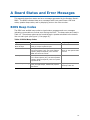
Table 15. BIOS Beep Codes
Type
Pattern
Frequency
F2 Setup/F10 Boot
Menu Prompt
One 0.5-second beep when the BIOS is
ready to accept keyboard input
932 Hz
Video error
On-off (1.0 second each) two times, then a
2.5-second pause (off); the entire pattern
repeats (beeps and pause) once and the
BIOS will continue to boot.
932 Hz
When no VGA option ROM
is found.
Memory error
On-off (1.0 second each) three times, then 932 Hz
a 2.5-second pause (off); the entire pattern
repeats (beeps and pause) until the system
is powered off.
Thermal trip warning
Alternate high and low beeps (1.0 second
each) for eight beeps, followed by system
shut down.
High beep 2000 Hz
Low beep 1500 Hz
51