1
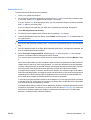
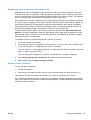
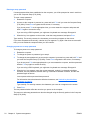
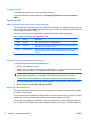
HP Z200 Small Form Factor Workstation
Maintenance and Service Guide
Copyright Information
Warranty
Trademark Credits
© Copyright 2010 Hewlett-Packard
Development Company, L.P.
Hewlett-Packard Company shall not be liable
for technical or editorial errors or omissions
contained herein or for incidental or
consequential damages in connection with
the furnishing, performance, or use of this
material. The information in this document is
provided “as is” without warranty of any kind,
including, but not limited to, the implied
warranties of merchantability and fitness for
a particular purpose, and is subject to
change without notice. The warranties for HP
products are set forth in the express limited
warranty statements accompanying such
products.
Microsoft, Windows, and XP are U.S.
registered trademarks of Microsoft
Corporation in the U.S. and other countries.
Nothing herein should be construed as
constituting and additional warranty.
This document contains proprietary
information that is protected by copyright. No
part of this document may be photocopied,
reproduced, or translated to another
language without the prior written consent of
Hewlett-Packard Company.
Intel is a trademark of Intel Corporation in the
U.S. and other countries and are used under
license.
ENERGY STAR is a U.S. registered mark of
the United States Environmental Protection
Agency.
597849–001
First Edition, February 2010
About this guide
This guide provides service and maintenance information for the HP Z200 Small Form Factor (SFF)
Workstation. It includes these topics:
Guide topics
Product overview on page 1
Setting up the operating system on page 16
Restoring the operating system on page 22
System management on page 28
Replacing components on page 59
Diagnostics and troubleshooting on page 125
Configuring RAID devices on page 162
Configuring password security and resetting CMOS on page 166
Connector pins on page 170
System board designators on page 176
Routine Care on page 178
Locating HP resources on page 180
ENWW
iii
iv
About this guide
ENWW
Table of contents
1 Product overview ............................................................................................................................................ 1
Product features ................................................................................................................................... 1
System board architecture ................................................................................................... 1
Processor technology .......................................................................................... 2
Memory technology ............................................................................................. 2
Graphics .............................................................................................................. 2
Expansion card slots ........................................................................................... 3
Additional features .............................................................................................. 3
Computer components ........................................................................................................ 4
Chassis components ........................................................................................... 4
Front panel components ..................................................................................... 5
Rear panel components ...................................................................................... 6
Computer specifications ....................................................................................................................... 7
Physical characteristics ....................................................................................................... 7
Power supply description ..................................................................................................... 7
Power supply voltages ........................................................................................ 7
Power supply currents ......................................................................................... 8
Power supply specifications ................................................................................ 9
Power consumption and heat dissipation ............................................................ 9
System fans ..................................................................................................... 10
Resetting the power supply .............................................................................. 10
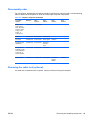
Environmental specifications ............................................................................................. 11
ENERGY STAR Qualification ............................................................................................ 12
ERP compliance mode ...................................................................................................... 13
Enabling ERP compliance mode ....................................................................... 13
Disabling ERP compliance mode ...................................................................... 13
Accessibility ....................................................................................................................... 13
Hyper-threading ................................................................................................................. 13
SATA Power Management ................................................................................................ 13
Intel Turbo Boost Technology ............................................................................................ 14
HP Cool Tools .................................................................................................................... 14
Ensuring proper ventilation ................................................................................................ 15
2 Setting up the operating system ................................................................................................................. 16
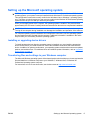
Setting up the Microsoft operating system ......................................................................................... 17
Installing or upgrading device drivers ................................................................................ 17
Transferring files and settings to your Windows computer ................................................ 17
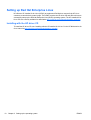
Setting up Red Hat Enterprise Linux .................................................................................................. 18
ENWW
v
Installing with the HP driver CD ......................................................................................... 18
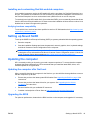
Installing and customizing Red Hat-enabled computers .................................................... 19
Verifying hardware compatibility ....................................................................... 19
Setting up Novell SLED ...................................................................................................................... 19
Updating the computer ....................................................................................................................... 19
Updating the computer after first boot ............................................................................... 19
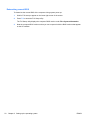
Upgrading the BIOS ........................................................................................................... 19
Determining current BIOS ................................................................................. 20
Upgrading BIOS ................................................................................................ 21
Upgrading device drivers ................................................................................................... 21
3 Restoring the operating system .................................................................................................................. 22
Restore methods ................................................................................................................................ 22
Ordering backup software .................................................................................................................. 23
Restoring Windows 7 or Windows Vista ............................................................................................. 23
Ordering the RestorePlus! media ...................................................................................... 23
Restoring the operating system ......................................................................................... 23
Restoring Windows XP Professional .................................................................................................. 24
Creating RestorePlus! media ............................................................................................. 24
Creating HP Backup and Recovery (HPBR) media ........................................................... 25
Restoring the operating system ......................................................................................... 26
Using RestorePlus! ........................................................................................... 26
Using HPBR ..................................................................................................... 26
Using the recovery partition .............................................................................. 26
Restoring Novell SLED ....................................................................................................................... 26
Creating restore media ...................................................................................................... 26
4 System management .................................................................................................................................... 28
BIOS ROM ......................................................................................................................................... 29
The Computer Setup (F10) Utility ....................................................................................................... 29
Computer Setup (F10) functionality ................................................................................... 29
Accessing the Computer Setup (F10) Utility ..................................................................... 31
The Computer Setup (F10) Utility menu ............................................................................ 32
Desktop management ........................................................................................................................ 39
Initial computer configuration and deployment .................................................................. 40
Installing a remote system ................................................................................................. 40
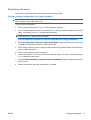
Replicating the setup ......................................................................................................... 41
Copying a setup configuration to a single computer ......................................... 41
Copying a setup configuration to multiple computers ....................................... 42
Updating and managing software ...................................................................................... 43
HP Client Manager Software ............................................................................................. 43
Altiris Client Management Solutions .................................................................................. 43
HP SoftPaq Download Manager ........................................................................................ 44
vi
ENWW
System Software Manager ................................................................................................ 45
Proactive Change Notification ........................................................................................... 45
Subscriber's Choice ........................................................................................................... 45
ROM Flash ......................................................................................................................... 46
Remote ROM Flash .......................................................................................... 46
HPQFlash .......................................................................................................... 46
FailSafe Boot Block ROM .................................................................................................. 47
Recovering the computer from Boot Block Recovery mode ............................. 47
Workstation security .......................................................................................................... 48
Asset tracking .................................................................................................... 48
SATA hard disk drive security ........................................................................... 49
DriveLock applications ...................................................................... 50
Using DriveLock ............................................................................... 50
Password security ............................................................................................. 52
Establishing a setup password using Computer Setup (F10)
Utility ................................................................................................. 52
Establishing a power-on password using computer setup ............... 53
Entering a power-on password ........................................................ 53
Entering a setup password ............................................................... 54
Changing a power-on or setup password ......................................... 54
Deleting a power-on or setup password ........................................... 55
National keyboard delimiter characters ............................................ 55
Clearing passwords .......................................................................... 56
Chassis security ................................................................................................ 56
Side access panel sensor (Smart Cover Sensor) (optional) ............. 56
Side access panel solenoid lock ....................................................... 56
Cable lock (optional) ......................................................................... 57
Fault notification and recovery ........................................................................................... 57
Drive Protection System .................................................................................... 57
ECC fault prediction .......................................................................................... 57
Thermal sensors ............................................................................................... 57
Dual-state power button ..................................................................................................... 58
Changing the power button configuration ......................................................... 58
5 Replacing components ................................................................................................................................ 59
Warnings and cautions ....................................................................................................................... 60
Service considerations ....................................................................................................................... 61
Cautions, warnings and safety precautions ....................................................................... 61
ESD information ................................................................................................................. 61
Generating static ............................................................................................... 61
Preventing ESD equipment damage ................................................................. 62
Personal grounding methods and equipment ................................................... 62
Grounding the work area ................................................................................................... 63
Recommended ESD prevention materials and equipment ................................................ 63
ENWW
vii
Tools and software requirements ...................................................................................... 64
Special handling of components ........................................................................................ 64
Cables and connectors ..................................................................................... 64
Hard drives ........................................................................................................ 65
Lithium coin cell battery ..................................................................................... 65
Customer Self-Repair ......................................................................................................................... 65
Removing and installing components ................................................................................................. 66
Component locations ......................................................................................................... 66
Predisassembly procedures .............................................................................................. 68
Disassembly order ............................................................................................................. 69
Removing the cable lock (optional) .................................................................................... 69
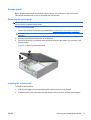
Access panel ..................................................................................................................... 71
Removing the access panel .............................................................................. 71
Installing the access panel ................................................................................ 71
Bezel .................................................................................................................................. 72
Removing the front bezel .................................................................................. 72
Installing the front bezel .................................................................................... 72
Front bezel security ........................................................................................... 73
Access panel sensor (optional) .......................................................................................... 74
Removing the access panel sensor .................................................................. 74
Installing the access panel sensor .................................................................... 75
Access panel solenoid lock ................................................................................................ 76
Removing the access panel solenoid lock ........................................................ 76
Installing the access panel solenoid lock .......................................................... 76
Removing and installing drives . ........................................................................................ 76
Predisassembly for drives ................................................................................. 77
Follow all general predisassembly procedures ................................. 77
Perform a data backup .................................................................... 77
Gather required tools ....................................................................... 77
Verify drive position and information ................................................ 77
Remove bezel blanks ....................................................................... 78
Locate system board drive connections ........................................... 78
Locate extra guide screws ................................................................ 79
Carefully handle hard disk drives ..................................................... 80
Removing an optical drive ................................................................................. 80
Installing an optical drive ................................................................................... 82
Removing a hard disk or media card from the drive cage ................................. 85
Installing a hard drive or media card reader into the drive cage ....................... 87
Removing and replacing the primary hard drive ............................................... 88
Cable management ........................................................................................................... 93
Power connections ............................................................................................ 94
Using the Small Form Factor Computer in a Tower Orientation ........................................ 95
Front panel I/O device assembly ....................................................................................... 96
Removing the front panel I/O device assembly ................................................. 96
viii
ENWW
Installing the front panel I/O device assembly ................................................... 98
Speaker ........................................................................................................................... 100
Removing the speaker .................................................................................... 100
Installing the speaker ...................................................................................... 100
Power supply ................................................................................................................... 101
Removing the power supply ............................................................................ 101
Installing the power supply .............................................................................. 102
System fan assembly ....................................................................................................... 103
Removing the system fan assembly ............................................................... 103
Installing the system fan assembly ................................................................. 104
Memory ............................................................................................................................ 105
Supported DIMM configurations ...................................................................... 105
DIMM installation guidelines ........................................................................... 105
DIMM installation order ................................................................................... 105
BIOS errors and warnings ............................................................................... 106
Removing a DIMM .......................................................................................... 107
Installing a DIMM ............................................................................................ 108
Expansion card slot identification .................................................................................... 110
Slot identification and description .................................................................... 110
Card configuration restrictions for power supplies ......................................... 110
Choosing an expansion card slot .................................................................... 111
Removing and installing expansion cards ....................................................................... 112
Expansion card slot description ...................................................................... 112
Removing an expansion card .......................................................................... 112
Installing an expansion card ............................................................................ 114
Battery ............................................................................................................................. 117
Removing the battery ...................................................................................... 117
Installing the battery ........................................................................................ 118
CPU heatsink ................................................................................................................... 118
Removing the CPU heatsink ........................................................................... 118
Installing the CPU heatsink ............................................................................. 119
CPU ................................................................................................................................. 121
Removing a CPU ............................................................................................ 121
Installing a CPU .............................................................................................. 122
System board ................................................................................................................... 123
Removing the system board ........................................................................... 123
Installing the system board ............................................................................. 123
Product recycling .............................................................................................................................. 124
6 Diagnostics and troubleshooting .............................................................................................................. 125
Calling technical support .................................................................................................................. 126
Locating ID labels ............................................................................................................................. 126
Locating warranty information .......................................................................................................... 127
ENWW
ix
Diagnosis guidelines ........................................................................................................................ 128
Diagnosis at startup ......................................................................................................... 128
Diagnosis during operation .............................................................................................. 129
Troubleshooting checklist ................................................................................................................. 130
HP troubleshooting resources and tools .......................................................................................... 131
HP Support Assistant ....................................................................................................... 131
HP Help and Support Center ........................................................................................... 131
E-support ......................................................................................................................... 131
Troubleshooting a problem ............................................................................. 132
Instant Support and Active Chat ..................................................................... 132
Customer Advisories, Customer and Security Bulletins, and Customer
Notices ............................................................................................................ 132
Product Change Notifications .......................................................................... 132
Helpful hints ..................................................................................................................... 132
At startup ......................................................................................................... 133
During operation .............................................................................................. 133
Customizing the monitor display ..................................................................... 134
Troubleshooting scenarios and solutions ......................................................................................... 134
Solving minor problems ................................................................................................... 134
Solving diskette problems ............................................................................................... 136
Solving hard drive problems ............................................................................................ 137
Solving display problems ................................................................................................. 138
Solving audio problems ................................................................................................... 140
Solving printer problems .................................................................................................. 141
Self-troubleshooting with HP Vision Diagnostics .............................................................................. 141
Overview .......................................................................................................................... 142
Downloading and accessing HP Vision Diagnostics ........................................................ 144
Accessing HP Vision Diagnostics on the computer ......................................................... 145
Creating and using a bootable USB key ......................................................... 145
Creating and using a bootable DVD ................................................................ 145
Using the HP Memory Test utility .................................................................... 145
User interface .................................................................................................................. 146
Survey tab ....................................................................................................... 146
Test tab ........................................................................................................... 148
Status tab ........................................................................................................ 150
History tab ....................................................................................................... 150
Errors tab ........................................................................................................ 150
Help tab ........................................................................................................... 151
Saving and printing information in HP Vision Diagnostics ............................................... 152
Diagnostic codes and errors ............................................................................................................. 152
Diagnostic LED and audible (beep) codes ...................................................................... 152
LED color definitions ........................................................................................................ 154
POST error messages ..................................................................................................... 156
x
ENWW
7 Configuring RAID devices .......................................................................................................................... 162
Maximum hard drive configurations ................................................................................................. 162
Configuring SATA RAID devices ...................................................................................................... 163
Attaching SATA HDDs .................................................................................................... 163
Configuring system BIOS ............................................................................................... 164
Creating RAID volumes ................................................................................................... 165
8 Configuring password security and resetting CMOS .............................................................................. 166
Preparing to configure passwords .................................................................................................... 166
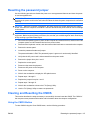
Resetting the password jumper ........................................................................................................ 167
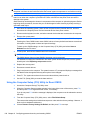
Clearing and Resetting the CMOS ................................................................................................... 167
Using the CMOS Button .................................................................................................. 167
Using the Computer Setup (F10) Utility to Reset CMOS ................................................. 168
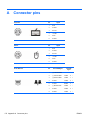
Appendix A Connector pins .......................................................................................................................... 170
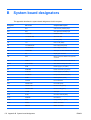
Appendix B System board designators ....................................................................................................... 176
Appendix C Routine Care .............................................................................................................................. 178
General cleaning safety precautions ............................................................................................... 178
Cleaning the computer case ............................................................................................................. 178
Cleaning the keyboard .................................................................................................................... 178
Cleaning the monitor ....................................................................................................................... 179
Cleaning the mouse ......................................................................................................................... 179
Appendix D Locating HP resources ............................................................................................................. 180
Product information .......................................................................................................................... 181
Product support ............................................................................................................................... 182
Product documentation .................................................................................................................... 183
Product diagnostics .......................................................................................................................... 184
Product updates ............................................................................................................................... 185
Index ................................................................................................................................................................. 186
ENWW
xi
xii
ENWW
1
Product overview
This chapter presents an overview of the hardware components of the computer. It includes these topics:
Topics
Product features on page 1
Computer specifications on page 7
Product features
The following sections describe the computer system board architecture and components, and includes
these topics:
Topics
System board architecture on page 1
Computer components on page 4
System board architecture
This section describes the system architecture.
ENWW
Product features
1
The following figure shows the typical system board block diagram.
Figure 1-1 System board block diagram
NOTE: The x1 and x16 designators describe the mechanical length of the slot. The number in
parentheses lists the number of electrical PCIe lanes routed to the expansion slot. For example, x16(4)
means that the expansion slot is mechanically a x16 length connector, with four PCIe lanes connected.
Processor technology
This computer uses the Intel® Series 3450 chipset, including support of Quad Core Intel Xeon™
processors and processors of up to 95W. These processors incorporate an integrated 2-channel
memory controller, microarchitecture improvements, integrated graphics, and L3 caching to improve
performance. In addition, the computer uses Intel DMI interface to connect the processor to the I/O
controller.
Memory technology
The computer dual in-line memory modules (DIMMs) are based on DDR3 1333MHz technology, and
are error checking and correcting (ECC). Two direct-attach memory channels permit low latency access
and fast data transfer to improve performance. System memory sizes up to 16GB (using 4GB DIMMs)
are supported.
NOTE: To optimize performance, distribute the DIMMs across both memory channels. See Memory
on page 105 for more information.
Graphics
The system supports multiple graphics cards as long as the total power usage of all graphics cards is
less than 45W, and the total of all I/O power usage is less than 80W.
2
Chapter 1 Product overview
ENWW
Expansion card slots
The computer provides multiple graphics and I/O slots: one full PCIe Gen2 x16, one PCIe x16(4); one
PCIe x1; and one PCI 32/33. These slots provide extra I/O bandwidth for high speed I/O cards.
NOTE: The total of all graphics cards cannot exceed 45 W, and the total I/O power usage cannot
exceed 80W.
Additional features
The computer provides these additional features:
ENWW
●
Ten external and four internal USB 2.0 ports.
●
A 240W power supply that is 89% efficient and permits Energy Star Version 5.0 system
configurations.
●
Supports European Union ERP Lot 6 power limit of less than 1W in off mode.
●
HP Quiet Fan Technology permits quiet system operation.
●
Parallel and serial headers that can be used with an optional PCI bulkhead connector.
Product features
3
Computer components
This section describes the computer components, including front and rear panel components.
For complete and current information on supported accessories and components for the computer,
see http://partsurfer.hp.com.
Chassis components
The following image shows the components of a typical computer layout. Drive configurations can vary.
Figure 1-2 Computer components
Table 1-1 Computer component descriptions
Item
4
Description
Item
Description
1
Access panel
8
System fan
2
Processor (CPU)
9
Chassis
3
Heatsink
10
Front bezel
4
PCIe card
11
Speaker
5
System board
12
Optical drive
6
Hard disk drive
13
Optional media reader or second
hard disk drive
7
Airflow guide
Chapter 1 Product overview
ENWW
Front panel components
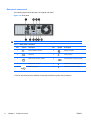
The following figure shows the layout of a typical front panel.
Figure 1-3 Front panel
Table 1-2 Front panel connectors
Item
ENWW
Symbol
Description
Item
Symbol
Description
1
Optical drive activity light
6
Microphone connector
2
Optical drive
7
Headphone connector
3
Optical drive manual eject button
8
Hard drive activity light Optical drive
activity light
4
Power button
9
Media card reader (shown) or optional
hard disk drive
5
USB 2.0 ports (4)
Product features
5
Rear panel components
The following figure shows the layout of a typical rear panel.
Figure 1-4 Rear panel
NOTE:
The labels for the rear panel connectors use industry-standard icons and colors.
Table 1-3 Rear panel connectors
Item
Symbol
Description
Item
Symbol
Description
1
RJ–45 network connector
6
Display port (DP)1
2
Serial port
7
VGA (monitor)1
3
PS/2 mouse connector (green)
8
PS/2 keyboard connector (purple)
4
Power cord connector
9
Audio line-out connector (green)
5
USB 2.0 ports (6)
10
Audio line-in connector (blue)
1. The DP and VGA ports are disabled if used with Intel® Xeon quad–core processors.
6
Chapter 1 Product overview
ENWW
Computer specifications
This section provides computer chassis, power supply, and environmental specifications.
Physical characteristics
The following table lists the computer physical characteristics.
Weight (Typical configuration)
7.6 kg (16.72 lb.)
Chassis Dimensions
Height: 10.0 cm (3.95 in.)
Width: 33.8 cm (13.0 in.)
Depth: 37.9 cm (14.9 in.)
Power supply description
The computer includes a 240W 89% efficient power supply to provide power for the computer. The
power supply is compatible with ENERGY STAR Ver. 5 requirements.
Power supply voltages
Table 1-4 Power supply source voltages
Source voltage
ENWW
Description
+12 V-CPU
Input to onboard regulator that supplies power to CPU
+12 V-MAIN
PCI, PCIe, system fans, storage (optical and hard disk drives), and input to
onboard regulators
+12 V-SBY
Input to onboard regulators
V12N
PCI and serial ports
Computer specifications
7
Power supply currents
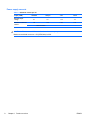
Table 1-5 Maximum current per rail
Output (240W)
+12V Main
+12Vcpu
–12V
12Vsb
Nominal output
voltage
12.1
12.1
-12.0
11.4
14A
12A
0.15A
1.3A
Maximum continuous
current
240W combined
CAUTION: Do not exceed 240 watts of total continuous output power.
Maximum combined current on +12V(CPU,Main) is 20A.
8
Chapter 1 Product overview
ENWW
Power supply specifications
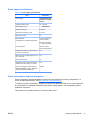
Table 1-6 Power supply specifications
Item
Description
Power supply
240W Wide Ranging,
Active PFC and 89%
efficient
Operating voltage range
90 – 264 VAC
Rated voltage range
100–240 VAC
Rated line frequency
50–60 Hz
Operating line frequency range
47–63 Hz
Rated input current
4A
Heat dissipation
Typical 170 BTU/hr =
(42.87 kg-cal/hr)
(Configuration and software dependent)
Maximum 1063 BTU/
hr = (206.27 kg-cal/hr)
Power supply fan
One fan, 92mm x
25mm, variable speed
FEMP Standby Power compliant @115V
(<2W in S5 – Power Off)
Yes
ERP Lot 6 (EuP) compliant @230V (<1w in
S5 – Power Off)
Yes
Built-in Self Test LED
No
Surge tolerant full ranging power supply
(withstands power surges up to 2000V)
Yes
Power Consumption in sleep mode (as
defined by ENERGY STAR) - Suspend to
RAM (S3) (Instantly Available PC)
<6 watts
Power consumption and heat dissipation
Power consumption and heat dissipation specifications are available for multiple configurations. To
review available specifications, see http://www.hp.com/go/quickspecs.
To reach zero power consumption, unplug the computer from the power outlet or use a power strip with
an on/off switch. For additional information about power-saving features, see the operating system
installation instructions.
This product is in compliance with U.S. Executive Order 13221.
ENWW
Computer specifications
9
System fans
This computer includes:
●
One front system fan
●
One power supply fan
In addition, some graphics cards include onboard fans.
Resetting the power supply
If an overload triggers the power supply overload protection, power is immediately disconnected.
To reset the power supply:
1.
Disconnect the power cord from the computer.
2.
Determine what caused the overload and fix the problem. For troubleshooting information, see
Diagnostics and troubleshooting on page 125.
3.
Reconnect the power cord and restart the computer.
When you power off the computer through the operating system, power consumption falls below what
is considered low power consumption but does not reach zero. This low power consumption feature
extends the life of the power supply.
10
Chapter 1 Product overview
ENWW
Environmental specifications
The following table lists the environmental specifications of HP Workstations.
Table 1-7 HP Workstation environmental specifications
Operating: 5 to 35°C (40 to 95°F)
Temperature
Non-operating: -40 to 60°C (-40 to 140°F)
NOTE: Derate by one degree C (1.8 degrees F) for every 305m (1,000 ft.) altitude over 1,524m
(5,000 ft.).
Humidity
Altitude
Operating: 8 to 85% Relative Humidity (RH), non-condensing
Non-operating: 8 to 90% Relative Humidity, non-condensing
Operating: 0 to 3,048m (10,000 ft.)
Non-operating: 0 to 9,144m (30,000 ft.)
Operating: ½-sine: 40g, 2-3ms
Non-operating:
Shock
●
½-sine: 160 cm/s, 2-3ms (~100g)
●
square: 422 cm/s, 20g
NOTE:
Values represent individual shock events and do not indicate repetitive shock events.
Operating Random: 0.5g (rms), 5-300 Hz
Vibration
Non-Operating: random: 2.0g (rms), 10-500 Hz
NOTE:
ENWW
Values do not indicate continuous vibration.
Computer specifications
11
ENERGY STAR Qualification
HP computers marked with the ENERGY STAR logo are compliant with the applicable U.S.
Environmental Protection Agency (EPA) ENERGY STAR specifications for computers. The EPA
ENERGY STAR logo does not imply endorsement by the EPA. As an ENERGY STAR Partner, HewlettPackard Company has determined the products marked with the ENERGY STAR logo are ENERGY
STAR qualified per the applicable ENERGY STAR guidelines for energy efficiency. The following logo
appears on all ENERGY STAR qualified computers.
The ENERGY STAR Computers Program was created by the EPA to promote energy efficiency and
reduce air pollution through more energy-efficient equipment in homes, offices, and factories. One way
products achieve this energy efficiency is by reducing power consumption when not being used through
the Microsoft Windows Power Management feature.
The Power Management feature enables the computer to enter a low-power (or “sleep”) mode after a
period of inactivity. When used with an external monitor that is ENERGY STAR qualified, this feature
also supports the similar power management features of the external monitor.
To take advantage of this energy savings:
●
The Power Management feature has been preset to suspend the computer to a sleep state after
30 minutes of inactivity.
●
The Power Management feature has been preset to suspend the monitor to a sleep state after 15
minutes of inactivity.
Both the computer and monitor can be woken from sleep mode through user interaction with any of the
computer input devices (mouse, keyboard, and so on). when configured with Wake On LAN (WOL)
enabled, the computer can also be woken by a network signal.
See the EPA ENERGY STAR Power Management Web site for more information about the energy and
financial savings potential of the Power Management Feature: http://www.energystar.gov/
powermanagement.
See the EPA ENERGY STAR Web site for more information about the ENERGY STAR program and
its environmental benefits: http://www.energystar.gov.
CAUTION: Using the Energy Save Monitor feature with monitors that are not ENERGY STAR qualified
can cause video distortion when an Energy Save timeout occurs.
NOTE:
ENERGY STAR is not supported on Linux computers.
If it is necessary to restore the operating system, you must also reset the ENERGY STAR settings (if
applicable) after the restore.
To verify the factory default power settings for your computer, select Start>Control Panel, and then
double-click Power Options.
12
Chapter 1 Product overview
ENWW
ERP compliance mode
This computer provides ERP compliance mode capability.
When enabled, this feature enables the computer to shut down to the lowest possible power state by
removing all power to the system board.
When disabled, the computer powers down conventionally.
When the computer is shut down in ERP compliance mode, it must be powered up with the computer
power button.
Enabling ERP compliance mode
To enable ERP compliance mode:
1.
Press F10 during start up.
2.
Using the arrow keys, select the Power>Hardware Power Management>ERP Compliance
Mode, and then select Enable.
3.
Press F10 to accept the change.
4.
Select File>Save Change and Exit, and then press F10 to accept the change.
Disabling ERP compliance mode
To disable the ERP compliance mode:
1.
Press F10 during start up.
2.
Select Power>Hardware Power Management>ERP Compliance Mode, and then select
Disable.
3.
Press F10 to accept the change.
4.
Select File>Save Change and Exit, and then press F10 to accept the change.
Accessibility
HP is committed to developing products, services, and information that is easier to access for all
customers, including customers with disabilities and age-related limitations. HP products with
Windows® 7, Windows Vista® Business, and Microsoft® Windows® XP Professional preinstalled are
designed for accessibility. These products are tested with industry-leading Assistive Technology
products. For more information see http://www.hp.com/accessibility.
Hyper-threading
This HP computer supports Hyper-threading.
Hyper-Threading Technology (HTT), is an Intel-proprietary technology used to provide process
parallelization . The technology improves processor performance under certain workloads by providing
useful work for execution units that would otherwise be idle. A processor with Hyper-Threading enabled
is treated by the operating system as two processors instead of one. Hyper-threading relies on support
in the operating system as well as the CPU.
SATA Power Management
SATA Power Management enables or disables SATA bus and/or device power management.
ENWW
Computer specifications
13
Intel Turbo Boost Technology
The HP Z Workstation series supports Intel® Turbo Boost Technology.
This feature enables the CPU to run at a higher than normal rate. When all CPU cores are not necessary
for the workload, inactive cores are turned off and power is diverted to the active cores to increase their
performance.
Turbo Boost is enabled and disabled in computer BIOS.
HP Cool Tools
An HP computer with Windows XP includes additional software that is not installed when you first start
the computer. To access or learn more about these additional preinstalled tools on the computer that
can enhance the computer experience:
1.
Open the HP Cool Tools folder by selecting Start>All Programs>HP Cool Tools.
2.
Select the HP Cool Tools icon on the desktop.
3.
To learn more about these applications, select HP Cool Tools—Learn More.
4.
To install or launch the applications, select the appropriate application.
NOTE: A preinstalled Windows 7 or Windows Vista Business operating system does not contain a
Cool Tools icon, shortcut or folder but several of the tool programs are included, such as Performance
Tuning Framework.
14
Chapter 1 Product overview
ENWW
Ensuring proper ventilation
Proper ventilation for the system is important for computer operation. Follow these guidelines to ensure
adequate ventilation:
●
Operate the computer on a sturdy, level surface.
●
Place the computer in an area with adequate ventilation. Provide at least 15.24 CM (6 inches) of
clearance at the front and back of the computer as shown in the following figure. (Your computer
might look different than the one shown.)
Figure 1-5 Proper computer ventilation
●
Ensure that the ambient air temperature surrounding the computer falls within the published limit.
NOTE: The ambient upper limit of 35 C is only good up to 1524 M (5000 FT) elevation. There is
a 1 C per 304.8 M (1000 FT) derating above 1524 M (5000 FT). So, at 3,048 M (10,000 FT), the
upper ambient air temperature limit is 30 C.
●
For cabinet installation, ensure adequate cabinet ventilation and ensure that the ambient
temperature within the cabinet does not exceed published limits.
●
Never restrict the incoming or outgoing airflow of the computer by blocking any vents or air intakes
as shown in the following figure.
Figure 1-6 Proper computer placement
ENWW
Computer specifications
15
2
Setting up the operating system
This chapter provides setup and update information for the computer operating system. It includes these
topics:
Topics
Setting up the Microsoft operating system on page 17
Setting up Red Hat Enterprise Linux on page 18
Setting up Novell SLED on page 19
Updating the computer on page 19
This chapter also includes information on how to determine that you have the latest BIOS, drivers, and
software updates installed on the computer.
CAUTION: Do not add optional hardware or third-party devices to the HP computer until the operating
system is successfully installed. Adding hardware might cause errors and prevent the operating system
from installing correctly.
16
Chapter 2 Setting up the operating system
ENWW
Setting up the Microsoft operating system
NOTE: If you ordered a downgrade from Windows Vista or Windows 7 to the Windows XP Professional
operating system, your system comes pre-installed with the Windows XP Professional operating system.
This configuration comes with recovery media for the Windows Vista or Windows 7 operating system
only. Therefore you should create your own recovery media for the Windows XP Professional operating
system as soon as you can after you first boot your system
When you first apply power to the computer, the operating system is installed. This process takes
approximately 5 to 10 minutes. Carefully follow the instructions on the screen to complete the installation.
CAUTION: After installation has started, do not turn off the computer until the process is complete.
Turning off the computer during installation can damage the installation and operation of the software.
For complete operating system installation and configuration instructions, see the operating system
documentation that was provided with the computer. Additional information is available in the online
help tool after you successfully install the operating system.
Installing or upgrading device drivers
To install hardware devices after the operating system is installed, you must install the appropriate
device drivers before you install the devices. Follow the installation instructions that came with the
device. In addition, for optimum performance, your operating system must have the most recent updates,
patches, and software fixes. For additional driver and software update information, refer to Upgrading
device drivers on page 21.
Transferring files and settings to your Windows computer
The Microsoft Windows operating system offers data migration tools that helps you choose and transfer
files and data from a Windows computer to your Windows 7, Windows Vista, or Windows XP
Professional operating system computer.
For instructions on how to use these tools, see the documents at http://www.microsoft.com.
ENWW
Setting up the Microsoft operating system
17
Setting up Red Hat Enterprise Linux
HP offers an HP Installer Kit for Linux (HPIKL) to supplement Red Hat box sets and help HP Linux
customers customize their system image. The HPIKL contains the HP driver CD and device drivers to
successfully setup up the Red Hat Enterprise Linux (RHEL) operating system, The HP Installer Kit for
Linux CDs are currently available for download at http://www.hp.com/support/workstation_swdrivers.
Installing with the HP driver CD
To install the HP driver CD, see “Installing with the HP Installer Kit for Linux” in the HP Workstations for
Linux manual at http://www.hp.com/support/workstation_manuals.
18
Chapter 2 Setting up the operating system
ENWW
Installing and customizing Red Hat-enabled computers
Linux-enabled computers require the HP Installer Kit and the purchase of a Red Hat Enterprise Linux
box set. The Installer kit includes the HP CDs necessary to complete the installation of all versions of
the Red Hat Enterprise Linux box set that have been qualified to work on an HP computer.
To use the drivers in the HP Installer kit for Linux other than RHEL, you must manually extract the drivers
from the HP Driver CD and install them. HP does not test the installation of these drivers on other Linux
distributions nor does HP support this operation.
Verifying hardware compatibility
To see which Linux versions have been qualified to work on HP Workstations visit http://www.hp.com/
support/linux_hardware_matrix.
Setting up Novell SLED
To set up the SUSE Linux Enterprise Desktop (SLED) on systems preloaded with the operating system:
1.
Boot the computer.
2.
Start the Installation Settings and enter the password, network, graphics, time, keyboard settings,
and Novell Customer Center Configuration for the computer.
NOTE: During Installation Settings after the first time after booting the system the Novell
subscription can be activated from the Novell Customer Center Configuration screen. Visit the full
Novell Customer Center documentation at http://www.novell.com/documentation/ncc/.
Updating the computer
HP is constantly working on improving your total computer experience. To ensure that the computer
leverages the latest enhancements, HP recommends that you install the latest BIOS, driver, and
software updates on a regular basis.
Updating the computer after first boot
After successfully booting the computer for the first time, you should follow these guidelines to ensure
that the computer is up-to-date:
●
Ensure that you have the latest system BIOS loaded. See Upgrading the BIOS on page 19 for
instructions.
●
Ensure that you have the latest drivers for your system. See Upgrading device drivers
on page 21 for instructions.
●
Become familiar with your available HP resources.
●
Consider a subscription to Driver Alerts at http://www.hp.com/go/subscriberschoice.
Upgrading the BIOS
For optimum performance, determine the BIOS revision on the computer, and upgrade it if necessary.
ENWW
Setting up Novell SLED
19
Determining current BIOS
To determine the current BIOS of the computer during system power up:
1.
Wait for F10=setup to appear on the lower right corner of the screen.
2.
Press F10 to enter the F10 Setup utility.
The F10 Setup utility displays the computer BIOS version under File > System Information.
3.
20
Note the computer BIOS version so that you can compare it with the BIOS versions that appear
on the HP website.
Chapter 2 Setting up the operating system
ENWW
Upgrading BIOS
To find and download the latest available BIOS, which includes the latest enhancements:
1.
Go to http://www.hp.com/go/workstationsupport.
2.
Select Download Drivers and Software from the left menu column under Tasks.
3.
Follow the instructions to locate the latest BIOS available for the computer.
4.
If the BIOS on the Web site is the same as the version on your system, no further action is required.
5.
If the BIOS on the Web site is a version later than the one on your system, download the appropriate
version for the computer. Follow the instructions in the release notes to complete the installation.
Upgrading device drivers
If you install a peripheral device (such as a printer, display adapter, or network adapter), confirm you
have the latest device drivers loaded. If you purchased your device through HP, visit the HP Web site
to download the latest drivers for your device. These drivers have been tested to ensure the best
compatibility between your device and your HP computer.
If you did not purchase your device from HP, HP recommends visiting the HP Web site first to see if
your device and its drivers have been tested for HP computer compatibility. If no driver is available, visit
the device manufacturer's Web site to download the latest drivers.
To upgrade device drivers:
1.
Go to http://www.hp.com/go/workstationsupport.
2.
Select Download Drivers and Software from the left menu column under Tasks.
3.
Follow the instructions to find the latest drivers available for the computer.
If a needed driver is not found, see the Web site of the manufacturer of the peripheral device.
ENWW
Updating the computer
21
3
Restoring the operating system
This chapter describes how to restore the Windows or Linux operating system. It includes these topics:
Topics
Restore methods on page 22
Ordering backup software on page 23
Restoring Windows 7 or Windows Vista on page 23
Restoring Windows XP Professional on page 24
Restoring Novell SLED on page 26
Restore methods
The Windows 7 or Windows Business Vista operating system can be reinstalled using the HP
RestorePlus! process. The Windows XP Professional operating system can be reinstalled using the
RestorePlus! process or the HP Backup and Recovery Manager.
●
RestorePlus!
The RestorePlus! process reinstalls the Windows operating system and device drivers (for devices
included with the system) to a near-factory state. The process does not back up or recover data
on the hard drive. Some application software might not be restored using this process and must
be installed from the appropriate application CD.
●
HP Backup and Recovery Manager (HPBR) Recovery Point
The HP Backup and Recovery Manager application can be used to capture and restore the contents
of the system partition. It captures a snapshot of the system partition and stores it in a Recovery
Point. Everything on the system partition at the time the recovery point was made is saved.
NOTE: HP Backup and Restore is only supported on the HP xw6600 and xw8600 Workstations.
The Recovery Point is saved to the hard drive and can be burned to media for safekeeping.
CAUTION: These methods restore the operating system, but not data. Data must be backed up
regularly to avoid loss.
22
Chapter 3 Restoring the operating system
ENWW
Ordering backup software
If you cannot create system recovery CDs or DVDs, you can order a recovery disk set from the HP
support center. To obtain the support center telephone number for your region see http://www.hp.com/
support/contactHP.
Restoring Windows 7 or Windows Vista
This section describes how to restore Windows 7 or Windows Vista.
Ordering the RestorePlus! media
If you ordered restore media with your computer, the media is included with your computer components.
If you did not order restore media, call HP Support and request a RestorePlus! media kit. For worldwide
technical support phone numbers, see http://www.hp.com/support.
Restoring the operating system
NOTE: Windows Vista provides a backup and restore application as well. To learn more about this
application, see the Microsoft Web site.
CAUTION:
Before you restore the operating system, back up your data.
When you run RestorePlus! from media, the process deletes all information on the primary hard drive,
including all partitions.
To restore Windows 7 or Windows Vista:
1.
Boot from the RestorePlus! DVD to start the RestorePlus! process. You must start from the
RestorePlus! DVD to install device drivers and settings.
2.
Follow the prompts to restore your operating system.
Some application software might not be restored using this process. If software is not restored, install
it from the appropriate application DVD.
ENWW
Ordering backup software
23
Restoring Windows XP Professional
This section describes how to restore the Windows XP Professional operating system.
NOTE:
The computer must have a CD or DVD writer installed to create the media set.
Creating RestorePlus! media
The RestorePlus! kit can be created using the files contained on the hard drive. To create the restore
media:
1.
Boot the computer.
2.
During boot up, an HP Backup and Recovery Manager screen is displayed prompting you to create
Recovery CDs or DVDs. Select Now.
3.
An Initial Recovery Point (IRP) of the system is captured. This is a snapshot of the system hard
drive. The capture can take more than 10 minutes.
4.
After the IRP is created, you can create a set of backup CDs or DVDs.
To create a RestorePlus! media set including the Windows XP operating system CD, select
RestorePlus! > Microsoft Windows XP operating system > Supplemental media.
NOTE: Depending on the options, there might be additional DVDs you can create.
5.
Follow the prompts to create RestorePlus!, operating system, and HPBR media.
If you are unable to create CD/DVDs on your computer, call HP Support and request a RestorePlus!
media kit. For worldwide technical support phone numbers, see http://www.hp.com/support.
24
Chapter 3 Restoring the operating system
ENWW
Creating HP Backup and Recovery (HPBR) media
NOTE: HPBR is only supported on Windows XP systems. For details, refer to the documentation on
the Supplemental Software - HP Backup and Recovery CD included with the computer. The
documentation can be accessed during installation.
The Initial Recovery Point can be burned to optical media and used to recover a system. This section
describes making the media.
NOTE:
The computer must have a CD or DVD writer to create the media set.
To create HPBR recovery media:
1.
The Initial Recovery Point was captured when the RestorePlus! media set was created previously.
If the IRP was not created, start the HP Backup and Recovery Manager and create recovery points
using the Expert mode. Follow the HPBR online documentation for instructions.
2.
Burn the IRP to media from HPBR.
Select HPBR Start > All Programs > HP Backup & Recovery > HP Backup and Recovery
Manager.
3.
Select Next at the first screen.
Select Create recovery CDs or DVDs to recover the system, and then select Next.
ENWW
4.
Choose Next to display a list of available CD image and the recovery points.
5.
Check the box next to Initial Recovery Point, and then select Next.
6.
Follow the instructions to create the media.
Restoring Windows XP Professional
25
Restoring the operating system
CAUTION: Before you restore the operating system, back up your data.
When you run RestorePlus! from media, the process deletes all information on the primary hard drive,
including all partitions. If you run RestorePlus! from the recovery partition, only the root (C:) partition is
affected.
Using RestorePlus!
To restore with RestorePlus!:
1.
Boot the computer from the RestorePlus! DVD. You must start from the RestorePlus! DVD for
device drivers and settings to be installed.
2.
Follow the prompts to restore the operating system.
Some application software might not be restored using this process. If software is not restored, install
it from the appropriate application DVD.
Using HPBR
To restore with the HPBR Initial Recovery Point media:
1.
Boot the computer from the Initial Recovery Point media.
2.
Follow the prompts to restore the system to the state when the IRP was created.
Using the recovery partition
A system that shipped with Windows XP includes a recovery partition. You can boot the system from
that recovery partition.
From the recovery partition you can perform a system restore using the HPBR Initial Recovery Point, if
it was created. If it was not, you can use a RestorePlus! install.
To restore using the recovery partition:
1.
Boot the computer.
2.
When prompted on the boot screen to enter the Recovery Manager, press F11.
TIP: The opportunity to press F11 during the boot process is small. It comes about the time the
F10 prompt appears.
NOTE: To ensure that the recovery processes reinstall on the correct hard drive, do not
disconnect the target drive during the recovery process.
3.
Follow the prompts to restore the system to factory-like condition.
Restoring Novell SLED
The SLED restore media is required to restore the Linux operating system.
Creating restore media
THE SUSE Linux Enterprise Desktop preload includes a SUSE ISO icon on the desktop. You can click
this icon to go to the /iso directory. The /iso directory contains all iso images used to preload your
computer. To recover or restore the original image, follow the instructions in the readme file in the /iso
directory to copy the ISO image file onto CDs.
26
Chapter 3 Restoring the operating system
ENWW
NOTE: Make copies of the ISO recovery images on CD as backup files in case your computer
experiences a hard drive failure.
ENWW
Restoring Novell SLED
27
4
System management
This section describes the tools and utilities that provide system management for the computer. It
includes these topics:
Topics
BIOS ROM on page 29
The Computer Setup (F10) Utility on page 29
Desktop management on page 39
28
Chapter 4 System management
ENWW
BIOS ROM
The BIOS ROM is a collection of machine language applications stored as firmware in ROM. It includes
functions such as Power on Self Test (POST), PCI device initialization, Plug and Play support, power
management, and the Computer Setup (F10) Utility. The BIOS ROM is an 8MB Serial Peripheral
Interface (SPI) port.
See http://www.hp.com/go/quickspecs to review the latest BIOS ROM specifications.
The Computer Setup (F10) Utility
This section contains these topics:
Topics
Computer Setup (F10) functionality on page 29
Accessing the Computer Setup (F10) Utility on page 31
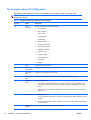
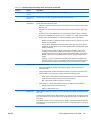
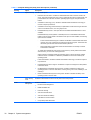
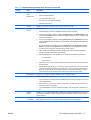
The Computer Setup (F10) Utility menu on page 32
Computer Setup (F10) functionality
The Computer Setup (F10) Utility enables you to:
ENWW
●
Change factory default settings and set or change the computer configuration, which might be
necessary when you add or remove hardware.
●
Determine if all devices installed on the computer are recognized by the system and functioning.
●
Determine information about the operating environment of the computer.
●
Solve system configuration errors that are detected but not fixed during the Power-On Self-Test
(POST).
●
Establish and manage passwords and other security features.
●
Establish and manage energy-saving time-outs (not supported on Linux platforms).
●
Modify or restore factory default settings.
●
Set the computer date and time.
●
Set, view, change, or verify the computer configuration, including settings for CPU, graphics,
memory, audio, storage, communications, and input devices.
●
Modify the boot order of installed mass storage devices such as SATA, optical disk drives, network
drives, LS-120 drives, and USB boot devices.
●
Configure the boot priority of SATA hard-drive controllers.
●
Enable or disable Network Server Mode, which enables the computer to start the operating system
when the power-on password is enabled with or without a keyboard or mouse attached. When
attached to the computer, the keyboard and mouse remain locked until the power-on password is
entered.
●
Enable or disable POST Messages to change the display status of POST messages. POST
Messages disabled suppresses most POST messages, such as memory count, product name, and
other nonerror text messages. If a POST error occurs, the error is displayed regardless of the mode
BIOS ROM
29
selected. To manually switch to POST Messages Enabled during POST, press any key except
F1 through F12.
30
●
Specify an Ownership Tag, which appears when the computer is powered on or restarted.
●
Specify the Asset Tag or property identification number assigned by the company to this computer.
●
Enable power-on password prompts during system restarts (warm-starts) and power on.
●
Hide or show the integrated I/O functionality, including serial, USB, or parallel ports, audio, or
embedded NIC. Hidden devices are inaccessible, which increases system security.
●
Enable or disable removable media boot ability.
●
Enable or disable removable media write ability (if supported by hardware).
●
Replicate the computer setup by saving system configuration information on CD or diskette and
restoring it on computers.
●
Execute self-tests on specified SATA hard disk drives (if supported by the drive).
Chapter 4 System management
ENWW
Accessing the Computer Setup (F10) Utility
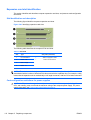
To access the Computer Setup (F10) Utility menu:
1.
Power on or restart the computer.
2.
When the display is active and F10=Setup appears in the lower right corner of the screen,
press F10.
If you do not press F10 at the appropriate time, try again. Turn the computer off, then on, and
press F10 again to access the utility. You can also press the Ctrl + Alt + Delete keys before starting
if you miss the opportunity to press F10.
3.
Select the language from the list and press the Enter key.
In the Computer Setup (F10) Utility menu, five headings are displayed: File, Storage, Security,
Power, and Advanced.
4.
Use the left and right arrow keys to select the appropriate heading, use the up and down arrow
keys to select an option, and then press Enter.
5.
Choose from the following:
●
To apply and save changes, select File>Save Changes, and then select F10=YES.
●
To remove changes you have made, select Ignore Changes and then select F10=YES.
●
To reset to factory settings, select File>Default Setup>Restore Factory Settings as
Default. Press F10 to accept the changes, and then select Apply Defaults and Exit. This
restores the original factory system defaults.
CAUTION: Do not power off the computer while the ROM is saving the Computer Setup (F10) Utility
changes, because the Complementary Metal-Oxide Semiconductor (CMOS) could become corrupted.
After you exit the F10 Setup screen, you can disconnect power from the computer.
ENWW
The Computer Setup (F10) Utility
31
The Computer Setup (F10) Utility menu
The following table describes the functions available in the Computer Setup (F10) utility menu.
NOTE: With new BIOS releases, the following content is subject to change, so the menu might be
different than shown.
Table 4-1 Computer Setup (F10) Utility menu descriptions
Heading
Option
Description
File
System
Information
Displays the following system characteristics:
Product Name
●
QPI Link Speed
●
Memory Size
●
Integrated MAC
●
System BIOS
●
Boot Block Date
●
Chassis serial number
●
Asset Tracking Number
●
Management Module
●
Processor Type
●
Processor Speed
●
Processor Stepping
●
Cache Size
●
DIMMs
About
Displays copyright information.
System
Temperatures
Displays system temperatures and fan speeds.
Set Time and
Date
Enables you to set system time and date.
Flash System
ROM
Enables you to upgrade the BIOS from a ROM image on diskette, CD, or USB.
Replicated
Setup
Provides these options:
Default Setup
Apply Defaults
and Exit
32
●
Chapter 4 System management
●
Save to Removable Media—Saves the computer configuration, including CMOS, in the
qsetup.txt file. This file can be saved to a formatted, blank 1.44-MB diskette, or to a USB
device.
●
Restore from Removable Media—Restores the computer configuration from a diskette or a
USB device.
Provides these options:
●
Save Current Settings as Default—Saves the current settings as default settings for the next
operation.
●
Restore Factory Settings as Default—Restores the factory settings as the default settings for
the next operation.
Restores the default settings defined in Default Setup.
ENWW
Table 4-1 Computer Setup (F10) Utility menu descriptions (continued)
Heading
Storage
Option
Description
Ignore Changes
and Exit
Exits computer setup without applying or saving changes.
Save Changes
and Exit
Saves changes to system configuration and exits the computer setup.
Device
Configuration
Lists installed non-SCSI storage devices (except SATA devices) and provides options for obtaining
specific information about each device:
●
Hard Disk—Provides information about the hard disk drives in the computer. It is available in
IDE Mode only.
●
CD-ROM—Provides information about the optical disk drives in the computer. (IDE mode
only.)
●
Diskette Type (for legacy diskette drives only)—Identifies the highest capacity media type
accepted by the diskette drive. Options are 3.5" (1.44 MB), 5.25" (1.2 MB), and Not Installed.
●
Default Values—Resets devices to their default configuration (SATA is the default).
◦
Multisector Transfers—Defines the transfer of data per interrupt. Options are 8, 16, and
Disable (16 is the default).
◦
Transfer Mode—Specifies the active data transfer mode. Options (subject to device
capabilities) are Max UDMA, PIO 0, Max PIO, Enhanced DMA, and Ultra DMA0. (Max
UDMA is the default).
◦
Translation Mode—Enables the BIOS to determine the translation mode used to
configure a formatted SATA or USB mass storage device. This prevents you from
needing to know how the mass storage device was formatted. Options are Automatic,
Bit Shift, LBA Assisted, Use (Cylinders, Heads, Sectors), and Off. Automatic is the
default.
Ordinarily, you should not change the translation mode selected by the BIOS. If the
selected translation mode is not compatible with the translation mode that was active
when the drive was partitioned and formatted, the data on the disk is inaccessible.
Storage Options
Provides these options:
●
Removable Media Boot—Enables and disables the ability to start the computer from
removable media.
●
Legacy Diskette Write—Enables and disables the ability to write data to removable media.
●
SATA Emulation—Sets the SATA emulation mode with the following options:
●
DPS Self-test
◦
RAID + AHCI—both the RAID and AHCI OPROMs execute. This emulation mode is the
default and offers the best performance and most functionality.
◦
IDE —offers standard SATA supports (four ports only).
SATA PORT 0-n—enables and disables the SATA ports. Offers these configurations:
◦
GEN 2/3.0 Gbps (Internal Only/eSATA Only)
◦
GEN 1/1.5 Gbps (eSATA Only)
Select a drive—Enables you to select a drive to test. This option is available in SATA IDE emulation
mode only.
The DPS self-test function directs an IDE hard disk to run an internal self-test and report the results.
If the SATA controller is not in IDE emulation mode, the DPS self-test option is not displayed in the
setup menu.
This selection appears only when at least one drive capable of performing the IDE DPS self-test
is attached to the computer. By default, the SATA controller is in RAID+AHCI mode, so this option
is not displayed
ENWW
The Computer Setup (F10) Utility
33
Table 4-1 Computer Setup (F10) Utility menu descriptions (continued)
Heading
Option
Description
Boot Order
Enables you to configure the boot, diskette drive, and hard disk drive orders by physically
reordering the menu entries. The following is the default boot order presented in the menu:
●
Optical Drive
●
Diskette Drive
●
USB Device
●
Hard Drive
●
Embedded Ethernet controller
●
Embedded Ethernet controller (ASF) Second embedded LAN. (Not available in some
configurations.)
Press Enter to drag a device to a preferred place. Press F5 to remove the device from consideration
as a bootable device.
MS-DOS drive lettering assignments might not apply after an operating system other than MSDOS has started.
Boot devices can be disabled in the boot order process. These order changes are stored in the
physical ROM when the F10 Setup changes are confirmed with File>Save Changes and Exit.
You can temporarily override the boot order. To start one time from a device other than the default
device specified in Boot Order, restart the computer and press F9 when the F9=Boot Menu
message appears on the screen. After POST completes, a list of bootable devices is displayed.
Use the arrow keys to select the preferred bootable device and press Enter. The computer then
starts from the selected nondefault device for this one time.
Security
Setup Password
Enables you to set and enable a setup password for the administrator.
If you create a setup password, you must use it to change computer setup options, to flash the
ROM, and to make changes to certain Plug and Play settings under Windows.
Power-On
Password
Enables you to set and enable the power-on password.
Password
Options
This option becomes available when you create a setup and/or power-on password. It provides
these options:
Smart Cover
34
Chapter 4 System management
●
Lock Legacy Resources—Prevents the operating system from changing resources to serial,
parallel, or diskette controller.
●
Network Server Mode—Enables network server mode.
●
Password Prompt on Warm Boot—Enables a password prompt on a warm boot.
●
Setup Browse Mode—Enables read-only functionality for password info.
Enables you to enable and disable the cover removal sensor, or to notify you if the sensor is
activated.
ENWW
Table 4-1 Computer Setup (F10) Utility menu descriptions (continued)
Heading
Option
Description
Device Security
Makes the following devices available or hidden to the computer:
●
Serial Port
●
Front USB Ports
●
Rear USB Ports
●
Internal USB Ports
●
System Audio
●
IEEE 1394 Controller (Not available on some models.)
●
Ethernet Controller
●
Ethernet Controller (ASF) (Not available on some models.)
●
Legacy Diskette
●
Embedded Security Device
●
SATA 0-n
For each device, Device Available is the default setting and allows the operating system to access
the device. Device Hidden makes the device unavailable; it is disabled by the BIOS and cannot be
enabled by the operating system.
NOTE: An entry for enabling DriveLock appears in the setup menu if the computer has a
DriveLock-compatible hard disk drive.
Embedded
Security Device
This option becomes available if Embedded Device is set to Available.
Embedded Security Device (Hidden or Available) turns the Trusted Platform Mechanism (TPM) on
and off. Device Hidden is the default. If this option is made available, the following options become
available:
●
Power-On Authentication Support—Enables and disables an authentication feature that
requires you to enter a TPM user key password to start the computer. This feature uses the
TPM to generate and store the authentication password.
●
Reset Authentication Credential—Resets the authentication functionality and clears
authentication credentials.
To enable the Embedded Security Device and to access any security features associated with the
device, you must enter a setup password.
Setting a device to Available enables the operating system to access the device. Hidden makes
the device unavailable. It is disabled by the BIOS and cannot be enabled by the operating system.
ENWW
Network Service
Boot
Enables or disables the ability to boot to the network using the F12 key or the boot order.
System IDs
Provides these options:
●
Asset Tag—A 16-byte string identifying the computer.
●
Ownership Tag—An 80-byte string identifying ownership of the computer. This tag appears
on the screen during POST.
●
Universal Unique Identifier (UUID)—Can only be updated if the current chassis serial number
is invalid. (These ID numbers are normally set in the factory and are used to uniquely identify
the computer.)
●
Keyboard—Enables you to set the keyboard locale for System ID entry.
The Computer Setup (F10) Utility
35
Table 4-1 Computer Setup (F10) Utility menu descriptions (continued)
Heading
Option
Description
System Security
Provides these options:
●
Data Execution Prevention—Enables or disables Data Execution Prevention mode in the
CPUs. This mode prohibits code from running in pages that were set up as data pages, and
prevents attacks such as buffer overflows. Operating system support is required for this
feature.
●
Virtualization Technology (VTx)—Enables or disables Intel® Virtualization Technology to
increase computer performance.
●
Virtualization Technology for Directed I/O (VT–d2)Enables a virtual machine to gain exclusive
control of a hardware device, such as a graphics card.
●
Embedded Security Device—This option becomes available if Embedded Device is set to
Available.
Embedded Security Device (Hidden or Available) turns the Trusted Platform Mechanism
(TPM) on and off. Device Hidden is the default. If this option is made available, the following
options become available:
◦
Power-On Authentication Support—Enables and disables an authentication feature that
requires you to enter a TPM user key password to start the computer. This feature uses
the TPM to generate and store the authentication password.
◦
Reset Authentication Credential—Resets the authentication functionality and clears
authentication credentials.
To enable the Embedded Security Device and to access any security features associated
with the device, you must enter a setup password.
Setting a device to Available enables the operating system to access the device. Hidden
makes the device unavailable. It is disabled by the BIOS and cannot be enabled by the
operating system.
Power
36
●
Intel IO Virtualization—Enables or disables Virtualization Technology to increase computer I/
O performance.
●
Embedded Security Device Support—Enables the computer to leverage the trusted platform
mechanism device.
●
OS Management of Embedded Security Device—Enables or disables the ability of the
operating system to control the TPM device, including turning it on and off, initializing it, and
resetting it.
●
Reset of Embedded Security Device through OS—Enables or disables the ability of the
operating system to reset the TPM.
Setup Security
Level
Enables the administrator to set the security level of each setup feature.
OS Power
Management
Enables or disables:
Chapter 4 System management
●
Runtime Power Management
●
MWAITE-AWARE OS
●
Idle Power Savings
●
ACPI S3 Hard Disk Reset
●
ACPI S3 PS/2 Mouse Wakeup
●
USB Wake on Device Insertion
●
Unique Sleep State Blink Rates
ENWW
Table 4-1 Computer Setup (F10) Utility menu descriptions (continued)
Heading
Advanced2
ENWW
Option
Description
Hardware
Power
Management
Enables or disables:
●
SATA Power Management
●
Intel Turbo Boost Technology
●
Enhanced Intel Turbo Boost Technology
●
ERP Compliance Mode
Thermal
Enables you to set the rate of the system fan when the CPU is in idle.
Power-On
Options
Sets the following:
●
POST Messages—Enables or disables the splash screen during POST.
●
F9 Prompt (Displayed or Hidden)—Selecting Displayed displays the F9=Boot Menu during
POST. Selecting Hidden prevents the text from being displayed. However, pressing F9 still
accesses the boot menu.
●
F10 Prompt (Displayed or Hidden)—Selecting Displayed displays F10=Setup during POST.
Selecting Hidden prevents the text from being displayed, but pressing F10 still accesses the
Setup screen.
●
F12 Prompt (Displayed or Hidden)—Selecting Displayed displays F12=Network Service
Boot during POST. Selecting Hidden prevents the text from being displayed but pressing
F12 still forces the computer to attempt booting from the network.
●
Option ROM1 prompt (Enable or Disable)—Enabling this feature causes the computer to
display a message before loading options ROMs.
●
Remote Wakeup Boot Source—Enables you to set the remote wakeup boot source as:
◦
Local Hard Drive
◦
Remote Server
●
After Power Loss (On, Off, Previous State)—Enabling this option directs the previous state
to be the default.
●
POST Delay (in seconds) (5, 10, 15, 20, None)—Adds a specified delay to the POST process.
This delay is sometimes needed for hard disk drives on some expansion cards that spin up
slowly (so slowly that they are not ready to start by the time POST is finished). The POST
delay also gives you time to select F10 to enter the Computer Setup (F10) Utility.
BIOS Power-On
Enables you to disable or specify a weekday and time for BIOS power-on.
Processors
Enables/disables these options:
●
Hyper-Threading—Provides processor parallelization such that the operating system treats
one processor as two.
●
Active Cores (1,2, or All Cores)—Selects a single core, or multiple cores per socket. (Not
available on some configurations.)
●
Limit CPUID Maximum Value to 3 (Enable or Disable)—Sets the number of allowable CPU
IDs.
Onboard
Devices
Enables you to set resources (IRQ, DMA, I/O Rate) for or disable onboard system devices such
as serial port and diskette controller. Operating system parameters generally override Onboard
Devices settings.
PCI VGA
Configuration
Configures graphics cards per computer slots. In multi-graphics card configurations, this option
designates one card as primary graphics, and the other card as secondary graphics.
The Computer Setup (F10) Utility
37
Table 4-1 Computer Setup (F10) Utility menu descriptions (continued)
Heading
Option
Description
Chipset/
Memory
Enable/disable these options:
Device Options
38
●
PCI SERR# Generation (Enable or Disable)—Controls PCI SERR# generation for ill-behaved
PCI add-in cards (that can generate SERR# spuriously).
●
PCI VGA Palette Snooping (Enable or Disable)—Controls PCI VGA Palette Snooping for
compatibility purposes.
●
Memory Mode Interleave—Sets interleave mode for dual socket computers.
Enables you to set the following device options:
●
Num Lock State at Power-On (On or Off)
●
S5 Wake-on-LAN (Enable or Disable)
●
Multiprocessor (Activates a single core.)
●
Unique Sleep State Blink Rates (Enable or Disable)
●
Internal speaker
●
Monitor Tracking (Enable or Disable)
●
NIC PXE Option ROM1 Download (Enable or Disable)
●
SATA RAID Option ROM1 Download (Enable or Disable)
1
Available on selected models
2
These options should be used by advanced users only
Chapter 4 System management
ENWW
Desktop management
This section summarizes capabilities, features, and key components of computer management,
including:
Topics
Initial computer configuration and deployment on page 40
Installing a remote system on page 40
Replicating the setup on page 41
Updating and managing software on page 43
HP Client Manager Software on page 43
Altiris Client Management Solutions on page 43
System Software Manager on page 45
Proactive Change Notification on page 45
Subscriber's Choice on page 45
ROM Flash on page 46
FailSafe Boot Block ROM on page 47
Workstation security on page 48
Fault notification and recovery on page 57
Dual-state power button on page 58
NOTE:
ENWW
Support for specific features described in this guide can vary by model and software version.
Desktop management
39
Initial computer configuration and deployment
The computer includes a preinstalled system software image. After a brief software unbundling process,
the computer is ready to use.
If you prefer to replace the preinstalled software image with a customized set of system and application
software, several methods are available for deploying a customized software image, including:
●
Installing additional software applications after unbundling the preinstalled software image
●
Using a disk cloning process to copy the contents from one hard disk drive to another
The Restore Plus! CD, ROM-based setup, and ACPI hardware provide further assistance with recovery
of system software, configuration management and troubleshooting, and power management.
Support for specific features described in this guide can vary by model and software version.
The best deployment method depends on the information technology environment and processes.
Installing a remote system
Remote system installation enables starting and setting up the computer using software and
configuration information on a network server. This feature is usually used as a system setup and
configuration tool and can be used for the following tasks:
●
Deploying a software image on new PCs
●
Formatting a hard disk drive
●
Installing application software or drivers
●
Updating the operating system, application software, or drivers
To initiate a remote system installation, press F12 when F12=Network Service Boot appears in the
lower right corner of the HP logo screen. Follow the onscreen instructions to continue the installation
process. The default boot order is a BIOS configuration setting that can be changed to always attempt
a PXE boot.
40
Chapter 4 System management
ENWW
Replicating the setup
This section provides information about replicating the computer setup.
Copying a setup configuration to a single computer
CAUTION: A setup configuration is model-specific. File system corruption can result if source and
target computers are not the same model.
To copy a setup configuration:
1.
Select a setup configuration to copy, and then restart the computer.
2.
As soon as the computer powers on, press and hold F10 until you enter the Computer Setup (F10)
Utility. If necessary, press Enter to bypass the title screen.
NOTE: If you do not press F10 at the appropriate time, you must restart the computer, and then
press and hold F10 again to access the utility.
If you are using a PS/2 keyboard, you might see a keyboard error message. Disregard it.
ENWW
3.
Select File>Replicated Setup>Save to Removable Media. Follow the instructions on the screen
to create the configuration diskette or USB media device.
4.
Power off the computer you are configuring and insert the configuration diskette into the diskette
drive or USB media device.
5.
Power on the computer you are configuring.
6.
Press and hold the F10 key until you enter the Computer Setup (F10) Utility. If necessary, press
Enter to bypass the title screen.
7.
Select File>Replicated Setup>Restore from Removable Media, and then follow the instructions
on the screen.
8.
Restart the computer when the configuration is complete.
Desktop management
41
Copying a setup configuration to multiple computers
CAUTION: A setup configuration is model-specific. If source and target computers are not the same
model, file system corruption can result. For example, do not copy the setup configuration from an HP
xw8600 Workstation to an HP Z200 Workstation.
This method takes longer to prepare the configuration diskette, but copying the configuration to target
computers is fast.
A bootable diskette is required for this procedure. If Windows XP is not available to create a bootable
diskette, use the method for copying to a single computer instead (see Copying a setup configuration
to a single computer on page 41).
1.
Create a bootable diskette or USB media device.
2.
Select a setup configuration to copy.
3.
If you are using a diskette or USB storage device, insert it now.
4.
Restart the computer.
5.
As soon as the computer powers on, press and hold F10 until you enter the Computer Setup (F10)
Utility. If necessary, press Enter to bypass the title screen.
NOTE: If you do not press the F10 key at the appropriate time, you must restart the computer,
and then press and hold the F10 key again to access the utility.
If you are using a PS/2 keyboard, you might see a keyboard error message. Disregard it.
6.
Select File>Replicated Setup>Save to Removable Media, and follow the instructions on the
screen to create the configuration diskette or USB media device.
7.
Download a BIOS utility for replicating setup (repset.exe), and copy it to the configuration diskette
or USB media device. To obtain this utility, see http://www.hp.com/support/files.
8.
Enter the model number of the computer.
9.
On the configuration diskette, create an autoexec.bat file containing repset.exe and cpqsetup.txt.
10. Power off the computer you are configuring, insert the configuration diskette or USB device, and
then power on the computer. The configuration utility runs automatically.
11. When the configuration is complete, restart the computer.
42
Chapter 4 System management
ENWW
Updating and managing software
HP provides several tools for managing and updating software on desktops and computers:
●
HP Client Manager Software
●
System Software Manager
●
Altiris Client Management Solutions
●
Proactive Change Notification
●
Subscriber’s Choice
HP Client Manager Software
The HP Client Manager Software offers these services:
●
Detailed views of hardware inventory for asset management
●
PC health-check monitoring and diagnostics
●
Proactive notification of changes in the hardware environment
●
Web-accessible reporting of business-critical details such as thermal warnings and memory alerts
●
Remote updating of system software such as device drivers and ROM BIOS
●
Remote changing of boot order
●
Configuration of system BIOS settings
The HP Client Management Solutions (CMS), available for download from http://www.hp.com/go/
easydeploy, are standards-based solutions for managing and controlling computers in a networked
environment.
For more information about the HP Client Manager, see http://www.hp.com/go/ssm.
Altiris Client Management Solutions
Altiris and HP have partnered to provide comprehensive, tightly integrated systems management
solutions to reduce the cost of owning HP client PCs.
The HP CMS is the foundation for additional Altiris Client Management Solutions that address the
following topics.
●
Inventory and asset management
●
Deployment and migration
●
Help desk and problem resolution
●
Software and operations management
For more information about the following topics, go to http://www.hp.com/go/ssm.
ENWW
●
How HP CMS works
●
Which solutions are compatible with the operating system
●
How to download a fully functional, 30-day evaluation version of Altiris solutions
Desktop management
43
HP SoftPaq Download Manager
HP SoftPaq Download Manager is a free, easy-to-use interface for locating and downloading software
updates for the HP client PC models in your environment. By specifying your models, operating system,
and language, you can quickly locate, sort, and select the softpaqs you need. To download HP SoftPaq
Download Manager, visit http://h20331.www2.hp.com/Hpsub/cache/509658-0-0-225-121.html.
44
Chapter 4 System management
ENWW
System Software Manager
System Software Manager (SSM) is a utility available on Windows computers that enables you to update
system-level software on multiple systems simultaneously. When executed on a PC client system, SSM
detects hardware and software versions and then updates the software from a central repository, known
as a file store. Driver versions supported by SSM are noted with a special icon on the software, the
driver download Web site, and on the Support Software CD.
To download the utility or to obtain more information about SSM, see http://www.hp.com/go/ssm.
Proactive Change Notification
The Proactive Change Notification application uses the Subscriber's Choice Web site to:
●
Send Proactive Change Notification (PCN) e-mail informing you up to 60 days in advance of
hardware and software changes to most commercial computers and servers
●
Send you e-mail containing customer bulletins, customer advisories, customer notes, and driver
alerts for most commercial computers and servers
You can create a profile to ensure you receive only the information relevant to the specific IT
environment.
To learn more about the PCN application and to create a custom profile, see Subscriber's Choice
on page 45.
Subscriber's Choice
Subscriber’s Choice is a client-based service from HP that supplies you with personalized product tips,
feature articles, and driver and support alerts and notifications based on the profile.
Subscriber’s Choice Driver and Support Alerts and Notifications delivers e-mail notifying you that the
information you subscribed to in the profile is available for review and retrieval.
To learn more about Subscriber’s Choice and create a custom profile, see http://www.hp.com/go/
subscriberschoice.
ENWW
Desktop management
45
ROM Flash
HP computers include a programmable flash ROM. By establishing a setup password in the Computer
Setup (F10) Utility, you can protect the ROM from being inadvertently updated or overwritten. This
function is important to ensure the operating integrity of the computer.
To upgrade the ROM, download the latest SoftPaq images from http://www.hp.com/support/
workstation_swdrivers.
For maximum ROM protection, establish a setup password. The setup password prevents unauthorized
ROM upgrades. SSM enables you to create the setup password on several computers simultaneously.
Remote ROM Flash
Remote ROM Flash allows system administrators to safely upgrade the ROM on remote HP computers
from a centralized network management console, resulting in a consistent deployment of, and greater
control over, HP PC ROM images over the network.
To use Remote ROM Flash, the computer must be powered on, or turned on using Remote Wakeup.
For more information about Remote ROM Flash and HPQFlash, see the HP Client Manager Software
or System Software Manager sections at http://www.hp.com/go/ssm.
HPQFlash
The HPQFlash utility is used to locally update or restore the system ROM on PCs using a Windows
operating system. For more information about HPQFlash, see http://www.hp.com/go/ssm, and enter the
name of the computer.
46
Chapter 4 System management
ENWW
FailSafe Boot Block ROM
The FailSafe Boot Block ROM enables system recovery in the unlikely event of a ROM flash failure. For
example, if a power failure occurs during a ROM upgrade, the Boot Block uses a flash-protected section
of the ROM to verify a valid system ROM flash when power is restored to the computer.
If the system ROM is valid, the computer starts normally.
If the system ROM fails the validation check, the FailSafe Boot Block ROM provides enough support to
start the computer from a BIOS image CD created from a SoftPaq. The BIOS image CD programs the
system ROM with a valid image.
When Boot Block detects an invalid system ROM, the computer power LED blinks red eight times and
the computer beeps eight times; then the computer pauses for two seconds. On some models, a Boot
Block recovery mode message appears.
In preparation for system recovery, use the BIOS CD media file in the SoftPaq to create a BIOS image
CD.
Recovering the computer from Boot Block Recovery mode
To recover the computer after it enters Boot Block recovery mode:
1.
Remove any media such as USB keys or disks in the optical disk drives.
2.
Insert a BIOS image CD into the CD drive. You can also use USB media such as an HP DriveKey.
3.
Power off, then power on the computer.
If no BIOS image CD or USB media is found, you are prompted to insert one and restart the
computer.
If a setup password has been established, the Caps Lock light illuminates and you are prompted
for the password.
4.
Enter the setup password.
If the computer starts from the CD or USB media and successfully reprograms the ROM, three
keyboard lights illuminate. A rising-tone series of beeps also signals successful recovery.
ENWW
5.
Remove the CD or USB media and power off the computer.
6.
Restart the computer.
Desktop management
47
Workstation security
This section provides information about providing system security through asset tracking, password
security, hard disk drive locking, and chassis locks.
Asset tracking
Asset tracking features incorporated into the computer provide asset tracking data that can be managed
using HP Systems Insight Manager (HP SIM), HP CMS, or other systems-management applications.
Seamless, automatic integration between asset tracking features and these products enables you to
choose the management tool that is best suited to the environment and to leverage investments in
existing tools.
HP also offers several solutions for controlling access to valuable components and information:
●
HP ProtectTools Embedded Security prevents unauthorized access to data, checks system
integrity, and authenticates third-party users attempting system access.
●
Security features such as ProtectTools and the Side access panel sensor (Smart Cover Sensor)
help prevent unauthorized access to the data and to the internal components of the computer.
●
By disabling parallel, serial, or USB ports, or by disabling removable-media boot capability, you
can protect valuable data assets.
●
Memory Change and Side access panel sensor (Smart Cover Sensor) alerts can be forwarded to
system management applications to deliver proactive notification of tampering with a computer’s
internal components.
ProtectTools, the Side access panel sensor (Smart Cover Sensor), and the Side access panel solenoid
lock (Hood Lock) are available as options on select systems.
Use the following utilities to manage security settings on the HP computer:
●
Locally, using the Computer Setup (F10) Utility
●
Remotely, using the HP CMS or System SSM, which enables the secure, consistent deployment
and control of security settings from a simple command line utility
For more information about the Computer Setup (F10) Utility, see The Computer Setup (F10) Utility
menu on page 32.
The following table and sections refer to the management of computer security through the Computer
Setup (F10) Utility
Table 4-2 Security features overview
48
Feature
Purpose
How it is established
Removable Media Boot Control
Prevents booting from removable media
drives
From the Computer Setup (F10)
Utility menu
Serial, Parallel, USB, or Infrared
Interface Control
Prevents transfer of data through the
integrated serial, parallel, USB, or infrared
interface
From the Computer Setup (F10)
Utility menu
Power-On Password
Prevents use of the computer until the
password is entered (applies to initial system
startup and restarts)
From the Computer Setup (F10)
Utility menu
Chapter 4 System management
ENWW
Table 4-2 Security features overview (continued)
Feature
Purpose
How it is established
Setup Password
Prevents reconfiguration of the computer (use
of the Setup utility) until the password is
entered
From the Computer Setup (F10)
Utility menu
Network Server Mode
Provides unique security features for
computers used as servers
From the Computer Setup (F10)
Utility menu
SATA hard disk drive security
HP computers include the HP DriveLock facility for SATA hard disk drives to prevent unauthorized
access to data.
WARNING! Enabling DriveLock can render a SATA hard disk drive permanently inaccessible if the
master password is lost or forgotten. No method exists to recover the password or access the data.
DriveLock has been implemented as an extension to Computer Setup (F10) functions. It is only available
when hard disk drives that support the ATA security command set are detected. On HP computers, it
is not available when the SATA emulation mode is RAID+AHCI or RAID.
DriveLock is for HP customers for whom data security is a paramount concern. For such customers, the
cost of a hard disk drive and the loss of the data stored on it is inconsequential when compared to the
damage that could result from unauthorized access to its contents.
To balance this level of security with the need to address the issue of a forgotten password, the HP
implementation of DriveLock employs a two-password security scheme. One password is intended to
be set and used by a system administrator, while the other is typically set and used by the user.
No "back door" can be used to unlock the drive if both passwords are lost. Therefore, DriveLock is most
safely used when the data contained on the hard disk drive is replicated on a corporate information
system or is regularly backed up.
If both DriveLock passwords are lost, the hard disk drive is rendered unusable. For users who do not fit
the previously defined customer profile, this might not be acceptable. For users who fit this profile, it
might be a tolerable risk, given the nature of the data stored on the hard disk drive.
ENWW
Desktop management
49
DriveLock applications
The most practical use of DriveLock is in a corporate environment. The system administrator would be
responsible for configuring the hard disk drive, which involves setting the DriveLock master password
and a temporary user password. If you forget the user password or if the equipment is passed on to
another employee, the master password can be used to reset the user password and regain access to
the hard disk drive.
HP recommends that corporate system administrators who enable DriveLock also establish a corporate
policy for setting and maintaining master passwords. This should be done to prevent a situation where
an employee sets both DriveLock passwords before leaving the company. In such a scenario, the hard
disk drive is unusable and requires replacement. Likewise, by not setting a master password, system
administrators might find themselves locked out of a hard disk drive and unable to perform routine
checks for unauthorized software, other asset control functions, and support.
For users with less stringent security requirements, HP does not recommend enabling DriveLock. Users
in this category include personal users, or users who do not maintain sensitive data on their hard disk
drives as a common practice. For these users, the potential loss of a hard disk drive resulting from
forgetting both passwords is much greater than the value of the data DriveLock protects.
Access to Computer Setup (F10) and DriveLock can be restricted through the setup password. By
specifying a setup password and not giving it to users, system administrators can restrict users from
enabling DriveLock.
Using DriveLock
When hard disk drives that support the ATA security command set are detected, DriveLock appears
under the Security menu in the Computer Setup (F10) menu. You are presented with options to set the
master password and to enable DriveLock. You must provide a user password to enable DriveLock.
Because the initial configuration of DriveLock is typically performed by a system administrator, a master
password should be set first.
HP encourages system administrators to set a master password whether they plan to enable DriveLock
or not. This gives the administrator the ability to modify DriveLock settings if the drive is locked in the
future. After the master password is set, the system administrator can enable DriveLock or leave it
disabled.
If a locked hard disk drive is present, POST requires a password to unlock the device. If a power-on
password is set and it matches the device’s user password, POST does not prompt the user to re-enter
the password. Otherwise, the user is prompted to enter a DriveLock password.
For a cold start, use the master or user password. For a warm start, enter the same password used to
unlock the drive during the preceding cold start.
Users have two attempts to enter a correct password. During cold start, if neither attempt succeeds,
POST continues but the drive remains inaccessible. During a warm-start or restart from Windows, if
neither attempt succeeds, POST halts and the user is instructed to cycle power.
50
Chapter 4 System management
ENWW
Enabling DriveLock
To enable and set the DriveLock user password:
1.
Power on or restart the computer.
2.
As soon as the computer is powered on, press and hold F10 until you enter the Computer Setup
(F10) Utility. Press Enter to bypass the title screen, if necessary.
If you do not press F10 at the appropriate time, you must restart the computer, and then press and
hold F10 again to access the utility.
If you are using a PS2 keyboard, you might see a keyboard error message. Disregard it.
3.
Select Security>DriveLock Security.
4.
For each DriveLock-capable drive, select a drive by pressing F10 to accept.
5.
Under Enable/Disable DriveLock options, select Enable, and then press F10 to enable DriveLock
for a specific drive.
CAUTION: Forgetting the DriveLock password renders the drive unusable.
6.
Enter a new user password, and then press F10 to accept. This password may be 1 to 32 characters
long.
7.
Enter the password again in the Enter New Password Again field. If you forget this password, the
drive is rendered permanently disabled.
8.
Select File>Save Changes and Exit, and then press F10. After you press F10, the computer
performs a cold start before invoking the DriveLock function.
You can also use this process to set the DriveLock master password by selecting Master in Step
5.
When the computer starts, you are prompted to enter the DriveLock password for each DriveLockcapable drive for which you have set a password. You have two attempts to enter the password
correctly. If the password is not entered correctly, the computer attempts to start anyway. However,
the boot process most likely fails because data from a locked drive cannot be accessed.
In a single drive computer, if the drive has DriveLock enabled, the computer might not be able to
boot to the operating system, and might try to boot from the network or from another storage device
(depending on the boot ordering options). Regardless of the outcome of the start attempts, the
drive-locked drive remains inaccessible without the DriveLock password.
In a two-drive computer that has a boot drive and a data drive, you can apply the DriveLock feature
to the data drive only. In this case, the computer can always start, but the data drive is accessible
only when the DriveLock password is entered.
Cold starts require that you enter DriveLock passwords. However, DriveLock passwords are also
required for warm starts. For example, if you boot to DOS and press Ctrl+Alt+Del, you must enter
the DriveLock password before the computer completes the next start cycle. This warm-start
behavior is consistent with the DriveLock feature.
ENWW
Desktop management
51
Password security
The power-on password prevents unauthorized use of the computer by requiring entry of a password
to access applications or data when the computer is powered on or restarted. The setup password
specifically prevents unauthorized access to the Computer Setup (F10) Utility and can also be used as
an override to the power-on password. When prompted for the power-on password, entering the setup
password instead enables access to the computer.
You can establish a network-wide setup password to enable the system administrator to log in to all
network systems to perform maintenance without needing to know the power-on password.
Establishing a setup password using Computer Setup (F10) Utility
Establishing a setup password through the Computer Setup (F10) Utility prevents reconfiguration of the
computer (through the use of the Computer Setup (F10) Utility) until the password is entered.
To establish a setup password using the Computer Setup (F10) menu:
1.
Power on or restart the computer.
2.
As soon as the computer is powered on, press and hold F10 until you enter the Computer Setup
(F10) Utility. Press Enter to bypass the title screen, if necessary.
If you do not press F10 at the appropriate time, you must restart the computer, and then press and
hold F10 again to access the utility.
If you are using a PS/2 keyboard, you might see a keyboard error message. Disregard it.
52
3.
Select Security>Setup Password and then follow the onscreen instructions.
4.
Before exiting, select File>Save Changes and Exit.
Chapter 4 System management
ENWW
Establishing a power-on password using computer setup
Establishing a power-on password through the Computer Setup (F10) Utility prevents access to the
computer when power is connected, unless you specify the password. When a power-on password is
set, the Computer Setup (F10) Utility presents Password Options in the Security menu. The password
options include Network Server Mode and Password Prompt on Warm Boot.
When Network Server Mode is disabled, you must enter the password when the computer is powered
on, when the key icon appears on the monitor. When Password Prompt on Warm Boot is enabled, you
must enter the password. The password must also be entered each time the computer is restarted.
When Network Server Mode is enabled, the password prompt is not presented during POST, but an
attached PS/2 keyboard remains locked until you enter the power-on password.
To enable Network Server Mode, you must set a power-on password under Advanced>Password
Options. This option enables the computer to start without requiring the power-on password, but the
keyboard and mouse are locked until you enter the password. The keyboard LEDs rotate constantly
when the computer is in locked mode.
To establish a power-on password through the Computer (F10) menu:
1.
Power on or restart the computer.
2.
As soon as the computer is powered on, press and hold F10 until you enter the Computer Setup
(F10) Utility. Press Enter to bypass the title screen, if necessary.
If you do not press F10 at the appropriate time, you must restart the computer and then press and
hold F10 again to access the utility.
If you are using a PS/2 keyboard, you might see a keyboard error message. Disregard it.
3.
Select Security>Power-On Password and then follow the onscreen instructions.
4.
Before exiting, select File>Save Changes and Exit.
Entering a power-on password
To enter a power-on password:
1.
Restart the computer.
2.
When the key icon appears on the monitor, enter the current password, and then press Enter.
Type carefully. For security reasons, the characters you enter do not appear on the screen.
If you enter the password incorrectly, a broken key icon appears. Try again. After three unsuccessful
tries, you will enter the F10 setup screen with read-only permission. (See the Setup Browse Mode option
under the Power-On options.)
ENWW
Desktop management
53
Entering a setup password
If a setup password has been established on the computer, you will be prompted to enter it each time
you run the Computer Setup (F10) Utility.
To enter a setup password:
1.
Restart the computer.
2.
As soon as the computer is powered on, press and hold F10 until you enter the Computer Setup
(F10) Utility. Press Enter to bypass the title screen, if necessary.
If you do not press F10 at the appropriate time, you must restart the computer and press and
hold F10 again to access the utility.
If you are using a PS/2 keyboard, you might see a keyboard error message. Disregard it.
3.
When the key icon appears on the monitor, enter the setup password, and press Enter.
Type carefully. For security reasons, the characters you enter do not appear on the screen.
If you enter the password incorrectly, a broken key icon appears. Try again. After three unsuccessful
tries, you must restart the computer before you can continue.
Changing a power-on or setup password
To change a power-on or setup password:
1.
Restart the computer.
2.
To change the power-on password, go to step 4.
3.
To change the setup password, as soon as the computer is powered on, press and hold F10 until
you enter the Computer Setup (F10) Utility. Press Enter to bypass the title screen, if necessary.
If you do not press F10 at the appropriate time, you must restart the computer, and then press and
hold the F10 key again to access the utility.
If you are using a PS/2 keyboard, you might see a keyboard error message. Disregard it.
4.
When the key icon appears, enter the current password, a slash (/) or alternative delimiter
character, the new password, another slash (/) or alternative delimiter character, and the new
password again as shown:
current password/new password/new password
For information about the alternative delimiter characters, see National keyboard delimiter
characters on page 55.
Type carefully. For security reasons, the characters you enter do not appear on the screen.
5.
Press Enter.
The new password takes effect the next time you power on the computer.
The power-on and setup passwords can also be changed using the Security options in the Computer
Setup (F10) Utility.
54
Chapter 4 System management
ENWW
Deleting a power-on or setup password
To delete a power-on or setup password:
1.
Power on or restart the computer.
2.
Choose from the following:
●
To delete the power-on password, go to step 4.
●
To delete the setup password, as soon as the computer is powered on, press and hold F10
until you enter the Computer Setup (F10) Utility. Press Enter to bypass the title screen, if
necessary.
If you do not press F10 at the appropriate time, you must restart the computer and then press
and hold F10 again to access the utility.
Use the appropriate operating system shutdown process.
3.
When the key icon appears, enter the current password followed by a slash (/) or alternative
delimiter character: current password/.
For information about the alternative delimiter characters see National keyboard delimiter
characters on page 55.
4.
Press Enter.
National keyboard delimiter characters
Each keyboard meets country-specific requirements. The syntax and keys you use for changing or
deleting passwords depend on the keyboard included with the computer.
Table 4-3 National keyboard delimiter characters
Language
*
ENWW
Delimiter
Language
Delimiter
Language
Delimiter
Arabic
/
Greek
-
Russian
/
Belgian
=
Hebrew
.
Slovakian
-
BHCSY *
-
Hungarian
-
Spanish
-
Brazilian
/
Italian
-
Swedish/Finnish
/
Chinese
/
Japanese
/
Swiss
-
Czech
-
Korean
/
Taiwanese
/
Danish
-
Latin American
-
Thai
/
French
!
Norwegian
-
Turkish
.
French
Canadian
é
Polish
-
U.K. English
/
German
-
Portuguese
-
U.S. English
/
Bosnia-Herzegovina, Croatia, Slovenia, and Yugoslavia
Desktop management
55
Clearing passwords
If you forget the password, you cannot access the computer.
For instructions about clearing passwords, see Configuring password security and resetting
CMOS.
Chassis security
Side access panel sensor (Smart Cover Sensor) (optional)
The optional Side access panel sensor is a combination of hardware and software technology that can
alert you when the computer side access panel has been removed (if the sensor has been configured
in the Computer Setup (F10) Utility).
The three levels of Side access panel sensor protection are shown in the following table:
Table 4-4 Side access panel sensor protection levels
*
Level
Setting
Description
Level 0
Disabled
Side access panel sensor * is disabled (default).
Level 1
Notify User
When the computer restarts, a message appears indicating that the computer
side access panel has been removed.
Level 2
Setup Password
When the computer is restarted, a message appears indicating that the computer
side access panel has been removed. You must enter the setup password to
continue.
Side access panel sensor settings can be changed using the Computer Setup (F10) Utility.
Setting the side access panel sensor protection level
To set the side access panel sensor protection level:
1.
Power on or restart the computer.
2.
As soon as the computer is powered on, press and hold the F10 key until you enter the Computer
Setup (F10) Utility. Press Enter to bypass the title screen, if necessary.
NOTE: If you do not press the F10 key at the appropriate time, you must restart the computer,
and then press and hold the F10 key again to access the Computer Setup (F10) Utility.
If you are using a PS/2 keyboard, you might see a keyboard error message. Disregard it.
3.
Select Security>Smart Cover>Cover Removal Sensor, and follow the onscreen instructions.
4.
Before exiting, select File>Save Changes and Exit.
Side access panel solenoid lock
The side access panel solenoid locks the side access panel to the chassis. The solenoid is controlled
by a local or remote signal.
To lock the solenoid, set a password for the solenoid lock in the Computer Setup (F10) Utility. To unlock
the solenoid, remove the solenoid lock password in the Computer Setup (F10) Utility.
The solenoid lock FailSafe Key–available from HP–is is a device for manually disabling the solenoid
lock. You will need the FailSafe Key in case of forgotten password, power loss, or computer malfunction.
56
Chapter 4 System management
ENWW
Cable lock (optional)
To prevent theft, the rear chassis panel of the computer accommodates a keyed cable lock. This cable
lock attaches to the chassis and secures it to the work area.
Fault notification and recovery
Fault notification and recovery features combine innovative hardware and software technology to
prevent the loss of critical data and minimize unplanned downtime.
If the computer is connected to a network that is managed by HP CMS, the computer sends a fault
notice to the network management application. With HP CMS, you can also remotely schedule
diagnostics to run on managed PCs and create a summary report of failed tests.
Drive Protection System
The Drive Protection System (DPS) is a diagnostic tool built into hard disk drives and is installed in select
HP computers. The DPS helps diagnose problems that might result in unwarranted hard disk drive
replacement.
When HP computers are built, each installed hard disk drive is tested using the DPS, and a permanent
record of key information is written onto each drive. Every time the DPS is run, test results are written
to the hard disk drive. The service provider can use this information to help diagnose conditions that
required you to run the DPS software.
ECC fault prediction
When the computer encounters an excessive number of error checking and correcting (ECC) memory
errors, it displays a local alert message. This message contains information about the errant DIMM,
enabling you to take action before you experience noncorrectable memory errors. ECC DIMMs are
standard on this computer.
Thermal sensors
Several thermal sensors in the HP Workstation regulate computer fans to maintain an acceptable,
efficient chassis temperature.
ENWW
Desktop management
57
Dual-state power button
With ACPI enabled, the power button can function as an on/off switch or as a button. This feature does
not completely turn off power, but instead causes the computer to enter a low-power standby state. This
enables you to go to standby without closing applications, and to return to the same operational state
without any data loss.
Changing the power button configuration
To change the power button configuration:
1.
Select Start, and then select Control Panel>Power Options.
2.
In Power Options Properties, select the Advanced tab.
3.
In the Power Button section, select Hibernate.
NOTE: Hibernate must be enabled in the Hibernate tab.
After configuring the power button to function as a button, you can press the power button to put the
computer in a very low power state. Press the button again to bring the computer out of this low power
state to full power state. To completely turn off power to the computer, press and hold the power button
for four seconds.
CAUTION: Do not use the power button to power off the computer unless the system is not responding;
turning off the power without operating system interaction can cause data loss.
58
Chapter 4 System management
ENWW
5
Replacing components
This chapter presents removal and installation procedures for most internal computer components. It
includes these topics:
Topics
Warnings and cautions on page 60
Service considerations on page 61
Customer Self-Repair on page 65
Removing and installing components on page 66
Product recycling on page 124
ENWW
59
Warnings and cautions
WARNING!
Any surface or area of the equipment marked with this symbol indicates the presence
of a hot surface or hot component. If this surface is contacted, the potential for injury exists. To reduce
the risk of injury from a hot component, enable the surface to cool before touching.
WARNING!
Any surface or area of the equipment marked with this symbol indicates the presence
of an electrical shock hazard. To reduce the risk of injury from electrical shock, do not open any enclosed
area marked with this symbol.
WARNING! To reduce the risk of electric shock or damage to your equipment:
— Do not disable the power cord grounding plug. The grounding plug is an important safety feature.
— Plug the power cord in a grounded (earthed) outlet that is easily accessible at all times.
— Disconnect power from the equipment by unplugging the power cord from the electrical outlet.
WARNING! To reduce the risk of serious injury, read the Safety & Comfort Guide. It describes proper
computer setup, posture, health, and work habits for computer users, and provides important electrical
and mechanical safety information. This guide is located at http://www.hp.com/ergo.
WARNING! If a product is shipped in packaging marked with this symbol,
, the product must always
be lifted by two persons to avoid personal injury due to product weight.
CAUTION: Static electricity can damage the electronic components of the computer. Before beginning
these procedures, be sure you discharge static electricity by briefly touching a grounded metal object.
CAUTION: Observe the following cautions when removing or replacing a processor:
— Installing a processor incorrectly can damage the system board. Contact an HP authorized reseller
or service provider to install the processor. If you plan to install the processor yourself, read all of the
instructions carefully before you begin.
— Failure to follow the computer preparation instructions can result in an improperly installed processor,
causing extensive computer damage.
— Processor socket pins are delicate and bend easily. Use extreme care when placing the processor
in the socket.
CAUTION: To prevent damage to the computer, observe the following Electrostatic Discharge (ESD)
precautions while performing the system parts removal and replacement procedures:
— Work on a static-free mat.
— Wear a static strap to ensure that any accumulated electrostatic charge is discharged from your body
to the ground.
— Create a common ground for the equipment you are working on by connecting the static-free mat,
static strap, and peripheral units to that piece of equipment.
NOTE: HP accessories are for use in HP Workstation products. They have been extensively tested
for reliability and are manufactured to high quality standards.
60
Chapter 5 Replacing components
ENWW
Service considerations
Review the following service considerations before replacing system components.
Cautions, warnings and safety precautions
Review the cautions, warnings, and safety precautions before accessing the computer components.
Also, review the Safety and Regulatory Guide that came with the computer for more information.
ESD information
Generating static
The following table shows that different activities generate different amounts of static electricity through
electrostatic discharge (ESD). Static electricity increases as humidity decreases.
Relative humidity
Event
40%
10%
Walking across carpet
7,500V
15,000V
35,000V
Walking across vinyl floor
3,000V
5,000V
12,000V
Motions of bench worker
400V
800V
6,000V
Removing bubble pack from PCB
7,000V
20,000V
26,500V
Packing PCBs in foam-lined box
5,000V
11,000V
21,000V
CAUTION:
ENWW
55%
Static electricity in the amount of 700 volts might degrade a product.
Service considerations
61
Preventing ESD equipment damage
Many electronic components are sensitive to ESD. Circuitry design and structure determine the degree
of sensitivity. The following packaging and grounding precautions are necessary to prevent damage to
electric components and accessories:
●
Transport products in static-safe containers such as tubes, bags, or boxes, to avoid hand contact.
●
Protect electrostatic parts and assemblies with nonconductive or approved containers or
packaging.
●
Keep electrostatic-sensitive parts in their containers until they arrive at static-free stations.
●
Place items on a grounded surface before removing them from containers.
●
When handling or touching a sensitive component or assembly, ground yourself by touching the
chassis.
●
Avoid contact with pins, leads, or circuitry.
●
Place reusable electrostatic-sensitive parts from assemblies in protective packaging or
nonconductive foam.
Personal grounding methods and equipment
Use the following items to help prevent ESD damage:
●
Wrist straps—These are flexible straps with a maximum of one megohm ± 10% resistance in the
ground cords. To provide a proper ground, wear the strap against bare skin. The ground cord must
be connected and fit snugly into the banana plug connector on the grounding mat or computer.
●
Heel straps, toe straps, and boot straps—These can be used at standing computers and are
compatible with most types of shoes or boots. On conductive floors or dissipative floor mats, use
them on both feet with a maximum of one megohm ± 10% resistance between the operator and
ground.
The following table shows protection levels available from static shielding materials.
Table 5-1 Static shielding protection levels
Method
Voltage
Antistatic plastic
1,500V
Carbon-loaded plastic
7,500V
Metalized laminate
15,000V
This section provides guidelines to prevent ESD damage to equipment.
62
Chapter 5 Replacing components
ENWW
Grounding the work area
To prevent static damage in the work area:
●
Cover the work surface with approved static-dissipative material. Use a wrist strap connected to
the work surface, and properly grounded tools and equipment.
●
Use static-dissipative mats, foot straps, or air ionizers to give added protection.
●
Handle electrostatic-sensitive components, parts, and assemblies by the case or PCB laminate.
Handle them only in static-free work areas.
●
Disconnect power and input signals before inserting and removing connectors or test equipment.
●
Use fixtures made of static-safe materials when fixtures must directly contact dissipative surfaces.
●
Keep work area free of nonconductive materials, such as plastic assembly aids and Styrofoam.
●
Use field service tools (such as cutters, screwdrivers, and vacuums) that are conductive.
Recommended ESD prevention materials and equipment
The recommended materials and equipment are:
ENWW
●
Antistatic tape
●
Antistatic smocks, aprons, and sleeve protectors
●
Conductive bins and other assembly or soldering aids
●
Conductive foam
●
Conductive tabletop computers with a ground cord of one megohm ± 10% resistance
●
Static-dissipative table or floor mats with a hard-tie to ground
●
Field service kits
●
Static awareness labels
●
Wrist straps and footwear straps providing one megohm ± 10% resistance
●
Material-handling packages
●
Conductive plastic bags
●
Conductive plastic tubes
●
Conductive tote boxes
●
Opaque shielding bags
●
Transparent metallized shielding bags
●
Transparent shielding tubes
Service considerations
63
Tools and software requirements
The tools necessary for computer component removal and installation are:
●
Torx T-15 driver
●
Flat blade and cross-tip screwdrivers
●
Diagnostics software
Special handling of components
The components included in this section require special handling when servicing the computer.
WARNING! Do not use the front bezel as a handle or lifting point when lifting or moving the computer.
Lifting the computer from the front bezel, or lifting it incorrectly, could cause the computer to fall, causing
possible injury to you and damage to the computer. To properly and safely lift the computer, lift from the
bottom of the computer.
WARNING! Do not use the front bezel as a handle or lifting point when lifting or moving the computer.
Lifting the computer from the front bezel, or lifting it incorrectly, could cause the computer to fall, causing
possible injury to you and damage to the computer. To properly and safely lift the computer, use the
handles. If the computer is not equipped with handles, lift from the bottom of the computer.
Cables and connectors
Handle cables with care to avoid damage. Apply only the tension required to seat or unseat cables
during insertion or removal from the connector. When possible, handle cables by the connector or pullstrap. In all cases, avoid bending or twisting the cables, and be sure that the cables are routed in such
a way that they cannot be caught or snagged by parts being removed or replaced.
When servicing the computer, be sure that cables are placed in their proper location during the
reassembly process. Improper cable placement can damage the computer.
64
Chapter 5 Replacing components
ENWW
Hard drives
Hard drives are fragile, precision components. Avoid subjecting them to physical shock and vibration.
The following guidelines apply to all drives, including failed drives, replacement drives, and spares.
●
Do not remove hard drives from the shipping package for storage. Keep hard drives in their
protective packaging until they are mounted in the computer.
●
Avoid dropping hard drives from any height.
●
If you are inserting or removing a hard drive, power off the computer. Do not remove a hard drive
while the computer is powered on or in standby mode.
●
Before handling a drive, be sure that you discharge static electricity. While handling a drive, avoid
touching the connector. For more information about preventing electrostatic damage, see ESD
information on page 61.
To prevent possible ESD damage when the drive is installed, connect the drive power cable before
connecting the data cable. This discharges accumulated static electricity through the drive power
cable to the computer chassis.
●
When inserting a drive, do not use excessive force.
●
Avoid exposing a hard drive to liquids, temperature extremes, or products with magnetic fields such
as monitors or speakers.
Lithium coin cell battery
The battery included with the computer provides power to the real-time clock and has a lifetime of about
three years.
For instructions on battery removal and replacement, see Battery on page 117.
WARNING! This computer contains a lithium battery. There is a risk of fire and chemical burn if the
battery is handled improperly. Do not disassemble, crush, puncture, short the external contacts, dispose
of in water or fire, or expose the battery to temperatures higher than 60° Centigrade (140° Fahrenheit).
NOTE:
Do not dispose of batteries, battery packs, and accumulators with general household waste.
Customer Self-Repair
Customer Self-Repair enables you to obtain replacement parts and install them on the computer. For
more information, see http://www.hp.com/go/selfrepair/.
ENWW
Customer Self-Repair
65
Removing and installing components
Component locations
The following illustration and table identify computer system board components.
Figure 5-1 System board component locations
Table 5-2 System board components ID
Item
Component
Item
Component
Item
Component
1
PCI 32/33
11
Front power button/LED
21
Solenoid hood lock
2
Front system fan
12
Speaker
22
Audio
3
PCIe2 x16(16)
13
Front audio
23
Keyboard/mouse
4
PCIe x16(4)
14
Front USB
24
VGA/1st serial
5
PCIe x1
15
Front USB
25
Display port
6
CPU socket
16
SATA power
26
USB
7
Chassis intrusion switch
17
Power COMM
27
Network/USB
8
CPU power
18
Main power
28
Parallel
9
SATA ports (3) and eSATA
port (1)
19
Internal USB1
29
2nd serial
10
Memory sockets
20
Internal USB2/DASH
All SATA ports are eSATA compatible, even though only one port is labeled for eSATA on the system board.
The DP and VGA ports are disabled if used with Intel Xeon quad–core processors.
66
Chapter 5 Replacing components
ENWW
For related system architecture information, see System board architecture on page 1.
ENWW
Removing and installing components
67
Predisassembly procedures
CAUTION: To avoid personal injury, equipment damage, or data loss, read the sections on Warnings
and cautions and the Safety and Regulatory Information for the computer before servicing components.
Perform the following steps before servicing a computer:
1.
Locate and clear a suitable work area.
2.
Close all open software applications.
3.
Remove all USB keys, diskettes, CDs, and DVDs from the computer.
4.
Shut down the operating system.
5.
Power off the computer and all peripheral devices connected to it.
6.
Remove or disengage security devices that prevent you from opening the computer.
7.
Disconnect the power cord from the electrical outlet and then from the computer.
8.
Disconnect peripheral device cables from the computer.
9.
If the computer is on a stand, remove the computer from the stand.
10. Gather the tools.
11. Service the computer.
12. Restore power to the computer when servicing is done.
68
Chapter 5 Replacing components
ENWW
Disassembly order
For convenience, disassembly procedures should be followed in a particular order. Use the following
table to determine the sequence in which to access major computer components.
Table 5-3 computer component installation
To install/
replace...
Remove...
Then
remove...
Then
remove...
Battery, front
bezel, optical
drive, hard drive,
memory, power
supply, hood
sensor, or
solenoid lock
Chassis lock
Access panel
Heatsink
Chassis lock
Access panel
Airflow guide
Processor
Chassis lock
Access panel
Airflow guide
Expansion card
(PCI/PCIe)
Chassis lock
Access panel
Expansion
card slot
cover
Front panel I/O
assembly, power
button assembly,
system fan, or
system speaker
Chassis lock
Access panel
Front bezel
System board
Chassis lock
Access panel
Airflow guide
Then
remove...
Then
remove...
Heatsink
Expansion
cards or
DIMMs
Heatsink
Removing the cable lock (optional)
If a cable lock is installed on the computer, remove it before servicing the computer.
ENWW
Removing and installing components
69
Unlock it and pull it out of the cable lock slot as shown in the following figure.
Figure 5-2 Removing the cable lock
70
Chapter 5 Replacing components
ENWW
Access panel
Before accessing the internal components of the computer, you must remove the access panel.
This section describes how to remove and install the access panel.
Removing the access panel
WARNING! Power off the computer and disconnect the power cord from the electrical outlet before
you remove the computer access panel.
To remove the access panel:
1.
Prepare the computer for servicing by following the Predisassembly procedures on page 68.
CAUTION: Failure to follow the predisassembly procedures can result in equipment damage or
data loss.
2.
Remove locks that are present such as a cable lock.
3.
Pull up on the handle (1) and then rotate the panel away from the chassis (2), as shown in the
following figure.
Figure 5-3 Removing the access panel
Installing the access panel
To install the access panel:
ENWW
1.
Align the front edge of the access panel with the slot on the front of the chassis.
2.
Rotate the back of the panel down onto the chassis, then press firmly until the latch engages.
Removing and installing components
71
Bezel
This section describes how to remove and install the front chassis bezel.
Removing the front bezel
To remove the front bezel:
1.
Prepare the computer for servicing by following the Predisassembly procedures on page 68.
CAUTION:
data loss.
Failure to follow the predisassembly procedures can result in equipment damage or
2.
Remove the access panel (see Removing the access panel on page 71).
3.
If the security screw is installed (next to the middle front bezel release tab), remove the screw.
(See Front bezel security on page 73.)
4.
Lift the release tabs (1), and then rotate the front bezel off the chassis (2).
Figure 5-4 Removing the front bezel
Installing the front bezel
To install the front bezel:, align the tabs discussed in the previous section and rotate the bezel until it
snaps in place.
72
1.
Align the tabs discussed in the previous section and rotate the bezel until it snaps in place.
2.
If you are using the bezel security screw, replace the screw next to the middle front bezel release
tab.
Chapter 5 Replacing components
ENWW
Front bezel security
You can lock the front bezel in place by installing a security screw provided by HP. To install the security
screw:
1.
Prepare the computer for servicing by following the Predisassembly procedures on page 68.
CAUTION: Failure to follow the predisassembly procedures can result in equipment damage or
data loss.
2.
Remove the access panel (see Removing the access panel on page 71).
3.
Remove the front bezel (see Removing the access panel on page 71).
4.
Remove one of the five silver 6-32 standard screws located on the front of the chassis behind the
bezel.
Figure 5-5 Retrieving the Front Bezel Security Screw
5.
ENWW
Replace the front bezel.
Removing and installing components
73
6.
Install the security screw next to the middle front bezel release tab to secure the front bezel in
place.
Figure 5-6 Installing the Front Bezel Security Screw
7.
Replace the access panel.
8.
Reconnect all connections and equipment listed in the Predisassembly procedures on page 68.
Access panel sensor (optional)
The access panel sensor is a remote solenoid that detects when the access panel is opened. This
section describes how to remove and install the sensor.
Removing the access panel sensor
To remove the access panel sensor:
1.
Prepare the computer for servicing by following the Predisassembly procedures on page 68.
CAUTION:
data loss.
2.
74
Failure to follow the predisassembly procedures can result in equipment damage or
Remove the access panel (see Removing the access panel on page 71).
Chapter 5 Replacing components
ENWW
3.
Disconnect the sensor cable from the in-line chassis cable as shown below (1).
Figure 5-7 Removing the access panel sensor
4.
Slide the sensor back in its slot, push the sensor down, and then remove it from the chassis (2).
Installing the access panel sensor
To replace the access panel sensor, reverse the previous steps.
ENWW
Removing and installing components
75
Access panel solenoid lock
The access panel solenoid lock provides a method to lock the access panel by means of a local or
remote signal-controlled solenoid. This section describes how to remove and install the access panel
solenoid lock.
Removing the access panel solenoid lock
To remove the access panel solenoid lock:
1.
Prepare the computer for servicing by following the Predisassembly procedures on page 68.
CAUTION:
data loss.
Failure to follow the predisassembly procedures can result in equipment damage or
2.
Remove the access panel (see Removing the access panel on page 71).
3.
Remove the screw that fastens the solenoid lock to the chassis (1) as shown in the following figure.
4.
Disconnect the access panel solenoid lock cable from the system board (2).
5.
Pull the solenoid lock assembly inward and then up (3) to remove the assembly from the chassis.
Figure 5-8 Removing the access panel solenoid lock
Installing the access panel solenoid lock
Reverse the above steps to install the access panel solenoid lock. This involves connecting the solenoid
lock cable to the system board and fastening the solenoid lock to the chassis.
Removing and installing drives .
This section describes how to remove and install the Z200 SFF drives:
76
●
Optical disk drive
●
Internal hard disk drive
●
Optional hard disk drive or media card reader
Chapter 5 Replacing components
ENWW
NOTE: For information about configuring SATA RAID devices, see Configuring RAID devices
on page 162.
Predisassembly for drives
Take these actions before you begin installing or removing a drive:
Follow all general predisassembly procedures
Prepare the computer for servicing by following the Predisassembly procedures on page 68.
CAUTION:
loss.
Failure to follow the predisassembly procedures can result in equipment damage or data
Perform a data backup
CAUTION: Before removing a hard drive, make sure you back up all information on the drive up to an
external storage device before. Failure to do so can result in data loss. After replacing the primary hard
drive, you must run the Restore Plus! CD to load the HP factory-installed files.
Gather required tools
You will need a Torx T-15 screwdriver to remove and install the guide screws on a drive.
Verify drive position and information
To verify the type, size, and capacity of the storage devices installed in the computer, run the Computer
Setup (F10) Utility. The following figure illustrates the physical position of the drives.
Table 5-4 Drive positions
ENWW
1
3.5-inch internal hard drive bay
2
3.5-inch internal/external drive bay for optional drives (media card reader shown)
3
5.25-inch external drive bay for optional drives (optical drive shown)
NOTE:
The drive configuration on your computer may differ from the drives shown above.
NOTE:
You can install a maximum of two hard disk drives in the Z200 SFF.
NOTE:
For additional information about configuring SATA RAID devices, see Configuring RAID deviceson page 162.
Removing and installing components
77
Remove bezel blanks
On some models, you may need to remove the bezel blanks that cover the 3.5-inch and 5.25-inch drive
bays before you install a drive. To remove a bezel blank:
1.
Remove the access panel (see Removing the access panel on page 71).
2.
Remove the front bezel (see Removing the access panel on page 71).
3.
On the inside of the bezel, push the two retaining tabs that hold the bezel blank in place towards
the outer right edge of the bezel (1) and then slide the bezel blank back and to the left to remove
it (2).
Locate system board drive connections
Adding a new drive may require that you make new connections from the drive to the system board.
Refer to the following illustration and table to identify the system board drive connectors.
Figure 5-9 System board drive connections
78
Chapter 5 Replacing components
ENWW
Table 5-5 System Board Drive Connections
No.
System Board Connector
System Board Label
Color
1
SATA0
SATA0
dark blue
2
SATA1
SATA1
black
3
SATA2
SATA2
black
4
eSATA
eSATA
black
5
Media Card Reader
MEDIA
black
●
The primary Serial ATA (SATA) hard drive must be connected to the dark blue primary SATA
connector on the system board labeled SATA0.
●
Connect SATA optical drives to the white SATA1 connector.
●
Connect devices in order of SATA0, SATA1, then SATA2
●
Connect an optional eSATA adapter cable to the black ESATA connector on the system board.
●
Connect a media card reader USB cable to the USB connector on the system board labeled MEDIA.
If the media card reader has a 1394 port, connect the 1394 cable to the 1394 PCI card.
NOTE:
The system does not support Parallel ATA (PATA) optical drives or PATA hard drives.
Locate extra guide screws
Each drive requires four guide screws to ensure the drive lines up correctly in the drive cage and locks
in place. HP provides extra guide screws for installing new drives.
●
The extra screws are mounted in the front of the chassis, under the front bezel.
●
There are four black M3 metric screws used to install most drives.
●
There are five silver 6-32 standard screws. Four are used for mounting 3.5–inch hard disk drives,
and the fifth is used for bezel security (see Front bezel security on page 73).
●
If you are replacing the primary hard drive, you must remove the four silver and blue 6-32 isolation
mounting guide screws from the old hard drive and install them in the new hard drive.
Figure 5-10
ENWW
Removing and installing components
79
Table 5-6 Extra Guide Screw Locations
No.
Guide screw, color
Device
1
Black M3 Metric Screws
Optical disk drives, SSDs, small form factor hard drives (6.3cm/2.5in),
media card reader
2
Silver 6-32 Standard Screws
8.9cm/3.5in hard disk drives, front bezel security
There are at total of five extra silver 6-32 standard screws. Four are used as guide screws for a secondary hard drive. The fifth
is used for bezel security.
Carefully handle hard disk drives
CAUTION: Take proper precautions when handling hard disk drives to prevent loss of work and
damage to the computer or drive.
●
Always follow the Predisassembly procedures on page 68, which include shutting down the
operating system, turning off the power, and unplugging the power cord. Never remove a drive
while the computer is on or in standby mode.
●
Before handling a drive, ensure that you are discharged of static electricity. While handling a drive,
avoid touching the connector.
●
Handle a drive carefully; do not drop it.
●
Do not use excessive force when inserting a drive.
●
Avoid exposing a hard drive to liquids, temperature extremes, or products that have magnetic fields
such as monitors or speakers.
●
If you must mail a drive, use a bubble-pack mailer or other protective packaging and label the
package “Fragile: Handle With Care.”
Removing an optical drive
To remove an optical drive from the drive cage:
1.
Follow the procedures listed in the Predisassembly for drives on page 77 section.
CAUTION:
data loss.
80
Failure to follow the predisassembly procedures can result in equipment damage or
2.
Remove the access panel (see Removing the access panel on page 71).
3.
Remove the front bezel (see Removing the front bezel on page 72).
Chapter 5 Replacing components
ENWW
4.
Rotate the drive cage to its upright position.
Figure 5-11 Rotating the Drive Cage Up
5.
Disconnect the power cable (1) and data cable (2) from the rear of the optical drive.
Figure 5-12 Disconnecting the power and data cables
6.
Rotate the drive cage back down to its normal position.
CAUTION: Be careful not to pinch any cables or wires when rotating the drive cage down.
ENWW
Removing and installing components
81
7.
Press down on the green drive retainer button located on the left side of the drive to disengage the
drive from the drive cage (1). While pressing the drive retainer button, slide the drive back until it
stops, then lift it up and out of the drive cage (2).
Figure 5-13 Removing the optical drive
8.
If you are replacing the drive, transfer the four guide screws from the old drive to the new one.
Installing an optical drive
To install or re-install an optical drive:
1.
Follow the procedures listed in the Predisassembly for drives on page 77 section.
CAUTION:
data loss.
82
Failure to follow the predisassembly procedures can result in equipment damage or
2.
Remove the access panel (see Removing the access panel on page 71).
3.
Remove the front bezel (see Removing the front bezel on page 72).
4.
If necessary remove the bezel blank. (See Remove bezel blanks on page 78).
Chapter 5 Replacing components
ENWW
5.
Install four M3 metric guide screws in the lower holes on each side of the drive. Either re-use the
screws used by your previous optical drive or use the extra HP—provided guide screws mounted
on the front of the chassis. (See Locate extra guide screws on page 79.)
CAUTION: Use only 5-mm long screws as guide screws. Longer screws can damage the internal
components of the drive.
Figure 5-14 Installing Guide Screws in the Optical Drive
6.
Position the guide screws on the drive into the J-slots in the drive bay. Then slide the drive toward
the front of the computer until it locks into place.
Figure 5-15 Installing the Optical Drive
ENWW
Removing and installing components
83
7.
Rotate the drive cage to its upright position.
Figure 5-16 Rotating the Drive Cage Up
8.
If a cable is not already present and connected:
a.
Connect the SATA data cable to the system board connector labeled SATA1.
b.
Route the data cable through the cable guides. There are two cable guides that keep the data
cable from being pinched by the drive cage when raising or lowering it. One is located on the
bottom side of the drive cage. The other is part of the chassis frame under the drive cage.
Ensure that the data cable is routed through these guides before connecting it to the optical
drive.
Figure 5-17 Routing the drive cable
9.
84
If necessary, route the data cable through the cable guides. There are two cable guides that keep
the data cable from being pinched by the drive cage when raising or lowering it. One is located on
the bottom side of the drive cage. The other is located on the chassis frame under the drive cage.
Ensure that the data cable is routed through these guides before connecting it to the optical drive.
Chapter 5 Replacing components
ENWW
10. Connect the power cable (1) and data cable (2) to the rear of the optical drive.
Figure 5-18 Connecting the power and data cables
11. Carefully rotate the drive cage back down to its normal position.
CAUTION: Be careful not to pinch any cables or wires when rotating the drive cage down.
See Cable management on page 93.
12. Replace the front bezel (see Installing the front bezel on page 72).
13. Replace the access panel (see Installing the access panel on page 71).
14. Restore all connections and equipment that you removed during the Predisassembly procedures
on page 68.
Removing a hard disk or media card from the drive cage
The 3.3 cm (3.5 in) drive is located underneath the 13.3 cm (5.25 in) optical drive. A media card can
also be installed at this location. If an optical drive is present, you must remove it before removing the
hard drive.
To remove a hard drive or media card from the drive cage:
1.
Follow the procedures listed in the Predisassembly for drives on page 77 section.
CAUTION: Failure to follow the predisassembly procedures can result in equipment damage or
data loss.
ENWW
2.
Remove the access panel (see Removing the access panel on page 71).
3.
Remove the front bezel (see Removing the front bezel on page 72).
4.
Remove the optical disk drive if it is present. (See Removing an optical drive on page 80.)
Removing and installing components
85
5.
Disconnect the drive cables from the rear of the drive, or, if you are removing a media card reader,
disconnect the USB and 1394 cables from the system board as indicated in the following
illustrations.
Figure 5-19 Disconnecting the 1394 cable
Figure 5-20 Disconnecting the Media Card Reader 1394 Cable
NOTE: On some models, the media card reader does not include a 1394 port or cable.
86
Chapter 5 Replacing components
ENWW
6.
Press down on the green drive retainer button located on the left side of the drive to disengage the
drive from the drive cage (1). While pressing the drive retainer button, slide the drive back until it
stops, then lift it up and out of the drive cage (2).
Figure 5-21 Removing a drive from the drive cage (media card reader shown)
7.
Rotate the drive cage back down to its normal position.
CAUTION: Be careful not to pinch any cables or wires when rotating the drive cage down.
8.
If you are replacing the drive, transfer the four guide screws from the old drive to the new one.
9.
Replace the optical drive. (See Installing an optical drive on page 82.)
10. Replace the front bezel (see Installing the front bezel on page 72).
11. Replace the access panel (see Installing the access panel on page 71).
12. Restore all connections and equipment that you removed during the Predisassembly procedures
on page 68.
Installing a hard drive or media card reader into the drive cage
The 3.3 cm (3.5 in) drive is located underneath the 13.3 cm (5.25 in) optical drive. A media card reader
can also be installed at this location. If an optical drive is present, you must remove it to install the hard
drive.
To install a hard drive or media card in the drive cage:
1.
Follow the procedures listed in the Predisassembly for drives on page 77 section.
CAUTION: Failure to follow the predisassembly procedures can result in equipment damage or
data loss.
ENWW
2.
Remove the access panel (see Removing the access panel on page 71).
3.
Remove the front bezel (see Removing the front bezel on page 72).
4.
Remove the optical disk drive if it is present. (See Removing an optical drive on page 80.)
Removing and installing components
87
5.
Place the drive's guide screws into the J-slots in the drive bay. Then slide the drive toward the front
of the computer until it locks into place.
TIP: Angle the drive toward one side of the chassis to line up the guide screws with the slots.
Figure 5-22 Installing a drive into the drive cage (media card reader shown)
6.
Connect the drive cables:
a.
If installing a second hard drive, connect the power and data cables to the rear of the drive
and connect the other end of the data cable to the next available (unpopulated) SATA
connector on the system board by following the numbered sequence of the connectors.
b.
If installing a media card reader, connect the USB cable from the media card reader to the
USB connector on the system board labeled MEDIA. If the media card reader includes a 1394
port, connect the 1394 cable to the 1394 PCI card.
NOTE: See Locate system board drive connections on page 78 for an illustration of the
system board drive connectors.
7.
Replace the optical drive. (See Installing an optical drive on page 82.)
8.
Replace the front bezel (see Installing the front bezel on page 72).
9.
Replace the access panel (see Installing the access panel on page 71).
10. Restore all connections and equipment that you removed during the Predisassembly procedures
on page 68.
Removing and replacing the primary hard drive
The preinstalled 3.5-inch hard drive is located under the power supply. To remove and replace the hard
drive:
1.
Follow the procedures listed in the Predisassembly for drives on page 77 section.
CAUTION:
data loss.
88
Failure to follow the predisassembly procedures can result in equipment damage or
2.
Remove the access panel (see Removing the access panel on page 71).
3.
Remove the front bezel (see Removing the front bezel on page 72).
Chapter 5 Replacing components
ENWW
4.
Rotate the drive cage to its upright position.
Figure 5-23 Rotating the Drive Cage Up
5.
Rotate the power supply to its upright position. The hard drive is located beneath the power supply.
Figure 5-24 Rotating the power supply up
ENWW
Removing and installing components
89
6.
Disconnect the power cable (1) and data cable (2) from the hard drive.
Figure 5-25 Removing the optical drive
7.
Press down on the green release latch next to the hard drive (1). While holding the latch down,
slide the drive forward until it stops, then lift the drive up and out of the bay (2).
Figure 5-26 Removing the primary hard drive
90
Chapter 5 Replacing components
ENWW
8.
To install a new hard drive, the silver and blue isolation mounting guide screws from the old hard
drive to the new hard drive.
Figure 5-27 Installing the hard drive guide screws
You can also install a small form factor (6.4 cm/2.5 in.) hard drive in the primary drive bay:
a.
Transfer the silver and blue isolation mounting guide screws from the old hard drive to the
drive carrier (1).
b.
Use the black M3 screws from the front of the chassis to mount the small form factor drive to
the carrier (2). (See Locate extra guide screws on page 79for screw location.)
Figure 5-28 Attaching the drive to the carrier
ENWW
Removing and installing components
91
9.
Align the guide screws with the slots on the chassis drive cage, press the hard drive down into the
bay, then slide it back until it stops and locks in place.
Figure 5-29 Installing the hard drive (drive carrier shown)
92
Chapter 5 Replacing components
ENWW
10. Connect the drive cables:
a.
Connect the power cable (1) and data cable (2) to the hard drive.
Figure 5-30 Removing the optical drive
b.
Route the SATA and power cables through the cable guide on the bottom of the chassis frame
behind the hard drive. (See Cable management on page 93.)
c.
If the system has only one SATA hard drive, the data cable must be connected to the dark
blue connector labeled SATA0 on the system board to avoid any hard drive performance
problems. (See Locate system board drive connections on page 78.)
11. Rotate the drive cage and the power supply down to their normal positions.
12. Replace the front bezel (see Installing the front bezel on page 72).
13. Replace the access panel (see Installing the access panel on page 71).
14. Restore all connections and equipment that you removed during the Predisassembly procedures
on page 68.
Cable management
The Z200 Small Form Factor chassis is a very compact computer and proper routing of the internal
cables is critical to the operation of the computer. Follow good cable management practices when
working inside the computer
ENWW
●
Keep cables away from direct contact with major heat sources like the heat sink. (The air flow guide
has a cable guide that lets you route cables safely around the heatsink.)
●
Do not jam cables on top of expansion cards or DIMMs. Circuit cards and DIMMs are not designed
to take excessive pressure.
●
Keep cables clear of movable or rotating parts like the power supply and drive cage to prevent
them from being cut or crimped when the component is lowered into its normal position
●
When folding a flat ribbon cable, never fold to a sharp crease. Sharp creases may damage the
wires.
●
Some flat ribbon cables come prefolded. Never change the folds on these cables.
Removing and installing components
93
●
Do not bend any cable sharply. A sharp bend can break the internal wires.
●
Never bend a SATA data cable tighter than a 30 mm (1.18 in) radius.
●
Never crease a SATA data cable.
●
Do not rely on components like the drive cage, power supply, or computer cover to push cables
down into the chassis. Always position the cables to lay properly by themselves or in the cable
guides and chassis areas designed for cable routing.
When removing the power supply power cables from the connector on the system board, always follow
these steps:
1.
Squeeze on the top of the retaining latch attached to the cable end of the connector.
2.
Grasp the cable end of the connector and pull it straight up.
CAUTION: Always pull the connector - NEVER pull on the cable. Pulling on the cable could
damage the cable and result in a failed power supply.
Power connections
For help with identifying power cables, see the following figure and table. Ensure that all cables are
routed or tied so they cannot interfere with the processor heatsink fans.
Figure 5-31 Power connector identification for a typical configuration
Table 5-7 Power connector description
94
Item
Description
Item
P1
Main power
P5
4–pin connector for legacy
devices
P2
PWRCMD—Power command
P6
(P9) Optical disk drive
Chapter 5 Replacing components
Description
ENWW
Table 5-7 Power connector description (continued)
Item
Description
Item
P3
CPU power
P7
P4
Hard disk drive
Description
SATA PWR1 (P160 on
system board) for optical
disk or hard disk drives
Using the Small Form Factor Computer in a Tower Orientation
The Small Form Factor computer can be used in a tower orientation. The HP logo plate on the front
bezel is adjustable for either desktop or tower orientation.
1.
Follow the procedures listed in the Predisassembly procedures on page 68 section.
CAUTION: Failure to follow the predisassembly procedures can result in equipment damage or
data loss.
2.
Orient the computer so that its right side (as seen from the front) is facing down and place the
computer in the optional stand.
NOTE: To stabilize the computer in a tower orientation, HP recommends the use of the optional
tower stand.
Figure 5-32 Changing from desktop to tower orientation
3.
Restore all connections and equipment that you removed during the Predisassembly procedures
on page 68.
NOTE: Ensure at least 10.2 cm (4 in) of space on all sides of the computer remains clear and
free of obstructions.
ENWW
Removing and installing components
95
Front panel I/O device assembly
This section describes how to remove and install a front panel I/O device assembly.
Removing the front panel I/O device assembly
To remove the front panel I/O device assembly:
1.
Disconnect power from the computer (see Predisassembly procedures on page 68 ).
2.
Remove the access panel (see Removing the access panel on page 71).
3.
Remove the front bezel (see Removing the front bezel on page 72).
4.
Remove the screws that attach the I/O device assembly to the chassis, as shown in the following
figure (1).
5.
Swing the assembly into the chassis to release it from the front panel, as shown in the following
figure (2).
Figure 5-33 Disconnecting the front panel I/O device assembly
96
Chapter 5 Replacing components
ENWW
6.
Disconnect the front panel I/O device assembly cables from the system board as shown below.
Figure 5-34 Disconnecting the front panel I/O cables
7.
Carefully guide the cables through the chassis openings (1), as shown in the following figure.
Figure 5-35 Removing the front panel I/O device assembly
8.
ENWW
Carefully lift the front panel I/O device assembly and cables from the chassis (2).
Removing and installing components
97
Installing the front panel I/O device assembly
To install the front panel I/O device assembly:
1.
Prepare the computer for servicing by following the Predisassembly procedures on page 68.
CAUTION:
data loss.
Failure to follow the predisassembly procedures can result in equipment damage or
2.
Remove the access panel (see Removing the access panel on page 71).
3.
Remove the front bezel (see Removing the front bezel on page 72).
4.
Rotate the drive cage to its upright position.
Figure 5-36 Rotating the Drive Cage Up
98
5.
Carefully guide the front panel I/O device assembly cables through the chassis openings from
which they were removed.
6.
Place the front panel I/O device assembly in the chassis, and then install the fastening screw.
Chapter 5 Replacing components
ENWW
7.
Connect the front panel USB (1 and 2), front audio (3), and front power/LED (4) cables to the system
board as shown in the following diagram.
Figure 5-37 Connecting the front panel I/O device cables
8.
Rotate the drive cage down to its normal position.
9.
Replace the front bezel (see Installing the front bezel on page 72).
10. Replace the access panel (see Installing the access panel on page 71).
11. Restore all connections and equipment that you removed during the Predisassembly procedures
on page 68.
ENWW
Removing and installing components
99
Speaker
This section describes how to remove and install the speaker.
Removing the speaker
To remove the speaker:
1.
Prepare the computer for servicing by following the Predisassembly procedures on page 68.
CAUTION:
data loss.
Failure to follow the predisassembly procedures can result in equipment damage or
2.
Remove the access panel (see Removing the access panel on page 71).
3.
Remove the front bezel (see Removing the front bezel on page 72).
4.
Disconnect the speaker cable from the system board (1) as shown in the figure below.
5.
Remove the two screws as shown (2).
6.
Slide the speaker away from the chassis and remove it from the chassis (3).
Figure 5-38 Removing the computer speaker
Installing the speaker
To install the speaker, reverse the previous steps.
100 Chapter 5 Replacing components
ENWW
Power supply
This section describes how to remove and install a power supply.
Removing the power supply
To remove the power supply:
1.
Prepare the computer for servicing by following the Predisassembly procedures on page 68.
CAUTION: Failure to follow the predisassembly procedures can result in equipment damage or
data loss.
2.
Remove the access panel (see Removing the access panel on page 71).
3.
Disconnect all of the power supply cables from the system board and all peripheral devices,
including hard drives, optical drives, and others as needed. (See Power connections
on page 94.)
4.
Rotate the drive cage to its upright position.
Figure 5-39 Rotating the drive cage up
ENWW
Removing and installing components 101
5.
Slide the power supply toward the chassis and then up to remove it from the chassis.
Figure 5-40 Removing power supply
Installing the power supply
To install the power supply, reverse the previous steps.
102 Chapter 5 Replacing components
ENWW
System fan assembly
This section describes how to remove and install the system fan assembly.
Removing the system fan assembly
To remove the system fan assembly:
1.
Prepare the computer for servicing by following the Predisassembly procedures on page 68.
CAUTION: Failure to follow the predisassembly procedures can result in equipment damage or
data loss.
2.
Remove the access panel (see Removing the access panel on page 71).
3.
Remove the front bezel (see Removing the front bezel on page 72).
4.
Remove the cables from the support arm on the airflow guide
5.
Remove the airflow guide by pulling it straight up and out of the chassis, as shown in the following
figure. (The processor heatsink is not shown.)
Figure 5-41 Removing the airflow guide
ENWW
Removing and installing components 103
6.
Disconnect the system fan assembly cable from the system board as shown in the following figure.
Figure 5-42 Disconnecting fan wires
7.
Remove the fan assembly by pushing in on the four release tabs on the front of the chassis (1),
and then sliding the fan assembly into the chassis until you can lift it out.
Figure 5-43 Removing the fan assembly
Installing the system fan assembly
To install the system fan assembly, reverse the removal steps.
104 Chapter 5 Replacing components
ENWW
Memory
This section presents memory module (DIMM) configuration information and removal/installation
procedures.
Supported DIMM configurations
The computer supports these DIMM configurations:
●
Four DIMM slots
●
Memory configuration from 1 GB to 16GB
●
No support for mirroring
●
No support for DIMM sparing
●
Error checking and correcting (ECC) and non-ECC DIMMs are supported.
DIMM installation guidelines
●
Install only HP-approved DDR3 DIMMs
CAUTION: HP ships only DIMMs that are electrically and thermally compatible with this
computer. Because third-party DIMMs might not be electrically or thermally compatible, they are
not supported by HP.
●
For ECC DIMMs, use only industry-standard ECC unbuffered DIMMs. See http://www.hp.com/go/
quickspecs to find which DIMMs are compatible with the computer.
DIMM installation order
The numbers in the following figure show the correct installation order for DIMMs.
Figure 5-44 DIMM load order
ENWW
Removing and installing components 105
BIOS errors and warnings
The BIOS generates warnings/errors on invalid memory configurations:
●
If the BIOS can find a valid memory configuration by disabling plugged-in memory, it does so and
reports a warning during POST. the computer can still be started. The warning will indicate the
location of the failed DIMM on the system board or memory riser.
●
If there is no way for the BIOS to obtain a valid memory configuration by disabling plugged-in
memory, the BIOS halts with a diagnostics code for memory error (five beeps and blinks).
106 Chapter 5 Replacing components
ENWW
Removing a DIMM
To remove a DIMM:
1.
Prepare the computer for servicing by following the Predisassembly procedures on page 68.
CAUTION: Failure to follow the predisassembly procedures can result in equipment damage or
data loss.
2.
Remove the access panel (see Removing the access panel on page 71).
3.
Rotate the drive cage to its upright position.
Figure 5-45 Rotating the drive cage up
4.
Push gently outward on the DIMM socket levers (1) as shown in the following figure.
Figure 5-46 Removing a DIMM
5.
ENWW
Lift the DIMM straight up (2) and out of the socket, then store the DIMM in an antistatic bag.
Removing and installing components 107
Installing a DIMM
To install the DIMM:
1.
Prepare the computer for servicing by following the Predisassembly procedures on page 68.
CAUTION:
data loss.
Failure to follow the predisassembly procedures can result in equipment damage or
2.
Remove the access panel (see Removing the access panel on page 71).
3.
Rotate the drive cage to its upright position.
Figure 5-47 Rotating the drive cage up
4.
Push gently outward on the DIMM socket levers.
108 Chapter 5 Replacing components
ENWW
5.
Align the DIMM connector key with the DIMM socket key, and then seat the DIMM firmly in the
socket (1).
CAUTION: DIMMs and their sockets are keyed for proper installation. To prevent socket or DIMM
damage, align these guides properly when installing DIMMs.
Figure 5-48 Opening DIMM socket levers
6.
Secure the socket levers (2).
7.
Rotate the drive cage and the power supply down to their normal positions.
8.
Replace the front bezel (see Installing the front bezel on page 72).
9.
Replace the access panel (see Installing the access panel on page 71).
10. Restore all connections and equipment that you removed during the Predisassembly procedures
on page 68.
ENWW
Removing and installing components 109
Expansion card slot identification
This section identifies and describes computer expansion card slots, and presents card configuration
information.
Slot identification and description
The following figure identifies computer expansion card slots.
Figure 5-49 Identifying expansion card slots
The following table describes the computer PCIe card slots.
Table 5-8 PCI slots
Slot
Type
Slot power (maximum)
1
PCI 32b/33MHZ
●
45W for all graphics cards
2
PCIe2 - x16
●
80W for all I/O devices
3
PCIe - x16(4)
4
PCIe1 - x1
NOTE: The x1, x4, and x16 designators describe the mechanical length of the slot. The number in
parentheses lists the number of electrical PCIe lanes routed to the expansion slot. For example, x16(4)
means that the expansion slot is mechanically a x16 length connector, with four PCIe lanes connected.
Card configuration restrictions for power supplies
CAUTION: To prevent damage, the overall power consumption of the computer (including I/O cards,
CPU, and memory) must not exceed the maximum rating of the computer power supply. For power
supply information, see Power supply specificationson page 9.
110 Chapter 5 Replacing components
ENWW
Choosing an expansion card slot
Whenever possible, use the following tips to help you select the proper slot for an expansion card:
ENWW
●
Use the black PCIe x16 I/O slot for the primary graphics card; if you do not use this slot for the
graphics card, only cards certified as After Market Options are supported.
●
Insert a second graphics card in the white PCIe x16 slot.
●
Install a card in a slot that most closely matches its interface technology:
◦
Install a PCIe Gen1 x16 or a PCIe Gen1 x8 card in the PCIe Gen2 x16 slot.
◦
Install a PCIe Gen1 x4 card in the PCIe Gen1 x4 slot.
◦
Install a PCIe Gen1 x1 card in the PCIe Gen1 x1 slot.
◦
Install a PCI card in one of the PCI slots.
◦
Whenever possible, install a PCIe x1 card in an x1 slot.
●
Leave as much space as possible between cards.
●
For best operational efficiency, select a slot that:
◦
Electrically matches the number of PCIe card lanes (e.g., x1 in a x1 slot).
◦
Has more lanes electrically.
◦
Has fewer lanes, but is closer to your needs. For example, place an x16 card in an x4 slot,
and an x4 card in a an x1 slot.
●
An x1 connector supports an x1 card only. Although, an x1 card can be inserted into any slot, this
may waste the potential for future card placement.
●
To prevent electromagnetic interference, avoid installing a card with external cable connections
next to a graphics card.
Removing and installing components 111
Removing and installing expansion cards
PCIe I/O slots can support other PCIe cards with less bus bandwidth than what is physically defined for
the slot.
Expansion card slot description
NOTE: The x1, x4, and x16 designators describe the mechanical length of the slot. The number in
parentheses lists the number of electrical PCIe lanes routed to the expansion slot. For example, x16(4)
means that the expansion slot is mechanically a x16 length connector, with four PCIe lanes connected.
Use the following table to determine PCIe card compatibility.
Table 5-9 Computer PCIe compatibility matrix
Slot
Mechanical compatibility
Electrical compatibility
Color
1
PCI 32–bit/33MHz
PCI only
White
2
x16 connector
(x1, x4, x8, x16)
Black
3
x16 connector
(x1, x4)
White
4
x1 connector
(x1)
Black
Removing an expansion card
To remove an expansion card:
1.
Prepare the computer for servicing by following the Predisassembly procedures on page 68.
CAUTION:
data loss.
Failure to follow the predisassembly procedures can result in equipment damage or
2.
Remove the access panel (see Removing the access panel on page 71).
3.
Remove any cables connected to the expansion card.
112 Chapter 5 Replacing components
ENWW
4.
Push down on the expansion card retention clamp levers on the inside of the chassis to open the
retention clamp (1) as shown below.
Figure 5-50 Releasing the retention clamp
5.
If the card slot has a latch, release the latch (1), and then carefully lift the card from the chassis
(2).
Figure 5-51 Removing the expansion card
ENWW
6.
Install an expansion slot cover if you do not intend to replace the card.
7.
Close the expansion card retention clamp. If the expansion card retention clamp does not close,
ensure that all cards are properly seated, and then try again.
8.
Replace the access panel (see Installing the access panel on page 71).
9.
Restore all connections and equipment that you removed during the Predisassembly procedures
on page 68.
Removing and installing components 113
Installing an expansion card
Visit http://www.hp.com/go/quickspecs to learn which graphics cards are supported in the computer,
how much memory each graphics card includes, and graphics card power requirements.
To install an expansion card:
1.
Prepare the computer for servicing by following the Predisassembly procedures on page 68.
CAUTION:
data loss.
Failure to follow the predisassembly procedures can result in equipment damage or
2.
Remove the access panel (see Removing the access panel on page 71).
3.
Push the expansion card retention clamp levers down on the outside of the chassis to release the
retention clamp () as shown in the figure below.
Figure 5-52 Releasing the retention clamp
114 Chapter 5 Replacing components
ENWW
4.
Remove the expansion card slot cover by pulling it up, out of the chassis.
TIP: Grasp the slot cover between two fingers—one from the inside of the chassis, and one from
the outside.
Figure 5-53 Removing the slot cover
5.
Angle the expansion card to Insert it into the expansion card guide.
6.
Align the PCIe card keyway with the slot key, and then firmly seat the card in the slot as shown
next.
Figure 5-54 Inserting the expansion card
7.
ENWW
Close the expansion card retention clamp by rotating it downward.
●
If the PCI retention clamp does not close, ensure that all cards are properly seated, and then
try again.
●
If required by the card, connect the auxiliary power cable to the card (not illustrated).
Removing and installing components 115
8.
Replace the access panel (see Installing the access panel on page 71).
9.
Restore all connections and equipment that you removed during the Predisassembly procedures
on page 68.
116 Chapter 5 Replacing components
ENWW
Battery
This section describes how to remove and install the battery.
The battery that comes with the computer provides power to the real-time clock and has a minimum
lifetime of about three years.
WARNING! This computer includes a lithium battery. There is a risk of fire and chemical burn if the
battery is handled improperly. Do not disassemble, crush, puncture, short external contacts, dispose of
in water or fire, or expose battery to temperatures higher than 60°C (140°F).
CAUTION: Before removing the battery, back up the CMOS settings in case they are lost when the
battery is removed. To back up the CMOS settings, select the Save to Diskette option in the Computer
Setup (F10) Utility.
NOTE:
Do not dispose of batteries, battery packs, and accumulators with general household waste.
Removing the battery
To remove the battery:
1.
Prepare the computer for servicing by following the Predisassembly procedures on page 68.
CAUTION: Failure to follow the predisassembly procedures can result in equipment damage or
data loss.
2.
Remove the access panel (see Removing the access panel on page 71).
3.
On the system board, press the release tab of the battery holder.
4.
Lift the battery straight up and out of the holder as shown in the following figure.
Figure 5-55 Removing the battery
ENWW
Removing and installing components 117
Installing the battery
To install the battery:
1.
Confirm the polarity (positive or negative) of the battery to position it correctly in the battery holder.
2.
Angle the battery and place the battery edge under the plastic housing tab and press gently until
it snaps into place.
CPU heatsink
This section describes how to remove and install a CPU heatsink.
Removing the CPU heatsink
To remove a heatsink:
1.
Prepare the computer for servicing by following the Predisassembly procedures on page 68.
CAUTION:
data loss.
Failure to follow the predisassembly procedures can result in equipment damage or
2.
Remove the access panel (see Removing the access panel on page 71).
3.
Remove the airflow guide.
4.
Slowly and evenly loosen one pair of diagonally opposite screws (1) from the CPU until the screw
shanks disengage from the system board, and then loosen the remaining pair (2) as shown below.
CAUTION: Do not fully loosen one screw, and then move on to the next. Instead, loosen all
screws a little at a time, ensuring that the CPU remains level.
Figure 5-56 Loosening heatsink screws in sequence
118 Chapter 5 Replacing components
ENWW
5.
Disconnect the heatsink screws from the system board (1) as shown in the following figure.
Figure 5-57 Disconnecting the heatsink screws
6.
Before lifting the heatsink, gently twist the heatsink to break the thermal compound between the
CPU and the heatsink.
7.
Lift the CPU heatsink out of the chassis (2).
8.
Use alcohol and a soft cloth to clean the thermal interface residue from the CPU and the heatsink.
Let the alcohol on the CPU and CPU heatsink dry completely.
Installing the CPU heatsink
To install a heatsink:
1.
Prepare the computer for servicing by following the Predisassembly procedures on page 68.
CAUTION: Failure to follow the predisassembly procedures can result in equipment damage or
data loss.
ENWW
2.
Remove the access panel (see Removing the access panel on page 71).
3.
Remove the airflow guide.
4.
Perform one of the following tasks:
●
If you are reusing the original heatsink, clean the old themal compound from the bottom of
the heatsink, then apply a new layer of thermal compound to the center of the CPU top surface.
●
If you are using a new CPU heatsink, remove the thermal compound protective liner from the
bottom of the new heatsink. (New heatsinks already have thermal compound on the heatsink
surface.)
5.
Align the heatsink's four mounting screws with the mounting holes in the chassis.
6.
Carefully place the heatsink on the CPU.
7.
Tighten each heatsink screw a little at a time to ensure that the CPU stays level. Do not fully tighten
one screw and then move on to the next.
8.
Tighten each set of diagonally opposed screws a little at a time to 6 in.-lbs. of torque.
Removing and installing components 119
CAUTION:
chassis.
9.
Do not overtighten the heatsink screws. Overtightening can strip the threads in the
Replace the airflow guide.
10. Replace the access panel (see Installing the access panel on page 71).
11. Restore all connections and equipment that you removed during the Predisassembly procedures
on page 68.
120 Chapter 5 Replacing components
ENWW
CPU
This section describes how to remove and install a CPU.
Removing a CPU
To remove a CPU:
1.
Prepare the computer for servicing by following the Predisassembly procedures on page 68.
CAUTION: Failure to follow the predisassembly procedures can result in equipment damage or
data loss.
2.
Remove the access panel (see Removing the access panel on page 71).
3.
Remove the CPU heatsink (see Removing the CPU heatsink on page 118).
4.
Raise the CPU socket lever (1) and open the cover (2) as shown in the following figure (fan
assembly not shown).
Figure 5-58 Removing a CPU
CAUTION: Do not touch the CPU socket contacts or the gold pads underneath the CPU. Use
extreme care and handle the CPU only by the edges.
5.
ENWW
Pull the CPU straight out of the socket (3), and store the CPU in a static free container in a safe
place where it cannot be damaged
Removing and installing components 121
Installing a CPU
NOTE:
HP recommends that you do not swap processors (CPUs) from one system board to another.
To install a CPU:
1.
Prepare the computer for servicing by following the Predisassembly procedures on page 68.
CAUTION:
data loss.
Failure to follow the predisassembly procedures can result in equipment damage or
2.
Remove the access panel (see Removing the access panel on page 71).
3.
Remove the airflow guide.
4.
If necessary, remove the CPU heatsink (see Removing the CPU heatsink on page 118).
5.
Using extreme care, fully raise the CPU socket lever and cover.
CAUTION: The CPU socket contacts are delicate. To avoid bending the contacts, use extreme
care when installing the CPU in the socket.
6.
Align the notches in the CPU base with the tabs on the socket as shown in the figure below.
Seat the CPU into the socket. Ensure that the underside of the CPU is level with the top of the CPU
socket.
Figure 5-59 Seating the CPU
7.
Close the CPU cover plate by lightly pressing down on the CPU cover plate while closing the socket
lever.
8.
Replace the CPU heatsink (see Installing the CPU heatsink on page 119),
9.
Replace the access panel (see Installing the access panel on page 71).
10. Restore all connections and equipment that you removed during the Predisassembly procedures
on page 68.
122 Chapter 5 Replacing components
ENWW
System board
This section describes replacing the system board.
Removing the system board
To remove the system board:
1.
Prepare the computer for servicing by following the Predisassembly procedures on page 68.
CAUTION: Failure to follow the predisassembly procedures can result in equipment damage or
data loss.
2.
Remove the access panel (see Removing the access panel on page 71).
3.
Rotate the drive cage upward (see Removing an optical drive on page 80).
4.
Rotate the power supply upward (see Power supply on page 101).
5.
Remove expansion boards and graphics cards (see Removing an expansion card on page 112).
6.
Remove the CPU heatsink (see Removing the CPU heatsink on page 118).
7.
Disconnect all cabling from the system board.
TIP: Make a note of the cable connections before disconnecting them from the system board.
For more information, refer to Cable management on page 93.
8.
Remove the mounting screws (1) as shown in the following figure.
Figure 5-60 Removing the system board
9.
Lift the system board slightly, and pull the board away from the rear of the chassis.
10. Lift the system board upward out of the chassis (2).
Installing the system board
To install the system board, reverse the steps for removing the board.:
ENWW
Removing and installing components 123
Product recycling
HP encourages customers to recycle used electronic hardware, HP original print cartridges, and
rechargeable batteries.
For information about recycling HP components or products, see http://www.hp.com/go/recycle.
124 Chapter 5 Replacing components
ENWW
6
Diagnostics and troubleshooting
This chapter describes the tools available for diagnosing and troubleshooting system issues, and
includes these topics:
Topics
Calling technical support on page 126
Locating ID labels on page 126
Locating warranty information on page 127
Diagnosis guidelines on page 128
Troubleshooting checklist on page 130
HP troubleshooting resources and tools on page 131
Troubleshooting scenarios and solutions on page 134
Self-troubleshooting with HP Vision Diagnostics on page 141
Diagnostic codes and errors on page 152
ENWW
125
Calling technical support
At times you might encounter an issue that requires technical support. When you call technical support:
●
Have the computer readily accessible.
●
Write down the computer serial numbers, product numbers, model names, and model numbers
and have them in front of you.
●
Note any applicable error messages.
●
Note any add-on options.
●
Note the operating system.
●
Note any third-party hardware or software.
●
Note the details of any blinking LEDs on the front of the computer.
●
Note the applications you were using when you encountered the problem.
NOTE: When calling in for service or support, you might be asked for the Product Number (example:
PS988AV) of the computer. If the computer has a Product Number, it is generally located next to the
10- or 12-digit Serial Number of the computer.
NOTE: On most models, the serial number and product number labels can be found on the top panel
or side of the computer and at the rear of the computer.
For a listing of all worldwide technical support phone numbers, visit http://www.hp.com/support, select
your region, and click Contact HP in the upper-left corner.
Locating ID labels
To assist in troubleshooting, product, serial, and authentication numbers are available on each
computer.
Typically each HP Workstation has two unique serial number labels (1) and a Certificate of
Authentication (COA) label (2) as shown in the figure below.
Figure 6-1 Workstation label locations
126 Chapter 6 Diagnostics and troubleshooting
ENWW
In general, the serial number labels can be found on the top panel or on the side of the computer and
at the rear of the computer (your computer may look different). Keep this number available when
contacting customer service for assistance.
A product number is generally located next to the serial number.
The COA is used for Windows-preinstalled systems only, and is generally located on the top panel or
side of the computer near the serial number label. On some computers it is located on the bottom of the
computer.
Locating warranty information
To locate base warranty information, see http://www.hp.com/support/warranty-lookuptool.
To locate an existing Care Pack, see http://www.hp.com/go/lookuptool.
To extend a standard product warranty, visit http://www.hp.com/hps/carepack. HP Care Pack Services
offer upgraded service levels to extend and expand a standard product warranty.
ENWW
Locating warranty information 127
Diagnosis guidelines
If you encounter a problem with the computer, monitor, or software, the following sections provide a list
of general suggestions that help you isolate and focus on the problem before taking further action.
Diagnosis at startup
●
Verify that the computer and monitor are plugged into a working electrical outlet.
●
Remove all diskettes, CDs, or USB drive keys from your system before turning it on.
●
Verify that the computer is turned on and the green power light is on.
●
If you have installed an operating system other than the factory-installed operating system, check
to be sure that it is supported on your system by visiting http://www.hp.com/go/quickspecs.
●
Verify that the monitor is turned on and the green monitor light is on. Note that not all monitors are
equipped with LED lights to indicate their functionality.
●
Turn up the brightness and contrast controls of the monitor if the monitor is dim.
●
If the computer has multiple video sources and only a single monitor, the monitor must be
connected to the primary display adapter. During startup, the other monitor connectors are
disabled; if the monitor is connected to one of these ports, it will not function after Power-on Self
Test (POST). You can select the default source in Computer Setup (F10).
128 Chapter 6 Diagnostics and troubleshooting
ENWW
Diagnosis during operation
ENWW
●
Look for blinking LEDs on the front of the computer. The blinking lights are error codes that will
help you diagnose the problem. Refer to the Diagnostic LED and audible (beep) codes
on page 152 section of this document for information on interpreting diagnostic lights and audible
codes.
●
Press and hold any key. If the system beeps, then your keyboard is operating correctly.
●
Check all cables for loose or incorrect connections.
●
Wake the computer by pressing any key on the keyboard or the power button. If the system remains
in suspend mode, shut down the system by pressing and holding the power button for at least four
seconds, then press the power button again to restart the system. If the system does not shut down,
unplug the power cord, wait a few seconds, then plug it in again. If it does not restart, press the
power button to start the computer.
●
Reconfigure the computer after installing a non–plug and play expansion board or other option.
●
Be sure that all required device drivers have been installed. For example, if you have connected
a printer, you must install a printer driver.
●
If you are working on a network, plug another computer with a different cable into the network
connection. There might be a problem with the network plug or cable.
●
If you recently added new hardware, remove the hardware and verify if the computer functions
properly.
●
If you recently installed new software, uninstall the software and verify if the computer functions
properly.
●
If the screen is blank, plug the monitor into a different video port on the computer if one is available.
Alternatively, replace the monitor with a monitor that you know is working properly.
●
Upgrade the BIOS. A new release of the BIOS might have been released that supports new features
or fixes your problem.
Diagnosis guidelines 129
Troubleshooting checklist
Before running diagnostic utilities, use the following checklist to find possible solutions for computer or
software problems.
●
Is the computer and monitor connected to a working electrical outlet?
●
Is the computer powered on?
●
Is the blue power light illuminated?
●
Is the monitor on?
●
Is the monitor power LED illuminated?
●
If the monitor is dim, adjust the monitor brightness and contrast controls.
●
Press and hold any key. If the system beeps, the keyboard is operating correctly.
●
Check cables for loose or improper connections.
●
After installing a non-plug and play (PnP) expansion board or other option (such as a diskette drive),
reconfigure the computer.
●
Are all necessary device drivers installed?
●
Have all printer drivers been installed for each application?
●
Have you removed diskettes, optical disks, and USB drive keys from the drives before powering
on the computer?
●
Are you running the latest version of BIOS, drivers, and software?
130 Chapter 6 Diagnostics and troubleshooting
ENWW
HP troubleshooting resources and tools
This section provides information on the HP Help and Support Center, E-support, and Helpful Hints for
troubleshooting.
HP Support Assistant
The HP Support Assistant is a customized HP user interface that enhances the Windows Vista and Win
7 Help and Support Center functions. This customized utility allows you to access specific information
about an HP Workstation such as configuration information by clicking Start > Help and Support. The
interface also provides customized help and support links to the HP Web site related to the HP
Workstation.
NOTE: The customized HP Support Assistant is not available on Windows XP Professional x32 or x64
Editions, or on Linux.
HP Help and Support Center
The HP Help and Support Center is a customized HP user interface that enhances the Windows XP
Help and Support Center Help feature. This customized utility allows you to access specific information
about your HP Workstation such as configuration information by clicking Start > Help and Support.
The interface also provides customized help and support links to the HP Web site related to your HP
Workstation.
NOTE: The customized HP Help and Support Center is not available on Windows XP Professional
x64 Edition or on Linux.
NOTE:
Currently, HP Help and Support Center does not work on Windows 7 or Windows Vista.
E-support
Online access and support resources include Web-based troubleshooting tools, technical knowledge
databases, driver and patch downloads, online communities, and product change notification services.
The following Web sites are also available to you:
ENWW
●
http://www.hp.com—Provides useful product information.
●
http://www.hp.com/support/workstation_manuals—Provides the latest online documentation.
●
http://www.hp.com/go/workstationsupport—Provides technical support information for
workstations.
●
http://www.hp.com/support—Provides a listing of the worldwide technical support phone numbers.
Access the telephone numbers by visiting the Web site, then select your region, and click Contact
HP in the upper-left corner.
●
http://www.hp.com/support/workstation_swdrivers—Provides access to software and drivers for
workstations.
HP troubleshooting resources and tools 131
Troubleshooting a problem
To help you troubleshoot problems with your system, HP provides the Business Support Center (BSC).
The BSC is a portal to an extensive selection of online tools. To access BSC and troubleshoot a problem
with the workstation, complete the following:
1.
Visit http://www.hp.com/go/workstationsupport.
2.
Under the Business Support Center menu on the left, select Troubleshoot a problem.
3.
Under Select your product (center window), select Workstations (under personal
computing).
4.
Under Select your product, continue with selections as appropriate to the workstation series and
model, and to the problem you are troubleshooting.
Instant Support and Active Chat
HP Instant Support is a set of Web-based support tools that automate and speed up the resolution of
desktop computing, tape storage, and printing problems.
Active Chat enables you to electronically submit a support ticket to HP over the Web. When you submit
a support ticket, Active Chat collects information about the computer and passes it to an online support
specialist. The collection of information might take up to 30 seconds depending on the computer
configuration. When you submit a support ticket, you receive a confirmation message containing your
case ID, the support hours for your location, and the estimated time of response.
For more information about HP Instant Support and Active Chat and how to use them, visit
http://www.hp.com/hps/hardware/hw_professional.html.
NOTE:
This feature is not available on Windows XP Professional x64 Edition or on Linux.
Customer Advisories, Customer and Security Bulletins, and Customer Notices
To find advisories, bulletins, and notices:
1.
Visit http://www.hp.com/go/workstationsupport.
2.
Select the desired product.
3.
Under Resources for <your selected product>, select See more….
4.
Under Self-Help resources: in the center of the window, choose the desired action and appropriate
information in the scroll list to view the index.
Product Change Notifications
Product Change Notifications (PCNs) are proactive notifications for product changes occurring within a
30-60 day window of the effective date of the change in the manufacturing process. PCNs give
customers advanced notice of changes to their product, such as an updated BIOS version that they may
need to qualify prior to the change taking place. The latest PCNs are located at: http://www.hp.com/go/
workstationsupport.
Helpful hints
If you encounter a problem with the workstation, monitor, or software, the following provides a list of
general suggestions that help you isolate and focus on the problem before taking further action.
132 Chapter 6 Diagnostics and troubleshooting
ENWW
At startup
●
Verify that the workstation and monitor are plugged into a working electrical outlet.
●
Remove all diskettes, optical disks, and USB drive keys from the drives before powering on the
workstation.
●
Verify that the workstation is turned on and the blue power light is on.
●
If you have installed an operating system other than the factory-installed operating system, check
to be sure that it is supported on your system by visiting http://www.hp.com/go/quickspecs.
●
Verify that the monitor is turned on and the power LED is illuminated.
●
Turn up the brightness and contrast controls of the monitor if the monitor is dim.
●
If the workstation has multiple video sources and only a single monitor, the monitor must be
connected to the source selected as the primary video adapter. During startup, the other monitor
connectors are disabled; if the monitor is connected to one of these ports, it will not function after
Power-on Self Test (POST). You can select the default video source in Computer Setup (F10).
During operation
ENWW
●
Look for blinking LEDs on the front of the workstation. The blinking lights are error codes that will
help you diagnose the problem. Refer to the Diagnostic lights and audible (beep) codes section of
this document for information on interpreting diagnostic lights and audible codes.
●
Press and hold any key. If the system beeps, then your keyboard is operating correctly.
●
Check all cables for loose or incorrect connections.
●
Wake the workstation by pressing any key on the keyboard or the power button. If the system
remains in suspend mode, shut down the system by pressing and holding the power button for at
least four seconds, then press the power button again to restart the system. If the system does not
shut down, unplug the power cord, wait a few seconds, then plug it in again. If it does not restart,
press the power button to start the workstation.
●
Reconfigure the workstation after installing a non–plug and play expansion board or other option.
Refer to the Troubleshooting scenarios and solutions on page 134 section of this document for
instructions.
●
Be sure that all required device drivers have been installed. For example, if you have connected
a printer, you must install a printer driver.
●
If you are working on a network, plug another workstation with a different cable into the network
connection. There might be a problem with the network plug or cable.
●
If you recently added new hardware, remove the hardware and verify if the workstation functions
properly.
●
If you recently installed new software, uninstall the software and verify if the workstation functions
properly.
●
If the screen is blank, plug the monitor into a different video port on the workstation if one is
available. Alternatively, replace the monitor with a monitor that you know is working properly.
●
Upgrade the BIOS. A new release of the BIOS might have been released that supports new features
or fixes your problem.
HP troubleshooting resources and tools 133
Customizing the monitor display
You can manually select or change the monitor model, refresh rates, screen resolution, color settings,
font sizes, and power management settings. To do so, right-click the desktop, then click Properties (for
Windows XP) or Personalize (for Windows 7 or Windows Vista) to change display settings. For more
information, see the online documentation provided with the graphics controller utility or the
documentation that came with your monitor.
Troubleshooting scenarios and solutions
This section presents an extensive overview of various troubleshooting scenarios and possible solutions
for a Windows-based computer.
NOTE: For Linux troubleshooting information, refer to the HP Workstations for Linux User Manual
at http://www.hp.com/support/linux_user_manual.
Solving minor problems
Table 6-1 Minor problems
Problem
Cause
Possible Solution
Workstation appears frozen
and does not shut down when
the power button is pressed.
Software control of the power
switch is not functional.
1.
Press and hold the power button for at least four
seconds until the computer shuts down.
2.
Disconnect the electrical plug from the outlet.
3.
Restart the computer.
1.
If possible, use the Windows Task Manager to isolate
and terminate the offending process.
2.
Attempt the normal Windows shutdown procedure.
3.
Restart the computer using the power button.
Workstation seems to be
frozen.
Program in use has stopped
responding to commands.
Workstation date and time
display is incorrect.
Real-time clock (RTC) battery
might need replacement.
1.
Reset the date and time in the Control Panel.
2.
Replace the RTC battery.
Workstation appears to pause
periodically.
Network driver is loaded and no
network connection is
established.
Establish a network connection, or use the Computer Setup
(F10) Utility or the Microsoft Windows Device Manager to
disable the network controller.
Cursor does not move using
the arrow keys on the keypad.
The Num Lock key might be on.
Press Num Lock. The Num Lock key can be disabled or
enabled in the Computer Setup (F10) Utility.
Poor performance is
experienced.
Processor is hot.
1.
Verify that airflow to the computer is not blocked.
2.
Verify that chassis fans are connected and working
properly. Some fans operate only when needed.
3.
Verify that the processor heatsink is installed properly.
Hard drive is full.
134 Chapter 6 Diagnostics and troubleshooting
Transfer data from the hard drive to create more space on
the hard drive.
ENWW
Table 6-1 Minor problems (continued)
Problem
Cause
Possible Solution
Workstation powered off
automatically and the Power
LED flashes red 2 times (once
every second), followed by a 2second pause, and then two
simultaneous beeps sounded.
Processor thermal protection is
activated.
1.
Verify that the computer air vents are not blocked.
2.
Open the access panel and press the computer power
button.
3.
Verify that the system fan is running.
4.
Verify that the processor heatsink fan spins. If the fan
is not spinning, verify that the heatsink fan cable is
plugged into the system board connector and that the
heatsink is properly seated.
5.
Replace the processor heatsink.
A fan might be blocked or not
turning.
OR
The processor heatsink is not
properly attached to
the processor.
System does not power on,
and the LEDs on the front of
the computer are not flashing.
System cannot power on.
Press and hold the power button for less than four seconds.
If the hard drive LED turns green, then perform the following
steps.
1.
To find a faulty device, remove all devices one at a time:
a.
Disconnect AC power to the computer.
b.
Remove a device.
c.
Reconnect AC power and power on the computer.
2.
Repeat this process until the faulty device is identified.
Remove the graphics card last. Replace the faulty
device.
3.
If no faulty device is found, replace the system board.
OR
1.
2.
ENWW
Press and hold the power button for less than four
seconds. If the hard drive LED does not illuminate, then
perform the following tasks:
a.
Verify that the computer is plugged into a working
AC outlet.
b.
Verify that the power button harness is connected
to the inline front panel I/O device assembly
connector.
Verify that the power supply cables are connected to
the system board.
Troubleshooting scenarios and solutions 135
Solving diskette problems
Table 6-2 Diskette problems
Problem
Cause
Solution
Diskette drive light stays on.
Diskette is damaged.
1.
Right-click Start, select Explore, and then select a
drive.
2.
Select File>Properties>Tools.
3.
Under Error-checking, select Check Now.
Drive not found.
Diskette drive cannot write to a
diskette.
Cannot format diskette.
Diskette is incorrectly inserted.
Remove and reinsert diskette.
Files on the diskette are
damaged.
Verify the program diskettes.
Drive cable is not properly
connected.
Reconnect the power cable and verify that all four pins
are connected.
Cable is loose.
Reseat the diskette drive data and power cables.
Removable drive is not seated
properly.
Reseat the drive.
Diskette is not formatted.
Format the diskette.
Diskette is write-protected.
Use another diskette or remove the write protection.
Writing to the wrong drive.
Verify the drive letter in the path statement.
There is not enough space on
the diskette.
Use another diskette.
Diskette write-control is
enabled.
Use the Computer Setup (F10) Utility to verify the storage
security feature disabled settings.
Diskette is damaged.
Replace the damaged disk.
Invalid media reported.
When formatting a disk in MS-DOS, you might need to
specify diskette capacity.
For example, to format a 1.44-MB diskette, enter the
following command at the MS-DOS prompt: FORMAT
A: /F:1440
A problem has occurred with a disk
transaction.
Diskette drive cannot read
a diskette.
The directory structure is bad,
or there is a problem with a file.
1.
Right-click Start, select Explore, and then select a
drive.
2.
Select File>Properties>Tools.
3.
Under Error-checking, select Check Now.
Diskette is not formatted.
Format the diskette.
You are using the wrong
diskette type for the drive type.
Verify the type of drive that you are using and use the
correct diskette type.
You are reading the wrong
drive.
Verify the drive letter in the path statement.
Diskette is damaged.
Replace the diskette with a new one.
136 Chapter 6 Diagnostics and troubleshooting
ENWW
Table 6-2 Diskette problems (continued)
Problem
Cause
Invalid system disk is displayed.
A diskette that does not contain When drive activity stops, remove the diskette and press
the system files needed to start the Spacebar. The computer attempts to boot from the
the computer has been inserted next device in the boot order.
into the drive.
Cannot boot to diskette
Solution
Diskette error has occurred.
Restart the computer by pressing the power button.
Diskette is not bootable.
Replace with a bootable diskette.
Diskette boot has been
disabled in Computer Setup.
Run the Computer Setup (F10) Utility and enable diskette
boot in Storage>Boot Order.
Removable media boot has
been disabled in Computer
Setup.
Run the Computer Setup (F10) Utility and enable
Removable Media Boot in Storage>Storage Options.
Diskette MBR validation is
enabled.
Run the Computer Setup (F10) Utility and disable
Diskette MBR Validation in Storage>Storage Options.
Solving hard drive problems
Table 6-3 Hard drive problems
Problem
Cause
Solution
Hard drive error occurs.
Hard disk has bad sectors or
has failed.
Locate and block the usage of bad sectors. If necessary,
reformat the hard disk.
If the drive is detected by the BIOS, run DPS Self-test.
Disk transaction problem.
Drive not found (identified).
The directory structure is bad,
or there is a problem with a file.
1.
Right-click Start, select Explore, and select a drive.
2.
Select File>Properties>Tools.
3.
Under Error-checking, select Check Now.
Improper cable connection
On computers with discreet data and power cables, ensure
that the data and power cables are securely connected to
the hard drive. (See the Hard drive section of this guide for
connection details.)
Improperly seated hard drive
On systems with blind-mate drive connections, check for
connector damage on the drive and in the chassis.
Reseat the hard drive and its carrier in the chassis to
ensure a proper connection. (See the Hard drive section of
this guide for connection details.)
The system might not have
automatically recognized a
newly installed device.
1.
Run the Computer Setup (F10) Utility.
2.
If the system does not recognize the new device,
verify that the device is listed in the Computer Setup
(F10) Utility.
If it is listed, the probable cause is a driver problem. If
it is not listed, the probable cause is a hardware
problem.
3.
Drive responds slowly
immediately after power-up.
ENWW
If this drive is newly installed, enter Setup and try
adding a POST delay under Advanced>Power-On.
Run the Computer Setup (F10) utility, and increase the
POST Delay in Advanced>Power-On Options.
Troubleshooting scenarios and solutions 137
Table 6-3 Hard drive problems (continued)
Problem
Cause
Solution
Nonsystem disk or NTLDR missing
message.
System is trying to start from a
nonbootable diskette.
Remove the diskette from the drive.
System is trying to start from a
damaged hard drive.
1.
Insert a bootable diskette into the drive and restart the
computer.
2.
If the hard drive is still inaccessible and MBR Security
is enabled, try restoring the previously saved
MBR image by entering Setup and selecting
Security>Restore Master Boot Record.
1.
Insert a bootable system diskette and restart.
2.
Verify that the hard drive is partitioned and formatted.
3.
Install the system files for the appropriate operating
system, if necessary.
System files missing or not
properly installed.
Hard drive boot disabled in
Computer Setup.
Run the Computer Setup (F10) Utility and enable the hard
drive entry in the Storage>Boot Order list.
Hard drive is damaged.
Replace the hard drive.
Problem
Cause
Solution
Blank screen (no video).
The cable connections are not
correct.
Verify the cable connections from the monitor to the
computer and to a working electrical outlet.
The monitor is off.
Turn the monitor on (LED is on). You might need to refer
to the monitor manual for an explanation of LED signals.
Screen blanking utility installed
or energy saver features
enabled.
Press a key or the mouse button and, if set, enter your
password.
Workstation will not start.
Solving display problems
Table 6-4 Display problems
System ROM is bad; system is Reflash the ROM using a SoftPaq.
running in FailSafe Boot Block
mode (indicated by 8 beeps).
Fixed-sync monitor does not
sync at the resolution
specified.
Verify that the monitor can accept the same horizontal scan
rate as the resolution specified.
Computer is in Hibernate
mode.
Press the power button to resume from Hibernate mode.
Workstation monitor settings
are not compatible with the
monitor.
1.
When you see Press F8 in the bottom-right corner of
the screen, restart the computer and press F8 during
startup.
2.
Using the keyboard arrow keys, select Enable VGA
Mode and then press Enter.
3.
For Windows, double-click the Display icon in the
Control Panel and then select the Settings tab.
4.
Use the sliding control to reset the resolution.
138 Chapter 6 Diagnostics and troubleshooting
ENWW
Table 6-4 Display problems (continued)
Problem
Cause
Solution
The display works properly during
the POST but goes blank when the
operating system starts.
The display settings in the
operating system are
incompatible with your
graphics card and monitor.
1.
For Windows, restart your computer in VGA mode.
2.
After the operating system starts, change the display
settings to match those supported by your graphics
card and monitor.
3.
Refer to your operating system and graphics card
documentation for information about changing display
settings.
Power LED flashes red 6 times
(once every second), followed by a
2–second pause, and then the
computer beeps 6 times.
For systems with a graphics card:
1.
Reseat the graphics card.
2.
If the card requires external power, make sure the
power cable is properly connected.
3.
Replace the graphics card.
4.
Replace the system board.
Monitor does not function when
used with Energy Saver features.
Monitor without Energy Saver
capabilities is being used with
Energy Saver features
enabled.
Disable the monitor Energy Saver feature.
Dim characters
The brightness and contrast
controls are not set properly.
Adjust the monitor brightness and contrast controls.
Cables are not properly
connected.
Verify that the graphics cable is connected to the graphics
card and the monitor.
If the graphics controller was
upgraded, the correct video
drivers might not be loaded.
Install the video drivers included in the upgrade kit, or
download and install the latest drivers for your graphics
card from http://welcome.hp.com/country/us/en/
support.html.
Monitor cannot display
requested resolution.
Change the requested resolution.
The monitor connections might
be faulty, or the monitor might
be incorrectly adjusted.
1.
Be sure the monitor cable is securely connected to the
computer.
2.
In a multiple CRT monitor system, ensure that the
monitors' electromagnetic fields are not interfering
with each other . Move them apart if necessary.
3.
Move fluorescent lights or fans that are too close to
the CRT monitor.
Blurry video or requested
resolution cannot be set.
The picture is broken up, rolls,
jitters, or flashes.
ENWW
Prevideo graphics error.
Monitor must be degaussed.
Degauss the monitor.
Vibrating or rattling noise coming
from inside a CRT monitor when
powered on.
Monitor degaussing coil has
been activated.
None. It is normal for the degaussing coil to be activated
when the monitor is powered on.
Clicking noise coming from inside a
CRT monitor.
Electronic relays have been
activated inside the monitor.
None. It is normal for some monitors to make a clicking
noise when turned on and off, when going in and out of
Standby mode, and when changing resolutions.
High pitched noise coming from
inside a flat-panel monitor.
Brightness and contrast
settings are too high.
Lower brightness and contrast settings.
Troubleshooting scenarios and solutions 139
Table 6-4 Display problems (continued)
Problem
Cause
Solution
Fuzzy focus; streaking, ghosting,
or shadowing effects; horizontal
scrolling lines; faint vertical bars; or
unable to center the picture on the
screen (flat-panel monitors using
an analog VGA input connection
only.)
Flat-panel monitor’s internal
digital conversion circuits
might be unable to correctly
interpret the output
synchronization of the
graphics card.
1.
Select the monitor’s Auto-Adjustment option in the
monitor’s onscreen display menu.
2.
Manually synchronize the Clock and Clock Phase
onscreen display functions.
3.
Download SoftPaq SP22333 to assist with the
synchronization).
Some typed symbols do not appear
correctly.
The font you are using does
not support that symbol.
Use the Character Map to locate and select the appropriate
symbol.
Select Start>All Programs> Accessories>System
Tools>Character Map. You can copy the symbol from the
Character Map into a document.
Solving audio problems
Table 6-5 Audio problems
Problem
Cause
Solution
Sound does not come out of the
speaker or headphones.
Software volume control is
turned down.
Double-click the Speaker icon on the taskbar and use the
volume slider to adjust the volume.
The external speakers are not
turned on.
Turn on the external speakers.
External speakers plugged into
the wrong audio jack.
See your sound card documentation for proper speaker
connection.
Digital CD audio is
not enabled.
Enable digital CD audio:
1.
From the Control Panel, select System.
2.
On the Hardware tab, select the Device Manager
button.
3.
Right-click the CD/DVD device and select
Properties.
4.
On the Properties tab, select Enable digital CD audio
for this CD-ROM device.
Headphones or devices
connected to the line-out
connector have muted the
internal speaker.
Turn on and use headphones or external speakers, if
connected, or disconnect headphones or external
speakers.
Volume is muted.
1.
From the Control Panel, select Sound, Speech and
Audio Devices, and then select Sounds and Audio
Devices.
2.
Deselect the Mute checkbox.
Computer is in Standby mode.
140 Chapter 6 Diagnostics and troubleshooting
Press the power button to resume from Standby mode.
ENWW
Table 6-5 Audio problems (continued)
Problem
Cause
Solution
Noise or no sound comes out of the
speakers or headphones.
1.
If you are using digital speakers that have a stereo
jack and you want the system to autoswitch to digital,
use a stereo-to-mono adapter to engage the auto
sense feature, or use multimedia device properties
to switch the audio signal from analog to digital.
2.
If the headphones have a mono jack, use the
multimedia device properties to switch the system to
analog out.
NOTE: If you set digital as the Output Mode, the
internal speaker and external analog speakers no
longer output audio until you switch back to an auto
sense or analog mode.
If you set analog as the Output Mode, external digital
speakers do not function until you change the output
mode back to an auto-sense or digital mode.
Sound occurs intermittently.
Processor resources are being
used by other open
applications.
Shut down all open processor-intensive applications.
Workstation appears to be locked
up while recording audio.
The hard disk might be full.
1.
Before recording, be sure there is enough free space
on the hard disk.
2.
Try recording the audio file in a compressed format.
Solving printer problems
Table 6-6 Printer problems
Problem
Printer does not print.
Cause
Solution
Printer is not turned on and
online.
Turn the printer on and be sure it is online.
The correct printer driver for
the application is not installed.
1.
Install the correct printer driver for the application.
2.
Try printing using the MS-DOS command:
DIR C:\> [printer port]
Replace printer port with the address of the printer
used. If the printer works, reload the printer driver.
Printer does not turn on.
If you are on a network, you
might not have made a
connection to the printer.
Make the proper network connection to the printer.
Printer might have failed.
Run printer self-test.
The cables might not be
connected properly.
Self-troubleshooting with HP Vision Diagnostics
Hewlett-Packard Vision Diagnostics is a diagnostic tool that can be used by the end user or technical
support personnel to view information about the hardware configuration of the computer and perform
hardware troubleshooting on HP Desktop and Workstation systems. This diagnostic tool should be used
to help determine hardware failures. Accessible by either CD or USB key, these diagnostics run outside
ENWW
Self-troubleshooting with HP Vision Diagnostics 141
the operating system and so make it easy to isolate potential issues that may be operating system related
versus hardware.
HP Vision Diagnostics benefits are:
●
●
Capture complete system configuration information that can be shared as an HTML file, including:
◦
System serial number
◦
System product number
◦
System BIOS revision
◦
Memory size and configuration
◦
Processor information
◦
Storage device information and configuration
◦
Graphics / audio / communications information and configuration
◦
And more...
Comprehensive list of diagnostic test available with new added features:
◦
Highly configurable testing options: quick / complete / custom / interactive / non-interactive
◦
Specific failing memory DIMM identification
◦
Tests video card memory
◦
Launches DST Smart tests for both SATA and SAS drives
◦
Many other tests and diagnostics
●
Diagnostic Failure Code Output – A unique warranty code is generated for each failure which can
be used to validate diagnostic use for a specific system
●
Easy to use - uses similar user interface as previous field diagnostics, HP Insight Diagnostics
●
True End2End diagnostics – same diagnostics modules used in factory
●
Easy to obtain
◦
Download from Web
◦
USB key bootable or CD bootable
◦
Included with restore media
It is expected that these Vision diagnostics will be run on supported products when attempting to
troubleshoot system issues.
Overview
The HP Vision Diagnostics utility allows you to view information about the hardware configuration of the
computer and perform hardware diagnostic tests on the subsystems of the computer. The utility
simplifies the process of effectively identifying, diagnosing, and isolating hardware issues.
The Survey tab is displayed when you invoke HP Vision Diagnostics. This tab shows the current
configuration of the computer. From the Survey tab, there is access to several categories of information
about the computer. Other tabs provide additional information, including diagnostic test options and test
results. The information in each screen of the utility can be saved as an html file and stored on a diskette
or USB flash drive.
142 Chapter 6 Diagnostics and troubleshooting
ENWW
Use HP Vision Diagnostics to determine if all the devices installed on the computer are recognized by
the system and functioning properly. Running tests is optional but recommended after installing or
connecting a new device.
You should run tests, save the test results, and print them so that you have printed reports available
before placing a call to the Customer Support Center.
NOTE:
ENWW
Third-party devices may not be detected by HP Vision Diagnostics.
Self-troubleshooting with HP Vision Diagnostics 143
Downloading and accessing HP Vision Diagnostics
Follow these steps to download the HP Vision Diagnostics utility from the HP Web site to a DVD or USB,
and then use it to perform diagnostics on the computer:
1.
Go to http://www.hp.com.
2.
Select the Support & Drivers link.
3.
Select the Download driver and software radio button.
4.
Enter your product number in the text box, and then press Enter.
5.
Select your operating system.
6.
Select the Diagnostic link.
7.
Locate HP Vision Diagnostics and select Download.
8.
After the .iso file is downloaded, use CD-ROM burning software to copy the .iso file to an optical
medium or USB flash drive.
9.
When the CD or USB flash drive has the utility installed, insert the CD or USB flash drive into the
computer (while it is on).
10. Shut down the operating system and turn off the computer.
11. Turn on the computer. The system will boot into HP Vision Diagnostics.
NOTE: If the system does not boot to the CD in the optical drive or to the USB flash drive, you
may need to change the boot order. You may use the Computer Setup (F10) utility to change the
boot order, or you may press F9 to select the appropriate boot device.
12. At the boot menu, select either the HP Vision Diagnostics utility to test the various hardware
components in the computer or the HP Memory Test utility to test memory only.
NOTE: The HP Memory Test is a comprehensive memory diagnostic utility that is run as a standalone application, outside of HP Vision Diagnostics.
If the computer is booted from a CD, a separate boot CD will be required to use the memory
diagnostic. Hence, HP recommends that a USB key be used to boot the diagnostic utilities. It is
faster than using a CD, and it accommodates both Memory and Vision diagnostics.
13. If running HP Vision Diagnostics, select the appropriate language and click Continue.
14. In the End User License Agreement page, select Agree if you agree with the terms. The HP Vision
Diagnostics utility launches with the Survey tab displayed
144 Chapter 6 Diagnostics and troubleshooting
ENWW
Accessing HP Vision Diagnostics on the computer
The following procedures describe how to access the HP Vision Diagnostics utilities that are included
in the computer software.
Creating and using a bootable USB key
This section describes how to use a USB key to access the HP Vision Diagnostics.
NOTE:
Using a USB key is the most convenient method to access the HP Vision Diagnostics.
1.
In the C:\VisionDiagnostics\ directory, double-click on VisionDiagUSB.exe. A setup menu appears.
2.
Follow the setup prompts to create a bootable ISO image of the diagnostic utilities on a USB key.
3.
Turn off the computer and restart it with the USB key installed. The computer will boot to the USB
key and initiate the HP Vision Diagnostics utility.
4.
Follow the HP Vision Diagnostic prompts to troubleshoot the computer.
Creating and using a bootable DVD
This section describes how to use a DVD to access the HP Vision Diagnostics.
1.
In the C:\VisionDiagnostics\ directory, double-click on the VisionDiagISO.exe file. A setup menu
appears.
2.
Follow the setup prompts to create a bootable ISO image of the diagnostic utilities on a DVD.
3.
Enable the computer to boot from DVD.
4.
Turn off the computer and restart it with the DVD installed in the optical drive. The computer will
boot to the DVD and initiate the HP Vision Diagnostics utility.
5.
Follow the HP Vision Diagnostic prompts to troubleshoot the computer.
Using the HP Memory Test utility
This section describes how to access the HP Memory Test utility.
NOTE: The HP Memory Test is a comprehensive memory diagnostic utility that is run as a stand-alone
application, outside of HP Vision Diagnostics.
If the computer is booted from a CD, a separate boot CD will be required to use the memory diagnostic.
Hence, HP recommends that a USB key be used to boot the diagnostic utilities. It is faster than using
a CD, and it accommodates both Memory and Vision diagnostics.
ENWW
1.
In the C:\VisionDiagnostics\ directory, double-click on the MemoryDiagISO.exe file. A setup menu
appears.
2.
Follow the setup prompts to create a bootable ISO image of the memory diagnostic utility on a
DVD.
3.
Turn off the computer and restart it with the DVD installed in the optical drive. The computer will
boot to the DVD and initiate the memory diagnostic utility.
4.
Follow the diagnostic prompts to troubleshoot computer memory.
Self-troubleshooting with HP Vision Diagnostics 145
User interface
The HP Vision Diagnostics application provides six major functions, accessible through Tabs. These
functions are:
●
Survey — Your current system hardware information.
●
Test — List all diagnostics available for your system. Tests are started there.
●
Status — This screen shows progress and status of currently running diagnostics.
●
History — All past diagnostics runs and status are listed there.
●
Errors — All past diagnostics failures are listed there.
●
Help — User help about HP Vision Diagnostics.
There are also some common operations that are part of the utility. They include:
●
Exit Diagnostics button — This button will close HP Vision Diagnostic application and reboot your
system. Any running test will be aborted.
●
Reload button — If available, this button will rescan your system hardware and reload the
diagnostics without the need to restart your entire system.
●
Save button — If available, save your system survey, test history or error data as an HTML file to
a floppy disk or a USB key drive.
Survey tab
The Survey tab shows your system hardware information, organized into eleven Categories (for example
"Processors") and device instances (for example "Processor 1").
The amount of information displayed can be controlled by selecting a combination of View Level and
Category.
The View Levels include:
●
Overview — shows high level summary of the system hardware. This is the default view level.
●
Summary — gives limited configuration data for each specific Category.
●
Advanced — offers more technical and low-level data for the computer-savvy user.
The Categories Levels include:
●
All — Shows all Categories.
●
Architecture — Shows system architecture information such as high level PCI devices, low level
SMBIOS, CMOS and PCI configuration space data.
●
Audio — Shows all embedded and add-on audio devices.
●
Asset Control — Shows asset control related information such as product name, serial number,
asset tag, and universal unique ID information.
●
Communication — Shows communication devices such as serial, parallel, USB, network,
Firewire, modem, and Bluetooth ports and devices.
●
Graphics — Shows all embedded and add-on video cards.
●
Input Devices — Shows user input devices such as all connected mice and keyboards.
●
Memory — Shows system memory information.
146 Chapter 6 Diagnostics and troubleshooting
ENWW
ENWW
●
Miscellaneous — List any devices or data that doesn't belong to any other Category.
●
Processors - Shows system processors.
●
Storage — Shows mass storage devices such as floppy drives, optical drives, SATA, SAS hard
disk drives and controllers, as well as any RAID arrays.
●
System — Shows information about system board devices such as fans and cables.
Self-troubleshooting with HP Vision Diagnostics 147
Test tab
The Test tab lists all available diagnostics. The lists have been tailored according to your system
configuration. Individual test may be selected or unselected. The following Test Modes exist:
●
Quick — This test selection was picked to perform quickly while covering your entire hardware.
Test parameters cannot be modified.
●
Complete — This test selection offers all available tests and may take a long time to complete.
Test parameters cannot be modified.
●
Custom — Like Complete this test selection offers all available tests. The test parameters may be
modified to fit specific needs. For advanced users only!
By default, the three test modes do not display prompts and require no interaction. If errors are found,
they are displayed when testing is complete.
However, for each test type, you may also optionally add interactive tests by clicking the Include
interactive tests box under Test mode. Selecting interactive tests provides the maximum control over
the testing process. The diagnostic software will prompt you for input during tests.
NOTE: Memory can not be tested from within the HP Vision Diagnostics application. To test the
memory in your computer, exit HP Vision Diagnostic, boot to either the CD or USB flash drive and
select HP Memory Test from the boot menu.
The Duration of Test options control the duration of the test sequence. The following options are
available:
●
Number of loops — A test selection will run once by default. Enter a positive number to make a
test selection run many times.
●
Total test time (hours:minutes) — Alternatively, the test selection can be set to run for a specified
amount of time. This does not guarantee that all tests will run if the entered time is less than the
necessary time to run all the tests
●
Stop at first error— Check this option to stop test execution as soon as one error is encountered.
The following Test Controls exist:
●
Select All, Unselect All button — This button toggles to select or unselect all the tests from the
test selection tree.
●
Expand, Collapse button — This button toggles to expand or collapse the test selection tree.
●
Start Test button — Click this button to start executing all selected tests. HP Vision Diagnostics
will automatically switch to the Status tab in order to keep track of the test execution and status.
WARNING! Once started, do not reboot or power off your computer until all the tests have been
completed.
To begin testing:
1.
Select the Test tab.
2.
Select the type of tests you want to run: Quick, Complete, or Custom.
3.
Include optional interactive tests by selecting Include interactive tests.
4.
Choose how you want the test to be executed, either Number of Loops or Total Test Time. When
choosing to run the test over a specified number of loops, enter the number of loops to perform. If
you want the diagnostic test for a specified time period, enter the amount of time in minutes.
148 Chapter 6 Diagnostics and troubleshooting
ENWW
ENWW
5.
Click the Start Test button to start the testing. The Status tab, which allows you to monitor the
progress of the tests, is automatically displayed during the testing process. When the tests are
complete, the Status tab shows whether the devices passed or failed.
6.
If errors are found, go to the Errors tab to display detailed information and recommended actions.
Self-troubleshooting with HP Vision Diagnostics 149
Status tab
The Status tab shows the overall progress and status of the test scenario as well as the progress and
status of each test. The color coded status are black, blue, green, red, and orange.
The Status tab colors are:
●
Waiting (black) — when no test is running
●
Running (blue) — when at least one test is currently running
●
Passed (green) — when all tests have run successfully, meaning that no hardware error or defect
was detected
●
Failed (red) — when the tests have detected at least one error with your system
●
Canceled (orange) — when the test scenario has been explicitly canceled, in which case no pass
or fail conclusion can be drawn
The available data is:
●
Current Loop — Shows the current execution loop out of total number of loops specified in the
Test panel.
●
Test Time — Shows the total time elapsed since the beginning of the test execution.
●
Test Complete — Shows the number of tests successfully completed out of the total number of
test to execute.
●
Cancel button — Push the Cancel button to immediately terminate all currently running tests.
History tab
The History tab shows the history of the past test executions.
The History Log displays all tests that have been executed, the number of times of execution, the number
of times failed, the date each test was executed, and the time it took to complete each test. The Clear
History button will clear the contents of the History Log.
The contents of the History Log may be saved as a HTML file to either floppy or USB flash drive by
clicking the Save button.
Errors tab
The Errors tab displays detailed information about any errors found, as well as any recommended
actions.
The Error Log displays the tests for devices that have failed during the diagnostic testing and includes
the following columns of information.
●
The Device section displays the device tested.
●
The Test section displays the type of test run.
●
The Times Failed is the number of times the device has failed a test.
●
The Defect Code provides a numerical code for the failure. The error codes are defined in the Help
tab.
●
The Description section describes the error that the diagnostic test found.
●
The Reason section describes the likely cause of the error.
150 Chapter 6 Diagnostics and troubleshooting
ENWW
●
The Recommended Repair will give a recommended action that should be performed to resolve
the failed hardware.
●
The Warranty ID is a unique error code associated with the specific error on your computer. When
contacting the HP Support Center for assistance with a hardware failure, please be prepared to
provide the Warranty ID.
●
The Clear Errors button will clear the contents of the Error Log.
The contents of the Error Log may be saved as a HTML file to either floppy or USB flash drive by clicking
the Save button.
Help tab
The Help tab contains a Vision Help section, and a Test Components section. This tab includes search
and index features. You may also review the HP End User License Agreement (EULA), as well as the
HP Vision Diagnostic application version information on this tab.
The various sections located here are:
ENWW
●
The Vision Help section contains information on the major functions of HP Vision Diagnostics.
●
The Test components section provides a description of each test, as well as the parameters that
may be adjusted when running in Custom test mode.
●
The Defect codes section contains information on the numerical error code that may appear in the
Errors tab.
●
The Memory test tab section provides information on the HP Memory Test application that may be
launched from the boot menu.
●
The HP Support section provides information on obtaining technical support from HP.
Self-troubleshooting with HP Vision Diagnostics 151
Saving and printing information in HP Vision Diagnostics
You can save the information displayed in the HP Vision Diagnostics Survey, History and Errors tabs
to a diskette or a USB flash drive. You can not save to the hard drive. The system will automatically
create an html file that has the same appearance as the information displayed on the screen.
1.
Insert a diskette or USB flash drive if running HP Vision Diagnostics from CD.
2.
Click Save in the bottom on any of the Survey, History or Errors tabs. All three log files will be saved
regardless of from which tab the Save button was clicked.
3.
Select the drive onto which you will save the log files and click the Save button. Three html files
will be saved to the inserted diskette or USB flash drive.
NOTE: Do not remove the diskette or USB key until you see a message indicating that the html
files have been written to the media.
4.
Print the desired information from the storage device used to save it.
NOTE: To exit HP Vision Diagnostics, click the Exit Diagnostics button at the bottom of the
screen. Be sure to remove the USB flash drive or CD from the optical drive.
Diagnostic codes and errors
This section presents information about diagnostic LED codes, LED color definitions, and POST error
messages to help you troubleshoot problems.
Diagnostic LED and audible (beep) codes
This section describes the front panel LED error and operation codes as well as the audible codes that
might occur before or during the POST.
Table 6-7 Diagnostic lights and audible codes
Activity
Possible cause
Blue Power LED* on. No
beeps.
Computer on.
Blue Power LED* blinks
every two seconds.* No
beeps.
Computer in Sleep mode
(S3-Suspend to RAM).
Select models only.
Blue Power LED* is off.* No
beeps.
Computer in Hibernate
mode (S4-Suspend to disk)
or system is off (S5).
Blue Power LED* blinks
three times*, once per
second.* No beeps.
Computer in Sleep mode
(S3-Suspend to RAM).
Select models only.
Blue Power LED* blinks four
times*, once per second.* No
beeps.
Computer in Hibernate
mode (S4-Suspend to disk).
Recommended action
N/A
*User-selectable. See The Computer Setup (F10) Utility
menu on page 32 for details.
For the following LED activity and beeps, the beeps are heard through the chassis speaker. Blinks and beeps repeat for 5 cycles, after
which, only the blinks continue to repeat.
152 Chapter 6 Diagnostics and troubleshooting
ENWW
Table 6-7 Diagnostic lights and audible codes (continued)
Activity
Red Power LED blinks two
times, once every second,
followed by a two-second
pause. Two beeps.
Recommended action
CPU thermal protection
activated by either of the
following methods:
CAUTION: Internal components might be powered even when the
computer is off. To prevent damage, disconnect the computer power cord
before you remove a component.
●
A fan might be blocked
or not turning.
1.
Ensure that the computer air vents are not blocked and the cooling
fan is running.
●
The heatsink and fan
assembly is not
properly attached to the
CPU.
2.
Open the access panel, press power button, and verify that the CPU
fan is spinning. If the CPU fan is not spinning, make sure the fan
cable is plugged into the computer board header. Ensure the fan is
fully and properly seated or installed.
3.
If fan is plugged in and seated properly, but is not spinning, the
problem might be in the CPU fan. Contact HP for assistance.
4.
Verify that the fan assembly is properly attached. If problems persist,
there might be a problem with the CPU heatsink. Contact HP for
assistance.
Red Power LED blinks three
times, once every second,
followed by a two-second
pause. Three beeps.
CPU not installed (not an
indicator of bad CPU).
1.
Verify that the CPU is present.
2.
Reseat the CPU.
Red Power LED blinks four
times, once every second,
followed by a two-second
pause. Four beeps.
Power failure (power supply
is overloaded)
CAUTION: Internal components might be powered even when the
computer is off. To prevent damage, disconnect the computer power cord
before you remove a component.
Red Power LED blinks five
times, once every second,
followed by a two-second
pause. Five beeps.
Red Power LED blinks six
times, once every second,
followed by a two-second
pause. Six beeps.
ENWW
Possible cause
Pre-video memory error
Pre-video graphics error.
1.
Open the access panel and ensure that all power connections (24pin Main, 4-pin CPU) are secure on the system board.
2.
Check if a device is causing the problem by removing all attached
devices (such as hard, diskette, or optical disk drives, and expansion
cards.) Power on the computer. If the system enters the POST,
power off and replace one device at a time; repeat this procedure
until failure occurs. Replace the device that is causing the failure.
Continue adding devices one at a time to ensure all devices are
functioning properly.
CAUTION: Internal components might be powered even when the
computer is off. To prevent damage, disconnect the computer power cord
before you remove a component.
1.
Reseat DIMMs.
2.
Replace DIMMs one at a time to isolate faulty module.
3.
Replace third-party memory with HP memory.
4.
The problem might be on the system board. Contact HP for
assistance.
CAUTION: Internal components might be powered even when the
computer is off. To prevent damage, disconnect the computer power cord
before you remove a component.
1.
Reseat the graphics card.
2.
Verify the graphics auxiliary power cable is connected (if applicable).
3.
The problem might be on the graphics card. Contact HP for
assistance.
Diagnostic codes and errors 153
Table 6-7 Diagnostic lights and audible codes (continued)
Activity
Possible cause
Red Power LED blinks
seven times, once every
second, followed by a twosecond pause. Seven
beeps.
System board failure (ROM
detected failure prior to
video).
Red Power LED blinks eight
times, once every second,
followed by a two-second
pause. Eight beeps.
Invalid ROM based on bad
checksum.
Recommended action
1.
Clear CMOS.
NOTE: Refer to the Maintenance and Service Guide for the
computer model for detailed information on clearing CMOS.
2.
The problem might be on the system board. Contact HP for
assistance.
CAUTION: Internal components might be powered even when the
computer is off. To prevent damage, disconnect the computer power cord
before you remove a component.
1.
Clear CMOS.
NOTE: Refer to the Maintenance and Service Guide for the
computer model for detailed information on clearing CMOS.
Red Power LED blinks nine
times, once every second,
followed by a two-second
pause. Nine beeps.
System powers on but does
not start.
System does not power-on
and LEDs are not blinking.
No beeps.
System unable to power on.
2.
Upgrade the ROM using SoftPaq, either from the hard disk drive,
CD, diskette, or USB removable device (for example, HP Drive Key).
See the ROM Flash section of the Maintenance and Service
Guide at http://www.hp.com/support/workstation_manuals. SoftPaq
is a self-extracting executable, which contains instructions for its
use, that enables you to upgrade the ROM. To download the Softpaq
executable, visit http://www.hp.com/go/workstationsupport.
3.
The problem might be on the system board. Contact HP for
assistance.
1.
The problem might be on the system board. Contact HP for
assistance.
2.
The problem might be in the CPU. Contact HP for assistance.
CAUTION: Internal components might be powered even when the
computer is off. To prevent damage, disconnect the computer power cord
before you remove a component.
To resolve the problem, choose one of the following options:
Press and hold the power button for less than 4 seconds. If the hard disk
drive LED turns green, then:
1.
Remove the expansion cards one at a time and try holding the power
button again for less than 4 seconds.
2.
The problem might be on the system board. Contact HP for
assistance.
Press and hold the power button for less than 4 seconds. If the hard disk
drive LED does not turn on green then:
*
1.
Check that unit is plugged into a working AC outlet.
2.
Open the access panel and check that the power button harness is
properly connected to the system board.
3.
Check that all power supply cables are properly connected to the
system board.
The BIOS option you select controls the blue LED function during these suspend modes.
LED color definitions
The following table describes what each LED light on the computer front panel signifies.
154 Chapter 6 Diagnostics and troubleshooting
ENWW
Table 6-8 LED color definitions
ENWW
LED state
LED color
System status
Solid
Blue
System is on.
Flashing
Blue
System is in Standby.
Solid or flashing
Red
System has experienced an error. (See POST error
messages on page 156.)
None
No light
System is in Hibernate, or is off.
Diagnostic codes and errors 155
POST error messages
The Power-On Self Text (POST) is a series of diagnostic tests that runs automatically when the computer
is powered on.
Audible and visual messages occur before the operating system starts if the POST encounters a
problem. POST checks the following items to ensure that the computer system is functioning properly:
●
Keyboard
●
DIMMs
●
Diskette drives
●
All mass storage devices
●
CPUs
●
Controllers
●
Fans
●
Temperature sensors
●
Cables (front/rear panels, audio, and USB ports)
The table shown next describes the POST error messages.
Table 6-9 POST error messages
Screen message
Probable cause
Recommended action
101—Option ROM Checksum
Error
System ROM checksum.
Verify the you have the latest ROM:
102—System Board Failure
1.
Flash the ROM, if needed.
2.
If an expansion card was recently added, remove
it to find out if the problem remains.
3.
Clear CMOS. If the message disappears, there
might be a problem with the expansion card.
4.
Replace the system board.
DMA, timers, and so forth, might be set 1.
improperly or might be defective.
2.
3.
110—Out of memory space for Option ROM for a device could not run
option ROMs
because of memory constraints.
Clear the CMOS.
Remove the expansion boards.
Replace the system board.
Run the Computer Setup (F10) Utility to disable
unneeded option ROMs, and to enable ACP1/USB
Buffers at Top of Memory.
162—Systems Options Error
163—Time and Date Not Set
●
Invalid time or date in
configuration memory.
●
RTC battery might need
replacement.
●
1.
Set the date and time from the Control Panel or in
the Computer Setup (F10) Utility (depending on
the operating system).
2.
If the problem persists, replace the RTC battery.
CMOS jumper might not be
properly installed.
156 Chapter 6 Diagnostics and troubleshooting
ENWW
Table 6-9 POST error messages (continued)
Screen message
Probable cause
Recommended action
164—Memory Size Error
Memory configuration is incorrect.
1.
Run the Computer Setup (F10) Utility or the
Windows utilities.
2.
Verify that the memory modules are installed
properly.
3.
If third-party memory has been added, test the
memory configuration using HP memory.
4.
Verify the memory module type.
1.
Run the Computer Setup (F10) utility or the
Windows utilities.
2.
Be sure that memory modules are installed
correctly.
3.
Verify the memory module type.
4.
Remove and replace memory modules one at a
time to isolate faulty modules.
5.
Replace faulty memory modules.
6.
If the error persists after replacing memory
modules, replace the system board.
201—Memory Error
202—Memory Type Mismatch
Memory modules do not match.
Replace the memory modules with matched sets.
203—Memory module failed
self-test and failing rank was
disabled
Defective memory module.
Replace the memory module.
204—Memory module failed
and user rank was disabled
Improper module load.
Reseat the memory module correctly.
205—Memory high
temperature detected
Insufficient memory module cooling.
Verify that a memory module cooling fan is installed and
operating.
206—Memory setup invalid
Memory configured incorrectly.
Reconfigure the memory modules in the proper slots.
207—Incompatible DIMMs
detected
DIMMs are installed that do not fulfill
system requirements.
1.
Verify that the memory module type matches
computer requirements.
2.
Insert the DIMM in the proper memory socket.
3.
Replace the DIMM if the problem persists.
208—Mismatched DIMMs
detected
Installed DIMMs are improperly
matched.
Verify that matching DIMMs are installed.
209—Memory warning
condition detected
Incorrect memory module type in use.
Verify that the memory modules are compatible with
computer requirements.
212—Failed Processor 0
Processor has failed to initialize.
1.
Reseat the processor in its socket.
2.
If the processor does not respond, replace it.
3.
Replace the system board.
1.
Verify the memory module type.
2.
Insert the DIMM in another memory socket.
3.
Replace the module with a DIMM conforming
to the SPD standard.
213—Incompatible Memory
Modules
ENWW
RAM failure.
A memory module in the memory
socket identified in the error message
is missing critical SPD information, or
is incompatible with the chipset.
Diagnostic codes and errors 157
Table 6-9 POST error messages (continued)
Screen message
Probable cause
Recommended action
214—DIMM Configuration
Warning
DIMMs are not installed correctly (not
paired correctly).
See the service label on the computer access panel for
the correct memory configurations, and reseat the
DIMMs accordingly.
216—Memory Size Exceeds
Maximum Supported
The amount of memory installed
exceeds that supported by the
hardware.
1.
Verify how much memory the computer supports.
2.
Remove the excess memory.
301—Keyboard Error
Keyboard failure.
1.
Reconnect the keyboard with the computer
powered off.
2.
Check the connector for bent or missing pins.
3.
Be sure that none of the keys are pressed.
4.
Replace the keyboard.
1.
Reconnect the keyboard with the computer
powered off.
2.
Connect a keyboard directly to the computer
(instead of through a switch box).
3.
Replace the system board.
1.
Reconnect the keyboard with the computer
powered off.
2.
Connect a keyboard directly to the computer
(instead of through a switch box).
3.
Be sure that none of the keys are pressed.
4.
Replace keyboard.
5.
Replace system board.
215—DIMM Configuration
Error
303—Keyboard Controller
Error
304—Keyboard or System
Unit Error
I/O board keyboard controller is
defective or is not set properly.
Keyboard failure.
510—Splash Screen image
corrupted
Splash Screen image has errors.
Update system BIOS.
511—CPU Fan not detected
Fan is not connected or is defective.
1.
Reseat the fan cable.
2.
Reseat the fan.
3.
Replace the fan.
1.
Reseat the fan cable.
2.
Reseat the fan.
3.
Replace the fan.
1.
Reseat the fan cable.
2.
Reseat the fan.
3.
Replace the fan.
1.
Reseat the fan cable.
2.
Reseat the fan.
3.
Replace the fan.
512—Chassis fan not detected
513—Front Chassis fan not
detected
514—Memory fan not
detected
Fan missing, disconnected, or
defective.
Front fan missing, disconnected, or
defective.
Memory fan missing, disconnected, or
defective.
158 Chapter 6 Diagnostics and troubleshooting
ENWW
Table 6-9 POST error messages (continued)
Screen message
Probable cause
Recommended action
515—CPU Overtemp
occurred
Insufficient processor cooling or
processor defect.
1.
If necessary, add a heatsink to the processor and
ensure proper operation.
2.
Replace the processor.
1.
Reseat the fan cable.
2.
Reseat the fan.
3.
Replace the fan.
516—Chipset fan not detected
517—Low power CPU
heatsink(s) detected for high
power CPUs
Inadequate heatsink is installed.
Replace the low power heatsink with a high power
heatsink.
518—Power supply wattage
insufficient for hardware
configuration
Computer configuration requires more
power than the power supply can
provide.
1.
Reduce the computer power consumption.
2.
Replace the power supply with a high output
power supply.
601—Diskette Controller Error
Diskette controller circuitry or diskette
drive circuitry incorrect.
1.
Run the Computer Setup (F10) utility.
2.
Verify cabling and replace defective cables if
necessary.
3.
Clear CMOS.
4.
Replace the diskette drive.
5.
Replace the system board.
1.
Run the Computer Setup (F10) Utility.
2.
Disconnect any other diskette controller devices
(tape drives).
3.
Clear the CMOS.
610—External Storage Device External storage device is not
Failure
detected, is improperly connected, or
is defective.
1.
Verify that the external device is present and
connected properly.
2.
Replace the external device.
611—Primary Floppy Port
Address Assignment Conflict
The flexible disk drive is configured at
a previously assigned address.
Select a new address for the flexible disk drive.
912—Computer Cover Has
Been Removed Since Last
System Start Up
N/A
No action required.
914— Hood Lock Coil is not
Connected
Mechanism is missing or is not
connected.
1.
Reconnect or replace the missing mechanism.
2.
Reseat or replace the missing mechanism cable.
916—Power Button Not
Connected
Power button cable is disconnected
from the system board.
Reconnect the cable and restart.
917—Front Audio Not
Connected
Front Audio mechanism is missing or
is not connected.
1.
Replace or reconnect the missing front audio
mechanism to the system board.
2.
Reseat or replace the missing mechanism cable.
1.
Replace or reconnect the missing Front USB
mechanism to the system board.
2.
Reseat or replace the missing mechanism cable.
605—Diskette Drive Type
Error
918—Front USB Not
Connected
ENWW
Chipset fan missing, disconnected, or
defective.
Mismatch in drive type.
Front USB mechanism is missing or is
not connected.
Diagnostic codes and errors 159
Table 6-9 POST error messages (continued)
Screen message
Probable cause
Recommended action
919—Multi-Bay Riser Not
Connected
Multi-Bay riser mechanism is missing
or is not connected.
1.
Replace or reconnect the missing Multi-Bay
mechanism to the system board.
2.
Reseat or replace the missing mechanism cable.
920—Fatal error on QPI link X
Fatal error detected on QPI link x,
where x is 0 or 1. This type of error is
identified on the line following the error
message.
921—Fatal error on QPI
Protocol link X
Fatal error detected in QPI link x
Potential system board problem; contact HP Support.
protocol, where x is 0 or 1. This type of
error is identified on the line following
the error message.
922—Fatal error on PCIe slot
X
Fatal error occurred in the designated
slot.
Move the card to a different slot. If the problem persists,
replace the card.
923—Fatal error on ESI port 0
A fatal error occurred on ESI port 0.
slot.
Verify that the ESI port device is connected and working
properly.
924—Fatal error on IOH core
X
Fatal error detected on IOH core x,
where x is 0 or 1. This type of error is
identified on the line following.
Potential system board problem; contact HP Support.
925—Fatal error on IOH
miscellaneous
Fatal miscellaneous error detected on
IOH core x, where x is 0 or 1.
Potential system board problem; contact HP Support.
926—Fatal error on IOH Vtd
Fatal error detected in the Intel
Virtualization Technology.
Potential system board problem; contact HP Support.
927—Fatal error on DIMM in
slot CPU X DIMM Y
Fatal multibit ECC error detected on
the DIMM in the slot labeled DIMM x
(where x is 1 - 4), as labeled on the
system board.
Replace the DIMM in the identified slot.
928—Fatal machine check
detected on CPU X
1720—SMART Hard Drive
Detects Imminent Failure
Potential system board problem; contact HP Support.
Contact HP support.
Hard drive is about to fail. (Some hard
disk drives have a firmware patch that
fixes erroneous error messages.)
1.
Determine if the hard disk drive is giving a correct
error message.
2.
Run the Drive Protection System test (if
applicable).
3.
Apply firmware patch (if applicable).
See http://www.hp.com/support.
4.
Back up contents and replace the hard disk drive.
1783—Fixed Disk 0/1 locked
Hard disk drive failure.
Diagnose the hard disk drive, and replace it if
necessary.
1796—SATA Cabling Error
Missing or improperly attached cable.
Verify that a cable is attached. Reattach the cable.
1797—SATA Drivelock is not
supported in RAID mode
SATA Drivelock is not supported in
RAID mode.
Disable RAID mode, or disable SATA drivelock..
1801—Microcode Update
Error
Unknown or unsupported processor
stepping.
The microcode update failed. Check the processor
stepping to ensure it is a supported stepping. If it is
contact, HP Support.
1802—Processor Not
Supported
The system board does not support the
processor.
Replace the processor with a compatible one.
160 Chapter 6 Diagnostics and troubleshooting
ENWW
Table 6-9 POST error messages (continued)
ENWW
Screen message
Probable cause
Recommended action
1803—Processor feature set
is insufficient for current
system settings
Processor feature set is insufficient for
current system settings. The BIOS
settings do not match the support
provided by the processor
Change the BIOS settings or upgrade the processor.
1804—A processor feature
and the memory configuration
are incompatible
A processor feature is incompatible
with the memory configuration.
Restore the previous memory configuration.
ERROR: Invalid 1394 GUID
(Invalid electronic serial
number)
No electronic serial number is stored
with the system.
To assign a serial number , select Security >System
IDs in the Computer Setup (F10) Utility.
ERROR: Invalid electronic
serial number (no number)
No electronic serial number is stored
with the system
To assign a serial number , select Security >System
IDs in the Computer Setup (F10) Utility.
ERROR: An unsupported
processor is installed. System
halted
Unsupported processor detected.
Replace the processor.
ERROR: A processor requiring
too much power is installed.
System halted
Unsupported processor detected.
Replace the processor.
Invalid electronic serial
number
Incorrect serial number registered in
the system.
To assign a serial number , select Security >System
IDs in the Computer Setup (F10) Utility.
Network Server Mode Active
and No Keyboard Attached
Keyboard not detected.
Verify that a functioning keyboard is attached to the
computer.
Processor initialization fails
Processor defective.
Replace the processor.
Diagnostic codes and errors 161
7
Configuring RAID devices
This chapter describes how to configure SATA RAID devices on all Z series computers and includes
these topics:
Topics
Maximum hard drive configurations on page 162
Configuring SATA RAID devices on page 163
For additional information about configuring RAIDs, see http://www.hp.com/support/RAID_FAQs. For
information about preparing the computer for RAID configuration, see http://www.hp.com/support/
workstation_manuals.
Maximum hard drive configurations
This section lists the maximum number of hard drives supported on HP computers for RAID
configurations.
NOTE: This section applies to internal computer configurations that do not use add-in cards and
JBODs.
TIP: Use the table values to determine computer-specific maximum number of hard drives as
discussed the sections below.
Table 7-1 Maximum hard drives
Workstation
SATA hard drive
SATA SFF*
hard drive
*
Z800
5
6
Z600
3
4
Z400
4
4
Z200
3
0
Z200 SFF
2
2
Small form factor hard drive
162 Chapter 7 Configuring RAID devices
ENWW
Configuring SATA RAID devices
This section describes how to use the Intel® Rapid Storage Manager option ROM Configuration utility
to set up and manage SATA RAID volumes.
The following SATA RAID configurations are supported on this computer:
●
Up to the computer-specific maximum number of internal SATA hard disk drives and eSATA drives
(if you use an optional eSATA bulkhead cable)
●
Intel Rapid Storage Manager (IRSM) for Windows
If only a single HDD is attached, the Intel Rapid Storage Manager option ROM does not execute.
Associated messages are not displayed.
The Intel SATA AHCI BIOS executes when you select RAID+AHCI for the SATA emulation mode. This
BIOS is only used to support serial-attached optical drives.
This section does not apply to configuring SATA RAID in the Linux environment. For Linux SATA RAID,
refer to the Software RAID in Linux Workstations section in the HP Workstations for Linux User Guide
at http://www.hp.com/support/linux_user_manual.
Attaching SATA HDDs
Attach the required minimum number of SATA hard drives for the desired RAID level:
ENWW
●
RAID 0: two or more hard drives
●
RAID 1: only two hard drives
●
RAID 5: three or more hard drives (for computers that support three or more hard drives)
Configuring SATA RAID devices 163
Configuring system BIOS
Configure the system BIOS to enable embedded SATA RAID functionality.
1.
To enter the system BIOS setup, press F10.
2.
Use the arrow keys to highlight the desired language, and then press Enter.
3.
Use the arrows to highlight Storage>Storage Options, and then press Enter.
4.
Use the up or down arrow key to highlight SATA Emulation.
5.
Use the left or right arrow key to select RAID+AHCI.
6.
To accept the new setting, press F10.
7.
Use the arrows to highlight Advanced>Power-On Options, and then press Enter.
8.
Use the up or down arrow key to highlight POST Messages.
9.
Use the left or right arrow key to select Enable.
10. To accept the new setting, press F10.
11. Use the arrow keys to highlight Advanced>Device Options, and then press Enter.
12. Use the up or down arrow key to highlight SATA RAID Option ROM Download, and then press
Enter.
13. Use the left or right arrow key to select Enable.
14. To accept the new setting, press F10.
15. Use the arrows to highlight File>Save Changes and Exit, and then press Enter.
16. Press F10 when prompted.
164 Chapter 7 Configuring RAID devices
ENWW
Creating RAID volumes
To create RAID volumes, use the Intel Rapid Storage Manager option ROM Configuration utility.
1.
To enter the Intel Rapid Storage Manager option ROM Configuration utility, press Ctrl+l when
prompted.
2.
If required, refer the computer Maintenance and Service Guide to make available enough physical
drives to create the RAID volume.
3.
Use the up or down arrow key to highlight 1. Create RAID Volume, and then press Enter.
4.
Type the desired RAID volume name in the Name: field, and then press Tab.
5.
Use the up or down arrow key to select the RAID level in the RAID Level: field, and then press
Tab.
6.
If three or more hard drives are installed (for workstations that support three or more hard drives):
a.
Press Enter to display the Select dialog.
b.
Use the up and down arrow keys and Space to mark individual physical as members of the
volume.
c.
Press Enter to exit the Select dialog and return to the Create Volume Menu dialog.
7.
If appropriate, use the up or down arrow key to select the Strip Size in the Strip Size: field, and
then press Tab.
8.
Enter the desired volume size in the Capacity: field, and then press Tab.
9.
Press Enter to initiate volume creation.
10. When prompted, press Y to acknowledge the warning message and create the volume.
11. Use the up or down arrow key to highlight 5. Exit, and then press Enter.
12. Press Y when prompted to confirm the exit.
ENWW
Configuring SATA RAID devices 165
8
Configuring password security and
resetting CMOS
This chapter describes how to configure password security and to reset CMOS, and includes these
topics:
●
Preparing to configure passwords on page 166
●
Resetting the password jumper on page 167
●
Clearing and Resetting the CMOS on page 167
Preparing to configure passwords
The Computer Setup (F10) Utility enables you to create setup and power-on passwords.
There are three possibilities for setting passwords:
●
Define a setup password only
●
Define a power-on password only
●
Define both
When defining a setup password only, you cannot enter the setup utility without the password.
No password is needed to boot from power-on.
When defining a power-on password only, the power-on password is needed to enter F10 Setup
or to boot from power-on.
When defining both, the setup password is needed to enter F10 setup and can be used to boot
from power-on.
The power-on password cannot be used to enter the F10 Setup Utility, but it can be used to boot
from power-on.
One of the passwords will be required to boot from power on.
After you create both passwords, you can use the setup password in place of the power-on password
as an override to log into the computer (a useful feature for a network administrator).
NOTE: You can only clear the passwords with the password jumper. Clearing CMOS does not clear
the passwords.
CAUTION: Before pressing the Clear CMOS button, back up your computer CMOS settings.
Pressing the Clear CMOS button resets CMOS values to factory defaults and erases customized
information, including asset numbers and special settings.
To back up the CMOS settings, run the Computer Setup (F10) Utility and select Save to Diskette from
the File menu.
166 Chapter 8 Configuring password security and resetting CMOS
ENWW
Resetting the password jumper
Use the following procedure to disable the power-on or setup password features and clear the poweron and setup passwords.
WARNING! To reduce the risk of personal injury from electrical shock and hot surfaces, be sure to
disconnect the power cord from the wall outlet and allow the internal system components to cool before
touching.
CAUTION: When the computer is plugged in, the power supply has voltage applied to the system
board, even when the computer is turned off. Failure to disconnect the power cord can result in damage
to the system.
CAUTION: Static electricity can damage the electronic components of the computer or optional
equipment. Before beginning these procedures, be sure that you are discharged of static electricity by
briefly touching a grounded metal object.
1.
Shut down the operating system, power off the computer and external devices, and disconnect the
computer power cord and external devices from power outlets.
2.
Disconnect the keyboard, monitor, and other external devices that are connected to the computer.
3.
Remove the access panel.
4.
Locate the password header and jumper.
The password header is E49. The password jumper is green so it can be easily identified.
5.
Verify that the AC power cord is disconnected from the power outlet.
6.
Remove the jumper from pins 1 and 2.
7.
Replace the access panel.
8.
Reconnect the external equipment.
9.
Reconnect AC power to the computer.
10. Power on the computer.
11. Wait for the workstation to display the HP splash screen.
12. Repeat steps 1 through 5.
13. Replace the jumper from pins 1 and 2.
14. Repeat steps 7 through 10.
15. Wait for the workstation to boot to the F10 (Setup) Utility.
16. Use the F10 (Setup) Utility to create new passwords.
Clearing and Resetting the CMOS
This section describes the steps necessary to successfully clear and reset the CMOS. The CMOS of
the computer stores password information and information about the computer configuration.
Using the CMOS Button
To clear CMOS using the Clear CMOS button, use the following procedure:
ENWW
Resetting the password jumper 167
WARNING! To reduce the risk of personal injury from electrical shock and hot surfaces, disconnect
the power cord from the wall outlet and allow the internal system components to cool before touching.
CAUTION: When the computer is plugged in, the power supply has voltage applied to the system
board, even when the computer is powered off. Failure to disconnect the power cord can result in
damage to the system.
Static electricity can damage the electronic components of the computer or optional equipment. Before
beginning these procedures, be sure that you are discharged of static electricity by briefly touching a
grounded metal object.
1.
Shut down the operating system, power off the computer and any external devices, and then
disconnect the computer power cord and external devices from power outlets.
2.
Disconnect the keyboard, monitor, and other external devices that are connected to the computer.
3.
Remove the access panel.
CAUTION:
Before pressing the Clear CMOS button, back up your computer CMOS settings.
Pressing the Clear CMOS button resets CMOS values to factory defaults and erases customized
information, including asset numbers and special settings.
To back up the CMOS settings, run the Computer Setup (F10) Utility and select Save to
Diskette from the File menu.
4.
Locate, press, and hold the CMOS button for five seconds.
NOTE: Verify that the AC power cord is disconnected from the power outlet.
The CMOS button does not clear CMOS if the power cord is connected.
For assistance locating the CMOS button and other system board components, see the system
board layout in the Replacing components section.
5.
Replace the access panel.
6.
Reconnect external devices.
7.
Plug in and power on the computer. The system boots to a F1 prompt and displays a message that
the date/time has changed and that system options have changed.
8.
Press F1. The system shuts down for three seconds and then powers back on.
9.
Use the F10 (Setup) Utility to reset the date and time.
Using the Computer Setup (F10) Utility to Reset CMOS
1.
Access the Computer Setup (F10) Utility menu.
2.
When the Computer Setup message appears in the lower-right corner of the screen, press F10,
and then press Enter to bypass the title screen, if necessary.
If you do not press F10 while the message is displayed, the computer must be rebooted to access
this utility.
3.
From the Computer Setup (F10) Utility menu, select File>Default Setup.
This restores the settings that include boot sequence order and other factory settings. However, it
does not force hardware rediscovery.
4.
Choose Restore Factory Settings as Default, and the press F10 to accept.
168 Chapter 8 Configuring password security and resetting CMOS
ENWW
5.
Select File->Apply Defaults and Exit, and then press F10 to accept.
6.
Reset the computer passwords and configuration information, such as the system date and time.
NOTE:
ENWW
This step does not clear the passwords.
Clearing and Resetting the CMOS 169
A
Connector pins
Keyboard
Mouse
RJ-45 Ethernet
170 Appendix A Connector pins
Pin
Signal
1
Data
2
Unused
3
Ground
4
+5 VDC
5
Clock
6
Unused
Pin
Signal
1
Data
2
Unused
3
Ground
4
+5 VDC
5
Clock
6
Unused
Pin
10/100–MbSignal
1000–Mb
signal
1
(+) Transmit Data
TX/RX
0
+
2
(-) Transmit Data
TX/RX
0
–
3
(+) Receive Data
TX/RX
1
+
4
Unused
TX/RX
2
+
5
Unused
RX/RX
2
–
6
(-) Receive Data
TX/RX
1
–
7
Unused
TX/RX
3
+
8
Unused
TX/RX
3
–
ENWW
USB
Pin
Microphone cable, 6.35 MM (1/8 inch)
1
+5 VDC
2
- Data
3
+ Data
4
Ground
Pin
Headphone cable, 6.35 MM (1/8 inch)
Audio
2 (Ring)
Power
3 (Shield)
Ground
Signal
1 (Tip)
Audio_Left
2 (Ring)
Audio_Right
3 (Shield)
Ground
Pin
Line-out audio cable, 6.35 MM (1/8 inch)
Signal
1 (Tip)
Pin
Audio line-in cable, 6.35 MM (1/8 inch)
Signal
Signal
1 (Tip)
Audio_In_Left
2 (Ring)
Audio_In_Right
3 (Shield)
Ground
Pin
Signal
1 (Tip)
Audio_Out_Left
2 (Ring)
Audio_Out_Right
3 (Shield)
Ground
SATA drive
Pin
Signal
Data Cable
ENWW
Pin
Signal
Power Cable
Pin
Signal
Power Cable
S1
Ground
P1
3.3V power
P8
5V power
S2*
A+
P2
3.3V power
P9
5V power
171
SATA drive
Pin
Signal
Data Cable
Pin
Signal
Pin
Power Cable
Signal
Power Cable
S3*
A-
P3
3.3V power
P10
Ground
S4
Ground
P4
Ground
P11
Reserved
S5**
B-
P5
Ground
P12
Ground
S6**
B+
P6
Ground
P13
12V power
Ground
P7
5V power
P14
12V power
P15
12V power
S7
* S2 and S3 differential signal pair
**S5 and S6 differential signal pair
VGA
Pin
Signal
Pin
Signal
Pin
Signal
1
Red Analog
6
GND
11
Monitor ID
2
Green Analog
7
GND
12
DDC Serial Data
3
Blue Analog
8
GND
13
Horizontal Sync
4
Monitor ID
9
+5 VDC
14
Vertical Sync
5
GND
10
GND
15
DDC Serial Clock
Display port
172 Appendix A Connector pins
ENWW
Display port
Pin
Signal
Pin
Signal
1
ML_Lane 0(p)
11
GND
2
GND
12
ML_Lane 3(n)
3
ML_Lane 0(n)
13
GND
4
ML_Lane 1(p)
14
GND
5
GND
15
AUX CH(p)
6
ML_Lane 1(n)
16
GND
7
ML_Lane 2(p)
17
AUX CH(n)
8
GND
18
Hot Plug Detect
9
ML_Lane 2(n)
19
DP_PWR Return
10
ML_Lane 3(p)
20
DP_PWR
Main power cable, P1
4
6
1
3
Pin
Signal
Color
1
GND
Black
2
GND
Black
3
–12V
Dark blue
4
12V-Main
Yellow
5
12V-Main
Yellow
6
12Vsb
Purple
PWRCMD—Power command, P2
ENWW
1
PWM
White
2
Tach
White
3
PS_ON
Green
173
PWRCMD—Power command, P2
4
PWROK
Gray
5
GND
Black
6
PSU_DETECT
(empty)
CPU power cable, P3
Pin
Color
Signal
1
BLK
GND
2
BLK
GND
3
BRN
12V CPU
4
BRN
12V CPU
CAUTION: Never connect the PCIe power cable to the system board when
power is on. If you do so, the system board can be damaged and the warranty
voided. Ensure that you can tell which power cable connects to the PCIe x16
graphics card and which power cable connects to the system board. These two
cables have different pin counts and different colors. The PCIe power cable has
a 6-pin black connector, and the CPU power cable has an 4-pin white connector.
To see a picture of the PCIe cable and where it must be connected, see Removing
and installing expansion cardson page 112.
Internal USB 1 2x5
Pin
Signal
1
+5V
2
+5V
3
USB6#
4
USB9#
CAUTION: Possible equipment damage.
5
USB6
The 2x5 connector can be mated to either
a wide 2x5 option cable connector or a
narrow 1x5 option cable connector.
6
USB9
7
GND
To prevent damage to the connectors,
always connect a narrow 1x5 option cable
connector to pins 1,3,5, and 7 only of the
2x5 connector (pin 9 is not keyed on the
connector).
8
GND
9
(not keyed)
10
DETECT
174 Appendix A Connector pins
ENWW
Internal USB 2 2x5
Pin
Signal
1
+5V
2
+5V
3
USB7#
4
USB8#
Possible equipment damage.
5
USB7
The 2x5 connector can be mated to either
a wide 2x5 option cable connector or a
narrow 1x5 option cable connector.
6
USB8
7
GND
To prevent damage to the connectors,
always connect a narrow 1x5 option cable
connector to pins 1,3,5, and 7 only of the
2x5 connector (pin 9 is not keyed on the
connector).
8
GND
9
(not keyed)
10
DETECT
Pin
Signal
1
GND
2
+12V
3
Tach
4
PWM
CAUTION:
System fan, CHFAN1, P9
Internal serial
ENWW
Pin
Signal
Pin
Signal
1
DTR1#
9
+5V
2
RXD1
10
+3.3V AUX
3
CTS1#
11
RTS1#
4
DSR1#
12
COM DETECT
5
TXD1
13
DCD21#
6
RI#
14
-12V
7
Ground
15
+12V
8
Ground
175
B
System board designators
This appendix describes the system board designators for this computer.
Designator
Silk screen
Component/Description
E15
E15
Crisis recovery header/jumper
E49
E49
Clear password header/jumper
J9
J9 RJ/USB
LAN/DUAL USB
J10
J10 QUAD USB
Quad rear USB
J20
J20 PCI
PCI slot (white)
J31
J31
PCIe x1 slot (black)
J41
J41 X16PCIEXP
PCIe x16(16) slot (black)
J42
J42 X4PCIEXP
PCIe x16(4) slot (white)
J53
VGA/COMA
Serial port connector stacked over VGA port
J64
DP
Display port connector
J68
PS2
Mouse connector stacked over keyboard
connector
J78
IN/OUT
Audio line in stacked over audio line out
SW50
SW50 CMOS
Clear CMOS switch/push button
P1
PWR
Power supply, 6-pin (white)
P2
PWRCMD
Power command, 6-pin (white)
P3
PWRCPU
Power supply, 4-pin (white)
P5
P5 PB/LED
Front power button/LED (black)
P6
SPRK
Internal speaker (white)
P9
CHFAN1
Front chassis fan
P23
FRONT AUD
Front audio (blue)
P24
FRONT USB
Front I/O USB (yellow)
P25
FRONT USB2
Front I/O USB (green)
P52
COMB
Serial port
P124
HLCK
Hood lock solenoid (black)
P125
HSENSE
Hood sensor
P126
PAR
Flying parallel port (black)
P150
MEDIA
Media card reader
P151
MEDIA2
Media card reader
176 Appendix B System board designators
ENWW
Designator
Silk screen
Component/Description
P160
SATAPWR1
HDD power (black)
XBT1
XBT1 BAT
Battery holder
XMM1 - XMM4
XMM1 - XMM4
Memory slots
DIMM1 - DIMM4
XU1
ENWW
XU1
Primary CPU socket
177
C
Routine Care
General cleaning safety precautions
●
Never use solvents or flammable solutions to clean the computer.
●
Never immerse any component in water or cleaning solutions; apply any liquids to a clean cloth
and then use the cloth on the component.
●
Always unplug the computer before cleaning the keyboard, mouse, or air vents.
●
Always disconnect the keyboard before cleaning it.
●
Wear safety glasses equipped with side shields when cleaning the keyboard.
Cleaning the computer case
●
Follow the safety precautions presented in the Service Considerations section before cleaning
the computer.
●
To remove light stains or dirt, use plain water with a clean, lint-free cloth or swab.
●
For stronger stains, use a mild dish washing liquid diluted with water. Rinse well by wiping it with
a cloth or swab dampened with clear water.
●
For stubborn stains, use isopropyl (rubbing) alcohol. No rinsing is required because the alcohol
evaporates quickly and does not leave a residue.
●
After cleaning, always wipe the computer with a clean, lint-free cloth.
●
Occasionally, clean the air vents on the computer. Lint and other foreign matter can block the vents
and limit the airflow.
Cleaning the keyboard
CAUTION: Use safety glasses equipped with side shields before attempting to clean debris from under
the keys.
●
Follow the safety precautions presented in the Service Considerations section before cleaning
the computer.
●
Visible debris underneath or between the keys can be removed by vacuuming or shaking.
●
Canned, pressurized air can be used to clean debris from under the keys. Use caution because
too much air pressure can dislodge lubricants applied under the wide keys.
●
If you remove a key, use a specially designed key remover to prevent damage to the keys. This
tool is available from many electronic supply outlets.
CAUTION: Never remove a wide key (like the space bar key) from the keyboard. If these keys
are improperly removed or installed, the keyboard might not function properly.
178 Appendix C Routine Care
ENWW
●
Clean under a key with a swab moistened with isopropyl alcohol and squeezed out. Be careful not
to wipe away lubricants necessary for proper key functions. Allow the parts to air dry before
reassembly.
●
Use tweezers to remove any fibers or dirt in confined areas.
Cleaning the monitor
●
Follow the safety precautions presented in the Service Considerations section before cleaning
the computer.
●
To clean the monitor, wipe the monitor screen with a towelette designed for cleaning monitors or
a clean cloth moistened with water.
CAUTION: Do not use sprays or aerosols directly on the screen—the liquid might seep into the
housing and damage a component.
Never use solvents or flammable liquids on the monitor because display or housing damage may
result.
Cleaning the mouse
ENWW
1.
Follow the safety precautions presented in the Service Considerations section before cleaning
the computer.
2.
Remove the mouse ball from the housing by removing the retaining plate.
3.
Clean the mouse ball.
4.
Pull out any debris from the ball socket, and wipe the ball with a clean, dry cloth.
5.
Reassemble the mouse.
Cleaning the monitor 179
D
Locating HP resources
This section provides information on the following HP resources for your computer:
Topics
Product information on page 181
●
HP Cool Tools
●
Regulatory information
●
Accessories
●
System board
●
Serial number and Certificate of Authenticity labels
●
Linux
Product support on page 182
●
Additional information
●
Technical support
●
Business Support Center
●
IT Resource Center
●
HP Service Center
●
HP Business and IT Services
●
Warranty information
Product documentation on page 183
●
HP user documentation, third-party documentation, and white papers
●
Product notifications
●
QuickSpecs
●
Customer Advisories, Security Bulletins, Notices
Product diagnostics on page 184
●
Diagnostics tools
●
Audible beeps and LED code definitions
Product updates on page 185
●
Software, BIOS, and driver updates
●
Operating system
180 Appendix D Locating HP resources
ENWW
Product information
Table D-1 Product information
Topic
HP Cool Tools
Location
Most HP Microsoft Windows computers are preloaded with
additional software that is not automatically installed during
first boot. Additionally, a number of valuable tools on your
computer are preinstalled that may enhance system
performance. To access or learn more about these
applications, choose one of the following options:
●
Click the HP Cool Tools icon on the desktop, or
●
Open the HP Cool Tools folder by selecting Start >
All Programs > HP Cool Tools.
To learn more about these applications, click HP Cool
Tools—Learn More.
To install or launch the applications, click the appropriate
application icon.
ENWW
Regulatory information
Refer to the Safety & Regulatory Information guide for
product Class information. You can also refer to the label on
the computer chassis.
Accessories
For complete and current information on supported
accessories and components, see www.hp.com/go/
bizsupport.
System board
A diagram of the system board is located on the inside of
the side access panel. Also, additional information is located
in the Maintenance and Service Guide on the Web at
www.hp.com/go/bizsupport under the link for Manuals.
Serial number and Certificate of
Authenticity (COA) labels (if
applicable)
Serial number labels are on the top panel, or on the side of
the unit at the rear, depending on the computer model. The
COA label is generally located on the top or side panel near
the serial number label. Some computers have this label on
the bottom of the unit.
Linux
For information on running Linux on HP computers, see
www.hp.com/go/bizsupport and search for “Linux”.
Product information 181
Product support
Table D-2 Product support
Topic
Additional information
Location
For online access to technical support information and tools,
see www.hp.com/go/bizsupport.
Support resources include Web-based troubleshooting
tools, technical knowledge databases, driver and patch
downloads, online communities, and proactive notification
services.
The following communication and diagnostic tools are also
available:
●
Instant Chat
●
Instant Support
●
Diagnose Problem
Refer to the computer Maintenance and Service Guide for
more information on how to receive support.
Technical support
Before you contact technical support, refer to the
computer Maintenance and Service Guide for a listing of
information you need to have available.
For links to all technical support resources, see
http://www.hp.com/go/bizsupport.
Business Support Center (BSC)
For software/driver downloads, warranty information, taskrelated documents, user manuals, or service manuals,
see http://www.hp.com/go/bizsupport.
IT Resource Center (ITRC)
To access a searchable knowledge base for IT
professionals, go to http://www.hp.com/go/bizsupport and
follow the IT Resource Center link.
HP Business and IT Services.
For business and IT information, see http://www.hp.com/
hps/.
HP Hardware Support Services
For hardware service information, see http://www.hp.com/
hps/hardware/.
Warranty information
To locate base warranty information, see
http://www.hp.com/support/warranty-lookuptool.
To locate an existing Care Pack, see http://www.hp.com/go/
lookuptool.
To extend a standard product warranty, see
http://www.hp.com/hps/carepack. HP Care Pack Services
offer upgraded service levels to extend and expand a
standard product warranty.
182 Appendix D Locating HP resources
ENWW
Product documentation
Table D-3 Product documentation
Topic
Location
HP user documentation, white
papers, and third-party
documentation
For the latest online documentation, see
http://www.hp.com/go/bizsupport.
Product notifications
Subscriber's Choice is an HP program that allows you to
sign up to receive driver and software alerts, proactive
change notifications (PCNs), the HP newsletter, customer
advisories, and more. Sign up at http://www.hp.com/go/
subscriberschoice/.
Customer advisories and product change notifications are
also available on http://www.hp.com/go/bizsupport/.
ENWW
Workstation QuickSpecs
The Product Bulletin contains QuickSpecs for HP
Workstations. QuickSpecs provide an overall specification
review of your product. It includes information about its
features including the operating system, power supply,
memory, CPU, and many other components of the system.
To access the QuickSpecs, see http://www.hp.com/go/
productbulletin/.
Customer Advisories, Security
Bulletins, and Notices
To find advisories, bulletins, and notices:
1.
See http://www.hp.com/go/bizsupport.
2.
From the Resources section, select See more…
3.
Use the scroll bar to select Customer Advisories,
Customer Bulletins, or Customer Notices.
Product documentation 183
Product diagnostics
Table D-4 Product diagnostics
Topic
Location
Diagnostics tools
The HP Vision Diagnostics utility can be downloaded from
the HP Web site. To use this utility, refer to the appropriate
section of the computer Maintenance and Service Guide.
Audible beep and LED code
definitions
Refer to the appropriate section of the computer
Maintenance and Service Guide for detailed information
about beep and Light Emitting Diode (LED) codes
applicable to the computer.
184 Appendix D Locating HP resources
ENWW
Product updates
Table D-5 Product updates
Topic
Software, BIOS, and driver
updates
Location
See http://www.hp.com/go/bizsupport to verify that you have
the latest drivers for the computer.
To locate the current computer BIOS on your Microsoft
Windows computer, select Start>Help and Support>Pick a
Task>Use Tools to view...>Tools>My Computer
Information>View general system information....
Operating system
ENWW
For information on operating systems supported on HP
computers, see http://www.hp.com/go/wsos.
Product updates 185
Index
A
Appendices
Connector pins iii
System board designators iii
B
BIOS
Determining version 20
Updating 21
BIOS ROM 28
C
Cable management 93
Computer Setup (F10) Utility
Menu description 29
Configuring RAID devices
SATA RAID 162
Connector pins
Audio line-in 171
Audio line-out 171
CPU power cable 174
Display port 172
Ethernet 170
Headphone 171
Internal serial 175
Internal USB 174, 175
Keyboard 170
Main power cable 173
Microphone 171
Mouse 170
Rear system fan 175
SATA drive 171
USB 171
VGA 172
D
Desktop management
Altiris Client Management
Solutions 39
Dual-state power button 39
FailSafe Boot Block ROM 39
Fault notification and
recovery 39
186 Index
HP Client Manager
Software 39
HP SoftPaq Download
Manager 44
HPQFlash 46
Initial configuration 39
Proactive Change
Notification 39
Remote ROM Flash 46
Remote system install 39
Replicating the setup 39
ROM Flash 39
Subscriber's Choice 39
System Software Manager 39
Updating software 39
Workstation security 39
Diagnostic codes and errors
LED and beep codes 129
LED colors 154
POST errors 155
Diagnostics and troubleshooting
Diagnosis guidelines 125
HP Vision Diagnostics 125
Locating ID labels 125
Locating warranty info 125
Drivers
Installing 17
Updating 17
drives
removal and replacement 76
F
Fan, system 103
front bezel
removing blanks 78
H
HP Backup and Recovery 25
HP resources
Locating iii
Product diagnostics 180
Product documentation 180
Product information 180
Product support 180
Product updates 180
Web links 180
M
media card reader; removal and
replacement 76
Microsoft Windows
Setting up 16
Transferring files 17
monitor
Windows 134
N
Novell SLED
Restoring 22
Setting up 16
O
Operating system setup
Microsoft Windows 16
Red Hat Linux 16
Operating system setup; Novell
SLED 16
P
Power supply
Currents 8
Power consumption 9
Resetting power supply 10
Specifications 9
System fans 10
Voltages 7
Product features
Computer components 1
ERP compliance mode 13
Front panel components 5
HP Cool Tools 14
Hyper-threading 13
Physical characteristics 7
Rear panel components 6
SATA Power Management 13
System board architecture 1
Turbo Boost 14
Product overview iii
ENWW
R
Red Hat Linux
Setting up 16
removal and replacement
drives 76
removing
bezel blanks 78
Replacing components
Access panel 71
access panel sensor 74
access panel solenoid 76
Battery 65
cable lock 69
Component locations 66
computer speaker 100
CPU 121
CPU heatsink 118
Disassembly order 69
Front panel I/O device 96
Memory 2
PCIe card 112
Power connections 94
Power supply 101
Predisassembly 68
Service considerations 59
Slot identification 110
System board 123
System fan 103
RestorePlus! 23
Restoring the operating system
Restore methods 22
Windows Vista 22
Windows XP 22
Windows Vista
Restoring 22
Setting up 16
Windows XP
Restoring 22
Setting up 16
Workstation setup
Ensuring proper ventilation 15
S
Software
Ordering 22
Support
Locating HP resources iii
U
Updating the computer
First boot update 19
Updating drivers 17
Updating the BIOS 21
W
Windows 7 16
Windows operating system
monitor 134
ENWW
Index 187