1
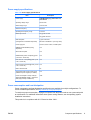
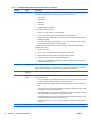
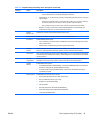
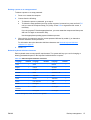
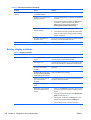
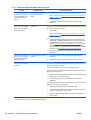
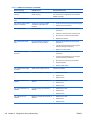
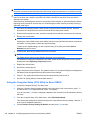
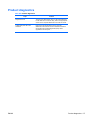
Table 4-1 Computer Setup (F10) Utility menu descriptions (continued)
Heading
Storage
Option
Description
Apply Defaults
and Exit
Restores the default settings defined in Default Setup.
Ignore Changes
and Exit
Exits computer setup without applying or saving changes.
Save Changes
and Exit
Saves changes to system configuration and exits the computer setup.
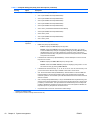
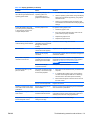
Device
Configuration
Lists installed non-SCSI storage devices (except SATA devices) and provides options for obtaining
specific information about each device:
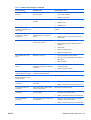
●
Hard Disk—Provides information about the hard disk drives in the computer.
●
CD-ROM—Provides information about the optical disk drives in the computer.
●
Diskette Type (for legacy diskette drives only)—Identifies the highest capacity media type
accepted by the diskette drive. Options are 3.5" (1.44 MB), 5.25" (1.2 MB), and Not Installed.
●
Default Values—Resets devices to their default configuration (SATA is the default).
◦
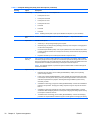
Multisector Transfers—Defines the transfer of data per interrupt. Options are 8, 16, and
Disable (16 is the default).
◦
Transfer Mode—Specifies the active data transfer mode. Options (subject to device
capabilities) are Max UDMA, PIO 0, Max PIO, Enhanced DMA, and Ultra DMA0. (Max
UDMA is the default).
◦
Translation Mode—Enables the BIOS to determine the translation mode used to
configure a formatted SATA or USB mass storage device. This prevents you from
needing to know how the mass storage device was formatted. Options are Automatic,
Bit Shift, LBA Assisted, Use (Cylinders, Heads, Sectors), and Off. Automatic is the
default.
Ordinarily, you should not change the translation mode selected by the BIOS. If the
selected translation mode is not compatible with the translation mode that was active
when the drive was partitioned and formatted, the data on the disk is inaccessible.
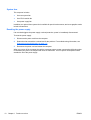
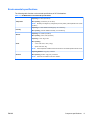
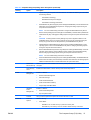
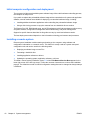
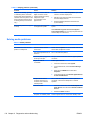
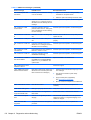
Storage Options
DPS Self-test
Provides these options:
●
Removable Media Boot (Enable/Disable)—Sets the ability to start the computer from
removable media.
●
ESATA Port—Lets you define ports as eSATA ports for use with external drives.
●
SATA Emulation—Sets the SATA emulation mode with the following options:
◦
RAID + AHCI—both the RAID and AHCI OPROMs execute. This emulation mode is the
default and offers the best performance and most functionality.
◦
IDE —offers standard SATA supports (four ports only).
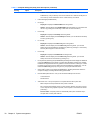
Select a drive—Lets you execute self-tests on ATA hard drives capable of performing Drive
Protection System (DPS) self-tests.
NOTE: This selection appears only when the system has one or more drives capable of
performing the DPS self-tests.
ENWW
The Computer Setup (F10) Utility
33