1
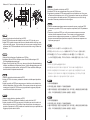
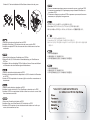
Hard drive installation 2.Установите 2.5-дюймовый жесткий диск и закрепите прилагаемыми болтами M3 (Установка в устройство FP55 трех жестких дисков допустима лишь при условии того, что 5.25-дюймовый отсек для установки дисков достаточно хорошо вентилируется.) 2.2.5”ࡂ࠼࠺ࠖࠬࠢ࠼ࠗࡉߪઃዻߩM3ࡀࠫߢ࿕ቯߒߡ⸳⟎ߒ߹ߔޕ FP55ߦࡂ࠼࠺ࠖࠬࠢ࠼ࠗࡉ3บࠍ⸳⟎ߢ߈ࠆߩߪޔ5.25"࠼ࠗࡉࡌࠗ࿐ߦචಽߩ ࠛࠕࡈࡠ߇⏕ߐࠇߡࠆ႐วߦ㒢ࠅ߹ߔޕ㧕 2.2.5” 䚌☐ ♈㏘䆠⏈ ┍⸽═ M3 ⇌㇠⦐ Ḕ㥉䚝⏼␘. ( FP55㜄 䚌☐♈㏘䆠 3ᵐ 㣙㵝㐐㜄⏈ 5.25” ☐⢰㢨⽀ ⷔ㢨㜄 㻝⺸䚐 ḩὤᴴ ḩἽ╌⏈ ㇵ䞝㜄㉐⬀ Ề㣙䚝⏼␘. ~ 䚌☐♈㏘䆠㜄㉐ ⵐ㈑䚌⏈ 㜨⦐㢬䚨 ⱬ㥐ᴴ ⵐ㈑䚔 ㍌⓸ 㢼㏩⏼␘. ) 2.Install the 2.5” hard drive and secure with included M3 screws (Installation of three hard drives in the FP55 is only recommended if the case used has sufficient airflow around the 5.25" drive bay.) ᅝ㺱ā⹀ˈϺҹܻ䰘ⱘ≝丁0㶎㍆䥪DŽ ᅝ㕂ৄ⹀ᰖ⚎⹀䴴ᕫᕜ䖥ˈⱐ➅↨䓗催ˈᓎ䅄⺎ܜᅮॳᴀ″←ⱘā᳝䎇ⱘ䗮乼 ᰖˈᠡৃҹ䗭咐خDŽ 2.Installieren Sie die 2,5 Zoll-Festplatte, anschließend mit den beigelegten M3-Schrauben fixieren. (Die Installation von drei Festplatten im FP55 ist nur dann ratsam, wenn innerhalb des Gehäuses ein ausreichender Luftstrom um den 5,25 Zoll-Laufwerkschacht herrscht.) ᅝ㺙ā⹀Ⲭˈᑊҹݙ䰘ⱘ≝༈0㶎ϱ䫕DŽ ᅝ㕂ৄ⹀ⲬᯊЎ⹀Ⲭ䴴ᕫᕜ䖥ˈথ⛁↨䕗催ˈᓎ䆂⹂ܜᅮॳᴀᴎⱘā᳝䎇ⱘ䗮亢ᯊˈ ᠡৃҹ䖭МخDŽ 2.Instale el disco duro de 2,5” y fíjelo con los tornillos M3 incluidos. (La instalación de tres discos duros en el FP55 solo se recomienda si la carcasa usada tiene suficiente flujo de aire alrededor de la bahía para dispositivos de 5,25”) 2.Installez le disque dur 2.5” et fixez-le avec les vis M3 fournies (L'installation de trois disques durs dans le FP55 est seulement recommandé si le boîtier utilisé permet d'avoir un flux d'air suffisant autour de la baie 5.25".) 2.Install the 2.5” hard drive and secure with included M3 screws (Installation of three hard drives in the FP55 is only recommended if the case used has sufficient airflow around the 5.25" drive bay.) 3 4