1
80-SOLO6C-97-0001-02 09-10-26
Illustrations
Product connection and operation
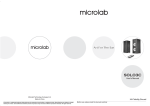
Front View
Front View of Remote control
MUTE
INPUT
2
1
PC
+
_
Main Speaker
5
Mp3 \ Mp4
Media player
CD\ VCD \ DVD
3
VOLUME
+
+
TREBLE
BASS
_
_
Sub Speaker
4
1. MUTE: press the key to make the system in muting
2. INPUT SELECT: press the key to select AUX or
PC audio input
3. VOLUME +/- key: adjust the speaker system's
volume, press the key to your demanding level
4. BASS +/-key: adjust the bass volume, press the
key to your demanding level
5. TREBLE+/-key: adjust the treble volume, press
the key to your demanding level
Remote Control Signal Receiving
Window and digital display
AC power supply:
220V-240V~ 50Hz
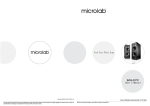
Real View
*please note the figure above for this product system correct placing and connection
1.Heat sink
2.Volume Control
Adjust the speaker system's volume to
your demanding level
3.AUDIO INUPUT
1
2.0 channel signal input jack
4.AUDIO OUTPUT
VOLUME
AUX
2
PC
—
+
To L speaker
3
L
AUDIO
INPUT
5.Power switch
R
TO L SPEAKER
AC IN
ON
Press the switch ON or OFF
4
OFF
L-
L+
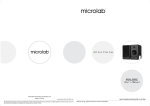
1. Multimedia speaker connections
a. Connect the interconnect speaker cable to the Sub speaker and the other end to the
Main speaker's audio output jacks (terminals)
b. Ensure the terminal polarity connections are matched both ends.
c. Ensure the master volume on the rear panel is turned down low or minimum, connect the 2RCA
left and right connector to the Main speaker rear audio input jacks.
d. Connect the corresponding end to your playback device.
e. Plug the AC power cable to source and turn on the power.
6.AC power supply
2. Operation
a. Depress the POWER switch on the Main speaker to turn on the multimedia speaker system.
5
b. Ensure that your audio source is correctly configured and start the playback file.
6
c. Adjust the master volume on the rear panel of the Main speaker to your preferred level.
3
4