1
2
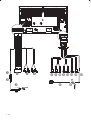
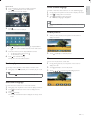
Connect the other end of the supplied standard connector to
the car audio system.
Eng l i sh
Connect wires
Caution
F Ensure that all loose leads are insulated with electrical tape.
Caution
F In order to avoid any accident, the driver must not watch video while driving. This
1
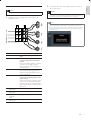
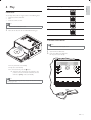
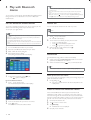
Check the car’s wiring carefully, then connect them to the
supplied ISO wires.
unit is designed to not allow watching moving video while driving. Park your car in a
safe place and engage the parking brake before watching moving video.
Note
F The video blocking system under parking brake not engaged only control this unit’s
display, and will not affect the video output through the rear RCA video output.
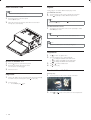
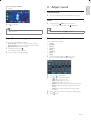
F If watch moving video from Disc or AV-In source but parking brake is not properly
connected, the video signal will be blocked by the system, and the below display
will be shown on TFT:
1
2
3
4
5
6
7
8
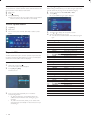
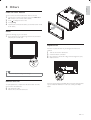
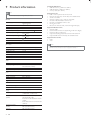
Connector
Yellow wire
Connect to
The +12V car battery which is live at all
times.
Blue wire
The electric antenna control lead
or power supply lead of the antenna
booster
If there is no electric antenna or antenna
booster, or it is manually operated
telescopic antenna, it is not necessary to
connect this lead.
Black wire
A metal surface of the car
First connect the black ground (earth)
lead, then connect the yellow and red
power supply leads.
Red wire
The +12V power terminal which is live
in the accessory (ACC) position of the
ignition switch
If there is no accessory position, connect
to the +12V car battery terminal that is
always live. Be sure to connect the black
ground (earth) lead to a metal surface of
#$
Green and green/ Left speaker (Rear)
black wires
White and white/ Left speaker (Front)
black wires
Gray and
Right speaker (Front)
gray/black
wires
Purple and purple/ Right speaker (Rear)
black wires
EN
9