1
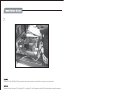
1.
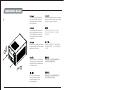
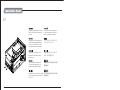
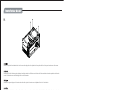
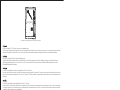
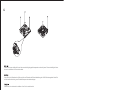
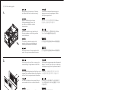
Unscrew screws holding the
top cover and then remove it
by pulling to the rear and away
from the chassis.
Выкрутите крепежные винты верхней
крышки, а затем снимите ее, потянув
назад и в сторону от корпуса.
Lösen Sie die Schrauben an der
oberen Abdeckung; entfernen
Sie die Abdeckung, indem Sie
diese nach hinten vom Gehäuse
wegziehen.
상부커버를 고정하고 있는 나사를
제거한 후, 뒤쪽으로 당겨 커버를
제거합니다.
Dévisser les vis arrière maintenant
le capot supérieur et tirer le capot
supérieur vers l’arrière.
上部カバーを固定しているネジを外し
てから後方に引き、ケースから取り外
します。
繁体中文
Quite los tornillos que sujetan la
cubierta superior y luego quítela
empujando hacia la parte trasera
y fuera del chasis.
請以螺絲起子將上蓋鎖固的螺絲卸下,
並向後拉起自機殼中取出。
Svitare le viti che tengono
il cover superiore e quindi
rimoverlo tirandolo verso
la parte posteriore.
请以螺丝起子将上盖锁固的螺丝卸下,
并向后拉起自机壳中取出。
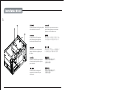
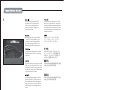
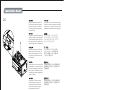
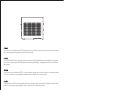
Unscrew screws holding the
fan bracket and then pull up
and away from the case.
Выкрутите крепежные винты
кронштейна вентилятора, а
затем потяните его вверх и в
сторону от корпуса.
Lösen Sie die Schrauben der
Kühlerhalterung; ziehen Sie die
Halterung vom Gehäuse ab.
팬 브라켓을 고정하고 있는 나사를
제거한 후, 위로 당겨 올려 케이스로부터
제거합니다.
Dévisser les vis maintenant le
support de ventilateur, puis tirez
vers le haut.
ファンブラケットを固定しているネジ
をはずし、引き上げて、ケースから取
り外します。
Quite los tornillos que sujetan
el bracket del ventilador y luego
tire de él hacia arriba y fuera de
la carcasa.
將鎖固風扇架的螺絲卸下,並
向前往上拉起自機殼中取出。
Svitare le viti che tengono il
supporto della ventola, quindi
rimuoverlo dal case.
将锁固风扇架的螺丝卸下,并
向前往上拉起自机壳中取出。
简体中文
2.
繁体中文
简体中文
3