1
10
English
Cleaning
Never use scouring pads, abrasive cleaning agents or aggressive liquids such as petrol or acetone
to clean the appliance.
Never immerse the toaster oven in water or splash water onto it to prevent electric shock.
1 Set the timer knob to 0, remove the plug from the wall socket and let the appliance cool
down completely.
2 Wipe the inside and outside of the toaster oven with a moist cloth.
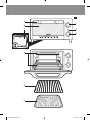
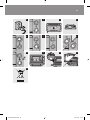
3 Unhook the wire rack and clean it in warm water with some washing-up liquid. Wipe it dry
with a cloth before you put it back into the toaster oven (Fig. 12).
4 Clean the baking tray in warm water with some washing-up liquid or in the dishwasher. If
food particles or juices have caked onto the tray, let it soak in hot water for a while before
you start cleaning it.
5 To remove crumbs, turn the appliance on its back and push the crumb removal door down
to remove it. Then wipe away the crumbs with a dry or moist cloth.  (Fig. 13)
Make sure that the wire rack and the baking tray are dry before you put them back into the
toaster oven.
Always close the crumb removal door before you use the appliance again.
Make sure the appliance is completely dry before you use it again.
Environment
-- Do not throw away the appliance with the normal household waste at the end of its life, but
hand it in at an official collection point for recycling. By doing this, you help to preserve the
environment (Fig. 14).
Guarantee & service
If you need service or information or if you have a problem, please visit the Philips website at
www.philips.com or contact the Philips Consumer Care Centre in your country (you find its phone
number in the worldwide guarantee leaflet). If there is no Consumer Care Centre in your country,
go to your local Philips dealer.
Troubleshooting
This chapter summarises the most common problems you could encounter with the appliance. If
you are unable to solve the problem with the information below, contact the Consumer Care
Centre in your country.
Problem
Solution
The toaster oven does not
work.
Make sure the plug is properly inserted into the wall socket.
If the plug is in the wall socket and the appliance still does not
work, the electronic system is malfunctioning. Have the appliance
examined and repaired by Philips or a service centre authorised
by Philips.
I want to interrupt the
cooking process.
4222.200.0342.2.indd 10
Turn the timer knob to 0 to switch off the toaster oven.
09-12-09 11:45