1
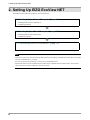
2. Setting Up EIZO EcoView NET
Configuring Network
111
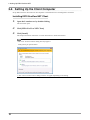
Start EIZO EcoView NET Client
Select [Start] - [(All) Programs] - [EIZO] - [EIZO EcoView NET Client] - [EIZO EcoView NET Client].
222
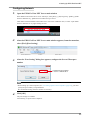
After the EIZO EcoView NET Client setup window appears, click [Communication
Setting]
333
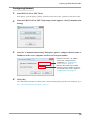
After the “Communication Setting” dialog box appears, configure the host name or
IP address of the server computer and Server/Client port number
Enter the host name or IP address
of the server computer that you
configured in “2-1. Setting Up the
Server Computer” (page 9).
Enter the Server/Client port number
Enter the same port number as the one
you entered on the server computer in
“Configuring Network” (page 11).
444
Click [OK]
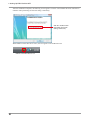
The communication settings are enabled. After you have finished setting up all the client computers, go on
to “2-3. Refreshing Monitor Information” (page 14).
13