1
Operator Controls
Control Panel
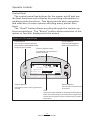
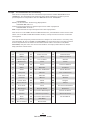
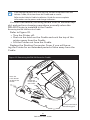
The control panel has buttons for the power on/off and media feed functions and a display for providing information regarding printer functions. Two keys provide easy navigation
and selection of menu options affecting many printer functions.
The “Scroll” button allows scrolling through the various options and settings. The “Select” button allows selection of the
option or function displayed on the screen.
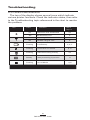
Figure 11: LCD Control Panel
Feed Button
Scroll Button
Press to advance the media one
blank label or a software determined
length of journal media.
Press to scroll through the
menu choices on the LCD.
Printer Status Icons
Indicates the status of several
printer functions
Zebra RW 420
Signal:0%
Battery
Latch: ok
Rdr
(ok)
MENU
Power Button
Select Button
Press to turn unit on. Press again to turn
unit off
Press to select a menu choice
on the LCD.
LCD
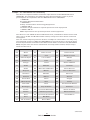
See LCD Functions Table for an overview of menu options
NOTE: LCD menu options are under specific application
control. Not all options may be available In your printer’s
application.
Zebra RW 420
Signal:0%
Battery
Latch: ok
Rdr
23
RW Series User Guide
(ok)
MENU