1
PRC
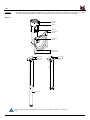
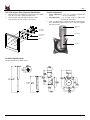
UFP-220 Adapter Plate (Optional Installation)
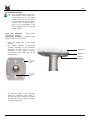
Tension Adjustment
1.
1.
2.
Attach the UFP-220 Adapter Plate to the back of the display
using the six (6) M4 x 10mm flat head screws.
Attach the PRC mounting plate to the back of the
UFP-220 using the four (4) M4 x 5 mm screws.
2.
3.
Swivel Adjustment – Use a ¾” wrench to tighten and
loosen
the swivel adjustment.
Tilt Adjustment - Use a 14mm socket to tighten and
loosen the tilt adjustment.
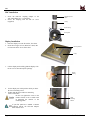
After everything has been tightened and the orientation has
been determined, tighten the set screw using the supplied
M3 Allen wrench.
M6 x 6mm Set
Screw
VESA 75
M4 x 10mm Flat
Head Screws
Swivel Tension
M4 x 5mm Phillips
Head Screws
UFP-220
Tilt Tension
Technical Specifications
All measurements are in inches (mm).
Installation Manual
Page - 7 -