1
INSTALLATION GUIDE
ENGLISH
AXIS Q7900 Rack
FRANÇAIS
DEUTSCH
ITALIANO
ESPAÑOL
About this Document
Equipment Modifications
This document includes instructions for installing the AXIS
Q7900 on your network. Previous experience of networking
will be beneficial when installing the product.
This equipment must be installed and used in strict
accordance with the instructions given in the user
documentation. This equipment contains no
user-serviceable components. Unauthorized equipment
changes or modifications will invalidate all applicable
regulatory certifications and approvals.
Legal Considerations
Video and audio surveillance can be prohibited by laws that
vary from country to country. Check the laws in your local
region before using this product for surveillance purposes.
Electromagnetic Compatibility (EMC)
This equipment generates, uses and can radiate radio
frequency energy and, if not installed and used in
accordance with the instructions, may cause harmful
interference to radio communications. However, there is no
guarantee that interference will not occur in a particular
installation.
If this equipment does cause harmful interference to radio
or television reception, which can be determined by turning
the equipment off and on, the user is encouraged to try to
correct the interference by one or more of the following
measures: Re-orient or relocate the receiving antenna.
Increase the separation between the equipment and
receiver. Connect the equipment to an outlet on a different
circuit to the receiver. Consult your dealer or an experienced
radio/TV technician for help. Shielded (STP) network cables
must be used with this unit to ensure compliance with EMC
standards.
USA - This equipment has been tested and found to
comply with the limits for a Class A computing device,
pursuant to Part 15 of the FCC rules. These limits are
designed to provide reasonable protection against harmful
interference when the equipment is operated in a
commercial environment. This equipment generates, uses
and can radiate radio frequency energy and, if not installed
and used in accordance with the instruction manual, may
cause harmful interference to radio communications.
Operation of this equipment in a residential area is likely to
cause interference, in which case the user will be required
to correct the interference at his own expense.
Canada - This Class A digital apparatus complies with
Canadian ICES-003.
Europe -
This digital equipment fulfills the
requirements for radiated emission according to limit A of
EN55022, and the requirements for immunity
according to EN55024 residential, commercial and industry.
Warning! This is a Class A product. In a domestic
environment this product may cause radio interference, in
which case the user may be required to take adequate
measures.
Japan - This is a class A product based on the standard of
the Voluntary Control Council for Interference by
Information Technology Equipment (VCCI). This device is a
Class A information technology device. If you use the device
in home environment, radio disturbance may arise. When
such trouble occurs, the user may be required to take
corrective action.
Australia - This electronic device meets the requirements
of the Radio communications (Electromagnetic
Compatibility) Standard AS/NZS CISPR22:2002. Warning!
This is a Class A product. In a domestic environment this
product may cause radio interference, in which case the
user may be required to take adequate measures.
Liability
Every care has been taken in the preparation of this
document. Please inform your local Axis office of any
inaccuracies or omissions. Axis Communications AB cannot
be held responsible for any technical or typographical errors
and reserves the right to make changes to the product and
documentation without prior notice. Axis Communications
AB makes no warranty of any kind with regard to the
material contained within this document, including, but not
limited to, the implied warranties of merchantability and
fitness for a particular purpose. Axis Communications AB
shall not be liable nor responsible for incidental or
consequential damages in connection with the furnishing,
performance or use of this material.
RoHS
This product complies with both the European RoHS
directive, 2002/95/EC, and the Chinese RoHS
regulations, ACPEIP.
WEEE Directive
The European Union has enacted a Directive
2002/96/EC on Waste Electrical and Electronic
Equipment (WEEE Directive). This directive is
applicable in the European Union member states.
The WEEE marking on this product (see right) or
its documentation indicates that the product must not be
disposed of together with household waste. To prevent
possible harm to human health and/or the environment, the
product must be disposed of in an approved and
environmentally safe recycling process. For further
information on how to dispose of this product correctly,
contact the product supplier, or the local authority
responsible for waste disposal in your area.
Business users should contact the product supplier for
information on how to dispose of this product correctly. This
product should not be mixed with other commercial waste.
Support
Should you require any technical assistance, please contact
your Axis reseller. If your questions cannot be answered
immediately, your reseller will forward your queries through
the appropriate channels to ensure a rapid response. If you
are connected to the Internet, you can:
• download user documentation and firmware updates
• find answers to resolved problems in the FAQ database.
Search by product, category, or phrases
• report problems to Axis support by logging in to your
private support area.
For additional information, see page 55.
Safeguards
Please read through this Installation Guide carefully before installing the product. Keep the Installation Guide
for further reference.
CAUTION!
•
•
This Axis product must be used in compliance with local laws and regulations.
•
•
IMPORTANT!
ENGLISH
•
•
•
When transporting the Axis product, use the original packaging or equivalent to prevent damage to the
product.
Store the Axis product in a dry and ventilated environment.
Only use handtools when installing the Axis product, the use of electrical tools or excessive force could
cause damage to the product.
Do not use chemicals, caustic agents, or aerosol cleaners. Use a damp cloth for cleaning.
Only use accessories and spare parts provided or recommended by Axis.
Do not attempt to repair the product by yourself, contact Axis or your Axis reseller for service matters.
AXIS Q7900 Installation Guide
Page 5
AXIS Q7900 Rack
Installation Guide
This installation guide describes the hardware installation of the AXIS Q7900, which can hold up to
14 Axis video encoder blades. To install the Axis video encoder on the network, please see the video
encoder’s own installation guide.
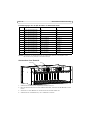
Installation steps
1. Check the package contents against the list below.
2. Hardware overview. See page page 6.
3. Install the hardware. See page 7.
Package contents
Please contact your dealer if anything is missing or damaged.
Item
Models/variants/notes
Video encoder rack
AXIS Q7900
2 cover plates
• 1 1-port front panel cover
• 6 2-port front panel covers
2 AC power cords
•
•
•
•
Terminal connectors
• 28 14-pin terminal connectors
• 14 2-pin terminal connectors
Printed materials
• AXIS Q7900 Installation Guide (this document)
• Axis Warranty Document
Mounting kit
Europe
UK
US, Canada, Japan
Australia
See separate inventory below
•
•
•
•
Switzerland
Denmark
South Korea
Argentina
ENGLISH
Follow these steps to install the AXIS Q7900 on your local network (LAN):
Page 6
AXIS Q7900 Installation Guide
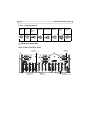
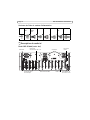
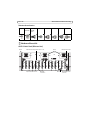
Power cord plug variants
Europe
UK
US,
Canada,
Japan
Australia
Switzerland
Denmark
South
Korea
Argentina
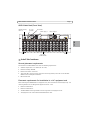
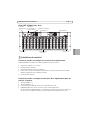
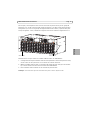
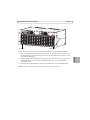
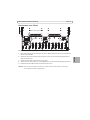
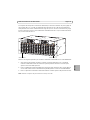
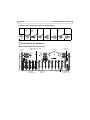
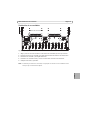
Hardware overview
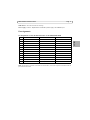
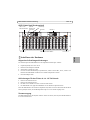
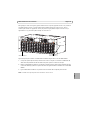
AXIS Q7900 Rack (Rear View)
Fan
I/O Power
Connector 1-14
I/O Terminal
Connector
Network
Connector
Fan
RS-485
Connector
Rack ID
Network
Connection Switch
AXIS Q7900 Installation Guide
Page 7
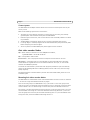
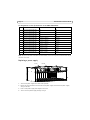
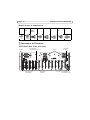
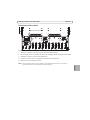
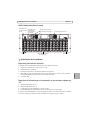
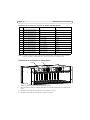
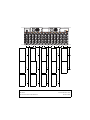
AXIS Q7900 Rack (Front View)
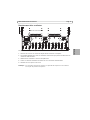
Network Activity
LEDs 1-4
Fans button
PS 1-2 &
Fan LEDs
Power supply 1
Power supply 2
AXIS Q7900 Rack
PS1
PS 2
NETWORK
ACTIVITY
FANS
1
2
3
4
LOOP
POWE R
POWE R
POWE R
POWE R
POWE R
POWE R
POWE R
POWE R
POWE R
6
6
POWER
6
POWE R
6
POWER
6
6
6
6
6
6
6
6
6
POWER
6
5
5
5
5
5
5
5
5
5
5
5
5
5
5
4
4
4
4
4
4
4
4
4
4
4
4
4
4
3
3
3
3
3
3
3
3
3
3
3
3
3
3
2
2
2
2
2
2
2
2
2
2
2
2
2
2
1
1
1
1
1
1
1
1
1
1
1
1
1
1
Slot 1
Axis Video
Encoder Blades
Slot 14
Install the hardware
General placement requirements
The location of the AXIS Q7900 must meet the following requirements:
•
•
•
•
•
Ambient temperature: 0° to +45°C (32° to 113°F)
Relative humidity: 20-80%
Power source within 1.8 meters
There must be a minimum of 5cm free space on the top, bottom, front and rear of the AXIS
Q7900 to ensure adequate ventilation
No excessive dust
Placement requirements for installation in a 19” equipment rack
When mounting the AXIS Q7900 in an equipment rack, never stack other units directly on top - the
mounting brackets are not designed to support more than 1 unit.
•
•
•
•
Pozidriv screwdriver #1
Pozidriv screwdriver #3
The AXIS Q7900 must be grounded to the same ground as the equipment rack.
The equipment rack must be braced and bolted to the floor.
ENGLISH
POWE R
Page 8
AXIS Q7900 Installation Guide
Connect power
The AXIS Q7900 has two On/Off switches. Please ensure that the correct AC power cord for your
country is used.
Note also the following requirements and restrictions:
•
•
•
•
•
To prevent the risk of electrical shock when in contact with the unit casing, only earthed/
grounded power cords should be used to power the AXIS Q7900.
Protection against overcurrents, short circuits and earth faults should be provided in the building installation.
The AXIS Q7900 is intended for indoor use only, and only for TN and IT power systems.
If a foreign object is accidently dropped into the Video encoder Rack, always disconnect power
before attempting to remove the object.
To turn off power to the AXIS Q7900, both power supplies must be turned off.
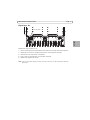
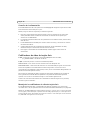
Axis video encoder blades
S/N - (serial number) is identical to the unit’s MAC/Ethernet address,
e.g. 00408C1A2B3C = 00-40-8C-1A-2B-3C.
P/N - is the product’s model number.
Bus Connector - This is the physical interface to the I/O terminal connector on the rack.
DIP Switches - Each video input has a corresponding line termination DIP switch. Axis video
encoder blades are supplied with the line termination enabled for each input; i.e. with the DIP
switches set to ON (down position).
To connect the video encoder in parallel with other equipment, disable the input termination by
setting the corresponding DIP switch to OFF (up position). Failure to do so may affect the image
quality negatively.
For detailed hardware information about a particular Axis video encoder blade, please refer to its
installation guide.
Mounting Axis video encoder blades
The AXIS Q7900 can accommodate 14 Axis video encoder blades. The slots for these are numbered
1-14 from left to right. See Hardware overview, on page 6.
There are four slot groups in the AXIS Q7900: 1-4, 5-7, 8-10 and 11-14. If a slot group is to be
used, the first slot in the slot group must be occupied. So if the first slot group is to be used, there
must be a blade in slot 1. If slots 5 through 7 are to be used, there must be blade in slot 5 etc..
For example, if you have three blades and want to put them into the first group of slots 1-4, one of
the three blades must occupy slot 1. The other two blades could occupy either slot 2, 3 or 4. Or if
three slot groups were to be used, the first blade could occupy slot 1 or 5, the second blade could
occupy slot 5 or 8, and the third blade could occupy slot 8 or 11.
AXIS Q7900 Installation Guide
Page 9
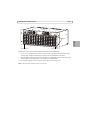
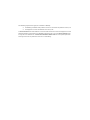
Screws
ENGLISH
Video channel 1
Video channel 14
Follow these steps to mount an Axis video encoder blade in the AXIS Q7900:
1. If there is a a front panel cover, remove it from the slot in to which the video encoder will be
mounted. This is done by unfastening the screw at the top and bottom of the cover.
2. Slide the video encoder into place, using the guides as an aid. Make sure that video channel (1)
is at the bottom of the blade when it is inserted into the AXIS Q7900.
3. Fix the video encoder in place, using the screws from the front panel cover.
Note: Front panel covers should be used on all empty slots.
Page 10
AXIS Q7900 Installation Guide
Unit connectors
Rear connectors
Network Connector - Axis video encoder blades are designed for 10/100/1000 Mbps networks and
connect via the standard RJ-45 connector.
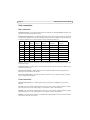
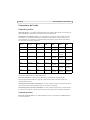
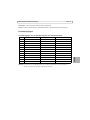
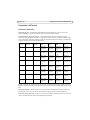
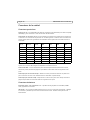
Network Connector Switch - The Network Connector Switch controls which blades are connected
to a particular network connector. The following table shows how the blades are connected based
on how the switches are set. These settings are only made during power up.
NET 1-2 NET 2-3 NET 3-4 NET1
switch
switch
switch
connector
NET2
connector
NET3
connector
NET4
connector
Off
Off
Off
Blade 1-4
Blade 5-7
Blade 8-10
Blade 11-14
On
Off
Off
Blade 1-7
Do not connect
Blade 8-10
Blade 11-14
Off
On
Off
Blade 1-4
Blade 5-10
Do not connect
Blade 11-14
On
On
Off
Blade 1-10 Do not connect
Do not connect
Blade 11-14
Off
Off
On
Blade 1-4
Blade 5-7
Blade 8-14
Do not connect
On
Off
On
Blade 1-7
Do not connect
Blade 8-14
Do not connect
Off
On
On
Blade 1-4
Blade 5-14
Do not connect
Do not connect
On
On
On
Blade 1-14 Do not connect
Do not connect
Do not connect
Rack ID - Sets a rack ID for all blades in the rack. Possible ID 0 to 15. The Blade ID, will correspond
to the slot number.
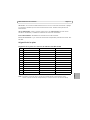
RS-485 Connector - Usually used for connecting Pan Tilt Zoom devices. See page 11 below for pin
assignment information.
I/O Power Connector(s) - 12VDC 100mA out. This connector could be used to supply power to
external units connected to the I/O port.
I/O Terminal Connector(s) - Provides the physical interface for up to 12 I/Os. See page 12 below
for pin assignment information.
Front connectors
Network Activity LEDs 1-4 - 10/100 yellow flashes with activity, 1000M green, flashes with
activity.
PS1 LED - This will indicate a RED light when there is an error in Power supply 1. Please shut down
PS1 and replace with a new power supply. It also indicates if PS1 is disconnected
PS2 LED - This will indicate a RED light when there is an error in Power supply 2. Please shut down
PS2 and replace with a new power supply. It also indicates if PS2 is disconnected
FAN LED - This will indicate if one or more FANS need to be replaced with new ones. Please replace
the fans and reset the fans warning.
AXIS Q7900 Installation Guide
Page 11
FANS button - This will reset the fan warning.
Power supply 1 and 2 - Replaceable and redundant power supply. 100-240VAC input.
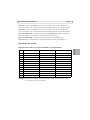
Pin assignments
Pin assignments for the RS-485 connector of the AXIS Q7900 Rack
AXIS Q7406
AXIS 243Q
AXIS 241Q/S, AXIS 240Q
12
Channel 6, RS485B
NC
NC
11
Channel 6, RS485A
NC
NC
10
Channel 5, RS485B
NC
NC
9
Channel 5, RS485A
NC
NC
8
Channel 4, RS485B
NC
NC
7
Channel 4, RS485A
NC
NC
6
Channel 3, RS485B
NC
NC
5
Channel 3, RS485A
NC
NC
4
Channel 2, RS485B
NC
NC
3
Channel 2, RS485A
NC
NC
2
Channel 1, RS485B
Channel 1, RS485B
RS485B
1
Channel 1, RS485A
Channel 1, RS485A
RS485A
Note: For RS-485 unit connector information for video encoders, refer to their respective Installation Guide for
I/O connector information.
ENGLISH
Pin
Page 12
AXIS Q7900 Installation Guide
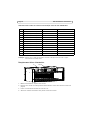
Pin assignments for the I/O Connector of the AXIS Q7900 Rack
Pin
AXIS Q7406
AXIS 243Q
AXIS 241Q/S, AXIS 240Q
12
Channel 6, Configurable I/O 2
NC
NC
11
Channel 5, Configurable I/O 2
NC
NC
10
Channel 4, Configurable I/O 2
NC
NC
9
Channel 3, Configurable I/O 2
NC
NC
8
Channel 2, Configurable I/O 2
Channel 4, Output1
Output4
7
Channel 1, Configurable I/O 2
Channel 3, Output1
Output3
6
Channel 6, Configurable I/O 1
Channel 2, Output1
Output2
5
Channel 5, Configurable I/O 1
Channel 1, Output1
Output1
4
Channel 4, Configurable I/O 1
Channel 4, Input 1
Input4
3
Channel 3, Configurable I/O 1
Channel 3, Input 1
Input3
2
Channel 2, Configurable I/O 1
Channel 2, Input 1
Input2
1
Channel 1, Configurable I/O 1
Channel 1, Input 1
Input1
Note: For I/O unit connector information for video encoders, refer to their respective Installation Guide for I/O
connector information.
Replacing a power supply
Screw
Handle
1. Turn off the power supply that needs to be replaced.
2. Loosen the screw located on the left side of the power supply and remove the power supply
using the handle.
3. Insert a new power supply and retighten the screw.
4. Turn on the new power supply to begin using it.
AXIS Q7900 Installation Guide
Page 13
Replacing a fan
Power connector
Screws
ENGLISH
Follow these steps to replace a fan.
1.
2.
3.
4.
5.
Loosen and remove the screws located on each side of the fan that needs to be replaced.
Gently pull out the fan far enough to disconnect it from the power connector.
Disconnect the fan and remove it completely.
Insert a new fan and reconnect it to the power connector.
Replace and retighten the screws.
Note: If one fan needs to be replaced, it is best to replace all three fans as soon as possible for optimum
performance.
Mesures de sécurité
Lisez attentivement le présent guide d’installation avant d’installer le produit. Conservez le guide d’installation
si vous souhaitez le consulter ultérieurement.
ATTENTION !
•
•
•
•
•
•
Pour éviter d’endommager le produit Axis, utilisez l’emballage d’origine ou un équivalent pour le
transporter.
Stockez le produit Axis dans un environnement sec et aéré.
Utilisez uniquement des outils manuels pour l’installation du produit Axis, l’utilisation d’outils électriques
ou l’usage excessif de la force risque de l’endommager.
N’utilisez ni produits chimiques, ni substances caustiques, ni nettoyeurs aérosol. Utilisez un linge humide
pour le nettoyage.
Utilisez uniquement des accessoires et des pièces de rechange fournis ou recommandés par Axis.
Ne tentez pas de réparer le produit vous-même, contactez Axis ou votre revendeur Axis pour tout problème
lié au service.
IMPORTANT !
•
Ce produit Axis doit être utilisé conformément aux lois et réglementations locales en vigueur.
AXIS Q7900 Guide d'installation
Page 15
Rack AXIS Q7900
Guide d’installation
Le présent guide d’installation décrit l’installation matérielle de l’AXIS Q7900 permettant
d’accueillir jusqu’à 14 encodeurs vidéo lames Axis. Pour savoir comment installer l’encodeur vidéo
Axis sur le réseau, veuillez vous reporter au guide d’installation de l’encodeur vidéo.
Procédure d’installation
Procédez comme suit pour installer l’AXIS Q7900 sur votre réseau local :
1. Vérifiez le contenu de l’emballage par rapport à la liste ci-dessous.
2. Description du matériel. Cf. page 16.
3. Installation du matériel. Cf. page 17.
Article
Modèles/variantes/remarques
Rack d’encodeurs
vidéo
AXIS Q7900
2 plaques
d’obturation
• 1 couvercle de panneau avant à un port
• 6 couvercles de panneau avant à deux ports
2 cordons
d’alimentation CA
•
•
•
•
Connecteurs pour
terminaux
• 28 connecteurs pour terminaux à 14 broches
• 14 connecteurs pour terminaux à 2 broches
Documentation
• Guide d’installation de l’AXIS Q7900 (le présent document)
• Document de garantie d’Axis
Kit de montage
Europe
Royaume-Uni
États-Unis, Canada, Japon
Australie
Voir liste séparée ci-dessous
•
•
•
•
Suisse
Danemark
Corée du Sud
Argentine
FRANÇAIS
Contenu de l’emballage
Veuillez contacter votre revendeur s’il manque des articles ou si certains sont endommagés.
Page 16
AXIS Q7900 Guide d’installation
Variantes de fiche de cordon d’alimentation
Europe
Royaume États-Unis,
-Uni
Canada,
Japon
Australie
Suisse
Danemark
Corée du
Sud
Argentine
Description du matériel
Rack AXIS Q7900 (vu de dos)
Ventilateur
Connecteur
d’alimentation E/S 1-14
Connecteur pour
terminaux E/S
Connecteur RS-485
Ventilateur
ID de rack
Connecteur
réseau
Commutateur de
connexion réseau
AXIS Q7900 Guide d'installation
Page 17
Rack AXIS Q7900 (vu de face)
Indicateurs
d’activité réseau
1-4
Indicateurs
d’alimentation 1-2
et de ventilateur
Bouton de ventilateur
Alimentation 1
Alimentation 2
AXIS Q7900 Rack
PS1
PS 2
NETWORK
ACTIVITY
FANS
1
2
3
4
LOOP
POWE R
POWE R
POWE R
POWE R
POWE R
POWE R
POWE R
POWE R
POWE R
POWE R
6
6
POWER
6
POWE R
6
POWER
6
6
6
6
6
6
6
6
6
POWER
6
5
5
5
5
5
5
5
5
5
5
5
5
5
5
4
4
4
4
4
4
4
4
4
4
4
4
4
4
3
3
3
3
3
3
3
3
3
3
3
3
3
3
2
2
2
2
2
2
2
2
2
2
2
2
2
2
1
1
1
1
1
1
1
1
1
1
1
1
1
1
Encodeurs vidéo
lames Axis
Logement 14
Installation du matériel
Facteurs à prendre en compte lors du choix d’un emplacement
L’AXIS Q7900 doit être installé à un endroit répondant aux critères suivants :
•
•
•
•
•
Température ambiante : 0 ° à +45 °C
Humidité relative : 20-80%
Source d’alimentation à moins de 1,80 mètre
Il doit y avoir au moins 5 cm d’espace libre au-dessus, au-dessous, devant et derrière l’AXIS
Q7900 afin de garantir une ventilation suffisante
Pas de poussière excessive
Facteurs à prendre en compte lors du choix d’un emplacement pour un
rack de 19 pouces
•
•
•
•
Tournevis Pozidriv n° 1
Tournevis Pozidriv n° 3
Le rack doit être consolidé par des renforts et être boulonné au sol.
L’AXIS Q7900 doit être mis à la même terre que le rack de l’équipement.
Lors du montage de l’AXIS Q7900 sur un rack physique, n’empilez jamais plusieurs racks les uns
sur les autres : les supports de fixation ne sont pas prévus pour supporter plus d’un rack.
FRANÇAIS
Logement 1
Page 18
AXIS Q7900 Guide d’installation
Branchement de l’alimentation
L’AXIS Q7900 possède deux boutons de marche/arrêt. Vérifiez que vous utilisez le cordon
d’alimentation CA approprié pour votre pays.
Tenez également compte des contraintes et restrictions suivantes :
•
•
•
•
•
Pour éviter tout risque de choc électrique en cas de contact avec le boîtier de l’appareil, utilisez
uniquement un cordon d’alimentation à la terre/masse pour l’alimentation de l’AXIS Q7900.
Les installations du bâtiment doivent offrir une protection contre les surintensités, les courtscircuits et les défauts de terre.
L’AXIS Q7900 est destiné à être utilisé en intérieur exclusivement et uniquement pour les
systèmes d’alimentation TN et IT.
Si un corps étranger devait tomber accidentellement dans le rack d’encodeur vidéo, mettez
toujours ce dernier hors tension avant de tenter de retirer l’objet.
Pour mettre l’AXIS Q7900 hors tension, coupez les deux alimentations.
Encodeur vidéo lame Axis
Le numéro de série (S/N) - est identique à l’adresse Ethernet/MAC de l’appareil.
Par exemple : 00408C1A2B3C = 00-40-8C-1A-2B-3C.
Le numéro de pièce (P/N) - correspond au numéro de modèle du produit.
Connecteur de bus - Le connecteur de bus joue le rôle d’interface physique avec le connecteur
pour terminaux E/S du rack.
Commutateurs DIP - Chaque entrée vidéo possède un commutateur DIP de terminaison de ligne
correspondant. Les encodeurs vidéo lames Axis sont fournis avec la terminaison de ligne activée
pour chaque entrée, c’est-à-dire avec les commutateurs DIP configurés sur ON (position inférieure).
Pour connecter l’encodeur vidéo en parallèle avec d’autres équipements, désactivez la terminaison
d’entrée en réglant le commutateur DIP correspondant sur OFF (position supérieure). Sinon, la
qualité d’image risque d’être affectée.
Pour toute information détaillée à propos d’un encodeur vidéo lame AXIS spécifique, reportez-vous
à son guide d’installation.
Montage des encodeurs vidéo Axis
L’AXIS Q7900 peut accepter 14 encodeurs vidéo lames Axis. Les logements prévus à cet effet sont
numérotés de 1 à 14, de gauche à droite. Cf. section Description du matériel, à la page 16.
L’AXIS Q7900 possède également quatre groupes de logements : 1-4, 5-7, 8-10 et 11-14. Si un
groupe de logements doit être utilisé, le premier logement de chaque groupe doit être occupé.
Autrement dit, si le premier groupe de logements doit être utilisé, il doit y avoir une lame dans le
logement 1. Si les logements 5 à 7 doivent être utilisés, il doit y avoir une lame dans le logement 5,
etc.
AXIS Q7900 Guide d'installation
Page 19
Par exemple, si vous disposez de trois lames et vous voulez les placer dans le premier groupe de
logements 1 à 4, une des trois lames doit occuper le logement 1, les deux autres pouvant occuper
les logements 2, 3 ou 4. Si trois groupes de logements doivent être utilisés, la première lame peut
occuper le logement 1 ou 5, la deuxième le logement 5 ou 8 et la troisième le logement 8 ou 11.
Vis
FRANÇAIS
Canal vidéo 1
Canal vidéo 14
Procédez comme suit pour monter un encodeur vidéo lame Axis sur l’AXIS Q7900 :
1. Si le logement dans lequel l’encodeur vidéo sera monté possède un couvercle de panneau avant,
retirez-le. Pour ce faire, dévissez les vis au sommet et au bas du couvercle.
2. Mettez l’encodeur vidéo en place, en vous aidant des guides. Assurez-vous que le canal vidéo
(1) se trouve au bas de la lame lors de l’insertion dans l’AXIS Q7900.
3. Fixez l’encodeur vidéo à l’aide des vis du couvercle de panneau avant.
Remarque : Des couvercles de panneau avant doivent être posés sur tous les logements vides.
Page 20
AXIS Q7900 Guide d’installation
Connecteurs de l’unité
Connecteurs arrière
Connecteur réseau - Les encodeurs vidéo lames Axis sont destinés à être utilisés sur les réseaux 10/
100/1 000 Mbits/s et connectés à l’aide du connecteur RJ-45 standard.
Commutateur de connecteur réseau - Le commutateur de connecteur réseau contrôle les lames
connectées à un connecteur réseau donné. Le tableau suivant indique la manière dont les lames
sont connectées, en fonction de la configuration des commutateurs. Ces paramètres sont établis
lors de la mise sous tension uniquement.
Commutateur
NET 1-2
Commutateur
NET 2-3
Commutateur
NET 3-4
Connecteur
NET1
Connecteur
NET2
Connecteur Connecteur
NET3
NET4
Désactivé
Désactivé
Désactivé
Lame 1-4
Lame 5-7
Lame 8-10
Lame 11-14
Activé
Désactivé
Désactivé
Lame 1-7
Non
connecté
Lame 8-10
Lame 11-14
Désactivé
Activé
Désactivé
Lame 1-4
Lame 5-10
Non
connecté
Lame 11-14
Activé
Activé
Désactivé
Lame 1-10
Non
connecté
Non
connecté
Lame 11-14
Désactivé
Désactivé
Activé
Lame 1-4
Lame 5-7
Lame 8-14
Non
connecté
Activé
Désactivé
Activé
Lame 1-7
Non
connecté
Lame 8-14
Non
connecté
Désactivé
Activé
Activé
Lame 1-4
Lame 5-14
Non
connecté
Non
connecté
Activé
Activé
Activé
Lame 1-14
Non
connecté
Non
connecté
Non
connecté
ID de rack - Définit un ID de rack pour toutes les lames du rack. Les ID possibles vont de 0 à 15. L’ID
de lame doit correspondre au numéro du logement.
Connecteur RS-485 - Est généralement utilisé pour la connexion de périphériques PTZ
(panoramique/inclinaison/zoom). Cf. page 21 ci-dessous pour toute information concernant
l’affectation des broches.
Connecteur(s) d’alimentation d’entrée/sortie - 12 V CC 100 mA en sortie. Ce connecteur peut être
utilisé pour alimenter des périphériques externes branchés sur le port E/S.
Connecteur(s) pour terminaux d’entrée/sortie - Fournit l’interface physique de 12 entrées/sorties
au maximum. Cf. page 22 ci-dessous pour toute information concernant l’affectation des broches.
Connecteurs avant
Indicateurs d’activité réseau 1-4 - 10/100 clignote en jaune en cas d’activité. 1000M clignote en
vert en cas d’activité.
AXIS Q7900 Guide d'installation
Page 21
Voyant PS1 - S’allume en ROUGE en cas d’erreur au niveau de l’alimentation 1. Mettez PS1 à
l’arrêt et remplacez-la par une nouvelle alimentation. Indique également si PS1 est déconnectée.
Voyant PS2 - S’allume en ROUGE en cas d’erreur au niveau de l’alimentation 2. Mettez PS2 à
l’arrêt et remplacez-la par une nouvelle alimentation. Indique également si PS2 est déconnectée.
Voyant de VENTILATEUR - Indique si un ou plusieurs VENTILATEURS doivent être remplacés par
des neufs. Remplacez les ventilateurs et remettez l’avertissement à zéro.
Bouton de VENTILATEUR - Permet de remettre l’avertissement de ventilateur à zéro.
Alimentation 1 et 2 - Alimentation remplaçable et redondante. Entrée en 100-240 V CA.
Affectation des broches
Affectation des broches du connecteur RS-485 du rack AXIS Q7900
AXIS 243Q
AXIS 241Q/S, AXIS 240Q
12
Canal 6, RS485B
NC
NC
11
Canal 6, RS485A
NC
NC
10
Canal 5, RS485B
NC
NC
9
Canal 5, RS485A
NC
NC
8
Canal 4, RS485B
NC
NC
7
Canal 4, RS485A
NC
NC
6
Canal 3, RS485B
NC
NC
5
Canal 3, RS485A
NC
NC
4
Canal 2, RS485B
NC
NC
3
Canal 2, RS485A
NC
NC
2
Canal 1, RS485B
Canal 1, RS485B
RS485B
1
Canal 1, RS485A
Canal 1, RS485A
RS485A
Remarque : Reportez-vous au Guide d’installation de l’encodeur vidéo pour toute information à propos
des connecteurs d’entrée/de sortie RS-485.
FRANÇAIS
Broche AXIS Q7406
Page 22
AXIS Q7900 Guide d’installation
Affectation des broches du connecteur d’entrée/de sortie du rack AXIS Q7900
Broche AXIS Q7406
AXIS 243Q
AXIS 241Q/S, AXIS 240Q
12
Canal 6, entrée/sortie configurable 2
NC
NC
11
Canal 5, entrée/sortie configurable 2
NC
NC
10
Canal 4, entrée/sortie configurable 2
NC
NC
9
Canal 3, entrée/sortie configurable 2
NC
NC
8
Canal 2, entrée/sortie configurable 2
Canal 4, sortie 1
Sortie 4
7
Canal 1, entrée/sortie configurable 2
Canal 3, sortie 1
Sortie 3
6
Canal 6, entrée/sortie configurable 1
Canal 2, sortie 1
Sortie 2
5
Canal 5, entrée/sortie configurable 1
Canal 1, sortie 1
Sortie 1
4
Canal 4, entrée/sortie configurable 1
Canal 4, entrée 1
Entrée 4
3
Canal 3, entrée/sortie configurable 1
Canal 3, entrée 1
Entrée 3
2
Canal 2, entrée/sortie configurable 1
Canal 2, entrée 1
Entrée 2
1
Canal 1, entrée/sortie configurable 1
Canal 1, entrée 1
Entrée 1
Remarque : Reportez-vous au Guide d’installation de l’encodeur vidéo pour toute information à propos
des connecteurs d’entrée/de sortie.
Remplacement d’une alimentation
Vis
Poignée
1. Mettez l’alimentation à remplacer hors tension.
2. Desserrez la vis située sur le côté gauche de l’alimentation et retirez cette dernière à l’aide de la
poignée.
3. Insérez une nouvelle alimentation et resserrez la vis.
4. Allumez la nouvelle alimentation. Vous pouvez maintenant l’utiliser.
AXIS Q7900 Guide d'installation
Page 23
Remplacement d’un ventilateur
Connecteur d’alimentation
Vis
1. Desserrez et retirez les vis situées de chaque côté du ventilateur à remplacer.
2. En procédant délicatement, sortez le ventilateur suffisamment pour pouvoir le débrancher du
connecteur d’alimentation.
3. Débranchez le ventilateur et sortez-le complètement.
4. Insérez un nouveau ventilateur et branchez-le sur le connecteur d’alimentation.
5. Remettez les vis en place et serrez-les.
Remarque : Si un ventilateur a besoin d’être remplacé, il est préférable de remplacer les trois ventilateurs
à la fois pour des performances optimales.
FRANÇAIS
Procédez comme suit pour remplacer un ventilateur.
Sicherheitsvorkehrungen
Bitte lesen Sie zunächst diese Installationsanleitung vollständig durch, bevor Sie mit der Installation Ihres
Produkts beginnen. Halten Sie die Installationsanleitung bereit, falls Sie darauf zurückgreifen müssen.
VORSICHT!
•
•
•
•
•
•
•
Transportieren Sie das Axis-Produkt nur in der Originalverpackung bzw. in einer vergleichbaren Verpackung,
damit das Produkt nicht beschädigt wird.
Lagern Sie das Axis-Produkt in einer trockenen und belüfteten Umgebung.
Oberflächen oder Wänden. Dies könnte zu Beschädigungen des Produkts führen.
Verwenden Sie keine elektrischen Werkzeuge zur Montage des Axis-Produkts, da diese das Produkt
beschädigen könnten.
Verwenden Sie keine chemischen, ätzenden oder Aerosol-Reinigungsmittel. Verwenden Sie zur Reinigung
ein feuchtes Tuch.
Verwenden Sie nur Zubehör und Ersatzteile, die von Axis empfohlen bzw. bereitgestellt wurden.
Versuchen Sie nicht, das Produkt selbst zu reparieren. Wenden Sie sich bei Service-Angelegenheiten an Axis
oder an Ihren Axis-Händler.
WICHTIG!
•
Verwenden Sie dieses Axis-Produkt unter Beachtung der geltenden rechtlichen Bestimmungen.
AXIS Q7900 Installationsanleitung
Seite 25
AXIS Q7900 Rack
Installationsanleitung
Diese Installationsanleitung beschreibt die Hardwareinstallation des AXIS Q7900, welches bis zu 14
Axis Video-Encoder-Blades aufnehmen kann. Informationen zur Installation des Axis VideoEncoders im Netzwerk entnehmen Sie bitte der Installationsanleitung des Video-Encoders.
Installationsschritte
Befolgen Sie diese Schritte, um das AXIS Q7900 in Ihrem lokalen Netzwerk (LAN) zu installieren:
1. Prüfen Sie, ob alle in der nachfolgenden Liste aufgeführten Komponenten vorhanden sind.
2. Hardwareübersicht. Siehe Seite Seite 26.
3. Installieren der Hardware. Siehe Seite 27.
Lieferumfang
Falls etwas fehlt oder beschädigt ist, wenden Sie sich bitte an Ihren Händler.
Modell/Varianten/Anmerkungen
Video-Encoder-Rack
AXIS Q7900
DEUTSCH
Komponente
2 Abdeckplatten
• 1 Frontplattenabdeckung mit 1 Anschluss
• 6 Frontplattenabdeckungen mit 2 Anschlüssen
2 Netzkabel
•
•
•
•
Terminalanschlüsse
• 28 14-polige Terminalanschlüsse
• 14 2-polige Terminalanschlüsse
Gedruckte
Dokumente
• AXIS Q7900 Installationsanleitung (dieses Dokument)
• Axis-Garantieerklärung
Montagesatz
Europa
Großbritannien
USA, Kanada, Japan
Australien
Siehe die separat aufgeführten Artikel unten
•
•
•
•
Schweiz
Dänemark
Südkorea
Argentinien
Seite 26
AXIS Q7900 Installationsanleitung
Netzsteckervarianten
Europa
GroßUSA,
britannien Kanada,
Japan
Australien
Schweiz
Dänemark
Südkorea
Argentinien
Hardwareübersicht
AXIS Q7900 Rack (Rückansicht)
Lüfter
E/A-Stromversorgungsanschluss 1-14
E/A-Terminalanschluss
RS-485Anschluss
Netzwerkanschluss
Lüfter
Rack-ID
Netzwerkanschlus
sschalter
AXIS Q7900 Installationsanleitung
Seite 27
AXIS Q7900 Rack (Vorderansicht)
LEDs 1-4 für
Netzwerkaktivität
Lüfterknopf
LEDs für
Netzteil 1&2
und Lüfter
Netzteil 2
Netzteil 1
AXIS Q7900 Rack
PS1
PS 2
NETWORK
ACTIVITY
FANS
1
2
3
4
LOOP
POWE R
POWE R
POWE R
POWE R
POWE R
POWE R
POWE R
POWE R
POWE R
POWE R
6
6
POWER
6
POWE R
6
POWER
6
6
6
6
6
6
6
6
6
POWER
6
5
5
5
5
5
5
5
5
5
5
5
5
5
5
4
4
4
4
4
4
4
4
4
4
4
4
4
4
3
3
3
3
3
3
3
3
3
3
3
3
3
3
2
2
2
2
2
2
2
2
2
2
2
2
2
2
1
1
1
1
1
1
1
1
1
1
1
1
1
1
Einschub 1
AXIS Video-Encoder-Blades
Einschub 14
Allgemeine Aufstellungsanforderungen
Der Aufstellungsort des AXIS Q7900 muss die folgenden Anforderungen erfüllen:
•
•
•
•
•
Umgebungstemperatur: 0 bis +45 °C
Relative Luftfeuchtigkeit: 20-80 %
Stromquelle innerhalb von 1,8 m
Um eine ausreichende Belüftung zu gewährleisten, müssen auf der Ober-, Unter-, Vorder- und
Rückseite des AXIS Q7900 mindestens 5 cm Abstand eingehalten werden.
Kein übermäßiger Staub
Anforderungen für den Einbau in ein 19“-Geräterack
• Pozidriv-Schraubenzieher Nr. 1
• Pozidriv-Schraubenzieher Nr. 3
• Das Rack muss im Boden verankert und verschraubt werden.
• Das AXIS Q7900 muss gegen dieselbe Masse wie das Geräterack geerdet werden.
Wenn das AXIS Q7900 in ein Geräterack eingebaut wird, dürfen auf keinen Fall andere Geräte direkt
darauf gestapelt werden, da die Montagehalterungen nur für ein Gerät ausgelegt sind.
Stromversorgung
Das AXIS Q7900 besitzt zwei Ein/Aus-Schalter. Achten Sie darauf, dass das passende Netzkabel für
Ihr Land verwendet wird.
DEUTSCH
Installieren der Hardware
Seite 28
AXIS Q7900 Installationsanleitung
Beachten Sie außerdem die folgenden Anforderungen und Einschränkungen:
•
•
•
•
•
Um die Gefahr eines Stromschlags bei einem Kontakt mit dem Gerätegehäuse zu vermeiden,
dürfen nur geerdete Netzkabel zur Stromversorgung des AXIS Q7900 verwendet werden.
Die Gebäudetechnik muss für Schutz gegen Überströme, Kurzschlüsse und Erdfehler sorgen.
Das AXIS Q7900 ist nur zum Einsatz in Innenräumen und ausschließlich für TN- und IT-Systeme
bestimmt.
Sollte versehentlich ein Fremdkörper in das Video-Encoder-Rack gelangt sein, trennen Sie
immer erst die Stromversorgung, bevor Sie versuchen, den Gegenstand zu entfernen.
Um die Stromversorgung des AXIS Q7900 zu unterbrechen, müssen beide Netzteile
ausgeschaltet werden.
Axis Video-Encoder-Blades
S/N - (Seriennummer) ist mit der MAC-/Ethernet-Adresse des Geräts identisch,
z.B. 00408C1A2B3C = 00-40-8C-1A-2B-3C.
P/N - ist die Modellnummer des Produkts.
Busanschluss - Dies ist die physische Schnittstelle mit dem E/A-Terminalanschluss am Rack.
DIP-Schalter - Jeder Videoeingang verfügt über einen entsprechenden DIP-Schalter zum
Leitungsabschluss. Axis Video-Encoder-Blades werden mit aktiviertem Leitungsabschluss für jeden
Eingang ausgeliefert, d.h. mit den DIP-Schaltern in unterer Stellung (ON).
Um den Video-Encoder parallel zu anderen Geräten anzuschlißen, deaktivieren Sie den
Eingangsabschluss, indem Sie den entsprechenden DIP-Schalter auf OFF stellen (obere Stellung).
Andernfalls kann die Bildqualität beeinträchtigt werden.
Ausführliche Hardwareinformationen zu einem bestimmten Axis Video-Enoder-Blade finden Sie in
der entsprechenden Installationsanleitung.
Einsetzen von Axis Video-Encoder-Blades
Das AXIS Q7900 kann 14 Axis Video-Encoder-Blades aufnehmen. Die Einschübe dafür sind von links
nach rechts mit 1 bis 14 durchnummeriert. Siehe Hardwareübersicht, auf Seite 26.
Außerdem verfügt das AXIS Q7900 über vier Einschubgruppen: 1-4, 5-7, 8-10 und 11-14. Wenn
eine Einschubgruppe verwendet werden soll, muss immer der erste Einschub der jeweiligen
Einschubgruppe belegt werden. Wenn also die erste Einschubgruppe verwendet werden soll, muss
sich ein Blade in Einschub 1 befinden. Wenn die Einschübe 5 bis 7 verwendet werden sollen, muss
ein Blade in Einschub 5 vorhanden sein.
Wenn Sie beispielsweise drei Blades haben und diese in die erste Einschubgruppe 1-4 einsetzen
möchten, muss eines der drei Blades Einschub 1 belegen. Die anderen beiden Blades können
entweder Einschub 2, 3 oder 4 belegen. Oder wenn drei Einschubgruppen verwendet werden sollen,
könnte das erste Blade Einschub 1 oder 5, das zweite Blade Einschub 5 oder 8 und das dritte Blade
Einschub 8 oder 11 belegen.
AXIS Q7900 Installationsanleitung
Seite 29
Schrauben
Videokanal 1
Videokanal 14
Befolgen Sie diese Schritte, um ein Axis Video-Encoder-Blade in das AXIS Q7900 einzubauen:
Hinweis: Für leere Einschübe sollten die Frontplattenabdeckungen verwendet werden.
DEUTSCH
1. Falls eine Frontplattenabdeckung vorhanden ist, entfernen Sie diese von dem Einschub, in den
der Video-Encoder eingebaut werden soll. Lösen Sie hierzu die Schraube an der Ober- und der
Unterseite der Abdeckung.
2. Schieben Sie den Video-Encoder über die Führungen in das Rack ein. Achten Sie darauf, dass
sich Videokanal (1) an der Unterseite des Blades befindet, wenn es in das AXIS Q7900
eingeschoben wird.
3. Befestigen Sie den Video-Encoder mithilfe der Schrauben von der Frontplattenabdeckung.
Seite 30
AXIS Q7900 Installationsanleitung
Geräteanschlüsse
Rückseitige Anschlüsse
Netzwerkanschluss - Axis Video-Encoder-Blades sind für Netzwerke mit 10/100/1000 MBit/s
ausgelegt und werden über den standardmäßigen RJ-45-Anschluss verbunden.
Netzwerkanschlussschalter - Der Netzwerkanschlussschalter steuert, welche Blades mit einem
bestimmten Netzwerkanschluss verbunden sind. Die folgende Tabelle zeigt, wie die Blades je nach
Schalterstellung verbunden sind. Diese Einstellungen werden nur beim Hochfahren vorgenommen.
Schalter
NET 1-2
Schalter Schalter Anschluss
NET 2-3 NET 3-4 NET1
Anschluss
NET2
Anschluss NET3
Anschluss NET4
Aus
Aus
Blade 5-7
Blade 8-10
Blade 11-14
Aus
Blade 1-4
Ein
Aus
Aus
Blade 1-7
Nicht verbinden Blade 8-10
Blade 11-14
Aus
Ein
Aus
Blade 1-4
Blade 5-10
Nicht verbinden
Blade 11-14
Ein
Ein
Aus
Blade 1-10
Nicht verbinden Nicht verbinden
Blade 11-14
Aus
Aus
Ein
Blade 1-4
Blade 5-7
Nicht verbinden
Blade 8-14
Ein
Aus
Ein
Blade 1-7
Nicht verbinden Blade 8-14
Nicht verbinden
Aus
Ein
Ein
Blade 1-4
Blade 5-14
Nicht verbinden
Nicht verbinden
Ein
Ein
Ein
Blade 1-14
Nicht verbinden Nicht verbinden
Nicht verbinden
Rack ID - Hiermit wird eine Rack-Kennung für alle Blades im Rack eingestellt. Möglich sind
Kennungen von 0 bis 15. Die Blade-Kennung entspricht der Einschubnummer.
RS-485-Anschluss - Wird normalerweise für den Anschluss von PTZ-Geräten verwendet.
Informationen zur Kontaktbelegung finden Sie auf Seite 31.
E/A-Netzanschluss - 12 V Wechselstrom, 100 mA Ausgang. Dieser Anschluss kann zur
Stromversorgung externer Geräte verwendet werden, die an den E/A-Anschluss angeschlossen sind.
E/A-Terminalanschluss - Physische Schnittstelle für bis zu 12 E/As. Informationen zur
Kontaktbelegung finden Sie auf Seite 32.
Vorderseitige Anschlüsse
LEDs für Netzwerkaktivität (NETWORK ACTIVITY) 1-4 - 10/100 blinkt gelb bei Aktivität, 1000M
blinkt grün bei Aktivität.
LED PS1 - Diese LED leuchtet ROT, wenn ein Fehler bei Netzteil 1 vorliegt. Schalten Sie das Netzteil
PS1 aus und ersetzen Sie es durch ein neues. Sie zeigt auch an, wenn PS1 getrennt ist.
LED PS2 - Diese LED leuchtet ROT, wenn ein Fehler bei Netzteil 2 vorliegt. Schalten Sie das Netzteil
PS2 aus und ersetzen Sie es durch ein neues. Sie zeigt auch an, wenn PS2 getrennt ist.
LED für Lüfter (FAN) - Diese LED zeigt an, wenn ein oder mehrere Lüfter durch neue ersetzt
werden müssen. Tauschen Sie die Lüfter aus und setzen Sie die Lüfterwarnung zurück.
AXIS Q7900 Installationsanleitung
Seite 31
Lüfterknopf - Hiermit wird die Lüfterwarnung zurückgesetzt.
Netzteil 1 und 2 - Austauschbare, redundante Netzteile. 100-240 V Wechselstrom Eingang.
Kontaktbelegungen
Kontaktbelegungen für den RS-485-Anschluss des AXIS Q7900 Racks
Kontakt AXIS Q7406
AXIS 243Q
AXIS 241Q/S, AXIS 240Q
12
Kanal 6, RS485B
NC
NC
11
Kanal 6, RS485A
NC
NC
Kanal 5, RS485B
NC
NC
9
Kanal 5, RS485A
NC
NC
8
Kanal 4, RS485B
NC
NC
7
Kanal 4, RS485A
NC
NC
6
Kanal 3, RS485B
NC
NC
5
Kanal 3, RS485A
NC
NC
4
Kanal 2, RS485B
NC
NC
3
Kanal 2, RS485A
NC
NC
2
Kanal 1, RS485B
Kanal 1, RS485B
RS485B
1
Kanal 1, RS485A
Kanal 1, RS485A
RS485A
Hinweis: Informationen zum RS-485-Geräteanschluss für Video-Encoder finden Sie in den Angaben zu
den E/A-Anschlüssen der jeweiligen Installationsanleitungen.
DEUTSCH
10
Seite 32
AXIS Q7900 Installationsanleitung
Kontaktbelegungen für den E/A-Anschluss des AXIS Q7900 Racks
Kontakt AXIS Q7406
AXIS 243Q
AXIS 241Q/S, AXIS 240Q
12
Kanal 6, E/A 2 konfigurierbar
NC
NC
11
Kanal 5, E/A 2 konfigurierbar
NC
NC
10
Kanal 4, E/A 2 konfigurierbar
NC
NC
9
Kanal 3, E/A 2 konfigurierbar
NC
NC
8
Kanal 2, E/A 2 konfigurierbar
Kanal 4, Ausgang 1
Ausgang 4
7
Kanal 1, E/A 2 konfigurierbar
Kanal 3, Ausgang 1
Ausgang 3
6
Kanal 6, E/A 1 konfigurierbar
Kanal 2, Ausgang 1
Ausgang 2
5
Kanal 5, E/A 1 konfigurierbar
Kanal 1, Ausgang 1
Ausgang 1
4
Kanal 4, E/A 1 konfigurierbar
Kanal 4, Eingang 1
Eingang 4
3
Kanal 3, E/A 1 konfigurierbar
Kanal 3, Eingang 1
Eingang 3
2
Kanal 2, E/A 1 konfigurierbar
Kanal 2, Eingang 1
Eingang 2
1
Kanal 1, E/A 1 konfigurierbar
Kanal 1, Eingang 1
Eingang 1
Hinweis: Informationen zum E/A-Geräteanschluss für Video-Encoder finden Sie in den Angaben zu den
E/A-Anschlüssen der jeweiligen Installationsanleitungen.
Austauschen eines Netzteils
Schraube
Griff
1. Schalten Sie das Netzteil, das ausgetauscht werden muss, aus.
2. Lösen Sie die Schraube, die sich links am Netzteil befindet, und ziehen Sie das Netzteil am Griff
heraus.
3. Setzen Sie ein neues Netzteil ein und ziehen Sie die Schraube wieder fest.
4. Schalten Sie das neue Netzteil ein, um es in Betrieb zu nehmen.
AXIS Q7900 Installationsanleitung
Seite 33
Austauschen eines Lüfters
Stromversorgungsanschluss
Schrauben
Befolgen Sie diese Schritte, um einen Lüfter auszutauschen.
Hinweis: Wenn ein Lüfter ausgetauscht werden muss, sollten am besten alle drei Lüfter ersetzt werden,
um eine optimale Leistung zu gewährleisten.
DEUTSCH
1. Lösen und entfernen Sie die Schrauben, die sich zu beiden Seiten des Lüfters, der ausgetauscht
werden muss, befinden.
2. Ziehen Sie den Lüfter vorsichtig weit genug heraus, dass er vom Stromversorgungsanschluss
getrennt werden kann.
3. Trennen Sie den Lüfter und entfernen Sie ihn ganz.
4. Setzen Sie einen neuen Lüfter ein und schließen Sie ihn an den Stromversorgungsanschluss an.
5. Setzen Sie die Schrauben wieder ein und ziehen Sie sie fest.
Precauzioni
Leggere per intero e con attenzione questa Guida all'installazione prima di installare il prodotto. Conservare la
Guida all'installazione per ulteriori riferimenti.
ATTENZIONE!
•
•
•
•
•
•
Quando si trasporta un prodotto Axis, utilizzare l'imballo originale o un imballo equivalente per evitare
danni al prodotto.
Conservare il prodotto Axis in un ambiente asciutto e ventilato.
Per l'installazione del prodotto Axis, utilizzare solo attrezzi manuali, l'utilizzo di utensili elettrici o
l'applicazione di una forza eccessiva potrebbero danneggiare il prodotto.
Non utilizzare sostanze chimiche, agenti caustici o detergenti aerosol. Utilizzare un panno umido per la
pulizia.
Utilizzare solo accessori e parti di ricambio forniti o consigliati da Axis.
Non tentare di riparare da soli il prodotto, ma contattare Axis o il rivenditore Axis per qualsiasi argomento
relativo all'assistenza tecnica.
IMPORTANTE!
•
Questo prodotto Axis deve essere utilizzato in conformità alle leggi e alle regolamentazioni locali.
Guida all'installazione di AXIS Q7900
Pagina 35
AXIS Q7900 Rack
Guida all'installazione
Questa guida spiega come installare l'hardware del rack AXIS Q7900, che può contenere fino a 14
codificatori video blade Axis. Per informazioni su come installare il codificatore video Axis in rete,
consultare la guida fornita con il codificatore video.
Procedura di installazione
Attenersi alla seguente procedura per installare il rack AXIS Q7900 nella rete locale (LAN):
1. Controllare il contenuto della confezione utilizzando l'elenco fornito di seguito.
2. Panoramica dell’hardware. Vedere la pagina 36.
3. Installazione dell'hardware. Vedere la pagina 37.
Contenuto della confezione
In caso di componenti mancanti o danneggiati, rivolgersi al rivenditore.
Articolo
Modelli/varianti/note
Rack per codificatori
video
AXIS Q7900
• 1 copertura a 1 porta per il lato frontale
• 6 coperture a 2 porta per il lato frontale
2 cavi di
alimentazione CA
•
•
•
•
Connettori per
morsetti
• 28 connettori per morsetti a 14 pin
• 14 connettori per morsetti a 2 pin
Documentazione
cartacea
• Guida all'installazione del rack AXIS Q7900 (questo documento)
• Certificato di garanzia Axis
Kit di montaggio
Europa
Regno Unito
USA, Canada, Giappone
Australia
Vedere l'elenco seguente fornito a parte
•
•
•
•
Svizzera
Danimarca
Corea del Sud
Argentina
ITALIANO
2 piastre di
copertura
Pagina 36
Guida all'installazione di AXIS Q7900
Modelli di spine di alimentazione
Europa
Regno
Unito
USA,
Canada,
Giappone
Australia
Svizzera
Danimarca
Corea del
Sud
Argentina
Panoramica dell’hardware
AXIS Q7900 Rack (vista posteriore)
Ventola
Connettore di
alimentazione I/O 1-14
Connettore del
morsetto I/O
Connettore
RS-485
Connettore
di rete
Ventola
ID rack
Interruttore per la
connessione di rete
Guida all'installazione di AXIS Q7900
Pagina 37
AXIS Q7900 Rack (lato anteriore)
LED 1-4 – Attività
di rete
LED PS 1-2
e ventola
Pulsanti ventola
Alimentatore 1
Alimentatore 2
AXIS Q7900 Rack
PS1
PS 2
NETWORK
ACTIVITY
FANS
1
2
3
4
LOOP
POWE R
POWE R
POWE R
POWE R
POWE R
POWE R
POWE R
POWE R
POWE R
POWE R
6
6
POWER
6
POWE R
6
POWER
6
6
6
6
6
6
6
6
6
POWER
6
5
5
5
5
5
5
5
5
5
5
5
5
5
5
4
4
4
4
4
4
4
4
4
4
4
4
4
4
3
3
3
3
3
3
3
3
3
3
3
3
3
3
2
2
2
2
2
2
2
2
2
2
2
2
2
2
1
1
1
1
1
1
1
1
1
1
1
1
1
1
Slot 1
Axis Video Encoder Blade
Slot 14
Installazione dell'hardware
Requisiti generali per l'installazione
•
•
•
•
•
Temperatura ambiente: da 0 °C a +45 °C
Umidità relativa: 20-80%
Presa di alimentazione a una distanza max. di 1,8 metri
Spazio libero di 5 cm sul lato superiore, inferiore, anteriore e posteriore del codificatore video
AXIS Q7900 per una ventilazione adeguata
Assenza di polvere eccessiva
Requisiti per l'installazione su rack da 19"
•
•
•
•
Cacciavite Pozidriv n. 1
Cacciavite Pozidriv n. 3
Il rack deve essere fissato al pavimento mediante bulloni.
Il rack AXIS Q7900 deve essere connessa allo stesso punto di messa a terra del rack delle
apparecchiature.
Durante il montaggio del rack AXIS Q7900 sul rack delle apparecchiature, fare attenzione a non
impilare altre unità direttamente sul lato superiore, poiché le staffe di montaggio non sono
progettate per sostenere più di 1 unità.
ITALIANO
Il codificatore video AXIS Q7900 deve essere installato in un'area che soddisfi i seguenti requisiti:
Pagina 38
Guida all'installazione di AXIS Q7900
Connessione all'alimentazione
Il codificatore video AXIS Q7900 dispone di due interruttori di accensione. Verificare che il cavo di
alimentazione CA utilizzato sia adatto al paese di utilizzo.
Tenere conto anche i seguenti requisiti e limitazioni:
•
•
•
•
•
Per evitare il rischio di scosse elettriche in caso di contatto con il casing dell'unità, utilizzare
solo cavi di alimentazione muniti di idonea messa a terra per alimentare il rack AXIS Q7900.
Verificare che l'edificio disponga di idonee protezioni contro le sovracorrenti, i corto circuiti e i
guasti di terra.
Il rack AXIS Q7900 è progettato per essere usato solo in ambienti interni e con sistemi di
alimentazione TN e IT.
In caso di caduta accidentale di materiale estraneo all'interno del rack per codificatore video,
scollegare sempre l'alimentazione prima di tentare di rimuovere l'oggetto.
Per scollegare il rack AXIS Q7900 dall'alimentazione, spegnere entrambi gli alimentatori.
Codificatori video blade Axis
Il numero - di serie) è identico all'indirizzo MAC/Ethernet dell''unità,
ossia 00408C1A2B3C = 00-40-8C-1A-2B-3C.
Il codice prodotto - corrisponde al numero di modello.
Connettore bus - Rappresenta l'interfaccia fisica del connettore del morsetto I/O sul rack.
DIP switch - Ciascun ingresso video è munito di un DIP switch per la terminazione della linea
corrispondente. I codificatori video blade Axis vengono forniti con la terminazione di linea abilitata
per ciascun ingresso, ossia con i DIP switch impostati su ON (spostati verso il basso).
Per collegare il codificatore video in parallelo con altre apparecchiature, disattivare la terminazione
di ingresso impostando il DIP switch corrispondente su OFF (spostandolo verso l'alto). Il mancato
rispetto di queste istruzioni può compromettere la qualità delle immagini.
Per informazioni dettagliate sull'hardware dei singoli codificatori video blade Axis, consultare la
guida all'installazione fornita con il codificatore video.
Montaggio dei codificatori video blade Axis
Il rack AXIS Q7900 può contenere 14 codificatori video Axis modello blade. Gli slot sono numercati
da 1 a 14, da sinistra a destra. Vedere la sezione Panoramica dell’hardware, alla pagina 36.
Sul rack AXIS Q7900 sono presenti anche quattro gruppi di slot: 1-4, 5-7, 8-10 e 11-14. Se si
utilizza un gruppo di slot, è necessario occupare prima il primo slot di ciascun gruppo. Quindi, se si
utilizza il primo gruppo di slot, è necessario installare il codificatore video blade nello slot 1. Se si
utilizzano gli slot da 5 a 7, il codificatore video blade deve essere inserito nello slot 5, e così via.
Guida all'installazione di AXIS Q7900
Pagina 39
Se si dispone ad esempio di tre codificatori video blade, è necessario installarli nel primo gruppo di
slot numerati da 1 a 4 e uno dei tre codificatori deve occupare lo slot 1. Gli altri due codificatori
video possono essere inseriti indifferentemente negli slot 2, 3 o 4. Se invece si utilizzano tre gruppi
di slot, è necessario inserire il primo codificatore video blade nello slot 1 o 5, il secondo nello slot 5
o 8, e il terzo nello slot 8 o 11.
Viti
Canale video 1
Canale video 14
Attenersi alla seguente procedura per montare il codificatore video blade Axis sul rack AXIS Q7900:
Nota: Montare le coperture del pannello frontale su tutti gli slot vuoti.
ITALIANO
1. Se la copertura del pannello frontale è installata, rimuoverla dallo slot in cui si prevede di
installare il codificatore video. Per effettuare questa operazione allentare la viti nella parte
superiore e inferiore della copertura.
2. Inserire il codificatore video facendolo scorrere lungo le guide. Verificare che il canale video (1)
si trovi nella sezione inferiore del codificatore quando questo è inserito nel rack AXIS Q7900.
3. Fissare in posizione il codificatore video utilizzando le viti della copertura del pannello frontale.
Pagina 40
Guida all'installazione di AXIS Q7900
Connettori dell'unità
Connettori posteriori
Connettore di rete - I codificatori video blade Axis sono progettati per essere usati con reti a
10/100/1000 Mbps e per essere collegati tramite connettori RJ-45 standard.
Interruttore per la connessione di rete - Questo interruttore consente di controllare quali
codificatori video blade sono collegati a un connettore di rete specifico. La seguente tabella mostra
come i codificatori video sono collegati in base alle impostazioni degli interruttori. Le impostazioni
vengono effettuate al momento dell'accensione.
Interruttore Interruttore
NET 1-2
NET 2-3
Interruttore
NET 3-4
Connettore
NET1
Connettore
NET2
Connettore
NET3
Connettore
NET4
Off
Off
Off
Codificatore
video blade
1-4
Codificatore
video blade
5-7
Codificatore
video blade
8-10
Codificatore
video blade 1114
On
Off
Off
Codificatore
video blade
1-7
Da non
connettere
Codificatore
video blade
8-10
Codificatore
video blade 1114
Off
On
Off
Codificatore
video blade
1-4
Codificatore
video blade
5-10
Da non
connettere
Codificatore
video blade 1114
On
On
Off
Codificatore
video blade
1-10
Da non
connettere
Da non
connettere
Codificatore
video blade 1114
Off
Off
On
Codificatore
video blade
1-4
Codificatore
video blade
5-7
Codificatore
video blade
8-14
Da non
connettere
On
Off
On
Codificatore
video blade
1-7
Da non
connettere
Codificatore
video blade
8-14
Da non
connettere
Off
On
On
Codificatore
video blade
1-4
Codificatore
video blade
5-14
Da non
connettere
Da non
connettere
On
On
On
Codificatore
video blade
1-14
Da non
connettere
Da non
connettere
Da non
connettere
ID rack - Consente di impostare un ID rack per tutti i codificatori video blade installati nel rack. È
possibile impostare un qualsiasi ID compreso tra 0 e 15. L'ID blade deve corrispondere al numero di
slot.
Connettore RS-485 - Questo connettore viene generalmente utilizzato per collegare periferiche
PTZ (Pan Tilt Zoom). Per informazioni sull’assegnazione dei pin, vedere la sezione pagina 41.
Connettori del morsetto I/O - Uscita a 12 V CC e 100 mA. Questo connettore può essere usato per
fornire alimentazione alle unità esterne collegate alla porta I/O.
Guida all'installazione di AXIS Q7900
Pagina 41
Connettori del morsetto I/O - Forniscono l’interfaccia fisica fino a 12 I/O. Per informazioni
sull’assegnazione dei pin, vedere la sezione pagina 42.
Connettori anteriori
LED 1-4 di attività di rete - I LED 10/100 e 1000M lampeggiano in giallo e verde per segnare
un'attività in corso.
LED PS1 - Questo LED si accende in rosso quando l'alimentatore 1 non funziona. Per risolvere il
problema, spegnere l'alimentatore PS1 e sostituirlo. Il LED indica anche se l'alimentatore PS1 è
scollegato o meno.
LED PS2 - Questo LED si accende in rosso quando l'alimentatore 2 non funziona. Per risolvere il
problema, spegnere l'alimentatore PS2 e sostituirlo. Il LED indica anche se l'alimentatore PS2 è
scollegato o meno.
LED VENTOLA - Questo LED indica se uno o più VENTOLE devono essere sostituite. In questo caso è
necessario sostituire le ventole e cancellare l'avviso.
Pulsante VENTOLA - Può essere usato per reimpostare l'avviso.
Alimentatori 1 e 2 - Alimentatori sostituibili e ridondanti. Ingresso a 100-240 VCA.
Assegnazioni dei pin
Assegnazione dei pin del connettore RS-485 del rack AXIS Q7900
AXIS Q7406
AXIS 243Q
AXIS 241Q/S, AXIS 240Q
12
Canale 6, RS485B
NC
NC
11
Canale 6, RS485A
NC
NC
10
Canale 5, RS485B
NC
NC
9
Canale 5, RS485A
NC
NC
8
Canale 4, RS485B
NC
NC
7
Canale 4, RS485A
NC
NC
6
Canale 3, RS485B
NC
NC
5
Canale 3, RS485A
NC
NC
4
Canale 2, RS485B
NC
NC
3
Canale 2, RS485A
NC
NC
2
Canale 1, RS485B
Canale 1, RS485B
RS485B
1
Canale 1, RS485A
Canale 1, RS485A
RS485A
Nota: Per informazioni sul connettore RS-485 dei codificatori video, consultare la sezione corrispondente
nella guida all'installazione.
ITALIANO
Pin
Pagina 42
Guida all'installazione di AXIS Q7900
Assegnazioni dei pin del connettore I/O del rack AXIS Q7900
Pin
AXIS Q7406
AXIS 243Q
AXIS 241Q/S, AXIS 240Q
12
Canale 6, I/O 2 configurabile
NC
NC
11
Canale 5, I/O 2 configurabile
NC
NC
10
Canale 4, I/O 2 configurabile
NC
NC
9
Canale 3, I/O 2 configurabile
NC
NC
8
Canale 2, I/O 2 configurabile
Canale 4, Uscita 1
Uscita 4
7
Canale 1, I/O 2 configurabile
Canale 3, Uscita 1
Uscita 3
6
Canale 6, I/O 1 configurabile
Canale 2, Uscita 1
Uscita 2
5
Canale 5, I/O 1 configurabile
Canale 1, Uscita 1
Uscita 1
4
Canale 4, I/O 1 configurabile
Canale 4, Ingresso 1
Ingresso 4
3
Canale 3, I/O 1 configurabile
Canale 3, Ingresso 1
Ingresso 3
2
Canale 2, I/O 1 configurabile
Canale 2, Ingresso 1
Ingresso 2
1
Canale 1, I/O 1 configurabile
Canale 1, Ingresso 1
Ingresso 1
Nota: Per informazioni sul connettore I/O dei codificatori video, consultare la sezione corrispondente
nella guida all'installazione.
Sostituzione dell'alimentatore
Vite
Maniglia
1. Spegnere l'alimentatore che deve essere sostituito.
2. Allentare la vite ubicata sul lato sinistro dell'alimentatore e rimuovere l'alimentatore
utilizzando la maniglia.
3. Inserire il nuovo alimentatore e serrare la vite.
4. Accendere il nuovo alimentatore prima di usarlo.
Guida all'installazione di AXIS Q7900
Pagina 43
Sostituzione della ventola
Connettore di alimentazione
Viti
Attenersi alla seguente procedura per sostituire la ventola.
1.
2.
3.
4.
5.
Allentare e rimuovere le viti su ciascun lato della ventola da sostituire.
Estrarre delicatamente la ventola quanto basta per scollegarla dal connettore di alimentazione.
Scollegare la ventola e rimuoverla completamente.
Installare la nuova ventola e ricollegarla al connettore di alimentazione.
Sostituire e serrare nuovamente le viti.
Nota: Se nessuna delle ventole deve essere sostituita, è consigliabile sostituire tutte e tre le ventole il
ITALIANO
prima possibile per essere certi di ottenere prestazioni ottimali.
Medidas preventivas
Lea atentamente la Guía de instalación antes de instalar el producto. Guarde la Guía de instalación para futuras
consultas.
¡PRECAUCIÓN!
•
•
•
•
•
•
A la hora de transportar el producto Axis, utilice el embalaje original o uno equivalente para no dañar el
producto.
Guarde el producto Axis en un entorno seco y ventilado.
Utilice solo herramientas manuales a la hora de instalar el producto Axis, ya que el empleo de herramientas
eléctricas o de una fuerza excesiva podría dañar el producto.
No utilice productos químicos, agentes cáusticos ni limpiadores en aerosol. Utilice un paño húmedo para la
limpieza.
Utilice únicamente accesorios y piezas de recambio suministrados o recomendados por Axis.
No intente reparar el producto por sí mismo, póngase en contacto con Axis o con el distribuidor de Axis
para los temas de servicio técnico.
¡IMPORTANTE!
•
Este producto Axis debe utilizarse de conformidad con la legislación y normativas locales.
AXIS Q7900 Guía de instalación
Página 45
Rack AXIS Q7900
Guía de instalación
Esta guía describe la instalación del hardware del rack AXIS Q7900, el cual puede alojar hasta 14
codificadores de vídeo de tarjeta Axis. Para instalar el codificador de vídeo Axis en la red, consulte
su guía de instalación.
Pasos para la instalación
Siga estos pasos para instalar el rack AXIS Q7900 en su red local (LAN):
1. Verifique el contenido del paquete con la lista que aparece más abajo.
2. Presentación del hardware. Consulte la página página 46.
3. Instalación del hardware. Consulte la página 47.
Contenido del paquete
Póngase en contacto con su distribuidor si falta algún elemento o está defectuoso.
Artículo
Modelos/variantes/notas
Rack de
codificadores de
vídeo
AXIS Q7900
2 tapas de
protección
• 1 tapa de panel frontal de 1 puerto
• 6 tapas de panel frontal de 2 puertos
2 cables de
alimentación de CA
•
•
•
•
Conectores de
terminal
• 28 conectores de terminal de 14 pines
• 14 conectores de terminal de 2 pines
Material impreso
• AXIS Q7900 Guía de instalación (este documento)
• Documento de garantía de Axis
•
•
•
•
Consulte la lista de inventario separada de más abajo
Suiza
Dinamarca
Corea del Sur
Argentina
ESPAÑOL
Kit de montaje
Europa
Reino Unido
EE.UU., Canadá, Japón
Australia
Página 46
AXIS Q7900 Guía de instalación
Variantes del enchufe del cable de alimentación
Europa
Reino
Unido
EE.UU.,
Canadá,
Japón
Australia
Suiza
Dinamarca
Corea del
Sur
Argentina
Presentación del hardware
AXIS Q7900 Rack (Vista posterior)
Ventilador
Conector de alimentación
de E/S, 1-14
Conector de
terminal de E/S
Conector
RS-485
Ventilador
ID del rack
Conector
de red
Conmutador de
conexión a la red
AXIS Q7900 Guía de instalación
Página 47
AXIS Q7900 Rack (Vista frontal)
Indicadores LED Indicadores LED
1-4 de actividad de fuentes de
de red
alimentación 1-2
y ventilador
Botón de ventiladores
Fuente de alimentación 2
Fuente de alimentación 1
AXIS Q7900 Rack
PS1
PS 2
NETWORK
ACTIVITY
FANS
1
2
3
4
LOOP
POWE R
POWE R
POWE R
POWE R
POWE R
POWE R
POWE R
POWE R
POWE R
POWE R
6
6
POWER
6
POWE R
6
POWER
6
6
6
6
6
6
6
6
6
POWER
6
5
5
5
5
5
5
5
5
5
5
5
5
5
5
4
4
4
4
4
4
4
4
4
4
4
4
4
4
3
3
3
3
3
3
3
3
3
3
3
3
3
3
2
2
2
2
2
2
2
2
2
2
2
2
2
2
1
1
1
1
1
1
1
1
1
1
1
1
1
1
Ranura 1
Codificadores de vídeo
de tarjeta Axis
Ranura 14
Instalación del hardware
Requisitos generales de ubicación
La ubicación del rack AXIS Q7900 debe satisfacer los requisitos siguientes:
•
Temperatura ambiente: 0° a +45 °C (32° a 113 °F)
Humedad relativa: 20-80 %
Fuente de alimentación a una distancia máxima de 1,8 metros
Debe haber al menos un espacio libre de 5 cm en la parte superior, inferior, frontal y posterior
del rack AXIS Q7900 para garantizar una ventilación adecuada
Sin mucho polvo
Requisitos de ubicación para la instalación en un rack para equipos de
19”
• Destornillador Pozidriv del nº 1
• Destornillador Pozidriv del nº 3
• El rack debe fijarse con abrazaderas y pernos al suelo.
• El rack AXIS Q7900 se debe conectar a la misma tierra que el rack de equipos.
Al instalar el rack AXIS Q7900 en un rack de equipos, no apilar nunca directamente otras unidades
encima; los soportes de montaje no están diseñados para aguantar más de 1 unidad.
ESPAÑOL
•
•
•
•
Página 48
AXIS Q7900 Guía de instalación
Conexión de la alimentación
El rack AXIS Q7900 tiene dos interruptores de encendido/apagado. Asegúrese de que utiliza el cable
de alimentación de CA correcto para su país.
Además, tenga en cuenta los requisitos y limitaciones siguientes:
•
•
•
•
•
Para evitar riesgos de descarga eléctrica cuando se entra en contacto con la carcasa de la
unidad, sólo deben utilizarse cables de alimentación con conexión de tierra/masa para
alimentar el rack AXIS Q7900.
La instalación del edificio debe contar con protecciones contra sobrecorrientes, cortocircuitos y
fallos de tierra.
El rack AXIS Q7900 está diseñado para utilizarse sólo en interiores, y únicamente en sistemas
de alimentación TN e IT.
Si algún objeto extraño cae accidentalmente dentro del rack de codificadores de vídeo,
desconecte siempre la alimentación antes de intentar extraerlo.
Para apagar la alimentación del rack AXIS Q7900, se deben apagar las dos fuentes de
alimentación.
Codificadores de vídeo de tarjeta Axis
El S/N - (número de serie) es idéntico a la dirección MAC/Ethernet de la unidad,
p. ej., 00408C1A2B3C = 00-40-8C-1A-2B-3C.
El P/N - (número de parte) es el número de modelo del producto.
Conector de bus - Es la interfaz física al conector de terminal de E/S del rack.
Conmutadores DIP - Cada entrada de vídeo tiene un conmutador DIP para ajustar la terminación
de línea correspondiente. Los codificadores de vídeo de tarjeta Axis se suministran con la
terminación de línea habilitada en cada entrada; es decir, con los conmutadores DIP ajustados en la
posición de activación (posición inferior).
Para conectar el codificador de vídeo en paralelo con otro equipo, deshabilite la terminación de
línea ajustando el conmutador DIP correspondiente a la posición de desactivación (posición
superior). Si no se hace así la calidad de imagen se verá afectada negativamente.
Si desea más información del hardware de un codificador de vídeo de tarjeta Axis en particular,
consulte su guía de instalación.
Montaje de los codificadores de vídeo de tarjeta Axis
El rack AXIS Q7900 puede alojar 14 codificadores de vídeo de tarjeta Axis. Las ranuras están
numeradas del 1 al 14, de izquierda a derecha. Consulte Presentación del hardware, en la página 46.
Además, el rack AXIS Q7900 tiene cuatro grupos de ranuras: 1-4, 5-7, 8-10 y 11-14. Si se tiene que
usar un grupo, se tiene de ocupar la primera ranura de cada grupo. Así pues, si se tiene que usar el
primer grupo de ranuras, ha de haber una tarjeta en la ranura 1. Si se tienen que usar las ranuras 5
a 7, debe haber una tarjeta en la ranura 5, etc..
AXIS Q7900 Guía de instalación
Página 49
Por ejemplo, si tiene tres tarjetas y quiere conectarlas en el primer grupo de ranuras 1-4, una de las
tres debe ocupar la ranura 1. Las otras dos tarjetas podrían ocupar la ranura 2, 3 ó 4. O si se
tuvieran que utilizar tres grupos de ranuras, la primera tarjeta podría ocupar la ranura 1 ó 5, la
segunda la 5 u 8, y la tercera podría ocupar la ranura 8 u 11.
Tornillos
Canal de vídeo 1
Canal de vídeo 14
Siga estos pasos para instalar un codificador de vídeo de tarjeta Axis en el rack AXIS Q7900:
1. Si hay una tapa de panel frontal, retírela de la ranura en la que va a instalar el codificador de
vídeo. Para ello, desatornille los tornillos de la parte superior e inferior de la tapa.
2. Deslice el codificador de vídeo en su posición, usando las guías como ayuda. Asegúrese de que
el canal de vídeo (1) queda en la parte inferior de la tarjeta cuando se introduce en el rack AXIS
Q7900.
3. Fije el codificador de vídeo en su posición con los tornillos de la tapa del panel frontal.
Nota: Se deben usar tapas de panel frontal en todas las ranuras vacías.
ESPAÑOL
Página 50
AXIS Q7900 Guía de instalación
Conectores de la unidad
Conectores posteriores
Conector de red - Los codificadores de vídeo de tarjeta Axis están diseñados para redes de 10/100/
1000 Mbps y para conectarse a través del conector RJ-45 estándar.
Conmutador de conectores de red - El conmutador de conectores de red controla las tarjetas que
se conectan a un conector de red particular. En la tabla siguiente se muestra cómo se conectan las
tarjetas según cómo estén ajustados los conmutadores. Estos ajustes sólo se efectúan durante el
encendido.
Conmutador
NET 1-2
Conmutador
NET 2-3
Conmutador
NET 3-4
Conector
NET1
Conector
NET2
Conector
NET3
Conector
NET4
Desactivado
Desactivado
Desactivado
Tarjeta 1-4
Tarjeta 5-7
Tarjeta 8-10
Tarjeta 11-14
Activado
Desactivado
Desactivado
Tarjeta 1-7
No conecta
Tarjeta 8-10
Tarjeta 11-14
Desactivado
Activado
Desactivado
Tarjeta 1-4
Tarjeta 5-10
No conecta
Tarjeta 11-14
Activado
Activado
Desactivado
Tarjeta 1-10
No conecta
No conecta
Tarjeta 11-14
Desactivado
Desactivado
Activado
Tarjeta 1-4
Tarjeta 5-7
Tarjeta 8-14
No conecta
Activado
Desactivado
Activado
Tarjeta 1-7
No conecta
Tarjeta 8-14
No conecta
Desactivado
Activado
Activado
Tarjeta 1-4
Tarjeta 5-14
No conecta
No conecta
Activado
Activado
Activado
Tarjeta 1-14
No conecta
No conecta
No conecta
ID de rack - Establezca un ID de rack para todas las tarjetas conectadas en el rack. Se puede
ajustar entre 0 y 15. El ID de tarjeta corresponderá al número de ranura.
Conector RS-485 - Se usa normalmente para conectar dispositivos PTZ (movimiento vertical,
horizontal y zoom). Consulte la página 51 para obtener información sobre la asignación de los
pines.
Conector(es) de alimentación de E/S - Salida de 12 VCC, 100 mA. Este conector se podría usar
para suministrar corriente a las unidades externas conectadas al puerto de E/S.
Conector(es) de terminal de E/S - Proporcionan la interfaz física para hasta 12 E/S. Consulte la
página 52 para obtener información sobre la asignación de los pines.
Conectores delanteros
Indicadores LED 1-4 de actividad de red - 10/100 amarillo, parpadea con actividad; 1000M
verde, parpadea con actividad.
LED de PS1 - Se iluminará en ROJO cuando exista un error en la fuente de alimentación 1. Apague
la fuente PS1 y cámbiela por una fuente de alimentación nueva. También indica que PS1 está
desconectada
AXIS Q7900 Guía de instalación
Página 51
LED de PS2 - Se iluminará en ROJO cuando exista un error en la fuente de alimentación 2. Apague
la fuente PS2 y cámbiela por una fuente de alimentación nueva. También indica que PS2 está
desconectada
LED de VENTILADOR - Indica si hay que cambiar uno o más VENTILADORES por otros nuevos.
Cambie los ventiladores y restablezca la indicación de aviso de los ventiladores.
Botón VENTILADORES - Restablecerá la indicación de aviso del ventilador.
Fuente de alimentación 1 y 2 - Fuente de alimentación reemplazable y redundante. Entrada: 100240 VCA.
Asignación de los pines
Asignación de los pines en el conector RS-485 del rack AXIS Q7900
Pin
AXIS Q7406
AXIS 243Q
AXIS 241Q/S, AXIS 240Q
12
Canal 6, RS485B
NC
NC
11
Canal 6, RS485A
NC
NC
10
Canal 5, RS485B
NC
NC
9
Canal 5, RS485A
NC
NC
8
Canal 4, RS485B
NC
NC
7
Canal 4, RS485A
NC
NC
6
Canal 3, RS485B
NC
NC
5
Canal 3, RS485A
NC
NC
4
Canal 2, RS485B
NC
NC
Canal 2, RS485A
NC
NC
2
Canal 1, RS485B
Canal 1, RS485B
RS485B
1
Canal 1, RS485A
Canal 1, RS485A
RS485A
Nota: Para obtener información sobre el conector de unidad RS-485 de los codificadores de vídeo,
consulte su Guía de instalación correspondiente para informarse acerca de los conectores de E/S.
ESPAÑOL
3
Página 52
AXIS Q7900 Guía de instalación
Asignación de los pines en el conector de E/S del rack AXIS Q7900
Pin
AXIS Q7406
AXIS 243Q
AXIS 241Q/S, AXIS 240Q
12
Canal 6, 2 E/S configurables
NC
NC
11
Canal 5, 2 E/S configurables
NC
NC
10
Canal 4, 2 E/S configurables
NC
NC
9
Canal 3, 2 E/S configurables
NC
NC
8
Canal 2, 2 E/S configurables
Canal 4, salida 1
Salida 4
7
Canal 1, 2 E/S configurables
Canal 3, salida 1
Salida 3
6
Canal 6, 1 E/S configurable
Canal 2, salida 1
Salida 2
5
Canal 5, 1 E/S configurable
Canal 1, salida 1
Salida 1
4
Canal 4, 1 E/S configurable
Canal 4, entrada 1
Entrada 4
3
Canal 3, 1 E/S configurable
Canal 3, entrada 1
Entrada 3
2
Canal 2, 1 E/S configurable
Canal 2, entrada 1
Entrada 2
1
Canal 1, 1 E/S configurable
Canal 1, entrada 1
Entrada 1
Nota: Para obtener información sobre el conector de unidad de E/S de los codificadores de vídeo, consulte
su Guía de instalación correspondiente para informarse acerca de los conectores de E/S.
Sustitución de una fuente de alimentación
Tornillo
Asa
1. Apague la fuente de alimentación que tiene que cambiar.
2. Afloje el tornillo situado en el lateral izquierdo de la fuente de alimentación y extraiga ésta con
el asa.
3. Introduzca una fuente de alimentación nueva y apriete el tornillo.
4. Encienda la fuente de alimentación para empezar a utilizarla.
AXIS Q7900 Guía de instalación
Página 53
Sustitución de un ventilador
Conector de alimentación
Tornillos
Siga estos pasos para cambiar un ventilador.
1.
2.
3.
4.
5.
Afloje y retire los tornillos situados en cada lateral del ventilador que tiene que sustituir.
Extraiga suavemente el ventilador para poder desconectarlo del conector de alimentación.
Desconecte el ventilador y extráigalo totalmente.
Introduzca un ventilador nuevo y vuelva a conectarlo al conector de alimentación.
Coloque los tornillos y apriételos.
Nota: Si sólo tiene que cambiarse un ventilador, la mejor opción es sustituir los tres ventiladores cuanto
antes para que el rendimiento sea óptimo.
ESPAÑOL
The following requirements apply for installation in Norway:
• the building installation shall provide a means for connection to protective earth; and
• the equipment is to be connected to that means; and
a SERVICE PERSON shall check whether or not the socket-outlet from which the equipment is to be
powered provides a connection to the building protective earth. If not, the SERVICE PERSON shall
arrange for the installation of a PROTECTIVE EARTHING CONDUCTOR from the separate protective
earthing terminal to the protective earth wire in the building.
AXIS Q7900 Rack
PS1
PS 2
NETWORK
ACTIVITY
FANS
1
2
3
4
LOOP
POWE R
POWE R
POWE R
POWE R
POWE R
POWE R
POWE R
POWE R
POWE R
POWE R
6
6
POWER
6
POWE R
6
POWER
6
6
6
6
6
6
6
6
6
POWER
6
5
5
5
5
5
5
5
5
5
5
5
5
5
5
4
4
4
4
4
4
4
4
4
4
4
4
4
4
3
3
3
3
3
3
3
3
3
3
3
3
3
3
2
2
2
2
2
2
2
2
2
2
2
2
2
2
1
1
1
1
1
1
1
1
1
1
1
1
1
1
2
1
3
4
5
6
7
8
9
10
11
12
13
14
1
4
7
10
13
2
5
8
11
14
3
6
9
12
Installation Guide
AXIS Q7900
© Axis Communications AB, 2008-2010
Ver.1.5
Printed: November 2010
Part No. 41266