1
INSTALLATION INSTRUCTIONS
FSA-1000
SMALL FLAT PANEL DISPLAY
MOUNT SECURITY
Prior to assembly, unpack carton completely and verify contents.
If you are missing any of the following components, please contact Customer Service at 1-800/582-6480
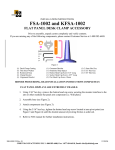
Figure 1
(1) Security Bracket
(4) 10-24 X .375 Button Head Security Screw
(1) Nylon Washer, #10
(1) ¼” X 1/8” Spacer
(1) 5/32” Security Hex Key
BEFORE PROCEEDING, READ INSTALLATION INSTRUCTIONS COMPLETELY
1. Place security bracket on latching flag as shown in Figure 2.
Figure 2
8804-000031
12/10/03
CHIEF MANUFACTURING INC. 1-800-582-6480, Fax: 1-877-894-6918, Email: [email protected]
2. Place spacer and Nylon washer on one 10-24 x .375 button head security screw.
3. Secure bracket on latching flag using screw, washer and spacer assembled in step 2 and second 10-24
x .375 button head security screw as shown in Figure 3.
4. For pitch adjustable brackets, replace two tilt adjustment screws on one side of bracket with two
10-24 x .375 button head security screw (see Figure 4).
Security screw
Security screw, washer and spacer
Figure 3
Replace using
security screws
Figure 4
8804-000031
12/10/03
CHIEF MANUFACTURING INC. 1-800-582-6480, Fax: 1-877-894-6918, Email: [email protected]