1
FileMaker Server 10
®
Getting Started Guide
© 2007-2009 FileMaker, Inc. All rights reserved.
FileMaker, Inc.
5201 Patrick Henry Drive
Santa Clara, California 95054
FileMaker, the file folder logo, Bento and the Bento logo are
either trademarks of FileMaker, Inc. in the U.S. and other
countries. Mac and the Mac logo are the property of Apple Inc.
registered in the U.S. and other countries. All other trademarks
are the property of their respective owners.
FileMaker documentation is copyrighted. You are not authorized
to make additional copies or distribute this documentation
without written permission from FileMaker. You may use this
documentation solely with a valid licensed copy of FileMaker
software.
All persons, companies, email addresses, and URLs listed in the
examples are purely fictitious and any resemblance to existing
persons, companies, email addresses or URLs is purely
coincidental. Credits are listed in the Acknowledgements
documents provided with this software. Mention of third-party
products and URLs are for informational purposes only and
constitutes neither an endorsement nor a recommendation.
FileMaker, Inc. assumes no responsibility with regard to the
performance of these products.
For more information, visit our website at www.filemaker.com.
Edition: 01
Contents
Preface
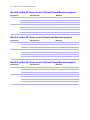
System requirements for FileMaker Server
Mac OS X and Mac OS X Server version 10.4 (Intel-based Macintosh computers)
Mac OS X and Mac OS X Server version 10.4 (PowerPC-based Macintosh computers)
Mac OS X and Mac OS X Server version 10.5 (Intel-based Macintosh computers)
Mac OS X and Mac OS X Server version 10.5 (PowerPC-based Macintosh computers)
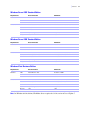
Windows Server 2003 Standard Edition
Windows Server 2008 Standard Edition
Windows Vista Business Edition
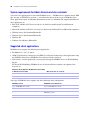
System requirements for Admin Console and site assistants
Supported client applications
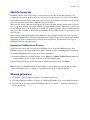
About the license key
Upgrading the FileMaker Server 10 license
Where to go from here
7
7
8
8
8
9
9
9
10
10
11
11
11
Chapter 1
Installation quick start
Before you begin
Considering performance
Installing FileMaker Server on a single machine
Next steps
13
13
14
20
Chapter 2
Deploying FileMaker Server across multiple machines
Deployment alternatives
One-machine deployment
Two-machine deployments
Three-machine deployment
Installing on multiple machines
Before you begin
Installing on the worker machines
Installing on the master machine
Installation notes
Next steps
21
22
23
24
25
25
26
28
35
36
4
FileMaker Server Getting Started Guide
Chapter 3
Testing your deployment
Using the FileMaker Server Technology Tests page
Troubleshooting
Deployment assistant reports that the web server test failed
Deployment assistant does not start after installation
Admin Console doesn’t start after deployment on master machine
Admin Console Start Page says to install Java when it’s already installed
Cannot start Admin Console from a remote machine
Clients cannot see databases hosted by FileMaker Server
The Mac OS web server fails during startup
37
39
39
39
39
40
40
40
40
Chapter 4
Administration overview
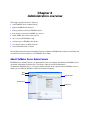
About FileMaker Server Admin Console
Using Admin Console to administer FileMaker Server
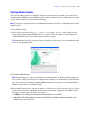
Starting Admin Console
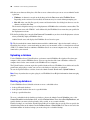
Uploading a database
Backing up databases
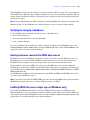
Verifying the integrity of databases
Hosting databases connected to ODBC data sources
Enabling ODBC data source single sign-on (Windows only)
Running a server-side script
FileMaker scripts
System-level scripts
Script Sequences
Sending messages to FileMaker Pro clients
Viewing log file entries in Admin Console
Emailing notifications
41
42
43
44
44
45
45
45
46
47
47
47
47
48
48
Chapter 5
Upgrading or moving an existing installation
Step 1. Stop FileMaker Server
Stopping FileMaker Server 8
Stopping FileMaker Server 9 or 10
Step 2. Make a copy of databases, scripts, and plug-ins
FileMaker Server 8 and 9 files
FileMaker Server 10 files (default installation)
FileMaker Server 10 files (non-default installation)
49
49
49
50
50
50
50
|
Step 3. Note your FileMaker Server settings
Where to note settings for FileMaker Server 8
Where to note settings for FileMaker Server 9 or 10
Step 4. Uninstall FileMaker Server
Uninstalling FileMaker Server 8 or 9
Uninstalling FileMaker Server 10
Step 5. Install FileMaker Server 10
Step 6. Move files to the proper location
Step 7. Recreate schedules and configure
5
51
51
51
51
51
51
52
52
53
Chapter 6
Setting up the web server
Windows IIS settings
Setting up authentication for a Windows IIS website
Using Web publishing on 64-bit Windows editions
Windows Vista
Windows Server 2008
Mac OS X settings
55
55
57
57
58
59
Chapter 7
Additional resources
Product documentation
Using FileMaker Server documentation
Where to find PDF documentation
Registration and customer support
Check for software updates
61
61
61
62
62
Index
63
6
FileMaker Server Getting Started Guide
Preface
Welcome to FileMaker® Server 10. FileMaker Server is a dedicated database server that opens
FileMaker Pro files, makes them available to other machines on a network, and publishes FileMaker data in
web pages on the Internet or a company’s intranet. FileMaker Pro is an application for creating and
modifying database files. Clients use FileMaker Pro to access database files hosted by FileMaker Server.
Before you install, confirm that your machines meet the minimum requirements listed below.
System requirements for FileMaker Server
This section provides the minimum and recommended requirements for running FileMaker Server on the
following systems:
1 Mac OS X and Mac OS X Server version 10.4.11 (Intel-based and PowerPC-based Macintosh
computers)
1
1
1
1
Mac OS X and Mac OS X Server version 10.5.4 (Intel-based and PowerPC-based Macintosh computers)
Windows Server 2003 Standard Edition SP2
Windows Server 2008 Standard Edition SP1
Windows Vista Business Edition SP1
Note On Windows Vista Business Edition, FileMaker Server is supported on a one-machine deployment
only.
For information on systems that are not listed here, see www.filemaker.com.
Mac OS X and Mac OS X Server version 10.4 (Intel-based Macintosh computers)
Requirement
Hardware
Software
Recommended
Minimum
CPU
Dual Core Intel
Any
RAM
2 GB
1 GB
Hard drive
80+ GB
80+ GB
OS
10.4.11
10.4.11
Web server
Apache 1.3
Apache 1.3
PHP
PHP 5.2.6
PHP 5.2.6
Java
5.0 (32 bit, 1.5.0_13)
5.0 (32 bit, 1.5.0_13)
8
FileMaker Server Getting Started Guide
Mac OS X and Mac OS X Server version 10.4 (PowerPC-based Macintosh computers)
Requirement
Hardware
Software
Recommended
Minimum
CPU
Dual G5
G5
RAM
2 GB
1 GB
Hard drive
80+ GB
80+ GB
OS
10.4.11
10.4.11
Web server
Apache 1.3
Apache 1.3
PHP
PHP 5.2.6
PHP 5.2.6
Java
5.0 (32 bit, 1.5.0_13)
5.0 (32 bit, 1.5.0_13)
Mac OS X and Mac OS X Server version 10.5 (Intel-based Macintosh computers)
Requirement
Hardware
Software
Recommended
Minimum
CPU
Dual Core Intel
Any
RAM
2 GB
1 GB
Hard drive
80+ GB
80+ GB
OS
10.5.4
10.5.4
Web server
Apache 2.x
Apache 2.x
PHP
PHP 5.2.6
PHP 5.2.6
Java
5.0 (32 bit, 1.5.0_13)
5.0 (32 bit, 1.5.0_13)
Mac OS X and Mac OS X Server version 10.5 (PowerPC-based Macintosh computers)
Requirement
Hardware
Software
Recommended
Minimum
CPU
Dual G5
G5
RAM
2 GB
1 GB
Hard drive
80+ GB
80+ GB
OS
10.5.4
10.5.4
Web server
Apache 2.x
Apache 2.x
PHP
PHP 5.2.6
PHP 5.2.6
Java
5.0 (32 bit, 1.5.0_13)
5.0 (32 bit, 1.5.0_13)
|
Preface
Windows Server 2003 Standard Edition
Requirement
Hardware
Software
Recommended
Minimum
CPU
Dual CPU/Core Duo
Pentium 3.4 GHz
RAM
2 GB
1 GB
Hard drive
80+ GB
80+ GB
OS
Windows Server 2003 Standard Edition SP2
Windows Server 2003 Standard Edition SP2
Web server
IIS 6.0
IIS 6.0
PHP
PHP 5.2.6
PHP 5.2.6
Java
6 (32 bit, Update 7)
5.0 (32 bit)
Bonjour
1.0.5
1.0.5
Windows Server 2008 Standard Edition
Requirement
Hardware
Software
Recommended
Minimum
CPU
Dual CPU/Core Duo
Pentium 2.4 GHz
RAM
2 GB
1 GB
Hard drive
80+ GB
80+ GB
OS
Windows Server 2008 Standard Edition SP1
Windows Server 2008 Standard Edition SP1
Web server
IIS 7.0 (Native Mode)
IIS 7.0 (Native Mode)
PHP
PHP 5.2.6
PHP 5.2.6
Java
6 (32 bit, Update 7)
5.0 (32 bit)
Bonjour
1.0.5
1.0.5
Windows Vista Business Edition
Requirement
Hardware
Software
Recommended
Minimum
CPU
Dual CPU/Core Duo
Pentium 3.4 GHz
RAM
2 GB
1 GB
Hard drive
80+ GB
80+ GB
OS
Windows Vista Business Edition SP1
Windows Vista Business Edition SP1
Web server
IIS 7.0 (Native Mode)
IIS 7.0 (Native Mode)
PHP
PHP 5.2.6
PHP 5.2.6
Java
6 (32 bit, Update 7)
5.0 (32 bit)
Bonjour
1.0.5
1.0.5
Note On Windows 64-bit editions, FileMaker Server requires the 32-bit version of Java 6 Update 7.
9
10
FileMaker Server Getting Started Guide
System requirements for Admin Console and site assistants
You can use the applications that come with FileMaker Server — FileMaker Server Admin Console, PHP
Site Assistant, and XSLT Site Assistant — on machines that have network access to FileMaker Server.
These applications require Java Runtime Environment version 5 at a minimum. The supported platforms for
these applications are:
1 Mac OS X and Mac OS X Server version 10.4.11 (Intel-based and PowerPC-based Macintosh
computers)
1
1
1
1
1
Mac OS X and Mac OS X Server version 10.5.4 (Intel-based and PowerPC-based Macintosh computers)
Windows Server 2003 Standard Edition SP2
Windows Server 2008 Standard Edition SP1
Windows XP
Windows Vista Business Edition SP1
Supported client applications
FileMaker Server supports the following client applications:
1 FileMaker Pro 7, 8, 8.5, 9, and 10.
1 ODBC (Open Database Connectivity) and JDBC (Java Database Connectivity) client applications using
the FileMaker client drivers (FileMaker Server Advanced license required).
1 Web browsers (or other applications) accessing data through the FileMaker Server 10 Web Publishing
Engine.
For Instant Web Publishing (FileMaker Server 10 Advanced license required), the supported web
browsers are:
Windows Vista, Windows XP, Windows Server 2003,
or Windows Server 2008
Mac OS X (10.4.11 or 10.5.4)
Firefox 3.0
Firefox 3.0
Internet Explorer 7
Safari 3.1.2
Your copy of FileMaker Server supports one of the following client configurations:
FileMaker Server
FileMaker Server Advanced
Up to 250 FileMaker Pro clients
Up to 999 FileMaker Pro clients
Up to 125 hosted databases
Up to 125 hosted databases
Up to a total of 100 Custom Web Publishing sessions
Up to a total of 100 Custom Web Publishing and Instant Web
Publishing sessions
Up to a total of 50 ODBC and JDBC clients
|
Preface
11
About the license key
FileMaker software comes with a unique, 35-character license key. Do not lose this license key. We
recommend that you keep the license key in a safe place in case the software ever needs to be reinstalled.
You can find your license key(s) on the back of the CD sleeve. If you paid for your software electronically,
you received an email with a link to a PDF file with your license key.
The license key ensures adherence to the single user license agreement, which generally allows for use of
one (1) copy of the Software on a single machine or a single multiple-machine deployment at a time (refer
to your Software License). If the license key is invalid or if another copy of the software installed with that
same license key is running on the network, the FileMaker Server software displays an error message and
does not start.
You can choose to deploy FileMaker Server components across multiple machines that work together to
form a single FileMaker Server deployment. You must have a unique license key for each multiple-machine
deployment, or obtain a volume license for more than one deployment. You must license one copy of
FileMaker Server for each deployment.
Upgrading the FileMaker Server 10 license
To upgrade your license from a trial version of FileMaker Server 10 or from FileMaker Server 10 to
FileMaker Server 10 Advanced on the same machine, you must change your FileMaker Server license key.
To change the FileMaker Server license of an existing deployment:
1. From the FileMaker Server Admin Console, choose Help menu > Update FileMaker Server License. See
“Starting Admin Console” on page 43 for how to start the Admin Console.
2. In the Change License Key dialog box, enter the information required, then click Update.
Note To move your FileMaker Server 10 deployment to a new machine or to upgrade from an earlier
version of FileMaker Server, see chapter 5, “Upgrading or moving an existing installation.”
Where to go from here
1 To install on a single machine, see chapter 1, “Installation quick start.”
1 To install on multiple machines, see chapter 2, “Deploying FileMaker Server across multiple machines.”
1 To move from an existing installation of FileMaker Server, see chapter 5, “Upgrading or moving an
existing installation.”
12
FileMaker Server Getting Started Guide
Chapter 1
Installation quick start
This chapter explains how to install FileMaker Server on a single machine.
Before you begin
Here is a list of things you must do before installing FileMaker Server:
1 To install on more than one machine, see chapter 2, “Deploying FileMaker Server across multiple
machines.”
1 To enable web publishing, make sure the web server is enabled. See chapter 6, “Setting up the web
server.”
1 If your server computer has a firewall, open the necessary ports in the firewall so that FileMaker Server
can communicate with users and administrators:
1 Required on all deployments: 5003, 16000, and 16001.
1 Additionally required for web publishing: 80.
1 Ports 16004, 16006, 16008, 16010, 16012, 16014, 16016, 16018, 50003, and 50006 must be available
on the machine, but not open in the firewall. For more information, see “One-machine deployment”
on page 22.
1 To upgrade from an earlier version of FileMaker Server, see chapter 5, “Upgrading or moving an existing
installation.” To upgrade to FileMaker Server Advanced, see “Upgrading the FileMaker Server 10
license” on page 11.
1 Locate your license key. See “About the license key” on page 11.
1 If you are currently running FileMaker Pro on the same machine, you must quit FileMaker Pro before
installing FileMaker Server.
1 To use web publishing on a 64-bit edition of Windows, follow the instructions in “Using Web publishing
on 64-bit Windows editions” on page 57 before running the Deployment assistant.
Also keep in mind the following:
1 You cannot run two different versions of FileMaker Server on the same machine at the same time.
1 Because some DHCP servers cycle IP addresses, FileMaker recommends using a static IP address.
Considering performance
For best performance, run FileMaker Server on a dedicated machine reserved for use as a database server.
When FileMaker Server is hosting many clients or a large number of database files, it uses a high level of
processor, hard disk, and network capacity. Other processor-intensive software or heavy network traffic on
the same machine will cause FileMaker Server to run more slowly and degrade the performance of
FileMaker Pro on client machines.
14
FileMaker Server Getting Started Guide
To improve performance:
1 Avoid installing FileMaker Server on a machine that is a user’s primary workstation.
1 Avoid using the machine running FileMaker Server as an email, print, or network file server.
1 Do not use system backup software to back up databases hosted by FileMaker Server. Instead use
FileMaker Server Admin Console to schedule backups of databases.
1 Do not use anti-virus software to scan the folders that contain hosted database files.
1 Disable screen savers and sleep (or hibernate and standby) mode on the server. These features reduce
performance or suspend access to hosted databases.
1 Use a fast hard disk.
1 Turn off Indexing Service (Windows), Spotlight (Mac OS), or any other third-party file indexing
software. This feature reduces performance.
Installing FileMaker Server on a single machine
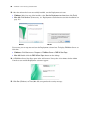
1. Insert the CD into the drive or follow your electronic download instructions.
2. Double-click the installation icon.
Mac OS
Windows
3. Windows: Select a language, then click OK.
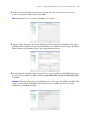
4. Windows: If you do not have Java Runtime Environment version 5 (at a minimum) or Bonjour for
Windows, you are prompted to allow the FileMaker Server installer to install Java version 6 and Bonjour
for Windows.
For more information about Java and Bonjour installation, see “Installation notes” on page 35.
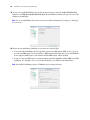
5. Read the Before You Begin information. If there is a task you did not do, quit the installer and do the
task. If you are ready to install FileMaker Server, click Continue (Mac OS) or Next (Windows).
6. Review and accept the end user license agreement.
Chapter 1
|
Installation quick start
15
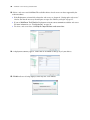
7. Windows: Select a destination folder, then click Next.
Note On Windows, you can select a non-default location. See “Installation notes” on page 35.
8. Select Single Machine and click Next.
9. Enter your license key information.
10. Windows: Click Next.
11. Click Install.
Note On Mac OS, if you do not have Java Runtime Environment version 5 at a minimum installed, you
are prompted to use Software Update to install it and then re-run the installer. If Bonjour is not running,
you are prompted to run it. For more information about Java and Bonjour installation, see “Installation
notes” on page 35.
FileMaker Server begins to install. This process may take several minutes.
12. After the software has been successfully installed, start the Deployment assistant.
1 Windows: In the last step of the installer, select Start the Deployment assistant, then click Finish.
1 Mac OS: Click Continue. (If necessary, see “Deployment assistant does not start after installation” on
page 39.)
Windows
Mac OS
16
FileMaker Server Getting Started Guide
If you want, you can stop now and start the Deployment assistant later. To deploy FileMaker Server at a
later time:
1 Windows: Click Start menu > Programs > FileMaker Server > FMS 10 Start Page.
1 Mac OS: Double-click the FMS 10 Start Page shortcut on the desktop.
13. A FileMaker Server Start Page opens in the web browser. It may take a few minutes for the Admin
Console to start and the Deployment assistant to appear.
14. Click Run (Windows) or Trust (Mac OS) to respond to the security message.
15. In the first step of the Deployment assistant, assign the user name and password you want to use
whenever you log into Admin Console. Click Next.
Note User Name is not case-sensitive. Password is case-sensitive.
16. Specify a name, description, and contact information for this deployment of FileMaker Server, then
click Next. This information will appear on the FileMaker Server Admin Console Start Page. The Server
Name is displayed to FileMaker Pro users in the Open Remote dialog box.
Chapter 1
|
Installation quick start
17
17. If you purchased a FileMaker Server Advanced license, you can enable a hosted FileMaker Pro file to
be a data source via ODBC and JDBC. Click Yes, enable ODBC/JDBC or No, do not enable ODBC/JDBC.
Click Next.
Important This feature allows clients to use FileMaker files as data sources using ODBC and JDBC. This
feature is not needed to host FileMaker Pro databases that access ODBC data sources. For more
information, see FileMaker Pro Help.
18. If you want to publish FileMaker data on the internet or intranet, click Yes, enable Web Publishing.
Otherwise, click No, do not enable Web Publishing. Then click Next. Continue with step 21 if you are not
enabling web publishing.
Note To use web publishing, the web server must be installed and running. See chapter 6, “Setting up
the web server.”
18
FileMaker Server Getting Started Guide
19. Select the web publishing technologies you want to use and click Next.
1 You can install the FileMaker Server supported version of the PHP engine (PHP 5.2.6), or you can
use your own PHP engine. If you already have a PHP engine installed and choose to use the FileMaker
Server supported PHP engine, your currently installed PHP engine will be disabled.
1 If you use your own PHP engine, you must manually install the FileMaker API for PHP to use PHP
publishing. See FileMaker Server Custom Web Publishing with PHP for more information.
Note Instant Web Publishing requires a FileMaker Server Advanced license.
20. Select a web server and click Next.
1 If the Deployment assistant fails to detect the web server, see chapter 6, “Setting up the web server.”
1 If you see Web Server Test Failed, the Deployment assistant detects but cannot communicate with the
web server. For more information, see “Troubleshooting” on page 39.
1 To configure this web server setting later, click Skip this step and select a web server later.
21. A deployment summary appears. Click Finish or click Back to change any of your choices.
Chapter 1
|
Installation quick start
19
22. FileMaker Server is being deployed. This may take a few minutes.
23. FileMaker Server Admin Console starts. Click OK in the Welcome dialog box.
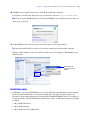
If you don't see the Welcome dialog box, open a web browser and enter: http://localhost:16000
Note You can register FileMaker Server and verify the FileMaker Server deployment now or later. See
“Next steps” on page 20.
24. In the FileMaker Server Overview pane, note the IP address of the server.
Tip Write down the IP address so that you can start the Admin Console from another computer.
Windows: When Admin Console starts and the firewall is on, an alert displays. Click Unblock to start
Admin Console.
Write down
the IP address
20
FileMaker Server Getting Started Guide
Next steps
Now that you have deployed FileMaker Server, get started using your new software.
1. Start Admin Console: See “Starting Admin Console” on page 43.
2. Test your installation: FileMaker Server provides a sample database and a one-click method to verify
that your installation is working. See chapter 3, “Testing your deployment.”
3. Register your software: Register your copy of FileMaker Server. See “Registration and customer
support” on page 62.
4. Administer FileMaker Server: For information on how to upload databases, schedule backups, and
other regular tasks, see chapter 4, “Administration overview.”
Chapter 2
Deploying FileMaker Server across multiple
machines
FileMaker Server allows you to deploy its components on multiple machines to improve overall
performance. In many environments, a single-machine deployment provides sufficient performance for web
publishing. However, if FileMaker Server will be used frequently by internet clients accessing data with
Instant Web Publishing, XSLT, or PHP, then you can deploy the components of FileMaker Server across two
or three machines.
You can first deploy FileMaker Server on fewer machines. If the web publishing load increases, you can
change your initial deployment to improve FileMaker Server’s performance.
Note If you’re not using web publishing, you don’t gain performance improvements from a multiplemachine deployment.
Deployment alternatives
The diagram below shows the major components of FileMaker Server. You can deploy them all on one
machine or across two or three machines. The operating systems of the machines can be all Windows, all
Mac OS, or any combination of the two.
FileMaker Server components
Web Server
Web Server Module
Web Publishing
Engine
Database Server
PHP Engine
Admin Console
FileMaker Server uses the following components:
1 Web Server: FileMaker Server requires Internet Information Services (IIS) on Windows or an Apache
web server on Mac OS. For Windows, install and enable IIS before installing the Web Server Module.
The Apache web server is installed as part of Mac OS, but you need to enable web sharing.
1 Web Server Module: this FileMaker Server software component is installed on the web server host
machine. The Web Server Module enables the Web Publishing Engine to connect to the web server.
1 Web Publishing Engine: provides the Custom Web Publishing services for databases hosted by
FileMaker Server and the Instant Web Publishing services (for FileMaker Server Advanced).
1 PHP Engine: for Custom Web Publishing with PHP, FileMaker Server requires a PHP engine to respond
to requests from the web server and to process PHP code. FileMaker Server includes a PHP engine and
the FileMaker API for PHP. When PHP code calls the FileMaker API for PHP, those calls are interpreted
and sent to the Web Publishing Engine.
22
FileMaker Server Getting Started Guide
1 Database Server: hosts the databases that you share with FileMaker Pro users and publish on the web.
In a multiple-machine deployment, the machine running the Database Server is called the master
machine. See the description below.
1 Admin Console: runs on any client computer from which you want to configure and administer
FileMaker Server.
When you deploy FileMaker Server across two or three machines, one machine is always the master and the
others are workers.
1 The master machine is always the machine on which the Database Server is deployed.
1 The worker machines are the machines that run the Web Publishing Engine and the web server.
The master communicates with the workers to handle database requests from users, configure the settings
on all machines, and monitor the status and activity of all components.
Important To enhance the security of your database solution, especially on the internet, consider using a
firewall on the public side of a FileMaker Server deployment. Also consider using SSL for the web server.
For more information on setting up security for web published solutions, see
www.filemaker.com/support/security.
One-machine deployment
You can deploy FileMaker Server on one machine in two ways: Database Server only or Database Server
and Web Publishing Engine. For information on installing FileMaker Server in a one-machine configuration,
see chapter 1, “Installation quick start.”
Database Server only
You can install FileMaker Server on one machine with web publishing disabled. With this type of
deployment, you can serve FileMaker Pro clients and, if you have a FileMaker Server Advanced license,
serve ODBC/JDBC clients.
Benefits: This is the easiest deployment to set up and administer, if you don't need web publishing.
Database Server
Admin Console
Ports 5003, 16000, and 16001 must be open.
Ports 16004, 50003, and 50006 must be available.
Chapter 2
|
Deploying FileMaker Server across multiple machines
23
Database Server and Web Publishing Engine
You can install FileMaker Server, the Web Publishing Engine, and all of the associated software components
on the same machine as your web server.
Benefits: This is the simplest deployment and the one that most FileMaker Server users will use. This
configuration is suitable for small deployments (up to 50 FileMaker Pro clients) and limited web publishing.
Web Server
Web Publishing
Engine
Web Server Module
Database Server
PHP Engine
Admin Console
Ports 80, 5003, 16000, 16001, 16016, and 16018 must be open.
Ports 16004, 16006, 16008, 16010, 16012, 16014, 50003, and 50006 must be available.
Two-machine deployments
You can deploy FileMaker Server across two machines in two ways.
Two-machine
You deploy the Web Publishing Engine, web server, and Web Server Module on one machine. You deploy
the Database Server on a second machine.
Benefits: This deployment separates all of the web publishing-related components from the Database
Server. Under most conditions, this configuration is the highest performing FileMaker Server deployment.
Machine 1 (worker)
Web Server
Web Server Module
Machine 2 (master)
Web Publishing
Engine
Database Server
PHP Engine
Admin Console
Ports 16000 and 16004 through 16018
must be available.
Ports 5003
and 16000
must be open.
Ports 5003, 16000,
16001, 50003, and 50006
must be available.
24
FileMaker Server Getting Started Guide
Two-machine alternative
You deploy the web server and Web Server Module on one worker machine, and you deploy the Web
Publishing Engine and the Database Server on a second (master) machine. In this deployment, you can
optionally locate the web server (worker) machine outside of a firewall, and the Web Publishing Engine and
the Database Server (master) machine can be located inside the firewall.
Benefits: This deployment might be better if someone else limits what you can install on the web server or
if your web server is heavily loaded with non-FileMaker content. However, because the Database Server and
Web Publishing Engine are on the same machine, this deployment faces the same scalability constraints as
the single-machine deployment.
Machine 1 (worker)
Machine 2 (master)
Web Server
Web Publishing
Engine
Web Server Module
Database Server
PHP Engine
Admin Console
Port 16000
must be
available.
Ports 16000,
16016, and 16018
must be open.
Ports 5003, 16000, 16001, 16004 through 16018, 50003,
and 50006 must be available. Port 5003 must be open if
machine two has an internal software firewall.
Three-machine deployment
You deploy the web server and Web Server Module on one worker machine, deploy the Web Publishing
Engine on a second worker machine, and deploy the Database Server on a third (master machine). The web
server and Web Server Module are on a machine that serves as the request gateway, and you can optionally
use a firewall to separate them from the components on the other two machines.
Benefits: In general, this deployment performs slightly slower than the two-machine deployment for web
publishing because of the overhead to communicate with the separate web server machine. However, the
overhead is generally minimal and constant. In a very high-load environment, this deployment outperforms
the two-machine deployment because the web server is offloaded.
Admin Console
Machine 1 (worker)
Web Server
Web Server Module
Machine 2 (worker)
Machine 3 (master)
Web Publishing
Engine
Database Server
PHP Engine
Ports 16000, 16010,
16018 must be available.
Ports 16000,
16016, and 16018
must be open.
Ports 16000 and
16004 through 16018
must be available.
Ports 5003 and
16000 must be
open.
Ports 5003, 16000,
16001, 50003, and 50006
must be available.
Chapter 2
|
Deploying FileMaker Server across multiple machines
25
Installing on multiple machines
For a multiple-machine deployment, you install FileMaker Server software on each machine. After the
software is installed on all of the machines, you use the Deployment assistant on the master machine to
configure your settings and specify which machines run which components. You do not use the Deployment
assistant on worker machines.
Important Install the FileMaker Server software on the worker machines first and then on the master
machine.
Note On Windows Vista Business Edition, FileMaker Server is supported on a one-machine deployment
only. For information about installing on only one machine, see chapter 1, “Installation quick start.”
Before you begin
Do the following before installing FileMaker Server on multiple machines:
1 To enable web publishing, make sure the web server is enabled on the worker machine that has the web
server. See chapter 6, “Setting up the web server.”
1 When running FileMaker Server in an environment that uses a firewall, be sure to configure the firewall
on each machine to allow FileMaker Server to use them. Restart each machine after configuring the
firewall.
Port number
Used by
Purpose
80
Web server machine, end users
HTTP
5003
Master machine, end users
FileMaker Pro and FileMaker Server for hosting files
16000
All machines, Admin Console users
HTTP: Admin Console Start Page, Admin Helpers
16001
Master machine, Admin Console users
HTTPS: Admin Console communications
16004
All machines
Admin Console
16006
Web Publishing Engine machine
FileMaker Internal
16008
Web Publishing Engine machine
FileMaker Internal
16010
Web Publishing Engine machine
Custom Web Publishing Engine
16012
Web Publishing Engine machine
FileMaker Internal
16014
Web Publishing Engine machine
FileMaker Internal
16016
Web Publishing Engine machine
Apache Jakarta Protocol (AJP) 1.3
16018
Web Publishing Engine machine
Apache Jakarta Protocol (AJP) 1.3
50003
Master machine (local only)
FileMaker Server service (Windows) or daemon (Mac OS)
50006
Master machine (local only)
FileMaker Server Helper service (Windows) or daemon
(Mac OS)
1 To upgrade from an earlier version of FileMaker Server, see chapter 5, “Upgrading or moving an existing
installation.” To upgrade to FileMaker Server Advanced, see “Upgrading the FileMaker Server 10
license” on page 11.
1 Locate your license key. See “About the license key” on page 11.
1 If you are currently running FileMaker Pro on the same machine, you must quit FileMaker Pro before
installing FileMaker Server.
26
FileMaker Server Getting Started Guide
1 To use web publishing on a 64-bit edition of Windows, follow the instructions in “Using Web publishing
on 64-bit Windows editions” on page 57 before running the Deployment assistant.
Installing on the worker machines
Install FileMaker Server on the worker machines first, then on the master machine. Worker machines run
the web server, the Web Publishing Engine, or both. You can change the machine role of each worker later.
Note If you set up a machine as a worker and want to change it to a master, uninstall and then reinstall
FileMaker Server. Choose Master in the installer’s Master/Worker Designation dialog box. For more
information, see chapter 5, “Upgrading or moving an existing installation.”
1. Insert the CD into the drive or follow your electronic download instructions.
Mac OS
Windows
2. Double-click the installation icon.
3. Windows: Select a language, then click Next.
4. Windows: If you do not have Java Runtime Environment version 5 (at a minimum) or Bonjour for
Windows, you are prompted to allow the FileMaker Server installer to install Java version 6 and Bonjour
for Windows.
For more information about Java and Bonjour installation, see “Installation notes” on page 35.
5. Read the Before You Begin information. If there is a task you did not do, quit the installer and do the
task. If you are ready to install FileMaker Server, click Continue (Mac OS) or Next (Windows).
6. Review and accept the end user license agreement.
7. Windows: Select a destination folder, then click Next.
Note On Windows, you can select a non-default location. See “Installation notes” on page 35.
Chapter 2
|
Deploying FileMaker Server across multiple machines
27
8. Select Multiple Machines and click Next.
9. Select Worker and click Next.
Note On Mac OS, if you do not have Java Runtime Environment version 5 at a minimum installed, you
are prompted to use Software Update to install it and then re-run the installer. If Bonjour is not running,
you are prompted to run it. For more information about Java and Bonjour installation, see “Installation
notes” on page 35.
FileMaker Server begins to install. This process may take several minutes.
10. After the software has been successfully installed, click Finish (Windows) or OK (Mac OS) to complete
the installation of a worker machine.
Next, install FileMaker Server 10 on another worker machine or on the master machine.
28
FileMaker Server Getting Started Guide
Installing on the master machine
Install FileMaker Server on the worker machines first, then on the master machine. The master machine
always hosts the Database Server, and may additionally host the Web Publishing Engine.
1. Insert the CD into the drive or follow your electronic download instructions.
2. Double-click the installation icon.
Mac OS
Windows
3. Windows: Select a language, then click OK.
4. Windows: If you do not have Java Runtime Environment version 5 (at a minimum) or Bonjour for
Windows, you are prompted to allow the FileMaker Server installer to install Java version 6 and Bonjour
for Windows.
For more information about Java and Bonjour installation, see “Installation notes” on page 35.
5. Read the Before You Begin information. If there is a task you did not do, quit the installer and do the
task. If you are ready to install FileMaker Server, click Continue (Mac OS) or Next (Windows).
6. Review and accept the end user license agreement.
7. Windows: Select a destination folder, then click Next.
Note On Windows, you can select a non-default location. See “Installation notes” on page 35.
Chapter 2
|
Deploying FileMaker Server across multiple machines
29
8. Select Multiple Machines and click Next.
9. Select Master and click Next.
10. Enter your license key information.
11. Windows: Click Next.
12. Click Install.
Note On Mac OS, if you do not have Java Runtime Environment version 5 at a minimum installed, you
are prompted to use Software Update to install it and then re-run the installer. If Bonjour is not running,
you are prompted to run it. For more information about Java and Bonjour installation, see “Installation
notes” on page 35.
FileMaker Server begins to install. This process may take several minutes.
30
FileMaker Server Getting Started Guide
13. After the software has been successfully installed, start the Deployment assistant.
1 Windows: In the last step of the installer, select Start the Deployment assistant, then click Finish.
1 Mac OS: Click Continue. (If necessary, see “Deployment assistant does not start after installation” on
page 39.)
Windows
Mac OS
If you want, you can stop now and start the Deployment assistant later. To deploy FileMaker Server at a
later time:
1 Windows: Click Start menu > Programs > FileMaker Server > FMS 10 Start Page.
1 Mac OS: Double-click the FMS 10 Start Page shortcut on the desktop.
14. A FileMaker Server Start Page opens in the web browser. It may take a few minutes for the Admin
Console to start and the Deployment assistant to appear.
15. Click Run (Windows) or Trust (Mac OS) to respond to the security message.
Chapter 2
|
Deploying FileMaker Server across multiple machines
31
16. In the first step of the Deployment assistant, assign the user name and password you want to use
whenever you log into Admin Console. Click Next.
Note User Name is not case-sensitive. Password is case-sensitive.
17. Specify a name, description, and contact information for this deployment of FileMaker Server, then
click Next. This information will appear on the FileMaker Server Admin Console Start Page. The Server
Name is displayed to FileMaker Pro users in the Open Remote dialog box.
18. If you purchased a FileMaker Server Advanced license, you can enable a hosted FileMaker Pro file to
be a data source via ODBC and JDBC. Click Yes, enable ODBC/JDBC or No, do not enable ODBC/JDBC.
Click Next.
Important This feature allows clients to use FileMaker files as data sources using ODBC and JDBC. This
feature is not needed to host FileMaker Pro databases that access ODBC data sources. For more
information, see FileMaker Pro Help.
32
FileMaker Server Getting Started Guide
19. If you want to publish FileMaker data on the internet or intranet, click Yes, enable Web Publishing.
Otherwise, click No, do not enable Web Publishing. Then click Next. Continue with step 24 if you are not
enabling web publishing.
Note To use web publishing, the web server must be installed and running. See chapter 6, “Setting up
the web server.”
20. Select the web publishing technologies you want to use and click Next.
1 You can install the FileMaker Server supported version of the PHP engine (PHP 5.2.6), or you can
use your own PHP engine. If you already have a PHP engine installed and choose to use the FileMaker
Server supported PHP engine, your currently installed PHP engine will be disabled.
1 If you use your own PHP engine, you must manually install the FileMaker API for PHP to use PHP
publishing. See FileMaker Server Custom Web Publishing with PHP for more information.
Note Instant Web Publishing requires a FileMaker Server Advanced license.
Chapter 2
|
Deploying FileMaker Server across multiple machines
33
21. Select a deployment type. Click Next. For more information, see “Deployment alternatives” on page 21.
22. Assign a worker machine to each role (Web Publishing Engine or web server). Click Next.
1 The Deployment assistant detects all unassigned worker machines on the local network and shows
their IP addresses in the Machines list beside each role. If a worker is not listed, click Rescan. Then
check to see whether the worker is listed.
1 If a worker's IP address is still not listed, enter the address in IP Address and click Lookup. The IP
address you entered is added to the Machines list if the machine responds and is an available worker.
Note You will not be able to see the worker machines if the required ports of the firewall are not open.
(See “Before you begin” on page 25.) See “Deployment assistant reports that the web server test failed”
on page 39 if an error screen displays.
34
FileMaker Server Getting Started Guide
23. Select a web server and click Next. The available choices of web servers are those supported by the
worker machines.
1 If the Deployment assistant fails to detect the web server, see chapter 6, “Setting up the web server.”
Also be sure that the necessary firewall ports are open. See “Before you begin” on page 25.
1 If you see Web Server Test Failed, the Deployment assistant cannot communicate with the web server.
For more information, see “Troubleshooting” on page 39.
1 To select a web server later, click Skip this step and select a web server later.
24. A deployment summary appears. Click Finish or click Back to change any of your choices.
25. FileMaker Server is being deployed. This may take a few minutes.
Chapter 2
|
Deploying FileMaker Server across multiple machines
35
26. FileMaker Server Admin Console starts. Click OK in the Welcome dialog box.
If you don't see the Welcome dialog box, open a web browser and enter: http://localhost:16000
Note You can register FileMaker Server and verify the FileMaker Server deployment now or later. See
“Next steps” on page 36.
27. In the FileMaker Server Overview pane, note the IP address of the master machine.
Tip Write down the IP address so that you can start the Admin Console from another computer.
Windows: When Admin Console starts and the firewall is on, an alert displays. Click Unblock to start
Admin Console.
Write down the IP
address of the master
machine
Installation notes
1 On Windows, you can install FileMaker Server in a non-default location including a non-boot volume,
but not on remote network drives or external removable drives. The path you specify replaces the
beginning of the default installation path, \Program Files\FileMaker\FileMaker Server. For example, if
you specify the My_Path installation folder, the Databases, Scripts, and Extensions folders are installed
as follows:
1 \My_Path\Data\Databases
1 \My_Path\Data\Scripts
1 \My_Path\Database Server\Extensions
36
FileMaker Server Getting Started Guide
1 Bonjour installation:
1 Windows: Do not uninstall or disable Bonjour for Windows if FileMaker Server is installed on your
computer.
1 Mac OS: If Bonjour is not enabled, then you can install FileMaker Server but you cannot deploy it.
1 On Windows 64-bit editions, FileMaker Server requires the 32-bit version of Java 6 Update 7. Even if the
64-bit version of Java 5 or Java 6 is already installed, the FileMaker Server installer requires you to install
the 32-bit version of Java 6 Update 7.
Next steps
Now that you have deployed FileMaker Server, get started using your new software.
1. Start Admin Console: See “Starting Admin Console” on page 43.
2. Test your installation: FileMaker Server provides a sample database and a one-click method to verify
that your installation is working. See chapter 3, “Testing your deployment.”
3. Register your software: Register your copy of FileMaker Server. See “Registration and customer
support” on page 62.
4. Administer FileMaker Server: For information on how to upload databases, schedule backups, and
other regular tasks, see chapter 4, “Administration overview.”
Chapter 3
Testing your deployment
This chapter describes how to test that FileMaker Server and web publishing technologies are working.
Using the FileMaker Server Technology Tests page
The easiest way to test your FileMaker Server deployment is to use the FileMaker Server Technology Tests
page. There are three ways to view the Test page:
1 Start Admin Console. Choose Server menu > Open Test Page or click the Open Test Page icon in the
toolbar.
Open Test Page icon
1 Type the following in a web browser:
http://[host]:16000
where [host] is the IP address or host name of the master machine.
Click the FileMaker Server 10 Technology Tests link under the Troubleshooting heading on the Admin
Console Start Page.
1 Type the following in a web browser:
http://[host]:16000/test
where [host] is the IP address or host name of the master machine.
Note You can use the Technology Tests page without logging into Admin Console.
FileMaker Server Technology Tests page
38
FileMaker Server Getting Started Guide
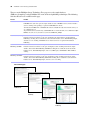
The tests on the FileMaker Server Technology Tests page access the sample database
(FMServer_Sample.fp7) using FileMaker Pro or one of the web publishing technologies. The following
table describes the tests available on this page.
To test
Do this
FileMaker Pro
Click Test FileMaker Pro.
If FileMaker Pro starts and opens the sample database hosted on FileMaker Server, then the Database
Server is working and responding to requests from FileMaker Pro clients.
You must have FileMaker Pro or FileMaker Pro Advanced installed locally on the machine where you
are conducting the test.
To perform the same test another way, start FileMaker Pro on another machine, choose File menu > Open
Remote, select the server you want to test, and select FMServer_Sample.
Instant Web Publishing Click Test Instant Web Publishing.
If another web browser window or tab opens and displays the sample database, then Instant Web
Publishing is working. If successful, this test shows that the Database Server, Web Publishing Engine,
and web server are working. A FileMaker Server Advanced license is required for Instant Web
Publishing.
Custom Web
Publishing with PHP
Click Test PHP Custom Web Publishing.
If another web browser window or tab opens and displays a table containing data from the sample
database, then Custom Web Publishing with PHP is working. If successful, this test shows that the
Database Server, Web Publishing Engine, web server, PHP engine, and FileMaker API for PHP are
working.
Custom Web
Publishing with XSLT
Click Test XSLT Custom Web Publishing.
If another web browser window or tab opens and displays a table containing data from the sample
database, then Custom Web Publishing with XSLT is working. If successful, this test shows that the
Database Server, Web Publishing Engine, and web server are working.
Successful test pages
FileMaker Pro
Instant Web
Publishing
XSLT Custom Web
Publishing
PHP Custom Web
Publishing
Chapter 3
|
Testing your deployment
39
Troubleshooting
Deployment assistant reports that the web server test failed
If the Deployment assistant cannot communicate with the web server that you specified, you can provide
more information and try again.
To change web server settings:
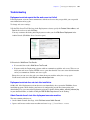
1. In the Web Server Test Failed step in the Deployment assistant, specify the Protocol, Host address, and
Port for the web server and click Retry.
You may encounter this during initial deployment or when you click Edit Server Deployment in the
Admin Console (FileMaker Server Overview pane).
Web Server test results
2. Examine the Web Server Test Results:
1 If successful, the result is Web Server Test Passed.
1 If unsuccessful, the Deployment assistant could not communicate with the web server. This test can
fail if your web server requires HTTPS or uses a port other than 80. You can re-enter this information
and try to communicate with the web server again.
Ensure that you can access the web server from the master machine and try these steps again.
If still unsuccessful, then click Skip this step and configure later.
Deployment assistant does not start after installation
On Mac OS, if the Deployment assistant does not start immediately after you run the FileMaker Server
installation program, check whether your browser is configured to prevent files from opening after
downloading. If so, you can start the Deployment assistant by double-clicking admin_console_webstart.jnlp
in your download folder, or double-clicking the FMS 10 Start Page shortcut on the desktop.
Admin Console doesn’t start after deployment on master machine
The most common solutions are:
1 On the Admin Console Start Page, click Click here to start Admin Console.
1 Open a web browser on the master machine and enter http://localhost:16000.
40
FileMaker Server Getting Started Guide
Admin Console Start Page says to install Java when it’s already installed
Internet Explorer may be configured to prevent add-ons from running. Click the Information Bar at the top
of the browser window and allow Internet Explorer to run the Java Web Start ActiveX Control add-on. Java
Web Start technology uses this add-on to detect whether the required version of Java is installed. After you
allow this add-on to run, click Start Admin Console.
Cannot start Admin Console from a remote machine
1 If the master machine has a firewall enabled, then you must open the ports required by FileMaker Server
to communicate with users and administrators. See “Before you begin” on page 25.
1 If you double-click an Admin Console shortcut and Admin Console doesn’t open, check whether the IP
address of the master machine has changed. Each shortcut starts Admin Console for a specific FileMaker
Server deployment. If the IP address of the master machine has changed, you must remove the shortcut
and start Admin Console again. See “Starting Admin Console” on page 43.
Clients cannot see databases hosted by FileMaker Server
The firewall settings on the master machine may be blocking the display of databases to clients. See “Before
you begin” on page 13 and “Before you begin” on page 25 for more information on which ports need to be
unblocked in firewalls.
The Mac OS web server fails during startup
When you install the FileMaker Server supported PHP engine, it does not appear in the Mac OS X Server
Admin tool; it is not supposed to be listed. If you use the Mac OS X Server Admin tool to turn on PHP, the
Server Admin tool adds a second PHP engine to the web server's configuration files. As a result, the web
server may fail during startup when it attempts to load the second PHP engine. Refer to the Knowledge Base
for more information.
Chapter 4
Administration overview
This chapter explains the basics of how to:
1
1
1
1
1
1
1
start FileMaker Server Admin Console
upload a FileMaker Pro database
back up databases hosted by FileMaker Server
host databases connected to ODBC data sources
enable ODBC data source single sign-on
run a server-side FileMaker script
send messages to FileMaker Pro clients
1 view log file entries in Admin Console
1 send email notifications to clients
For detailed information about using Admin Console to administer FileMaker Pro databases and clients that
are connected to hosted databases, see FileMaker Server Help.
About FileMaker Server Admin Console
FileMaker Server Admin Console is an application that lets you configure and administer FileMaker Server,
work with and monitor hosted databases and clients, and track statistical information.
To administer FileMaker Server, you can run Admin Console on the computer where FileMaker Server is
running or on a different Windows or Mac OS networked computer.
Menu
Toolbar
Help information
Navigation pane
Details pane
FileMaker Server Admin Console
42
FileMaker Server Getting Started Guide
You administer FileMaker Server by choosing options on the menus, toolbar, or Navigation pane. The
results are shown in the Details pane, where you can select tasks, specify configuration options, or monitor
activity. Tasks that can be performed from the toolbar include:
1
2
3
4
5
6
7
1. Start Database Server
2. Stop Database Server
3. Start Web Publishing Engine
4. Stop Web Publishing Engine
5. Start Upload Database assistant
6. Open FileMaker Server Start Page in a web browser
7. Open FileMaker Server Test page to test access to a sample database hosted by FileMaker Server
Using Admin Console to administer FileMaker Server
When administering FileMaker Server, you can:
1
1
1
1
1
1
1
1
1
Configure FileMaker Server application properties.
Open — or host — a FileMaker Pro database file, making it available to clients on the network.
View information about the files being hosted, like the number of clients accessing each database.
Send messages to connected clients.
Close a hosted FileMaker Pro database, making it unavailable to clients.
Disconnect a selected client from all hosted databases.
Pause or resume hosted databases.
Create scheduled tasks to back up hosted databases.
Start or stop the Database Server.
1 Start or stop the Web Publishing Engine.
1 Configure settings for Instant Web Publishing.
1 Configure Custom Web Publishing settings for XML, XSLT, or PHP.
Chapter 4
|
Administration overview
43
Starting Admin Console
You can start Admin Console on a Windows or Mac OS computer that has network access to the master
machine running FileMaker Server. FileMaker Server delivers Admin Console as a lightweight Java client
to your remote computer via Java Web Start technology.
Note Your remote computer must have Java Runtime Environment version 5 at a minimum before starting
Admin Console.
To start Admin Console:
1. Open a web browser and enter http://[host]:16000 where [host] is the IP address or host
name of the machine running FileMaker Server as a master. This is the address you noted when you
installed FileMaker Server. The Admin Console Start Page appears.
Tip Bookmark the Start Page in your web browser. Come back to this page to access documentation and
to use the web publishing tools.
2. Click Start Admin Console.
Note If nothing happens, your browser might have downloaded the Java Web Start file but might not
have started it. Check your web browser configuration to enable Java or automatically open downloaded
files. You can also look for admin_console_webstart.jnlp where your browser saves downloaded files.
Double-click this file to start Admin Console.
3. Before Admin Console starts, you must respond to a security message. The security message is a signed
certificate that ensures the authenticity of the product and it must be accepted to start Admin Console.
To suppress this message in the future and continue:
1 Windows: Select Always trust content from this publisher, then click Run.
1 Mac OS: Click Show Certificate and open Trust Settings. For When using this certificate, choose
Always Trust, then click Trust.
44
FileMaker Server Getting Started Guide
4. In the create shortcuts dialog box, click Yes to create a shortcut that you can use to start Admin Console
again later.
1 Windows: A shortcut is created on the desktop and in the Start menu under FileMaker Server.
Depending on the version of Java installed, the shortcuts may be created without prompting you.
1 Mac OS: After you click Yes, specify a name and location in the Save dialog box where to save the
shortcut, and then click Save.
The shortcut is helpful to manage several deployments of FileMaker Server from the same machine. The
shortcut name starts with “FMS10-” and is followed by the FileMaker Server name that you specified in
the Deployment assistant.
5. In the Login dialog box, enter the User Name and Password that you chose in the Deployment assistant
when you initially deployed FileMaker Server.
Admin Console starts and displays the FileMaker Server Overview pane.
Tip The best method for remote administration outside the administrator’s physical network is to keep a
firewall in place and use a secure mechanism to connect to your network, such as a virtual private network
(VPN). Use Admin Console to administer FileMaker Server on a remote computer once you are securely
connected to your network.
Uploading a database
Use the FileMaker Server Upload Database assistant to transfer FileMaker Pro database files from your
computer’s file system to FileMaker Server. You can copy database files from a Windows or Mac OS
computer that is on the same network as the FileMaker Server computer.
The Upload Database assistant copies the specified database files to a FileMaker Server folder and sets file
permissions and privileges so that you can access the databases after they are uploaded.
To start the Upload Database assistant, choose the Admin Console Server menu > Upload Database.
Note If any of your databases require a plug-in, see FileMaker Server Help for information about managing
plug-ins.
Backing up databases
Use the FileMaker Server Schedule assistant to create a scheduled task to:
1 back up all hosted databases
1 back up hosted databases that are in a specified folder
1 back up a specified database
To create a scheduled task for backing up databases, choose the Admin Console Schedules pane, select
Create a Schedule from the Actions menu, and click Perform Action. Then, choose Back Up Databases, and
specify whether you want to back up hourly, daily, weekly, or on a custom schedule.
Database backups are saved in the default backup folder or in a folder that you specify. You can specify the
default backup folder on the Admin Console Database Server > Default Folders tab. You can also select the
maximum number of database backups you want to keep for a scheduled backup.
Chapter 4
|
Administration overview
45
When FileMaker Server backs up a database, it copies the database while it is active. Users can continue to
make modifications. When the copy is complete, the database is paused to synchronize backup files with the
current database and then the database is resumed. You can set options to verify the backup and send email
notifications to clients.
Note If you use Time Machine on a Mac OS machine, exclude FileMaker Server folder items from the Time
Machine backup. Use the FileMaker Server Admin Console to create a database backup schedule.
Verifying the integrity of databases
Use the FileMaker Server Schedule assistant to create a scheduled task to:
1 verify all hosted databases
1 verify hosted databases that are in a specified folder
1 verify a specified database
To create a scheduled task for backing up databases, choose the Admin Console Schedules pane, select
Create a Schedule from the Actions menu, and click Perform Action. Then, choose Verify Databases, and
specify how often you want to verify the databases.
Hosting databases connected to ODBC data sources
FileMaker Server can host FileMaker Pro databases that are connected to external SQL data sources. In
FileMaker Pro, you can work with the ODBC data in much the same way that you work with data in a
FileMaker file. For example, you can add, change, delete, and search external data interactively.
To host databases connected to ODBC data sources after the ODBC data source has been defined in
FileMaker Pro, on the master machine create the DSNs (Data Source Names) required by each database. To
create the DSN, choose Control Panel > Administrative Tools > Data Sources (ODBC) (Windows) or ODBC
Administrator (Mac OS).
See FileMaker Server Help for more information on using ODBC and JDBC with FileMaker Server and
accessing external ODBC data sources.
Note You do not need to enable the OBDC/JDBC data source feature of FileMaker Server Advanced to host
FileMaker Pro databases that access an external SQL data source via ODBC.
Enabling ODBC data source single sign-on (Windows only)
If you work with FileMaker Pro databases hosted by FileMaker Server that access ODBC data from
Microsoft SQL Server, you can configure the master machine to enable single sign-on (SSO). ODBC data
source single sign-on allows FileMaker Pro clients to use their Windows-authenticated login credentials and
permissions to access Microsoft SQL Server without logging in.
46
FileMaker Server Getting Started Guide
To enable ODBC data source single sign-on with FileMaker Server, you must configure the FileMaker
Server service on the master machine to log in using the privileged user account. That is, this user account
must have the Impersonate a client after authentication privilege enabled, and the account must be an
Administrator account and configured in Windows Active Directory on the network.
Important Before you can enable ODBC data source single sign-on, your Windows domain administrator
must:
1 Configure the Account is trusted for delegation security setting for each user’s Windows user account.
1 Configure the Trust this user for delegation and Use Kerberos only security settings for the privileged user
account on the master machine.
1 Enable the Impersonate a client after authentication privilege for the privileged user account on the
master machine.
1 Configure the ODBC DSN to use Windows authentication on the master machine.
1 Configure Microsoft SQL Server to use Windows authentication.
To enable ODBC data source single sign-on on the master machine:
1. Choose Control Panel > Administrative Tools > Services > FileMaker Server, then choose Action >
Properties.
2. On the Log On tab, choose This account.
3. For This account, enter the privileged user account on the master machine, then click OK.
4. Choose Control Panel > Administrative Tools > Local Security Policy > Local Policies > User Rights
Assignments > Act as part of the operation system.
5. On the Local Security Setting tab, click Add User or Group, then enter the privileged user account you
specified earlier for This account.
6. Click OK, then restart the FileMaker Server service.
Important You must also enable ODBC data source single sign-on in the FileMaker Pro databases hosted
by FileMaker Server. For more information, see FileMaker Pro Help.
Running a server-side script
You can create scheduled tasks to run:
1 FileMaker scripts in databases hosted by FileMaker Server
1 system-level scripts — for example, Windows batch, Perl, VBScript, and AppleScript
1 script sequences that combine a FileMaker script with an optional pre-processing system-level script and
an optional post-processing system-level script
To create a scheduled task for scripts, choose the Admin Console Schedules pane, select Create a Schedule
from the Actions menu, and click Perform Action. Then, choose Run Script. The Schedule assistant starts
and guides you through the rest of the process.
Chapter 4
|
Administration overview
47
FileMaker scripts
To schedule a FileMaker script to run, start the Schedule assistant as described above, then choose Run
Script. Next, select the FileMaker Script type, then select the database that contains the script you want to
run.
FileMaker scripts can do simple tasks or complex tasks. For example, you can write a FileMaker script to
remove duplicate records or to validate the format of phone numbers. You can schedule these scripts to run
during off hours, perhaps before a daily backup.
Scripts can incorporate conditional decisions (if-else statements) and perform repetitive tasks (loop
statements). You use the Manage Scripts feature in FileMaker Pro to build scripts by selecting from a list of
web-compatible FileMaker Pro commands, called script steps, and specifying options (if necessary). To find
out if a FileMaker script step is web-compatible, see the script step reference in FileMaker Pro Help.
System-level scripts
Script files must be placed in the Scripts folder on the master machine in your FileMaker Server deployment.
To schedule a system-level script to run, start the Schedule assistant as described above, then choose Run
Script. Next, select the System-Level Script type, then select the script file you want to run.
System-level scripts can perform whatever tasks you need to perform at the operating system level on the
master machine. For more information, see the documentation for the scripting language you want to use.
See FileMaker Server Help for more information about running scripts as scheduled tasks.
Script Sequences
To create a script sequence, start the Schedule assistant as described above, then choose Run Script. Next,
select the Script Sequence type, then select the database that contains the script you want to run. Next, select
the script file you want to run, then select an optional pre-processing system-level script, an optional postprocessing system-level script, or both.
See FileMaker Server Help for more information about running script sequences as scheduled tasks.
Sending messages to FileMaker Pro clients
You can send messages to notify FileMaker Pro clients about important events such as server shutdowns,
database maintenance, or deadline reminders. You can send messages to:
1 all FileMaker Pro clients or selected FileMaker Pro clients connected to hosted databases
1 FileMaker Pro clients connected to any database or selected databases hosted by FileMaker Server
1 FileMaker Pro clients as a scheduled task
To send messages to FileMaker Pro clients, choose the Admin Console Clients pane and select one or more
clients from the list. Select Send Message or Send Message to All Clients from the Actions menu, and click
Perform Action to enter the message.
To send messages to FileMaker Pro clients connected to hosted databases, choose the Admin Console
Databases pane and select a folder or database file. Select Send Message or Send Message to all from the
Actions menu, and click Perform Action to enter the message.
To create a scheduled task for sending messages, choose the Admin Console Schedules pane, select Create
a Schedule from the Actions menu, and click Perform Action. Then, select Send Message, create the
message, and set up a schedule to deliver it.
48
FileMaker Server Getting Started Guide
Viewing log file entries in Admin Console
FileMaker Server tracks activity, client access, and other information as it operates and stores this
information in log files.
1 To view, sort, filter, and export a snapshot of the log file entries, choose the Admin Console Log Viewer
pane and select one or more log file modules for Modules, and select a date range on the calendars next
to Start and End.
1 To filter the log file entries displayed in the Log Viewer pane, select a message type (All, Error, Warning,
or Information) for Type.
1 To view the most recently logged events, click Refresh.
For more information about using the Log Viewer pane, see FileMaker Server Help.
Emailing notifications
You can configure FileMaker Server to send SMTP email notifications about errors and warnings as well as
completion of scheduled tasks. Emails allow for more timely notification of these events, without having to
locate the information in system or event logs on the computer running FileMaker Server.
You can send emails:
1 when FileMaker Server errors and warnings (optional) occur
1 when a scheduled task is finished
1 when a web user action occurs
Specify your SMTP mail server settings in FileMaker Server, including the SMTP server address, the port
number, user name and password, and the list of email addresses that will receive the email messages.
Each email notification type is configured separately in FileMaker Server, allowing for different recipients
for each type of email:
1 Configure FileMaker Server to send error or warning emails on the Admin Console General Settings >
Email Notifications tab. You can also specify a list of email addresses that will receive error or warning
emails on this tab.
1 Enable email notifications when you create a scheduled task with the Schedule assistant. The scheduled
task will send email notifications to the email addresses specified in the Schedule assistant. The SMTP
server used for email notifications is configured on the General Settings > Email Notifications tab.
1 If you create a solution using Custom Web Publishing with XSLT, you can use one of the
fmxslt:send_email() extension functions in an XSLT stylesheet to send email messages. You
configure the SMTP server on the Admin Console Web Publishing > XSLT tab.
For more information about email notifications, see FileMaker Server Help.
Chapter 5
Upgrading or moving an existing installation
You can upgrade an existing installation of FileMaker Server 8 or 9 to FileMaker Server 10. You can also
move an existing installation of FileMaker Server 10 to other machines.
If you are upgrading from a previous version of FileMaker Server 10, you must have the license key of the
previous version. The installer prompts you to enter the new upgrade license key and the previous license
key. To upgrade the license of an existing deployment of FileMaker Server 10 to FileMaker Server 10
Advanced, see “Upgrading the FileMaker Server 10 license” on page 11.
The steps listed below outline the process. See the remaining sections for information about each step.
Important You must perform the steps in the order they are presented.
1. Stop FileMaker Server.
2. Make a copy of any database files, shell script files, and plug-ins you used with FileMaker Server.
3. Note your existing FileMaker Server settings.
4. Uninstall FileMaker Server.
5. Install FileMaker Server 10.
6. Move any database files, script files, and plug-ins you used with the previous version of FileMaker Server
to the proper folders within the FileMaker Server 10 folder structure.
7. Recreate schedules and configure FileMaker Server.
Step 1. Stop FileMaker Server
Stopping FileMaker Server 8
For instructions on how to stop FileMaker Server or FileMaker Server Advanced 8, see the FileMaker
Knowledge Base.
Stopping FileMaker Server 9 or 10
1. Start the Admin Console. See “Starting Admin Console” on page 43.
2. Choose Server menu > Stop Web Publishing.
Wait while the Web Publishing Engine is stopped.
3. Choose Server menu > Stop Database Server.
Wait while the Database Server is stopped.
4. Stop the FileMaker Server service (Windows) or processes (Mac OS). For more information, see
FileMaker Server Help.
50
FileMaker Server Getting Started Guide
Step 2. Make a copy of databases, scripts, and plug-ins
Make a copy of any database files, shell script files, and plug-ins you used with FileMaker Server. In a
default FileMaker Server installation, they are stored on the master machine in the following folders.
FileMaker Server 8 and 9 files
Windows: \Program Files\FileMaker\FileMaker Server\Data\Databases
Mac OS: /Library/FileMaker Server/Data/Databases/
Windows: \Program Files\FileMaker\FileMaker Server\Data\Scripts\
Mac OS: /Library/FileMaker Server/Data/Scripts/
FileMaker Server 8 files
Windows: \Program Files\FileMaker\FileMaker Server\Extensions\Plugins\
Mac OS: /Library/FileMaker Server/Extensions/Plugins/
FileMaker Server 9 files
Windows: \Program Files\FileMaker\FileMaker Server\Extensions\
Mac OS: /Library/FileMaker Server/Extensions/
FileMaker Server 10 files (default installation)
Windows: \Program Files\FileMaker\FileMaker Server\Data\Databases
Mac OS: /Library/FileMaker Server/Data/Databases/
Windows: \Program Files\FileMaker\FileMaker Server\Data\Scripts\
Mac OS: /Library/FileMaker Server/Data/Scripts/
Windows: \Program Files\FileMaker\FileMaker Server\Database Server\Extensions\
Mac OS: /Library/FileMaker Server/Database Server/Extensions/
FileMaker Server 10 files (non-default installation)
When you install FileMaker Server in a non-default location on Windows, the beginning portion of the
default path, \Program Files\FileMaker\FileMaker Server, is replaced with the path you specified during
installation.
Windows: \User-specified location\Data\Databases
Windows: \User-specified location\Data\Scripts\
Windows: \User-specified location\Database Server\Extensions\
Chapter 5
|
Upgrading or moving an existing installation
51
Step 3. Note your FileMaker Server settings
Make a note of your existing FileMaker Server settings because you will have to re-enter your settings
manually later. Some examples of settings you might want to note are:
1 the name of your FileMaker Server installation (the name users see in the Open Remote dialog box in
FileMaker Pro)
1 schedules for backing up databases, running scripts, and sending messages
1 other settings that you have changed from the defaults and want to reuse in your FileMaker Server 10
deployment
Where to note settings for FileMaker Server 8
Start FileMaker Server Admin and note the settings described above. For details on using FileMaker Server
Admin, see the version 8 FileMaker Server Administrator's Guide.
To use settings from FileMaker Server Advanced version 8, start the Web Publishing Engine Administration
Console and note any web publishing settings you want to save. For details on using the Web Publishing
Engine, see the version 8 FileMaker Server Advanced Web Publishing Installation Guide.
Where to note settings for FileMaker Server 9 or 10
Before moving an existing installation of FileMaker Server 9 or 10 to another machine, start FileMaker
Server Admin Console (see “Starting Admin Console” on page 43). View the panes under Configuration and
note the settings described above.
Step 4. Uninstall FileMaker Server
After you have noted the settings in your existing installation of FileMaker Server, you can uninstall
FileMaker Server.
Important The uninstall process deletes your settings, so be sure to write down any settings that you want
to save. See “Step 3. Note your FileMaker Server settings.”
Uninstalling FileMaker Server 8 or 9
For instructions on how to uninstall FileMaker Server or FileMaker Server Advanced versions 8 or 9, see
the FileMaker Knowledge Base located at www.filemaker.com/kb.
Uninstalling FileMaker Server 10
To uninstall a multiple-machine deployment, uninstall the worker machines first.
Windows
To uninstall FileMaker Server:
1. Start Windows.
2. Windows 2003: Click the Start button, then choose Control Panel > Add or Remove Programs.
Windows 2008 and Windows Vista: Click the Start button, then choose Control Panel > Programs >
Programs and Features > Uninstall or Change a Program.
52
FileMaker Server Getting Started Guide
3. Select FileMaker Server 10 from the list and click Change.
4. In the Installation program, select Remove, then click Next and Remove.
Your database files, script files, and plug-ins are not deleted.
5. Restart the machine after uninstalling FileMaker Server 10.
Mac OS
To uninstall FileMaker Server:
1. Insert the CD into the drive or follow your electronic download instructions.
2. Double-click the FileMaker Server 10 installation icon.
3. Enter your Mac OS user name and password and follow the on-screen instructions.
4. For Installation Type, choose Uninstall and click Next.
Confirm that you want to uninstall FileMaker Server 10. Some files and folders cannot be removed.
5. Click OK.
6. Restart the machine after uninstalling FileMaker Server 10.
Step 5. Install FileMaker Server 10
To install FileMaker Server, you must use an account with administrative privileges. To deploy on a single
machine, see chapter 1, “Installation quick start.” To deploy across multiple machines, see chapter 2,
“Deploying FileMaker Server across multiple machines.”
Note If you enter an upgrade license key in the Personalization dialog box, the Upgrade dialog box prompts
you for a valid license key from the previous version of the product.
The FileMaker Server installer and the Deployment assistant prompts you for some of the settings that you
noted in “Step 2. Make a copy of databases, scripts, and plug-ins” on page 50.
Step 6. Move files to the proper location
Move the script files and plug-ins you used with the previous version of FileMaker Server to the proper
folders within the FileMaker Server 10 folder structure. See “Step 2. Make a copy of databases, scripts, and
plug-ins” on page 50.
Note You can use the Upload Database assistant to transfer your existing databases to your new FileMaker
Server deployment. See “Uploading a database” on page 44. To transfer your database files manually, see
FileMaker Server Help.
Chapter 5
|
Upgrading or moving an existing installation
53
Step 7. Recreate schedules and configure
You can now start the Admin Console and configure your FileMaker Server deployment using some of the
settings you noted in “Step 2. Make a copy of databases, scripts, and plug-ins” on page 50. For more
information on configuring your deployment, see FileMaker Server Help.
For information on how to upload databases, schedule backups, and perform other regular tasks, see
chapter 4, “Administration overview.”
54
FileMaker Server Getting Started Guide
Chapter 6
Setting up the web server
To use web publishing, you must install and configure Internet Information Services (IIS) in Windows or
enable Apache in Mac OS. For information on how to install and configure your web server, see the
documentation that is included with your operating system.
This chapter describes additional web server settings required by FileMaker Server.
Windows IIS settings
Before installing FileMaker Server, make sure that the web server is running and properly configured.
To verify the web server is running, enter the following in a web browser on your web server host machine:
1 On Windows Server 2003, enter: http://localhost/index.html (You must first create the
index.html file.)
1 On Windows Server 2008 and Windows Vista, enter: http://localhost
To access IIS online documentation, enter http://localhost/iisHelp in a web browser on your
web server host machine. (You must first setup the IIS help file.)
After you make sure that the web server is running, use the following settings with FileMaker Server.
Setting up authentication for a Windows IIS website
FileMaker Server handles the authentication for password-protected databases that are published via
Custom Web Publishing with XML or XSLT. You can choose whether you want to use IIS website
authentication in addition to FileMaker Server authentication.
You can choose from the following configurations:
1 Disable IIS authentication. You can disable all IIS authentication methods and use anonymous access
to the IIS site. This is the simplest configuration. See the next section, “Disabling IIS authentication.”
1 Leave IIS authentication enabled and also enable Basic Authentication. You can leave the current
IIS authentication methods enabled for use with other websites, and use Basic Authentication for the
Web Publishing Engine. You must also set up Windows user accounts that exactly match the user
accounts for the web-published FileMaker databases. See “Enabling IIS authentication” on page 56.
56
FileMaker Server Getting Started Guide
Disabling IIS authentication
By default, Windows IIS directory security attempts to authenticate all requests that are made through the
IIS web server. The simplest way to use IIS with FileMaker Server is to disable IIS authentication. If you
disable all IIS authentication methods and use anonymous access to the IIS site, then you don’t need to add
any Windows user accounts.
To disable IIS authentication:
1. From the Control Panel, choose Administrative Tools > Internet Information Services (IIS) Manager to
open the Internet Information Services Manager.
2. In Internet Information Services, select the website and choose Action menu > Properties. You may have
to expand some of the nodes to see the websites.
3. In the Directory Security properties pane, click Edit for authentication methods. (The button name varies
slightly among Windows versions.)
4. In the Authentication Methods dialog box, do the following:
1 Ensure that Anonymous Access is enabled.
1 For Authenticated access, disable all of the authentication methods.
5. Click OK.
Enabling IIS authentication
If you enable any of the IIS authentication methods for the IIS web server, you must enable Basic
Authentication for websites that connect to the Web Publishing Engine. The Web Publishing Engine uses
only Basic Authentication. Other websites on the web server can use the other IIS authentication methods.
In this configuration, you must also create Windows user accounts on the web server host machine that
contain user names and passwords. These user names and passwords must exactly match the user names and
passwords for all password-protected accounts defined in all FileMaker databases that are published via
Custom Web Publishing with XML or XSLT.
To enable IIS authentication:
1. From the Control Panel, choose Administrative Tools > Internet Information Services (IIS) Manager to
open the Internet Information Services Manager.
2. In Internet Information Services, select the website and choose Action menu > Properties. You may have
to expand some of the nodes to see the websites.
3. In the Directory Security properties pane, click Edit for authentication methods.
4. In the Authentications Methods dialog box, do the following:
1 Enable Anonymous access.
1 Enable Basic Authentication along with any of the other authentication methods under Authenticated
access.
5. Click OK.
Chapter 6
|
Setting up the web server
57
Using Web publishing on 64-bit Windows editions
FileMaker Server runs on the 64-bit editions of Windows Vista or Windows Server 2008, but to use web
publishing you must enable ISAPI filters, ISAPI extensions, and application pooling compatibility with 32bit applications.
Important If you perform the following steps after running the Deployment assistant, you must restart the
computer and run the Deployment assistant again.
Windows Vista
Enabling ISAPI filters and ISAPI extensions
To enable ISAPI filters and ISAPI extensions:
1. Choose Control Panel > Programs and Features.
2. Double-click Turn Windows features on or off.
3. In the Windows Features dialog box, open Internet Information Services > World Wide Web Services >
Application Development Features.
4. Select ISAPI Extensions and ISAPI Filters, then click OK.
5. After the installation is completed, restart the computer.
Enabling application pooling compatibility
To enable application pooling compatibility with 32-bit applications:
1. Choose Control Panel > Administrative Tools.
2. Double-click Internet Information Manager (IIS) to start Internet Information Services Manager.
3. In Internet Information Services Manager, expand your web server name and select Application Pools.
4. In the Application Pools pane, select DefaultAppPool and click Set Application Pool Defaults in the
Actions pane.
5. In the Application Pool Defaults dialog box, select Enable 32-bit Application and change the value to true,
then click OK.
6. Right-click DefaultAppPool in the Application Pools pane, choose Stop and then choose Start from the
context menu.
7. Verify that there were no errors in starting the application pool.
8. Close the IIS Manager windows and then exit IIS Manager.
58
FileMaker Server Getting Started Guide
Windows Server 2008
Enabling ISAPI filters and ISAPI extensions
To enable ISAPI filters ISAPI extensions:
1. Choose Control Panel > Programs and Features.
2. Double-click Turn Windows features on or off to start Server Manager.
3. Expand Roles in the left pane, then select Web Server (IIS).
4. In the right pane, click Add Roles Services in the Role Services section.
5. Select ISAPI Filters and ISAPI Extensions in the Application Development section, then click Next and
Install.
6. After the installation is completed, restart the computer.
Enabling application pooling compatibility
To enable application pooling compatibility with 32-bit applications:
1. Choose Control Panel > Programs and Features.
2. Double-click Turn Windows features on or off to start Server Manager.
3. Expand Roles in the left pane, then expand Web Server (IIS) and select Internet Information Services (IIS)
Manager.
4. In the Internet Information Services Manager pane, expand your web server name and select Application
Pools.
5. In the Application Pools pane, select DefaultAppPool and click Set Application Pool Defaults in the
Actions pane.
6. In the Application Pool Defaults dialog box, select Enable 32-bit Application and change the value to true,
then click OK.
7. Right-click DefaultAppPool in the Application Pools pane, choose Stop and then choose Start from the
context menu.
8. Verify that there were no errors in starting the application pool.
9. Close the Server Manager windows and then exit Server Manager.
Chapter 6
|
Setting up the web server
59
Mac OS X settings
Before installing FileMaker Server, ensure that the web server is enabled and properly configured. To access
Apache online documentation, enter http://localhost/manual in a web browser on your web
server host machine.
If the web server in your FileMaker Server deployment is running Mac OS X Server, then disable the
Performance Cache option for the Apache web server. The performance cache may interfere with FileMaker
Server and data may not refresh correctly.
To disable the performance cache on Mac OS X Server:
1. In the Mac OS X Server Admin, click Web in the list for the desired server.
2. Click Settings in the toolbar.
3. In the Sites pane, double-click the site in the list.
4. In the Options pane, clear the Performance Cache option.
60
FileMaker Server Getting Started Guide
Chapter 7
Additional resources
Product documentation
Using FileMaker Server documentation
The following manuals are included:
1 FileMaker Server Getting Started Guide (this manual): describes how to deploy FileMaker Server 10 and
how to move from FileMaker Server 8 or 9
1 FileMaker Server Custom Web Publishing with PHP: describes how to develop Custom Web Publishing
solutions using PHP on FileMaker Server
1 FileMaker Server Custom Web Publishing with XML and XSLT: describes how to develop Custom Web
Publishing solutions using XML or XSLT on FileMaker Server
1 FileMaker Server Guide to Updating Plug-ins: describes how FileMaker Server Auto Update can
download the most current plug-in to FileMaker Pro database client computers
The following manuals describe features available only in FileMaker Server Advanced:
1 FileMaker Instant Web Publishing Guide: describes how to make FileMaker Pro databases accessible to
web browser users over an intranet or the Internet
1 FileMaker ODBC and JDBC Guide: describes concepts and details to help you share FileMaker data with
other applications using ODBC and JDBC
Online Help is accessible from FileMaker Server Admin Console, Help menu > FileMaker Server Help.
Where to find PDF documentation
To access PDFs of FileMaker Server documentation:
1 In the Admin Console, choose Help menu > FileMaker Server Product Documentation.
1 Click the links in the FileMaker Server Admin Console Start Page.
1 On the web, go to www.filemaker.com/documentation.
To view the PDF files, you need a PDF reader. In Mac OS X, you can use either the built-in Preview
application or Adobe® Reader®. Windows users need Adobe Reader. If you do not have Adobe Reader, you
can download it from the Adobe website at www.adobe.com.
All of the PDF files use the tagged Portable Document Format (PDF). Tagged PDF files work with assistive
technology such as the screen readers JAWS and Window-Eyes for Windows. For more information about
tagged PDF files, see the Adobe website at www.adobe.com.
62
FileMaker Server Getting Started Guide
Registration and customer support
Please take the time to register your product during installation. By registering your software, you may be
eligible for upgrade offers and other customer services. Follow the prompts to provide your registration,
product, and additional information.
To use the FileMaker Server trial version, you must register your software prior to use.
You can register by choosing Help menu > Register Now in FileMaker Server Admin Console. You must
register with a valid license key.
For information about Technical Support and Customer Assistance, visit www.filemaker.com/intl.
To access resources on the FileMaker website such as ready-made solutions and the FileMaker Knowledge
Base, open the FileMaker Server Admin Console Start Page and click FileMaker Tech Support.
If you do not have access to the web, please refer to the FileMaker Service Directory that comes with your
software.
Check for software updates
From the FileMaker Server Admin Console Start Page, you can check for software updates. In the Software
Update section, click Check Now. If an update is available, you can click a link to download the update.
Index
A
D
accounts
Admin Console login 16, 31
IIS and Basic Authentication 55
web server 56
Windows user accounts 56
Admin Console
described 22, 41
Overview pane 19, 35
passwords 16, 31
requirements 10
shortcuts, creating 44
starting 43
troubleshooting deployment 39
user names 16, 31
admin_console_webstart.jnlp 39, 43
administrators, contact information 16, 31
alerts, sending to clients 47
anti-virus software 14
Apache web server 55, 59
assistive technology 61
authentication
setting up (Windows IIS) 55
web server 55
data sources
FileMaker files as 17, 31
ODBC files as 45
data, synchronizing 45
Database Server
described 22
stopping 49
databases. See files
deploying FileMaker Server
multiple machine 21, 31–34
single machine 16–19
testing deployment 37
deployment
alternatives 21
multiple machines
master machine 28
worker machines 26
type, selecting 33
Deployment assistant 16, 31
disabling Performance Cache on Mac OS X 59
DSNs for files connected to ODBC data sources 45
B
electronic documentation 61
email notifications 48
enabling
Custom Web Publishing 18, 32
Instant Web Publishing 18, 32
ODBC and JDBC 17, 31
PHP 18, 32
web publishing 17, 32
XML 18, 32
XSLT 18, 32
backing up files 44
backups, for migration 50
Basic Authentication 56
browser support 10
C
client applications 10
clients
maximum number of 10
sending messages to 47
computers
master and workers 22
remote 40
configuring web server 55
Custom Web Publishing
enabling 18, 32
testing 37
customer support 62
E
F
FileMaker API for PHP 18, 32
FileMaker Pro, testing connection to files 37
FileMaker scripts 47
FileMaker Server
administering 41
client applications supported 10
components, described 21
deploying on multiple machines 21
Deployment assistant 16, 31
described 7
64
FileMaker Server Getting Started Guide
documentation 61
installing on multiple machines 25–35
installing on one machine 13–19
requirements 7
setting up email notifications 48
Start Page 30
testing deployment 37
toolbar 42
uninstalling, in Mac OS 52
uninstalling, in Windows 51
updates 62
updating to FileMaker Server Advanced 11
upgrading from a previous version 49
FileMaker Server Admin Console. See Admin Console
FileMaker Server Advanced
updating to 11
FileMaker Server Start Page 30
files
backing up 44
DSNs for ODBC data sources 45
maximum number of 10
synchronizing data 45
testing database deployment 37
uploading 44
verifying 45
firewalls 44
configuring 25
FMServer_Sample.fp7 38
folders
for backups 44
uploading files to 44
G
guests. See clients
H
hibernate mode 14
hosting files, maximum number 10
HTTPS 39
I
IIS web server
enabling IIS authentication 56
setting up authentication 55
indexing software 14
installation options 21
installing FileMaker Server
moving an installation 49
multiple machines 25–35
recommendations 14
single machine 13–19
Instant Web Publishing
browsers supported 10
enabling 18, 32
testing 37
Internet Information Services (IIS). See IIS web server
IP addresses
DHCP 13
master machine 19, 35
Start page 43
static 13
worker machine 33
J
Java
requirements 10, 14, 15, 26, 27, 28, 29
troubleshooting deployment 40
JDBC
client drivers 10
enabling for FileMaker data sources 17, 31
K
Knowledge Base 62
L
license key 11
updating 11
upgrading from previous versions 49
limitations
client 10
file 10
localhost 19, 35
Log Viewer pane, using 48
M
Mac OS X
disabling Performance Cache 59
PHP troubleshooting 40
system requirements 7
web browser requirements 10
Mac OS X Server 59
machines
master and workers 22
remote 40
master machine 22
installing on 28
|
Index
passwords, Admin Console 16, 31
PDF documentation 61
performance
multiple-machine deployments 21
optimal 23
recommendations 13, 14
Performance Cache option 59
PHP
enabling 18, 32
PHP engine module, described 21
testing 37
troubleshooting on Mac OS X 40
PHP Site Assistant, requirements 10
plug-ins 44
ports
described 22–25
usage by component 25
backups 44
email notifications 48
messages 47
scripts 46
verifying 45
ScriptMaker scripts. See FileMaker scripts
scripts
FileMaker 47
script sequence 47
system-level 47
security
database 22
remote administration 44
security message 43
server
IP address 19, 35, 43
name 16, 31
settings, noting 51
setup information 16, 31
shell scripts 46
shortcuts, Admin Console 40
creating 44
shutdown notifications 47
single sign-on, ODBC data source 45
SMTP 48
Spotlight 14
SQL data sources 45
SSL 22
Start Page 30
starting Admin Console 43
static IP addresses 13
system requirements
Admin Console and Site Assistants 10
FileMaker Server 7–10
web server 21
R
T
registration 62
remote administration, security 44
remote machines 40
requirements, hardware and software 7
roles, worker machines 33
Technology Tests page 37
Test page 37
toolbar, described 42
trial versions, updating 11
troubleshooting deployment 39
S
U
sample database 38
SAT. See Admin Console
Schedule assistant 44, 45
scheduling
uninstalling FileMaker Server
in Mac OS 52
in Windows 51
updating FileMaker Server software 62
IP address 19, 35, 43
maximum number of clients 10
maximum number of files 10
messages, sending 47
migrating FileMaker Server from previous versions.
See upgrading FileMaker Server
multiple-machine deployment 21
O
ODBC
client drivers 10
enabling for FileMaker data sources 17, 31
ODBC data sources 45
ODBC data source single sign-on 45
Open Remote dialog box 38
P
65
66
FileMaker Server Getting Started Guide
updating FileMaker Server to FileMaker Server
Advanced 11
upgrading FileMaker Server 49
noting settings 51
Upload Database assistant 44
user accounts. See accounts
user names, Admin Console 16, 31
V
verifying files 45
VPNs 44
W
web browser support 10
web publishing
deployment options 21
enabling 17, 32
setting up web server 55
software components 21
testing deployment 37
Web Publishing Engine
described 21
stopping 49
web server
Mac OS 59
setting up 55
specifying 18, 34
testing 39
Windows IIS 55
Windows user accounts 56
Web Server Module, described 21
web-compatible script steps 47
Windows
directory security 56
system requirements 9
user accounts 56
web browser requirements 10
worker machines 22
assigning roles 33
changing to master 26
installing on 26
X
XML, enabling 18, 32
XSLT
enabling 18, 32
testing 37
XSLT Site Assistant, requirements 10