1
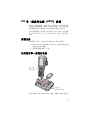
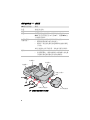
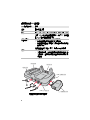
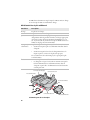
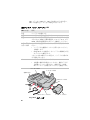
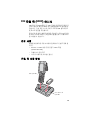
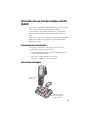
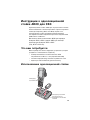
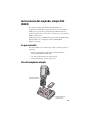
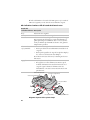
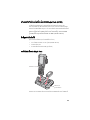
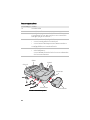
CK3 Single Dock AD20 CK3 单一底座充电器 说明 CK3 單基座充電器 說明 Instructions pour le socle unique CK3 Anleitung für CK3 Einzeldock CK3 Single Dock の取り扱い説明 CK3 단일 독 안내서 Instruções de uso da base simples do CK3 Èíñòðóêöèè ê îäíîñåêöèîííîé ñòîéêå äëÿ CK3 Instrucciones del acoplador simple CK3 ¤Óá¹Ð¹ÓÊÓËÃѺá·è¹àª×èÍÁµèÍ CK3 Single Dock Instructions (Multi-Language) Contents CK3 Single Dock (AD20) Instructions. . . . . . . . . . . . . . . . . . 3 CK3 单一底座充电器 (AD20) 说明 . . . . . . . . . . . . . . . . . . 5 CK3 單基座充電器 (AD20) 說明 . . . . . . . . . . . . . . . . . . . . . . 7 Instructions pour le socle unique CK3 (AD20) . . . . . . . . . . 9 Anleitung für CK3 Einzeldock (AD20) . . . . . . . . . . . . . . . . 11 CK3 Single Dock (AD20) の取り扱い説明 . . . . . . . . . . . . 13 CK3 단일 독 (AD20) 안내서. . . . . . . . . . . . . . . . . . . . . . . . . 15 Instruções de uso da base simples do CK3 (AD20) . . . . . . . . . . . . . . . . . . . . . . . . . . . . . . . . . . . . . . 17 Инструкции к односекционной стойке AD20 для CK3 . . . . . . . . . . . . . . . . . . . . . . . . . . . . . . . . . . 19 Instrucciones del acoplador simple CK3 (AD20) . . . . . . . 21 ¤Óá¹Ð¹ÓÊÓËÃѺá·è¹àª×èÍÁµèÍ CK3 Single Dock (AD20). . . . . . . . . . 23 ii CK3 Single Dock (AD20) Instructions The CK3 single dock (Model AD20) powers your CK3 Mobile Computer and charges a spare battery (AB17 or AB18) separately. The single dock also provides a two-wire serial debug port and client and host USB connectivity. You can also use the AD20 to charge an IP30 and SR61 battery (Model AB3) with the IP30 and SR61 battery adapter (P/N 871-233-xxx). What You Need You also need these items (sold and ordered separately): • Intermec 12 VDC universal power supply Model AE16 (P/N 851-061-208) • An appropriate AC power cord • Ethernet adapter and cables (optional) Using the Single Dock CK3 status LED Extra battery pack status LED 3 The CK3 status LED is red when the CK3 is charging and green when the CK3 is fully charged. Extra Battery Pack Status LED LED State Description Red The battery is charging. Green The battery is fully charged. Yellow The battery is out of charging temperature range. To ensure proper battery charging, the operating range for the AD20 is 5°C to 35°C (41°F to 95°F). Make sure the AD20 is within operating temperature range. Alternating The battery is not charging. Try these solutions: red and yellow • Make sure the battery is firmly installed in the charger. • Make sure the charging pins on the single dock and the contacts on the battery are clean. If these solutions do not work, the battery may be defective. Off • No battery is installed. • The charger is not receiving power. Make sure the power plug is firmly inserted in the charger and the power supply is properly connected to a powered AC outlet. Debug connector Docking connector Power connector USB host connector USB client connector Single Dock Ports Diagram 4 Ethernet adapter CK3 单一底座充电器 (AD20) 说明 CK3 单一底座充电器 (AD20 型)可分别为 CK3 移动计算机 供电以及为备用电池 (AB17 或 AB18)充电。 单一底座充电 器还提供双线串行调试端口以及 USB 客户端和主机接口。 安装手腕带您也可以使用 AD20 搭配 IP30 和 SR61 电池适配 器 (P/N 871-233-xxx),为 IP30 和 SR61 电池 (型号 AB3) 充电。 所需元件 还需要如下元件 (这些元件均单独出售,需另行订购): • Intermec 12 VDC 通用电源 (AE16 型) (P/N 851-061-208) • 一条适合的交流电源线 • 以太网适配器和电缆 (可选) 如何使用单一底座充电器 CK3⢊ᗕ LED ᣛ⼎♃ ⫼⬉∴ ⢊ᗕLEDᣛ⼎♃ CK3 充电时,CK3 的状态 LED 为红色,充满时 LED 为绿色。 5 备用电池状态 LED 指示灯 LED 指示灯状态 说明 红色 电池正在充电。 绿色 电池已充满。 黄色 电池超出充电温度范围。 要确保电池正确充电, AC20 的工作范围应为 5°C 到 35°C。 确保 AD20 在 工作温度范围内。 红色和黄色 交替亮起 未对电池充电。 请尝试使用以下解决方案: • 确保电池稳固地安装在充电器上。 • 确保单一底座充电器的充电插脚和电池触点都是 干净的。 如果上述解决方案不起作用,则电池可能存在故障。 熄灭 • 未安装电池。 • 充电器未插电。 确保电源插头牢固地插入充电器 且电源正确连接到通电的交流电源插座。 䇗䆩ষ ᑩᑻষ ⬉⑤ষ USB Џᴎষ USB ᅶ᠋ッষ 单一底座充电器的端口示意图 6 ҹ㔥䗖䜡఼ CK3 單基座充電器 (AD20) 說明 CK3 單基座充電器 (AD20 型 ) 可分別為 CK3 行動電腦供電, 以及為備用電池 (AB17 或 AB18) 充電。此單基座充電器還配 備雙線序列除錯埠以及 USB 用戶端與主機端的連接能力。 您也可以使用 AD20 搭配 IP30 和 SR61 電池配接器 (P/N 871233-xxx),進行 IP30 和 SR61 電池 (AB3 型)的充電。 需要的物品 您還需要如下物品 ( 單獨銷售,需另購 ): • Intermec 12 VDC 通用電源供應器 (AE16 型 ) (P/N 851-061-208) • 一條適合的 AC 電源線 • 乙太網路配接器與電纜 ( 選用 ) 如何使用單基座充電器 CK3ʳणኪʳ LEDʳਐقᗉ ໂشሽۃ णኪʳLEDʳਐقᗉ 當 CK3 正在充電時,CK3 狀態 LED 指示燈會亮起紅燈,充電 完成時,會亮起綠燈。 7 備用電池狀態 LED 指示燈 LED 指示燈狀態 說明 紅色 電池正在充電。 綠色 電池充電完成。 黃色 電池不在可進行充電的溫度範圍內。要確保電池正確 充電,AD20 的作業溫度範圍應為 5°C 到 35°C。檢查確 認 AD20 在作業溫度範圍之內。 紅色與黃色 交替亮起 電池未充電。請嘗試使用下列解決方法: • 檢查確認電池已穩固安放在充電器中。 • 檢查確認單基座充電器的充電針腳與電池接觸點 都是乾淨的。 如果這些解決方法都不奏效,則電池可能已損壞。 熄滅 • 未安裝電池。 • 充電器未通電。檢查確認電源插頭是穩固插入到 充電器中,且電源供應器正確地連接到通電的電 源插座。 ೈᙑ൷ᙰ ഗஆ൷ᙰ ሽᄭ൷ᙰ USB ᖲጤ൷ᙰ USBʳ֪شጤ൷ᙰ 單基座充電器的連接埠圖解 8 Ԭ֜ጻሁ൷ᕴ Instructions pour le socle unique CK3 (AD20) Le socle unique CK3 (modèle AD20) permet d'alimenter votre ordinateur nomade CK3 et de mettre en charge une pile de rechange (AB17 ou AB18) séparément. Le socle unique offre aussi un port de débogage en série à deux fils ainsi que la connectivité client et hôte USB. Vous pouvez aussi utiliser l’AD20 pour charger une batterie IP30 ou SR61 (modèle AB3) avec l’adaptateur de batterie IP30 ou SR61 (réf. 871-233-xxx). Ce qu'il vous faut Vous aurez aussi besoin des articles suivants (vendus et commandés séparément) : • Bloc d'alimentation multivoltage 12 V CC modèle AE16 (N/P 851-061-208) • Cordon d'alimentation CA approprié • Adaptateur et câbles Ethernet (en option) Utilisation du socle unique DEL d’état du CK3 DEL d'état du bloc de piles additionnel 9 Le DEL d'état du CK3 est rouge lorsque le CK3 est mis en charge et vert lorsque le CK3 est entièrement chargé. DEL d'état du bloc de piles additionnel DEL d'état Description Rouge La pile est en charge. Vert La pile est entièrement chargée. Jaune La pile est en dehors de la plage de température de chargement. Afin de garantir une mise en charge appropriée de la pile, la plage de fonctionnement du AD20 est 5 °C à 35 °C (41 °F à 95 °F). Assurez-vous que le AD20 est dans les limites de la plage de fonctionnement. Rouge et jaune La pile n'est pas en charge. Essayez les solutions suivantes : alternantes • Assurez-vous que la pile est solidement installée dans le chargeur. • Assurez-vous que les broches de chargement du socle uique et que les contacts de la pile sont propres. Si ces solutions ne fonctionnent pas, il se peut que la pile soit défectueuse. Éteint • Aucune pile n'est installée. • Le chargeur n'est pas sous tension. Assurez-vous que la fiche d'alimentation est solidement insérée dans le chargeur et que le bloc d'alimentation est bien branché sur une prise CA. Connecteur de débogage Connecteur de socle Prise d'alimentation Connecteur USB hôte Connecteur USB client Schéma des ports du socle unique 10 Adaptateur Ethernet Anleitung für CK3 Einzeldock (AD20) Das CK3 Einzeldock (Modell AD20) versorgt den Mobilcomputer CK3 und ladet einen Ersatzakku (AB17 oder AB18) separat. Das Einzeldock verfügt auch über einen zweipoligen seriellen Debug-Anschluss sowie USB-Client- und Host-Konnektivität. Sie können mit dem Modell AD20 mit Hilfe des IP30- und SR61Akkuadapters (Bestellnr. 871-233-xxx) auch einen IP30 und SR61 Akku (Modell AB3) laden. Benötigte Teile Es sind außerdem folgende Teile erforderlich (separat zu verkaufen und zu bestellen): • Intermec 12-VDC-Universalnetzteil, Modell AE16 (Bestellnr. 851-061-208) • Ein geeignetes Wechselstrom-Netzkabel • Ethernet-Adapter und -Kabel (optional) Gebrauch des Einzeldock CK3 Status-LED Status-LEDs des Zusatzakkus 11 Die CK3 Status-LED leuchtet rot, wenn das Modell CK3 ladet; sie leuchtet grün, wenn das CK3 vollständig geladen ist. Status-LED des Zusatzakkus LED-Status Beschreibung Rot Der Akku wird geladen. Grün Der Akku ist vollständig geladen. Gelb Der Akku ist außerhalb des Ladetemperaturbereichs Um korrekte Akkuladung zu gewährleisten, muss der Betriebsbereich für das AD20 zwischen 5 °C und 35 °C (41 °F und 95 °F) eingehalten werden. Darauf achten, dass das AC20 im Betriebstemperaturbereich ist. Wechselt zwischen rot und gelb Der Akku wird nicht geladen. Folgende Maßnahmen versuchen: • Sicherstellen, dass der Akku sicher in das Ladegerät eingesetzt ist. • Sicherstellen, dass die Ladepole am Einzeldock und die Akkukontakte des Akkus sauber sind. Falls diese Lösungen erfolglos sind, könnte der Akku beschädigt sein. Aus • Kein Akku eingebaut • Das Ladegerät wird nicht mit Strom versorgt. Sicherstellen, dass der Netzstecker sicher an das Ladegerät und das Netzteil korrekt an eine funktionierende Steckdose angeschlossen ist. Debug-Anschluss Andock-Anschluss Stromanschluss USB Host-Anschluss USB Client-Anschluss Diagramm der Einzeldock-Anschlüsse 12 Ethernet-Adapter CK3 Single Dock (AD20) の取り扱い説明 CK3 Single Dock (AD20 モデル ) は、CK3 モバイル コン ピュータと予備バッテリ (AB17 または AB18) を個別に充 電します。Single Dock には、2 線式シリアル デバッグ ポート、クライアント USB 接続およびホスト USB 接続も 準備されています。 た IP30 および SR61 電池アダプター (P/N 871-233-xxx) により AC20 で IP30 および SR61 電池(AB3 型)を 1 個充 電可能となります。 必要な品目 以下の品目も必要です ( 別売 )。 • Intermec 12 VDC ユニバーサル電源 AE16 モデル (P/N 851-061-208) • 適切な AC 電源コード • イーサネット アダプタおよびケーブル ( オプション ) Single Dock の使用方法 CK3ࠬ࠹࠲ࠬLED ㅊടࡃ࠶࠹ࡄ࠶ࠢ ࠬ࠹࠲ࠬLED 13 CK3 ステータス LED は、CK3 が充電中のときは赤色に、 CK3 の充電が完了したときには緑色に点灯します。 追加バッテリ パック ステータス LED LED の状態 説明 赤色 バッテリの充電中です。 緑色 バッテリの充電が完了しました。 黄色 バッテリが充電温度範囲外です。 バッテリを正しく充電 するための AD20 の動作範囲は、5°C から 35°C です。 AD20 が動作温度範囲内にあることを確認してください。 赤色と黄色が バッテリが充電されていません。以下の対策を取ってく 交互に点滅 ださい。 • バッテリが充電器にしっかりと挿入されていること を確認します。 • Single Dock の充電用ピンやバッテリの接触部分が汚 れていないか確認します。 これらの方法で解決しない場合は、バッテリに欠陥があ る可能性があります。 オフ • バッテリが挿入されていません。 • 充電器に電源が供給されていません。電源プラグが 充電器にしっかりと挿入され、電源が正しく電源 AC コンセントと接続されていることを確認します。 デバッグ コネクタ ドッキング コネクタ 電源コネクタ USB ホスト コネクタ USB クライアント コネクタ Single Dock のポート図 14 イーサネット アダプタ CK3 단일 독 (AD20) 안내서 CK3 단일 독 (AD20 모델 ) 은 CK3 모바일 컴퓨터의 전원을 공 급하고 여분의 배터리 (AB17 또는 AB18) 를 별도로 충전할 수 있습니다 . 단일 독은 2 선의 디버그 포트와 USB 클라이언트 및 호스트 연결을 지원합니다 . 또한 IP30 및 SR61 배터리 어댑터 (P/N 871-233-xxx) 와 함 께 IP30 과 SR61 배터리 (모델 AB3) 를 충전하기 위해 AD20 을 사용할 수 있습니다 . 준비 사항 제품을 사용하려면 다음 부속품이 필요합니다 ( 별도 판매 및 주문 ). • Intermec 12 VDC 범용 전원 공급기 AE16 모델 (P/N 851-061-208) • 적합한 AC 전원 코드 • 이더넷 어댑터 및 케이블 ( 옵션 ) 단일 독 사용 방법 CK3 ㆮ䇉 LED 㺁᳭ ⴝ䈝⪙ 䐖 ㆮ䇉 LED 13 CK3 가 충전 중일 때는 상태 LED 가 빨간색이고 완전히 충전 되면 녹색으로 변합니다 . 추가 배터리 팩 상태 LED LED 상태 설명 빨간색 배터리를 충전하는 중입니다 . 녹색 배터리가 완전히 충전되었습니다 . 노란색 배터리가 충전 온도 범위를 초과했습니다 . 정상적인 배 터리 충전을 위한 AD20 충전기의 동작 온도는 5°C ~ 35°C 입니다. AD20 충전기의 동작 온도가 정상 범위인지 확인하십시오 . 배터리가 충전되지 않고 있습니다 . 다음의 해결책을 시 도하십시오 . • 배터리가 충전기에 정확히 장착되었는지 확인합니다. 빨간색 / 노란 색 교대 점등 • AD20 충전기의 충전핀과 배터리의 접점에 이물질이 묻어 있는지 확인합니다 . 이상의 방법으로 문제가 해결되지 않을 경우 배터리 불량 일 가능성이 있습니다 . 꺼짐 • 배터리가 장착되지 않았습니다 . • 충전기에 전원이 공급되고 있지 않습니다 . 전원 플러 그가 충전기에 올바르게 끼워져 있고 AC 전원 출력 단자에 제대로 연결되어 있는지 확인하십시오 . ☁ụ 㿑−䈝 ⒱䆦 㿑−䈝 㣱㞽 㿑−䈝 USB 䜥㎑䎥 㿑−䈝 USB 䅡⡩㡡㚥䎥 단일 독 포트 구성도 14 㡡⑁∤ 㚡⏾䈝 Instruções de uso da base simples do CK3 (AD20) A base simples CK3 (modelo AD20) alimenta seu Coletor de dados CK3 e carrega uma bateria reserva (AB17 ou AB18) separadamente. A base simples também oferece uma porta de depuração serial de bifilar e conectividade USB de cliente e de host. Também é possível usar o AD20 para carregar uma bateria IP30 e SR61 (modelo AB3) com o adaptador de bateria IP30 e SR61 (N/P 871-233-xxx). Componentes necessários Os seguintes componentes, cuja venda e pedido são feitos separadamente, também são necessários: • Fonte de alimentação universal modelo AE16 Intermec de 12 VCC (N/P 851-061-208) • Um cabo de alimentação de CA apropriado • Adaptador de Ethernet e cabos (opcional) Uso da base simples LED de status do CK3 LEDs indicadores do status da carga da bateria adicional 15 O LED de status do CK3 fica vermelho quando o CK3 está carregando e verde quando o CK3 está completamente carregado. LEDs indicadores do status da carga da bateria adicional Estado do LED Descrição Vermelho A bateria está sendo carregada. Verde A bateria está completamente carregada. Amarelo A bateria está fora da faixa de temperatura de carregamento. Para garantir o carregamento correto da bateria, a faixa operacional para o modelo AD20 está entre 5°C e 35°C (41°F e 95°F). Certifique-se de que o modelo AC20 esteja dentro da faixa de temperatura operacional. Alternância entre vermelho e amarelo A bateria não está sendo carregada. Experimente essas soluções: • Certifique-se de que a bateria esteja firmemente colocada no carregador. • Certifique-se de que os pinos de contato da base simples e os contatos na bateria estejam limpos. Caso essas soluções não funcionem, a bateria pode estar com defeitos. Apagado • • Não há nenhuma bateria. O carregador não está recebendo energia elétrica. Certifique-se de que o plugue de energia esteja firmemente inserido no carregador e de que a fonte de alimentação esteja conectada adequadamente a uma tomada elétrica CA. Conector de depuração Conector de base Conector de energia Conector USB de host Conector USB do cliente Diagrama de portas de base simples 16 Adaptador de Ethernet Инструкции к односекционной стойке AD20 для CK3 Односекционная стойка AD20 для осуществляет питание вашего мобильного компьютера CK3 и отдельно заряжает запасную батарейку (AB17 или AB18). Кроме того, односекционна стойка обрудована двухпроводным последовательным отладочным портом и и соединениями USB-клиент и USB-хост. Вы можете также использовать AD20 для зарядки батареек IP30 и SR61 (модель AB3) при помощи адаптера для батареек IP30 и SR61 (изд. № 871-233-xxx). Что вам потребуется Вам потребуются также следующие устройства (которые продаются и заказываются отдельно): • Универсальный блок питания Intermec AE16 напряжением 12 В пост. тока (P/N 851-061-208) • • Соответствующий шнур питания переменного тока Адаптер и кабели Ethernet (дополнительно) Использование односекционной стойки Ñâåòîäèîä ñîñòîÿíèÿ CK3 Ñâåòîäèîä ñîñòîÿíèÿ äîïîëíèòåëüíîãî áàòàðåéíîãî èñòî÷íèêà ïèòàíèÿ 17 Светодиод состояния CK3 – красный, когда идет зарядка CK3, и зеленый, когда CK3 полностью заряжен. Светодиоды состояния дополнительного батарейного источника питания Состояние светодиода Описание Красный Батарейка заряжается. Зеленый Батарейка полностью заряжена. Желтый Температура батарейки вне диапазона нормальной зарядки. Диапазон надлежащей зарядки батарейки AD20 – от 5°C до 35°C. Проследите за тем, чтобы температура AD20 находилась в рабочем диапазоне. Попеременно красный и желтый Батарейка не заряжается. Попробуйте следующие варианты: • Убедитесь в том, что батарейка плотно вставлена в зарядное устройство. • Проверьте чистоту зарядных контактов односекционной стойки и контактов батарейки. Если это не помогает, возможно, батарейка повреждена. Выкл. • • Батарейка не вставлена Зарядное устройство не получает питания. Убедитесь в том, что штекер питания плотно вставлен в зарядное устройство, и что блок питания должным образом включен в розетку переменного тока. Îòëàäî÷íûé ðàçúåì Ðàçúåì ñòîéêè Ðàçúåì ïèòàíèÿ Ðàçúåì USB-õîñò Ðàçúåì USB-êëèåíò Схема портов односекционной стойки 18 Àäàïòåð Ethernet Instrucciones del acoplador simple CK3 (AD20) El acoplador simple CK3 (Modelo AD20) alimenta su computadora móvil CK3 y carga una batería de reserva (AB17 ó AB18) por separado. El acoplador simple también brinda un puerto de depuración en serie de dos conductores y conectividad USB de cielnte y host. También puede usar el AD20 para cargar una batería IP30 y SR61 (Modelo AB3) con el adaptador de batería IP30 y SR61 (P/N 871-233-xxx). Lo que necesita Necesita también estos artículos (los cuales se venden y piden por separado): • Fuente de alimentación universal de 12 VCC Intermec Modelo AE16 (P/N 851-061-208) • Un cable de alimentación de CA adecuado • Adaptador Ethernet y cables (opcional) Uso del acoplador simple Indicador luminoso de estado del CK3 Indicador luminoso del estado de la batería extra 19 El indicador luminoso de estado del CK3 aparece rojo cuando el CK3 está cargando y verde cuando está totalmente cargado. Más indicadores luminosos LED del estado de la batería extra Estado del indicador luminoso Descripción Rojo La batería está cargando. Verde La batería está totalmente cargada. Amarillo La batería está fuera de la gama de temperatura de carga. Para asegurar que la batería se cargue debidamente, la gama operativa para el AD20 es de 5°C a 35°C (41°F a 95°F). Confirme que el AD20 esté dentro de la gama de temperatura operativa. Alternando rojo y amarillo La batería no está cargando. Pruebe estas soluciones: • Revise que la batería esté firmemente instalada en el cargador. • Revise que las patillas de carga del acoplador simple y los contactos de la batería estén limpios. Si no funcionan estas soluciones, la batería puede estar defectuosa. Apagado • • No hay batería instalada. El cargador no recibe alimentación. Revise que el enchufe de alimentación esté bien insertado en el cargador y que la fuente de alimentación esté debidamente conectada a un tomacorriente de CA que funcione. Conector de depuración Conector de acoplamiento Conector de alimentación Conector USB host Conector USB cliente Diagrama de puertos del acoplador simple 20 Adaptador Ethernet ¤Óá¹Ð¹ÓÊÓËÃѺá·è¹àª×èÍÁµèÍ CK3 Single Dock (AD20) á·è¹àª×èÍÁµèÍ CK3 Single Dock (ÃØè¹ AD20) ãËé¾Åѧ§Ò¹á¡è¤ÍÁ¾ÔÇàµÍÃìẺ¾¡¾Ò CK3 áÅЪÒÃì¨áºµàµÍÃÕèÊÓÃͧ (AB17 ËÃ×Í AB18) â´ÂᡵèÒ§ËÒ¡ ¹Í¡¨Ò¡¹Õé á·è¹àª×èÍÁµèÍ Single Dock ´Ñ§¡ÅèÒÇÂѧÁÕ¾ÍÃ쵴պѡẺ͹ءÃÁ 2 ÊÒ áÅСÒÃàª×èÍÁµèÍ USB ÊÓËÃѺä¤ÅàÍç¹µìáÅÐâÎʵì คุณสามารถใช้แท่นชาร์จ AD20 สำหรับการชาร์จแบตเตอรี่รุ่น IP30 และ SR61 (รุ่น AB3) ได้ด้วยอุปกรณ์แปลงไฟ IP30 และ SR61 (P/N 871-233-xxx). ÊÔ觷Õè¤Ø³¨Óà»ç¹µéͧãªé ¤Ø³µéͧ¡ÒÃÊÔè§àËÅèÒ¹Õéà¾ÔèÁàµÔÁ (¨Ó˹èÒÂáÅÐÊÑ觫×éÍᡵèÒ§ËÒ¡): • à¾ÒàÇÍÃì«Ñ¾¾ÅÒ Intermec 12 VDC ÃØè¹ AE16 (P/N 851-061-208) • ÊÒÂä¿ AC ·ÕèàËÁÒÐÊÁ • ÍÐá´»àµÍÃìÍÕà¸ÍÃìà¹çµáÅÐÊÒÂà¤àºÔÅ (ÍØ»¡Ã³ìàÊÃÔÁ) ¡ÒÃãªéá·è¹àª×èÍÁµèÍ Single Dock ไฟแสดงสถานะ CK3 ไฟแสดงสถานะ ชุดแบตเตอรี่สำรอง ä¿áÊ´§Ê¶Ò¹Ð CK3 à»ç¹ÊÕá´§àÁ×èÍ CK3 ¡ÓÅѧªÒÃì¨ä¿ áÅÐà»ç¹ÊÕà¢ÕÂÇàÁ×èÍ CK3 ªÒÃì¨ä¿àµçÁáÅéÇ 23 ä¿áÊ´§Ê¶Ò¹ÐªØ´áºµàµÍÃÕèÊÓÃͧ ʶҹТͧä¿ÊÑ−−Ò³ ÃÒÂÅÐàÍÕ´ á´§ ẵàµÍÃÕè¡ÓÅѧªÒÃì¨ä¿ à¢ÕÂÇ áºµàµÍÃÕèªÒÃì¨ä¿àµçÁáÅéÇ àËÅ×ͧ ẵàµÍÃÕèÍÂÙè¹Í¡ªèǧÍسËÀÙÁÔÊÓËÃѺ¡ÒêÒÃì¨ à¾×èÍãËéªÒÃì¨áºµàµÍÃÕèä´éÍÂèÒ§àËÁÒÐÊÁ ªèǧÍسËÀÙÁÔÊÓËÃѺ¡Ò÷ӧҹ¢Í§ AD20 ¤ÇÃÍÂÙè·Õè 5°C ¶Ö§ 35°C µÃǨÊͺãËéá¹èã¨ÇèÒ AD20 ÍÂÙè㹪èǧÍسËÀÙÁÔ¡Ò÷ӧҹ·ÕèàËÁÒÐÊÁ ÊÅѺ ẵàµÍÃÕèäÁèä´é¡ÓÅѧªÒÃì¨ä¿ ÅͧãªéÇÔ¸Õá¡é»Ñ−ËÒµèÍ仹Õé: • µÃǨÊͺÇèÒẵàµÍÃÕè¶Ù¡µÔ´µÑé§ÍÂèÒ§á¹è¹Ë¹Òã¹à¤Ã×èͧªÒÃì¨ • µÃǨÊͺÇèÒ¾Ô¹º¹á·è¹àª×èÍÁµèÍ Single Dock áÅÐ˹éÒÊÑÁ¼Ñʺ¹áºµàµÍÃÕèÊÐÍÒ´ ËÒ¡ÇÔ¸Õá¡é»Ñ−ËÒ¹ÕéäÁèä´é¼Å áÊ´§ÇèÒẵàµÍÃÕèÍÒ¨ÁÕ¢éͺ¡¾Ãèͧ »Ô´ • äÁèä´éµÔ´µÑé§áºµàµÍÃÕè • à¤Ã×èͧªÒÃì¨äÁèä´éÃѺ¾Åѧ§Ò¹ µÃǨÊͺÇèÒ»ÅÑê¡ä¿àÊÕºà¢éҡѺà¤Ã×èͧªÒÃì¨ÍÂèÒ§á¹è¹Ë¹ÒáÅÐà¾ÒàÇÍÃì«Ñ¾¾ÅÒÂàª×èÍÁ µèÍÍÂèÒ§àËÁÒÐÊÁ¡ÑºàµéÒàÊÕÂºä¿ AC ขั้วต่อดีบัก ช่องเชื่อมต่อ ขั้วต่อเพาเวอร์ ขั้วต่อโฮสต์ USB ขั้วต่อไคลเอ็นต์ USB á¼¹¼Ñ§¾ÍÃ쵺¹á·è¹àª×èÍÁµèÍ Single Dock 24 อะแดปเตอร์อีเธอร์เน็ต Where to Find More Information 有关详细信息 有關詳細信息 Où trouver d’autres détails Verweise zu weiteren Informationen 정보를 더 발견하기 위하여 어디에 Onde obter mais informações Где найти дополнительную информацию Dónde encontrar más información 詳細にわたる情報について จะค้นหาข้อมูลมากยิ่งที่ไหน www.intermec.com In the U.S.A. and Canada, call 1.800.755.5505. Caution: See Compliance Insert for restrictions associated with this product. 警告:有关本产品相关的使用限制,请参阅 “符合性插页” 警告:請參見規範插頁中有關本產品使用限制方面的說明。 Attention: Consultez la Déclaration de conformité pour les restrictions d’usage associées à ce produit. Vorsicht: Das Konformitätsblatt führt etwaige Verwendungseinschränkungen für dieses Produkt an. 警告:本製品の使用制限は、適格性に関する折り込みをご参照下さい。 조의 : 본 제품과 관련된 사용 제한에 대한 자세한 내용은 준수 규정을 참조하십 시오 . Cuidado: Consulte as informações sobre as restrições de uso associadas a este produto no encarte sobre conformidade. Острожно: Ограничения, связанные с использованием устройства, приведены на вкладыше с требованиями по обеспечению соответствия. Precaución: Consulte el Inserto de cumplimiento para ver las restricciones de uso asociadas con este producto. ข้อเตือน ดูการใส่เข้าสำหรับการใช้ข้อจำกัดที่เกี่ยวข้องกับผลิตภัณฑ์น. This product is protected by one or more patents. 本产品受到一项或多项专利保护 . 本產品受到一項或 多項專利保護。Ce produit est protégé par un brevet ou plus. Dieses Produkt ist durch ein oder mehrere Patente geschützt. 本製品は 1 件またはそれ以上の特許により保護されています。본 제품은 하 나 이상의 특허권에 의해 보호를 받습니다 . Este produto está protegido por uma ou mais patentes. Этот продукт защищен одним или несколькими патентами. Este producto está protegido por una o varias patentes. ผลิตภัณฑ์นี้ป้องกันโดยสิทธิบัตรหนึ่งหรือมากกว่า. Electrical rating. 额定电压及电流 . 電子規定值。Cote électrique. Stromversorgung. 電流単位。전기 등 급 . Especificações eléctricas. Питание. Calificacón eléctrica. อัตราอิเล็กทรอนิกส: x 12 V, 2.5 A, 30 W Worldwide Headquarters 6001 36th Avenue West Everett, Washington 98203 U.S.A. tel 425.348.2600 fax 425.355.9551 www.intermec.com © 2008 Intermec Technologies Corporation. All rights reserved. CK3 Single Dock (AD20) Instructions (Multi-Language) *943-204-002* P/N 943-204-002