1
Dear customer
For your security and comfort, we urge you to carefully read the Safety booklet before attempting use.
In buying this multifunction machine, you have opted for a quality OKI product. Your device satisfies all of the different
needs of a modern office automation tool.
This machine allows you to scan in colour, to fax, print and copy in black and white. You can connect the multifunction
device to your PC (Microsoft Windows 2000/XP/Vista) or Mac/Linux.
Install the software included to use the multifunction device as a printer. Besides, you can scan, edit and save
documents through your PC. If you have a WLAN adaptor (optional) you can communicate with a personal computer
wirelessly.
WLAN is an optional working only with a specific adaptor that you can obtain from your retailer. You will find further
information on our website: http://www.okiprintingsolutions.com.
Thanks to its navigator and its multitask access, it is powerful, user-friendly and easy to use.
The MB290 multifunction machines come with a 600 dpi scanner and a black and white laser printer offering a printing
speed of 20 ppm. The Companion Suite Pro software provided allows you to use your multifunction machine as a
scanner and a printer from a personal computer. It also gives you the ability to manage your multifunction machine.
Consumables
Refer to section Specifications, page 91.
Dear customer
MB290
Contents
Dear customer
I
Consumables
I
Preface
Laser Safety Information
For Europe/Asia
For North America
Positions of Safety labels on the machine
Symbols for the main power switch
EMC
Note to users in the United States of
America
Declaration of Conformity
EME Compliance for Canada
Declaration of confomity
Notice to Users in EU Countries
Environmental Information
Software use license
Definition
License
Property
Duration
Warranty
Responsibility
Development
Applicable law
Registered trademarks
Prohibited reproductions
Installation
Location conditions
Cautions of use
Safety information
Safety During Operation
Power Supply
For Fax or Telephone
Paper recommendations
Loading paper in the main unit tray
Handling of paper
Humidity control
Handling the unit
Operator shocks
Moving the unit
Handling the Toner Cartridge
Rules for use symbols
Terminal description
Command panel
Accessing terminal menus
Packaging contents
Device installation
Installing the document feeder
Feed cassette paper insertion
Cartridge installation
Paper delivery stop
Starting your device
Device connection
Device initial setup
Paper insertion in the manual input tray
Use of envelopes
Copy
Simple copy
ECO mode copy
Advanced copying
ID Card Copy mode
Special setup for the copying
Resolution setup
Zoom setup
Collated copy setup
Analysis origin setup
Contrast setup
Brightness setup
Paper type setup
Paper tray selection
Sheet-feed analysis margins setup
Flat-bed analysis margins setup
Left and right printing margins setup
Top and bottom printing margins setup
Format paper setup
1
1
1
1
2
2
3
3
3
3
3
3
Fax
Fax transmission
Print a header page
Immediate transmission
Delayed transmission
Transmission with auto redial
Fax reception
Relay broadcast
Fax answering machine
Saving an access code
Activating / Deactivating the answering
machine
Printing fax messages stored in the
memory
Fax rerouting
Activating rerouting
Setting the re-direction contact
Printing rerouted documents
Rerouting fax messages to a USB memory key
Activating rerouting
Printing rerouted documents
Transmission waiting queue
Performing immediate transmission from
the waiting queue
Consulting or modifying the waiting
queue
Deleting a transmission on hold
Printing a document in waiting or in
deposit
Printing the waiting queue
Cancelling a transmission in progress
MailBoxes (MBX Fax)
Creating an MBX
Modifying the features of a MBX
Printing the contents of a MBX
Deleting a MBX
Printing the MBX list
MBX deposit in your fax
MBX deposit in a remote fax
MBX polling from a remote fax
Deposit and Polling
Placing a document in deposit
Polling a deposited document
4
5
5
5
5
5
5
5
5
6
6
6
7
7
7
8
8
9
9
9
9
9
9
9
9
9
10
10
11
12
12
13
13
13
13
14
15
15
15
15
17
SMS
17
SMS Parameters
Presentation of the sender
18
18
-I-
18
18
19
19
19
20
20
20
20
20
20
21
21
21
21
21
21
22
22
22
22
22
23
23
23
24
24
24
24
24
24
25
25
25
25
25
25
25
26
26
26
26
26
26
26
27
27
27
27
27
27
27
28
28
28
29
29
29
Contents
MB290
SMS Center transmission number
Sending an SMS
Parameters/Setup
Remote configuration
Conditions required
Accessing the embedded Web server
Date/Time
Summer time / Winter time setting
Your fax number/Your name
Type of network
Geographical settings
Country
Telecommuncation Network
Language
Local prefix
Transmission report
Document feed type
Economy period
Reception Mode
Reception without paper
Number of copies
Fax or PC reception
PC de-registering
Fax Server configuration
Configuring Fax server network parameters
Configuring fax server function
Selecting the access mode
Lock the Fax server settings
Adjust to page
Received faxes reduction mode
Technical Parameters
Printing the functions guide
Printing the logs
Print the list of setups
Font printing
Lock the machine
Lock the keyboard
Lock the numbers
Lock the Internet settings
Lock the SMS service
Lock the Media service
Read the counters
Sent pages counter
Received pages counter
Scanned pages counter
Printed pages counter
Display the consumables status
Calibrate your scanner
Directory
Creating subscribers record
Creating subscribers list
Modifying a record
Deleting a record or a list
Printing the directory
Importing a directory
How to structure the file
How to a import a directory
Exporting a directory
LDAP Server
Configuration
Accessing server contacts
Adding LDAP entries in the local directory
29
29
30
30
30
30
30
30
31
31
31
31
31
31
32
32
32
33
33
33
33
34
34
34
34
34
34
34
35
35
35
38
38
38
38
38
38
39
39
39
39
39
39
39
39
40
40
40
Saving/Restoring the directory (Smart
card option)
Games and Calendar
Sudoku
Print a grid
Print the solution to a grid
Calendar
Network features
Selecting the type of your local network
Ethernet network settings
Automatic configuration
Manual configuration
IP address
Sub-network mask
Gateway address
IEEE Address (or Ethernet address) or
MAC address
NetBIOS names
Name servers
Connection to a domain (for instance with
Windows NT, 2000 or XP)
Domain Login user name
Domain Login password
Domain name
SNTP server configuration
SNTP server address
SNTP server port
Activating the server access
Time zone
Summer time
WLAN network
Type of radio network
Radio infrastructure network
Radio ad-hoc network
Radio networks (WLAN)
Connect your WLAN adaptor
Configure your network
Creating or rejoining a network
Referring to or changing your network
parameters
An example of how an AD-HOC network
may be set up
Setting up a multifunction machine
Setting up the PC
SNMP service configuration
SNMP agent configuration
SNMP browser configuration
Message service
Information required to set up message
service
Configuring initialisation parameters
Access to servers parameters
41
41
42
42
42
42
42
42
43
43
44
44
44
44
Access to SMTP authentication parameters
Sending an E-mail text
Scan to Mail
Scan to FTP
Scan to Disk
Connection configuration
Standard settings
Selecting the connection type
Selecting the transmission type
Modifying the connection period
(Periodic type)
- II -
44
45
45
45
45
45
46
46
46
46
46
46
46
46
46
46
46
47
47
47
47
47
47
47
47
47
47
48
48
48
48
48
49
49
49
50
51
51
52
52
52
52
53
53
53
53
53
53
53
54
54
55
55
55
55
55
Contents
MB290
Modifying the connection time(s) (Set
Times type)
Selecting the print mode for the deposit
notice
Specifying an E-mail reply address
Printing the Internet settings
Mail sorting
F@X Only mode
PC Only mode
PC share mode
USB memory key
Use of the USB memory key
Print your documents
Print the list of files located in the key
Print the files located in the key
Delete your files located in the key
Analyse the USB memory key content
Save a document on a USB memory key
PC Features
Introduction
Configuration requirements
Installation
Installing the full software package
Installing the drivers using the Companion
Suite Pro software
Installing the drivers manually
USB print and scan drivers
LAN print and scan drivers
Installing PostScript print drivers
Multifunction Terminal's Supervision
Checking the connection between the PC
and the multifunction machine
Companion Director
Graphical presentation
Utilities and applications activation
Companion Monitor
Graphical presentation
Device management
Adding a device connected via USB
Adding a device connected to the network
Adding manually a device connected to
the network
Selecting the current device
Status of the connection
Device parameters
Removing a device
Display the consumable status
Links
Links available for connected USB devices
Links available for connected network
devices
Companion Suite Pro functionalities
Document analysis
Analysis with Scan To
Character recognition software (OCR)
Printing
Printing on the multifunction machine
Printing in duplex mode with the
multifunction machine
Address book
Add a contact to the terminal address
book
Add a group to the terminal address
book
Manage the address book
Modify the information related to a contact
Modify a group
Delete a contact or a group from the
address book
Print the address book
55
55
55
55
Import or export an address book
55
56
56
56
57
57
57
58
58
58
60
60
60
60
60
73
73
74
75
75
The outbox
The send memory (items sent)
The outbox log
The inbox log
75
75
75
75
The outbox
The outbox log
The sent item memory (items sent)
64
64
64
64
64
64
65
SMS Parameters
Access to SMS parameters
Description of the tab Logs and reports
Software Uninstallation
Uninstall the software from your PC
Uninstall the drivers from your PC
65
65
Uninstall the drivers using the Companion
Suite Pro software
Uninstall the drivers manually
Maintenance
68
68
68
69
69
69
69
70
70
70
70
72
72
72
72
- III -
74
74
Receive a fax
Follow-up of fax communications
SMS Communications
Presentation of the SMS window
Send an SMS
Follow-up of SMS
64
66
67
67
67
68
Fax communications
Presentation of the Fax window
Send a fax
Access to fax parameters
Description of the tab Logs and Reports
Description of the tab Fax Parameters
Cover page
Creating a cover page template
Creating a cover page
Description of the tab Cover page
63
63
64
73
73
73
Fax parameters
61
63
73
73
Save / Export your address book
Import an address book
Send a fax from the hard disk or the
terminal
Send a fax from an application
57
57
73
73
Service
General information
Toner cartridge replacement
Issues with smart cards
Cleaning
Scanner reading system cleaning
Printer cleaning
Printer external cleaning
Document-feeder roller cleaning
Printer issues
Error messages
Paper jam
Scanner issues
Miscellaneous issues
Communication errors
Transmission from the feeder
Transmission from memory
Communication error codes
General codes
PC printing issues
PC printing via USB connection
76
76
76
76
77
77
78
79
80
80
80
81
81
81
81
81
81
81
82
82
82
82
82
84
84
84
84
85
85
85
85
85
85
86
86
86
87
87
87
87
87
87
87
88
88
Contents
MB290
MB290
PC printing via LAN/WLAN connection
GDI, XPS or PCL printing
PostScript printing
Specifications
Physical specifications
Electrical specifications
Environmental specifications
Peripheral specifications
88
88
Contents
GDI, XPS or PCL printing
PostScript printing
89
89
89
90
90
90
90
90
- IV -
Preface
Every effort has been made to ensure that the information in this document is complete, accurate, and up-to-date. Oki
assumes no responsibility for the results of errors beyond its control. Oki also cannot guarantee that changes in
software and equipment made by other manufacturers and referred to in this guide will not affect the applicability of the
information in it. Mention of software products manufactured by other companies does not necessarily constitute
endorsement by Oki.
While all reasonable efforts have been made to make this document as accurate and helpful as possible, we make no
warranty of any kind, expressed or implied, as to the accuracy or completeness of the information contained herein.
The most up-to-date drivers and manuals are available from the Oki web site:
http://www.okiprintingsolutions.com
Copyright © 2006 Oki Europe Ltd.
Oki and Microline are registered trademarks of Oki Electric Industry Company, Ltd.
Microsoft, MS-DOS and Windows are registered trademarks of Microsoft Corporation.
Other product names and brand names are registered trademarks or trademarks of their proprietors.
Repairs/maintenance: Repairs and maintenance should only be carried out by a
qualified technician. There are no user serviceable parts inside the machine. To
reduce the risk of electrical shock, you must not carry out these operations yourself.
Opening or removing the covers exposes you to two hazards:
- The laser beam can cause irreversible eye damage.
- Contact with electrical components can lead to electrical shock.
For installation conditions and safety precautions, refer to the separate Safety/
Installation Instructions booklet provided.
Laser Safety Information
CAUTION: Use of controls, adjustments, or performance of procedures other than those specified in this guide
may result in hazardous light exposure.
This equipment complies with international safety standards and is classified as a Class 1 Laser Product.
With specific reference to lasers, the equipment complies with laser product performance standards set by
governmental, national, and international agencies as a Class 1 Laser Product. It does not emit hazardous light,
as the beam is totally enclosed during all phases of customer operation and maintenance.
For Europe/Asia
This machine complies with IEC 60825-1:1993+A1:1997+A2:2001 standard, is classified as laser class 1 product
and is safe for office/EDP use. It contains one class 3B laser diode, 10.72 mW max, 770-795 nm and other class
1 LEDs (280 µW at 639 nm).
Direct (or indirect reflected ) eye contact with the laser beam might cause serious eye damage. Safety precautions
and interlock mechanisms have been designed to prevent any possible laser beam exposure to the operator.
For North America
CDRH Regulations.
This equipment complies with the FDA performance standards for laser products except for deviations pursuant
to Laser Notice No.50, dated 24 June 2007 and contains 1 class 3B laser diode, 10.72 milliwatt, 770-795
nanometer wavelength and other class 1 LEDs (280 µW at 639 nm).
This equipment does not emit hazardous light, since the beam is totally enclosed during all customer modes of
operation and maintenance.
-1-
1 - Preface - Environmental Information - Software use license
MB290
Positions of Safety labels on the machine
The device has warning labels at the positions shown below. For your safety, you must never touch these surfaces
when you remove a paper jam or when you replace the Toner cartridge.
Symbols for the main power switch
In accordance with IEC 60417, this machine uses the following symbols for the main power switch:
-
means POWER ON.
-
means POWER OFF.
-2-
1 - Preface - Environmental Information - Software use license
MB290
EMC
Note to users in the United States of America
This equipment has been tested and found to comply with the limits for a Class B digital device, pursuant to Part
15 of the FCC Rules. These limits are designed to provide reasonable protection against harmful interference in
a residential installation.
This equipment generates, uses and can radiate radio frequency energy and, if not installed and used in
accordance with the instructions, may cause harmful interference to radio communications. However, there is no
guarantee that interference will not occur in a particular installation.
If this equipment does cause harmful interference to radio or television reception, which can be determined by
turning the equipment off and on, the user is encouraged to try to correct the interference by one more of the
following measures:
1.
2.
3.
4.
Reorient or relocate the receiving antenna.
Increase the separation between the equipment and receiver.
Connect the equipment into an outlet on a circuit different from that to which the receiver is connected.
Consult the dealer or an experienced radio / TV technician for help.
Declaration of Conformity
This device complies with Part 15 of the FCC Rules. Operation is subject to the following two conditions:
1. This device may not cause harmful interference, and
2. this device must accept any interference received, including interference that may cause undesired operation.
EME Compliance for Canada
This Class "B" digital apparatus complies with Canadian ICES-003.
Cet appareil numérique de la classe "B" est conforme à la norme NMB-003 du Canada.
Declaration of confomity
Notice to Users in EU Countries
This product complies with the requirements of the Council Directives 2004/108/EC
(EMC), 2006/95/EC (LVD) and 1999/5/EC (R&TTE), as amended where applicable on
the approximation of the laws of the member states relating to Electromagnetic
Compatibility, Low Voltage and Radio & Telecommunications Terminal Equipment.
-3-
1 - Preface - Environmental Information - Software use license
MB290
Environmental Information
-4-
1 - Preface - Environmental Information - Software use license
MB290
Software use license
CAREFULLY READ ALL THE TERMS AND CONDITIONS OF THE PRESENT LICENSE BEFORE OPENING THE
SEALED ENVELOPE CONTAINING THE SOFTWARE. OPENING THIS ENVELOPE INDICATES THAT YOU
ACCEPT THESE TERMS AND CONDITIONS.
In case you should not accept the terms of this license, the CD-ROM packaging should be returned to the retailer
unopened, along with the other components of the product. The purchase price of this product will be refunded. No
refunds will be made for products if the CD-ROM packaging have been opened, if components are missing or if the
reimbursement request is made after ten (10) days from the purchase date, your receipt is the proof of purchase.
Definition
The Software designates programs and associated documentation.
License
- This license allows you to use this Software on personal computers on a local network. You only have permission to
use this Software to print on one multifunction machine; you can not lend the Software or authorize anyone to use it.
- You are allowed to make a back up copy.
- This license is non-exclusive and non-transferable.
Property
The manufacturer or its providers hold the Software property right. You only become the owner of the CD-ROM. You
shall not modify, adapt, decompile, translate, create any derived piece, rent or sell the Software or the documentation.
Any rights not explicitly approved are reserved by the manufacturer or its providers.
Duration
This license remains valid until cancelled. You can cancel it by destroying the program and the documentation as well
as any other copies of them. This license will automatically be canceled in case you do not respect the terms of this
license. If the license is rendered invalid, you agree to destroy all copies of the program and the associate
documentation.
Warranty
The Software is provided "as is" with no warranties what so ever, whether expressed or implied, including without
limitation, any warranties of merchantability or fitness for a particular purpose; all the risks concerning the results and
performance of this Software are assumed by the buyer. In case the program should appear defective, all the repair
and service expenses will be covered by the buyer.
Nevertheless, the license holder benefits from the following warranty: we guarantee that the CD-ROM on which the
Software is recorded is free from hardware or manufacturing faults if used in normal conditions, the guarantee is valid
for ninety (90) days from the delivery date, the copy of the receipt being the proof of purchase. In case of a CD-ROM
fault that due to accident or misuse, the CD-ROM will not be replaced as per the warranty.
Responsibility
If the CD-ROM is not working properly, send it to the retailer together with a copy of the receipt. It is the retailer's sole
responsibility to replace the CD-ROM. Nobody, not even the manufacturer who is involved in the creation, realization,
merchantability and delivery of this program would be responsible for direct, indirect or immaterial damages, such as,
but not limited to, loss of information, loss of time, execution loss, loss of revenue, loss of customers, due to the use or
inability to use the program.
Development
With a constant concern for improvement, the manufacturer reserves the right to modify the Software specifications
without any notice. In case of modification, your user right does not give you access to free updates.
-5-
1 - Preface - Environmental Information - Software use license
MB290
Applicable law
This license is under the French law. Any dispute following the interpretation or execution of this license will be
submitted to the Paris Court.
Given the continuous technology development, the manufacturer reserves the right to modify the technical
specifications indicated for this product, at any time, without prior notice, and/or to stop manufacturing of the product.
All the names of the products and brands that could be trademarks registered by their respective owners are
recognized in the present document.
Registered trademarks
PCL® is a registered trademark of the Hewlett-Packard Company.
PostScript® is a registered trademark of Adobe Systems Incorporated.
Adobe® and the Adobe® products referred to here are registered trademarks of Adobe Systems Incorporated.
PaperPort11SE is a registered trademark of ScanSoft.
Microsoft® Windows 2000®, Microsoft® Windows Server 2003®, Microsoft® Windows XP®, Microsoft® Windows
Vista® and any other Microsoft® product referred to here are registered trademarks of Microsoft Corporation registered
and/or used in the United States and/or in other countries.
All the other brands or products referred to as examples or in order to give additional information are registered
trademarks of their respective owners.
The informations contents of this user manual are subject to change without notice.
Prohibited reproductions
Do not copy or print any item for which reproduction is prohibited by law.
Copying or printing the following items is generally prohibited by local law:
- bank notes;
- checks;
- bonds;
- stock certificates;
- bank drafts;
- passports;
- driver's licenses.
The preceding list is meant as a guide only and is not inclusive. If you have any questions concerning the legality of
copying or printing certain items, consult with your legal advisor.
-6-
1 - Preface - Environmental Information - Software use license
MB290
Installation
Location conditions
By choosing an appropriate location, you preserve the longevity of the machine. Check that the selected location has
the following characteristics:
- Choose a well ventilated location.
- Make sure not to obstruct the ventilation grids located on the left and right sides of the device. During the
installation, make sure to place the machine thirty centimeters away from the surrounding objects so all the lids
can be easily opened.
- Make sure that this location does not present any ammonia nor any other organic gasses emission hazard.
- The ground outlet (refer to the security notices presented in the Safety booklet ) to which you plan to connect the
machine must be located close to this one and have an easy access.
- Make sure that the machine is not directly exposed to sun light.
- Make sure not to place the machine in an area exposed to an air flow generated by an air conditioning, heating or
ventilation system, nor in an area subject to large temperature or humidity variations.
- Choose a solid and horizontal surface on which the machine will not be exposed to intense vibrations.
- Keep the machine away from any object that could obstruct its ventilation ports.
- Do not place the machine close to hangings or any other flammable objects.
- Choose a location where splashes of the water and other liquids are limited.
- Make sure that this location is dry, clean and dust free.
Make sure to place the machine in well ventilated premises. When in operation, the printer generates
a small amount of ozone. An unpleasant smell can come from the printer if it is used intensively in
poorly ventilated premises. For a secure use, make sure you place the machine in well ventilated
premises.
Cautions of use
Take into account the important precautions below when using the machine.
Running environment:
- Temperature: 10 °C to 27 °C [50 °F to 80.6 °F] with an ambient humidity included between 15 to 80% (up to 32°C
[89.6 °F] with an ambient humidity included between 15 to 54%).
Terminal:
The section below describes the precautions to be taken when using the machine:
- Never turn the machine off and never open the lids while printing.
- Never use gas or flammable liquids, or objects generating magnetic field close to the machine.
- When you unplug the power cord, always hold the connector without pulling the cord. A damaged cord presents
a potential fire hazard or an electric shock hazard.
- Never touch the power cord with wet hands. You risk getting an electric shock.
- Always unplug the power cord before moving the machine. Otherwise, you could risk having the cord damaged
and create a fire hazard or an electric shock hazard.
- Always unplug the power cord when you plan not to use the machine for a long period of time.
- Never put objects on the power cord, never pull it and never fold it. This could cause a fire hazard or an electric
shock hazard.
- Always make sure that the machine is not sitting on the power cord or any other electric device communication
cables. Make sure also that neither cord nor cable is introduced to the machine inner mechanism. This would
expose you to a machine malfunction risk or to a fire hazard.
- Make sure that the printer is unplugged from the power outlet before connecting or disconnecting an interface
cable to the printer (use a shielded interface cable).
- Never try to remove any fixed pane or hood. The machine contains high voltage circuits. Any contact with these
circuits can cause an electric shock risk.
-8-
2 - Installation
MB290
- Never try to modify the machine. This could cause a fire hazard or an electric shock hazard.
- Always make sure that paper clips, staples or other small metallic items do not get inside the machine via the
ventilation ports or other ports. Such items create fire hazards or electric shock hazards.
- Prevent water and any other liquid from spilling on the machine or near to it. Any contact of the machine with water
or liquid can cause a fire hazard or an electric shock hazard.
- If liquid or metallic item gets accidentally inside the machine, turn it off immediately, unplug the power cord and
contact your retailer. Otherwise, you will face a fire hazard or an electric shock hazard.
- In case of heat, smoke, unusual smell or abnormal noise emissions, turn the machine off, unplug the power cord
immediately and contact your retailer. Otherwise, you will face a fire hazard or an electric shock hazard.
- Avoid using the machine during an "electric storm", this can cause an electric shock hazard due to lightning.
- Never move the terminal during printing.
- Always lift the terminal when you wish to move it.
Make sure to place the machine in well ventilated premises. When in operation, the printer generates
a small amount of ozone. An unpleasant smell can come from the printer if it is used intensively in
poorly ventilated premises. For a secure use, make sure you place the machine in well ventilated
premises.
Safety information
When using your product, the following safety precautions should always be followed.
Safety During Operation
In this information slip, the following symbols are used:
Indicates a potentially hazardous situation which, if instructions are not followed, could
WARNING: result in death or serious injury.
Indicates a potentially hazardous situation which, if instructions are not followed, may result in
CAUTION: minor or moderate injury or damage to property.
WARNING
- Connect the power cord directly into a wall outlet and never use an extension cord.
- Disconnect the power plug (by pulling the plug, not the cable) if the power cable or plug becomes frayed or
otherwise damaged.
- To avoid hazardous electric shock or laser radiation exposure, do not remove any covers or screws other than
those specified in the Operating instructions.
- Turn off the power and disconnect the power plug (by pulling the plug, not the cable) if any of the following
conditions exists:
•
•
•
You spill something into the product.
You suspect that your product needs service or repair.
Your product’s cover has been damaged.
- Do not incinerate spilled toner or used toner. Toner dust might ignite when exposed to an open flame.
- Disposal can take place at our authorised dealer or at appropriate collection sites.
- Dispose of the used toner cartridge (or bottle) in accordance with the local regulation.
CAUTION
- Protect the product from dampness or wet weather, such as rain, snow, and so on.
- Unplug the power cord from the wall outlet before you move the product. While moving the product, you should
take care that the power cord will not be damaged under the product.
-9-
2 - Installation
MB290
- When you disconnect the power plug from the wall outlet, always pull the plug (not the cable).
- Do not allow paper clips, staples, or other small metallic objects to fall inside the product.
- Keep toner (used or unused), toner cartridge (or bottle), ink (used or unused) or ink cartridge out of reach of
children.
- Be careful not to cut yourself on any sharp edges when you reach inside the product to remove misfed sheets of
paper or masters.
- For environmental reasons, do not dispose of the product or expended supply wastes at household waste
collection point. Disposal can take place at our authorised dealer or at appropriate collection sites.
- Our products are engineered to meet the high standards of quality and functionality, and we recommend that you
only use the expendable supplies available at an authorised dealer.
Power Supply
The socket-outlet shall be installed near the product and shall be easily accessible.
For Fax or Telephone
- Do not use this product near water, for example near bath tub, wash bowl, kitchen sink or laundry tub, in a wet
basement or near a swimming pool.
- Avoid using a telephone (other than a cordless type) during an electrical storm. There may be a remote risk of an
electric shock from lightning.
- Do not use a telephone in the vicinity of a gas leak to report the leak.
Paper recommendations
Loading paper in the main unit tray
•
•
•
•
•
Insert paper with the face down, and adjust paper guides to the paper format to avoid feed failure, skewing, and
paper jams.
Amount of loaded paper must not exceed the loading mark. If the loading mark is exceeded, this may cause feed
failure, skewing, and paper jams.
Adding paper in the pile must be avoided because it may cause double feeding.
When withdrawing the cassette from the main unit, always support it with both hands to avoid dropping it.
If you use paper already printed by your machine or another printer, the printing quality may not be optimal.
Handling of paper
•
•
•
Curling must be corrected before printing.
Curls must not exceed 10 mm.
Care must be taken with storage to prevent feed faults and image defects due to leaving the paper in conditions of
high humidity.
Humidity control
•
•
•
Paper which has become damp, or paper which has been left unused for a very long time, must not be used.
After opening the paper, it must be kept in a plastic bag.
Paper with waved ends, paper which is creased, paper with crumples, and any other non-normal paper must not
be used.
Handling the unit
Operator shocks
During printing, shocks must not be applied to the paper feed cassette, tray, cover, and other parts of the machine.
Moving the unit
When moving the unit on a desk, it must be lifted, and not dragged.
- 10 -
2 - Installation
MB290
Handling the Toner Cartridge
•
•
Must not be stood on the side, or held upside down.
Must not be shaken strongly.
Rules for use symbols
WARNING
Indicates important safety notes.
Ignoring these notes could result in serious injury or death. Be sure to read these notes. Refer to the security notices
presented in the Safety booklet.
CAUTION
Indicates important safety notes.
Ignoring these notes could result in moderate or minor injury, or damage to the machine or to property. Be sure to read
these notes. Refer to the security notices presented in the Safety booklet.
Important
Indicates points to pay attention to when using the machine, and explanations of likely causes of paper misfeeds,
damage to originals, or loss of data. Be sure to read these explanations.
Note
Indicates supplementary explanations of the machine’s functions, and instructions on resolving user errors.
- 11 -
2 - Installation
MB290
Terminal description
Front and Back sides
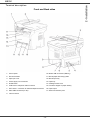
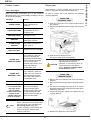
1. Control panel
10. Master USB connection (USB key)
2. Document feeder
11. Manual paper feed setup guides
3. Paper jam cover
12. Manual input tray
4. Power supply cord connection
13. Paper tray
5. On/Off switch
14. Cartridge access cover
6. LINE socket - telephone cable connection
15. Fold-down stopper for paper delivery
7. EXT. socket - connection for external telephone devices
16. Paper output
8. Slave USB connection (for PC)
17. Smart card insertion point
9. LAN connection
- 12 -
2 - Installation
MB290
MB290
2 - Installation
Command panel
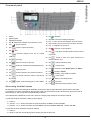
1.
Screen.
2.
Digital keypad.
3.
Alphabetical keypad.
4.
Key Í: deletes the character to the left of the cursor.
5.
Key
: input or line feed.
6.
Key
: access to special characters.
7.
Key
8.
Key
: document analysis to the PC or a media
(USB key).
16. Key
: Validation.
17. Key OK: confirms the displayed selection.
18. Key
: menu access and navigation down the menus.
19. Key C: back to the previous menu and input correction.
20. Key
21. Key
: Shift.
: navigation up the menus.
: stops the current operation.
22. Key
: sets up the activation delay and toner save in
copy mode.
: local copy.
23. Key
: access to print menu (print functions list,
machine settings, etc.).
10. Key
: stops the current PC print job.
24. Key
: analysis resolution setup.
11. Key
: sending of an SMS (Short Message Service).
25. Key
: contrast setup.
12. Key
: sending of a fax.
13. Key
: access to directory and quick dial numbers.
9.
Key
26. Icon
: resolution "Copy: Quality Text / Fax: SFine".
27. Icon
: resolution "Photo".
28. Icon
: resolution "Copy: Text / Fax: Fine".
: line manual connection, listen for tone during
14. Key
fax sending.
29. Icon
15. Key
31. Icon
: Fax mode.
32. Icon
: external answering machine mode.
: multiple contact sending (fax, e-mail or SMS).
30. Icon
: colour mode.
: activity on the telephone line.
Accessing terminal menus
All terminal functions and settings are available via the menu and are associated to a specific menu command.
For example, the menu command 51 launches the printing of the functions list (the functions list stores the list of all
terminal menus, sub-menus and their identification number).
Two methods are available to access menu items: the step by step method or the shortcut method.
To print the functions list with the Step by step method:
1 Press .
2 Use the
or
3 Use the
or
button to browse the menu and select 5 - PRINT. Confirm with OK.
button to browse the menu PRINT and select 51-FUNCTIONS LIST. Confirm with OK.
To print the functions list with the shortcut method:
1 Press .
2 Enter 51 with the numerical keypad to directly print the functions list.
- 13 -
Packaging contents
Device installation
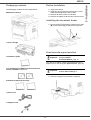
The packaging contains the items listed below:
1 Unpack the device.
2 Install the device respecting the security notices
stated at the beginning of this booklet.
3 Remove all stickers from the machine.
4 Remove the plastic protection film from the screen.
Multifunction device
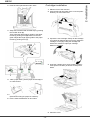
Installing the document feeder
1 Secure the document feeder by fitting the two clips
(B) in the notches (A) provided for this purpose.
1 toner cartridge
Feed cassette paper insertion
1 Installation guide
Important
Before inserting paper, refer to the
paragraph Paper
recommendations, page 10.
Your device accepts a number of formats and types of
papers (refer to the paragraph Specifications, page 91).
1 PC installation CD ROM and 1 Scan and Print
drivers CD ROM for Mac/Linux
Important
You can use paper weighing
between 60 and 105 g/m2.
1 Remove the paper feed cassette completely.
2 booklets (safety and warranty)
1 power cord
1 telephone cord
- 14 -
2 - Installation
MB290
2 Push the lower panel down until it clicks.
Cartridge installation
1 Stand in front of the machine.
2 Push the left and right sides of the cover and pull it
towards you at the same time.
3 Setup the back side feed cassette stop by pushing
the "PUSH" lever (A).
Then adjust the lateral paper guides to the paper
format by pushing lever (B) located on the left
guide. Adjust the length paper guide to the paper
format by pushing lever (C).
3 Unpack the new cartridge. Gently roll the cartridge
5 or 6 times to distribute the toner evenly inside the
cartridge. Thoroughly rolling the cartridge will
assure the maximum copies per cartridge.
Hold it by its handle.
4 Insert the cartridge in its slot by pushing it until it
clicks (last move down) as shown on the picture
below.
4 Take a paper stack, pull the paper off and align it
on a flat surface.
5 Put the paper stack in the feed cassette
(200 sheets of 80 g/m² paper for instance).
6 Put the feed cassette back in its location.
5 Close the cover.
- 15 -
2 - Installation
MB290
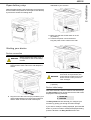
Paper delivery stop
dedicated to your machine.
Adjust the paper delivery stop, depending on the format of
the document to be printed. Do not forget to raise the flap
to prevent the sheets from falling down.
3 Make sure that the On/Off switch is on Off
(O position).
4 Connect the power cord to the device.
Plug the power cord to outlet on the wall.
Starting your device
Device connection
WARNING
Before plugging the power cord, it
is imperative to refer to the Safety
booklet.
1 Plug the end of the telephone line into the terminal
socket and the other end into the wall telephone
socket.
WARNING
The power cord is used as a power
unit cut off. As a precaution, the
outlet shall be located close to the
device and be of easy access in
case of danger.
5 Press the On/Off button to turn on the device
(I position).
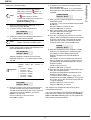
Device initial setup
After a few seconds, when the machine has warmed up,
the Easy Install function is launched and the LCD screen
displays the following message:
2 Plug the end of the LAN cord (as provided by your
network administrator) into the terminal LAN port
and the other end into the local network port
1 - FRANCAIS
2 - ENGLISH
The Easy Install function will help you configure your
machine by guiding you through the basic settings.
If you wish to modify the setting displayed, press the OK
button. If you do not want to modify the displayed setting,
press the C button: the Easy Install function then
- 16 -
2 - Installation
MB290
displays the next basic setting.
7 To specify the fax number and machine name,
press the OK button.
This information will appear on your transmitted
documents when the "Sending Header" function is
activated.
If you do not want to carry out the
initial setup, press the
button. A
confirmation message appears. Press
Note
NAME/NUMBER
YES=OK - NO=C
the
button again to confirm.
To manually modify and customise the
machine settings, refer to
Parameters/Setup, page 31.
8 Enter your fax number (20 digits max.) using the
numerical keypad.
To type the "+" sign, press simultaneously the CTRL
and Q keys.
Use the C button to correct an entry.
Press the OK button to confirm.
9 Enter your machine name (20 characters max.)
using the alphanumerical keypad.
Press the OK button to confirm.
10 If you are connecting your machine to a private
network, behind a company’s PABX, you may need
to specify a local prefix. This prefix will be then
used to exit the company’s telephone network.
To set up this function, press the OK button.
1 Select the desired language using the
or
buttons and confirm with OK.
2 To set the country, press the OK button.
SET COUNTRY
YES=OK - NO=C
3 Select your country in the list displayed using the
or
buttons and confirm with OK.
Note
If none of the options in the list is
suitable, select the "OTHER" option.
PREFIX
YES=OK - NO=C
4 If you have set the country to "Other", you may
need to set the public telephone NETWORK to use.
Press the OK button to specify it.
11 Enter the minimal size of the company’s outside
numbers (1 to 30) using the numerical keypad.
This setting is used to differentiate internal
telephone numbers from external telephone
numbers.
For example, if you are installing the machine in
France, behind your company’s PABX, enter 10
(10 digits being the standard telephone number
length for France).
Use C to correct an entry.
Press the OK button to confirm.
12 Enter the local prefix number (10 characters max.)
using the numerical keypad.
This prefix will automatically be added when an
external number is dialled.
To insert a pause for dial tone ("/" sign), press
simultaneously the CTRL and M keys, or long press
the 0 (zero) key on the numerical keypad until the
"/" sign is displayed.
Use the C button to correct an entry.
Press the OK button to confirm.
SET NETWORK
YES=OK - NO=C
Select the telephone network to use in the list
displayed using the
or
buttons and confirm
with OK.
Important
If none of the options in the list is
suitable, select the "OTHER X"
option:
• OTHER 1 = TRB21
• OTHER 2 = US
• OTHER 3 = Russia
• OTHER 4 = Jordan
• OTHER 5 = Israel
• OTHER 6 = TRB21
5 To set the date and time, press the OK button.
DATE/TIME
YES=OK - NO=C
6 Enter the numbers of the required date and time
one after another using the numerical keypad.
The date format depends on the country you have
selected: for instance, DDMMYY for France,
MMDDYY for the USA.
Use the C button to correct an entry.
Press OK to confirm.
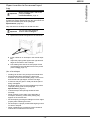
The setup is now complete and the functions list is
automatically printed out.
The LCD screen displays the message PAPER EMPTY if no
paper has been loaded in the paper tray (see Loading
paper in the main unit tray, page 10). Once paper has
been loaded, printing will resume.
- 17 -
2 - Installation
MB290
Paper insertion in the manual input
tray
Important
Before inserting paper, refer to the
paragraph Paper
recommendations, page 10.
The manual input tray allows you to use various paper
formats with greater grammage than the one used in the
paper feed cassette (refer to the paragraph
Specifications, page 91).
Only one sheet or envelope can be fed at a time.
Important
You can use paper weighing
between 52 and 160 g/m².
1 Spread the manual feed guides to the maximum.
2 Insert a sheet or an envelope in the manual input
tray.
3 Adjust the paper guides against the right and left
edges of the sheet or the envelope.
4 Print making sure that the chosen paper format
corresponds to the selected format on the printer
(refer to Copy, page 19).
Use of envelopes
•
•
•
•
•
•
•
•
•
Feeding can be done only through the manual feed.
Recommended area should be the area which
excludes 15 mm from the leading edge, 10 mm from
both the left and right edges, and the rear edge.
A few lines may be given in solid print at the part of
being overlapped.
Envelopes which are not recommended may lead to
improper printing (refer to the paragraph
Specifications, page 91).
Curled envelope after printing should be fixed
manually.
Small crumples on the edge of the wide side of
envelopes, smearing, or less clear printing may
appear on the reverse side.
Set envelope by pressing the folding line of four edges
properly after releasing air inside.
Set envelope in a proper position after aligning in case
it is bent or warped.
Paper conditioning is not allowed. And it should be
used under normal office environment.
- 18 -
2 - Installation
MB290
Copy
Your machine has the function to make one or more
copies.
You can also set up several parameters in order to make
copies at your will.
Simple copy
3 Enter the number of copies that you want and
confirm with the OK button.
4 Choose the paper tray AUTOMATIC or MANUAL
with the buttons
or , then confirm with the OK
button.
5 Choose with the buttons or the printing option
(see examples below) depending on the copy
mode that you want:
- Mosaic mode (document feeder): 1 Page onto 1,
2 Pages onto 1, or 4 Pages onto 1.
In this case, the default parameters are applied.
1 Place the document to be copied in the automatic
document feeder, printed face on the top.
or
Place the document to be copied face down on the
glass, respecting the indications around the glass.
2 Press the
button twice. The copy is made
using the default parameters.
ECO mode copy
The ECO mode enables you to reduce the amount of
toner consumed on the page so as to save your printing
costs.
When the ECO mode is used, the toner consumption is
reduced and the print density becomes lighter.
1 Place the document to be copied in the automatic
document feeder, printed face on the top.
or
Place the document to be copied face down on the
glass, respecting the indications around the glass.
2 Press the
button.
3 Press the
button.
- Poster mode (flat-bed scanner): 1 Page to 1,
1 Page to 4 or 1 page to 9.
Advanced copying
The sophisticated copy allows to do custom setups for the
current copy.
You can start copy by pressing the
Note
button at any time in below
steps.
1 Place the document to be copied in the automatic
document feeder, face printed on the top.
or
Place the document to be copied face down on the
glass, respecting the indications around the glass.
Note
2 Press the
After step 1, you can directly enter the
number of copies with the numerical
keypad and press the OK button to
validate. Then refer to step 4.
Confirm with the OK button.
button.
- 19 -
3 - Copy
MB290
6 Adjust the desired zoom level, from 25% TO 400%
with the buttons
or
, confirm with the OK
button (only available in 1 Page to 1 copy mode).
7 Adjust the desired origin values with the digital
keyboard buttons or then confirm with the OK
button.
8 Choose the resolution depending on the printing
quality that you want AUTO, TEXT, QUALITY
TEXT or PHOTO with the buttons
or , then
confirm with the OK button.
9 Adjust the contrast level with the buttons
or ,
then confirm with the OK button.
10 Adjust the desired brightness level with the buttons
or , then confirm with the OK button.
11 Choose the paper type NORMAL, THICK with the
buttons
or , then confirm with the OK button.
7 Adjust the contrast level with the buttons
or ,
then confirm with the OK button.
8 Adjust the desired brightness level with the buttons
or , then confirm with the OK button.
9 Choose the paper type NORMAL, THICK with the
buttons
or , then confirm with the OK button.
The LCD screen displays the following message:
PUT ID CARD
THEN OK
10 Place your identity card or any other official
document against the glass of the flatbed scanner,
as shown below:
ID Card Copy mode
The ID CARD copy function is used for copying both sides
of an identity card or driver’s license type document on an
A4 format sheet (original document size < A5) or on a
Letter format sheet (original document size < Statement).
11 Press the OK button.
The document is scanned then the LCD screen
displays the following message:
The LCD screen displays useful operating instructions
(when the original document should be placed, when the
document should be turned over, etc.) and asks for your
confirmation to proceed with the operation.
Important
This function is available only if the
document to be copied is placed on
the flatbed scanner, and if no paper
is detected in the automatic
document feeder.
Zoom and Origin adjustments are
not available in this copy mode.
12 Turn your document over then confirm with the
OK button.
The machine prints out a copy of your document.
Special setup for the copying
1 Make sure that there is no document in the
automatic document feeder.
2 Press the
Setups done through this menu become the device
default setups after you confirm.
button.
3 Enter the desired number of copies and confirm
with the OK button.
4 Choose the paper tray AUTOMATIC or MANUAL
with the buttons
or , then confirm with the OK
button.
Important
TURN UP DOC
THEN OK
Important
When the quality of the printing is
not satisfying, you can proceed to a
calibration (see Calibrate your
scanner, page 41).
Resolution setup
The RESOLUTION parameter allows you to setup the
photocopy resolution.
Copying in ID Card mode is only
possible on A4 (original document
size < A5) or Letter (original
document size < Statement) paper
size. Make sure that the selected
paper tray uses the correct paper
size.
841 - ADVANCED FCT/COPY/RESOLUTION
1 Press , enter 841 using the keypad.
2 Choose the resolution with the buttons
according to the following table:
5 Choose the copying option ID CARD with the
buttons
or
and confirm with the OK button.
6 Choose the resolution depending on the desired
printing quality AUTO, TEXT, QUALITY TEXT or
PHOTO with the buttons or , then confirm with
the OK button. For optimal results with ID
documents, select the PHOTO resolution.
- 20 -
Parameter
Signification
AUTO
Low resolution.
TEXT
Standard resolution for
documents containing text and
graphics.
or
Icon
none
3 - Copy
MB290
Parameter
Signification
Analysis origin setup
Icon
QUALITY
TEXT
Optimal resolution for
documents containing text.
PHOTO
Optimal resolution for
documents containing
photographies.
If you want, you can change the origin of the scanner.
By entering new values for X and Y in mm (X < 209 and
Y < 280), you move the analysed area as shown on the
diagram below.
3 Confirm your choice by pressing the OK button.
4 Quit this menu by pressing the
button.
You can also change the resolution by
Note
pressing the
button.
844 - ADVANCED FCT/COPY/ORIGIN
Zoom setup
1 Press , enter 844 using the keypad.
2 Select the X and Y coordinates with the buttons
or .
3 Setup the desired coordinates with the numerical
keypad or the buttons
and .
4 Confirm your choice by pressing the OK button.
The ZOOM parameter allows you to reduce or enlarge an
area of a document by choosing the origin and the zoom
level to apply to the document, from 25 to 400 %.
842 - ADVANCED FCT/COPY/ZOOMING
1 Press , enter 842 using the keypad.
2 Enter the desired zoom level with the
alphanumerical keypad or choose among
predefined values with the buttons
and .
3 Confirm your choice by pressing the OK button.
4 Quit this menu by pressing the
5 Quit this menu by pressing the
Contrast setup
The CONTRAST parameter allows to choose the
photocopy contrast.
button.
845 - ADVANCED FCT/COPY/CONTRAST
Collated copy setup
1 Press , enter 845 using the keypad.
2 Setup the desired level of contrast with the buttons
and .
3 Confirm your choice by pressing the OK button.
The COLLATED parameter allows you to assemble or
disassemble your copies.
843 - ADVANCED FCT/COPY/COLLATED
1 Press , enter 843 using the keypad.
2 Select the desired option with the buttons
according to the following table:
Parameter
and
Signification
4 Quit this menu by pressing the
The BRIGHTNESS parameter allows to lighten or darken
your output.
846 - ADVANCED FCT/COPY/BRIGHTNESS
1 Press , enter 846 using the keypad.
2 Setup the desired brightness with the buttons
and .
3 Confirm your choice by pressing the OK button.
E.g.: if you make three copies of a
10-page document, the document is
copied from page 1 to 10 three times
over.
The printer does not assemble the
copies of the original document.
4 Quit this menu by pressing the
button.
Paper type setup
UNCOLLATED E.g.: if you make three copies of a
10-page document, page 1 is copied
three times, then page 2, then page
3, etc.
851 - ADVANCED FCT/SCAN. & PRINT/PAPER
TYPE
1 Press , enter 851 using the keypad.
2 Select the paper NORMAL or THICK that you use
with the buttons
and .
3 Confirm your choice by pressing the OK button.
3 Confirm your choice by pressing the OK button.
4 Quit this menu by pressing the
button.
Brightness setup
The printer assembles the copies of
the original document.
COLLATED
button.
button.
4 Quit this menu by pressing the
- 21 -
button.
3 - Copy
MB290
Paper tray selection
Left and right printing margins setup
The Automatic selection can have two meanings
depending on the paper format defined on the paper
trays. The following table describes the different cases.
If you want to, you can offset the lateral margins of the
document to the left or right during printing.
Default tray
Same paper
format in the
trays
Different
paper format
in the trays
855 - ADVANCED FCT/SCAN. & PRINT/
PRINTER MARG
Tray used for copy
1 Press , enter 855 using the keypad.
2 Setup the left / right margins offsets (by 0.5 mm
steps) with the buttons
and .
3 Confirm by pressing the OK button.
Selection between the
AUTOMATIC main tray and the
manual tray.
MANUAL
The manual
used.
tray
is
4 Quit this menu by pressing the
AUTOMATIC The main tray is used.
MANUAL
The manual
used.
tray
button.
Top and bottom printing margins setup
is
If you want to, you can offset the lateral margins of the
document towards the top or the bottom during printing.
852 - ADVANCED FCT/SCAN. & PRINT/TRAY
PAPER
856 - ADVANCED FCT/SCAN. & PRINT/TOP
PRINT.
1 Press , enter 852 using the keypad.
2 Select the default paper tray to use, AUTOMATIC
or MANUAL, with the buttons
and .
3 Confirm by pressing the OK button.
1 Press , enter 856 using the keypad.
2 Setup the top / bottom margins offsets (by 0.5 mm
steps) with the buttons
and .
3 Confirm by pressing the OK button.
4 Quit this menu by pressing the
4 Quit this menu by pressing the
button.
button.
Sheet-feed analysis margins setup
Format paper setup
If you want to, you can offset the lateral margins of the
document to the left or right during the analysis with your
sheet-feed scanner.
This menu allows you to define the default paper format
of the manual tray and the main tray. You can also setup
the default scanning width.
853 - ADVANCED FCT/SCAN. & PRINT/ S.F.
MARGINS
857 - ADVANCED FCT/SCAN. & PRINT/
PAPER FORMAT
1 Press , enter 853 using the keypad.
2 Setup the left / right margins offsets (by 0.5 mm
steps) with the buttons
and .
3 Confirm by pressing the OK button.
1 Press , enter 857 using the keypad.
2 Select the paper tray for which you want to define
a default paper format with the buttons
and .
3 Confirm by pressing the OK button.
4 Choose the paper format with the buttons
or
according to the following table:
4 Quit this menu by pressing the
button.
Paper tray
Flat-bed analysis margins setup
If you want to, you can offset the lateral margins of the
document to the left or right during the analysis with your
flat-bed scanner.
854 - ADVANCED FCT/SCAN. & PRINT/
FLATBED MARG
1 Press , enter 854 using the keypad.
2 Setup the left / right margins offsets (by 0.5 mm
steps) with the buttons
and .
3 Confirm by pressing the OK button.
4 Quit this menu by pressing the
button.
- 22 -
MAN. TRAY
Available paper format
A5, Statement, A4, Legal and Letter
AUTO. TRAY A5, Statement, A4, Legal and Letter
SCANNER
LTR/LGL and A4
5 Confirm by pressing the OK button.
6 Quit this menu by pressing the
button.
3 - Copy
MB290
Fax
Immediate transmission
1 Place the document to be copied in the automatic
document feeder, face printed on the top.
or
Place the document to be copied face down on the
glass, respecting the indications around the glass.
This chapter describes all the fax processing and
configuration functions.
You will also find a section describing fax mailboxes.
2 Enter the fax number then press
Fax transmission
1 Select 30 - FAX /HEADER PAGE.
2 Select:
301 - LOCAL, to print a header page according to
the language configured on the terminal,
302 - INTERNAT, to print a bilingual header page,
the language of the country configured on the
terminal and English. The separator between the
two languages is "/".
Note
If English is the language configured
on the terminal, the header page will
only be printed in English.
Example of the international header page:
.
3 If you are using the flatbed scanner, you can scan
more than one page. Place the next page on the
scanner, select NEXT and confirm with OK. Select
DONE when all pages have been scanned.
Print a header page
A header page is stored in your terminal. To send your fax
using this header page, you can print it at any time and fill
in your details.
or
The
icon flashes during the call phase, it stays lit
when both faxes are in communication.
At the end of transmission the initial screen is displayed.
Note
You can modify transmission options
when sending a fax. To do so, press
OK after entering the fax number.
Delayed transmission
This function allows you to transmit a document at a later
time.
To program a postponed transmission you need to
identify the subscriber number, transmission time, feeder
type and number of pages.
To delay the transmission time of your document :
1 Place the document to be copied in the automatic
document feeder, face printed on the top.
or
Place the document to be copied face down on the
glass, respecting the indications around the glass.
Important
Make sure that the document in the
feeder tray or on the scanner window
is properly located in order to avoid
sending blank or incorrect pages.
2 Select 31 - FAX / TRANSMISSION.
3 Enter the subscriber number you wish to program
at a different time or choose your dialling mode and
confirm with OK.
4 Next to the current time, enter the new time and
confirm with OK.
5 Select IMAGE or PDF and confirm with OK.
6 Select B&W SCAN or COLOUR SCAN and
confirm with OK.
7 Adjust the contrast and confirm with OK.
8 Select the feed type, FEEDER or MEMORY and
confirm with OK.
9 You may enter the number of pages before
transmission and confirm with OK.
10 Confirm postponed transmission by pressing
.
11 If you are using the flatbed scanner, you can scan
more than one page. Place the next page on the
scanner, select NEXT and confirm with OK. Select
DONE when all pages have been scanned.
Your document is stored and will be sent at the new time.
- 23 -
4 - Fax
MB290
Transmission with auto redial
Default tray set to Manual:
This function allows you to monitor the dialling operation
during a fax transmission. In this case, the maximum
transmission rate will be 14400 bps.
This function allows for example:
•
•
to hear if the subscriber’s fax is engaged and if so,
choose the moment when the line is clear to start the
document transmission.
to control the communication progress in case of
uncertain numbers, etc.
Manual tray
paper format
The fax is printed on
manual tray.
A4,Letter and A5,
Legal
Statement
The fax is printed on
manual tray.
A4,Letter
and Legal
1 Place the document in the fax feeder.
2 Press
.
3 If necessary, set the sound level using the
or
keys.
4 Enter the subscriber number.
As soon as you hear the remote fax tone, the line is
clear and you can start the transmission.
5 Press
A5,
Statement
Manual tray
paper format
Fax reception
A5,
Statement
Main tray
paper format
A4,Letter and A4,Letter
Legal
and Legal
A4,Letter and A5,
Legal
Statement
Fax reception depends on the parameter settings of your
machine.
The following parameters let you customize the printing of
received faxes:
- Reception Mode, page 34;
- Reception without paper, page 34;
The paper on manual
tray is incompatible.
The fax is printed on the
main tray.
An error message is
displayed on the screen.
The paper on manual
tray is incompatible.
Default tray set to Automatic:
to start the document transmission.
If your machine is set in order to print a transmission
report, the reduced copy of the document first page will
not be printed and it notifies you that the communication
is manual (see Transmission report, page 33).
Action
A4,Letter and A4,Letter
Legal
and Legal
A5,
Statement
To take the line manually:
Main tray
paper format
A5,
Statement
A5,
Statement
A4,Letter
and Legal
A5,
Statement
- Number of copies, page 34;
Action
The fax is printed with
an automatic selection
of tray.
An error message is
displayed on the screen.
The paper on automatic
tray is incompatible.
The fax is printed on the
main tray.
An error message is
displayed on the screen.
The paper on automatic
tray is incompatible.
- Fax or PC reception, page 35;
- Received faxes reduction mode, page 36;
- Technical Parameters, page 36.
Important
The printing is not possible on A5
(or Statement) paper format.
The following tables give which tray is used to print
received fax depending on the default tray and the paper
format in both trays.
Relay broadcast
Your fax machine (initiator) can relay a document, in other
words, transmit a document to your subscribers via a
remote fax and with a precise relay list.
To do this the initiator fax and the remote fax must both
have the relay function.
To relay you need to supply the remote fax with the
document and the relay list number. The remote fax will
then transmit this document to all subscribers on the list.
Once the relay is activated by your fax and as soon as the
document is received by the remote fax, the document is
printed before relaying to all subscribers on the list.
- 24 -
4 - Fax
MB290
Activating / Deactivating the answering
machine
To activate relay from your fax machine:
1 Insert the document to relay.
Important
382 - FAX / FAX ANSW. / ACTIVATION
Make sure that the document in the
feeder tray or on the scanner window
is properly located in order to avoid
sending blank or incorrect pages.
2 Select 37 - FAX / BROADCAST.
3 Enter the remote fax number where you will relay to
or choose your dialling mode and press OK.
4 Enter the relay list number used by the remote fax
and press OK.
5 You may enter the time you wish to transmit the
document next to the current time and press OK.
6 If you wish to modify the document feed type,
select one of the options FEEDER or MEMORY,
then press OK.
7 If you wish, you may enter the number of pages of
your documents before transmitting.
8 Activate relay by pressing
1 Press , enter 382 using the keypad.
2 If you saved an access code for your fax answering
machine, enter it and confirm with OK.
3 Select the required answering machine option, ON
or OFF, and confirm you choice with OK.
4 Quit this menu by pressing the
button.
Printing fax messages stored in the memory
Important
The printing is not possible on A5
(or Statement) paper format.
381 - FAX / FAX ANSW. / PRINT
1 Press , enter 381 using the keypad.
2 If you saved an access code for your fax answering
machine, enter it and confirm with OK.
.
9 If you are using the flatbed scanner, you can scan
more than one page. Place the next page on the
scanner, select NEXT and confirm with OK. Select
DONE when all pages have been scanned.
Documents received and stored in the memory are
printed.
The document in the feeder will be relayed either
immediately or at a later time (according to your choice)
to the remote fax which will relay the document.
Fax rerouting
Fax answering machine
This function is used to reroute faxes received to a
directory contact. To use this function, you have to
perform two operations:
The Fax answering machine allows you to keep
confidential documents in storage and to avoid printing
them as you receive them.
The
indicator light lets you know the state of your
Fax answering machine.
1 Activate rerouting.
2 Set the rerouting address of the fax.
Activating rerouting
If answering machine is deactivated, the icon is light on.
Important
If answering machine is activated:
•
•
•
Light on: the answering machine is on.
Blinking: your fax has documents in storage or is in the
process of receiving faxes.
Light off: memory full, the terminal cannot receive any
more documents.
391 - FAX / REROUTING / ACTIVATION
1 Press , enter 391 using the keypad.
2 Using the keys
and
within the navigator,
select option ON.
3 Using the keys
and
within the navigator,
select the subscriber from the directory.
4 Confirm with OK.
5 Quit this menu by pressing the
button.
You can assure document confidentiality by using the 4
digit access code. Once saved, you will require this
access code for:
•
•
printing fax messages in memory,
activating or deactivating the fax answering machine.
Saving an access code
383 - FAX / FAX ANSW. / ANSWER CODE
If the option OFF is selected, the menus 392 and 393 will
not be included in the functions overview, when it is
printed out.
1 Press , enter 383 using the keypad.
2 Enter the code (4 digits) and confirm with OK.
3 Quit this menu by pressing the
Make sure that the subscriber exists
in the directory (see Directory,
page 42).
button.
- 25 -
4 - Fax
MB290
Setting the re-direction contact
Printing rerouted documents
392 - FAX / REROUTING / CALL NUMBER
1 Press , enter 392 using the keypad.
2 Using the keys
and within the navigator,
select the subscriber from the directory.
3 Confirm with OK.
4 Quit this menu by pressing the
button.
1 Press , enter 393 using the keypad.
2 Using the keys
and within the navigator,
select the COPY option (local printout of the
information relayed to your device) either ON
or OFF.
3 Confirm with OK.
4 Quit this menu by pressing the
button.
This menu is only accessible when
the function FAX ARCHIVING is
activated.
Transmission waiting queue
This function lets you obtain a recap of all documents
queuing, for transmission, including those in deposit or in
delayed transmission, etc.
Rerouting fax messages to a USB
memory key
This function allows you to reroute received fax messages
directly in the folder OKI MB290\FAX on a USB memory
key connected to your terminal. The folder OKI
MB290\FAX is created by the application. The USB
memory key then becomes the terminal reception
memory.
Fax messages that are rerouted are therefore saved on
the USB memory key with format Tiff and are named as
follows:
"FAXYYMMDDHHMMSS"
where
YYMMDDHHMMSS corresponds to the fax reception
date and time.
You can also print fax messages rerouted to your USB
memory key automatically by activating menu 052
PRINT.
Activating rerouting
Before activating this function,
connect the USB memory key to the
terminal.
051 - MEDIA / FAX ARCHIVING / ACTIVATION
1 Press , enter 051 using the keypad.
2 Using the keys
and
within the navigator,
select option ON and confirm your choice with OK.
button.
Important
1 Press , enter 052 using the keypad.
2 Using the keys
and , select the option ON to
print all rerouted documents automatically.
3 Confirm your choice with OK.
4 Quit this menu by pressing the
button.
393 - FAX / REROUTING / COPY
3 Quit this menu by pressing the
The printing is not possible on A5
(or Statement) paper format.
052 - MEDIA / FAX ARCHIVING / PRINT
Printing rerouted documents
Important
Important
It allows you to:
• Consult or modify the waiting queue. In this waiting
queue the documents are coded the following way:
Order number in the queue / document status /
subscriber’s telephone number.
Documents may have the following status:
- TX: transmission
- REL: relay
- DOC: in deposit
- POL: polling
- MBX: send to mailbox
- PMB: mailbox polling
- TR: ongoing commands
- SMS: SMS transmission
• Immediately perform a transmission from the waiting
queue,
• Print a document in storage, waiting to be transmitted
or in deposit,
• Print the waiting queue, in order to get the status of
each document in the queue, by either:
- queue order number,
- document name or number,
- scheduled transmission time (fax),
- operation type regarding the document: transmission
from memory, delayed transmission, deposit,
- number of pages of the document,
- document size (percentage of space stored in
memory)
• Cancel a transmission request in the waiting queue.
Performing immediate transmission from
the waiting queue
61 - COMMANDS / PERFORM
1 Press , enter 61 using the keypad.
2 Select the document in the waiting queue.
3 Confirm your choice with OK or
to
immediately perform the selected transmission.
- 26 -
4 - Fax
MB290
MailBoxes (MBX Fax)
Consulting or modifying the waiting queue
62 - COMMANDS / MODIFY
1 Press , enter 62 using the keypad.
2 In the waiting queue select the required document
and confirm your choice with OK.
3 You may now modify the parameters of the given
document then confirm your modifications by
pressing
MBX 00 is public. It is handled directly by the terminal to
record the messages of the fax TAD as soon as this is put
into service.
.
MBX’s 01 to 31 are private. Each is password-protected.
They can be used to receive documents confidentially.
Deleting a transmission on hold
63 - COMMANDS / CANCEL
1 Press , enter 63 using the keypad.
2 In the waiting queue select the desired document
and confirm your choice with OK.
Printing a document in waiting or in deposit
64 - COMMANDS / PRINT
1 Press , enter 64 using the keypad.
2 In the waiting queue select the desired document
and confirm your choice with OK.
Printing the waiting queue
65 - COMMANDS / PRINT LIST
Press
You can also print the waiting queue with
menu 57 - PRINT / COMMANDS.
Cancelling a transmission in
progress
Cancelling a transmission in progress is possible no
matter what the type of transmission but varies depending
on whether the transmission is a single call number or a
multi-call number.
•
Later you may:
• modify the features of an MBX,
• print the contents of an MBX, only possible if the MBX
contains one or more documents (with a star next to
the MBX). When the contents of an MBX have been
printed it becomes empty,
• delete an MBX, only if the MBX is initialised and
empty,
• print the list of your fax machine’s MBX’s.
You may receive and send through an MBX in complete
confidentiality.
In polling, the MBX’s are only accessible with an MBX
code.
A document called ** COMMAND LIST ** is printed.
•
The use and access to MBX 01 - 31 are conditioned by
the initialisation, defined by a MBX code (if needed) and
a mnemonic (its S.I.D.).
When depositing a document into your MBX, the access
code is not needed. All documents deposited in a MBX
are added to the ones already present.
, enter 65 using the keypad.
Note
There are 32 mailboxes (MBX), enabling you to transmit
documents in complete confidence using an access code
(named MBX code), to all subscribers equipped with a fax
compatible to yours.
You may perform MBX deposits or polls by:
• depositing a document in a fax MBX,
• transmitting to deposit a document in a remote fax
MBX,
• performing document poll from a remote fax.
Creating an MBX
For a single call number from the memory, the
document is erased from the memory.
For a multi-call number, only the call number in
progress at the time of the cancellation is erased from
the transmission queue.
To cancel transmission in progress:
1 Press
.
A message will ask you to confirm cancellation.
2 Press
to confirm cancellation in progress.
If your machine is set to print a transmission report, it will
print that the communication was cancelled by the user.
71 - MAILBOXES / CREATE MBX
1 Press , enter 71 using the keypad.
2 Select a free MBX out of the 31 MBX or directly
enter the number of a free MBX and confirm
with OK.
3 Select option MAILBOX CODE and press OK.
Value 0000 is always displayed.
4 Enter the code of your choice, if needed, and
press OK.
5 Select option MAILBOX NAME and press OK.
6 Enter this MBX’s S.I.D. (20 characters max.) and
press OK.
The MBX is initialised. If you wish to initialise
another, press C and repeat the same procedure.
7 To exit the MBX, press
- 27 -
.
4 - Fax
MB290
Modifying the features of a MBX
MBX deposit in your fax
71 - MAILBOXES / CREATE MBX
1 Press , enter 71 using the keypad.
2 Select the desired MBX out of the 31 MBX’s, or
enter the number of the MBX directly and
press OK.
3 Enter the code of this MBX, if there is one, and
confirm with OK.
4 Select the menu MAILBOX CODE or MAILBOX
NAME, then confirm your choice with OK.
5 Perform data modification of the menu and confirm
with OK.
1 Insert the document in the fax machine’s feeder.
2 Select 72 - MAILBOXES / DEPOSIT MBX.
3 Select the desired MBX out of the 31 MBX’s, or
enter the number of the MBX directly and
press OK.
The document is placed in the feeder and saved in the
selected MBX.
MBX deposit in a remote fax
1 Insert the document in the fax machine’s feeder.
2 Select 35 - FAX / MBX SENDING.
3 Enter your subscriber’s number for MBX deposit or
choose your dialling mode and validate with OK.
4 Enter the subscriber’s MBX number and confirm
with OK.
5 If you wish to delay transmission, enter the new
transmission time next to the current time and
press OK.
6 If you wish to modify the document feed type,
select one of the options FEEDER or MEMORY,
and press OK.
7 If you wish, you may enter the number of pages of
your document before transmitting and confirm
with OK.
8 Confirm the transmission request to a remote MBX
If needed, repeat the last two steps for the other menu.
Printing the contents of a MBX
73 - MAILBOXES / PRINT MBX
1 Press , enter 73 using the keypad.
2 Select the desired MBX out of the 31 MBX’s, or
enter the number of the MBX directly and
press OK.
3 Enter the code of this MBX, if there is one, and
confirm with OK.
All documents found in the MBX are printed and the MBX
is emptied.
fax by pressing
Deleting a MBX
Before deleting an MBX, you need to make sure it is
empty, by printing its content.
74 - MAILBOXES / DELETE MBX
1 Press , enter 74 using the keypad.
2 Select the desired MBX out of the 31 MBX’s, or
enter the number of the MBX directly and
press OK.
3 Enter the code of this MBX, if there is one, and
confirm with OK.
4 Press OK to confirm the MBX deletion.
In the case of an immediate transmission, the document
is sent immediately.
If the document is set for a postponed transmission, the
document will be stored in the memory and sent at the
requested time.
MBX polling from a remote fax
36 - FAX / MBX POLLING
Note
The MBX is deleted and will appear as a free MBX in the
list.
75 - MAILBOXES / PRT MBX LIST
, enter 75 using the keypad.
Note
You can also print the MBX list with
menu 58 - PRINT / LIST MBX.
The list gives the status of each MBX.
Please check for remote fax
compatibility.
1 Press , enter 36 using the keypad.
2 Enter your subscriber’s number for MBX polling or
choose your dialling mode and confirm with OK.
3 Enter the subscriber MBX number and press OK.
4 Enter this MBX access code and press OK.
5 If you wish to delay the poll time, enter the
departure time next to the current time and
press OK.
6 Confirm the MBX poll request by pressing
.
Printing the MBX list
Press
.
As soon as the remote fax is subscribed, either
immediately or later, the document(s) in the remote fax
MBX are received in your fax.
- 28 -
4 - Fax
MB290
Deposit and Polling
You may deposit a document in your fax and keep it
available to one or more subscribers who can obtain a fax
of this document by calling your fax with the POLL
function.
Setting the machine for document deposits, you must
define the type:
• SIMPLE- it may be polled only once from the memory
or feeder,
• MULTIPLE- it may be polled as many times as
necessary from the memory.
Setting the machine for polled documents, you must
define the poll number, then depending on the type of poll
you may:
• launch an immediate poll,
• program a delayed poll with a chosen time,
• launch a multi-poll, either immediately or later.
Placing a document in deposit
1 Insert the document to deposit in the feeder.
2 Select 34 - FAX / POLLING TX.
3 Choose the deposit type, according to the table
below:
Menu
Procedure
Simple
1 Select FEEDER or MEMORY.
2 If necessary, adjust the contrast
and confirm with OK.
3 Enter the number of pages that you
wish to deposit.
Multiple
1 If necessary, adjust the contrast
and confirm with OK.
2 Enter the number of pages that you
wish to deposit.
4 Confirm deposit by pressing OK.
Polling a deposited document
33 - FAX / POLLING RX
1 Select 33 - FAX / POLLING RX.
2 Enter the number of the party whose document you
want to poll or choose your dialling mode.
You can poll several documents using the
key
.
3 Depending on the type of poll, you should:
Menu
Procedure
Immediate
poll
1 Press
Delayed poll
1 Press OK.
2 Next to the current time, enter
the time you wish to poll the
.
document and press
.
- 29 -
4 - Fax
MB290
SMS
Sending an SMS
1 Press the
Important
2 Write your SMS using the alphabetical keypad.
To do so, an editor is at your disposal:
• for upper case letters, use the Ï key,
• to move inside the data entry field, use
and ,
• to move in the text from one word to another,
press CTRL and one of the navigator keys (
or ).
• to go to the next line, use
,
• to delete a character (by moving the cursor to
the left), use Í or C.
3 Validate with OK.
4 Dial the number of the recipient (mobile phone or
any other SMS-compatible device) in one of the
following ways:
• dial the number using the numerical keypad,
• enter the first letters of the recipient name,
The SMS service is dependent upon
the country and the service provider.
Thanks to the SMS button, you can send an SMS to
subscribers all over the world. An SMS (Short Message
Service) is a service which permits short written
messages to be sent to mobile phones or other SMScompatible devices.
The number of characters you can send per message is
dependent upon the service provider and the country you
are sending your SMS from (e.g. France 160 characters,
Italy 640 characters).
Note
There is a special scale of charges for
the SMS service.
SMS Parameters
•
Presentation of the sender
This setting allows you to show the name or the number
of the sender when sending an SMS.
•
•
41 - SMS SERVICE / SENDER
1 Press , enter 41 using the keypad.
2 Select the required presentation of the sender
option, ON or OFF, using the
or
keys.
3 Validate with OK.
•
421 - SMS SERVICE / INIT. SMS / SERVER
1 Press , enter 421 using the keypad.
2 Enter the number of the transmission server using
the numerical keypad.
3 Validate with OK.
press the
key until the required name
appears (names are classified in alphabetical
order).
Your SMS may be sent to only one person or to
several people. To send an SMS:
to only one person, press OK to confirm.
to several people:
5 Press the
key and enter the next recipient's
number.
6 Repeat the operations as many times as required
(10 persons max.). Press OK to validate the last
recipient; "SENDING SMS" is displayed as the
SMS is being sent.
SMS Center transmission number
This setting allows you to enter the transmission number
for the SMS Server. Your Internet provider will provide
you with this number.
key.
•
- 30 -
If SMS appears, then the SMS has been put on hold
and a further attempt will take place a couple of
minutes later. To immediately execute or cancel
transmission, refer to paragraph Transmission
waiting queue, page 26.
To check the SMS has been sent properly, you may
print the transmission/reception log (refer to paragraph
Printing the logs, page 39).
5 - SMS
MB290
Parameters/
Setup
Summer time / Winter time setting
This menu lets you choose to change to summer / winter
time automatically or not.
This function is only available if the
Important country configured on the machine is
part of the European Union.
You can setup your machine as you like depending on the
use. You will find in this chapter description of the
functions.
You can print the functions guide and the available setup
of your multifunction machine.
The 21>DATE/TIME menu includes 2 submenus:
Manual mode
211 - SETUP / DATE/TIME / MODIFY
Remote configuration
You may configure the same parameters by remote as
you would locally.
Automatic mode
Conditions required
To be able to configure your machine by remote, you
must:
•
•
have a Web browser on your PC (Internet Explorer
version 4 or above for optimal operation).
define your machine’s local network settings - IP
address, subnet mask, etc. (see Network features,
page 47).
212 - SETUP / DATE/TIME / AUTO ADJUST
If you select OFF and confirm with OK, the summer /
winter time will not be changed automatically. For the
machine to be set to the new time, you will need to use the
211 MODIFY menu.
If you select ON and confirm with OK, you will not have to
care about any change at the end of March (+1h) and
October (-1h). You will just be informed of this change by
a message on the screen.
Accessing the embedded Web server
1 Open a Web browser using a PC that is registered
on the network.
2 Enter the IP address of the machine in the Address
field and confirm by pressing Enter.
3 When the homepage opens, select the interface
language.
4 Modify the parameters you want on screen then
confirm.
Note
Your multifunction machine will prompt you to change the
date and time via the numerical keypad.
Remote configuration is also possible if
you have installed the Companion
Suite software on your PC (see Links,
page 69).
The default parameter is OFF.
Warning message
On automatic changing to summer / winter time, a
message will be displayed to inform you that the
multifunction machine time has been changed.
25-03-07 02:01
CHECK TIME
or
28-10-07 02:01
CHECK TIME
Date/Time
At any moment you may change the date and time on
your multifunction machine.
Your next action on the multifunction keypad will cause
the message to be automatically cleared.
Depending on the country configured on the machine, the
date format is of type DDMMYY (e.g.: France) or
MMDDYY (e.g.: USA).
21 - SETUP / DATE/TIME
1 Press
, enter 21 using the keypad. Confirm
with OK.
2 Enter the numbers of the required time and date
one after another (for example November 8 2004 at
9h33, press 0811040933 or 1108040933) and
press OK to confirm.
3 To exit this menu, press
.
- 31 -
6 - Parameters/Setup
MB290
Your fax number/Your name
201 - SETUP / GEOGRAPHICAL / COUNTRY
1 Press , enter 201 using the keypad.
2 Select the required option and press the OK key to
confirm.
3 To exit this menu, press
.
Your multifunction machine will print out your fax number
and your name on each document it transmits if you save
these settings.
Important
To benefit from this feature, you
must set SENDING HEADER to ON
(see
Technical
Parameters,
page 36).
The SENDING HEADER feature is
by default activated on the US
model and cannot be modified.
Important
Telecommuncation Network
To save your fax number and name:
22 - SETUP / NUMBER/NAME
1 Press , enter 22 using the keypad.
2 Enter your fax number (20 digits max.) and
press OK to confirm.
3 Enter your name (20 characters max) then press
OK to confirm.
This setting enables you to manually set the type of public
telephone network (PSTN) for a country, so that your
machine can communicate over the public telephone
network in compliance with the applicable standards.
By default, setting a country using the
201
command automatically sets the type of PSTN to use
in the selected country.
Important
For example, if you want to type the letter C, press
the key C until it appears on the screen.
4 To exit this menu, press
If none of the options in the list is
suitable, select the "OTHER" option.
.
These settings are different from the
NETWORK TYPE, which allows you
to choose between public and
private network.
To manually select the type of public telephone network:
202 - SETUP / GEOGRAPHICAL / NETWORK
Type of network
1 Press , enter 202 using the keypad.
2 Select the required option and press the OK key to
confirm.
3 To exit this menu, press
.
You can connect your fax to either a PSTN or a private
network such as private automatic branch exchange
(PABX). You must select the network which is the most
convenient.
To select the type of network:
251 - SETUP / TEL. NETWORK / NETWORK TYPE
1 Press , enter 251 using the keypad.
2 Select option PABX or PSTN then confirm your
choice with OK.
3 To exit this menu, press
.
If you are connecting your machine to a private network,
behind a company’s PABX, you may need to specify a
local prefix (see Local prefix).
Geographical settings
These settings will enable you to use your machine in
different preset countries using different languages.
Important
If none of the options in the list is
suitable, select the "OTHER X"
option:
• OTHER 1 = TRB21
• OTHER 2 = US
• OTHER 3 = Russia
• OTHER 4 = Jordan
• OTHER 5 = Israel
• OTHER 6 = TRB21
Language
This setting enables you to choose the menu language of
your choice. By default, the multifunction machine is set
to English.
To select the language:
Country
203 - SETUP / GEOGRAPHICAL / LANGUAGE
By choosing a country, you initialise:
• the settings for the public telephone network,
• the language by default.
1 Press , enter 203 using the keypad.
2 Select the required language using
and
press the OK key to confirm.
To select the country:
3 To exit this menu, press
- 32 -
.
, then
6 - Parameters/Setup
MB290
Local prefix
This function is used when your fax is installed with a
private network, behind a company’s PABX. It allows you
to program an additional automatic local prefix (to be
defined), enabling you to automatically exit the
company’s telephone network system, but only under
certain conditions:
• the company’s internal numbers, where a prefix is not
required, must be short numbers less than the
minimal size (to be defined, for example France has
10 digits),
• the outside numbers requiring a prefix, must be long
numbers greater or equal to the minimal size (to be
defined, for example France has 10 digits).
Programming your fax with the local prefix consists of two
steps:
1 defining the minimal size (or equal) of the
company’s outside numbers,
2 defining the outgoing local prefix of the company’s
telephone network. This prefix will automatically be
added as soon as an external number is dialled.
Important
If you define a local prefix, do not
add it to the numbers stored in
the
directory,
it
will
be
automatically dialled with each
number.
You may choose between more than one criteria for
printing reports:
• ON: a report is given when the transmission was
properly performed or when it is completely
abandoned (but there is only one report per request),
• OFF: no transmission report, however, your fax will
note all transmissions that took place in its log,
• ALWAYS: a report is printed with each transmission,
• ON ERROR: a report is printed only if the transmission
failed or is abandoned.
With each transmission report from memory, a reduced
version of the first page is automatically reproduced.
To select the report type:
231 - SETUP / SEND / SEND REPORT
1 Press , enter 231 using the keypad.
2 Select the required option ON, OFF, ALWAYS or
ON ERROR and confirm your choice with OK.
3 To exit this menu, press
You may also print a report for all transmissions handled
by a fax server (see Fax Server configuration, page 35).
To select the report type for transmissions handled by the
fax server:
837 - ADVANCED FCT / FAX SERVER / SEND
REPORT
252 - SETUP / TEL. NETWORK / PREFIX
1 Press , enter 252 using the keypad.
2 Enter the required minimal SIZE NUMBER of the
company’s outside numbers and confirm with OK.
The minimal size will range between 1 and 30.
3 Enter the required outgoing local PREFIX of the
company’s telephone network (maximum 10
characters) and confirm with OK.
Note
To insert a pause for dial tone ("/" sign),
press simultaneously the CTRL and M
keys, or long press the 0 (zero) key on
the numerical keypad until the "/" sign
is displayed.
1 Press , enter 837 using the keypad.
2 Select the required option ON, OFF, ALWAYS or
ON ERROR and confirm your choice with OK.
3 To exit this menu, press
.
Document feed type
You may choose the way you want to feed your
documents:
•
4 If you have configured the machine to transmit
faxes via a fax server (see Fax Server
configuration, page 35), enter the required
outgoing local prefix for the fax server and confirm
with OK.
5 To exit this menu, press
.
•
from memory, transmission will take place only after
memory storage of the document and dialling.
It allows you to get your originals back quickly to free
up the machine.
from the feeder of the sheet-feed scanner,
transmission will occur after dialling and paper
scanning. It allows transmission of larger documents.
To select the way you want to feed your documents:
232 - SETUP / SEND / MEMORY SEND.
.
Transmission report
You may print a transmission report for all
communications over the telephone network (PSTN).
- 33 -
1 Press , enter 232 using the keypad.
2 Select the option MEMORY or FEEDER and
confirm your choice with OK.
In feeder mode, reduced images will not appear on
the transmission report.
3 To exit this menu, press
.
6 - Parameters/Setup
MB290
Economy period
2 Select the required option and confirm with OK.
This function allows you to defer a fax transmission to "offpeak hours" and thus reduce the cost of your
communications.
3 To exit this menu, press
If you have connected a telephone to
the EXT socket on your terminal or
to a telephone plug adaptor, we
recommend that you set the
reception mode to MANUAL.
The economy period, via the telephone network (at offpeak hours), is preset by default from 7.00 pm to 7.30 am.
Nevertheless you may change this time slot.
Important
To modify the economy period:
233 - SETUP / SEND / ECO PER.
1 Press , enter 233 using the keypad.
2 Enter the hours of the new economy period (for
example 19:00-07:30) and confirm your choice
with OK.
3 To exit this menu, press
.
To use the economy period:
32 - FAX / ECO TRANS.
1
2
3
4
Select 32 - FAX / ECO TRANS.
Enter the call number and confirm with OK.
Adjust the contrast and confirm with OK.
Select the feed type, FEEDER or MEMORY and
confirm with OK.
5 You may enter the number of pages before
transmission and confirm with OK.
6 If you are using the flatbed scanner, you can scan
more than one page. Place the next page on the
scanner, select NEXT and confirm with OK. Select
DONE when all pages have been scanned.
Reception without paper
Your fax offers you the possibility to either accept or
refuse document reception if your printer is unavailable
(no paper...).
If your fax printer is unavailable, you may choose between
two modes of reception:
• reception mode WITHOUT PAPER, your fax saves
the incoming messages in the memory,
• reception mode WITH PAPER, your fax refuses all
incoming subscribers.
To select the reception mode:
242 - SETUP / RECEPTION / REC. PAPER
1 Press , enter 242 using the keypad.
2 Select the option WITH PAPER or WITHOUT
PAPER and confirm your choice with OK.
This function enables you, if you have an external device
(telephone, answering machine) plugged in to the EXT
socket on your terminal, or to the telephone plug adapter,
to select the device receiving faxes and/or voice
messages.
3 To exit this menu, press
Important
You may choose between the following reception modes :
•
•
MANUAL : the terminal does not receive any
documents automatically. When you answer your
telephone and realise that you are receiving a fax, you
should press the
button on the terminal to receive
the fax.
FAX : the Fax reception mode is launched on the
terminal systematically.
FAX-ANSWER. : the terminal handles reception of fax
messages automatically, the external device handles
reception of telephone communications automatically.
Press the #0 buttons on your telephone to cancel fax
detection.
, enter 241 using the keypad.
.
Paper out is indicated by a beep and
a message on the screen.
Received faxes are then stored in
memory (icon
flashing) to be
printed as soon as you add paper
into the feeder.
Number of copies
You may print incoming documents more than once (1 to
99).
To set the number of each document received:
243 - SETUP / RECEPTION / NBR OF COPIES
1 Press , enter 243 using the keypad.
2 Enter the wanted number of copies and confirm
with OK.
3 To exit this menu, press
.
To set the reception mode:
241 - SETUP / RECEPTION / MODE
1 Press
When you receive a call, you pick up
using this telephone and you hear
the particular fax tone. You can:
- press the
button on your
terminal or buttons #7 on your
telephone to receive the fax.
Reception Mode
•
.
At each document reception, your fax will print the
number of copies requested.
- 34 -
6 - Parameters/Setup
MB290
Fax or PC reception
This menu, combined with a software program installed
on your PC will enable you to select the machine you wish
to receive the documents on:
• fax,
• PC,
• PC if available, fax otherwise.
836 - ADVANCED FCT / FAX SERVER / DOMAIN
NAME
3 Enter the domain name of the fax server and press
OK to confirm.
Configuring fax server function
831 - ADVANCED FCT / FAX SERVER / CONNEC.
TYPE
To select the reception mode:
1 With
below:
244 - SETUP / RECEPTION / PC RECEPT.
To select the PC that will receive the documents:
Note
Signification
DISABLED
The machine sends directly
documents over the telephone line.
DIRECT
The machine sends documents to
the fax server over the local network.
2
Press OK to confirm.
Selecting the access mode
247 - SETUP / RECEPTION / RECIPIENT PC
832 - ADVANCED FCT / FAX SERVER / ACCESS
MODE
1 Press , enter 247 using the keypad.
2 Select the recipient PC and confirm with OK.
3 To exit this menu, press
, select your option from the table
Parameter
For more details, please refer to Fax communications,
page 74 in chapter PC Features.
This menu only appears if a PC is
registered on the machine via the local
network (see Device management,
page 66).
or
1 With
below:
.
or
Parameter
When a fax is received on the machine, it is transmitted to
the recipient PC and a reception report is printed on the
default printer of the PC.
PC de-registering
This menu lets you delete one or more PCs connected to
the terminal via LAN/WLAN (see Device management,
page 66).
All documents sent from the machine
are transmitted to the fax server over
the local network.
TELEPHONE
NETWORK
ONLY
All documents sent from the machine
are transmitted over the telephone
network.
AUTOMATIC
Documents are transmitted to the fax
server over the local network. If
transmission fails, they are then
transmitted over the telephone
network.
1 With or , select the PC that you want to delete,
then validate with OK.
2
Fax Server configuration
Configuring Fax server network parameters
Signification
FAX SERVER
ONLY
274 - SETUP / LAN ETHER / PC UNREG.
This function enables you, if you have a fax server, to
select the way fax transmission is handled by the
machine: direct transmission over the telephone line or
transmission to the fax server over the local network.
, select your option from the table
Press OK to confirm.
Lock the Fax server settings
This function prevents access to all the Fax server
settings of menu
83 - ADVANCED FCT / FAX
SERVER.
Before that you have to enter a lock code.
834 - ADVANCED FCT / FAX SERVER / SRV-FAX NA
1 Enter an identification E-mail address for your
machine (refer to the administrator of the fax server
to obtain this address) and press OK to confirm.
835 - ADVANCED FCT / FAX SERVER / IP ADDRESS
2 Enter the IP address of the fax server and press
OK to confirm.
- 35 -
8331 - ADVANCED FCT / SERVER FAX / LOCK /
LOCKING CODE
1 Press , enter 8331 using the keypad.
2 Enter your lock code (4 digits) with the keyboard,
6 - Parameters/Setup
MB290
confirm with OK.
Important
To set the manual mode:
If a code is already registered, enter
the old code before typing the new
one.
246 - SETUP / RECEPTION / REDUCTION
1 Press , enter 246 using the keypad.
2 Select FIXED and confirm with OK.
3 Enter the reduction value (between 70 and 100)
and confirm with OK.
4 To exit this menu, press
.
3 Enter again your lock code (4 digits) with the
keyboard, confirm with OK.
4 Quit this menu by pressing the
button.
To access the Fax server settings locking menu:
8332- ADVANCED FCT / FAX SERVER / LOCK /
LOCK ACCESS
1
2
3
4
Press , enter 8332 using the keypad.
Enter the four-digit locking code with the keypad.
Press OK to confirm.
With the buttons
or , choose ON and confirm
with OK.
5 Quit this menu by pressing the
button.
Technical Parameters
As delivered your machine is preset by default. However,
you may adjust it to meet your requirements by resetting
the technical parameters.
To set the technical parameters:
29 - SETUP / TECHNICALS
1 Press , enter 29 using the keypad.
2 Select the desired parameter and confirm with OK.
3 With the keys
or
, modify the parameter
settings by following the table below and press OK.
Adjust to page
This menu allows you to print out received faxes
automatically adjusting them to the page format.
Received faxes are then automatically reduced or
enlarged to fit the page format which is used on the
machine.
Parameter
Signification
1 - Scanning mode
Default value of the scan mode
resolution for the documents to be
transmitted.
2 - TX header
Important: this parameter is by
default activated on the US model
and cannot be modified.
To turn adjust to page mode on:
245 - SETUP / RECEPTION / ADJUST PAGE
1 Press , enter 245 using the keypad.
2 Select the option ON or OFF and confirm with OK.
3 To exit this menu, press
If this parameter is on, your header
will appear on all documents sent
to your subscribers with your
name, number, date and number
of pages.
.
Received faxes reduction mode
This menu allows you to reduce received faxes for
printing. This adjustment can be automatic or manual.
Warning: If you send a fax from
the document loader, the
transmission header will not
appear on the document your
correspondent receives.
Automatic mode:
This mode automatically resizes received faxes.
To set automatic mode:
3 - TX speed
246 - SETUP / RECEPTION / REDUCTION
1 Press , enter 246 using the keypad.
2 Select AUTOMATIC and confirm with OK.
3 To exit this menu, press
However, it may be necessary to
restrict the transmission speed for
some calls.
.
Manual mode:
The machine proposes a 70 to 100 % reduction. Outside
these values, the machine beeps for error. This fixed
reduction will be used when printing received documents,
regardless of the used paper format.
Transmission speed for outgoing
documents.
For a quality telephone line
(compatible, no echo),
communications occur at
maximum speed.
4 - Echo protect
- 36 -
If this parameter is on, the on-line
echo will be reduced during long
distance calls.
6 - Parameters/Setup
MB290
Parameter
6 - EPT mode
Signification
For some long distance calls
(satellite), the on-line echo may
disturb the call.
7 - COM. display
Choice between transmission
speed displayed or number of the
page in progress.
8 - Eco energy
Choosing the printer standby
delay: the printer will switch to
standby after a delay (in minutes)
of NON-operation or during the
period of time of your choice.
Parameter
25 - TEL Impedance This parameter lets you choose
between a complex impedance
and a 600 Ohm impedance,
depending on the telephone
network your terminal is connected
to.
73 - Improve rep @ This parameter lets you
automatically register the Internet
address of your subscribers fax
during a call (if available).
74 - Erase mailbox
Note: you can also access this
parameter by pressing the
key from the idle screen.
10 - RX header
11 - RX speed
If this parameter is on, all
documents received by your fax
will include the subscriber’s header
with his/her name, number (if
available) fax print date and the
page number.
12 - Rings
Number of rings to automatically
start your machine.
13 - Discard size
The Discard Size parameter only
defines the printing of received
faxes. The number of lines of a
document can be too high for the
printing paper format. This
parameter defines the threshold
beyond which the extra lines are
printed on a second page. Below
this threshold, extras lines are
deleted.
If you choose ON, the threshold is
set on 3 centimeters.
This parameter is useful only if you
have PC equipment. The memory
capacity is limited, you need to
empty your MBX or else new
messages may not be received.
75 - Text Attchmt.
Editing ON / OFF and printing the
received Internet documents.
76 - Attchmt. form
Default format of document sent
on the Internet:
PDF : monochrome or colour
IMAGE : monochrome (TIFF) or
colour (JPEG)
77 - LAN speed
To define the communication
speed of the peripheral units in
relation to the implemented Local
Area Network (LAN).
80 - Toner save
Makes printing lighter to save toner
cartridge ink.
81 - Font number
Starts the printing of the log list.
This parameter lets you set the
default PCL font. The possible
values are included between 5 and
128 included. The default value is
0 (Courier).
If you choose OFF, the threshold is
set on 1 centimeter.
20 - E.C.M.
When the fax machine receives an
e-mail with an attachment and
cannot open it, it erases the
message from the ISP MBX, prints
and transmits with a notice of
uncomprehension to the message
sender.
At E-mail reception, the fax does
not destroy the MBX message, it
prints a notice of uncomprehension
asking you to recuperate this
message with your computer
equipment.
Transmission speed for incoming
documents.
For a quality telephone line
(compatible, no echo),
communications occur at
maximum speed.
However, it may be necessary to
restrict the transmission speed for
some calls.
Signification
This parameter helps correct the
calls made on disturbed telephone
lines. It is used when the lines are
weak or too noisy. Transmission
times may be longer.
- 37 -
6 - Parameters/Setup
MB290
Parameter
82 - Form lines
Signification
This parameter lets you set the
number of lines per page.
This variable is linked to the PJL
variables: PAPER and
ORIENTATION. If you modify one
of these variables, the Form Lines
variable is automatically updated
(only for the print job in progress)
to respect the same spacing.
Parameter
95 - Symbol set
This parameter lets you set the
default character set. The possible
values are included between CS1
and CS30 included. The default
value is CS1 (Roman8).
96 - NBR. WEP
Keys
Number of WEP keys allowed
(from 1 to 4).
The possible values are included
between 5 and 128 inclusive. The
default value is 60.
83 - Font pitch
This parameter lets you set the
default font spacing, in characters
per inch (the default font must be
of type non-proportional).
The possible values are included
between 0,44 and 99,99 inclusive.
The default value is 10,00.
84 - Ptsize
This parameter lets you set the
default font height, in points (the
default font must be of type
proportional).
The possible values are included
between 4,00 and 999,75 (by step
of 0,25). The default value is
12,00.
85 - Line termin.
This parameter lets you define line
breaks conversion: <CR>, <LF>
and <FF>.
The possible values are included
between 0 and 3. The default value
is 0.
86 - Orientation
This parameter lets you set the
page orientation: portrait or
landscape. The default value is
"portrait".
90 - RAW Port
RAW network print port
connection.
91 - Printer error
timeout
Time-out before document being
printed is deleted following a print
error in PC print mode.
92 - Printer wait
timeout
Wait time-out for data from PC
before the task is deleted in PC
print.
Signification
93 - Replace format Page format change. This
parameter allows you to print a
LETTER format document on A4
pages using the LETTER/A4
setting.
- 38 -
6 - Parameters/Setup
MB290
Printing the functions guide
Press
The printing of the list of setups starts.
The printing is not possible on A5
(or Statement) paper format.
Important
Note
51 - PRINT / FUNCTIONS LIST
Press
, enter 56 using the keypad.
You can also access the PRINT menu
by pressing the
, enter 51 using the keypad.
Font printing
The printing of the functions guide starts.
Note
You can also access the PRINT menu
by pressing the
button.
You can print the list of fonts installed on your machine at
any time.
The printing is not possible on A5
(or Statement) paper format.
Important
The printing is not possible on A5
(or Statement) paper format.
Important
Printing the logs
Note
You can also access the PRINT menu
by pressing the
The incoming and outgoing logs list the last 30
transmissions (incoming and outgoing) made by your
machine.
To print PCL fonts:
An automatic print out will take place after every 30
transmissions. However, you may request a print out at
any time.
To print SG Script fonts:
Each log (incoming or outgoing) contains a table with the
following information:
• date and time of the incoming or outgoing document,
• subscriber’s number or E-mail address,
• transmission mode (Normal, Fine, SFine or Photo),
• number of pages sent or received,
• call duration,
• incoming or outgoing results: noted CORRECT if
properly transmitted,
or
information codes for special calls (polling, manual
subscribers, etc.)
• reason for call error (example: your subscriber does
not answer).
50 - PRINT / SGScript FONTS
Lock the machine
This function prevents non-authorized people from
accessing the machine. An access code will be required
every time someone wants to use the device. After each
use, the device will lock automatically.
Before that you have to enter a lock code.
811 - ADVANCED FCT / LOCK / LOCKING CODE
1 Press , enter 811 using the keypad.
2 Enter your lock code (4 digits) with the keyboard,
confirm with OK.
Important
54 - PRINT / LOGS
Note
You can also access the PRINT menu
by pressing the
If a code is already registered, enter
the old code before typing the new
one.
3 Enter again your lock code (4 digits) with the
keyboard, confirm with OK.
4 Quit this menu by pressing the
button.
, enter 54 using the keypad.
The printing of the logs starts. The incoming and outgoing
logs are printed on the same page.
button.
59 - PRINT / PCL FONTS
To print the logs:
Press
button.
Lock the keyboard
Every time you use your machine, you will have to enter
your code.
button.
812 - ADVANCED FCT / LOCK / LOCK KEYBD.
Print the list of setups
Important
1
2
3
4
The printing is not possible on A5
(or Statement) paper format.
To print the list of setups:
56 - PRINT / SETUP
- 39 -
Press , enter 812 using the keypad.
Enter the four-digit locking code with the keypad.
Press OK to confirm.
With the buttons
or , choose ON and confirm
with OK.
5 Quit this menu by pressing the
button.
6 - Parameters/Setup
MB290
Lock the numbers
To access the Media service locking menu:
This function locks dialling and the numerical keypad is
disabled. Transmissions are only possible from numbers
included in the directory.
816 - ADVANCED FCT / LOCK / LOCK MEDIA
1
2
3
4
Press , enter 816 using the keypad.
Enter the four-digit locking code with the keypad.
Press OK to confirm.
With the buttons
or , choose ON and confirm
with OK.
5 Quit this menu by pressing the
button.
To access the number interlocking option:
813 - ADVANCED FCT / LOCK / LOCK NUMBER
1
2
3
4
Press , enter 813 using the keypad.
Enter the four-digit locking code with the keypad.
Press OK to confirm.
With the buttons
or , choose DIRECT ONLY
and confirm with OK.
5 Quit this menu by pressing the
button.
Lock the Internet settings
This function prevents access to all the Internet settings
of menu 9 - E-MAIL.
As a matter of fact, any untoward change to these settings
might result in repeated connection failures. You can still
send documents to an E-mail address ( 95) and get
connected ( 93).
To access the Internet settings locking menu:
Read the counters
This function allows you to view the activity counters for
your machine at any time.
According to your needs, you can read the counters for:
• sent pages,
• received pages,
• scanned pages,
• printed pages.
Sent pages counter
To view the number of pages sent from your machine:
821 - ADVANCED FCT / COUNTERS / SENT PAGES
814 - ADVANCED FCT / LOCK / LOCK
PARAMETERS
1
2
3
4
Press , enter 814 using the keypad.
Enter the four-digit locking code with the keypad.
Press OK to confirm.
With the buttons
or , choose ON and confirm
with OK.
5 Quit this menu by pressing the
button.
1 Press , enter 821 using the keypad.
2 The number of sent pages appears on the screen.
3 Quit this menu by pressing the
button.
Received pages counter
To view the number of pages received on your machine:
822 - ADVANCED FCT / COUNTERS / RECEIVED
PG
Lock the SMS service
This function prevents access to the SMS service.
1 Press , enter 822 using the keypad.
2 The number of received pages appears on the
screen.
3 Quit this menu by pressing the
button.
To access the SMS service locking menu:
815 - ADVANCED FCT / LOCK / LOCK SMS
1
2
3
4
Press , enter 815 using the keypad.
Enter the four-digit locking code with the keypad.
Press OK to confirm.
With the buttons
or , choose ON and confirm
with OK.
5 Quit this menu by pressing the
button.
Scanned pages counter
To view the number of pages scanned on your machine:
Lock the Media service
This function prevents access to the Media service. The
access code will be required every time someone wants
to use the USB key functions:
• analyse the contents of a connected USB key,
• print from a USB key, delete files,
• archive received faxes on a USB key.
- 40 -
823 - ADVANCED FCT / COUNTERS / SCANNED
PAGE
1 Press , enter 823 using the keypad.
2 The number of scanned pages appears on the
screen.
3 Quit this menu by pressing the
button.
6 - Parameters/Setup
MB290
Printed pages counter
To view the number of pages printed on your machine:
824 - ADVANCED FCT / COUNTERS / PRINTED PG
1 Press , enter 824 using the keypad.
2 The number of printed pages appears on the
screen.
3 Quit this menu by pressing the
button.
Display the consumables status
You can read at any time the remaining toner in the
cartridge. This level appears in percentage.
86 - ADVANCED FCT / CONSUMABLES
1 Press , enter 86 using the keypad.
2 The available toner percentage appears on the
screen.
3 Quit this menu by pressing the
button.
Calibrate your scanner
You can do this operation when the quality of photocopied
documents is not satisfactory anymore.
80 - ADVANCED FCT / CALIBRATION
1 Press
, enter 80 using the keypad. Confirm
with OK.
2 The scanner is triggered and a calibration is done
automatically.
3 At the end of the calibration, the machine comes
back to the screen saver.
- 41 -
6 - Parameters/Setup
MB290
Directory
Your multifunction machine lets you create a directory by
memorising subscriber records and subscriber lists. Your
machine can store up to 250 subscriber records, which
you can group in 20 subscriber lists.
For all subscriber records or subscriber lists you may
create, consult, modify or delete contents. You can also
print the directory.
•
•
Or to associate a shared address (SMB address):
•
Furthermore, your machine lets you create and manage
your phone directory from your PC Kit. For more
information on this feature, refer to chapter PC Features,
page 61.
Creating subscribers record
To create subscribers record:
11 - DIRECTORY / NEW CONTACT
1 Press , enter 11 using the keypad.
2 Enter the NAME of your contact with the
alphanumerical keypad (20 characters maximum),
confirm with OK.
3 Enter the TEL number of your contact with the
numerical keypad (30 digits maximum), confirm
with OK.
Note
This field may be left empty if you only
want to associate an e-mail address,
an FTP address or an SMB address to
your subscriber.
In this case, press the OK key and
refer to step 4.
4 At this stage, you may associate an e-mail address,
an FTP address or an SMB address to your
subscriber.
If you do not wish to do so, confirm with OK and
refer to step 5.
To associate an e-mail address:
•
•
•
(when this field is not completed, the files are
stored directly under the root) of the FTP server
(for example: server name / Durand). Confirm
with OK.
Define the attachment format (Image or PDF)
then confirm with OK.
Refer to step 5.
Enter the E-Mail address of your subscriber and
confirm with OK.
Define the attachment format (Image or PDF)
then confirm with OK.
Refer to step 5.
Do not enter the e-mail address and confirm
with OK.
• Do not enter the FTP address and confirm
with OK.
• Enter the SMB address of the contact (for
example: \\PCJohn\SharedFolder[\JohnFiles]
or \\134.2.279.85\SharedFolder[\JohnFiles]).
The length of the SMB address is limited to 80
characters. Confirm with OK.
• Enter the SMB user name (for example: John)
then confirm with OK.
• Enter the password of the SMB user, then
confirm with OK.
• Check or correct the file destination directory
(for example: \SharedFolder[\JohnFiles]). When
this field is not completed, the files are stored
directly under the root of your contact’s station
(for example: \\PCJohn\). Confirm with OK.
• Define the attachment format (Image or PDF)
then confirm with OK.
• Refer to step 5.
5 Choose the RECORD NO from your directory with
the numerical keypad or accept the displayed
number, and confirm with OK.
6 Select W. ASSOC. KEY if you want to assign a
shortcut key (letter) to your subscriber record. The
first available letter appears, use or to choose
another letter. Confirm with OK.
7 Select the appropriate transmission RATE to send
faxes among the values 2400, 4800, 7200, 9600,
12000, 14400 and 33600 using
or . Confirm
with OK.
The maximum speed can be used if the telephone
line is of good quality, meaning appropriate,
without echo.
If your multifunction machine is
connected to a PABX, you may
insert a pause for dial tone after the
outgoing local prefix dialling.
Or to associate an FTP address:
•
•
•
•
•
Do not enter the e-mail address and confirm
with OK.
Enter the FTP address of the contact (for
example: 134.1.22.9), then confirm with OK.
Enter the FTP user name (for example: Durand)
then confirm with OK.
Enter the password of the FTP user, then
confirm with OK.
If necessary, enter the file destination directory
- 42 -
Important
To insert a pause for dial tone ("/"
sign), press simultaneously the
CTRL and M keys, or long press the
0 (zero) key on the numerical
keypad until the "/" sign is displayed.
For more details, refer to Local
prefix, page 33.
7 - Directory
MB290
Creating subscribers list
Press
To create subscribers list:
The printing of the directory starts, in alphabetical order.
12 - DIRECTORY / NEW GROUP
1 Press , enter 12 using the keypad.
2 Enter the LIST NAME with the alphanumerical
keypad (20 characters maximum), confirm
with OK.
3 CALLED NUMBER: use
or
to select from
existing records the contacts of your list and
confirm with OK. Repeat this operation for each
subscriber you want to add to your list.
4 Enter the GROUP NUMBER assigned to your list
with the numerical keypad or accept the displayed
number, and confirm with OK.
Important
, enter 15 using the keypad.
Note
Importing a directory
You can import an existing directory of contacts into your
multifunction machine as an electronic file. This file must
be in a specific format and must not comprise more than
500 entries.
The process of importing a directory uses electronic mail
as the transfer mechanism. The electronic file containing
the directory is received and processed as an e-mail
attachment.
In the directory, the letter G placed
next to a name identifies a
subscribers group.
Important
Modifying a record
Importing a new directory
completely overwrites any
existing directory entries.
How to structure the file
To modify a subscribers record or list:
13 - DIRECTORY / MODIFY
1 Press , enter 13 using the keypad.
2 With
or , browse the directory and select the
record or list you want to modify by pressing OK.
3 With
or , browse the entries of the selected
record or list. Press OK when the entry you want to
modify appears on screen.
4 The cursor appears at the end of the line. Press C
to delete characters.
5 Enter the new entry and confirm with OK.
6 Repeat the operations for each line you want to
modify.
Deleting a record or a list
The electronic file containing the data in the directory
must be structured into lines or records each comprising
five fields separated from one another by a unique
character (a tab stop, a comma or a semi-colon). The
lines themselves are separated by a line break (carriage
return).
Fields
Name
Fax
number
Your contacts’ fax number, without spaces or
dots, can be up to 30 characters long
(including any * and # characters).
This field may be left empty, for instance, in
the case of contacts to whom you only send
e-mails.
E-mail
address
Your contacts’ e-mail address or FTP
address or SMB address.
Can be up to 80 characters long, but must
not comprise the field separator character.
Any other characters may be used in this
field, which can also be left blank.
14 - DIRECTORY / CANCEL
1 Press , enter 14 using the keypad.
2 With
or , browse the directory and select the
record or list you want to delete by pressing OK.
3 Press OK to confirm the deletion.
4 Repeat the operations for each record or list you
want to delete.
Contents
A unique identifier in your directory, up to 20
characters long.
This field is mandatory; the name should not
include the field separator character.
To delete a subscribers record or list:
A capital letter (A to Z), unique to the
directory, which is associated with a specific
Shortcut
contact and enables quick selection.
key
As with the two previous fields, this field can
be left blank.
Printing the directory
Important
You can also print the directory with
menu 55 - PRINT / DIRECTORY.
The printing is not possible on A5
(or Statement) paper format.
Speed
To print the directory:
15 - DIRECTORY / PRINT
- 43 -
The fax transmit speed over the PSTN. If
you do not specify a value, the default speed
is the maximum speed. This field may be left
blank if all your fax transmissions are
handled by a fax server.
7 - Directory
MB290
Important
5 Your multifunction machine will receive the e-mail
containing the directory when it connects to the
mail server, and will automatically import the
attached file into its directory.
6 Repeat the procedure as many times as required,
for instance to update all the LAN faxes on your
network with the same directory.
You must enter a value for at least
one of the Fax number or E-mail
address fields. To enter a blank line,
key in four field separator characters
in a row.
Importing a new directory completely
overwrites any existing directory
entries on the machine.
Example:
Smith;0123456789;[email protected];J;8
Jones;01987654321;;@;8
O'Connor;0123469874;[email protected];U;8
Note
Important
@ alone is the indication that no
associated key is assigned to the
entry.
Once your machine has a complete
directory, we advise you to disable
importing in order to protect the data
already on the machine.
To disable importing:
17 - DIRECTORY / IMPORT
The rate is coded on a number, see the following board:
Rate
Code number
2400
5
4800
4
7200
3
9600
2
12000
1
14400
0
33600
8
1 Press , enter 17 using the keypad.
2 With
or , select OFF to prevent users from
importing a directory.
3 Press OK to confirm.
Exporting a directory
You may also export a directory from your machine as a
text file, and send it to any mail client (be it PC or fax
based), in the form of an e-mail attachment entitled
directoryxxx.csv.
To export the directory:
18 - DIRECTORY / EXPORT
1 Press , enter 18 using the keypad.
2 Enter the e-mail address of the PC or other fax
machine to which you want to export the directory.
3 Press OK to confirm.
4 Repeat the procedure as many times as required,
for instance to update all your fax machines or send
the same file to several PC users on your local
network.
You must always enter the field
separator character, even if one or
more of the fields are left blank.
Important
In the example above, which uses a
semi-colon as a separator, the entry
for « Jones » lacks both E-mail
address and shortcut key.
How to a import a directory
To import a directory:
17 - DIRECTORY / IMPORT
1 Press , enter 17 using the keypad.
2 With
or , select ON to authorise the
importation of a directory. Confirm with OK.
3 Create your directory on a PC in a file whose
structure corresponds to that set out above. In
order to be recognised as a directory, the file name
must include the word directory and must have a
.csv extension. For example: smithdirectory01.csv,
jonesdirectory.csv, or simply directory.csv.
4 Create an e-mail addressed to your multifunction
machine E-mail address, attach the file to it, and
send your message via your mail server.
- 44 -
7 - Directory
MB290
LDAP Server
the search.
The LDAP server allows you to access a directory server,
for contacts or lists of contacts (maximum 500 recipients).
Note
The LDAP server must be compatible
with LDAPv2 or prior versions.
Adding LDAP entries in the local directory
The LDAP function can be switched on only once there
are at least 50 free entries in the multifunction machine's
local directory. If this is not the case a message will ask
you to delete the necessary number of entries.
You can add a remote contact or list to the multifunction
machine’s local directory.
To add a remote contact or list to the local directory:
1 Press , enter 13 using the keypad.
2 With
or , browse the directory entries and
select the remote contact or list you want to add in
the local directory. Confirm with OK.
3 The name of the remote contact or list appears on
screen. Press OK until the screen below appears:
Configuration
To configure access to a LDAP directory server:
191 - DIRECTORY / LDAP SERVER / ADDRESS
1 Enter the LDAP IP address or server name.
2 Press OK to confirm.
1 LOCAL
2>REMOTE
192 - DIRECTORY / LDAP SERVER / IDENTIFIER
1 Enter the identifier for connecting to the server.
2 Press OK to confirm.
193 - DIRECTORY / LDAP SERVER / PASSWORD
1 Enter the password for connecting to the server.
2 Press OK to confirm.
194 - DIRECTORY / LDAP SERVER / DN BASE
1 Enter the database name.
2 Press OK to confirm.
195 - DIRECTORY / LDAP SERVER / PORT
4 With or
with OK.
, select the option LOCAL and confirm
The remote contact is automatically copied in the local
directory of your multifunction machine. You may now
modify, if necessary, the details of the contact (see
Modifying a record, page 43).
Saving/Restoring the directory
(Smart card option)
This function enables you to save the contents of your
directory on a Smart card and restore them on your
machine.
1 Enter the port number for connection to the server
(0 to 9999, default value is 389).
2 Press OK to confirm.
Important
This function is only available to
service technician with Smart
card.
To save the contents of your directory on your Smart
card:
Accessing server contacts
When the LDAP function on your multifunction machine is
switched on, you can send documents or e-mails to
contacts in the server's directory.
This is what happens when you search for a contact:
when you enter the first letter of the recipient's name, all
the entries in the server's directory which begin with this
letter will be alphabetically added to the local ones.
Note
If a list contains too many recipients, a
message will inform you that the list
cannot be used.
Note
161 - DIRECTORY / SAVE/LOAD / SAVE
1 Press , enter 16 using the keypad.
2 Select SAVE to save directory entries on the Smart
card and confirm with OK.
3 Insert your Smart card.
To restore the contents of your directory from your Smart
card:
The *** symbols placed before a name
identifies a remote contact, stored on a
LDAP server (for example: ***>DURAND).
162 - DIRECTORY / SAVE/LOAD / LOAD
If there are too many entries on the server, a message will
ask you to enter more of the letters in the name to refine
- 45 -
1 Press , enter 16 using the keypad.
2 Select LOAD to restore directory entries from the
Smart card and confirm with OK.
3 Confirm with OK.
4 Insert your Smart card.
7 - Directory
MB290
Games and
Calendar
3 Confirm with OK.
4 Select PRT SOLUTION using the
or
button.
5 Select the level of difficulty EASY, MEDIUM,
HARD, EVIL using the
or
button.
6 Confirm with OK.
7 Choose the grid you want by entering the number
on the numeric keypad (1 to 100).
8 Confirm with OK.
9 Choose the number of copies you want by entering
a number from 1 to 9 on the numeric keypad.
10 Confirm with OK.
Sudoku
Sudoku is a Japanese puzzle. The game is in a grid
format of three squares by three squares to be distributed
in fields in zones of 3 × 3. Depending on the level of
difficulty, more or fewer numbers are already entered at
the start of the game. The aim of the game is to distribute
the numbers 1 to 9 between the boxes in such a way that
each number appears only once in each row, column and
in each of the nine grids. There is only one solution.
The number of copies of the solution to the grid requested
is printed.
Print a grid
This function enables you to print the calendar for a year
of your choice.
Calendar
There are 400 Sudoku grids available in total, 100 for
each difficulty level.
Important
Important
The printing is not possible on A5
(or Statement) paper format.
53 - PRINT / CALENDAR
521 - PRINT / SUDOKU / PRINT GRID
1 Press , enter 5 using the keypad. Confirm
with OK.
1 Press , enter 5 using the keypad. Confirm
with OK.
2
3
4
5
6
7
8
9
10
Note
You can also access the PRINT menu
Note
by pressing the
button.
Select SUDOKU using the
or
button.
Confirm with OK.
Select PRINT GRID using the
or
button.
Select the level of difficulty EASY, MEDIUM,
HARD, EVIL using the
or
button.
Confirm with OK.
Choose the grid you want by entering the number
on the numeric keypad (1 to 100).
Confirm with OK.
Choose the number of copies you want by entering
a number from 1 to 9 on the numeric keypad.
Confirm with OK.
Note
522 - PRINT / SUDOKU / PRT SOLUTION
1 Press , enter 5 using the keypad. Confirm
with OK.
You can also access the PRINT menu
2 Select SUDOKU using the
button.
or
button.
The year must be between 1900 and
2099. Use the <Touches>C key to
correct an entry.
The calendar of the year requested is printed.
The printing is not possible on A5
(or Statement) paper format.
by pressing the
by pressing the
5 Confirm with OK.
Print the solution to a grid
Note
You can also access the PRINT menu
2 Select CALENDAR using the
or
button.
3 Confirm with OK.
4 Choose the year you want to print as calendar by
entering the number on the numeric keypad (for
example: 2009).
The number of copies of the grid requested is printed.
Important
The printing is not possible on A5
(or Statement) paper format.
button.
- 46 -
8 - Games and Calendar
MB290
Network features
To configure the local network setting manually:
2711 - SETUP / LAN ETHER / PARAMETERS / IP
CONFIG.
You may connect your multifunction terminal to an
Ethernet or a wireless network.
However, practical knowledge of your
configuration is required to set up a network.
computer
1 Choose Manual and press OK to confirm.
IP address
2712 - SETUP / LAN ETHER / PARAMETERS / IP
ADDRESS
Selecting the type of your local
network
This parameter allows you to configure your terminal
accordingly to the type of network you will install it in.
1 Enter the IP address of your terminal and press OK
to confirm.
Sub-network mask
26 - SETUP / LOCAL NETWORK
1 Select the desired network type using the
or
buttons
- WLAN if using a wireless network
- LAN ETHERNET if using a wired network
2 Confirm with OK.
2713 - SETUP / LAN ETHER / PARAMETERS /
SUBNET MASK
1 Enter the sub-network mask of your terminal and
press OK to confirm.
Gateway address
Ethernet network settings
2714 - SETUP / LAN ETHER / PARAMETERS /
GATEWAY
Automatic configuration
We recommend that you carry out a manual configuration
of your terminal. The automatic configuration of the local
network settings may be considered, if your local network
features a DHCP or BOOTP server that can dynamically
assign addresses to the peripheral devices present on the
LAN.
To automatically configure the local network settings:
2711 - SETUP / LAN ETHER / PARAMETERS / IP
CONFIG.
1 Choose Automatic and press OK to confirm. The
terminal scans the local network for a DHCP or
BOOTP server that can assign it its settings
dynamically (the message SELF-CONF is
displayed).
2 Once the message SELF-CONF has disappeared,
check for the IP Address, Sub-network mask and
Gateway address. If these are missing, you should
carry out a manual configuration (see below).
1 Enter the IP address of the network gateway and
press OK to confirm.
IEEE Address (or Ethernet address) or MAC
address
2715 - SETUP / LAN ETHER / PARAMETERS / IEEE
ADDRESS
The Ethernet card of your terminal already has an
unmodifiable, yet consultable, IEEE address.
NetBIOS names
These names, which can be used with the network
options, are used to identify your terminal machine from a
PC connected to a local network (for instance with the
name "IMP-NETWORK-1").
2716 - SETUP / LAN ETHER /PARAMETERS /
NETBIOS 1
2717 - SETUP / LAN ETHER / PARAMETERS /
NETBIOS 2
Manual configuration
To configure your terminal manually, you should obtain
the usual information used to set a peripheral device (IP
address, sub-network mask, network and gateway
address).
1 Enter the selected name (15 characters max) and
press OK to confirm.
Name servers
The WINS1 and WINS2 servers, used with the network
options, allow access to terminals on other sub-networks
by means of their NetBIOS name.
Note
- 47 -
These two addresses must be filled in
for the Scan To Disk function.
9 - Network features
MB290
2718 - SETUP / LAN ETHER / PARAMETERS /
WINS SRV. 1
2719 - SETUP / LAN ETHER / PARAMETERS /
WINS SRV. 2
1 Enter the IP address of each server, and press OK
to confirm.
Note
SNTP server port
2732- SETUP / LAN ETHER / SNTP SERVER /
PORT
1 Enter the server port number, then validate
with OK.
The port by default is port 123.
Activating the server access
If the terminal is set up in Automatic
configuration mode (menu 2711),
these addresses can be filled in
automatically by certain DHCP
servers.
2733- SETUP / LAN ETHER / SNTP SERVER /
STATE
1 With
or , select ON to activate the SNTP
server then validate with OK.
Connection to a domain (for instance with
Windows NT, 2000 or XP)
Time zone
2734- SETUP / LAN ETHER / SNTP SERVER / TIME
ZONE
The machine can identify itself on the local network by
using the parameters of a user account, before it can,
among others, archive documents by means of the Scan
to Disk function.
Once these parameters have been filled in, they will be
used by default, if you do not declare a user name and
password when using the function.
Domain Login user name
2721 - SETUP / LAN ETHER / DOM. LOGIN / USER
1 With
or , select the time zone where the
terminal is located then validate with OK.
If you have activated the automatic summer time
management, the TIME ZONE setting is initialised
automatically (see Summer time / Winter time setting,
page 31).
Summer time
2735- SETUP / LAN ETHER / SNTP SERVER /
SUMMER TIME
1 Enter the user name for login on the local network,
then validate with OK.
Domain Login password
2722 - SETUP / LAN ETHER / DOM. LOGIN /
PASSWORD
1 Enter the password for login on the local network,
then validate with OK.
1 With
or , select the appropriate time setting,
WINTER TIME, SUMMER TIME +1 or SUMMER
TIME +2, then validate with OK.
Note
Domain name
2723- SETUP / LAN ETHER / DOM. LOGIN / DOM.
NAME
1 Enter the domain name of the local network, then
validate with OK.
SNTP server configuration
The machine can automatically update its date and time
when connecting to an SNTP server.
SNTP server address
2731- SETUP / LAN ETHER / SNTP SERVER /
ADDRESS
1 Enter the name of the SNTP server, then validate
with OK.
This name can be in the form of an IP address, a DNS
address or a NetBIOS name.
- 48 -
This menu is not displayed if the menu
AUTO ADJUST is activated (see
Summer time / Winter time setting,
page 31).
9 - Network features
MB290
WLAN network
well as the number of barriers, such as walls or ceilings.
You can connect your machine to a PC using a USB cable
or make a wireless connection (via radio) with a PC or
network.
Important
Important
Please note that in ad-hoc mode,
the WPA/WPA2 encryption method
is not available.
If you have a WLAN adaptor, you
can incorporate your machine as a
network printer into a radio network.
This works only with an approved
adaptor that you can obtain from our
ordering department. For further
information, contact
http://www.okiprintingsolutions.com.
Type of radio network
A radio network or WLAN (Wireless Local Area Network)
is created when at least two computers, printers or other
peripheral devices communicate with each other in a
network via radio waves (high frequency waves). The
transmission of data in the radio network is based on the
standards 802.11b and 802.11g. According to how the
network is set up, it may be described as an infrastructure
network or an ad-hoc network.
CAUTION
Beware, when you are using a
wireless connection, that certain
items of medical equipment,
sensitive or security systems may
be affected by the radio
transmissions of your device; in all
cases, please follow safety
guidelines closely.
Radio infrastructure network
In an infrastructure network, several devices
communicate via a central access point (a gateway or
router). All data is sent to the access point (gateway or
router) from where it is re-distributed.
Radio networks (WLAN)
Three steps are necessary to incorporate your machine
into a radio network (WLAN):
1 Configure the network to your PC.
2 Set up the parameters for your machine so that it
can function in a network.
3 Having set up the parameters for your device,
install the Companion Suite Pro software onto your
PC with the necessary printer drivers.
Once the machine is incorporated into a WLAN network,
you can from your PC:
• print documents on the multifunction machine from
your usual applications,
• scan colour, grey scale or black and white documents
on your PC.
Important
The PC and all other devices must
have their parameters set up to the
same network as the multifunction
machine. All the details needed for
setting up the device, such as the
network names (SSID), type of radio
network, encryption key, IP address
or subnetwork mask, must match
the specifications of the network.
You will find these details on your
PC or on the Access Point.
Radio ad-hoc network
In an ad-hoc network, the devices communicate directly
with each other without passing through an access point.
The speed of communication across the whole radio
network is as fast as the weakest connection in the
network. The speed of communication is also dependent
on spatial distance between transmitter and receiver, as
- 49 -
To find out how to set up the
parameters for your PC, please
consult the users’ manual for your
WLAN adaptor. For large networks,
please seek the advice of your
network administrator.
9 - Network features
MB290
Configure your network
You can be sure of perfect
communication if you use an
approved adaptor in conjunction with
your PC.
Note
Note
All of the latest printer drivers for the
approved adaptor may be found on
our website together with further
information:
http://www.okiprintingsolutions.com.
Creating or rejoining a network
Connect your WLAN adaptor
Your machine belongs to a new generation of terminals
that you can incorporate into a WLAN network using a
WLAN USB key.
Before attempting to use a WLAN adaptor on your
machine, you must enter the parameters that will allow a
WLAN network to recognise your machine.
On your machine you will find simple instructions
that guide you step by step through the set-up of your
network. Just follow them!
Your machine’s network radio
adaptor transmits data using the
radio protocol IEEE 802.11g; it can
also be incorporated into an existing
IEEE 802.11b network.
Important
We recommend that the settings of
your WLAN network should only be
changed by a person with a good
knowledge of the configuration of your
computer.
Note
This menu is only accessible when the
local network is set to WLAN (menu
26).
281 - SETUP / WLAN / SETUP WIZARD
When connecting to your machine,
only use the approved adaptor.
Other transmitting or receiving
adaptors may damage your device.
1 Type in , select the menu SETUP using the keys
or
and confirm with OK.
2 Select WLAN using the keys
or
and confirm
with OK.
3 Select SETUP WIZARD using the keys
or
and confirm with OK.
The machine searches for existing networks.
4 Select your existing network, or select NEW
NETWORK to create it, using the keys or and
confirm with OK.
Irrespective of whether you use your
machine in an infrastructure or adhoc network, you must set up certain
network and security parameters
(for example, the Service-Set-ID
(SSID) and the encryption key).
These must match the network’s
specifications.
If you choose an existing network,
steps 5 and 6 (and possibly 7) are
carried out automatically.
Note
1 Plug your WLAN USB key into the USB port of your
machine.
5 SSID appears on the screen, enter the name of
your network using the numerical keypad, pressing
the keys one after the other until you obtain the
name you want (32 characters maximum) and
confirm with OK.
6 AD-HOC MODE or INFRA. MODE appear on the
screen. Go back to the beginning of the chapter
and make your choice.
Select one of these modes and confirm with OK.
- If you choose AD-HOC mode, the sub-menu
CHANNEL appears, enter a figure between 1
and 13 (1 to 11 for the US) and confirm with OK.
7 Select your encryption method, OFF, WEP or
WPA, and confirm with OK:
Important
-
If you choose WEP, enter the WEP key that you
are using on your network.
Note
- 50 -
Please note that in ad-hoc mode,
the WPA/WPA2 encryption method
is not available.
The WEP key number may be
configured in the menu:
29 - SETUP /
TECHNICALS / WEP KEYS NBR.
9 - Network features
MB290
-
If you choose WPA, enter the WPA or WPA2
key that you are using on your network.
8 IP CONF.: MANU or IP CONF.: AUTO appear on
the screen.
If you choose to set up the system manually, go to
the next paragraph and enter the parameters
IP ADDRESS, SUBNET MASK and GATEWAY.
9 At the end of this procedure, you return to the main
menu of SETUP WIZARD.
key.
10 Exit this menu by pressing the
with OK.
3 Select PARAMETERS using the keys or and
confirm with OK.
4 Select GATEWAY using the keys
or
and
confirm with OK.
5 The number of your gateway will appear in the
format 000.000.000.000. Enter the new gateway
for your machine in the format displayed and
confirm with OK.
key.
6 Exit this menu by pressing the
Once the network has been set up, the LED of the WLAN
USB key should be on.
2825 - SETUP /WLAN / PARAMETERS / SSID
Referring to or changing your
network parameters
Each of the parameters of your network may be changed
as your network develops.
2822 - SETUP / WLAN / PARAMETERS / IP
ADDRESS
1 Type in , select the menu SETUP using the keys
or
and confirm with OK.
2 Select WLAN using the keys
or
and confirm
with OK.
3 Select PARAMETERS using the keys or and
confirm with OK.
4 Select IP ADDRESS using the keys
or
and
confirm with OK.
5 The number of your IP address will appear in the
format 000.000.000.000. Enter the new IP address
for your machine in the format displayed and
confirm with OK.
key.
6 Exit this menu by pressing the
2823 - SETUP / WLAN / PARAMETERS / SUBNET
MASK
1 Type in , select the menu SETUP using the keys
or
and confirm with OK.
2 Select WLAN using the keys
or
and confirm
with OK.
3 Select PARAMETERS using the keys or and
confirm with OK.
4 Select SUBNET MASK using the keys or and
confirm with OK.
5 The number of your subnet mask will appear in the
format 000.000.000.000. Enter the new submask
of your machine in the format displayed and
confirm with OK.
key.
6 Exit this menu by pressing the
2824 - SETUP / WLAN / PARAMETERS / GATEWAY
1 Type in , select the menu SETUP using the keys
or
and confirm with OK.
2 Select WLAN using the keys
or
and confirm
- 51 -
1 Type in , select the menu SETUP using the keys
or
and confirm with OK.
2 Select WLAN using the keys
or
and confirm
with OK.
3 Select PARAMETERS using the keys or and
confirm with OK.
4 Select SSID using the keys
or
and confirm
with OK.
5 The name of your network will appear on the
screen. Enter the new name of your network and
confirm with OK.
key.
6 Exit this menu by pressing the
2826 - SETUP / WLAN / PARAMETERS / MODE
1 Type in , select the menu SETUP using the keys
or
and confirm with OK.
2 Select WLAN using the keys
or
and confirm
with OK.
3 Select PARAMETERS using the keys or and
confirm with OK.
4 Select MODE using the keys
or
and confirm
with OK.
5 The symbol >>, tells you that your network is in
active mode.
6 Select one of the modes and confirm with OK.
- If you choose the AD-HOC MODE, the submenu CHANNEL will appear; enter a number
between 1 and 13 (1 to 11 for the US) and
confirm with OK.
7 Exit this menu by pressing the
Important
key.
In an AD-HOC network, the devices
communicate directly with each
other without passing through an
access point. The speed of
communication across the whole
AD-HOC radio network is as fast as
the weakest connection in the
network. The speed of
communication is also dependent on
spatial distance between transmitter
and receiver, as well as the number
of barriers, such as walls or ceilings.
9 - Network features
MB290
2827 - SETUP / WLAN / PARAMETERS / SECURITY
This parameter allows you to make your network secure
by setting the encryption method to use in your WLAN
network.
1 Type in , select the menu SETUP using the keys
or
and confirm with OK.
2 Select WLAN using the keys
or
and confirm
with OK.
3 Select PARAMETERS using the keys or and
confirm with OK.
4 Select SECURITY using the keys
or
and
confirm with OK.
5 Choose WEP, WPA or OFF and confirm with OK.
- If you choose WEP, enter a password:
- In a 64 bit security configuration, the password
must contain five characters exactly.
- In a 128 bit security configuration, the
password must contain 13 characters exactly.
Note
-
You may also enter the password
using the hexadecimal system, if this
is the case:
- For a 64 bit security configuration,
the password must contain exactly
10 hexadecimal characters.
- For a 128 bit security configuration,
the password must contain exactly
26 hexadecimal characters.
Once your connection has been set up, you must install
the network printer driver on your PC so that you can print
your documents.
Refer to the paragraph PC Features, page 61.
An example of how an AD-HOC network
may be set up
An example of how to configure an Ad-hoc network
without security protection using the following
parameters:
•
•
•
•
•
•
•
•
•
Setting up a multifunction machine
1 Plug the WLAN USB key into the USB connector of
the multifunction machine.
2 Type in , select the menu SETUP using the keys
or
and confirm with OK.
3 Select WLAN using the keys
or
and confirm
with OK.
4 Select SETUP WIZARD using the keys
or
and confirm with OK.
5 Select NEW NETWORK using the keys
or
and confirm with OK.
6 SSID appears on the screen, enter "house" using
the numerical keypad and confirm with OK.
7 Select the mode AD-HOC MODE and confirm
with OK.
8 Enter "1" in the field CHANNEL and confirm
with OK.
9 Select OFF and confirm with OK.
10 Select IP CONF.: MANU and confirm with OK.
11 Enter "169.254.0.2" in the field IP ADDRESS and
confirm with OK.
12 Enter "255.255.0.0" in the field SUBNET MASK
and confirm with OK.
13 Enter "0.0.0.0" in the field GATEWAY and confirm
with OK.
14 At the end of this process, you return to the main
menu of SETUP WIZARD.
key.
15 Exit this menu by pressing the
If you choose WPA, enter a WPA or WPA2
password (min. 8 characters to 63 characters
max.).
The password can contain alphanumerical
characters - numbers and letters - and any other
symbol available on the keypad. The only
invalid character is "€" (euro currency sign).
6 Exit this menu by pressing the
key.
2828 - SETUP / WLAN / PARAMETERS /
HOSTNAME
The machine name allows you to identify your machine on
the network via a PC (for example with the name "PRINTNETWORK-1").
1 Type in , select the menu SETUP using the keys
or
and confirm with OK.
2 Select WLAN using the keys
or
and confirm
with OK.
3 Select PARAMETERS using the keys or and
confirm with OK.
4 Select HOSTNAME using the keys
or
and
confirm with OK.
5 Type in the desired name (15 characters
maximum) and confirm with OK.
6 Exit this menu by pressing the
network name: "house"
radio type: "ad-hoc"
channel: "1"
PC’s IP address: "169.254.0.1"
PC’s subnetwork mask: "255.255.0.0"
PC’s gateway: "0.0.0.0"
IP address of the multifunction machine: "169.254.0.2"
subnetwork mask of the multifunction machine:
"255.255.0.0"
multifunction machine’s gateway: "0.0.0.0"
Once the network has been set up, the LED of the WLAN
USB key should be on.
You must now set up the PC.
key.
- 52 -
9 - Network features
MB290
Setting up the PC
4 In NETWORKS, select SNMP.
For this section, refer to the instructions supplied by the
manufacturer of the WLAN USB key to help you to find
and join the "house" network.
1 You may need to install the software for the WLAN
USB key on the PC, if this has not already been
done.
2 Plug WLAN USB key into a USB port on the PC.
3 Use the software of the WLAN USB key to detect
the network.
4 Join the network "house" once this has been
detected.
5 Now set up the WLAN network connection of your
PC.
Note
To guide you through this stage, refer
to the paragraph “Setting the
parameters for a connection” in the
manufacturer’s instructions.
To do this, you must configure the element
Protocol Internet (TCP/IP) for the WLAN
connection that has been created. If this element is
set up in such a way as to obtain an IP address
automatically, you must change it to manual mode
to set up the TCP/IP address ("169.254.0.1" in our
example), the subnet mask ("255.255.0.0" in our
example) and the default gateway ("0.0.0.0" in our
example).
6 Enter OK.
5 In COMMUNITY, enter the required write and read
shared community name that allows
communications between SNMP agents
(multifunction machine) and SNMP management
stations (PC with console).
6 In TRAP, select the information and events to
collect.
7 In TRAP RECIPIENT, enter the IP address of the PC
where the SNMP browser is installed.
8 Confirm your modifications.
SNMP service configuration
A Simple Network Management Protocol (SNMP) agent is
available on the multifunction machine for network
administrators who want to monitor and manage the
device via the local network using their SNMP network
service.
Note
Compatible with standard SNMPv1
and SNMPv2 IP networks.
SNMP agent configuration
To configure the parameters of the SNMP agent on the
multifunction machine:
1 Open a Web browser using a PC that is registered
on the network.
2 Enter the IP address of the machine in the Address
field and confirm by pressing Enter.
3 When the homepage opens, select the interface
language.
SNMP browser configuration
The multifunction machine comes with the following
embedded Management Information Base (MIBs):
• Common Printer
• Host Printer
• Printer Port Monitor
The following traps (collectable information) are available:
• Date
• Memory status (type, used and max. size)
• Devices type (keyboard, scanner, etc.)
• General status
• Default language
• Available languages
• Printer type (internal/external)
• LCD specification (line and character number)
• Serial number
• Covers type
• Paper tray (output, input, paper format, capacity)
• Resolution (600 dpi)
• Margin size
• PDL interpreter (type, version)
• Alerts (paper jam, cover, etc.)
- 53 -
9 - Network features
MB290
Message service
9233- E-MAIL / INIT ETHERNET / SMTP AUTHENT. /
IDENTIFIER
Your multifunction machine lets you send and receive
emails via your local network.
1 Enter the IDENTIFIER then validate with OK key.
9234- E-MAIL / INIT ETHERNET / SMTP AUTHENT. /
PASSWORD
To do so, you must connect your machine to a local
network. You must also configure the message service
settings.
Information required to set up
message service
1 Enter the PASSWORD then validate with OK key.
Sending an E-mail text
You can send a typed message to an E-mail mailbox.
Your network administrator must provide you the
following elements:
• message service identifier
• message service password
• email address
• servers’ identifiers (SMTP, POP, DNS1 and DNS2)
95 - E-MAIL / SEND EMAIL
1 Enter the addressee’s E-mail address or choose
your dialling mode and confirm with OK.
2 Enter the address of who you want to receive a
copy of the document (CC:), and press OK to
confirm.
3 Enter the object for mail (80 characters max.) and
press OK.
4 Enter the text with the alphabetical keypad (100
lines of 80 characters) and confirm with OK.
To go to the next line, use key
.
5 Press OK to confirm.
Configuring initialisation parameters
91 - E-MAIL / SUPPLIER
1 Select the LOCAL NETWORK from the list and
confirm with OK.
Important
Choosing No Access disables
access to local network functions.
The mail is stored and will be sent at the next connection
to the local network.
921 - E-MAIL / INIT ETHERNET / MESS. SERV
Scan to Mail
The Scan to Mail function enables you to analyse a
document and send it as an attachment (TIFF, JPEG or
PDF) to an E-mail address.
1 Enter Email Identifier, press OK.
2 Enter Email Password, press OK.
3 Enter E-mail Address, press OK.
To send a file as an attachment to an E-mail address:
Access to servers parameters
922 - E-MAIL / INIT ETHERNET / SERVERS
1
2
3
4
Enter Smtp, press OK.
Enter Pop3, press OK.
Enter Dns 1 (primary), press OK.
Enter Dns 2 (secondary), press OK.
1 Place the document to be copied in the automatic
document feeder, face printed on the top.
or
Place the document to be copied face down on the
glass, respecting the indications around the glass.
2 Press key
Access to SMTP authentication parameters
923- E-MAIL / INIT ETHERNET / SMTP AUTHENT.
1 In the ACTIVATION menu, select ON to activate
SMTP authentication then validate with OK key.
2 In the SETTINGS menu, select ID.MESS SERV. to
keep the same identification parameters as in the
messaging service or AUTHENT. SPEC. to define
other identification parameters, then validate by
pressing OK key.
3 When you select AUTHENT. SPEC., carry out the
two following operations:
- 54 -
. A choice screen is displayed.
3 Select SCAN-TO-MAIL with keys
or
then
press OK key.
4 Enter the addressee’s E-mail address or choose
your dialling mode and confirm with OK.
5 Enter the address of who you want to receive a
copy of the document (CC:), and press OK to
confirm.
6 Enter the object for mail (80 characters max.) and
press OK.
7 Enter the text with the alphabetical keypad (100
lines of 80 characters) and confirm with OK.
To go to the next line, use key
.
8 Press OK to confirm.
9 Select B&W SCAN to send a black and white
document or COLOUR SCAN to send a colour
document, and validate with OK key.
10 - Message service
MB290
10 Enter the name of the attachment and validate with
OK key.
11 If necessary, change the attachment format: PDF
or IMAGE and validate with OK key.
12 If you are using the flatbed scanner, you can scan
more than one page. Place the next page on the
scanner, select NEXT and confirm with OK. Select
DONE when all pages have been scanned.
13 Press OK to confirm.
14 Set contrast and resolution if necessary.
The document is scanned and the mail is stored. It will be
sent at the next connection to the local network.
Scan to FTP
The Scan to FTP function enables you to put your TIFF,
JPEG and PDF files in an FTP server, for example, for
archiving.
Scan to Disk
The Scan to Disk function enables you to put your TIFF,
JPEG and PDF files in a shared folder on a PC via the
local network.
To connect to the destination PC, you must know the
name of the PC, the full path to the destination directory
(shared address), the SMB user and password.
The SMB address has the following format:
• \\PCJohn\SharedFolder[\JohnFiles] where "PCJohn"
is the name of the destination PC
• \\134.2.279.85\SharedFolder[\JohnFiles] where
"134.2.279.8" is the IP address of the destination PC
When sending files, the machine connects to the
destination PC using the defined connection parameters.
To put a file in a shared folder on a PC via the local
network:
To connect to the FTP server, you must know the name
of the FTP user and the PASSWORD.
1 Place the document to be copied in the automatic
document feeder, face printed on the top.
or
Place the document to be copied face down on the
glass, respecting the indications around the glass.
When sending files, the machine connects to the FTP
server using the defined connection parameters.
To put a file in an FTP server:
2 Press key
. A choice screen is displayed.
1 Place the document to be copied in the automatic
document feeder, face printed on the top.
or
Place the document to be copied face down on the
glass, respecting the indications around the glass.
3 Select SCAN-TO-DISK with keys
or
then
press OK key.
4 Enter the SMB address or select it from the
2 Press key
5 Enter the SMB user name (operation prohibited
when the address is in the directory).
6 Enter the password of the SMB user (operation not
necessary when the address is selected in the
directory).
7 Validate with OK key.
8 Select B&W SCAN to send a document in black
and white or COLOUR SCAN to send a document
in colour. Validate with OK key.
9 Enter the name of the attachment and validate with
OK key.
10 If necessary, change the attachment format: PDF
or IMAGE and validate with OK key.
11 If you are using the flatbed scanner, you can scan
more than one page. Place the next page on the
scanner, select NEXT and confirm with OK. Select
DONE when all pages have been scanned.
12 Press OK to confirm.
directory by pressing the key
. A choice screen is displayed.
3 Select SCAN-TO-FTP with keys
or
then
press OK key.
4 Enter the FTP address of the server or select it
from the directory by pressing the key
.
5 Enter the name of the FTP user (operation
prohibited when the address is in the directory).
6 Enter the password of the FTP user (operation not
necessary when the address is selected in the
directory).
7 Validate with OK key.
8 Select B&W SCAN to send a document in black
and white or COLOUR SCAN to send a document
in colour. Validate with OK key.
9 Enter the name of the attachment and validate with
OK key.
10 If necessary, change the attachment format: PDF
or IMAGE and validate with OK key.
11 If you are using the flatbed scanner, you can scan
more than one page. Place the next page on the
scanner, select NEXT and confirm with OK. Select
DONE when all pages have been scanned.
12 Press OK to confirm.
.
The document is scanned and will be put on the
destination PC’s shared folder at the next connection to
the local network.
The document is scanned and will be put on the FTP
server at the next connection to the local network.
- 55 -
10 - Message service
MB290
Connection configuration
Modifying the connection period (Periodic type)
943 - E-MAIL / SETTINGS / PERIOD
The settings are divided into several categories:
•
•
the standard settings define the connection type and
frequency to the local network as well as the
transmission type for your documents,
the E-mail sorting defines treatment for all stored Email messages received.
Standard settings
Your machine has two types of settings that let you
define:
•
1 With the PERIODIC mode, enter the new
connection period by means of the numerical
keypad (value between 00:01 and 23:59).
2 Press OK to confirm.
A local network connection will be established every three
hours (default value).
Modifying the connection time(s) (Set Times
type)
943 - E-MAIL / SETTINGS / TIMES
The type and frequency of the connection to your
ISP.
1 After selecting the SET TIMES mode, use the
and
keys to place the cursor under the figure to
be modified.
2 Enter the new connection time(s) by means of the
numerical keypad (value between 00:01 and
23:59) and validate with the OK key.
an Internet connection is established
every day at 9:00 am, 12:30 am and
5:00 pma.
SET TIMES
PERIODIC
an Internet connection is established
every 3 hoursa. (default value).
ON DEMAND
Selecting the print mode for the deposit notice
an Internet connection is established at
your request by IMMED. ACCESS.
944 - E-MAIL / SETTINGS / DEPOSIT NOTICE
1 Select one of the deposit notice options ON, OFF,
ALWAYS or ON ERROR.
2 Press OK to confirm.
a. To avoid Internet access saturation, the automatic
connection will occur in reality 12 minutes, give or take,
around the requested time.
•
Type of transmission over the Internet.
IMMEDIATE
Specifying an E-mail reply address
document transmission will occur
immediately at each transmission
request.
945 - E-MAIL / SETTINGS / REPLY ADDR.
1 Enter the desired E-mail reply address.
2 Press OK to confirm.
transmissions will only occur at
DURING
programmed connections of SET TIMES
CONNECTIONS
or PERIODIC TYPE.
Printing the Internet settings
At any moment you may print the settings of your machine
to know their status.
Selecting the connection type
941 - E-MAIL / SETTINGS / CONNEC.TYPE
1 Select one of the connection options among SET
TIMES, PERIODIC or ON DEMAND.
2 Press OK to confirm.
Selecting the transmission type
942 - E-MAIL / SETTINGS / SEND TYPE
1 Select one of the send options IMMEDIATE or
DURING CNX.
2 Press OK to confirm.
946 - E-MAIL / SETTINGS / PRINT
The Internet settings are printed.
These settings may also be printed together with all the
other settings of your machine (refer to paragraph Print
the list of setups, page 39).
Mail sorting
This function lets you choose the mode for all Internet
documents stored in your mail box.
You have three choices:
•
•
•
- 56 -
F@X ONLY, lets you poll and print E-Mails in your
machine.
PC ONLY, lets you keep your E-Mails in you mailbox
for later use with a computer (no E-Mail poll),
PC SHARE lets you:
- if your PC and fax have two different addresses,
transfer all mails or only those with attachments to a
PC,
- if your PC and fax share the same address, use the
fax as a printer for E-Mails for the PC.
10 - Message service
MB290
96 - E-MAIL / SORT MESSAGES
F@X Only mode
1 Select option F@X ONLY and press OK to confirm.
All E-Mails are polled and printed.
PC Only mode
1 Select option PC ONLY and press OK to confirm.
The E-mails are neither polled nor printed and they may
be used with a computer.
At each connection, the number of E-mails in your
mailbox is displayed on the screen.
PC share mode
1 Select option PC SHARE and press OK to confirm.
You may choose to transfer your E-mails to a PC or use
the fax as an E-mail printer.
To transfer the E-Mails to a PC:
1 Select option WITH PC TRANS. and press OK to
confirm.
2 Enter the E-Mail address of the computer you wish
to transfer your E-Mail and press OK to confirm.
3 Select your option from the table below and press
OK to confirm.
Menu
Description
SEND ALL MAILS All E-Mails are sent to the PC.
UNUSABLE
ATTACH.
The fax machine polls and prints the
usable E-mails and transfers to the
PC mailbox all the E-mails containing
attachments it cannot use.
To use the fax as an E-Mail printer:
1 Select option W/O PC TRANS. and press OK to
confirm.
2 Select your option from the table below and
validate with OK.
Menu
Description
DELETE MAILS
The E-mails opened and read by the
fax (w/o attachment) are erased after
the fax has printed.
SAVE MAILS
The E-mails opened and read by the
fax are not erased.
At each connection, the number of E-mails still present in
your mailbox are displayed on the screen.
- 57 -
10 - Message service
MB290
USB memory key
You can connect a USB memory Key on the front side of
your machine. The files stored in TXT, TIFF, PDF (version
1.1 to 1.4) and JPEG formats will be analysed and you will
be able to use the following actions:
- print the stored files contained in your USB memory
key1,
- delete the files contained in your USB memory key,
- run an analysis on the contents of the inserted USB
memory key,
- digitalise a document on your USB memory key,
- fax archiving (see section Rerouting fax messages to
a USB memory key, page 26).
3 Select LIST with the
or
buttons and confirm
with OK.
4 The list is shown in a table with the following
information:
- the analysed files are indexed in an incremental
1 by 1 order,
- the files name with their extension,
- the date of the files last save,
- the files size in Kbytes.
Print the files located in the key
To print the files located in the key:
1 Insert the USB memory key on the front side of the
machine respecting the insertion way.
MEDIA ANALYSIS appears on the screen.
2 Select PRINT DOC. with the
or
buttons and
confirm with OK.
3 Select FILE with the
or
buttons and confirm
with OK.
4 You have three possibilities to print your files:
- ALL, to print all the files located in the USB
memory key.
Select ALL with the
or
buttons and
confirm with OK. The printing is started
automatically.
- SERIES, to print a series of files located in the
USB memory key.
Select SERIES with the
or
buttons and
confirm with OK.
FIRST FILE and the first indexed file appears
on the screen. Select with the
or
buttons
the first file of the series to print and confirm
with OK. A star (*) appears on the left side of the
file.
LAST FILE appears on the screen. Select with
the
or
buttons the last file of the series to
print and confirm with OK.
Use of the USB memory key
Important
01 - MEDIA / PRINT DOC. / FILE
Always respect the insertion way
when you connect a USB memory
key to the machine.
Do not disconnect your USB memory
key while the machine is reading its
contents or writing contents.
Print your documents
Important
The printing is not possible on A5
(or Statement) paper format.
You can print the stored files or a list of the files located in
the USB memory key.
Print the list of files located in the key
To print the list of files located in the key:
-
01 - MEDIA / PRINT DOC. / LIST
1 Insert the USB memory key on the front side of the
machine respecting the insertion way.
MEDIA ANALYSIS appears on the screen.
2 Select PRINT DOC. with the
or
buttons and
confirm with OK.
Press the
button.
COPIES NUMBER appears on the screen,
enter the desired number of copies with the
numerical keypad and confirm with OK.
Select the printing format (for JPEG files): A4 or
LETTER (depending on model), or PHOTO and
confirm with OK.
Select the printing format: THICK or NORMAL
and confirm with OK to start printing.
SELECTION, to print one or several files
located in the USB memory key.
Select with the
or
buttons the file to print
and confirm with OK. A star (*) appears on the
left side of the file.
Repeat this step for each file you want to print.
Press the
button.
COPIES NUMBER appears on the screen,
enter the desired number of copies with the
numerical keypad and confirm with OK.
1. It may be possible that some TIFF or PDF files of your USB
memory key cannot be printed due to data format limitation.
- 58 -
11 - USB memory key
MB290
Select the printing format (for JPEG files): A4 or
LETTER (depending on model), or PHOTO and
confirm with OK.
Select the printing format: THICK or NORMAL
and confirm with OK to start printing.
5 Quit this menu by pressing the
button.
Analyse the USB memory key content
After a period of inactivity, your machine will return to the
main menu. To view the USB memory key again please
proceed as follows:
07 - MEDIA / MEDIA ANALYSIS
1 Press , enter 07 using the keypad.
2 The USB memory key analysis is started.
3 You can print or delete the detected files located in
your USB memory key. Refer to the previous
chapters.
Delete your files located in the key
You can delete files located in your USB memory key.
061 - MEDIA / DELETE / MANUAL
1 Insert the USB memory key on the front side of the
machine respecting the insertion way.
MEDIA ANALYSIS appears on the screen.
2 Select DELETE with the
or
buttons and
confirm with OK.
3 Select MANUAL with the
or
buttons and
confirm with OK.
4 You have three possibilities to delete your files:
- ALL, to delete all the files located in the USB
memory key.
Select ALL with the
or
buttons and
confirm with OK.
You come back to the previous menu.
- SERIES, to delete a series of files located in the
USB memory key.
Select SERIES with the
or
buttons and
confirm with OK.
FIRST FILE and the first indexed file appears
on the screen. Select with the
or
buttons
the first file of the series to delete and confirm
with OK. A star (*) appears on the left of the file.
LAST FILE appears on the screen, select with
the
or
buttons the last file of the series to
delete and confirm with OK. A star (*) appears
on the left side of the file.
-
Save a document on a USB memory
key
This function allows you to digitise and save a document
directly in the folder OKI MB290\SCAN on a USB memory
key. The folder OKI MB290\SCAN is created by the
application.
Press the
button.
You come back to the previous menu.
SELECTION, to delete only one or several files
located in the USB memory key.
Select with the or buttons the file to delete
and confirm with OK. A star (*) appears on the
left side of the file.
Repeat this step for each file you want to delete.
Press the
button.
You come back to the previous menu.
5 Quit this menu by pressing the
Important
Before digitalising a document,
make sure that your USB memory
key has sufficient disk space. If not,
you can delete manually the files,
see section Delete your files
located in the key, page 59.
1 Place the document to be copied face down on the
glass.
2 Insert the USB memory key on the front side of the
machine respecting the insertion way.
The USB memory key analysis is started.
When the analysis is finished, the MEDIA menu is
displayed.
or
buttons then
3 Select SCAN TO with the
confirm with the OK button.
You can also access this function in
two other ways:
Important
•
•
by pressing the
button then
by selecting SCAN-TO-MEDIA.
by pressing the button from the
screen saver then by typing 03 on
the numerical keypad.
4 Choose between B&W SCAN or COLOUR SCAN
with the
or
buttons and confirm with OK.
5 With the alphanumerical keypad, give a name to
the scan file (up to 20 characters) and confirm
with OK.
6 Choose the scan format between IMAGE and PDF,
and confirm to start the scan and the recording of
the document.
IMAGE allows to have the same kind of file as a
photo. PDF is a format for the digital documents
creation.
button.
- 59 -
11 - USB memory key
MB290
11 - USB memory key
MB290
With the IMAGE format, if you have
selected:
• BLACK&WHITE, the picture will
be saved in TIFF format.
• COLOUR, the picture will be
saved in JPEG format.
You can choose the image resolution
that will be digitized to the USB
memory key; the default resolution is
AUTO.
Important
Press the
button several times
and select the resolution you require:
•
Scanning in BLACK&WHITE:
-
•
icon: text resolution.
icon: photo resolution.
- no icon: auto resolution.
Scanning in COLOUR:
icon: text resolution.
- no icon: auto resolution.
The beginning button
immediately starts the scan
and sends a file to the support with the parameters
defined in the analysis format.
- 60 -
PC Features
Installation
This section describes the following installation
procedures:
Introduction
The Companion Suite Pro software allows the connection
of a personal computer with a compatible multifunction
machine.
From the PC, you can:
• manage the multifunction machine, allowing you to set
it up according to your needs,
• print your documents on the multifunction machine
from your usual applications,
• scan colour, grey scale or black and white documents
and edit them on your PC, or process them into text
using the character recognition software (OCR).
•
•
•
Installing the full software package
Turn your PC on. Open an account session with the
administration rights.
Configuration requirements
The minimum configuration requirements for your
personal computer are:
Supported operating systems:
• Windows 2000 with at least Service Pack 4,
• Windows XP x86 (Home and Pro) with at least Service
Pack 1,
• Windows 2003 server for printing driver only,
• Windows Vista (32 and 64 bit),
• Mac OS 10.3 to 10.5,
• Linux (Redhat 9.0, Debian 4.0, Suse 10.2, Fedora 7
and Ubuntu 7.10).
Note
full installation of the Companion Suite Pro software,
installation of the drivers only using the Companion
Suite Pro software,
manual installation of the drivers only.
See Mac/Linux CD ROM for more
information about installation
instruction.
1 Open the CD-ROM drive, insert the installation CDROM and close the drive.
2 An installation procedure is automatically run (Auto
run). If it does not, double-click on setup.exe at the
CD-ROM's root.
3 A screen titled COMPANION SUITE PRO LL2
appears. This screen allows you to install and
uninstall the software, access the product's user
guides or browse the CD-ROM contents.
4 Place your cursor on INSTALL PRODUCTS and
confirm with left-click of the mouse.
5 The Products Installation screen appears.
Place your cursor on ALL PRODUCTS and confirm by
left-click with the mouse.
Note
Processor:
• 800 MHz for Windows 2000,
• 1 GHz for Windows XP x86 (Home and Pro),
• 1 GHz for Windows Vista (32 and 64 bit).
A CD-ROM drive
A free USB port or LAN port
600 Mbytes of available disk space for the installation
RAM memory:
• 128 Mbytes minimum for Windows 2000,
• 192 Mbytes minimum for Windows XP x86 (Home and
Pro),
• 1 GByte for Windows Vista (32 and 64 bit).
- 61 -
The full installation copies on your
hard disk the software required for the
good execution of the Companion
Suite Pro kit, which is:
- Companion Suite Pro (machine
management software, printer drivers,
scanner, ...),
- Adobe Acrobat Reader,
- PaperPort.
You may already be the owner of a
version of the software available in the
installation CD-ROM.
In this case use the CUSTOMIZED
installation, select the software that
you want to install on your hard drive
and confirm your choice.
12 - PC Features
MB290
6 The welcome screen appears. Click on the NEXT
button to launch the installation of the Companion
Suite Pro in your PC.
Your Companion Suite Pro kit is successfully installed on
your PC.
Important
If you have a firewall installed, you
will be asked whether you want to
authorize the MFServices
application to access the network.
Click Yes or Authorize (depending
on your firewall) to authorize
MFServices.exe to access the
network.
Some firewalls also require port
parametering. Check that ports upd
137 and tcp 26 are open.
Note: Windows XP with Service
Pack 2 and above, and Windows
Vista have a firewall installed by
default.
7 To continue, you need to accept the proposed
license agreement.
You can now connect your multifunction machine.
To connect the multifunction machine to the PC via USB,
refer to paragraph Adding a device connected via USB,
page 66.
To connect the multifunction machine to the PC via the
local network (LAN/WLAN), refer to paragraph Adding a
device connected to the network, page 66.
8 Click on the NEXT button.
9 The final installation is ready to be executed. Click
on the INSTALL button.
You can start the multifunction machine's management
software from the menu START > ALL PROGRAMS
> OKIDATA > COMPANION SUITE PRO LL2 > COMPANION
- DIRECTOR or by clicking on the icon COMPANION DIRECTOR located on your desktop.
Installing the drivers using the Companion
Suite Pro software
Turn your PC on. Open an account session with the
administration rights.
1 Open the CD-ROM drive, insert the installation CDROM and close the drive.
2 An installation procedure is automatically run (Auto
run). If it does not, double-click on setup.exe at the
CD-ROM's root.
3 A screen titled COMPANION SUITE PRO LL2
appears. This screen allows you to install and
uninstall the software, access the product's user
guides or browse the CD-ROM contents.
4 Place your cursor on INSTALL PRODUCTS and
confirm with left-click of the mouse.
5 The Products Installation screen appears.
Place your cursor on CUSTOMIZED and confirm by
left-click with the mouse.
6 Place your cursor on COMPANION SUITE PRO LL2
and confirm with left-click of the mouse.
The following screen appears to indicate the
progression of the installation.
10 Click on OK to finish the installation.
- 62 -
12 - PC Features
MB290
7 The welcome screen appears. Click on the NEXT
button to launch the installation of the Companion
Suite Pro kit on your PC.
11 Select the destination folder for installation and
click on the NEXT button.
12 The final installation is ready to be executed. Click
on the INSTALL button.
8 To continue, you need to accept the proposed
license agreement.
13 A screen informs you of the installation progress.
9 Click on the NEXT button.
10 Select INSTALL DRIVERS in the list and click on the
NEXT button.
14 Click on OK to finish the installation.
The Companion Suite Pro software is now installed on
your PC.
You can now connect your multifunction machine.
To connect the multifunction machine to the PC via USB,
refer to paragraph Adding a device connected via USB,
page 66.
- 63 -
12 - PC Features
MB290
To connect the multifunction machine to the PC via the
local network (LAN/WLAN), refer to paragraph Adding a
device connected to the network, page 66.
3 Click on LOCATE AND INSTALL DRIVER SOFTWARE
(RECOMMENDED).
Installing the drivers manually
You can install the printer and scan drivers manually
without running any setup software.
Note
This installation mode is only possible
on Windows 2000, XP and Vista.
USB print and scan drivers
It is recommended to install the
Companion Suite Pro software first
and then to connect the USB cable
to your machine (see Installing the
full software package, page 61).
Important
The following screen appears.
If you connect the USB cable before
installing the Companion Suite Pro
software the recognition system
(plug and play) identifies
automatically that new hardware has
been added.
When you use this procedure, only
printing and scanning functions are
activated.
4 Open the CD-ROM drive, insert the installation CDROM and close the drive.
The drivers are detected automatically.
5 Select MB290 (PCL6) in the list and click on NEXT.
1 Locate your USB cable connectors and connect as
shown below on the picture.
6 A screen informs you that the drivers have been
installed. Click on the CLOSE button.
2 Power on your multifunction machine.
The PC detects the device.
You can now use the multifunction machine to print or
scan your documents.
LAN print and scan drivers
It is possible to add LAN printers without installing the
Companion Suite Pro software.
From the Printers windows (START > CONTROL PANEL >
PRINTERS AND FAXES or START > CONTROL PANEL >
HARDWARE AND SOUND > PRINTERS, depending on the
operating system) select "Add Printer" and follow the
instructions on screen.
- 64 -
12 - PC Features
MB290
When asked for the drivers, insert the installation CDROM. The drivers are detected automatically.
Companion Director
Installing PostScript print drivers
This graphical Interface allows you to run the utilities and
the software to manage your multifunction machine.
If you want to install Postscript print drivers for your
multifunction machine, proceed as follows:
Graphical presentation
1 Connect to the Adobe website (http://
www.adobe.com/support/downloads/
product.jsp?product=44&platform=Windows) and
download the adequate universal driver installer.
2 Launch the installation file on your computer and
follow the instructions on screen.
3 When asked for the PPD file, insert the Companion
Suite Pro installation CD-ROM. The PPD file is
located in the Drivers\PPD folder.
Run the application by clicking on the COMPANION DIRECTOR icon located on your desktop or from the menu
START >ALLPROGRAMS > OKIDATA >COMPANION SUITE
PRO LL2 > COMPANION - DIRECTOR.
The PostScript printer is by default identified as OKI
MB290 (PS) if it is connected to the PC via USB, or as
OKI MB290 (PS) NETWORK if it is connected to an
Ethernet or a wireless network.
Multifunction Terminal's Supervision
The software that you have installed contains two
multifunction machine management applications,
COMPANION DIRECTOR and COMPANION MONITOR, which
allow you to:
•
•
•
•
Utilities and applications activation
check whether the multifunction machine is connected
to your PC,
monitor the multifunction machine activities,
monitor the status of the multifunction machine
consumables from the PC,
quickly access the graphic editor applications.
To manage the multifunction machine, run the
Companion Director application by clicking on the icon
located on your desktop or from the menu START
>ALLPROGRAMS > OKIDATA >COMPANION SUITE PRO
LL2 > COMPANION - DIRECTOR.
Checking the connection between the PC
and the multifunction machine
To check if the connection between the devices is good,
run the COMPANION MONITOR software from the icon
located on the desktop and check that the same
information is displayed on the multifunction machine.
The Companion Suite Pro graphical interface allows you
to run the following utilities and software:
•
•
get HELP from the current documentation,
run the PAPERPORT software (Doc Manager).
To run a software or utility contained in the Companion
Suite Pro kit, place the cursor on it and left-click with the
mouse.
Companion Monitor
Graphical presentation
Run the application by clicking on the COMPANION MONITOR icon located on your desktop or from the menu
START >ALLPROGRAMS > OKIDATA >COMPANION SUITE
PRO LL2 > COMPANION - MONITOR.
- 65 -
12 - PC Features
MB290
Adding a device connected to the network
From this screen you can monitor the information or
configure your multifunction machine from the tabs:
• DEVICE SELECTION: Displays the list of devices
managed by the PC.
• COMPANION: Presents the multifunction machine
screen.
• CONSUMABLES: Displays the consumables status.
• LINKS: Displays links to the machine parameters and
address book.
You may connect your multifunction terminal to an
Ethernet or a wireless network.
Important
The Companion Suite Pro software
shall be installed to perform this
operation.
1 Run the Companion Monitor application by clicking
on the icon located on your desktop or from the
menu START > ALLPROGRAMS > OKIDATA >
COMPANION SUITE PRO LL2 > COMPANION MONITOR.
2 Click the plus sign or ADD button.
Device management
This tab shows the list of devices managed by the PC.
Adding a device connected via USB
Make sure that your multifunction machine is powered off.
The connection between the PC and the machine
requires a USB 2.0 shielded cable no more than 3 meters
long.
Important
The Companion Suite Pro software
shall be installed to perform this
operation.
1 Locate your USB cable connectors and connect as
shown below on the picture.
3 The list of devices detected on the network
appears. Click on REFRESH to update the list.
2 Power on your multifunction machine.
The PC detects the device and the drivers are
automatically installed.
3 Once the installation is finished, a message
indicates that the drivers are installed correctly.
Detected devices appear with the following
information:
4 NetBIOS name (hardware identifier) or IP address
(device’s identifier on the network).
5 Network name (user-defined). To define the name
of a device on the local network, refer to paragraph
Network features, page 47.
You can now use the multifunction machine to print or
scan your documents.
Important
Only devices found on the same
local subnetwork as the PC are
automatically detected and
displayed. To add a device located
on another subnetwork, refer to
paragraph Adding manually a
device connected to the network,
page 67.
6 Select your multifunction machine and click OK.
- 66 -
12 - PC Features
MB290
7 Enter a registration name for your PC and click OK.
The multifunction machine will use this name to
identify your PC.
Adding manually a device connected to the
network
This procedure applies when your PC and the device to
add are installed on different subnetworks.
1 Run the Companion Monitor application by clicking
on the icon located on your desktop or from the
menu START > ALLPROGRAMS > OKIDATA >
COMPANION SUITE PRO LL2 > COMPANION MONITOR.
2 Click the plus sign or ADD button.
8 Click on the OK button.
9 Select the desired print language for your printer
and click on NEXT.
3 Click ADD MANUALLY.
10 The next window lists the different features of the
printer that are about to be installed. Click on the
NEXT button.
4 Type the IP address or the NetBIOS name of the
device that you wish to add. You can test the
connection between the PC and the device by
clicking TEST THE CONNECTION.
11 The window indicating that the installation
procedure was successful pops up. Click on the
FINISH button.
Important
- 67 -
The IP address can vary depending
on the network configuration of the
device. We recommend that you use
the NetBIOS name instead.
If the connection test fails, an error
message appears with the reason
for failure. Use the information on
screen to solve the problem then
test the connection again.
12 - PC Features
MB290
5 A message informs you when the connection is
established. Click OK twice.
6 Enter a registration name for your PC and click OK.
The multifunction machine will use this name to
identify your PC.
Colour
State
Red
The PC cannot connect to the device.
Check the USB or network connection.
Device parameters
1 Select a device by clicking on its line in the list and
click on PROPERTIES to configure the scanning
parameters to be applied for this device when you
use the SCAN TO function.
7 Click on the OK button.
8 Select the desired print language for your printer
and click on NEXT.
9 The next window lists the different features of the
printer that are about to be installed. Click on the
NEXT button.
10 The window indicating that the installation
procedure was successful pops up. Click on the
FINISH button.
2 Select the desired scan MODE in the drop-down
menu.
Selecting the current device
Only one device at a time may be connected to the PC.
The current device may be selected by clicking on the
radio button corresponding to the device.
3 Select the desired scan RESOLUTION in the dropdown menu.
Please note that it is not possible to get both LAN and
WLAN connections working at the same time for a single
device.
Status of the connection
The status of the connection between the current device
and the PC is indicated by a colour. The following table
defines the possible states of the connection.
Colour
State
Yellow
Connection in progress.
Green
Connection established.
- 68 -
12 - PC Features
MB290
4 Select the desired OUTPUT format in the drop-down
menu.
Display the consumable status
The following information will be available from the
CONSUMABLES tab:
•
•
•
•
Option
Description
PaperPort
TIFF
When a ScanTo PC is carried out from the
device, the document is put into TIFF
format and saved in the ScanTo directory.
PaperPort
PDF
When a ScanTo PC is carried out from the
device, the document is put into PDF
format and saved in the ScanTo directory.
To view the PDF, right click the file and
select "Open".
Mail PDF
When a Scan To PC is carried out from the
device, your e-mail application is launched
and the document analyzed is attached as
an attachment to a new message.
current consumables status,
number of printed pages,
number of scanned pages,
number of sent and received pages.
Links
Links available for connected USB devices
Important: to use this option, an e-mail
client must be configured on your PC.
5 Click OK to confirm the new parameters.
Removing a device
1 Select the device from the list and click the minus
sign or REMOVE button.
2 To confirm the removal of the device, click YES. To
cancel the removal, click NO.
The LINKS tab lets you access the machine parameters
and address book.
The device is no longer displayed in the list.
You can also unregister a PC from the multifunction
machine (refer to paragraph PC de-registering,
page 35).
To access the machine’s parameters, click on
PARAMETERS (refer to paragraph Parameters/Setup,
page 31 for a detailed description of available
parameters).
To access the machine’s address book, click on
DIRECTORY.
- 69 -
12 - PC Features
MB290
Companion Suite Pro functionalities
Links available for connected network devices
Document analysis
The document analysis can be carried out in two ways:
•
•
either by the SCAN TO function (application accessible
from the Companion Director window or from the
SCAN button on the machine),
or directly from a standard compatible application.
Analysis with Scan To
Run the application by clicking on the COMPANION DIRECTOR icon located on your desktop or from the menu
START >ALLPROGRAMS > OKIDATA > COMPANION SUITE
PRO LL2 > COMPANION - DIRECTOR.
The LINKS tab lets you access various configuration
utilities from the machine’s embedded website.
The PARAMETERS links opens the dedicated parameter
page of the machine (refer to paragraph Parameters/
Setup, page 31 for a detailed description of available
parameters).
The STATUS link opens the dedicated status page of the
machine, allowing you to consult its activity status.
The DIRECTORY link opens the dedicated address book
page of the machine, allowing you to view and manage all
contact information stored on the machine.
1 Click on the SCAN TO graphical image or press the
SCAN button on your machine and select SCANTO-PC.
2 You can follow the ongoing digitisation on a screen.
3 At the end of the digitisation, the scanned picture
appears in the PaperPort window.
Note
- 70 -
If the PaperPort software is not
installed on your hard drive, the
scanned picture will appear on your
desktop in TIFF format.
12 - PC Features
MB290
Printing
To scan a document from PaperPort:
You have the possibility to print your documents via the
USB connection or the network (LAN/WLAN) connection.
1 Click on FILE > SCAN.
2 Select the desired scanner, document feeder or
flatbed.
During the installation of the Companion Suite Pro
software, the OKI MB290 printer driver will be installed
automatically onto your PC.
Printing on the multifunction machine
Printing a document on the multifunction machine from
your PC is like printing a document in Windows.
1 Use the PRINT command from the FILE menu of the
currently open application on the screen.
2 Select the OKI MB290 printer.
Printing in duplex mode with the multifunction
machine
3 Customise the advanced properties of the
digitisation by clicking on the ADJUST THE QUALITY
OF THE SCANNED PICTURE link.
4 Adjust the desired parameters and click on the OK
button.
The machine offers the possibility to print a document in
manual duplex mode from your PC.
In manual duplex, the print
quality and paper transport are
not guaranteed.
CAUTION
- If some trouble occurred to the
paper during the print of the first
side, such as wrinkle, dog ear or
staple, do not use the paper for
manual duplex.
- When you load paper, please
true up the end of paper on a flat
surface.
For best results, we recommend
that you use 80 g/m² A4 paper or
20 lbs/m² Letter paper.
5 Click on the SCAN button, you can follow the
ongoing digitisation on a screen.
To print a document in manual duplex mode:
Character recognition software (OCR)
The character recognition function allows to create a
usable data file for desktop applications from a hardcopy
document or from a picture.
Important
The character recognition only works for printed
characters, such as printer outputs or typed text.
Nevertheless you can request for a handwritten text block
to be kept intact (a signature for instance) by outlining it.
Given your machine environment and the character
recognition from your machine, the OCR is done with a
Drag&drop of a document from the PaperPort to the
Notepad icon
Note
.
For more details about the usage of
this software, check the online help of
the product.
- 71 -
The duplex printing mode is not
available for PostScript drivers.
The duplex printing mode is
available only in a paper format
managed by the paper tray.
The manual tray cannot be used to
print in duplex mode.
1 Use the PRINT command from the FILE menu of the
currently open application on the screen.
2 Select the OKI MB290 printer.
12 - PC Features
MB290
3 Check the Duplex box and choose among the two
binding modes:
Binding mode
•
Long sides
•
Short sides
Printing
Long sides
Short sides
4 Click on the OK button to begin printing.
5 The machine prints the odd pages (from the higher
odd page to page 1) and the LCD screen displays:
** PRINTING **
** PC **
6 Once the odd pages are printed, the LCD screen
displays the message **PUT THE PRINTED SHEETS IN
THE PAPER TRAY WITH THE PRINTED SIDE VISIBLE...:
** PUT THE PRIN
... AND PRESS <OK>
Important
The PC generates and prints a page
explaining how to reload the sheets
for a duplex job. Read this page
carefully and place it back with the
other sheets.
it is very important that you return
the explanation sheet to the paper
tray to continue printing correctly.
7 Place the sheets in the paper tray as indicated on
the explanation page and below.
The following illustrations describe the necessary
operations depending on the selected binding
mode:
8 Press OK on the command panel to resume
printing.
9 Even pages are printed on the other side of the
sheets. Once all pages are printed, remove the
explanation sheet.
Important
- 72 -
If a paper jam or a paper format
error occurs, the job is cancelled.
You must then resubmit the print job.
12 - PC Features
MB290
Address book
2 Select the terminal address book.
3 Click NEW and select GROUP in the displayed
menu.
The address book enables you to store the numbers of
the contacts you call the most frequently. The purpose of
this function is to facilitate dialling your contact’s number
when you want to send an SMS or fax. If you want, you
can print the list of numbers stored in the address book.
You also have the possibility of creating groups of
contacts from the address book. Like this, you can group
together all contacts from, for example, a given company
or the same service, etc, to which you frequently send
common documents.
Add a contact to the terminal address book
1 Click on the link DIRECTORY of the window
COMPANION DIRECTOR.
The address book is displayed on the screen.
4 Enter the name of the group. The group may
consist of contacts from the address book or new
contacts.
1st case: group members are from the address
book.
Click SELECT THE MEMBERS.
The selection window is displayed.
2 Select the terminal address book.
3 Click on NEW and select CONTACT in the displayed
menu.
The input window for the contact data is displayed.
Select a contact or a group in the zone ADDRESS
(to add a contact to the group
BOOK, click on
you can also double click on it).
Click on OK.
4 Enter the contact name as well as the fax or GSM
telephone number, the fax transmission rate with
this person and the associated quick dial key. Click
on OK.
The new contact is added to the list.
2nd case: adding new contacts.
Click on NEW then add the personal data of the new
contact, as in the procedure for adding a contact.
5 As soon as the group is complete, click on OK.
The new group is added to the list.
Add a group to the terminal address book
Manage the address book
1 Click the link DIRECTORY of the window COMPANION
DIRECTOR.
When you are working in the address book, you can
perform different operations:
•
•
•
•
- 73 -
print a list of contacts in your address book,
delete a contact or a group in your address book,
search for a contact or a group of contacts in the
address book using the first letters of the name,
check the datasheet of a contact or a group in order to
modify it.
12 - PC Features
MB290
Fax communications
Modify the information related to a contact
1 Select the contact whose data you want to modify,
using the mouse.
2 Click on PROPERTIES.
3 Make the necessary changes in the window
ADDRESS BOOK.
4 Click on OK.
The fax communication enables you to:
• send documents as faxes from one of the scanners of
your terminal, from the hard disk or from the screen of
your PC,
• receive fax documents,
• monitor communications through various services: the
inbox, the outbox, the sent items, the outbox log and
the inbox log.
Modify a group
1
2
3
4
Select the group in the address book list.
Click on PROPERTIES.
Make the necessary changes.
Click on OK.
Parameters are available to modify the way your terminal
works with regard to fax communications. You can modify
these parameters to adapt the fax communications to
your requirements. For this procedure, refer to paragraph
Fax parameters, page 77.
Delete a contact or a group from the address
book
Presentation of the Fax window
1 Select the name of the contact or the name of the
group you want to delete, using the mouse.
2 Click on DELETE.
Important
When a contact is deleted from the
address book, it is automatically
deleted from any group in which it
may be included.
Print the address book
1 Click on PRINT.
The list of the address book is printed on the
terminal (if no contact is selected).
Import or export an address book
Item
Save / Export your address book
This operation lets you save your address book to a file in
EAB format.
1 Select EXPORT in the menu FILE of the window
ADDRESS BOOK.
2 Enter the name of the file and select the destination
directory, then click on SAVE.
Import an address book
Importing an address book makes it possible to exchange
address book entries between two devices without having
to enter contacts one by one manually. Address books
can be imported from files in EAB format. EAB files are
automatically generated during export.
Important
The whole address book will be
replaced by the imported address
book.
1 Select IMPORT in the menu FILE of the window
ADDRESS BOOK.
2 Select the file to import, click on OPEN.
- 74 -
Action
1
Create a new fax to send.
2
Delete a fax using one of the fax manager
directories. Except for directories SENT
LOG and RECEPTION LOG for which the
effect of this command is to delete the
entire log
3
Print a fax from one of the Fax manager
directories.
4
Display a fax with the Viewer.
5
Access to the address book.
6
Stop fax sending (only enabled for the
outbox).
7
Display all faxes in the selected directory
in the Fax manager.
8
Fax preview.
9
Fax manager directories.
12 - PC Features
MB290
Send a fax
Send a fax from an application
Send a fax from the hard disk or the terminal
This method is used to directly send a document you have
created using a desktop software without printing it
beforehand.
1 Click the icon
of the window COMPANION
DIRECTOR.
2 Click NEW then click FAX.
1 From your desktop software, select FILE > PRINT.
2 Select the printer OKI MB290 (FAX) and click OK.
The fax window is displayed.
3 In the zone SOURCES, select SCANNER if your
document is in paper format or MEMORY if the
document is a computer file located on your hard
disk (this file must be in TIFF or FAX format).
4 To send your fax to a contact, enter his/her number
or select a
in the field RECIPIENTS and click on
contact (or group) from one of the address books in
.
the field ADDRESS BOOK and click on the button
Repeat this operation as many times as necessary
(use the button
to delete a contact from the list
of contacts).
5 If necessary, adjust the advanced options (send
later and resolution) in the tab ADVANCED OPTIONS.
6 To add a cover page, select the tab COVER PAGE
then click the box WITH THE COVER PAGE. Select
the cover page you want to add from the drop-down
menu, or create a new one. For more information,
refer to paragraph Cover page, page 78.
7 Click OK to send your fax to all contacts in your list
of contacts.
3 To send your fax to a contact, enter his/her number
or select a
in the field RECIPIENTS and click on
contact (or a group) from one of the address books
.
in the field ADDRESS BOOK and click the button
Repeat this operation as many times as necessary
(use the button
to delete a contact from the list
of contacts).
4 If necessary, adjust the advanced options (send
later and resolution) in the tab ADVANCED OPTIONS.
5 To add a cover page, select the tab COVER PAGE
then click the box WITH THE COVER PAGE. Select
the cover page you want to add from the drop-down
menu, or create a new one. For more information,
refer to paragraph Cover page, page 78.
6 Click OK to send your fax to all contacts in your list
of contacts.
Your send request can then be checked, if necessary, in
the outbox.
Your send request can then be checked, if necessary, in
the outbox.
- 75 -
12 - PC Features
MB290
Receive a fax
The send memory (items sent)
The window Companion Manager and Companion
Director show, using different messages, the reception of
The sent memory is used to keep all faxes you have sent.
a fax. The icon
is displayed at the bottom of the
window Companion Manager and the icon
in the task bar.
appears
You can automatically print faxes on reception. To do this,
you have to define this parameter, refer to paragraph Fax
parameters, page 77.
The information in the send memory is:
• the recipient of the fax,
• the date the fax was created,
• the date the fax was sent,
• the size of the fax.
The outbox log
The outbox log is used to keep a history of all fax
communications (successful or rejected) that your
Terminal processes. The log is printed automatically as
soon as its contents fill a page.
Follow-up of fax communications
Follow-up of fax communications is by means of:
• an outbox,
• an inbox,
• a sent item memory,
• an outbox log,
• an inbox log.
Important
The button DELETE deletes the
entire log, and not simply the
selected message(s).
These services enable you to always know exactly what
communications are taking place on the terminal, whether
sending or receiving.
The information held in the log is:
• the recipient of the fax,
• the date the fax was sent,
• the status (sent, rejected ...).
The outbox and inbox logs are automatically printed when
their contents fill a page. After automatic printout, the
terminal creates a new log.
The inbox log
The outbox
In the fax outbox, there are the following:
• the requests being sent,
• the send later requests,
• the requests for which one or more send attempts
have already been made, and which will soon be
redialed,
• the rejected requests (calls not put through).
The inbox log is used to keep a history of all faxes
received by your Terminal. The log is printed
automatically as soon as its contents fill a page.
Important
The button DELETE deletes the
entire log, and not simply the
selected message(s).
The information held in the inbox log is:
• the sender of the fax,
• the date and reception of the fax,
• the reception type (reception on terminal or PC),
• the status.
The requests are classed in the order in which they are
executed.
The rejected requests are filed at the end of the list so that
they are more accessible if you want to work with them
(request a new send) or delete them.
- 76 -
12 - PC Features
MB290
Fax parameters
Description of the tab FAX PARAMETERS
Access to fax parameters
1 Click on the icon
of the window COMPANION
DIRECTOR.
2 Select TOOLS > OPTION > FAX.
3 Make the adjustments required, referring to the
description of parameters below and click OK.
Description of the tab LOGS AND REPORTS
Option
Option
Transmission
speed
Fax default transmission
speed.
Line number
Number of the line where your
terminal is connected.
Dialling prefix
This dialling prefix shall be
automatically inserted in front
of the number before sending
on this line.
Type of dialing
Must be parametered
according to the type of
switchboard your terminal is
connected to.
Header
Displays a Communication
Identification Line (LIC) on the
documents you send or on the
documents you receive.
ECM
Corrects communication errors
due to line disturbance. This
option ensures that received
documents are integral. On the
other hand, communication
times may be longer if the line
is bad.
Number of attempts
Number of attempts the
Terminal must make if send
fails.
Interval between
attempts
Duration between two send
attempts.
Description
Automatic printing
of a received
document
The fax is automatically printed
when received.
Printing of a inbox
report
A report is printed out for each
fax received.
Printing of inbox log
The log is automatically printed
when its contents fill a page.
Automatic printing
of a sent document
The fax is automatically printed
when it is sent.
Printing of an
outbox report
An outbox report is printed after
each fax is sent.
Printing of the
outbox log
The log is automatically printed
when its contents fill a page.
Description
- 77 -
12 - PC Features
MB290
Cover page
Details about Option A and B:
The cover page is part of a fax document automatically
generated by your terminal, on which there is information
concerning the sender, the recipient, the date, the time
sent, comments, etc...
•
This page may be sent alone or in front of a fax document,
but always at the same time as the document. A
document may be sent with a cover page from the
multifunction terminal or from the central processing unit.
In the latter case, some of the information in the cover
page may be provided by yourself when making the send
request. It is necessary to create model cover pages
before sending a document using them. On the other
hand, once the cover page is created, a model cover page
may be used for all documents sent.
Option (A): Open the application that you want to use
to edit the background (Word, Wordpad...). Draw the
background image then print this document in the
printer named "OKI MB290 (FAX)". At that point the
SendFax dialog is displayed:
Your terminal offers the possibility of creating and
customizing some model cover pages which you can
choose when sending a fax.
Creating a cover page template
Creating a cover page creates a template which fields (fax
number, comment, subject and so on) will be
automatically filled by the Fax Application depending on
the information provided for each recipient of a document.
Add any recipient to the recipient list, click on the tab
ADVANCED OPTIONS, select resolution FINE as shown
below:
To create this cover page template, there are two major
steps:
•
•
First step: Create a background image with the logos
and the layout that you wish.
Second step: Add the field that you want to be
displayed in the cover page: fax number, comment,
subject and so on. As mentioned before, these fields
will be filled by Fax application at emission time.
For the first step, there are two methods to create the
background image.
You can either
•
Option (A): Draw this background image in your
preferred application (such as Word, Excel,...),
OR
•
Finally click on the button SAVE AS DRAFT in the lower
right corner (floppy disk icon). The background image
is created in the directory C:\Program
Files\Companion Suite Pro
LL2\Documents\FAX\Temporary and has the file
extension .fax
Option (B): Scan a sheet of paper containing the
layout of the cover page.
- 78 -
12 - PC Features
MB290
•
Option (B): Launch COMPANION MANAGER, select NEW
FAX, select the scanner source as shown below:
For the second step:
Now that the background image is created in directory in
C:\Program Files\Companion Suite Pro
LL2\Documents\FAX\Temporary, you can add the fields
on top of the background image.
Please follow the procedure below:
(a) Launch Companion Manager, select New Fax, click
on the tab Cover Page, and check the check box
named With the cover page.
(b) Click on the button New, this displays a new window
with the title Creation of the cover page.
(c) Press the button Open in the toolbar, change the file
filter to *.fax and browse to the directory C:\Program
Files\Companion Suite Pro LL2 \Documents\FAX
\Temporary that contains the background image that
you have created in the First step.
(d) Click on the button Fields in the toolbar, a window
pops up allowing you to add the fields on top of the
background image.
Add any recipient to the recipient list, click on the tab
ADVANCED OPTIONS, select resolution FINE as shown
below:
(e) Click on the button Save to save the Cover Page
template and exit this window.
(f)
The window New Fax is displayed, you can now
choose the Cover Page template that you want to
use. When you double click the preview image in the
lower right corner, another window pops up giving
you a preview of the cover page with the fields filled
with the recipient's information.
Creating a cover page
Important
It is necessary to create a model
cover page before sending a fax
with it.
1 From the tab COVER PAGE, click on the button NEW.
2 Select the model cover page you have created
using the menu FILE.
Finally click on the button SAVE AS DRAFT in the lower
right corner (floppy disk icon). The background image
is created in the directory C:\Program
Files\Companion Suite Pro
LL2\Documents\FAX\Temporary and has the file
extension .fax.
A window with the model cover page you have
created is displayed:
Whether you choose Option A or B, you end up with a
background image with extension .fax, which is located in
C:\Program Files\Companion Suite Pro
LL2\Documents\FAX\Temporary.
Î You can now proceed to the second step right
below.
- 79 -
12 - PC Features
MB290
3 Click on the icon
fields.
Description of the tab COVER PAGE
to display the available
To add a field, proceed as follows:
- Select the field you want to insert by clicking the
field palette. A stamp replaces the cursor of your
mouse.
- Click the location where you want to put the field
on the model.
- You can move or enlarge the field as you like.
Important
Field
Description
Name of the cover
page
Either the name of the page
selected by default or the page
you have selected to use.
Sender
You can enter information
concerning the sender.
Recipient
You can enter information
concerning the recipient.
If the word Auto is entered in
one of the fields, the field is
updated during sending if the
recipient is listed in the address
book, favourites, a group or a
distribution list.
Comments
This is an editing window with
all the basic functions of a text
editor so that you can enter a
text which will be sent in the
cover page.
Preview of the
model
The preview enables you to
see the cover page you are
going to send.
Adjust the size of your field so that
the text is readable.
4 As soon as fields are inserted, save the cover
page.
This cover page can be selected in the tab COVER PAGE of
the fax send window.
- 80 -
12 - PC Features
MB290
SMS Communications
Send an SMS
From your PC, you can send SMS to a single recipient or
to multiple recipients using the distribution groups.
Communications being sent are monitored by means of
the outbox, the outbox log and the outbox memory (items
sent).
Important
1 Click on the icon SMS
of the window
COMPANION DIRECTOR.
2 Click on NEW then on SMS.
The SMS service is available
depending on the countries and the
operators.
Presentation of the SMS window
Item
3 Enter your message in the field CONTENT OF
MESSAGE provided for this purpose.
You can use the buttons and the "smiley" located
to the left of the input field to customize your
message, or to automatically insert the date and
time.
4 To send your SMS to a contact, enter his/her
number in the field TELEPHONE NUMBER and click
on
or select a recipient (or group) from one of
the address directory in the field CONTACT LIST and
click on
.
Action
1
Write an SMS.
2
Delete an SMS from one of the SMS
manager directories. Except for the
directory SEND LOG for which the effect of
this command is to delete the entire log.
3
Print an SMS from one of the SMS
manager directories.
4
Display an SMS with the Viewer.
5
Access to the address book.
6
Stop SMS sending (only enabled for the
outbox).
7
Displays all SMSs in the directory selected
in the Fax manager.
8
SMS preview.
9
SMS manager directories.
Repeat this operation as many times as necessary
(use the button
to delete a contact from the list
of contacts).
5 If necessary, adjust the advanced parameters (to
send later or give priority to the SMS) by pressing
the button ADVANCED PARAMETERS (
).
6 Click on OK to send your SMS to all contacts in
your list of contacts.
Your send request can then be checked, if necessary, in
the outbox.
- 81 -
12 - PC Features
MB290
Follow-up of SMS
The sent item memory (items sent)
SMS communications are monitored by means of:
• an outbox,
• a sent item memory,
• an outbox log.
The sent item memory is used to keep a copy of all SMS
messages you have sent.
These services make it possible to have complete
information on the terminal activity with regard to
communications.
The outbox log is automatically printed when its contents
fill a page. After this automatic printing, the terminal
creates a new log.
The information in the sent item memory is:
• the SMS recipient,
• the date of creation of the SMS,
• the date of sending of the SMS,
• the size of the SMS.
SMS Parameters
Access to SMS parameters
The outbox
The following is grouped in the SMS outbox:
• requests being sent,
• send later requests,
• requests for which one or more send attempts have
already been made, and which will soon be redialed,
• requests which have been rejected.
1 Click the icon SMS
of the window COMPANION
DIRECTOR.
2 Select TOOLS > OPTIONS > SMS.
3 Make the adjustments required, referring to the
description of the parameters below and click OK.
Description of the tab LOGS AND REPORTS
The outbox log
The outbox log is used to keep the entire history of SMS
communications (successful or rejected) that have been
processed by your terminal. The log is printed
automatically as soon as its contents fill a page.
Important
The button DELETE deletes the
entire log, and not simply the
selected message(s).
The information held in the log is:
• the SMS recipient,
• the date of sending of the SMS,
• the status (sent, rejected,...).
Option
Description
Automatic printing
of a sent document
The SMS is automatically
printed when it is sent.
Printing of a send
report
An outbox report is printed after
each SMS is sent.
Printing of the
outbox log
The log is automatically printed
when its contents fill a page.
- 82 -
12 - PC Features
MB290
Software Uninstallation
Uninstall the drivers using the Companion Suite
Pro software
This section describes the following procedures:
•
•
Run the programs removal from the menu START
>ALLPROGRAMS > OKIDATA >COMPANION SUITE PRO
LL2 > UNINSTALL.
full uninstallation of the Companion Suite Pro
software,
uninstallation of the drivers only.
Note
Uninstall the software from your PC
Turn your PC on. Open an account session with the
administration rights.
You can also uninstall COMPANION
SUITE PRO LL2 drivers using the
Windows function ADD/REMOVE
PROGRAMS from the control panel.
1 A confirmation screen appears. Click on the YES
button to continue the COMPANION SUITE PRO LL2
drivers program removal.
Run the programs removal from the menu START
>ALLPROGRAMS > OKIDATA >COMPANION SUITE PRO
LL2 > UNINSTALL.
1 A confirmation screen appears. Click on the YES
button to continue the Companion Suite Pro
program removal.
2 The uninstall program is launched. You can cancel
the removal by clicking on CANCEL.
2 The uninstall program is launched. You can cancel
the removal by clicking on CANCEL.
Uninstall the drivers manually
The following drivers must be removed:
3 Click on the OK button.
•
•
•
print driver
scan driver
modem driver
To remove the print driver:
1 Open the PRINTERS window (START > CONTROL
PANEL > PRINTERS AND FAXES or START > CONTROL
PANEL > HARDWARE AND SOUND > PRINTERS,
depending the operating system).
2 Delete the OKI MB290 icon.
3 In the PRINTERS window, right-click with the mouse
and select RUN AS ADMINISTRATOR > SERVER
PROPERTIES.
4 Select the DRIVERS tab.
4 You need to restart your system at the end of the
procedure. Click on the YES button.
Uninstall the drivers from your PC
Turn your PC on. Open an account session with the
administration rights.
Depending on the installation mode used, select the
required uninstallation mode:
• If you have installed the drivers with the Companion
Suite Pro software, see paragraph Uninstall the
drivers using the Companion Suite Pro software.
• If you have installed the drivers manually, see
paragraph Uninstall the drivers manually.
- 83 -
12 - PC Features
MB290
5 Select the OKI MB290 driver and click on the
REMOVE button.
3 Select UNINSTALL on the menu and left-click with
the mouse.
4 Click on the OK button to confirm the removal.
5 In the IMAGING DEVICES sub-menu, select the OKI
MB290 item and right-click with the mouse.
6 Select UNINSTALL on the menu and left-click with
the mouse.
7 Click on the OK button to confirm the removal.
6 Select the option REMOVE DRIVER AND DRIVER
PACKAGE and click on the OK button.
7 A confirmation screen appears. Click on the YES
button to continue.
8 Click on the DELETE button to confirm the removal.
To remove scan and modem drivers:
1 Open the DEVICE MANAGER window (START
>CONTROL PANEL > SYSTEM > HARDWARE > DEVICE
MANAGER or START >CONTROL PANEL > HARDWARE
AND SOUND > DEVICE MANAGER, depending on the
operating system).
2 In the OTHER DEVICES sub-menu, select the OKI
MB290 item and click on the right button of the
mouse.
- 84 -
12 - PC Features
MB290
Maintenance
To replace the toner cartridge, proceed as shown below.
1 Insert the smart card provided with the new toner
cartridge as shown on the picture below.
Service
General information
CAUTION
For your safety, it is imperative to
refer to the security directives
presented in the Safety booklet.
To ensure that your machine is kept in the best
conditions, it is recommended that you periodically clean
the inner parts.
The following message appears:
Please respect the following rules while using this
machine:
- Do not leave the scanner cover open.
- Do not try to lubricate the device.
- Do not close the scanner cover violently or do not
apply vibrations to the machine.
- Do not open the cartridge access cover while printing.
- Do not try to disassemble the machine.
- Do not use paper which has stayed in the tray for too
long.
2 Press OK.
The following message appears:
Toner cartridge replacement
Your machine comes with a current consumable
management system. It tells you if your toner cartridge is
close to its end of cycle.
CHANGE TONER?
YES=OK - NO=C
OPEN FRONT COVER
REPLACE TONER
3 Stand in front of the device.
4 Push on the left and right sides of the cover and pull
it towards you.
5 Raise and remove the toner cartridge from the
machine.
6 Unpack the new cartridge and insert it into the slot
as indicated in the diagram below.
The following messages will appear on your machine
screen when the toner cartridge reaches the critical
threshold (less than 10% toner cartridge left) and when it
is empty:
TONER NEAR
END
TONER EMPTY
REPLACE <OK>
You can however change the toner cartridge at any time,
before it reaches its end of cycle.
Important
Always use the smart card provided
when replacing the toner cartridge.
The smart card contains the
information necessary to reset the
level of toner. Replacing the toner
cartridge without using a smart card
may result in the consumable
management system being
inaccurate.
7 Close the cover.
The following message appears:
HAVE YOU CHANGED
THE TONER? <OK>
8 Press OK.
- 85 -
13 - Maintenance
MB290
Document-feeder roller cleaning
A wait message appears.
PLEASE
WAIT
The smart card is read.
NEW TONER
REMOVE CARD
9 Remove the smart card from the reader, your
machine is ready to print again.
Issues with smart cards
If you use a smart card that has already been used, the
machine will display:
Clean the roller of the document feeder when:
• one or more vertical lines appear on the copies of
documents placed on the document feeder (presence
of debris, ink, glue, etc., in the paper transport
mechanism).
• the message **YOU SHOULD CLEAN THE ROLLER OF THE
SCANNER FEEDER. PLEASE REFER TO USER MANUAL.
PRESS <STOP> WHEN THE ROLLER IS CLEANED** warns
you that the document feeder cannot transport paper
sheets anymore (dust, dirt or debris obstructing the
rollers). Press OK to clear the message on the screen.
To clean the document feeder roller, proceed as shown
below:
PLEASE
WAIT
1 Press the On/Off button to turn off the device
(0 position) and unplug the power cord.
2 Open the document-feeder scanner cover.
then,
REMOVE CARD
ALREADY USED
If you use a defective smart card, the machine will display:
PLEASE
WAIT
then,
UNKNOWN CARD
REMOVE CARD
If the C button is pressed while the smart card is being
read, the machine displays:
3 Clean the rollers of the document feeder and the
two idler rollers located on the mobile part of the
scanner with a soft lint-free cloth dampened with
mild alcohol.
To clean them, rotate them in the same direction as
during paper transport.
ACTION CANCELLED
REMOVE CARD
Cleaning
Scanner reading system cleaning
When one or more vertical lines appear on the copies,
clean the glass of the scanner.
1 Open the scanner cover until it is standing in
vertical position.
2 Wipe the glass with a soft lint-free cloth soaked with
mild alcohol.
3 Close the scanner cover.
4 Make a copy to check that the symptoms have
disappeared.
Printer cleaning
Dust, dirtiness and paper debris on the external and
internal surfaces of the printer can affect its operation. We
advise that it is cleaned regularly.
Printer external cleaning
Clean the external part of the printer with a soft cloth
soaked in mild detergent.
- 86 -
4 Wipe the rollers with a soft, dry lint-free cloth until
they are dry.
5 Close the document-feeder scanner cover.
6 Plug the power cord to outlet on the wall and press
the On/Off button to turn on the device (I position).
7 Make a copy to check that the symptoms have
disappeared.
13 - Maintenance
MB290
Printer issues
Paper jam
Error messages
When printing, a sheet of paper may get stuck in the
printer or the paper tray and cause a paper jam.
When the printer encounters any of the problems
described below, the corresponding message is shown
on the machine display.
In case of a paper jam in the machine, the following
message appears:
Message
CHECK TONER
Check the presence of a
toner cartridge in the
machine.
TONER NEAR END
Indicates that your
consumable will need
changing soon.
REPLACE PAPER
Add paper in tray.
HEATING
Message displayed when
starting the machine.
CLOSE COVER
PRINTER
The printer front cover is
open, close it.
TONER EMPTY
REPLACE <OK>
Replace the toner cartridge.
PAPER JAM
REMOVE TONER
A sheet of paper is jammed
in the machine. Take out
the toner cartridge and
remove the jammed paper
sheet. Take out the paper
tray and remove the
jammed paper sheet. Then
open and close the
consumable cover.
PAPER JAM
EXTERNAL TRAY
PAPER EMPTY
INFORMATION
**You should clean
the roller of the
scanner feeder.
Please refer to user
manual. Press
<STOP> when the
roller is cleaned**.
Note
PAPER JAM
EXTERNAL TRAY
Action
A sheet of paper is jammed
in the machine. Open the
paper jam cover. Remove
the jammed paper sheet.
Then open and close the
consumable cover.
1 Open the paper jam cover located at the back of
the machine.
2 Remove the jammed sheet of paper and close the
cover.
3 Open and close the front cover.
The printer starts again automatically.
CAUTION
The fusion unit can reach a very
high temperature during the
operation. To prevent any harm, do
not touch this area. For details,
refer to Positions of Safety labels
on the machine, page 2.
In case of paper jam, the following message appears:
PAPER JAM
REMOVE TONER
1 Remove the toner cartridge and check if a sheet is
jammed.
2 Remove the sheet of paper which causes the paper
jam.
3 Put the toner cartridge in the machine, or remove
the paper tray and remove the sheet of paper which
causes the paper jam.
4 Check that the paper sheets in the paper tray are
correctly placed.
Add paper in the paper tray.
The document feeder
cannot transport paper
sheets anymore (dust, dirt
or debris obstructing the
rollers). Clean the roller of
the document feeder.
After one of the error messages listed
above is displayed, it may happen that
the active print job is cancelled (see
PC printing issues, page 89).
In case of printing of received fax, the
print job is always restarted after
clearing of the error.
5 Replace the paper tray in the machine.
- 87 -
13 - Maintenance
MB290
Scanner issues
Communication errors
When a paper jam occurs, the following message
appears:
If the communication fails, the terminal advises you of an
automatic retry later.
Example of what is displayed:
REMOVE DOCUMENT
Current time
Time of next try
STOP TO CONFIRM
FRI 12 DEC 20:13
0142685014 20:18
1 Open the document feeder scanner cover.
Transmission from the feeder
You have the choice between:
• waiting until the transmission takes place at the given
time,
• restarting the transmission immediately by
pressing
•
,
abandoning transmission by pressing
the document, press
2 Remove the jammed paper without tearing it.
3 Close the document feeder scanner cover.
4 Press
again.
Transmission from memory
.
Miscellaneous issues
When turning on the terminal, nothing is displayed on
the screen.
Check the connection between the power cord and the
outlet.
The terminal does not detect the presence of the
document inserted in the scanner document feeder.
The message READY does not appear on the screen.
At the start and during scanning, REMOVE DOCUMENT
appears on the screen.
1 Remove the document or press button
.
2 Check the thickness of the document (50 sheets of
paper of 80 g/m2).
3 Iron out the sheets if needed.
4 Help the sheets along.
The terminal does not receive any faxes.
1 Check that the telephone line cable is correctly
plugged in.
2 Check that there is a tone signal on the telephone
line by means of the button
. To eject
.
You receive a blank page.
1 Make a photocopy of a document; if it is correct
then your fax is functioning normally.
2 Call back the subscriber and have him / her resend
the document. It was probably sent with the sheet
inserted backwards.
You cannot send a fax.
1 Check that the telephone line cable is correctly
plugged in.
2 Check the tone by pressing the button
.
3 Check the prefix is correctly programmed and
used.
You have the choice between:
• waiting until the transmission takes place at the given
time,
• restarting the transmission using the transmission
queue. In this case, for a document composed of
several pages, the transmission will take place from
the page where the error occurred (see Performing
immediate transmission from the waiting queue,
page 26),
• abandoning the transmission by deleting the
corresponding command in the transmission line (see
Deleting a transmission on hold, page 27).
The terminal makes at most 5 automatic redials. The nontransmitted document is automatically deleted from the
memory and a transmission report is then printed together
with an error code and the cause for transmission failure
(see the communication error codes).
Communication error codes
The communication error codes appear in the logs and
transmission reports.
General codes
Code 01 - Busy or no fax answer
This code appears after 6 unsatisfactory attempts. Call
later.
Code 03 - User break
A communication has been stopped by the user pressing
the button
.
Code 04 - Non programmed number
A number saved as a one-touch key or abbreviated
number is not valid, check it. (Example: a delayed
transmission was programmed with a one-touch key and
this key has been deleted in the meantime).
Code 05 - Scanning default
An incident occurred with the scanner, for example, the
sheet is jammed.
- 88 -
13 - Maintenance
MB290
Code 06 - Printer default
An incident occurred in the printer: no paper, paper jam,
opened cover... In the reception mode, this incident
appears only if the reception parameter is switched to
WITHOUT PAPER.
Code 07 - Disconnected
The link has been cut (bad line). Check the number and
try again.
Code 08 - Quality
The document you sent was not well received. Contact
your subscriber to see if you need to send again.
Code 0A - No document to be polled
You tried to poll a document from a subscriber who had
not prepared his/her document (no deposit) or the
password entered was incorrect.
Code 0B - Wrong number of pages
There is a difference between the number of pages
indicated during preparation for the transmission and the
number of pages sent. Check the number of pages in the
document.
Code 0C - Received document error
Ask the subscriber who called you to check the length of
his/her document (it may be too long to be completely
received).
Code 0D - Transmission failed
Ask the sender to resend the document.
Code 13 - Memory full
Your fax can no longer receive since its memory is full.
There are too many received unprinted documents or too
many documents in the transmission line.
Print the received documents and delete or transmit
immediately the documents in the transmission line.
Code 14 - Memory full
Received document memory full. Print all received
documents.
Code 15 - Unknown mailbox number
You wish to deposit a document in a subscriber’s mailbox.
The mailbox number does not exist.
Code 16 - No Relay Bcst list Nr x
You requested a document relay from a remote fax but
the fax has not programmed the list of subscribers
requested.
Code 17 - Unknown mailbox number
You wish to recover a document from a subscriber’s
mailbox. The mailbox number does not exist.
Code 18 - Relay Bcst impossible
You requested a document relay from a remote fax which
does not have the relay broadcast function.
Code 19 - Subscriber has stopped
The communication has been stopped by your
subscriber. (Example: a fax wanted to poll your fax but
there is no document deposited).
Code 1A - Disconnected
The transmission has not started. The telephone line is
busy.
Code 1B - Transmission failed
During transmission: start again.
During reception: ask your subscriber to resend the
document.
Code 50 - Server error
Check the number configured for the SMS server or a
communication error occurred during data transmission.
PC printing issues
This section details how the machine handles a print
request after having encountered an issue (paper jam,
connection loss, etc.).
Refer to the sections below to know if the printing of your
document will resume or will be cancelled, depending on:
• the connection to the PC,
• the print driver used,
• the problem encountered during printing.
PC printing via USB connection
GDI, XPS or PCL printing
Issue encountered
Print request handling
Paper empty
Once the problem is resolved,
printing resumes from the first
non-printed page.
No paper feed
Paper jam
Paper format problem
Once the problem is resolved,
printing resumes from the first
non-printed page.
Exception: If the document
was to be printed in manual
duplex mode, the printing of
the document is cancelled.
Toner empty
The printing of the active
document is cancelled.
Documents waiting to be
printed, however, will print
after the toner cartridge is
replaced.
Pause requested
from the spooler
The machine switches to idle
mode after a timeout (30
seconds by default).
The printing of the active
document is cancelled.
Documents waiting to be
printed, however, will be
printed.
Loss of USB
connection
Once the problem is resolved,
the printing of the document
restarts from the beginning,
regardless of the number of
pages already printed before
the connection loss.
PostScript printing
Issue encountered
Print request handling
Paper empty
Once the problem is resolved,
printing resumes from the first
non-printed page.
- 89 -
13 - Maintenance
MB290
Issue encountered
Print request handling
Issue encountered
Print request handling
Loss of LAN/WLAN
connection
Once the problem is resolved,
the printing of the document
restarts from the beginning,
regardless of the number of
pages already printed before
the connection loss.
No paper feed
Paper jam
The printing of the document
is cancelled.
Paper format problem
Toner empty
The printing of the document
is cancelled.
Pause requested
from the spooler
The machine switches to idle
mode after a timeout (30
seconds by default).
The printing of the active
document is cancelled.
Documents waiting to be
printed, however, will be
printed.
Loss of USB
connection
PostScript printing
Issue encountered
Print request handling
Paper empty
Once the problem is resolved,
printing resumes from the first
non-printed page.
No paper feed
Paper jam
Once the problem is resolved,
printing resumes from the first
non-printed page.
Paper format problem
PC printing via LAN/WLAN connection
Toner empty
The printing of the active
document is cancelled.
Pause requested
from the spooler
The machine switches to idle
mode after a timeout (30
seconds by default).
The printing of the active
document is cancelled.
Documents waiting to be
printed, however, will be
printed as blank pages or
filled with incorrect
characters.
Loss of LAN/WLAN
connection
Once the problem is resolved,
the printing of the document
restarts from the beginning,
regardless of the number of
pages already printed before
the connection loss.
GDI, XPS or PCL printing
Issue encountered
Print request handling
Paper empty
Once the problem is resolved,
printing resumes from the first
non-printed page.
No paper feed
Paper jam
Paper format problem
Once the problem is resolved,
printing resumes from the first
non-printed page.
Exception: If the document
was to be printed in manual
duplex mode, the printing of
the document is cancelled.
Toner empty
The printing of the active
document is cancelled.
Documents waiting to be
printed, however, will be
printed.
or
Printing resumes from the
first non-printed page.
Pause requested
from the spooler
The machine switches to idle
mode after a timeout (30
seconds by default).
The printing of the active
document is cancelled.
Documents waiting to be
printed, however, will be
printed.
- 90 -
Once the problem is resolved,
printing resumes from the first
non-printed page.
13 - Maintenance
MB290
Specifications
Physical specifications
Dimensions:
Weight:
412 x 447 x 386 mm
13 kg
Electrical specifications
Power supply (see rating plate):
Electric consumption:
Single phase 120 V - 50/60 Hz - 8.5 A or
single phase 220-240 V - 50/60 Hz - 4.5 A
according model (see rating plate)
13 W typical in powersave
36 W typical in standby
450 W average during printing (900W peak)
Environmental specifications
Operating temperature:
10 °C to 27 °C [50 °F to 80.6 °F] with an ambient humidity
included between 15 to 80% (up to 32°C [89.6 °F] with an ambient
humidity included between 15 to 54%)
Peripheral specifications
Printer
Type:
Resolution:
Speed:
Preheating time:
First page out time:
Laser (on normal paper)
600 dpi
20 ppm maximuma
21 sec.
13 sec.
a. Printing speed may vary depending on used operating systems, computer specifications, software applications, connection modes
(LAN, USB or WLAN), paper formats as well as file types and sizes.
Copier
Type:
Copy speed:
Resolution:
Multiple copies:
Zoom range:
Autonomous Black and White
20 ppm maximum
600 dpi
99 pages maximum
25 % to 400 %
Scanner
Type:
Document feeder capacity:
Colour depth:
Resolution:
Software compatibility:
Maximum paper format:
Colour scanner
50 sheets
36 bits
600 dpi (optical)
2400 dpi (interpolated)
TWAIN, WIA
Letter
Printing supports
Main paper tray capacity:
Output tray capacity:
Main tray paper format:
Paper format for manual printing:
250 sheets maximum (60 g/m²), 200 sheets maximum (80 g/m²)
50 sheets
A4, A5, Statement, Legal, Letter
60 to 105 g/m² paper
A4, A5, Statement, Legal, Letter, B5, exec, A6
52 to 160 g/m² paper
- 91 -
13 - Maintenance
MB290
PC connection
Slave USB 2.0 port (PC connection)
Master USB 2.0 port (Wlan connection, reader, USB memory key reader)
Operating System: Windows 2000 ≥ SP4, Windows XP x86 ≥ SP1, Windows Vista, Windows 2003 server (for printing
only)
Specifications are subject to changes for improvement without notice.
- 92 -
13 - Maintenance
MB290
Oki Systems (UK) Limited
550 Dundee Road
Slough Trading Estate
Slough, SL1 4LE
Tel:44 (0) 1753 819819
Fax:44 (0) 1753 819899
http://www.okiprintingsolutions.co.uk
Oki Systems Ireland Limited
The Square Industrial Complex
Tallaght, Dublin 24, Ireland
Tel:+353 1 4049590
Fax:+353 1 4049591
http://www.oki.ie
OKI Systems - Northern Ireland
40 Sydenham Park
Belfast, BT4 1PW
Tel:+44 (0)28 90 20 1110
http://www.oki.ie
Oki Data(S) P Ltd. Malaysia Rep
Office
Suite 21.03, 21st Floor Menara IGB,
Mid Valley City,
Lingkaran Syed Pura 59200,
Kuala Lumpur, Malaysia
Tel: (60) 3 2287 1177
Fax: (60) 3 2287 1166
Oki Systems (Czech & Slovak), s.r.o.
IBC - Pobřežní 3
186 00 Praha 8
Czech Republic
Tel.: +420 224 890158
Website: www.oki.cz, www.oki.sk
OKI Printing Solutions (Denmark)
Herstedøstervej 27
2620 Albertslund
Technical Support for all Ireland:
Tel:+353 1 4049570
Fax:+353 1 4049555
E-mail: [email protected]
Adm.: +44 43 66 65 00
Hotline: +44 43 66 65 40
Salg: +44 43 66 65 30
Fax: +44 43 66 65 90
Website: www.oki.dk
Oki Data Corporation
4-11-22 Shibaura, Minato-ku
Tokyo 108-8551
Oki Systems (Deutschland) GmbH
Hansaallee 187
40549 Düsseldorf
Tel:(81) 3 5445 6158
Fax:(81) 3 5445 6189
http://www.okidata.co.jp
Tel: 01805/6544357**
01805/OKIHELP**
Fax: +49 (0) 211 59 33 45
Website: www.okiprintingsolutions.de
[email protected]
**0,14€/Minute aus dem dt. Festnetz
der T-Com
(Stand 11.2008)
Oki Data (Singapore) Pte. Ltd.
78 Shenton Way, #09-01,
Singapore 079120
Tel:(65) 221 3722
Fax:(65)421 1688
http://www.okidata.com.sg
Oki Systems (Thailand) Ltd.
1168/81-82 Lumpini Tower,
27th Floor, Rama IV Rd.,
Tungmahamek, Sathorn,
Bangkok 10120
Tel: +662 6799235
Fax :+662 6799245
http://www.okisysthai.com/oki
Oki Hong Kong Limited
Unit 607, 6/F, Island Place Tower,
510 Kings Road, North Point,
Hong Kong
Tel: (852) 3543 9200
Fax: (852) 3549 6040
The IPL Group
146 O'Riordan Street
Mascot NSW 2020 Australia
Tel : (61) 2 9667 7000
Fax : (61) 2 9667 7094
http://www.oki.com.au
Comworth Systems Ltd.
10 Constellation Drive Mairangi Bay,
Auckland,
New Zealand
Tel:(64) 9 477 0500
Fax:(64) 9 477 0549
http://www.comworth.co.nz
Oki Systems (Iberica), S.A.
C/Teide, 3
San Sebastian de los Reyes
28700, Madrid
Tel: 91 3431620
Fax: 91-3431624
Atención al cliente: 902 36 00 36
Website: www.oki.es
Oki Systems (Finland) Oy
Kutomotie 18 B, 5. Krs
00380 Helsinki
Tel: +358 (0) 9 5404 420
Fax: +358 (0) 9 5404 4223
Website: www.oki.fi
Oki Systèmes (France) S.A.
44-50 Av. du Général de Gaulle
94246 L'Hay les Roses
Paris
Tel: 01 46 15 80 00
Télécopie: 01 46 15 80 60
Website: www.oki.fr
Oki Systems (Magyarország) Kft.
H1134 Budapest
Váci út 35
Telefon: +36 1 814-8000
Telefax: +36 1 814-8030
Webhely: www.okihu.hu
OKI Systems (Italia) S.p.A.
via Milano, 11
20084 Lacchiarella (MI)
Tel: 02.90026.1 (R.A.)
Fax: 02.90026.344
Website: www.oki.it
Oki Systems (Holland) b.v.
Neptunustraat 27-29
2132 JA Hoofddorp
Helpdesk: 0800 5667654
Tel: 023 5563740
Fax: 023 5563750
Website: www.oki.nl
Oki Systems (Belgium)
Schaarbeeklei 49 - 51
B-1800 Vilvoorde
Helpdesk: 02-2574620
Fax: 02 2531848
Website: www.oki.be
Oki Systems (Norway) A/S
Tevlingveien 23
N-1081 Oslo
Tel: 63 89 36 00
Telefax: 63 89 36 01
Ordrefax: 63 89 36 02
Website: www.oki.no
Oki Systems Printing Solutions
Platinium Business Park 11,
3rd Floor ul. Domaniewska 42,
02-672 Warsaw
Poland
Tel.: +48 22 448 65 00
Fax.: +48 22 448 65 01
Website: www.oki.com.pl
E-mail: [email protected]
Hotline: 0800 120066
E-mail: [email protected]
Oki Systems (Ibérica) S.A.
Sucursal Portugal
Edifício Prime Av. Quinta Grande 53,7ºD
2614-521 Amadora
Tel: 21 470 42 00
Fax: 21 470 42 01
Website:
www.okiprintingsolutions.com.pt
E-mail : [email protected]
Oki Service
Serviço de apoio técnico ao Cliente
Tel: 808 200 197
Oki Systems (Sweden) AB
Box 8133
Salagatan 42A
163 50 Spanga
Tel. +46 8 634 37 00
e-mail: [email protected] för allmänna
frågor om Oki produkter
[email protected] för teknisk support
gällandes Oki produkter
Vardagar: 08.30 - 12.00, 13.00 16.00
Website: www.oki.se
OKI Europe Ltd. (Russia)
B. Zlatoustinsky per. 1, bld. 6
Moscow 101000
Tel: +7 495 2586065
Fax: +7 495 2586070
e-mail: [email protected]
Website: www.oki.ru
Technical support:
Tel: +7 495 564 8421
e-mail: [email protected]
OKI Europe Ltd. (Ukraine)
20, Velyka Zhytomyrska Street
“Panorama” Business Centre
5th Floor
Kiev 01025
Tel: +380 44 537-52-88
e-mail: [email protected]
Website: www.oki.ua
Oki Sistem ve Yazıcı Çözümleri Tic. Ltd. Ști.
Harman Sokak, No:4, Kat:6, 34394,
Levent, Istanbul
Tel : +90 212 279 2393
Fax : +90 212 279 2366
http://www.oki.com.tr
www.okiprintingsolutions.com.tr
CPI S.A. (Greece)
1 Rafailidou str
177 78 Tavros
Athens
Tel: +30 210 48 05 800
Fax : +30 210 48 05 801
e-mail: [email protected]
Website: www.cpi.gr
07099901 iss.2