1
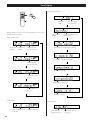
Time Display
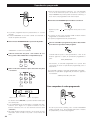
When the disc is MP3:
current file
number
During playback, each time the TIME button is pressed the
display changes as follows:
current folder
number
elapsed time of
the current file
current file number of the
current folder
When the disc is CD:
current disc
number
current track
number
elapsed time of
the current track
folder number - folder name (scrolling)
file number - file name (scrolling)
remaining time of
the current track
artist name (scrolling)
elapsed time of
the disc
album name (scrolling)
remaining time of
the disc
song title (scrolling)
In stop mode:
total number of tracks
in the disc
14
In stop mode:
total time of the disc
total number of
folders in the disc
total number of files
in the disc