1
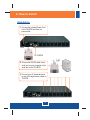
Daisy Chain
Note: You can daisy chain up to 16 TK-RP08 together, with a maximum of 128
AC powered devices.
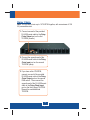
1. Connect one end of the provided
RJ-45 Ethernet cable to the Daisy
Chain Output port on the first
TK-RP08 (master).
2. Connect the opposite end of the
RJ-45 Ethernet cable to the Daisy
Chain Input port on the second
TK-RP08 (slave).
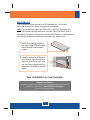
3. If you have a third TK-RP08,
connect one end of the provided
RJ-45 Ethernet cable to the Daisy
Chain Output port on the second
KVM switch. Then connect the
opposite end of the RJ-45 Ethernet
cable to the Daisy Chain Input
port on the third (slave) TK-RP08.
Repeat for each additional
TK-RP08.
3
English