1
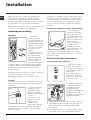
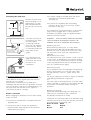
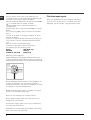
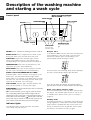
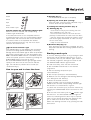
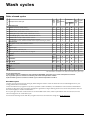
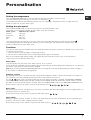
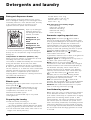
Instructions for use WASHING MACHINE Contents GB English,1 GB Installation, 2-3-4-5 Unpacking and levelling Connecting the electricity and water supplies The first wash cycle Technical data Description of the washing machine and starting a wash cycle, 6-7 Control panel Indicator lights How to open and shut the drum Starting a wash cycle Wash cycles, 8 Table of wash cycles WTL 500 Personalisation, 9 Setting the temperature Setting the spin speed Functions Detergents and laundry, 10 Detergent dispenser drawer Bleach cycle Preparing the laundry Garments requiring special care Load balancing system Precautions and tips, 11 General safety Disposal Saving energy and respecting the environment Care and maintenance, 12 Cutting off the water or electricity supply Cleaning the washing machine Caring for your appliance door and drum Cleaning the pump Checking the water inlet hose How to clean the detergent dispenser Troubleshooting, 13 Assistance, 14 1 Installation Keep this instruction manual in a safe place for future reference. Should the appliance be sold, transferred or moved, make sure the instruction manual accompanies the washing machine to inform the new owner as to its operation and features. GB Read these instructions carefully: they contain vital information on installation, use and safety. Unpacking and levelling Unpacking 1. Unpack the washing machine. 2. Check whether the washing machine has been damaged during transport. If this is the case, do not install it and contact your retailer. 3. Remove the four protective screws and the rubber washer with the respective spacer, situated on the rear of the appliance (see figure). 4. Seal the gaps using the plastic plugs provided. 5. Keep all the parts: you will need them again if the washing machine needs to be moved to another location. Warning: should the screws be re-used, make sure you fasten the shorter ones at the top. Packaging materials are not children's toys. Levelling Your machine may make a considerable amount of noise if the two front feet have not been adjusted correctly. 1. Install the washing machine on a flat sturdy floor, without resting it up against walls, furniture cabinets or other. 2. If the floor is not perfectly level, compensate for any unevenness by tightening or loosening the adjustable front feet (see figure); the angle of inclination must not exceed 2°, when measured over the worktop. 2 Levelling your appliance correctly will provide it with stability and avoid any vibrations, noise and shifting during operation. If it is placed on a fitted or loose carpet, adjust the feet in such a way as to allow enough room for ventilation beneath the washing machine. Putting your appliance in place and moving it. If your washing machine is equipped with a special set of retractable wheels you can easy move it. To lower the wheels and thus move the appliance effortlessly, just pull the lever, situated on the lefthand side beneath the base. Once the appliance is in the required position, put the lever back in place. The washing machine is now firmly in place (see figure). Electric and water connections Connecting the water inlet hose 1. Connect the supply pipe by screwing it to a cold water tab using a ¾ gas threaded connection (see figure). Before performing the connection, allow the water to run freely until it is perfectly clear. 2. Connect the other end of the water inlet hose to the washing machine, screwing it onto the appliance's cold water inlet, situated on the top righthand side on the rear of the appliance (see figure). 3. Make sure there are no kinks or bends in the hose. The water pressure at the tap must be within the values indicated in the Technical details table (see page 5). If the water inlet hose is not long enough, contact a specialist store or an authorised serviceman. Connecting the drain hose 65 - 100 cm Connect the drain hose, without bending it, to a draining duct or a wall drain situated between 65 and 100 cm from the floor; the supply voltage is included within the values indicated on the Technical details table (see page 5); GB the socket is compatible with the washing machine's plug. If this is not the case, replace the socket or the plug. Your appliance is now supplied with a 13 amp fused plug it can be plugged into a 13 amp socket for immediate use. Before using the appliance please read the instructions below. Where it connects to the waste water pipe cut end off spigot or remove the blanking cap The drain hose may be connected to an undersink trap. Before connecting the drain hose from the machine ensure that any blanks or removable ends have been taken off the spigot. If it is placed over the edge of a basin or sink be sure the free end of the hose is not underwater. We advise against the use of hose extensions; in case of absolute need, the extension must have the same diameter as the original hose and must not exceed 150 cm in length. Ensure that if the drain hose is pushed into a standpipe, that the end does not go down more than 15cms (6 inches). If the hose is pushed down too far, this may cause the machine to self -syphon ie. continuously empty as it is filling. Electric connection Before plugging the appliance into the mains socket, make sure that: the socket is earthed and in compliance with the applicable law; the socket is able to sustain the appliance's maximum power load indicated in the Technical details table (see page 5); WARNING - THIS APPLIANCE MUST BE EARTHED. THE FOLLOWING OPERATIONS SHOULD BE CARRIED OUT BY A QUALIFIED ELECTRICIAN. Replacing the fuse: When replacing a faulty fuse, a 13 amp ASTA approved fuse to BS 1362 should always be used, and the fuse cover re-fitted. If the fuse cover is lost, the plug must not be used until a replacement is obtained. Replacement fuse covers: If a replacement fuse cover is fitted, it must be of the correct colour as indicated by the coloured marking or the colour that is embossed in words on the base of the plug. Replacements can be obtained directly from your nearest Service Depot. Removing the plug: If your appliance has a non-rewireable moulded plug and you should wish to re-route the mains cable through partitions, units etc., please ensure that either: the plug is replaced by a fused 13 ampere re-wireable plug bearing the BSI mark of approval. or: the mains cable is wired directly into a 13 amp cable outlet, controlled by a switch, (in compliance with BS 5733) which is accessible without moving the appliance. Disposing of the plug: Ensure that before disposing of the plug itself, you make the pins unusable so that it cannot be accidentally inserted into a socket. Instructions for connecting cable to an alternative plug: Important: the wires in the mains lead are coloured in accordance with the following code: Green & Yellow Earth Blue Neutral Brown Live 3 GB As the colours of the wires in the lead may not correspond with the coloured markings identifyng the terminals in your plug, proceed as follows: Connect Green & Yellow wire to terminal marked E or or coloured Green or Green & Yellow. Connect Brown wire to terminal marked L or coloured Red. Connect Blue wire to terminal marked N or coloured Black. If a 13 amp plug (BS 1363) is used it must be fitted with a 13 amp fuse, either in the plug or adaptor or at the distribution board. If you are in any doubt about the electrical supply to your machine, consult a qualified electrician before use. How to connect an alternative plug: The wires in this mains lead are coloured in accordance with the following code: BLUE NEUTRAL (N) BROWN LIVE (L) GREEN & YELLOW EARTH (E) Disposing of the appliance: When disposing of the appliance please remove the plug by cutting the mains cable as close as possible to the plug body and dispose of it as described previously. GREEN & YELLOW BROWN BLUE 13 ampere fuse CROSS-BAR CORD GRIP The washing machine should not be installed in an outdoor environment, not even when the area is sheltered, because it may be very dangerous to leave it exposed to rain and thunderstorms. When the washing machine is installed, the mains socket must be within easy reach. Do not use extensions or multiple sockets. The power supply cable must never be bent or dangerously compressed. The power supply cable must only be replaced by an authorised serviceman. Warning! The company denies all liability if and when these norms are not respected. 4 The first wash cycle Once the appliance has been installed, and before you use it for the first time, run a wash cycle with detergent and no laundry, using the wash cycle 1. GB Technical data Model WTL 500 Dimensions width 40 cm height 85 cm depth 60 cm Capacity from 1 to 5 kg Electrical connections please refer to the technical data plate fixed to the machine Water connections maximum pressure 1 MPa (10 bar) minimum pressure 0.05 MPa (0.5 bar) drum capacity 42 litres Spin speed up to 1000 rotations per minute Energy rated programmes according to regulation EN 60456 programme 1; temperature 60°C; using a load of 5 kg. This appliance conforms to the following EC Directives: - 89/336/EEC dated 03/05/89 (Electromagnetic Compatibility) and subsequent modifications - 2002/96/EC - 2006/95/EC (Low Voltage) 5 Description of the washing machine and starting a wash cycle Control panel WASH CYCLE PROGRESS/ DELAY TIMER indicator lights SPIN SPEED GB knob ON/OFF button TEMPERATURE WASH CYCLE knob START/PAUSE FUNCTION buttons with indicator lights ON/OFFbutton: switches the washing machine on and off. WASH CYCLE knob: programmes the wash cycles. During the wash cycle, the knob does not move. FUNCTION buttons with indicator light: used to select the available functions. The indicator light corresponding to the selected function will remain lit. LID LOCKED indicator light knob button with indicator light Delayed start If the DELAY TIMER function has been activated (see Personalisation), after the wash cycle has been started the indicator light corresponding to the selected delay period will begin to flash: TEMPERATURE knob: sets the temperature or the cold wash cycle (see Personalisation). SPIN SPEED knob: sets the spin speed or exclude the spin cycle completely (see Personalisation). WASH CYCLE PROGRESS/DELAY TIMER indicator lights: used to monitor the progress of the wash cycle. The illuminated indicator light shows which phase is in progress. If the Delay Timer function has been set, the time remaining until the wash cycle starts will be indicated (see next page). LID LOCKED indicator light: indicates whether the door may be opened or not (see next page). START/PAUSE button with indicator light: starts or temporarily interrupts the wash cycles. N.B. To pause the wash cycle in progress, press this button; the corresponding indicator light will flash orange, while the indicator light for the current wash cycle phase will remain lit in a indicator light is switched fixed manner. If the LID LOCKED off, the door may be opened. To start the wash cycle from the point at which it was interrupted, press this button again. Indicator lights The indicator lights provide important information. This is what they can tell you: 6 As time passes, the remaining delay will be displayed and the corresponding indicator light will flash: Once the set delay has elapsed, the flashing indicator light will switch off and the selected wash cycle will begin. Wash cycle phase indicator lights Once the desired wash cycle has been selected and has begun, the indicator lights switch on one by one to indicate which phase of the cycle is currently in progress. Standby mode This washing machine, in compliance with new energy saving regulations, is fitted with an automatic standby system which is enabled after about 30 minutes if no activity is detected. Press the ON-OFF button briefly and wait for the machine to start up again. Wash A) Opening (Fig. 1): Lift the external lid and open it completely. Rinse B) Opening the drum (Soft opening): With one finger, push the button indicated in fig. 2 and the drum will open delicately. Spin Drain GB C) Loading the washing machine (Fig. 3). End of wash cycle Function buttons and corresponding indicator lights When a function is selected, the corresponding indicator light will illuminate. If the selected function is not compatible with the programmed wash cycle, the corresponding indicator light will flash and the function will not be activated. If a function which is incompatible with another function selected previously, only the most recent selection will remain active. Lid locked indicator light If this indicator light is on, the appliance door is locked to prevent it from being opened accidentally; to avoid any damage, wait for the indicator light to switch off (it will take about three minutes) before you open the appliance door. N.B. If the DELAY TIMER function is activated, the door cannot be opened; pause the machine by pressing the START/PAUSE button if you wish to open it. If the START/PAUSE indicator light (orange) flashes rapidly at the same time as the function indicator light, this indicates a problem has occurred (see Troubleshooting). How to open and to close the drum D) Shutting (Fig. 4): - close the drum fully by first shutting the front door followed by the rear one; - then ensure the hooks on the front door are perfectly housed within the seat of the rear door; - after the hooks have clicked into position, press both doors lightly downwards to make sure they do not come loose; - finally shut the external lid. E) Drum End Stop (Fig. 2): Once the wash cycle has been completed, the drum will position itself with doors facing upward for ease pf opening. Starting a wash cycle 1. Turn the washing machine on by pressing the ON/ OFF button. All the indicator lights will turn on for a few seconds, then only the indicator lights relative to the selected programme settings will remain lit and the START/PAUSE indicator light will flash. 2. Load the laundry, close the door and the lid. 3. Set the WASH CYCLE knob to the desired programme. 4. Set the washing temperature (see Personalisation). 5. Set the spin speed (see Personalisation). 6. Measure out the detergent and washing additives (see Detergents and laundry). 7. Select the desired functions. Fig. 1 Fig. 2 8. Start the wash cycle by pressing the START/ PAUSE button and the corresponding indicator light will remain lit in a fixed manner, in green. To cancel the set wash cycle, pause the machine by pressing the START/PAUSE button and select a new cycle. indicator light 9. At the end of the wash cycle the will switch on. The LID LOCKED indicator light will switch off, indicating that the door may be opened. Take out your laundry and leave the appliance door ajar to make sure the drum dries completely. Switch the washing machine off by pressing the ON/ OFF button. Fig. 3 Fig. 4 7 Wash cycles Table of wash cycles Wash cycles GB Detergents Max. Max. temp. speed Bleach Fabric (°C) (rpm) Wash softener Description of the wash cycle Max. load (kg) Cycle duration Essentials cycles 1 Cottons: extremely soiled whites. 1 Cottons (1): extremely soiled whites. 2 Cottons: heavily soiled whites and resistant colours. 2 Cottons (2): heavily soiled whites and delicate colours. 3 Coloureds (3): lightly soiled whites and delicate colours. 4 Synthetics 50°: heavily soiled resistant colours. Fastwash 60': to refresh lightly soiled garments quickly 5 (not suitable for wool, silk and clothes which require washing by hand). 90° 1000 - l l 5 145 60° 1000 l l 5 148 l l 5 138 l l 5 123 60° 1000 l 40° 1000 l 40° 1000 l l l 5 89 50° 800 - l l 2,5 82 60° 1000 - l l 2,5 60 40° 800 - l l 2 116 l Specials cycles Baby cycle: heavily soiled delicate colours. Shirts 40° 600 - l 2 69 Lingerie cycle 30° 600 - l l 1 79 Wool: for wool, cashmere, etc. 40° 600 - l l 1 55 Silk: for garments in silk and viscose, lingerie. 30° 0 - l l 1 55 - l l 3 85 - l l 2,5 77 - l l 2,5 30 Eco cycle Cottons Synthetics Fast Wash Partials wash cycles Cold 1000 Water Cold 800 Water Cold 800 Water Rinse - 1000 l - l 5 36 Spin - 1000 - - - 5 16 Pump out - 0 - - - 5 2 The information contained in the table is intended as a guide only. For all Test Institutes: 1) Test wash cycle in compliance with regulation EN 60456: set wash cycle 1 with a temperature of 60°C. 2) Long wash cycle for cottons: set wash cycle 2 with a temperature of 40°C. 3) Short wash cycle for cottons: set wash cycle 3 with a temperature of 40°C. Eco Wash cycles The Eco Cycles assure energy saving by eliminating the need to heat the water and its an advantage both to your energy bill and the environment! These innovative Eco programmes (Cotton, Synthetics and Fast Wash) are available for various fabrics and different quantity of garments; they have been designed to guarantee a high cleaning action even at low temperature and can be used for lightly to medium soiled loads. Eco Cycles give the best results thanks to an intensified wash action, water optimization and are carried out in the same average time of a standard cycle. For the best washing results with Eco programmes we recommend the usage of a liquid detergent. 8 Personalisation Setting the temperature GB Turn the TEMPERATURE knob to set the wash temperature (see Table of wash cycles). The temperature may be lowered, or even set to a cold wash ( ). The washing machine will automatically prevent you from selecting a temperature which is higher than the maximum value set for each wash cycle. Setting the spin speed Turn the SPIN SPEED knob to set the spin speed for the selected wash cycle. The maximum spin speeds available for each wash cycle are as follows: Wash cycles Maximum spin speed Cottons 1000 rpm Synthetics 800 rpm Wool 600 rpm Silk drain only The spin speed may be lowered, or the spin cycle can be excluded altogether by selecting the symbol . The washing machine will automatically prevent you from selecting a spin speed which is higher than the maximum speed set for each wash cycle. Functions The various wash functions available with this washing machine will help to achieve the desired results, every time. To activate the functions: 1. Press the button corresponding to the desired function; 2. The function is enabled when the corresponding indicator light is illuminated. Note: If the indicator light flashes rapidly, this signals that this particular function may not be selected in conjunction with the selected wash cycle. Delay timer This timer delays the start time of the wash cycle by up to 12 hours. Press the button repeatedly until the indicator light corresponding to the desired delay time switches on. The fifth time the button is pressed, the function will be disabled. N.B. Once you have pressed the START/PAUSE button, the delay time may only be decreased if you wish to modify it. This option is enabled with all programmes. Reduced creases By selecting this function, the wash and spin cycles will be modified in order to reduce the formation of creases. At the end of the cycle the washing machine will perform slow rotations of the drum. wash cycles, the machine will end the cycle while the laundry is soaking, the REDUCED CREASES For the , and START/PAUSE indicator lights will flash (orange) and the RINSE phase will remain lit in a fixed manner. To drain the water so that the laundry may be removed, press the START/PAUSE button or the REDUCED CREASES button. This function may not be used in conjunction with wash cycles , , , , , , . Extra rinse By selecting this function, the efficiency of the rinse is increased and optimal detergent removal is guaranteed. It is particularly useful for sensitive skin. This function may not be used in conjunction with wash cycles , , . Super Wash Because a greater quantity of water is used in the initial phase of the cycle, and because of the increased cycle duration, this function offers a high-performance wash. This function may not be used in conjunction with wash cycles 5, , , , , , , , , . 9 Detergents and laundry GB Detergent dispenser drawer Good washing results also depend on the correct dose of detergent: adding too much detergent won't necessarily make for a more efficient wash, and may in fact cause a build up on the interior of your appliance and even pollute the environment. Open up the detergent dispenser and pour in the detergent and fabric softener, as follows. compartment 1: Detergent for prewash compartment 2: Detergent for the wash cycle (powder or liquid) It is recommended that you place liquid detergent directly into the compartment using the appropriate dosing cup. compartment 3: Additives (softener, etc.) When pouring the softener in compartment 3, avoid exceeding the "max" level indicated. The softener is added automatically into the machine during the last wash. At the end of the wash programme, some water will be left in compartment 3. This is used for the inlet of denser fabric softeners into the machine, i.e. to dilute the more concentrated softeners. Should more than a normal amount of water remain in compartment 3, this means the emptying device is blocked. For cleaning instructions, see Care and maintenance. compartment 4: Bleach Bleach cycle Bleaching may only be performed in conjunction with . wash cycles 2, 3, Pour the bleach into compartment 4; pour the detergent and softener into the corresponding compartments, then select one of the abovementioned wash cycles. This option is recommended only for very soiled cotton garments. Preparing the laundry Divide the laundry according to: - the type of fabric/the symbol on the label - the colours: separate coloured garments from whites. Empty all garment pockets and check the buttons. Do not exceed the listed values, which refer to the weight of the laundry when dry: 10 Durable fabrics: max. 5 kg Synthetic fabrics: max. 2,5 kg Delicate fabrics: max. 2 kg Wool: max. 1 kg How much does your laundry weigh? 1 sheet 400-500 g 1 1 1 1 pillow case 150-200 g tablecloth 400-500 g bathrobe 900-1200 g towel 150-250 g Garments requiring special care Baby cycle: this wash cycle can be used to remove the soiling typically caused by babies, while ensuring that all detergent is removed from nappies in order to prevent the delicate skin of babies from suffering allergies. The cycle has been designed to reduce the amount of bacteria by using a greater quantity of water and optimising the effect of special disinfecting additives added to the detergent. to wash shirts in Shirts: use special wash cycle various fabrics and colours. It guarantees maximum care is taken of the garments and minimises the formation of creases. Lingerie cycle: for undergarments of any colour, in . any fabric. Use special wash cycle Wool: Hotpoint is the only washing machine manufacturer to have been awarded the prestigious Woolmark Platinum Care endorsement (M.0508) by the Woolmark Company, which means that all woollen garments may be washed in the washing machine, even those which state hand wash only on the label. Wash cycle therefore offers complete peace of mind when washing woollen garments in the washing machine (max. load 1 kg) and guarantees optimal performance. to wash all silk Silk: use special wash cycle garments. We recommend the use of special detergent which has been designed to wash delicate clothes. Curtains: fold curtains and place them in a pillow case or mesh bag. Use wash cycle . Load balancing system Before every spin cycle, to avoid excessive vibrations and to distribute the load in a uniform manner, the drum rotates continuously at a speed which is slightly greater than the washing rotation speed. If, after several attempts, the load is not balanced correctly, the machine spins at a reduced spin speed. If the load is excessively unbalanced, the washing machine performs the distribution process instead of spinning. To encourage improved load distribution and balance, we recommend small and large garments are mixed in the load. Precautions and tips This washing machine was designed and constructed in accordance with international safety regulations. The following information is provided for safety reasons and must therefore be read carefully. General safety This appliance was designed for domestic use only. This appliance is not intended for use by persons (including children) with reduced physical, sensory or mental capabilities, or lack of experience and knowledge, unless they have been given supervision or instruction concerning use of the appliance by a person responsible for their safety. Children should be supervised to ensure that they do not play with the appliance. Do not touch the machine when barefoot or with wet or damp hands or feet. Do not pull on the power supply cable when unplugging the appliance from the electricity socket. Hold the plug and pull. Do not touch the drained water as it may reach extremely high temperatures. Never force the porthole door. This could damage the safety lock mechanism designed to prevent accidental opening. If the appliance breaks down, do not under any circumstances access the internal mechanisms in an attempt to repair it yourself. Always keep children well away from the appliance while it is operating. If the appliance has to be moved, work in a group of two or three people and handle it with the utmost care. Never try to do this alone, because the appliance is very heavy. Before loading laundry into the washing machine, make sure the drum is empty. Disposal Consumers should contact their local authority or retailer for information concerning the correct disposal of their old appliance. GB Saving energy and respecting the environment Saving on detergent, water, energy and time To avoid wasting resources, the washing machine should be used with a full load. A full load instead of two half loads allows you to save up to 50% on energy. The pre-wash cycle is only necessary on extremely soiled garments. Avoiding it will save on detergent, time, water and between 5 and 15% energy. Treating stains with a stain remover or leaving them to soak before washing will cut down the need to wash them at high temperatures. A programme at 60°C instead of 90°C or one at 40°C instead of 60°C will save up to 50% on energy. Use the correct quantity of detergent depending on the water hardness, how soiled the garments are and the amount of laundry you have, to avoid wastage and to protect the environment: despite being biodegradable, detergents do contain ingredients that alter the natural balance of the environment. In addition, avoid using fabric softener as much as possible. If you use your washing machine from late in the afternoon until the early hours of the morning, you will help reduce the electricity board's peak load. The Delay Timer option helps to organise your wash cycles accordingly. If your laundry has to be dried in a tumble dryer, select a high spin speed. Having the least water possible in your laundry will save you time and energy in the drying process. Disposing of the packaging materials: observe local regulations so that the packaging may be re-used. The European Directive 2002/96/EC on Waste Electrical and Electronic Equipment, requires that old household electrical appliances must not be disposed of in the normal unsorted municipal waste stream. Old appliances must be collected separately in order to optimise the recovery and recycling of the materials they contain and reduce the impact on human health and the environment. The crossed out "wheeled bin" symbol on the product reminds you of your obligation, that when you dispose of the appliance it must be separately collected. 11 Care and maintenance GB Cutting off the water or electricity supply To recover any objects that have fallen into the prechamber: Turn off the water tap after every wash. This will limit the wear of your appliance's water system and also prevent leaks. 1. remove the plinth at the bottom on the front side of the washing machine by pulling from the side with your hands (see figure); 2. unscrew the lid rotating it anticlockwise (see figure): a little water may trickle out. This is perfectly normal; 3. clean the interior thoroughly; 4. screw the lid back on; 5. reposition the panel, making sure the hooks are securely in place before you push it onto the appliance. Unplug your appliance when cleaning it and during all maintenance operations. Cleaning your appliance The exterior and rubber parts of your appliance can be cleaned with a soft cloth soaked in lukewarm soapy water. Do not use solvents or abrasives. Caring for your appliance door and drum Always leave the appliance door ajar to prevent unpleasant odours from forming. Cleaning the pump The washing machine is fitted with a self-cleaning pump that does not require any maintenance. Sometimes, small items (such as coins or buttons) may fall into the pre-chamber that protects the pump, situated in the lower part of the same. Make sure the wash cycle has ended and unplug the appliance. Checking the water inlet hose Check the water inlet hose at least once a year. If you see any cracks, replace it immediately: during the wash cycles, water pressure is very strong and a cracked hose could easily split open. Never use hoses that have already been used. How to clean the detergent dispenser Disassembly: Press lightly on the large button on the front of the detergent dispenser and pull it upwards (fig. 1, 2). Cleaning: Then clean the dispenser under a tap (fig. 3) using an old toothbrush and, once the pair of siphons inserted in the top of compartments 1 and 2 (fig. 4) have been pulled out, check whether the same are not clogged and then rinse them. Fig. 1 Fig. 2 12 Fig. 3 Reassembly: Do not forget to reinsert the pair of siphons into the special housings and then to replace the dispenser into its seat, clicking it into place (fig. 4, 2 and 1). Fig. 4 Troubleshooting Your washing machine could fail to work. Before contacting the Technical Assistance Centre (see Assistance), make sure that the problem cannot be not solved easily using the following list. GB Problem: Possible causes / Solutions: The washing machine does not switch on. The appliance is not plugged into the socket fully, or is not making contact. There is no power in the house. The wash cycle does not start. The appliance Lid is not shut properly. The ON/OFF button has not been pressed. The START/PAUSE button has not been pressed. The water tap has not been opened. A delayed start has been set (see Personalisation). The washing machine does not take in water (the indicator light for the first wash cycle stage flashes rapidly). The water inlet hose is not connected to the tap. The hose is bent. The water tap has not been opened. There is no water supply in the house. The pressure is too low. The START/PAUSE button has not been pressed. The washing machine continuously takes in and drains water. The drain hose is not fitted at a height between 65 and 100 cm from the floor (see Installation). The free end of the hose is under water (see Installation). The wall drainage system is not fitted with a breather pipe. If the problem persists even after these checks, turn off the water tap, switch the appliance off and contact the Assistance Service. If the dwelling is on one of the upper floors of a building, there may be problems relating to water drainage, causing the washing machine to fill with water and drain continuously. Special anti-draining valves are available in shops and help to avoid this inconvenience. The washing machine does not drain or spin. The wash cycle does not include draining: some wash cycles require the drain phase to be started manually. The Reduced creases function has been activated: To complete the wash cycle, press the START/PAUSE button (Personalisation). The drain hose is bent (see Installation). The drainage duct is clogged. The washing machine vibrates a lot during the spin cycle. The drum was not unlocked correctly during installation (see Installation). The washing machine is not level (see Installation). The washing machine is trapped between cabinets and walls (see Installation). The washing machine leaks. The water inlet hose is not screwed on properly (see Installation). The detergent dispenser drawer is blocked (for cleaning instructions, see Care and maintenance). The drain hose is not fixed properly (see Installation). The START/PAUSE indicator light (orange) and the function indicator lights flash rapidly. Switch off the machine and unplug it, wait for approximately 1 minute and then switch it back on again. If the problem persists, contact the Technical Assistance Service. There is too much foam. The detergent is not suitable for machine washing (it should display the text for washing machines or hand and machine wash, or the like). Too much detergent was used. 13 Assistance Guarantee GB 12 Months Parts and Labour Guarantee Your appliance has the benefit of our manufacturers guarantee, which covers the cost of breakdown repairs for twelve months from the date of purchase. This gives you the reassurance that if, within that time, your appliance is proven to be defective because of either workmanship or materials, we will, at our discretion, either repair or replace the appliance at no cost to you. This guarantee is subject to the following conditions: - The appliance has been installed and operated correctly and in accordance with our operating and maintenance instructions. The appliance is used only on the electricity or gas supply printed on the rating plate. The appliance has been used for normal domestic purposes only. The appliance has not been altered, serviced, maintained, dismantled, or otherwise interfered with by any person not authorised by us. Any repair work must be undertaken by us or our appointed agent. Any parts removed during repair work or any appliance that is replaced become our property. The appliance is used in the United Kingdom or Republic of Ireland. - The guarantee does not cover: - Damage resulting from transportation, improper use, neglect or interference or as a result of improper installation. Replacement of any consumable item or accessory . These include but are not limited to: plugs, cables, batteries, light bulbs, fluorescent tubes and starters, covers and filters. Replacement of any removable parts made of glass or plastic. - THIS GUARANTEE WILL NOT APPLY IF THE APPLIANCE HAS BEEN USED IN COMMERCIAL OR NON-DOMESTIC PREMISES. 5 Year Parts Guarantee Hotpoint also offers you a free 5 year parts guarantee. This additional guarantee is conditional on you registering your appliance with us and the parts being fitted by one of our authorised engineers. There will be a charge for our engineer's time. To activate the extra parts warranty on your appliance, simply call our registration line on 08448 24 24 24 (ROI 01 230 0800). Extended Guarantees We offer a selection of repair protection plans that enable you to fully cover yourself against the expense of repair bills for the life of your policy. To find the ideal plan for you please call our advice line on 08448 226 226 (Republic of Ireland 01 230 0233). Free Helpdesk Service We have a dedicated team who can provide free advice and assistance with your appliance if you experience any technical difficulties within the first 90 days of ownership. Simply call our Hotpoint Service Hotline on 08448 224 224 (Republic of Ireland 0818 313 413) for telephone assistance, or, where necessary, to arrange for an engineer to call. If we cannot resolve the technical problem we will replace your machine or, if you prefer, give you your money back. 14 After Sales Service GB No one is better placed to care for your Hotpoint appliance during the course of its working life than us - the manufacturer. Essential Contact Information Hotpoint Service We are the largest service team in Europe offering you access to 400 skilled telephone advisors and 1000 fully qualified engineers on call to ensure you receive fast, reliable, local service. UK: 08448 224 224 Republic of Ireland: 0818 313 413 www.hotpointservice.co.uk Please note: Our advisors will require the following information: Model number: Serial number: Parts and Accessories We supply a full range of genuine replacement parts as well as accessory products that protect and hygienically clean your appliance to keep it looking good and functioning efficiently throughout its life. UK: 08448 225 225 Republic of Ireland: 0818 313 413 www.hotpointservice.co.uk Appliance Registration We want to give you additional benefits of Hotpoint ownership. To activate your free 5 year parts guarantee you must register your appliance with us. UK: 08448 24 24 24 Republic of Ireland: 01 230 0800 www.hotpointservice.co.uk Indesit Company UK Ltd. Morley Way, Peterborough, PE2 9JB Indesit Company Unit 49 Airways Industrial Estate,Dublin 17 Recycling & Disposal Information As part of Hotpoint's continued commitment to helping the environment, Hotpoint reserves the right to use quality, recycled components to keep down customer costs and minimise material wastage. Please dispose of packaging and old appliances carefully. To minimise the risk of injury to children, remove the door, plug and cut the mains cable off flush with the appliance. Dispose of these parts separately to ensure that the appliance can no longer be plugged into a mains socket, and the door 15 195082277.00 11/2009 - Xerox Fabriano GB 16