1
5 Play
Play discs
1
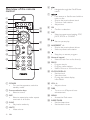
Press DISC on the remote control to
select the disc source.
2
Press on the top panel of the unit.
» The disc door opens.
3
Place a disc onto the tray and press
again.
• Ensure that the label side faces
upwards.
• Play starts automatically.
If play does not start, press /
to
select a track and then press
.
•
Play from USB
Note
• Ensure that the USB device contains playable
audio contents for supported formats.
1
Insert the USB plug of a USB device into
the
socket on the main unit.
2
Press USB to select the USB source.
» The total number of tracks displays.
3
4
5
Press ALB/PRESET+/- to select a folder.
16
EN
Press
Press
/
to select a file.
to start play.