1
SUPER S2DL3/370DL3/370DLE/370DLR/370DLI User's Manual
2-10 Installing Software Drivers
After the OS (Operating System) has been installed, you must install the
software drivers. The necessary drivers are all included on the Supermicro
CD that came packaged with your motherboard. After inserting this CD into
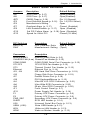
your CDROM drive, the display shown in Figure 2-7 should appear. (If this
display does not appear, click on the My Computer icon and then on the icon
representing your CDROM drive. Finally, double click on the S "Setup" icon.)
Installation
Figure 2-7.
Driver/Tool Installation Display Screen
Click the icons showing a hand writing on paper to view the readme files
for each item. The bottom icon with a CD on it allows you to view the
entire contents of the CD.
Video driver (ATI): For the 370DLR/DLI only.
Build Netword Card disk: For the S2DL3/370DL3/370DLE/370DLR/370DLI.
Build SCA disk (QLogic GEM 354): For integration with the SuperServer
SC850 and SC860 chassis.
Build SCSI disk (Ultra160): For the S2DL3/370DL3/370DLR/370DLI only.
2-22