1
Precautions
1. Setting up
- Refer to the identification label located on
the rear of your player for its proper
operating voltage.
- Install your player in a cabinet with
adequate ventilation holes. (7~10cm)
Do not block ventilation holes on any of
the components for air circulation.
- Do not push the disc tray in by hand.
- Do not stack components.
- Be sure to turn all components off before
moving the player.
- Before connecting other components to
this player, be sure to turn them off.
- Be sure to remove the disc and turn off
the player after use, especially if you are
not going to use it for a long time.
- The mains plug is used as a disconnect
device and shall stay readily operable at
any time.
2. For your safety
- This product utilizes a laser. Use of
controls or adjustments or performance
of procedures other than those specified
herein may result in hazardous radiation
exposure.
- Do not open covers and do not repair your
self. Refer servicing to qualified
personal.
3. Caution
- Your player is not intended for industrial
use but for domestic purposes. Use of
this product is for personal use only.
- Apparatus shall not be exposed to
dripping or splashing and no objects filled
with liquids, such as vases, shall be
placed on the apparatus.
- Exterior influences such as lightning and
static electricity can affect normal operation of this player. If this occurs, turn the
player off and on again with the POWER
button, or disconnect and then reconnect the AC power cord to the AC power
outlet. The player will operate normally.
- When condensation forms inside the
player due to sharp changes in tempera-
2
Table of contens
ture, the player may not operate correctly. If this occurs, leave the player at
room temperature until the inside of the
player becomes dry and operational.
4. Disc
- Do not clean disc using record-cleaning
sprays, benzene, thinner, or other volatile solvents that may cause damage to
the disc surface.
- Do not touch the disc’s bottom.
Hold by the edges or by one edge and
the hole in the center.
- Wipe the dirt away gently; never wipe a
cloth back and forth over the disc.
5. Environmental info
- The battery used in this product contains
chemicals that are harmful to the environment.
- So, dispose the batteries in the propermanner, according to federal, state, and
local regulations.
The product unit accomparied this user
manual is licenced under certain intellectual
property rights of certain third parties. This
licence is limited to private non-commercial use
by end-user consumers for licenced contents.
No rights are granted for commercial use. The
licence does not cover any product unit other
than this product unit and the licence does not
extend to any unlicenced product unit or process conforming to ISO/OUR 11172-3 or ISO/
OUR 13818-3 used or sold in combination
with this product unit. The licence only
covers the use of this product unit to encode
and/or decode audio files conforming to the
ISO/OUR 11172-3 or ISO/OUR 13818-3. No
rights are granted under this licence for
product features or functions that do not con
form to the ISO/OUR 11172-3 or ISO/OUR
13818-3.
CAUTION: USE OF ANY CONTROLS,
ADJUSTMENTS, OR PROCEDURES OTHER
THAN SPECIFIED HEREIN MAY RESULT IN
HAZARDOUS RADIATION EXPOSURE.
Precautions . . . . . . . . . . . . . . . . . . . . . . . . . . . . .
Setup
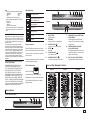
General Features . . . . . . . . . . . . . . . . . . . . . . . .
Description . . . . . . . . . . . . . . . . . . . . . . . . . . . . .
Tour of the Remote Control . . . . . . . . . . . . . . . . .
Connections
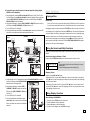
Choosing a Connection . . . . . . . . . . . . . . . . . . .
Basic Functions
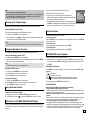
Playing a Disc . . . . . . . . . . . . . . . . . . . . . . . . . .
Using the Search and Skip Functions . . . . . . . .
Using the Display Function . . . . . . . . . . . . . . . .
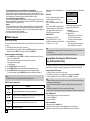
Using the Disc and Title Menu . . . . . . . . . . . . . .
Repeat Play . . . . . . . . . . . . . . . . . . . . . . . . . . . .
Slow Play . . . . . . . . . . . . . . . . . . . . . . . . . . . . . .
Advanced Functions
Adjusting the Aspect Ratio (EZ View) . . . . . . . . .
Selecting the Audio Language . . . . . . . . . . . . . .
Selecting the Subtitle Language . . . . . . . . . . . . .
Changing the Camera Angle . . . . . . . . . . . . . . . .
Using the Bookmark Function . . . . . . . . . . . . . . .
Using the Zoom Function . . . . . . . . . . . . . . . . . .
Clips Menu for MP3/WMA/JPEG/MPEG4/
CD Audio . . . . . . . . . . . . . . . . . . . . . . . . . . . . . . .
2
2
3
3
4
5
5
5
6
6
6
6
6
6
7
7
7
7
Folder Selection . . . . . . . . . . . . . . . . . . . . . . . . . 7
MP3/WMA/CD Audio Playback . . . . . . . . . . . . . . 7
MPEG4 Playback . . . . . . . . . . . . . . . . . . . . . . . . 8
Playing Media Files using the USB HOST
feature (Only DVD-C550/DVD-C550K) . . . . . . . . 8
CD Ripping (Only DVD-C550/DVD-C550K) . . . . 9
Picture CD Playback . . . . . . . . . . . . . . . . . . . . . . 9
Picture CD Playback for HD-JPEG . . . . . . . . . . . 9
Karaoke Functions
(Only DVD-C550K)
Karaoke Functions . . . . . . . . . . . . . . . . . . . . . . 10
Changing Setup Menu
Using the Setup Menu. . . . . . . . . . . . . . . . . . . . 10
Setting Up the Display Options . . . . . . . . . . . . . 10
Setting Up the Audio Options . . . . . . . . . . . . . . 10
Setting Up the System Options . . . . . . . . . . . . . 11
Setting Up the Language Features . . . . . . . . . . 11
Setting Up the Security Options . . . . . . . . . . . . 12
Setting Up the General Options . . . . . . . . . . . . 12
Setting Up the Support Options . . . . . . . . . . . . 12
Reference
Troubleshooting . . . . . . . . . . . . . . . . . . . . . . . . . 12
Specifications . . . . . . . . . . . . . . . . . . . . . . . . . . 13
Setup
General Features
Excellent Sound
Dolby Digital, a technology developed by Dolby
Laboratories, provides crystal clear sound reproduction.
Screen
Both regular and widescreen(16:9) pictures can be viewed.
Slow Motion
An important scene can be viewed in slow motion.
1080p Playback
This player upconverts regular DVDs for playback
on 1080p TVs.
Parental Control (DVD)
The parental control allows users to set the necessary level to prohibit children from viewing harmful
movies such as those with violence, adult subject
matter, etc.
Various On-Screen Menu Functions
You can select various languages (Audio/Subtitle)
and screen angles while enjoying movies.
Progressive Scan
Progressive scanning creates an improved picture
with double the scan lines of a conventional interlaced picture.
EZ VIEW (DVD)
Easy View enables picture adjustment to match your
TV's screen size (16:9 or 4:3).
Digital Photo Viewer (JPEG)
You can view Digital Photos on your TV.
Repeat
You can repeat a song or movie simply by pressing
the REPEAT button.
MP3/WMA
This unit can play discs contain MP3/WMA files.
MPEG4
This unit can play MPEG4 formats within an avi file.
HDMI (High Definition Multimedia
Interface)
HDMI reduces picture noise by allowing a pure
digital video/audio signal path from the player to
your TV.
CD Ripping (Only DVD-C550/
DVD-C550K)
This feature lets you to copy audio files from disc
to USB device into MP3 format. (Only Audio CD
(CD DA))