1
HDD Installation Procedures
1
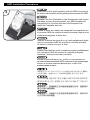
Lift up the leather cover and the main control module.
Öffnen Sie die Lederhülle und nehmen Sie das Hauptmodul heraus.
Levante la cubierta de cuero y el módulo de control principal.
Soulevez le cache en cuir et le module de contrôle principal.
Sollevare la copertura in pelle ed il modulo di controllo
principale.
Поднимите кожаный чехол и главный блок управления.
レザーカバーおよびメインコントロールモジュールを引き上げます。
가죽 커버와 메인 컨트롤 모듈을 들어 올립니다.
打開RVS01皮革上蓋與主控件模組
打开RVS01皮革上盖与主控件模块
2
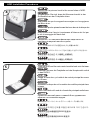
Press the left and right pincer to make them open widely
Drücken Sie die linke und die rechte Klammer damit diese
offen stehen.
Presione los enganches izquierdo y derecho para abrirlos del todo.
Appuyez sur les pinces droite et gauche pour les ouvrir largement
Premere i Fermi di destra e sinistra in modo che si aprano
per consentire il posizionamento dell’hard disk.
Надавите на левый и правый защелки-фиксаторы, чтобы
они разошлись.
左右のクリップを押して大きく開くようにします。
오른쪽과 왼쪽 집게를 눌러 넓혀준 다음 열어 줍니다.
按下模組的左右鉗片兩底端以打開模組
按下模块的左右钳片两底端以打开模块