1
4.1.2 Find your music
1
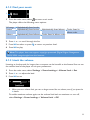
1 From the main menu, select
to enter music mode.
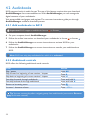
The player offers the following menu options:
All songs
Artists
Alphabetically listed tracks
Alphabetically listed artists
Alphabetically listed albums
Albums
Alphabetically listed albums
Tracks listed in album order
Tracks listed in
album order
2 Press + or - to scroll through the list.
3 Press 2; to select or press O to return to previous level.
4 Press 2; to play.
Note This player does not support copyright protected (Digital Rights Management –
DRM) WMA songs bought from the Internet.
4.1.3 Limit the volume
Listening to loud sounds for longer than a moment can be harmful to the listener. You can set
the volume level of the player to suit your preferences:
1 From the main menu, select Settings > Sound settings > Volume limit > Set.
2 Press + or - to adjust the level.
3 Press 2; to set.
>> When you set a volume limit, you can no longer exceed the set volume, even if you press the
+ button.
To enable maximum volume again, set the volume limit back to maximum or turn off,
select Settings > Sound settings > Volume limit > Off.
11