1
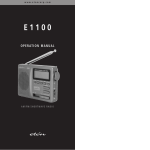
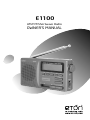
E1100
AM/FM/Shortwave Radio
OWNER’S MANUAL
E1100 OWNER’S MANUAL
DO YOU NEED HELP? Contact Us.
If you need help, please contact us, Monday-Friday, 8:30 a.m.-4:00
p.m., North American Pacific Time. 1-800-872-2228 from the U.S.;
1-800-637-1648 from Canada; 650-903-3866, worldwide; FAX:
650-903-3867; web site, www.etoncorp.com; Etón Corporation , 1015
Corporation Way, Palo Alto, CA 94303, USA
WARNING
• Do not expose this appliance to rain or moisture.
• Do not submerge or expose for extended period to water.
• Protect from high humidity and rain.
• Only operate within specified temperature range (0 °C to 40 °C).
• Unplug immediately if liquid has been spilled or object have fallen
into the apparatus.
• Clean only with a dry cloth. Do not use detergents or chemical
solvents as this might damage the finish.
• Unplug and disconnect external antennas during lightning storms.
• Do not remove cover [or back].
• Refer servicing to qualified service personnel.
ENVIRONMENT
Disposal
According to the European Directive 2002/96/EC all
electrical and electronic products must be collected separately by a local collection system.
Please act according to your local rules and do not dispose of your old
products with your normal household waste.
1
AL. ON/OFF
AL. SET
E1100 OWNER’S MANUAL
TIME SET
HOUR
MINUTE
LIGHT/SNOOZE
POWER/SLEEP
WORLD RECEIVER
FM
AM
SW — 1 2 3 4 5 6 7 8 9 10
DIAGRAMS
4
1
E
5
6
7
8
9
DIGITAL LCD FREQUENCY & CLOCK DISPLAY
AL. ON/OFF
AL. SET
TIME SET
HOUR
MINUTE
LIGHT/SNOOZE
10
POWER/SLEEP
WORLD RECEIVER
FM
AM
2
3
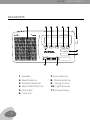
7. Hour Selector
1. Speaker G
DIGITAL LCD FREQUENCY & CLOCK DISPLAY
8. Minute Selector
2. Band Selector
9. Tuning Control
3. SW Band Selector
4. Alarm ON/OFF/Lock
AL. ON/OFF
10. Light/Snooze
AL. SET
TIME SET
HOUR
MINUTE
11. Power/Sleep
5. Alarm Set
LIGHT/SNOOZE
6. Time Set
POWER/SLEEP
WORLD RECEIVER
FM
2
11
SW — 1 2 3 4 5 6 7 8 9 10
AM
SW — 1 2 3 4 5 6 7 8 9 10
75m 3.90-4.00
25m 11.65-12.05
60m 4.75-5.06 49m 5.95-6.20 41m 7.10-7.30 31m 9.50-9.90
22m 13.60-13.80 19m 15.10-15.60 16m 17.55-17.90 13m 21.45-21.85
UM3 AA 1 5V X 2
UM3 AA 1 5V X 2
E1100 OWNER’S MANUAL
www.etoncorp.com
Made in China
CAUTION:
DO NOT USE NEW
AND OLD BATTERIES TOGETHER!
+
UM3 AA 1 5V X 2
G
DIGITAL LCD FREQUENCY & CLOCK DISPLAY
DIGITAL LCD FREQUENCY & CLOCK DISPLAY
DIAGRAMS
AL. ON/OFF
AL. SET
AL. ON/OFF
AL. SET
TIME SET
MINUTE
HOUR
TIME SET
LIGHT/SNOOZE
POWER/SLEEP
WORLD RECEIVER
FM
AM
MINUTE
HOUR
1
AM/FM STEREO/SW CL
FM
88 - 108 MHz
AM
FM
88 - 108 MHz
AM 530 - 1710 MHz
SM 3
75m 3.90-4.00 60m 4.75-5.06
75m 3.90-4.00 60m 4.75-5.06 49m 5.95-6.20 41m 7.10-7.3
25m 11.65-12.05 22m 13.60-13.8
25m 11.65-12.05 22m 13.60-13.80 19m 15.10-15.60 16m 17.55-17
www.etoncorp.com
www.etoncorp.com
LIGHT/SNOOZE
POWER/SLEEP
WORLD RECEIVER
CAUTION:
DO NOT USE NEW
CAUTION:
DO NOT USE NEW
AND OLD BATTERIES TOGETHER!
AND OLD BATTERIES TOGETHER!
FM
AM
SW — 1 2 3 4 5 6 7 8 9 10
SW — 1 2 3 4 5 6 7 8 9 10
E
+
+
12 BANDS
AM/FM STEREO/SW CLOCK RECEIVER
UM3 AA 1 5V X 2
UM3 AA 1 5V X 2
FM
88 - 108 MHz
AM 530 - 1710 MHz
S M 3.90 - 21.85 MHz
75m 3.90-4.00 60m 4.75-5.06 49m 5.95-6.20 41m 7.10-7.30 31m 9.50-9.90
25m 11.65-12.05 22m 13.60-13.80 19m 15.10-15.60 16m 17.55-17.90 13m 21.45-21.85
www.etoncorp.com
Made in China
CAUTION:
DO NOT USE NEW
AND OLD BATTERIES TOGETHER!
+
UM3 AA 1 5V X 2
2
VOLUME
VOLUME
3
5
TUNE
G
12 BANDS
AM/FM STEREO/SW CLOCK RECEIVER
TUNE
FM
88 - 108 MHz
AM 530 - 1710 MHz
S M 3.90 - 21.85 MHz
75m 3.90-4.00 60m 4.75-5.06 49m 5.95-6.20 41m 7.10-7.30 31m 9.50-9.90
25m 11.65-12.05 22m 13.60-13.80 19m 15.10-15.60 16m 17.55-17.90 13m 21.45-21.85
BUZZER
6
BUZZER
www.etoncorp.com
4
RADIO
EAR
EAR
CAUTION:
DO NOT USE NEW
AND OLD BATTERIES TOGETHER!
RADIO
Made in China
7
DC IN 3V
DC IN 3V
+
UM3 AA 1 5V X 2
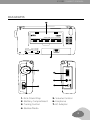
1. Kick-Stand Flap
5. Volume Control
2. Battery Compartment
6. Earphone
3. Tuning Control
7. AC Adaptor
4. Buzzer/Radio
3
E1100 OWNER’S MANUAL
BATTERIES
Remove the battery compartment cover by pushing it in the direction of the arrow. Install two ‘AA’ batteries according to the polarity
symbols (+ and -) marked next to the compartment. For easy removal,
place the batteries on top of the lift-out ribbon.
POWER ON/OFF AND SLEEP TIMER
Turn the radio on with the POWER/SLEEP button, on the right side
of the radio. A quick, short press engages the sleep timer with 60
minutes of playtime and the sleep timer symbol appears in the upper right corner of the display. To select a different time, press the
POWER/SLEEP button immediately after the radio turns on, selecting
60, 45, 30, 15, 10, 05, 120, 90 or 75 minutes.
To defeat the sleep timer, turn on the radio by pressing the POWER/
SLEEP for about two seconds. To turn it off, press the POWER/SLEEP
button.
It’s normal for the display to become lit for about 5 seconds, every
time that a button is pressed, except with the RADIO/BUZZER button, on the right side of the radio.
VOLUME
Use the volume knob, on the left side, to adjust the volume.
4
E1100 OWNER’S MANUAL
LISTENING TO FM, AM OR SW1-10
Select the FM, AM or SW1-10 band by using the band selector
switch. AM is shown as MW. Use the TUNE knob to tune the radio
to the desired frequency. If you are using an earphone to listen to
FM-stereo, the FM-stereo LED will light in the upper left corner. Note
that the frequency of the station appears in the display.
LISTENING TO SHORTWAVE
Shortwave allows listening to stations from around the world. During
the day, listen above 13 mHz. At night, listen below 13 mHz. To learn
more use the Internet or the two books below:
PASSPORT TO WORLD BAND RADIO Published by International Broadcasting Services (IBS); IBS North America, Box 300,
Penn’s Park PA 18943. Phone: (215) 598-9018.
www.passband.com.
WORLD RADIO TV HANDBOOK Published in the USA by
Watson-Guptill Publications, 770 Broadway, 7th Floor, New York,
NY 10003-9595. www.watsonguptill.com.
ANTENNA
For AM (MW) the radio uses an internal, directional, ferrite bar
antenna. Rotate the radio for best reception. For FM/SW, fully
extend the telescopic antenna.
5
E1100 OWNER’S MANUAL
AC ADAPTOR (INCLUDED)
The E1100 can be used with an AC adaptor that supplies an output
of 3 volts DC, negative polarity, 100 milliamperes or greater current.
To purchase this, visit www.etoncorp.com.
SETTING THE CLOCK
The clock displays time in 12-hour format. With the radio turned on
or off, press TIME SET for two seconds. Within three seconds press
the HOUR and MINUTE buttons to set the correct hour and minutes.
They can be pressed with quick, short presses to advance slowly or
they can be kept pressed down to advance rapidly. When finished,
release the TIME SET button or wait until the digits stop flashing.
SETTING THE ALARM
Select the BUZZER or RADIO setting on the right side of the radio.
With the radio turned on or off, press AL.SET for two seconds. Within
three seconds press the HOUR and MINUTE buttons to set the correct hour and minutes. They can be pressed with quick, short presses
to advance slowly or they can be kept pressed down to advance
rapidly. When finished, release the AL.SET button or wait until the
digits stop flashing.
6
E1100 OWNER’S MANUAL
SWITCHING THE ALARM ON/OFF
With the radio turned on or off, press the AL. ON/OFF button. The
alarm activation symbol appears in the upper right corner of the LCD
and looks like a loudspeaker. Turn it off by pressing the AL. ON/OFF
button again and the symbol disappears.
When the activated alarm turns the buzzer or the radio on, it can be
turned off by pressing the AL. ON/OFF button. This will cause the
loudspeaker symbol to disappear from the display.
LIGHT/SNOOZE
A quick press of the LIGHT button causes the display to be illuminated for about 5 seconds. Use a long press to permanently light
the display (note that this causes increased battery usage). Press
LIGHT/SNOOZE again to turn it off.
While the alarm is on, pressing the SNOOZE button causes the alarm
to pause for about 10 minutes, and then continue. This can be
repeated three times.
LOCK BUTTON
With the radio turned off, press this button for two seconds to lock
it; ‘Hold’ appears in the display. Press the button again to unlock it;
‘Un-H’ appears in the display.
7
E1100 OWNER’S MANUAL
IMPORTANT BATTERY
To minimize the possibility of battery acid leakage, only use high
quality alkaline, lithium or rechargeable nickel-metal-hydride batteries. Never intermix old with new, or different brands or types of
batteries. Damage caused by battery acid leakage is not covered by
this product’s warranty.
WARRANTY REGISTRATION
To ensure full warranty coverage or product updates, registration of
your product should be completed as soon as possible after purchase
or receipt. You may use one of the following options to register your
product:
1. By visiting our website at http://www.etoncorp.com.
2. Mail in enclosed warranty card.
3. Mail your registration card or information to the following
address; Include your name, full mailing address, phone number,
model purchased, date purchased, retail vendor name and
product serial number (typically located in or near the battery
compartment):
Etón Corporation
1015 Corporation Way
Palo Alto, CA 94303 USA
8
E1100 OWNER’S MANUAL
LIMITED WARRANTY
Retain the warranty information from your warranty card with your
proof of purchase or the Limited Warranty information can also be
viewed at www.etoncorp.com.
SERVICE FOR YOUR PRODUCT
To obtain service for your product, we recommend first contacting an
Etón service representative at 800-872-2228 US, 800-637-1648
Canada or (650) 903-3866 for problem determination and troubleshooting. If further service is required, the technical staff will instruct
how to proceed based on whether the radio is still under warranty or
needs non-warranty service.
WARRANTY – If your product is still in warranty and the Etón
service representative determines that warranty service is
needed, a return authorization will be issued and instructions
for shipment to an authorized warranty repair facility. Do Not
ship your radio back without obtaining the return authorization
number.
NON-WARRANTY – If your product is no longer under warranty
and requires service our technical staff will refer you to the nearest repair facility that will be able to best handle the repair.
For service outside of North America, please refer to the distributor
information included at time of purchase/receipt.
9
E1100 OWNER’S MANUAL
10
Etón Corporation
Corporate Headquarters
1015 Corporation Way
Palo Alto, California 94303 USA
tel +1 650-903-3866
tel +1 800-872-2228
fax +1 650-903-3867
Etón Europe/Lextronix Germany
Rosenstrasse 2
D-10178 Berlin, Germany
tel +49 [0]30 243102142
Etón Canada
1 Yonge Street, Suite 1801
Toronto, Ontario M5E 1W7 Canada
tel +1 416-214-6885
v. 01-12-06