1
Contents
Getting started......................5
Music ..................................32
Assembly............................................5
Turning on the phone.........................6
Help....................................................7
Charging the battery..........................8
Phone overview..................................9
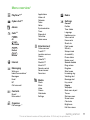
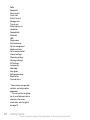
Menu overview*................................11
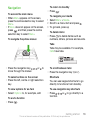
Navigation........................................13
Memory............................................14
Phone language...............................15
Entering text.....................................15
Stereo portable handsfree...............32
Music player.....................................32
PlayNow™........................................33
TrackID™ ........................................34
Online music and video clips...........34
Video player.....................................34
Radio ...............................................35
MusicDJ™........................................35
Record sound ..................................36
Calling..................................16
Making and receiving calls...............16
Contacts...........................................18
Speed dial........................................21
More calling features........................21
Cyber-shot™ ......................25
Using the camera.............................25
More camera features......................27
Viewing and tagging photos............28
Working with photos........................29
Sending content to a Web site.........30
Printing photos.................................31
Transferring and
handling content.................36
Handling content in the phone.........36
Sending content to another
phone...............................................37
Using a USB cable...........................37
Transferring content to and from
a computer.......................................38
Phone name.....................................39
Using Bluetooth™ wireless
technology........................................39
Backing up and restoring.................40
Messaging...........................41
Text and picture messages..............41
1
This is an Internet version of this publication. © Print only for private use.
Conversations..................................43
Voice messages...............................43
Email.................................................43
Instant messaging ...........................45
Internet ...............................47
Bookmarks.......................................47
History pages...................................47
More browser features.....................47
Internet security and certificates......48
Web feeds........................................48
YouTube™.......................................50
Synchronising.....................50
Theme..............................................56
Main menu layout.............................56
Ringtones.........................................57
Screen orientation............................57
Games..............................................57
Applications.....................................57
Locks................................................58
IMEI number.....................................59
Troubleshooting..................60
Common questions..........................60
Error messages................................63
Index....................................65
Synchronising using a computer.....50
Synchronising using an Internet
service..............................................51
More features......................52
Flight mode......................................52
Update Service.................................52
Location services.............................53
Alarms..............................................53
Calendar...........................................54
Notes................................................55
Tasks................................................55
Profiles.............................................55
Time and date..................................56
2
This is an Internet version of this publication. © Print only for private use.
Sony Ericsson C901/C901a/C901u
Cyber-shot™
This User guide is published by Sony Ericsson
Mobile Communications AB or its local affiliated
company, without any warranty. Improvements and
changes to this User guide necessitated by
typographical errors, inaccuracies of current
information, or improvements to programs and/or
equipment, may be made by Sony Ericsson Mobile
Communications AB at any time and without notice.
Such changes will, however, be incorporated into
new editions of this User guide.
All rights reserved.
©Sony Ericsson Mobile Communications AB, 2009
Publication number: 1225-3337.1
Attention: Some of the services and features
described in this User guide are not supported by
all networks and/or service providers in all areas.
Without limitation, this applies to the GSM
International Emergency Number 112. Please
contact your network operator or service provider
to determine availability of any specific service or
feature and whether additional access or usage
fees apply.
Please read the Important information before you
use your mobile phone.
Your mobile phone has the capability to download,
store and forward additional content, e.g. ringtones.
The use of such content may be restricted or
prohibited by rights of third parties, including but not
limited to restriction under applicable copyright
laws. You, and not Sony Ericsson, are entirely
responsible for additional content that you
download to or forward from your mobile phone.
Prior to your use of any additional content, please
verify that your intended use is properly licensed or
is otherwise authorized. Sony Ericsson does not
guarantee the accuracy, integrity or quality of any
additional content or any other third party content.
Under no circumstances will Sony Ericsson be liable
in any way for your improper use of additional
content or other third party content.
Smart-Fit Rendering is a trademark or a registered
trademark of ACCESS Co., Ltd.
Bluetooth is a trademark or a registered trademark
of Bluetooth SIG Inc. and any use of such mark by
Sony Ericsson is under license.
The Liquid Identity logo, BestPic, PlayNow,
MusicDJ, PhotoDJ, TrackID and VideoDJ are
trademarks or registered trademarks of
Sony Ericsson Mobile Communications AB.
TrackID™ is powered by Gracenote Mobile
MusicID™. Gracenote and Gracenote Mobile
MusicID are trademarks or registered trademarks of
Gracenote, Inc.
Cyber-shot, Smile Shutter, Sony, Memory Stick
Micro™, M2™ and Media Go are trademarks or
registered trademarks of Sony Corporation.
PictBridge is a trademark or registered trademark of
Canon Kabushiki Kaisha Corporation.
Google™, Google Maps™, YouTube and the
YouTube logo are trademarks or registered
trademarks of Google, Inc.
SyncML is a trademark or registered trademark of
Open Mobile Alliance LTD.
Ericsson is a trademark or registered trademark of
Telefonaktiebolaget LM Ericsson.
Adobe Photoshop Album Starter Edition is a
trademark or registered trademark of Adobe
Systems Incorporated in the United States and/or
other countries.
Microsoft, ActiveSync, Windows, Outlook, Windows
Media and Vista are registered trademarks or
trademarks of Microsoft Corporation in the United
States and/or other countries.
T9™ Text Input is a trademark or a registered
trademark of Tegic Communications. T9™ Text
Input is licensed under one or more of the following:
U.S. Pat. Nos. 5,818,437, 5,953,541, 5,187,480,
5,945,928, and 6,011,554; Canadian Pat. No.
3
This is an Internet version of this publication. © Print only for private use.
1,331,057, United Kingdom Pat. No. 2238414B;
Hong Kong Standard Pat. No. HK0940329; Republic
of Singapore Pat. No. 51383; Euro.Pat. No. 0 842
463(96927260.8) DE/DK, FI, FR, IT, NL, PT, ES, SE,
GB; and additional patents are pending worldwide.
This product is protected by certain intellectual
property rights of Microsoft. Use or distribution of
such technology outside of this product is prohibited
without a license from Microsoft.
Content owners use Windows Media digital rights
management technology (WMDRM) to protect their
intellectual property, including copyrights. This
device uses WMDRM software to access WMDRMprotected content. If the WMDRM software fails to
protect the content, content owners may ask
Microsoft to revoke the software's ability to use
WMDRM to play or copy protected content.
Revocation does not affect unprotected content.
When you download licenses for protected content,
you agree that Microsoft may include a revocation
list with the licenses. Content owners may require
you to upgrade WMDRM to access their content. If
you decline an upgrade, you will not be able to
access content that requires the upgrade.
This product is licensed under the MPEG-4 visual
and AVC patent portfolio licenses for the personal
and non-commercial use of a consumer for (i)
encoding video in compliance with the MPEG-4
visual standard ("MPEG-4 video") or the AVC
standard ("AVC video") and/or (ii) decoding MPEG4 or AVC video that was encoded by a consumer
engaged in a personal and non-commercial activity
and/or was obtained from a video provider licensed
by MPEG LA to provide MPEG-4 and/or AVC video.
No license is granted or shall be implied for any other
use. Additional information including that relating to
promotional, internal and commercial uses and
licensing may be obtained from MPEG LA, L.L.C.
See http://www.mpegla.com. MPEG Layer-3 audio
decoding technology licensed from Fraunhofer IIS
and Thomson.
Java, JavaScript and Java-based trademarks and
logos are trademarks or registered trademarks of
Sun Microsystems, Inc. in the U.S. and other
countries.
End-user license agreement for Sun Java Platform,
Micro Edition.
1. Restrictions: Software is confidential copyrighted
information of Sun and title to all copies is retained
by Sun and/or its licensors. Customer shall not
modify, decompile, disassemble, decrypt, extract,
or otherwise reverse engineer Software. Software
may not be leased, assigned, or sublicensed, in
whole or in part.
2. Export Regulations: Software including technical
data, is subject to U.S. export control laws, including
the U.S. Export Administration Act and its
associated regulations, and may be subject to
export or import regulations in other countries.
Customer agrees to comply strictly with all such
regulations and acknowledges that it has the
responsibility to obtain licenses to export, re-export,
or import Software. Software may not be
downloaded, or otherwise exported or re-exported
(i) into, or to a national or resident of, Cuba, Iraq, Iran,
North Korea, Libya, Sudan, Syria (as such listing may
be revised from time to time) or any country to which
the U.S. has embargoed goods; or (ii) to anyone on
the U.S. Treasury Department's list of Specially
Designated Nations or the U.S. Commerce
Department's Table of Denial Orders. 3. Restricted
rights: Use, duplication or disclosure by the United
States government is subject to the restrictions as
set forth in the Rights in Technical Data and
Computer Software Clauses in DFARS
252.227-7013(c) (1) and FAR 52.227-19(c) (2) as
applicable.
Restricted Rights: Use, duplication or disclosure by
the United States government is subject to the
restrictions as set forth in the Rights in Technical
Data and Computer Software Clauses in DFARS
4
This is an Internet version of this publication. © Print only for private use.
252.227-7013(c) (1) (ii) and FAR 52.227-19(c) (2) as
applicable.
Other product and company names mentioned
herein may be the trademarks of their respective
owners.
Any rights not expressly granted herein are reserved.
All illustrations are for illustration only and may not
accurately depict the actual phone.
Getting started
Instruction symbols
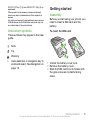
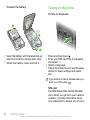
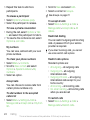
To insert the SIM card
Assembly
Before you start using your phone, you
need to insert a SIM card and the
battery.
These symbols may appear in the User
guide.
3
2
Note
Tip
Warning
>
1
Use a selection or navigation key to
scroll and select. See Navigation on
page 13.
1 Unlock the battery cover lock.
2 Remove the battery cover.
3 Slide the SIM card into its holder with
the gold-coloured contacts facing
down.
Getting started
This is an Internet version of this publication. © Print only for private use.
5
Turning on the phone
To insert the battery
To turn on the phone
2.1
1
2.2
3
1 Insert the battery with the label side up
and the connectors facing each other.
2 Attach the battery cover and lock it.
1 Press and hold down .
2 Enter your SIM card PIN, if requested,
and select OK.
3 Select a language.
4 Follow the instructions to use the setup
wizard for basic settings and useful
tips.
If you want to correct a mistake when you
enter your PIN, press
.
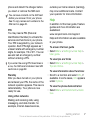
SIM card
The SIM (Subscriber Identity Module)
card, which you get from your network
operator, contains information about
your subscription. Always turn off your
6
Getting started
This is an Internet version of this publication. © Print only for private use.
phone and detach the charger before
you insert or remove the SIM card.
You can save contacts on the SIM card
before you remove it from your phone.
See To copy names and numbers to the
SIM card on page 20.
PIN
You may need a PIN (Personal
Identification Number) to activate the
services and functions in your phone.
Your PIN is supplied by your network
operator. Each PIN digit appears as *,
unless it starts with emergency number
digits, for example, 112 or 911. You can
see and call an emergency number
without entering a PIN.
If you enter the wrong PIN three times in
a row, the SIM card is blocked. See SIM
card lock on page 58.
Standby
After you have turned on your phone
and entered your PIN, the name of the
network operator appears. This view is
called standby. Your phone is now
ready for use.
Using other networks
Making and receiving calls, using
messaging, and data transfer, for
example, Internet-based services,
outside your home network (roaming),
may incur additional costs. Contact
your operator for more information.
Help
In addition to this User guide, Feature
guides and more information are
available at
www.sonyericsson.com/support.
Help and information are also available
in your phone.
To access the User guide
• Select Menu > Settings > User help >
User guide.
To view tips and tricks
• Select Menu > Settings > User help >
Tips and tricks.
To view information about functions
• Scroll to a function and select Info, if
available. In some cases, Info appears
under Options.
To view the phone demonstration
• Select Menu > Entertainment > Demo
tour.
Getting started
This is an Internet version of this publication. © Print only for private use.
7
To view the phone status
• Press
and then press the volume
key. Phone, memory and battery
information is shown.
hours. You can interrupt the charging
without damaging the battery.
Charging the battery
The phone battery is partly charged
when you buy it.
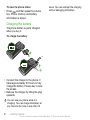
To charge the battery
1
2
1 Connect the charger to the phone. It
takes approximately 2.5 hours to fully
charge the battery. Press a key to view
the screen.
2 Remove the charger by tilting the plug
upwards.
You can use your phone while it is
charging. You can charge the battery at
any time and for more or less than 2.5
8
Getting started
This is an Internet version of this publication. © Print only for private use.
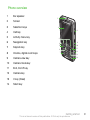
Phone overview
1
Ear speaker
2
Screen
3
Selection keys
4
Call key
5
Activity menu key
6
Navigation key
7
Keylock key
8
Volume, digital zoom keys
9
Camera view key
10
Camera mode key
11
End, On/off key
12
Camera key
13
C key (Clear)
14
Silent key
1
2
8
3
9
4
5
10
6
11
12
7
13
14
Getting started
This is an Internet version of this publication. © Print only for private use.
9
15
Flash
16
Camera lens
17
Retractable lens cover
18
Memory card slot (under the cover)
19
Connector for charger, handsfree and USB cable
20
Loudspeaker
21
Strap holder
18
15
16
17
19
20
21
10
Getting started
This is an Internet version of this publication. © Print only for private use.
Menu overview*
PlayNow™*
Cyber-shot™
Alarms
Calls**
All
Answered
Applications
Video call
Calendar
Tasks
Notes
Synchronisation
Timer
Stopwatch
Calculator
Code memo
Entertainment
Dialled
Missed
Internet
Messaging
Write new
Inbox/Conversations*
Messages
Email
IM*
Call voicemail
Contacts
Myself
New contact
Organiser
File manager **
Online services*
TrackID™
Location services
Games
VideoDJ™
PhotoDJ™
MusicDJ™
Remote control
Record sound
Demo tour
Media
Photo
Music
Video
Games
Web feeds
Settings
Radio
Settings
General
Profiles
Time & date
Language
Update service
Voice control
New events
Shortcuts
Flight mode
Security
Setup wizard
Accessibility
Phone status
Master reset
Sounds & alerts
Ring volume
Ringtone
Silent mode
Increasing ring
Vibrating alert
Message alert
Key sound
Display
Wallpaper
Main menu layout
Theme
Startup screen
Screen saver
Clock size
Brightness
Edit line names
Getting started
This is an Internet version of this publication. © Print only for private use.
11
Calls
Speed dial
Smart search
Divert calls
Switch to line 2
Manage calls
Time & cost
Show/hide my no.
Handsfree
Connectivity
Bluetooth
USB
Phone name
Synchronisation
Device management
Mobile networks
Data communication*
Internet settings
Streaming settings
Message settings*
SIP settings
Accessories
User help
User guide
Settings download
Basic setup
Tips and tricks
* Some menus are operator-,
network- and subscriptiondependent.
** You can use the navigation
key to scroll between tabs in
submenus. For more
information, see Navigation
on page 13.
12
Getting started
This is an Internet version of this publication. © Print only for private use.
Navigation
To access the main menu
• When Menu appears on the screen,
press the centre selection key to select
Menu.
• If Menu does not appear on the screen,
, and then press the centre
press
selection key to select Menu.
To navigate the phone menus
To return to standby
• Press
.
To navigate your media
1 Select Menu > Media.
2 Scroll to a menu item and press
3 To go back, press .
.
To delete items
• Press
to delete items such as
numbers, letters, pictures and sounds.
Tabs
Tabs may be available. For example,
Calls have tabs.
• Press the navigation key , ,
move through the menus.
or
to
To select actions on the screen
• Press the left, centre or right selection
key.
To view options for an item
• Select Options to, for example, edit.
To end a function
• Press
.
To scroll between tabs
• Press the navigation key
or
.
Shortcuts
You can use keypad shortcuts to go
directly to functions from standby.
To use navigation key shortcuts
• Press , , or to go directly to a
function.
Getting started
This is an Internet version of this publication. © Print only for private use.
13
To edit a navigation key shortcut
1 Select Menu > Settings > General >
Shortcuts.
2 Scroll to an option and select Edit.
3 Scroll to a menu option and select
Shortc..
Main menu shortcuts
Menu numbering starts from the top left
icon and moves across and then down
row by row.
To go directly to a main menu item
• Select Menu and press
–
,
,
or
.
To open the activity menu
• Press
.
Memory
You can save content on the memory
card, in the phone memory and on the
SIM card. Photos and music are saved
on the memory card, if a memory card
is inserted. If not, or if the memory card
is full, photos and music are saved in
the phone memory. Messages and
contacts are saved in the phone
memory, but you can choose to save
them on the SIM card.
The Main menu layout must be set to
Grid. See To change the main menu
layout on page 56.
Memory card
Activity menu
The activity menu gives you quick
access to:
Your phone supports Memory Stick
Micro™ (M2™) memory card adding
more storage space to your phone. It
can also be used as a portable memory
card with other compatible devices.
• New events – missed calls and new
messages.
• Running apps – applications that are
running in the background.
• My shortcuts – add your favourite
functions to access them quickly.
• Internet – quick access to the
Internet.
14
You may have to purchase a memory card
separately.
You can move content between a
memory card and the phone memory.
See Handling content in the phone on
page 36.
Getting started
This is an Internet version of this publication. © Print only for private use.
To insert a memory card
To shift between capitals and lowercase letters
• When you enter text, press
.
To enter numbers
• When you enter text, press and hold
down
–
.
• Remove the battery cover and insert
the memory card with the goldcoloured contacts facing down.
Phone language
You can select a language to use in
your phone.
To change the phone language
1 Select Menu > Settings > General >
Language > Phone language.
2 Select an option.
Entering text
You can use multitap text input or T9™
to enter text. The T9 Text
Text Input
Input method uses a built-in dictionary.
To change text input method
• When you enter text, press and hold
down
.
To enter full stops and commas
• When you enter text, press
.
To enter a symbol
1 When you enter text, select Options >
Add symbol.
2 Scroll to a symbol and select Insert.
To enter text using T9™ Text Input
1 Select, for example, Menu >
Messaging > Write new > Message.
2 If
is not displayed, press and hold
down
to change to T9 Text Input.
3 Press each key only once, even if the
letter you want is not the first letter on
the key. For example, to write the word
“Jane”, press
,
,
,
. Write
the whole word before looking at the
suggestions.
4 Use or to view suggestions.
5 Press
to accept a suggestion.
Getting started
This is an Internet version of this publication. © Print only for private use.
15
To enter text using multitap
1 From standby select, for example,
Menu > Messaging > Write new >
Message.
2 If
is displayed, press and hold down
to change to multitap text input.
3 Press
–
repeatedly until the
desired letter appears.
4 When a word is written, press
to
add a space.
To add words to the built-in dictionary
1 When you enter text using T9 Text
Input, select Options > Spell word.
2 Write the word using multitap input and
select Insert.
Calling
Making and receiving calls
You need to turn on your phone and be
within range of a network.
To make a call
1 Enter a phone number (with
international country code and area
code, if applicable).
2 Press
.
You can call numbers from your contacts
and call list. See Contacts on page 18,
and Call list on page 18.
To end a call
• Press
.
To make international calls
1 Press and hold down
until a “+”
sign appears.
2 Enter the country code, area code
(without the first zero) and phone
number.
3 Press
.
To re-dial a number
• When Retry? appears select Yes.
Do not hold your phone to your ear when
waiting. When the call connects, your
phone gives a loud signal.
16
Calling
This is an Internet version of this publication. © Print only for private use.
To answer a call
• Press
.
To reject a call
• Press
.
To change the ear speaker volume
during a call
• Press the volume key up or down.
To mute the microphone during a call
1 Press and hold down
.
2 Press and hold down
again to
resume.
To turn on the loudspeaker during a
call
• Press SpkrOn.
Do not hold your phone to your ear when
using the loudspeaker. This could
damage your hearing.
To view missed calls
• Press
to open the call list.
Networks
Your phone switches automatically
between GSM and 3G (UMTS)
networks depending on availability.
Some network operators allow you to
switch networks manually.
To switch networks manually
1 Select Menu > Settings > Connectivity >
Mobile networks > GSM/3G networks.
2 Select an option.
Emergency calls
Your phone supports international
emergency numbers, for example, 112
or 911. You can normally use these
numbers to make emergency calls in
any country, with or without the SIM
card inserted, if you are within range of
a network.
In some countries, other emergency
numbers may also be promoted. Your
network operator may therefore have
saved additional local emergency
numbers on the SIM card.
To make an emergency call
• Enter 112 (the international emergency
number) and press
.
To view your local emergency
numbers
1 Select Menu > Contacts.
2 Scroll to New contact and select
Options > Special numbers >
Emergency nos..
Calling
This is an Internet version of this publication. © Print only for private use.
17
Video call
You can share experiences with friends
and family as they happen or save them
to share later. You see the person you
are talking to on your screen. The other
person sees what is on your camera.
To view video call options
• During the call, select Options.
Before making video calls
3G (UMTS) service is available when
appears. To make a video call, both
parties on the call must have a 3G
(UMTS) phone subscription that
supports 3G (UMTS) service and 3G
(UMTS) coverage.
To call a number from the call list
1 Press
and scroll to a tab.
2 Scroll to a name or a number and press
.
To make a video call
1 Enter a phone number (with
international country code and area
code, if applicable).
2 Select Options > Make video call.
To use the zoom with an outgoing
video call
• Press or .
To share photos and videos during a
video call
1 During a video call, press to switch
to the video share mode tab.
2 Scroll to a video clip or photo and
select Share.
18
Call list
You can view information about recent
calls.
Contacts
You can save names, phone numbers
and personal information in Contacts.
Information can be saved in the phone
memory or on the SIM card.
You can synchronise your contacts using
the Sony Ericsson PC Suite.
Default contacts
You can choose which contact
information is shown as default. If
Phone contacts is selected as default,
your contacts show all the information
saved in Contacts. If you select SIM
contacts as default, your contacts
show names and numbers saved on
the SIM card.
To select default contacts
1 Select Menu > Contacts.
Calling
This is an Internet version of this publication. © Print only for private use.
2 Scroll to New contact and select
Options > Advanced > Default contacts.
3 Select an option.
Phone contacts
Phone contacts can contain names,
phone numbers and personal
information. They are saved in the
phone memory.
To add a phone contact
Select Menu > Contacts.
Scroll to New contact and select Add.
Enter the name and select OK.
Scroll to New number: and select Add.
Enter the number and select OK.
Select a number option.
Scroll between the tabs and add
information to the fields.
8 Select Save.
1
2
3
4
5
6
7
Calling contacts
To call a contact
1 Select Menu > Contacts.
2 Scroll to a contact and press
match the sequence of digits or
corresponding letters are shown in a
list.
2 Scroll to a contact or a phone number
and press
.
To turn on or off Smart search
1 Select Menu > Settings > Calls > Smart
search.
2 Select an option.
Editing contacts
1
2
3
4
5
.
To go directly to the contacts list
• Press and hold down
–
.
To call with Smart search
1 Press
–
to enter a sequence of
(at least two) digits. All entries which
To add information to a phone
contact
Select Menu > Contacts.
Scroll to a contact and select Options >
Edit contact.
Scroll between the tabs and select
Add or Edit.
Select an option and an item to add or
edit.
Select Save.
If your subscription supports Calling Line
Identification (CLI) service, you can
assign personal ringtones and pictures to
contacts.
To copy names and numbers to
phone contacts
1 Select Menu > Contacts.
2 Scroll to New contact and select
Options > Advanced > Copy from SIM.
Calling
This is an Internet version of this publication. © Print only for private use.
19
3 Select an option.
To copy names and numbers to the
SIM card
1 Select Menu > Contacts.
2 Scroll to New contact and select
Options > Advanced > Copy to SIM.
3 Select an option.
When you copy all contacts from your
phone to the SIM card, all existing SIM
card information is replaced.
To automatically save names and
phone numbers on the SIM card
1 Select Menu > Contacts.
2 Scroll to New contact and select
Options > Advanced > Auto save on
SIM.
3 Select an option.
To save contacts on a memory card
1 Select Menu > Contacts.
2 Scroll to New contact and select
Options > Advanced > Back up to m.
card.
SIM contacts
SIM contacts can contain names and
numbers only. They are saved on the
SIM card.
To add a SIM contact
1 Select Menu > Contacts.
20
Scroll to New contact and select Add.
Enter the name and select OK.
Enter the number and select OK.
Select a number option and add more
information, if available.
6 Select Save.
2
3
4
5
Deleting contacts
To delete all contacts
1 Select Menu > Contacts.
2 Scroll to New contact and select
Options > Advanced > Delete all
contacts.
3 Select an option.
Contact memory status
The number of contacts you can save
in your phone or on the SIM card
depends on available memory.
To view contact memory status
1 Select Menu > Contacts.
2 Scroll to New contact and select
Options > Advanced > Memory status.
Myself
You can enter information about
yourself and, for example, send your
business card.
To enter Myself information
1 Select Menu > Contacts.
Calling
This is an Internet version of this publication. © Print only for private use.
2 Scroll to Myself and select Open.
3 Scroll to an option and edit the
information.
4 Select Save.
6 For each contact phone number or
email address you want to mark, scroll
to it and select Mark.
7 Select Continue > Done.
To add your own business card
1 Select Menu > Contacts.
2 Scroll to Myself and select Open.
3 Scroll to My contact info and select
Add > Create new.
4 Scroll between the tabs and add
information to the fields.
5 Enter the information and select Save.
Groups
You can create a group of phone
numbers and email addresses from
Phone contacts to send messages to.
See Messaging on page 41. You can
also use groups (with phone numbers)
when you create accepted callers lists.
See Accept calls on page 24.
1
2
3
4
5
To create a group of numbers and
email addresses
Select Menu > Contacts.
Scroll to New contact and select
Options > Groups.
Scroll to New group and select Add.
Enter a name for the group and select
Continue.
Scroll to New and select Add.
Speed dial
Speed dialling lets you select nine
contacts that you can dial quickly from
standby. The contacts can be saved in
positions 1-9.
1
2
3
4
To add contacts to speed dial
numbers
Select Menu > Contacts.
Scroll to New contact and select
Options > Speed dial.
Scroll to a position number and select
Add.
Select a contact.
To speed dial
• Enter the position number and press
.
More calling features
Voicemail
If your subscription includes an
answering service, callers can leave a
voicemail message when you cannot
answer a call.
Calling
This is an Internet version of this publication. © Print only for private use.
21
To enter your voicemail number
1 Select Menu > Messaging > Messages
> Settings > the Message settings tab >
Voicemail number.
2 Enter the number and select OK.
To call your voicemail service
• Press and hold down
.
Voice control
By creating voice commands you can:
• Voice dial – call someone by saying
their name
• Answer and reject calls when you
use a handsfree
1
2
3
4
To record a voice command using
voice dialling
Select Menu > Settings > General >
Voice control > Voice dialling > Activate.
Select Yes > New voice command and
select a contact. If the contact has
more than one number, select the
number to add the voice command to.
Record a voice command such as
“John mobile.”
Follow the instructions that appear.
Wait for the tone and say the command
to record. The voice command is
played back to you.
22
5 If the recording sounds OK, select Yes.
If not, select No and repeat steps 3 and
4.
Voice commands are saved in the phone
memory only. They cannot be used in
another phone.
To voice dial
1 Press and hold down a volume key.
2 Wait for the tone and say a recorded
name, for example “John mobile.” The
phone plays the name back to you and
connects the call.
Diverting calls
You can divert calls, for example, to an
answering service.
When Restrict calls is used, some divert
call options are not available. See
Restricted dialling on page 24.
To divert calls
1 Select Menu > Settings > Calls > Divert
calls.
2 Select a call type and a divert option.
3 Select Activate.
4 Enter the number to divert calls to and
select OK.
More than one call
You can handle more than one call at a
time. For example, you can put an
Calling
This is an Internet version of this publication. © Print only for private use.
ongoing call on hold, while you make or
answer a second call. You can also
switch between the two calls. You
cannot answer a third call without
ending one of the first two calls.
Call waiting
You will hear a beep if you receive a
second call while call waiting is active.
To activate call waiting
• Select Menu > Settings > Calls >
Manage calls > Call waiting > Activate.
To make a second call
1 During the call, press
. This puts the
ongoing call on hold.
2 Select Options > Add call.
3 Enter the number to call and press
.
To answer a second call
• During the call, press
. This puts the
ongoing call on hold.
To reject a second call
• During the call, press
and continue
with the ongoing call.
To end an ongoing call and answer a
second call
• During the call, select Replace active
call.
Handling two voice calls
You can have calls ongoing and on
hold at the same time.
To switch between two calls
• During the call, press
.
To join two calls
• During the call, select Options > Join
calls.
To connect two calls
• During the call, select Options >
Transfer call. You are disconnected
from both calls.
To end an ongoing call and return to
the call on hold
• First press
and then
.
Conference calls
With a conference call, you can have a
joint conversation with up to five
people.
To add a new participant
1 During the call, press
. This puts the
joined calls on hold.
2 Select Options > Add call.
3 Enter the number to call and press
.
4 Select Options > Join calls to add the
new participant.
Calling
This is an Internet version of this publication. © Print only for private use.
23
5 Repeat this task to add more
participants.
To release a participant
1 Select Options > Release party.
2 Select the participant to release.
To have a private conversation
1 During the call, select Options > Talk
to and select the participant to talk to.
2 To resume the conference call, select
Options > Join calls.
My numbers
You can view, add and edit your own
phone numbers.
To check your phone numbers
1 Select Menu > Contacts.
2 Scroll to New contact and select
Options > Special numbers > My
numbers.
3 Select an option.
Accept calls
You can choose to receive calls from
certain phone numbers only.
To add numbers to the accepted
callers list
1 Select Menu > Settings > Calls >
Manage calls > Accept calls > Only from
list.
24
2 Scroll to New and select Add.
3 Select a contact or Groups.
See Groups on page 21.
To accept all calls
• Select Menu > Settings > Calls >
Manage calls > Accept calls > All
callers.
Restricted dialling
You can restrict outgoing and incoming
calls. A password from your service
provider is required.
If you divert incoming calls, you cannot
use some restrict calls options.
Restrict calls options
Standard options are:
• All outgoing – all outgoing calls
• Outgoing intl – all outgoing
international calls
• Outgoing intl roam. – all outgoing
international calls except to your
home country
• All incoming – all incoming calls
• Inc. when roaming – all incoming calls
when you are abroad
To restrict calls
1 Select Menu > Settings > Calls >
Manage calls > Restrict calls.
Calling
This is an Internet version of this publication. © Print only for private use.
2 Select an option.
3 Select Activate.
4 Enter your password and select OK.
Call time and cost
During a call, the phone shows how
long you have been talking. You can
also check on the duration of your last
call, your outgoing calls and the total
time of all your calls.
Cyber-shot™
You can take photos and record video
clips to view, save or send. You find
saved photos and video clips in Media
and in File manager.
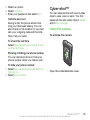
Using the camera
To activate the camera
To check the call time
• Select Menu > Settings > Calls > Time &
cost > Call timers.
Showing or hiding your phone number
You can decide to show or hide your
phone number when you make a call.
To hide your phone number
1 Select Menu > Settings > Calls > Show/
hide my no..
2 Select Hide number.
• Open the retractable lens cover.
Cyber-shot™
This is an Internet version of this publication. © Print only for private use.
25
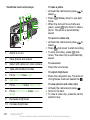
Viewfinder and camera keys
2
3
4
5
6
7
8
1
9
10
1
Zoom in or out
2
View photos and videos
3
Select still camera or video camera
4
Take photos/Record video
5
Photo: Flash Video: Light
6
Self-timer
7
Photo: Scenes Video: Night mode
8
Photo: Shoot mode Video: Video
length
9
Decrease brightness
To take a photo
1 Activate the camera and press
to
select .
2 Press
halfway down to use auto
focus.
3 When the dot and focus frame are
green, press
fully down to take a
photo. The photo is automatically
saved.
To record a video clip
1 Activate the camera and press
to
select .
2 Press
fully down to start recording.
3 To stop recording, press
fully
down. The video clip is automatically
saved.
To use zoom
• Press the volume key.
To adjust brightness
• Press the navigation key. The amount
of brightness is shown beside the .
To view photos and video clips
1 Activate the camera and press
.
2 Scroll to the item.
3 To view a video clip, press the centre
selection key.
10 Increase brightness
26
Cyber-shot™
This is an Internet version of this publication. © Print only for private use.
More camera features
To change settings
• Activate the camera and select
selected when auto-focus is used.
Focus is set to the face closest to the
camera.
.
To view information about settings
• Scroll to a setting and select .
Photo fix
You can use Photo fix to improve
photos. In a one-click operation,
brightness, light and contrast are
adjusted to give you the best possible
photo. The improvements are saved as
a copy of the photo. The original photo
is not affected.
To set face detection
1 Activate the camera and press
to
select .
2 Select > Focus > Face detection.
Smile Shutter™
Smile Shutter allows you to capture the
smiles of family and friends. The
camera detects up to three faces and
selects one face for smile detection
and auto focus. A yellow frame shows
which face is selected. When the
selected face smiles, the camera
automatically takes a photo.
To improve a photo with Photo fix
1 Activate the camera and press
to
select .
2 Make sure Review is set to On. Select
> Settings and scroll to Review > On.
Select to return to the viewfinder.
3 Take a photo.
4 During review, select Options > Photo
fix.
To set Smile Shutter™
1 Activate the camera and press
to
select .
2 Select > Shoot mode > Smile
Shutter™.
3 When appears, the camera is in Smile
Shutter mode.
Face detection
You can use face detection to bring an
off-centre face into focus. The camera
automatically detects up to three faces,
indicated by white frames. A green
frame shows which face has been
To use Smile Shutter™
1 Activate the camera and press
to
select .
2 When you see the yellow frame, press
fully down. When appears, smile
detection is activated.
Cyber-shot™
This is an Internet version of this publication. © Print only for private use.
27
3 The camera automatically takes the
photo when the subject smiles.
4 To take a photo although no smile is
detected, press
fully down again.
BestPic™
You can take a series of photos with
one press of the camera key. Then you
can save the best photo, or all of them.
To use BestPic™
1 Activate the camera and press
to
select .
2 Select > Shoot mode > BestPic™.
3 Press
halfway down to use auto
focus.
4 When the dot and focus frame are
green, press
fully down to
complete the shot.
5 Select Options > Save all or press the
navigation key left or right to choose
the best photo and select Save.
Viewing and tagging photos
To view photos in a slide show
1 Select Menu > Media > Photo > Camera
album.
2 Select a month.
3 Scroll to a photo and select View.
4 Select Options > Slide show.
5 Select a mood.
28
Viewing photos on a map
When you take a photo, you can attach
your geographical position to it. This is
called geo tagging. Geo-tagged photos
are tagged with in Media.
To view photos on a map
1 Select Menu > Media > Photo > Camera
album.
2 Select a month.
3 Scroll to a photo and select View.
4 Select Options > View on map.
To view photos on a map, you need a
subscription that supports data
transmission and Internet settings in your
phone. You can download Internet
settings using the setup wizard or from
www.sonyericsson.com/support.
To change the geo tagging setting
1 Activate the camera and press
to
select .
2 Select > Settings > Add position.
3 Select an option.
Photo tags
You can tag photos to categorise them
in Photo tags. For example, you can
create a tag called vacation and add it
to all your vacation photos.
Cyber-shot™
This is an Internet version of this publication. © Print only for private use.
To create a new photo tag
1 Select Menu > Media > Photo > Camera
album.
2 Select a month.
3 Scroll to a photo and select View.
4 Press and select Options > New tag.
5 Enter a name and select OK.
6 Select an icon.
7 To tag the photo, select Options > Tag
this photo.
1
2
3
4
5
6
To tag photos
Select Menu > Media > Photo > Camera
album.
Select a month.
Scroll to a photo and select View.
Press and scroll to a tag.
Select Options > Tag this photo.
For each photo you want to tag, scroll
to the photo and select Options > Tag
this photo.
Using photos
You can add a photo to a contact, use
it during phone startup, as a wallpaper
in standby or as a screen saver.
1
2
3
4
To use photos
Select Menu > Media > Photo > Camera
album.
Select a month.
Scroll to a photo and select View.
Select Options > Use as.
5 Select an option.
Working with photos
You can view, enhance and organise
your photos and video clips on your
computer by installing the Adobe™
Photoshop™ Album Starter Edition. It
is available for download at
www.sonyericsson.com/support.
Use Media Go™ to transfer content to
and from your phone. For more
information, see Transferring content
to and from a computer on page 38.
PhotoDJ™ and VideoDJ™
You can edit photos and video clips.
To edit and save a photo
1 Select Menu > Media > Photo > Camera
album.
2 Select a month.
3 Scroll to a photo and select View.
4 Select Options > Edit in PhotoDJ™.
5 Edit the photo.
To edit and save a video clip
1 Select Menu > Organiser > File
manager > Videos.
2 Scroll to a video clip and select
Options > Edit in VideoDJ™.
3 Edit the video clip.
4 Select Options > Save.
Cyber-shot™
This is an Internet version of this publication. © Print only for private use.
29
To trim a video clip
1 Select Menu > Organiser > File
manager > Videos.
2 Scroll to a video clip and select
Options > Edit in VideoDJ™ > Edit >
Trim.
3 Select OK > Set > Start to set the
starting point.
4 Select Set > End to set the ending
point.
5 Select Trim > Options > Save.
Sending content to a Web site
If your subscription supports this
service, you can send photos or video
clips to a Web site. If you cannot send
content to a Web site, see I cannot use
Internet-based services on page 61.
1
2
3
4
5 Select a Web site from the list or select
New Web site > Add.
6 Enter the email address used for
sending to the Web site.
7 Enter the Web address and title.
8 Select Save.
9 Select a Web site from the list.
10 Enter text.
11 Select Continue > Send.
1
2
3
4
To send video clips saved in your
phone to a Web site
Select Menu > Media > Video > Videos.
Scroll to a video clip and select
Options > Send > To Web site.
Select a Web site from the list or select
New Web site > Add.
Enter the email address used for
sending to the Web site.
Enter the Web address and title.
Select Save.
Select a Web site from the list.
Enter text.
Select Continue > Send.
Web services may require a separate
license agreement between you and the
service provider. Additional regulations
and charges may apply. Contact your
service provider.
5
6
7
8
9
To send photos saved in your phone
to a Web site
Select Menu > Media > Photo > Camera
album.
Select a month.
Scroll to a photo and select View.
Select Options > Send > To Web site.
To send photos or video clips you
have just taken to a Web site
1 When you have taken a photo or
recorded a video clip, select Send > To
Web site.
2 Select a Web site from the list or select
New Web site > Add.
30
Cyber-shot™
This is an Internet version of this publication. © Print only for private use.
3 Enter the email address used for
sending to the Web site.
4 Enter the Web address and title.
5 Select Save and select the Web site.
6 Enter text.
7 Select Continue > Send.
7 Scroll to a photo and select Options >
Print.
You should disconnect and re-connect
the USB cable if there is a printer error.
To go to a Web address from contacts
1 Select Menu > Contacts.
2 Scroll to a contact and select Open.
3 Scroll to a Web address and select Go
to.
Printing photos
You can print photos using a USB
cable connected to a PictBridge™
compatible printer.
You can also print using a Bluetooth
compatible printer that supports the
Object Push Profile.
To print photos using a USB cable
1 Connect a USB cable to the phone.
2 Connect the USB cable to the printer.
3 Wait for feedback in the phone and
select OK.
4 Enter printer settings (if required) and
select Print.
5 Select Menu > Media > Photo > Camera
album.
6 Select a month.
Cyber-shot™
This is an Internet version of this publication. © Print only for private use.
31
Music
3 Scroll to a title and select Play.
You can listen to music, audio books
and podcasts. Use Media Go™ to
transfer content to and from your
phone. For more information, see
Transferring content to and from a
computer on page 38.
To stop playing music
• Press the centre selection key.
Stereo portable handsfree
To fast forward and rewind
• Press and hold down or .
To move between tracks
• Press or .
To change the volume
• Press the volume key up or down.
To minimise the player
• Select Options > Minimise.
To return to the player
• Select Menu > Media.
To use a handsfree
• Connect a portable handsfree. Music
stops when you receive a call and
resumes when the call has ended.
Music player
To play music
1 Select Menu > Media > Music.
2 Browse by category using the
navigation key.
32
Playlists
You can create playlists to organise
your music. You can add tracks and
folders to a playlist. It may take a few
minutes for the phone to create a
playlist.
To create a playlist
1 Select Menu > Media > Music >
Playlists.
2 Scroll to New playlist and select Add.
3 Enter a name and select OK.
Music
This is an Internet version of this publication. © Print only for private use.
4 For each track you want to add, scroll
to the track and select Mark.
5 Select Add to add the marked tracks to
the playlist.
Audio books
If you use Media Go™ to transfer audio
books to your phone from a computer,
you can listen to the audio books in
your phone. It may take a few minutes
before a transferred audio book
appears in the list of available audio
books.
To access audio books
• Select Menu > Media > Music > Audio
books.
You can find audio books in formats
other than M4B and those that do not
have ID3v2 chapter tags in the Tracks
folder.
Buy Now
If you subscribe to a music service
allowing limited, non-permanent use
with your phone, you can mark a track
you are interested in buying later. The
next time you synchronise your music
with Windows Media® Player on a
computer with enabled Internet
access, you should be asked if you
want to buy the track you marked
earlier. If you accept, the track is
downloaded to your computer and
your selected music service account is
charged. This service requires a
subscription and account with a
downloadable music service, a
computer with Microsoft® Windows
Media® Player 11 or subsequent
compatible version of Windows
Media® Player, and a USB computer
connection.
You cannot see that a track is marked.
You cannot unmark tracks you have
already marked.
To mark a track
• When the track you want to mark is
playing, press and hold down
.
PlayNow™
When you select PlayNow™ you enter
PlayNow™ arena, where you can
download music, games, ringtones,
themes and wallpapers. You can
preview or listen to content before you
purchase and download it to your
phone. If you cannot use PlayNow™
and PlayNow™ arena, see I cannot use
Internet-based services on page 61.
This service is not available in all
countries.
Music
This is an Internet version of this publication. © Print only for private use.
33
For extended functionality, you can
also access the PlayNow™ arena Web
shop on a computer from
www.playnow-arena.com. For more
information, go to
www.sonyericsson.com/support to
read the PlayNow™ arena Feature
guide.
To use PlayNow™
1 Select Menu > PlayNow™.
2 Scroll through PlayNow™ arena and
follow the instructions to preview and
purchase content.
TrackID™
TrackID™ is a music recognition
service. You can search for title, artist
and album name for a track you hear
playing through a loudspeaker or on
the radio in your phone. If you cannot
use TrackID™, see I cannot use
Internet-based services on page 61.
To search for track information
• When you hear a track through a
loudspeaker, select Menu >
Entertainment > TrackID™ > Start.
• When the radio in your phone is playing
select Options > TrackID™.
For best results, use TrackID™ in a quiet
area.
34
Online music and video clips
You can view video clips and listen to
music by streaming them to your phone
from the Internet. If you cannot use the
Internet, see I cannot use Internetbased services on page 61.
To select a data account for
streaming
1 Select Menu > Settings > Connectivity >
Streaming settings > Connect using:.
2 Select the data account to use.
3 Select Save.
To stream music and video clips
1 Select Menu > Internet.
2 Select Options > Go to > Bookmarks.
3 Select a link to stream from.
Video player
To play videos
1 Select Menu > Media > Video > Videos.
2 Scroll to a title and select Play.
To stop playing videos
• Press the centre selection key.
To fast forward and rewind
• Press and hold down or .
To move between videos
• Press or .
Music
This is an Internet version of this publication. © Print only for private use.
To change the volume
• Press the volume key up or down.
To change the video screen size
1 Select Options > Video size.
2 Select an option.
To save a picture from a video clip
1 To pause the video clip, press the
centre selection key.
2 To save the paused image as a picture,
select Options > Save picture.
Radio
Do not use your phone as a radio in places
where this is prohibited.
To turn on the radio
1 Connect a handsfree to the phone.
2 Select Menu > Radio.
To search for channels automatically
• Select Search.
To search for channels manually
• Press or .
To change the volume
• Press the volume key up or down.
To minimise the radio
• Select Options > Minimise.
To return to the radio
• Select Menu > Radio.
Saving channels
You can save up to 20 preset channels.
To save channels automatically
• Select Options > Auto save.
To save channels manually
1 When you have found a radio channel,
select Options > Save.
2 Scroll to a position and select Insert.
To select saved channels
1 Select Options > Channels.
2 Select a radio channel.
To switch between saved channels
• Press or .
MusicDJ™
You can compose and edit your own
melodies to use as ringtones. Prearranged sounds with different
characteristics are available.
To compose a melody
1 Select Menu > Entertainment >
MusicDJ™.
2 Select to Insert, Copy or Paste sounds.
3 Use , , or to scroll between the
sounds.
Music
This is an Internet version of this publication. © Print only for private use.
35
Transferring and
handling content
4 Select Options > Save melody.
Record sound
You can transfer and handle content
such as pictures and music.
You can record a voice memo or a call.
Recorded sounds can also be set as
ringtones.
You are not allowed to exchange some
copyright-protected material. identifies
a protected item.
In some countries or states it is required
by law that you inform the other person
before recording the call.
Handling content in the phone
To record a sound
• Select Menu > Entertainment > Record
sound > Record.
To record a call
1 During an ongoing call, select Options
> Record.
2 To save the recording, select Save.
To listen to a recording
1 Select Menu > Organiser > File
manager.
2 Scroll to Music and select Open.
3 Scroll to a recording and select Play.
You can use File manager to handle
content saved in the phone memory or
on a memory card. Tabs and icons in
File manager show where the content is
saved. If the memory is full, delete
some content to create space.
To view memory status
1 Select Menu > Organiser > File
manager.
2 Select Options > Memory status.
3 Select Memory card or Phone.
1
2
3
4
36
To select more than one item in a
folder
Select Menu > Organiser > File
manager.
Scroll to a folder and select Open.
Select Options > Mark > Mark several.
For each item you want to mark, scroll
to the item and select Mark.
Transferring and handling content
This is an Internet version of this publication. © Print only for private use.
1
2
3
4
5
To move items between the phone
memory and the memory card
Select Menu > Organiser > File
manager.
Find an item and select Options >
Manage file > Move.
Select Memory card or Phone.
Scroll to a folder and select Open.
Select Paste.
To view information about content
1 Select Menu > Organiser > File
manager.
2 Find an item and select Options >
Information.
Sending content to another
phone
You can send content, for example, in
messages or using Bluetooth™
wireless technology.
To send content
1 Scroll to an item and select Options >
Send.
2 Select a transfer method.
Make sure the receiving device supports
the transfer method you select.
Using a USB cable
You can connect your phone to a
computer with a USB cable to
synchronise, transfer and back up
phone content and use your phone as
a modem. For more information, go to
www.sonyericsson.com/support to
read Feature guides.
You may have to purchase a USB cable
separately.
Before using a USB cable
See Required operating systems on
page 38.
Only use a USB cable supported by your
phone. Do not remove the USB cable
from your phone or computer during
transfer as this may corrupt the memory
card or the phone memory.
To disconnect the USB cable safely
1 Computer: Close any software that you
are using with your phone.
2 Disconnect the USB cable.
Drag and drop content
You can drag and drop content
between your phone, a memory card
and a computer in Microsoft Windows
Explorer.
Transferring and handling content
This is an Internet version of this publication. © Print only for private use.
37
To drag and drop content
1 Connect your phone to a computer
using a USB cable.
2 Phone: Select Media transfer. The
phone will remain activated during file
transfer.
3 Computer: Wait until the phone
memory and memory card appear as
external disks in Windows Explorer.
4 Drag and drop selected files between
the phone and the computer.
Transferring content to and
from a computer
You can use Media Go™ to transfer
media content between your phone
and a computer.
Media Go™ is available for download at
www.sonyericsson.com/support.
Required operating systems
You need one of these operating
systems to use Sony Ericsson PC
software:
• Microsoft® Windows Vista™
• Microsoft® Windows XP, Service
Pack 2 or higher
To download Media Go™
1 Computer: In your Internet browser, go
to www.sonyericsson.com/support.
38
2
3
4
5
Select a region and country.
Select Software downloads.
Select a phone from the list.
Select Read more and download under
Media Go™.
6 Select Download now and save the file
to your computer.
Remember where you save the file.
To install Media Go™ from the
downloaded file
1 Locate the downloaded Media Go™
file on the computer.
2 Double-click the file and follow the
instructions.
To transfer content using Media Go™
Do not remove the USB cable from your
phone or computer during transfer, as this
may corrupt the memory card or the
phone memory.
1 Connect the phone to a computer with
a USB cable supported by your phone.
2 Computer: Select Start/Programs/
Sony/Media Go™.
3 Phone: Select Media transfer.
4 Computer: Select Transfer to or from
Device using Media Go™ and click
OK.
5 Wait until the phone appears in Media
Go™.
Transferring and handling content
This is an Internet version of this publication. © Print only for private use.
6 Move files between your phone and the
computer in Media Go™.
Phone name
You can enter a name for your phone
that is shown to other devices when
using, for example, Bluetooth™
wireless technology.
To enter a phone name
1 Select Menu > Settings > Connectivity >
Phone name.
2 Enter the phone name and select OK.
Using Bluetooth™ wireless
technology
The Bluetooth™ function is free of
charge and makes wireless connection
to other Bluetooth devices possible.
You can, for example:
• Connect to handsfree devices.
• Connect to several devices at the
same time.
• Connect to computers and access
the Internet.
• Exchange items.
• Play multiplayer games.
A range within 10 metres (33 feet), with no
solid objects in between, is
recommended for Bluetooth
communication.
Before using Bluetooth wireless
technology
You must turn on the Bluetooth
function to communicate with other
devices. You may also have to pair your
phone with other Bluetooth devices.
To turn on the Bluetooth function
• Select Menu > Settings > Connectivity >
Bluetooth > Turn on.
Make sure that the device you want to pair
your phone with has the Bluetooth
function activated and Bluetooth visibility
turned on.
To pair the phone with a device
1 Select Menu > Settings > Connectivity >
Bluetooth > My devices.
2 Scroll to New device and select Add to
search for available devices.
3 Select a device.
4 Enter a passcode, if required.
To allow connection to the phone
1 Select Menu > Settings > Connectivity >
Bluetooth > My devices.
2 Select a device from the list.
3 Select Options > Allow connection.
4 Select Always ask or Always allow.
This is only possible with devices that
require access to a secure service.
Transferring and handling content
This is an Internet version of this publication. © Print only for private use.
39
To pair the phone with a Bluetooth
handsfree for the first time
1 Select Menu > Settings > Connectivity >
Bluetooth > Handsfree.
2 Select a device.
3 Enter a passcode, if required.
Power saving
You can save battery power with the
Power save function. In Power save
mode you can only connect with a
single Bluetooth device. If you want to
connect with more than one Bluetooth
device at the same time you must turn
this function off.
To turn on power save
• Select Menu > Settings > Connectivity >
Bluetooth > Power save > On.
Transferring sound to and from a
Bluetooth handsfree
You can transfer the sound to and from
a Bluetooth handsfree using a phone
key or the handsfree key.
To transfer sound
1 Select Menu > Settings > Connectivity >
Bluetooth > Handsfree > Incoming call.
2 Select an option. In phone transfers
sound to the phone. In handsfree
transfers sound to the handsfree.
40
You need to answer the call with the
phone key for this setting to apply.
To transfer sound during a call
1 During a call, select Sound.
2 Select from the list.
Backing up and restoring
You can backup and restore contacts,
the calendar, tasks, notes and
bookmarks using the Sony Ericsson PC
Suite.
Before backing up and restoring, you
need to install the Sony Ericsson PC
Suite, which is available from
www.sonyericsson/support.
You can backup and restore contacts
within your phone using a Memory
Stick Micro™ (M2™) memory card.
You can move content between the
memory card and the phone memory.
See Handling content in the phone on
page 36.
Back up your phone content regularly to
make sure you do not lose it.
To make a backup using the
Sony Ericsson PC Suite
1 Computer: Start the Sony Ericsson PC
Suite from Start/Programs/
Transferring and handling content
This is an Internet version of this publication. © Print only for private use.
Sony Ericsson/Sony Ericsson PC
Suite.
2 Follow the instructions in the
Sony Ericsson PC Suite for how to
connect.
3 Phone: Select Phone mode.
4 Computer: Go to the backup and
restore section in the Sony Ericsson PC
Suite and make a backup.
To restore phone content using the
Sony Ericsson PC Suite
The Sony Ericsson PC Suite will overwrite
all the phone content during the restore
process. You may damage your phone if
you interrupt the process.
1 Computer: Start the Sony Ericsson PC
Suite from Start/Programs/
Sony Ericsson/Sony Ericsson PC
Suite.
2 Follow the instructions in the
Sony Ericsson PC Suite for how to
connect.
3 Phone: Select Phone mode.
4 Computer: Go to the backup and
restore section in the Sony Ericsson PC
Suite and restore your phone.
Messaging
Text and picture messages
Messages can contain text, pictures,
sound effects, animations, and
melodies. You can also create and use
templates for your messages.
When sending messages, the phone
automatically selects the most suitable
method (as a text or picture message)
for sending the message.
If you cannot use picture messages,
see I cannot use Internet-based
services on page 61.
Sending messages
You can send messages from your
phone. The maximum size of a
standard text message is 160
characters including spaces if no other
items are added to the message. If you
enter more than 160 characters, a
second message is created. Your
messages are sent as one
concatenated message.
To create and send a message
1 Select Menu > Messaging > Write new
> Message.
Messaging
This is an Internet version of this publication. © Print only for private use.
41
2 Enter text. To add items to the
message, press , scroll and select
an item.
3 Select Continue > Contacts look-up.
4 Select a recipient and select Send.
If you send a message to a group, you
will be charged for each member.
To copy and paste text in a message
1 When you write the message, select
Options > Copy & paste.
2 Select Copy all or Mark & copy. Scroll to
and mark text in the message.
3 Select Options > Copy & paste > Paste.
Receiving and saving messages
You are notified when you receive a
message. Messages are automatically
saved in the phone memory. When the
phone memory is full, you can delete
messages or save them on a memory
card or on the SIM card.
To save an incoming message on a
memory card
• Select Menu > Messaging > Messages
> Settings > Save to > Memory card.
To save a message on the SIM card
1 Select Menu > Messaging > Messages
and select a folder.
42
2 Scroll to a message and select
Options > Save message.
To view a message from the inbox
1 Select Menu > Messaging > Inbox.
2 Scroll to the message and select View.
To call a number in a message
• When you view the message, scroll to
.
the phone number and press
Templates
If you often use the same phrases and
pictures in a message, you can save
the message as a template.
To add a message template
1 Select Menu > Messaging > Messages
> Templates > New template > Add.
2 Enter text. To add items to the
message, press , scroll and select
an item.
3 Select Save.
4 Enter a title and select OK.
To save a message as a template
1 Select Menu > Messaging > Inbox.
2 Scroll to the message and select View
> Options > Save as template.
Message options
You can set some options, such as the
Message alert and default storage
Messaging
This is an Internet version of this publication. © Print only for private use.
location, to apply to all messages. You
can set other options, such as the
Delivery priority and Delivery time, for
each message you send.
To set options for all messages
1 Select Menu > Messaging > Messages
> Settings.
2 Select an option.
To set options for a specific message
1 When the message is ready and a
recipient is selected, select Options >
Advanced.
2 Scroll to an option and select Edit.
Conversations
You can choose whether to view your
messages in Conversations or Inbox. A
messaging conversation shows all
messaging communication between
you and one of your contacts.
To view messages in Conversations
1 Select Menu > Messaging > Inbox > the
Conversations tab.
2 Select a conversation.
To send a message from
Conversations
1 Select Menu > Messaging >
Conversations.
2 Select a conversation.
3 Write a message and select Send.
Voice messages
You can send and receive a sound
recording as a voice message.
The sender and recipient must have a
subscription supporting picture
messaging.
To record and send a voice message
1 Select Menu > Messaging > Write new
> Voice message.
2 Record the message and select Stop >
Send > Contacts look-up.
3 Select a recipient and select Send.
Email
You can use standard email functions
and your computer email address in
your phone.
You can synchronise your email using
Microsoft® Exchange ActiveSync®.
Before using email
You can use the setup wizard to check
if settings are available for your email
account or you can enter them
manually. You can also receive settings
at www.sonyericsson.com/support.
Messaging
This is an Internet version of this publication. © Print only for private use.
43
To create an email account
1 To start the setup wizard, select Menu
> Messaging > Email.
2 Follow the instructions to create the
account.
To receive and read an email
message
1 Select Menu > Messaging > Email >
Inbox > Options > Check new email.
2 Scroll to the message and select View.
If you enter settings manually, you can
contact your email provider for more
information. An email provider could be
the company that supplied your email
address.
To save an email message
1 Select Menu > Messaging > Email >
Inbox.
2 Scroll to the message and select View
> Options > Save message.
To write and send an email message
1 Select Menu > Messaging > Email >
Write new.
2 Select Add > Enter email address. Enter
the email address and select OK.
3 To add more recipients, scroll to To:
and select Edit.
4 Scroll to an option and select Add >
Enter email address. Enter the email
address and select OK. When you are
ready, select Done.
5 Select Edit and enter a subject. Select
OK.
6 Select Edit and enter the text. Select
OK.
7 Select Add and choose a file to attach.
8 Select Continue > Send.
To reply to an email message
1 Select Menu > Messaging > Email >
Inbox.
2 Scroll to the message and select
Options > Reply.
3 Write the reply and select OK.
4 Select Continue > Send.
To view an attachment in an email
message
• When you view the message, select
Options > Attachments > Use > View.
Active email account
If you have several email accounts, you
can change which one is active.
To change the active email account
1 Select Menu > Messaging > Email >
Accounts.
2 Select an account.
44
Messaging
This is an Internet version of this publication. © Print only for private use.
Push email
You can receive notification in your
phone from your email server that you
have new email messages.
To turn on push email notification
• Select Menu > Messaging > Email >
Settings > Push email.
When using push email, the phone stays
connected to the email server and
normal traffic rates apply. Contact your
network operator for details.
Instant messaging
You can connect and log in to the
Instant messaging server to
communicate online using chat
messages. If you cannot use Instant
messaging, see I cannot use Internetbased services on page 61.
Before using Instant messaging
If no settings exist in your phone, you
need to enter server settings. Your
service provider can provide standard
settings information such as:
•
•
•
•
Username
Password
Server address
Internet profile
To enter Instant messaging server
settings
1 Select Menu > Messaging > IM >
Configure.
2 Scroll to a setting and select Add.
To log in to the Instant messaging
server
• Select Menu > Messaging > IM > Log
in.
To log out of the Instant messaging
server
• Select Options > Log out.
To add a chat contact
1 Select Menu > Messaging > IM > the
Contacts tab.
2 Select Options > Add contact.
To send a chat message
1 Select Menu > Messaging > IM > the
Contacts tab.
2 Scroll to a contact and select Chat.
3 Write the message and select Send.
Status
You can show your status, for example,
Happy or Busy, to your contacts only.
You can also show your status to all
users on the Instant messaging server.
Messaging
This is an Internet version of this publication. © Print only for private use.
45
To view my status
1 Select Menu > Messaging > IM.
2 You are the first contact listed.
To update your status
1 Select Menu > Messaging > IM > the
Contacts tab.
2 Scroll to your name and select
Change.
3 Edit the information and select Save.
Chat group
A chat group can be started by your
service provider, by an individual
Instant messaging user or by yourself.
You can save chat groups by saving a
chat invitation or by searching for a
specific chat group.
2 Select an option.
Conversation history is saved between
log out and when you log in again to let
you return to chat messages from
previous conversations.
To save a conversation
1 Select Menu > Messaging > IM > the
Conversations tab.
2 Enter a conversation.
3 Select Options > Advanced > Save
conversation.
To create a chat group
1 Select Menu > Messaging > IM > the
Chat groups tab.
2 Select Options > Add chat group > New
chat group.
3 Select who to invite from your contacts
list and select Continue.
4 Enter a short invitation text and select
Continue > Send.
To add a chat group
1 Select Menu > Messaging > IM > the
Chat groups tab > Options > Add chat
group.
46
Messaging
This is an Internet version of this publication. © Print only for private use.
Internet
History pages
If you cannot use the Internet, see I
cannot use Internet-based services on
page 61.
To start browsing
1 Select Search.
2 Enter a Web address, a search phrase
or the name of a bookmark.
3 Scroll to an item in the list and select
Go to or Search.
To exit the browser
• Select Options > Exit browser.
Bookmarks
You can create and edit bookmarks as
quick links to your favourite Web
pages.
You can view Web pages you have
browsed.
To view history pages
• Select Menu > Internet > Options > Go
to > History.
More browser features
To use pan and zoom on a Web page
1 When you browse the Internet, press
.
2 Use the navigation key to move the
frame.
3 Press Zoom.
4 To switch back to pan, press
.
To use pan and zoom, Smart-Fit must be
turned off.
To create a bookmark
1 When you browse the Internet, select
Options > Tools > Add bookmark.
2 Enter a title and an address. Select
Save.
To turn on or off Smart-Fit
Rendering™
1 Select Menu > Internet > Options >
Advanced > Smart-Fit.
2 Select an option.
To select a bookmark
1 Select Menu > Internet.
2 Select Options > Go to > Bookmarks.
3 Scroll to a bookmark and select Go to.
To make a call when you browse
• Press
.
To save a picture from a Web page
1 When you browse the Internet, select
Options > Tools > Save picture.
Internet
This is an Internet version of this publication. © Print only for private use.
47
2 Select a picture.
To find text on a Web page
1 Select Options > Tools > Find on page.
2 Enter text and select Find.
To send a link
1 When you browse the Internet, select
Options > Tools > Send link.
2 Select a transfer method.
Make sure the receiving device supports
the transfer method you select.
Internet keypad shortcuts
You can use the keypad to go directly
to an Internet browser function.
Key
Shortcut
Bookmarks
-
Enter text to Enter address,
Search Internet or search in
Bookmarks
Zoom
Pan & zoom (when Smart-Fit
is off)
To select Internet keypad shortcuts
1 Select Menu > Internet.
48
2 Select Options > Advanced > Keypad
mode > Shortcuts.
Internet security and
certificates
Your phone supports secure browsing.
Certain Internet services, such as
banking, require certificates in your
phone. Your phone may already
contain certificates when you buy it or
you can download new certificates.
To view certificates in the phone
• Select Menu > Settings > General >
Security > Certificates.
Web feeds
You can subscribe to and download
frequently updated content, such as
news, podcasts or photos, using Web
feeds.
To add new feeds for a Web page
1 When you browse a page on the
Internet that has Web feeds, indicated
by , select Options > Web feeds.
2 For each feed you want to add, scroll
to the feed and select Mark.
3 Select Continue.
To search for Web feeds
1 Select Menu > Media > Web feeds.
Internet
This is an Internet version of this publication. © Print only for private use.
2 Select New feed and enter a Web
address.
To download content via Web feeds
1 Select Menu > Media > Web feeds.
2 Scroll to an updated feed and select
View or
.
3 Select a heading to expand.
4 Select an icon depending on content,
to open a Web page, to download
an audio podcast, to download a
video podcast or to download a
photo.
You can also subscribe to and download
content to a computer via feeds using
Media Go™. You can then transfer the
content to your phone.
Updating Web feeds
You can manually update your feeds,
or schedule updates. When there are
updates, appears on the screen.
To schedule Web feed updates
1 Select Menu > Media > Web feeds.
2 Scroll to a feed and select Options >
Schedule update.
3 Select an option.
Frequent updates may be costly.
Web feeds in standby
You can show news updates on the
standby screen.
To show Web feeds in standby
1 Select Menu > Media > Web feeds.
2 Scroll to a feed and select Options >
Settings > Standby ticker > Show in
standby.
To access Web feeds from standby
1 Select Ticker.
2 To read more about a feed, press or
to scroll to a headline and select Go
to.
Podcasts
Podcasts are files, for example, radio
programmes or video content, that you
can download and play. You subscribe
to and download podcasts using Web
feeds.
To access audio podcasts
• Select Menu > Media > Music >
Podcasts.
To access video podcasts
• Select Menu > Media > Video >
Podcasts.
Internet
This is an Internet version of this publication. © Print only for private use.
49
Photo feeds
You can subscribe to Photo feeds and
download photos. To start using Photo
feeds, see Web feeds on page 48.
To access photo feeds
• Select Menu > Media > Photo > Photo
feeds.
YouTube™
You can watch video clips on your
phone by using the YouTube™ Java™
application. You can search for video
clips or upload your own videos.
To access YouTube
• Select Menu > Media > Video >
YouTube.
To upload videos to YouTube, you need
to access YouTube and follow the
instructions in the application.
Synchronising
You can synchronise in two different
ways. You can synchronise your phone
using a computer program or you can
synchronise using an Internet service.
Use only one of the synchronisation
methods at a time with your phone.
For more information, go to
www.sonyericsson.com/support to
read the Synchronisation Feature
guide.
Synchronising using a
computer
You can use a USB cable or Bluetooth
wireless technology to synchronise
phone contacts, appointments,
bookmarks, tasks and notes with a
computer program such as Microsoft
Outlook®.
Before synchronising, you need to
install the Sony Ericsson PC Suite.
Sony Ericsson PC Suite software is
available for download at
www.sonyericsson.com/support.
See Required operating systems on
page 38.
50
Synchronising
This is an Internet version of this publication. © Print only for private use.
To download Sony Ericsson PC Suite
1 Computer: In your Internet browser, go
to www.sonyericsson.com/support.
2 Select a region and country.
3 Select Software downloads.
4 Select a phone from the list.
5 Select Read more and download under
PC Suite.
6 Select Download now and save the file
to your computer.
Remember where you save the file.
To install Sony Ericsson PC Suite from
the downloaded file
1 Locate the downloaded Sony Ericsson
PC Suite file on the computer.
2 Double-click the file and follow the
instructions.
1
2
3
4
your phone, you can start
synchronising.
For usage details, see the
Sony Ericsson PC Suite Help section
once the software has been installed on
your computer.
Synchronising using an
Internet service
You can synchronise with an Internet
service using SyncML™ or a
Microsoft® Exchange Server using
Microsoft Exchange ActiveSync. For
more information, go to
www.sonyericsson.com/support to
read the Synchronisation Feature
guide.
To synchronise using the
Sony Ericsson PC Suite
Computer: Start Sony Ericsson PC
Suite from Start/Programs/
Sony Ericsson/Sony Ericsson PC
Suite.
Follow the instructions in the
Sony Ericsson PC Suite for how to
connect.
Phone: Select Phone mode.
Computer: When you are notified that
the Sony Ericsson PC Suite has found
Synchronising
This is an Internet version of this publication. © Print only for private use.
51
More features
Flight mode
In Flight mode the network and radio
transceivers are turned off to prevent
disturbance to sensitive equipment.
When the flight mode menu is activated
you are asked to select a mode the next
time you turn on your phone:
• Normal mode – full functionality
• Flight mode – limited functionality
To activate the flight mode menu
• Select Menu > Settings > General >
Flight mode > Continue > Show at
startup.
To select flight mode
1 When the flight mode menu is
activated, turn off your phone.
2 Turn on your phone and select Flight
mode.
Update Service
You can update your phone with the
latest software using your phone or a
PC.
Updating using your phone is not possible
in all countries/regions.
52
To view the current software in the
phone
1 Select Menu > Settings > General >
Update service.
2 Select Software version.
Update Service using the phone
You can update your phone over the air
using your phone. You do not lose
personal or phone information.
Update Service using your phone
requires data access such as GPRS, 3G
or HSDPA.
To select settings for Update Service
• Select Menu > Settings > General >
Update service > Settings > Internet
settings.
To use Update Service using the
phone
1 Select Menu > Settings > General >
Update service.
2 Select Search for update and follow the
instructions that appear.
Update Service using a PC
You can update your phone using a
USB cable and an Internet-connected
PC.
Make sure all personal data in your phone
memory is backed up before you perform
More features
This is an Internet version of this publication. © Print only for private use.
an update using a PC. See Backing up
and restoring on page 40.
To use Update Service using a PC
• Go to
www.sonyericsson.com/updateservice.
Location services
You can get help to find your way and
save your favourite locations. With
information from mobile towers near
you, you may be able to view your
approximate location on a map.
You can get more exact information
about your location with a GPS
accessory supported by your phone.
To access favourites from Google
Maps
• Press
.
Alarms
You can set a sound or the radio as an
alarm signal. The alarm sounds even if
the phone is turned off. When the alarm
sounds you can silence it or turn it off.
1
2
3
4
If you cannot use some features of
Location services, see I cannot use
Internet-based services on page 61.
To use Google Maps for mobile
• Select Menu > Entertainment > Location
services > Google Maps.
To learn more about Google Maps
• When you use Google Maps, select
Options > Help.
To view your location
• When using Google Maps, press
To view a saved location on a map
1 Select Menu > Entertainment > Location
services > My favourites.
2 Scroll to a location and select Go to.
.
To set the alarm
Select Menu > Alarms.
Scroll to an alarm and select Edit.
Scroll to Time: and select Edit.
Enter a time and select OK > Save.
To set the recurrent alarm
Select Menu > Alarms.
Scroll to an alarm and select Edit.
Scroll to Recurrent: and select Edit.
Scroll to a day and select Mark.
To select another day, scroll to the day
and select Mark.
6 Select Done > Save.
1
2
3
4
5
To set the alarm signal
1 Select Menu > Alarms.
More features
This is an Internet version of this publication. © Print only for private use.
53
2
3
4
5
Scroll to an alarm and select Edit.
Scroll to the tab.
Scroll to Alarm signal: and select Edit.
Find and select an alarm signal. Select
Save.
To silence the alarm
• When the alarm sounds, press any key.
• To repeat the alarm, select Snooze.
To turn off the alarm
• When the alarm sounds, press any key,
then select Turn off.
To cancel the alarm
1 Select Menu > Alarms.
2 Scroll to an alarm and select Turn off.
The alarm in silent mode
You can set the alarm not to sound
when the phone is in silent mode.
1
2
3
4
5
To set an alarm to sound or not in
silent mode
Select Menu > Alarms.
Scroll to an alarm and select Edit.
Scroll to the tab.
Scroll to Silent mode: and select Edit.
Select an option.
To set the snooze duration
1 Select Menu > Alarms.
2 Scroll to an alarm and select Edit.
54
3 Scroll to Snooze duration: and select
Edit.
4 Select an option.
Calendar
You can synchronise your calendar with
a computer calendar, with a calendar on
the Web or with a Microsoft® Exchange
Server (Microsoft® Outlook®).
Appointments
You can add new appointments or
reuse existing appointments.
To add an appointment
1 Select Menu > Organiser > Calendar.
2 Select a date.
3 Scroll to New appointment and select
Add.
4 Enter the information and confirm each
entry.
5 Select Save.
To view an appointment
1 Select Menu > Organiser > Calendar.
2 Select a date.
3 Scroll to an appointment and select
View.
To edit an appointment
1 Select Menu > Organiser > Calendar.
2 Select a date.
More features
This is an Internet version of this publication. © Print only for private use.
3 Scroll to an appointment and select
View.
4 Select Options > Edit.
5 Edit the appointment and confirm each
entry.
6 Select Save.
1
2
3
4
To set when reminders should sound
Select Menu > Organiser > Calendar.
Select a date.
Select Options > Advanced >
Reminders.
Select an option.
A reminders option set in calendar affects
a reminders option set in tasks.
Notes
You can make notes and save them.
You can also show a note in standby.
To add a note
1 Select Menu > Organiser > Notes.
2 Scroll to New note and select Add.
3 Write a note and select Save.
To show a note in standby
1 Select Menu >Organiser > Notes.
2 Scroll to a note and select Options >
Show in standby.
To hide a note from standby
1 Select Menu > Organiser > Notes.
2 Scroll to the note shown in standby.
This is marked with an icon. Select
Options > Hide in standby.
Tasks
You can add new tasks or reuse
existing tasks.
1
2
3
4
To add a task
Select Menu > Organiser > Tasks.
Select New task and select Add.
Select an option.
Enter details and confirm each entry.
To set when reminders should sound
1 Select Menu > Organiser > Tasks.
2 Scroll to a task and select Options >
Reminders.
3 Select an option.
A reminders option set in tasks affects a
reminders option set in calendar.
Profiles
You can change settings such as the
ring volume and vibrating alert to suit
different locations. You can reset all
profiles to the phone’s original settings.
To select a profile
1 Select Menu > Settings > General >
Profiles.
2 Select a profile.
More features
This is an Internet version of this publication. © Print only for private use.
55
To view and edit a profile
1 Select Menu > Settings > General >
Profiles.
2 Scroll to a profile and select Options >
View and edit.
To change the clock size of the
standby screen
1 Select Menu > Settings > Display >
Clock size.
2 Select an option.
You cannot rename the Normal profile.
Theme
Time and date
You can change the appearance of the
screen through items such as colours
and wallpaper. You can also create
new themes and download them. For
more information, go to
www.sonyericsson.com/fun.
Time and date may be reset if the battery
is removed.
To set the time
1 Select Menu > Settings > General >
Time & date > Time.
2 Enter the time and select Save.
To set the date
1 Select Menu > Settings > General >
Time & date > Date.
2 Enter the date and select Save.
To set the time zone
1 Select Menu > Settings > General >
Time & date > My time zone.
2 Select the time zone you are in.
If you select a city, My time zone also
updates the time when daylight saving
time changes.
56
To set a theme
1 Select Menu > Settings > Display >
Theme.
2 Scroll to a theme and select Set.
Main menu layout
You can change the layout of the icons
in the main menu.
To change the main menu layout
1 Select Menu > Options > Main menu
layout.
2 Select an option.
More features
This is an Internet version of this publication. © Print only for private use.
Ringtones
To set a ringtone
1 Select Menu > Settings > Sounds &
alerts > Ringtone.
2 Find and select a ringtone.
To change screen orientation in the
browser
1 Select Menu > Internet.
2 Select Options > Advanced >
Orientation.
3 Select an option.
To set the ringtone volume
1 Select Menu > Settings > Sounds &
alerts > Ring volume.
2 Press or to change the volume.
3 Select Save.
To change screen orientation in
Media
1 Select Menu > Media > Settings >
Orientation.
2 Select an option.
To turn off the ringtone
• Press
and then press and hold
down
.
The alarm signal is not affected.
To set the vibrating alert
1 Select Menu > Settings > Sounds &
alerts > Vibrating alert.
2 Select an option.
Screen orientation
You can change between landscape
and portrait orientation, or, if available,
select Auto rotate to have the
orientation change when you rotate the
phone.
Games
Your phone contains preloaded
games. You can also download games.
For more information, go to
www.sonyericsson.com/fun. Help
texts are available for most games.
To start a game
1 Select Menu > Media > Games.
2 Select a game.
To end a game
• Press
.
Applications
You can download and run Java
applications. You can also view
information or set different
permissions. If you cannot use Java
More features
This is an Internet version of this publication. © Print only for private use.
57
applications, see I cannot use Internetbased services on page 61.
2 Select Wallpaper > Application.
3 Select a Java application.
To select a Java application
1 Select Menu > Organiser >
Applications.
2 Select an application.
You can only see the Java applications
that have support for wallpaper.
To set permissions for a Java
application
1 Select Menu > Organiser >
Applications.
2 Scroll to an application and select
Options > Permissions.
3 Set permissions.
SIM card lock
This lock only protects your
subscription. Your phone will work with
a new SIM card. If the lock is on, you
have to enter a PIN (Personal Identity
Number).
Java application screen size
Some Java applications are designed
for a specific screen size. For more
information, contact the application
vendor.
To set the screen size for a Java
application
1 Select Menu > Organiser >
Applications.
2 Scroll to an application and select
Options > Screen size.
3 Select an option.
To set a Java™ application as a
wallpaper
1 Select Menu > Settings > Display.
58
Locks
If you enter your PIN incorrectly three
times in a row, the SIM card is blocked
and you need to enter your PUK
(Personal Unblocking Key). Your PIN
and PUK are supplied by your network
operator.
To unblock the SIM card
1 When PIN blocked appears, enter your
PUK and select OK.
2 Enter a new four-to-eight-digit PIN and
select OK.
3 Re-enter the new PIN and select OK.
To edit the PIN
1 Select Menu > Settings > General >
Security > Locks > SIM protection >
Change PIN.
2 Enter your PIN and select OK.
More features
This is an Internet version of this publication. © Print only for private use.
3 Enter a new four-to-eight-digit PIN and
select OK.
4 Re-enter the new PIN and select OK.
If Codes do not match appears, you
entered the new PIN incorrectly. If Wrong
PIN appears, followed by Old PIN:, you
entered your old PIN incorrectly.
To use the SIM card lock
1 Select Menu > Settings > General >
Security > Locks > SIM protection >
Protection.
2 Select an option.
3 Enter your PIN and select OK.
Phone lock
You can stop unauthorised use of your
phone. Change the phone lock code
(0000) to any four-to-eight-digit
personal code.
It is important that you remember your
new code. If you forget it, you have to take
your phone to your local Sony Ericsson
retailer.
To use the phone lock
1 Select Menu > Settings > General >
Security > Locks > Phone protection >
Protection.
2 Select an option.
3 Enter the phone lock code and select
OK.
To unlock the phone
• Enter your code and select OK.
To change the phone lock code
1 Select Menu > Settings > General >
Security > Locks > Phone protection >
Change code.
2 Enter the old code and select OK.
3 Enter the new code and select OK.
4 Repeat the code and select OK.
Keypad lock
You can set this lock to avoid
accidental dialling. Incoming calls can
be answered without unlocking the
keypad.
Calls to the international emergency
number 112 can still be made.
To use the automatic keylock
1 Select Menu > Settings > General >
Security > Automatic keylock.
2 Select an option.
To unlock the keypad manually
1 Press
and then press
.
2 Select Unlock.
IMEI number
Keep a copy of your IMEI (International
Mobile Equipment Identity) number in
case your phone is stolen.
More features
This is an Internet version of this publication. © Print only for private use.
59
To view your IMEI number
• Press
,
,
,
,
.
Troubleshooting
Some problems can be fixed using
Update Service. Using Update Service
on regular basis will optimize the
phone’s performance. See Update
Service on page 52.
Some problems will require you to call
your network operator.
For more support go to
www.sonyericsson.com/support.
Common questions
I have problems with memory
capacity or the phone is working
slowly
Restart your phone every day to free
memory or do a Master reset.
Master reset
If you select Reset settings, the
changes that you have made to
settings will be deleted.
If you select Reset all, your settings and
content, such as contacts, messages,
pictures, sounds and downloaded
games, will be deleted. You may also
lose content that was in the phone at
purchase.
60
Troubleshooting
This is an Internet version of this publication. © Print only for private use.
To reset the phone
1 Select Menu > Settings > General >
Master reset.
2 Select an option.
3 Follow the instructions that appear.
I cannot charge the phone or battery
capacity is low
The charger is not properly connected
or the battery connection is poor.
Remove the battery and clean the
connectors.
The battery is worn out and needs to be
replaced. See Charging the battery on
page 8.
No battery icon appears when I start
charging the phone
It may take a few minutes before the
battery icon appears on the screen.
Some menu options appear in grey
A service is not activated. Contact your
network operator.
I cannot use Internet-based services
Your subscription does not include
data capability. Settings are missing or
incorrect.
You can download settings using the
setup wizard or by going to
www.sonyericsson.com/support.
To download settings
1 Select Menu > Settings > User help >
Settings download.
2 Follow the instructions that appear.
Contact your network operator or service
provider for more information.
I cannot send messages from my
phone
Most messages require a service
centre number to send them. The
number is supplied by your service
provider and is usually saved on the
SIM card. If the number to your service
centre is not saved on your SIM card,
you must enter the number yourself.
To send most picture messages, you
must set an MMS profile and the
address of your message server. If no
MMS profile or message server exists,
you can receive all the settings
automatically from your network
operator, download settings using the
setup wizard or at
www.sonyericsson.com/support.
Troubleshooting
This is an Internet version of this publication. © Print only for private use.
61
To enter a service centre number
1 Select Menu > Settings > Connectivity >
Message settings > Text message and
scroll to Service centre. The number is
shown if it is saved on the SIM card.
2 If there is no number shown, select
Edit.
3 Scroll to New ServiceCentre and select
Add.
4 Enter the number, including the
international “+” sign and country
code.
5 Select Save.
The phone does not ring or rings too
softly
Make sure that Silent mode has not
been set to On. See To turn off the
ringtone on page 57.
To select an MMS profile
1 Select Menu > Settings > Connectivity >
Message settings > Picture message.
2 Select an existing profile or create a
new one.
The phone cannot be detected by
other devices using Bluetooth
wireless technology
You have not turned the Bluetooth
function on. Make sure that the visibility
is set to Show phone. See To turn on
the Bluetooth function on page 39.
To set the message server address
1 Select Menu > Settings > Connectivity >
Message settings > Picture message.
2 Scroll to a profile and select Options >
Edit.
3 Scroll to Message server and select
Edit.
4 Enter the address and select OK >
Save.
62
Check the ringtone volume. See To set
the ringtone volume on page 57.
Check the profile. See To select a
profile on page 55.
Check the divert call options. See To
divert calls on page 22.
I cannot synchronise or transfer
content between my phone and my
computer, when using a USB cable.
The cable or software has not been
properly installed. Go to
www.sonyericsson.com/support to
read Feature guides which contain
detailed installation instructions and
troubleshooting sections.
Troubleshooting
This is an Internet version of this publication. © Print only for private use.
I have forgotten my code memo
passcode
If you forget your passcode, you must
reset the code memo. This means that
all entries in the code memo are
deleted. The next time you enter the
code memo, you must proceed as if
you are opening it for the first time.
1
2
3
4
To reset Code memo
Select Menu > Organiser > Code
memo.
Enter an incorrect passcode three
times.
Reset Code memo and delete all
items? appears.
Select Yes.
Where can I find the regulatory
information such as my IMEI number
if I cannot turn on my phone?
Error messages
Insert SIM
There is no SIM card in your phone or
you may have inserted it incorrectly.
See To insert the SIM card on page 5.
The SIM card connectors need
cleaning. If the card is damaged,
contact your network operator.
Insert correct SIM card
Your phone is set to work only with
certain SIM cards. Check if you are
using the correct operator SIM card.
Wrong PIN/Wrong PIN2
You have entered your PIN or PIN2
incorrectly.
Enter the correct PIN or PIN2 and
select Yes.
PIN blocked/PIN2 blocked
You have entered your PIN or PIN2
code incorrectly three times in a row.
To unblock, see SIM card lock on
page 58.
Codes do not match
Codes that you have entered do not
match. When you want to change a
Troubleshooting
This is an Internet version of this publication. © Print only for private use.
63
security code, for example your PIN,
you have to confirm the new code. See
SIM card lock on page 58.
No netw. coverage
Your phone is in flight mode. See Flight
mode on page 52.
Your phone is not receiving any
network signal, or the received signal is
too weak. Contact your network
operator and make sure that the
network has coverage where you are.
The SIM card is not working properly.
Insert your SIM card in another phone.
If this works, it is probably your phone
that is causing the problem. Please
contact the nearest Sony Ericsson
service location.
Emerg. calls only
You are within range of a network, but
you are not allowed to use it. However,
in an emergency, some network
operators allow you to call the
international emergency number 112.
See Emergency calls on page 17.
PUK blocked. Contact operator.
You entered your personal unblocking
key code (PUK) incorrectly 10 times in
a row.
64
Troubleshooting
This is an Internet version of this publication. © Print only for private use.
Index
A
backing up and restoring .....................40
battery
capacity ..........................................8
charging .........................................8
inserting ..........................................6
BestPic™ .............................................28
Bluetooth™ wireless technology .........39
bookmarks ...........................................47
business card .......................................21
answering and rejecting ...............17
emergency ...................................17
handling two calls ........................23
international ..................................16
making and receiving ...................16
putting on hold .............................22
recording ......................................36
video .............................................18
camera .................................................25
overview .......................................26
printing .........................................31
camera shortcuts .................................26
code memo ..........................................63
conference calls ...................................23
contacts
adding phone contacts ................19
default contacts ...........................18
groups ..........................................21
Smart search ................................19
costs .......................................................7
C
D
activity menu ........................................14
alarms ...................................................53
answering service .................................21
applications ..........................................57
appointments .......................................54
assembly ................................................5
audio book ...........................................33
auto rotate ............................................57
B
calendar ................................................54
call divert ..............................................22
call list ..................................................18
call numbers in message ......................42
call time ................................................25
caller-specific ringtones .......................19
calls
accepting .....................................24
date ......................................................56
download
settings .........................................61
downloading music ..............................34
E
email .....................................................43
emergency numbers ............................17
Index
This is an Internet version of this publication. © Print only for private use.
65
entering text .........................................15
F
face detection ......................................27
file manager ..........................................36
flight mode ...........................................52
G
games ...................................................57
geo tagging ..........................................28
groups ..................................................21
H
handsfree .......................................22, 32
Bluetooth™ wireless technology . 40
help .........................................................7
hiding number ......................................25
I
imaging .................................................25
IMEI number .........................................59
instant messaging ................................45
Internet
bookmarks ...................................47
screen orientation ........................57
security and certificates ...............48
settings .........................................61
K
keypad lock ..........................................59
keys ........................................................9
66
L
language ...............................................15
location services ...................................53
lock
keypad ..........................................59
phone ...........................................59
SIM card .......................................58
M
master reset .........................................60
Media Go™ ..........................................38
media transfer ......................................38
memory ................................................14
memory card ........................................14
memory status .....................................20
menu overview .....................................11
messages
email .............................................43
picture ..........................................41
text ...............................................41
voice .............................................43
microphone ..........................................17
MMS See picture messages
model name ...........................................8
music player .........................................32
MusicDJ™ ............................................35
my numbers .........................................24
my phone number ..................................8
N
navigating menus .................................13
notes ....................................................55
Index
This is an Internet version of this publication. © Print only for private use.
O
push email ............................................45
online
music ............................................34
video clips ....................................34
P
pan and zoom
Web pages ...................................47
PC Suite ...............................................50
phone
turning on .......................................6
phone memory .................................8, 14
phone mode .........................................51
phone name .........................................39
photo fix ...............................................27
PhotoDJ™ ............................................29
photos ..................................................28
editing ..........................................29
feeds ............................................50
geo tagging ..................................28
improving .....................................27
printing .........................................31
tags ..............................................28
picture messages .................................41
pictures ................................................28
PIN ....................................................7, 58
playlists ................................................32
PlayNow™ ............................................33
podcasts ..............................................49
power saving ........................................40
profiles ..................................................55
PUK ......................................................58
R
radio .....................................................35
recording
listening to ....................................36
restricted dialling ..................................24
ringtones ..............................................57
setting ..........................................57
roaming ..................................................7
RSS feeds See Web feeds
S
screen orientation .................................57
search
on Web pages ..............................48
selection keys .......................................13
setting
ringtones ......................................57
settings
download .....................................61
settings, Internet ..................................61
shortcuts ..............................................13
SIM card
copying to/from ......................19, 20
inserting ..........................................5
lock and unblock ..........................58
SMS See text messages
SOS See emergency numbers
sound recorder .....................................36
speed dialling .......................................21
Index
This is an Internet version of this publication. © Print only for private use.
67
standby ..................................................7
notes ............................................55
streaming .............................................34
synchronising .......................................50
T
T9™ Text Input .....................................15
tagging photos .....................................28
tasks .....................................................55
templates ..............................................42
text messages ......................................41
theme ...................................................56
time ......................................................56
time zone ..............................................56
TrackID™ .............................................34
transfer method
Bluetooth™ wireless technology . 39
USB cable ....................................37
transferring
music ............................................38
photos ..........................................38
sound ...........................................40
turning on/off
Bluetooth™ function ....................39
phone lock ....................................59
SIM lock protection ......................59
V
video editing .........................................29
video player ..........................................34
video recorder ......................................25
video ringtones .....................................57
VideoDJ™ ............................................29
voice control .........................................22
voice messages ....................................43
voicemail ..............................................21
volume
ear speaker ..................................17
ringtone ........................................57
W
Web feeds ............................................48
Web pages
history ...........................................47
Y
YouTube ...............................................50
Z
zoom ....................................................26
U
Update Service .....................................52
USB cable ............................................37
68
Index
This is an Internet version of this publication. © Print only for private use.