1
G
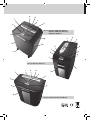
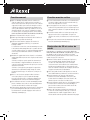
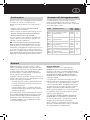
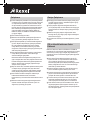
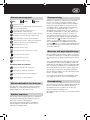
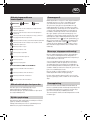
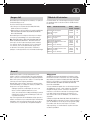
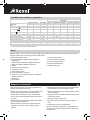
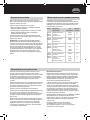
Shredder Control Panel
Auto
Forward
Initial Setup
Reverse
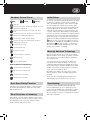
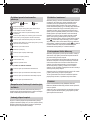
Safety First
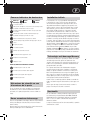
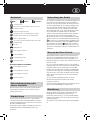
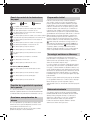
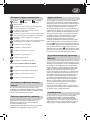
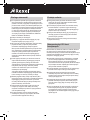
This means you should be careful because long hair can become
entangled in the cutting head.
This means don’t reach into the feed opening of the cutting
head.
This means be careful of ties and other loose clothing which
could become entangled in the cutting head.
This means keep children away from shredder.
This means be careful of loose jewelry which could become
entangeld in the cutting head.
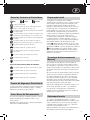
This means the door is open.
This means the bin is full.
This means no aerosols.
This means machine is cooling down.
This means oil level.
This means oiling in operation.
RSM1130, RDM1150 and RDSM750 only.
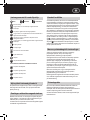
This means do not shred credit cards.
This means do not shred paper clips.
This means do not shred staples.
This means do not shred CDs.
Door Open Safety Function
If the door is opened during shredding as a safety precaution
the shredder will instantly stop, and the door open symbol/
indicator will glow red.
Rare Occasions of Jamming
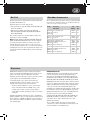
The shredder is designed to automatically lubricate the cutting
mechanism as required to ensure the product continues to
work to its maximum performance and to extend the product
life. Before turning on the machine for the first time, please
open the oil reservoir cap on the head of the shredder (j) and
pour in the 60ml bottle of oil provided as standard. This is
sufficient to allow the shredder to start for the first time and
to operate continuously for approximately 1 hour shredding
before the reservoir will need refilling. Press and hold down the
Auto button (f) for 5 seconds to start the pump and prime the
system. This operation is only required the very first time the
shredder is used. When the ‘Oil Refill’ indicator is illuminated
, flip up the oil reservoir cap (j) and refill the oil reservoir
using a bottle of standard Rexel oil (1760049). The automatic
oiling operation
lasts approximately 2 seconds and you
will hear the distribution pump during this time. Auto-oiling
operates after 15 minutes of shredding.
Mercury Anti-Jam Technology
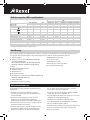
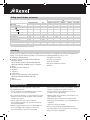
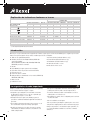
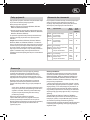
Mercury Shredders will only shred stacks of paper that are
within the shredder’s sheet capacity. For example, a shredder
with a capacity of 22 sheets will not allow the shredding of
more sheets than this.
Sensors in the paper feed area measure the thickness of
paper about to be shredded. The ability to shred or not is
communicated through red and green lighting. Green means
that the stack of paper is within the shredders sheet capacity
and OK to shred. Red means that you have too much paper,
remove some sheets in order to shred.
Given that you are unable to shred more sheets of paper
than the shredder is capable of shredding, paper jams are
prevented.
This prevents time wasted through reversing paper and
unblocking jams not to mention the mess it can create.
Over Heating
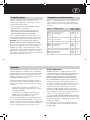
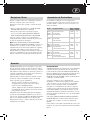
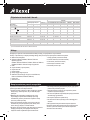
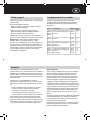
If small office models (RSS2030, RSX1630, RSM1130,
RSS2232 and RSX1632) are used continuously for long
periods of time the shredder may overheat. If this occurs the
thermometer symbol on the indicator panel will illuminate.
When the shredder is ready to be used again the thermometer
symbol will not illuminate.
In the unlikely event of the shredder jamming, use the reverse
function to unblock the shredder (see Reverse function section).
Alternating between the reverse and continuous forward
functions will help unblock the feed area.
5