1
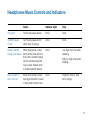
Headphones Phone Controls and Indicators
Action
Indicator Light
Tone
Low battery indicator
None
3 red flashes every 3 high tones every
10 seconds
10 seconds
Mute/unmute the call
(call in progress)
Press in the volume/
tracking/mute button.
None
Low and high tone to
mute, then a single low
tone every minute. High
and low tone to unmute.
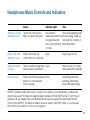
Adjust the call volume Tap the volume/tracking/mute
None
(call in progress)
button forward (+) or backward (-).
Brief low tone (2 low
tones when volume limit
is reached)
Warning Do not use headphones at high volumes for an extended period of time. Doing so can
cause hearing loss. Always listen at moderate levels. See www.plantronics.com/healthandsafety for
more information on headphones and hearing.
Redial
Double tap on control button
Voice dialing (trying to 2 second press on call
initiate call)
control button
None
Double low tone
None
Single low tone
9