1
32
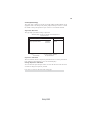
User Password
This page helps you install or change a password.
CMOS Setup Utility - Copyright (C) 1985-2005, American Megatrends, Inc.
User Password
User Password : Disabled
Change User Password
mnlk : Move
Help Item
Press Enter
Enter : Select
F1: General Help
Install or Change the
password.
+/-/: Value F10: Save ESC: Exit
F9: Optimized Defaults
User Password
This item indicates whether a user password has been set. If the password has been
installed, Installed displays. If not, Not Installed displays.
Change User Password
You can select this option and press <Enter> to access the sub menu. You can use the
sub menu to change the user password. This item will show if the Supervisor Password
is set.
Press <Esc> to return to the main menu setting page.
Save & Exit Setup
Highlight this item and press <Enter> to save the changes that you have made in the
Setup Utility and exit the Setup Utility. When the Save and Exit dialog box appears,
select [OK] to save and exit, or select [Cancel] to return to the main menu.
Exit Without Saving
Highlight this item and press <Enter> to discard any changes that you have made in
the Setup Utility and exit the Setup Utility. When the Exit Without Saving dialog
box appears, select [OK] to discard changes and exit, or select [Cancel] to return to
the main menu.
If you have made settings that you do not want to save, use the “Exit
Without Saving” item and select [OK] to discard any changes you have
made.
This concludes Chapter 3. Refer to the next chapter for information on the software
supplied with the motherboard.
Using BIOS