1
User Manual
5. MEDIA ICON PROGRAM INSTALLATION
After you install the card reader to your PC, then you need to setup the icon
program as follow steps.
Windows XP
A. Close all of your exist executing file.
B. Insert program disc into the CD-ROM drive.
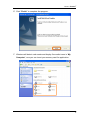
C. Double click “Setup” to install.
D. Click “Next” to begin software installing.
5